3D Product Customizer & Configurator for WooCommerce
| 开发者 |
deosebitsoft
freemius |
|---|---|
| 更新时间 | 2026年7月30日 18:17 |
| PHP版本: | 7.4 及以上 |
| WordPress版本: | 7.0.1 |
| 版权: | GPLv2 or later |
| 版权网址: | 版权信息 |
详情介绍:
- Customers stop asking "can I get it in blue?" — they configure it themselves and see the result live
- Every option selection is stored on the order as a line item — your workshop or fulfillment team sees exactly what was chosen
- Per-option pricing — add a surcharge to premium finishes and watch the total update in real time as the customer selects
- Customers can share their exact configuration via a link, perfect for review-before-you-order workflows
- PDF download gives customers a record of what they ordered
- Real-time 3D product viewer — rotate, zoom, and see changes instantly
- Customization steps — organize options into labeled groups (e.g. Frame, Fabric, Legs) each targeting specific parts of the model
- Material swapping — assign a texture or base color to each option
- Geometry toggles — show or hide parts of the model based on selections (e.g. add a badge, swap a component)
- Step visibility — show or hide entire configuration steps based on what the customer has already selected
- Per-option price surcharge with live price display
- Undo / redo history
- Shareable configuration URL
- PDF preview download
- AR view on supported mobile devices
- HDR environment lighting and background color switcher
- Custom icons per step and per option
- Reusable texture library (Custom Post Type)
- Automatic step thumbnail generation (EXPERIMENTAL)
- GLB / GLTF model format support
- PBR (Physically Based Rendering) material support — base color, roughness, normal, AO, metalness, and displacement maps
- Powered by Three.js (WebGL), bundled — no external CDN dependency
- Shortcodes, Gutenberg blocks, action hook, and automatic placement support — including standalone viewer-only variants for embedding just the 3D canvas anywhere
- 18+ WordPress action hooks for developer extensibility
- Upload & display a 3D model
- Base color texture or color picker per option
- Roughness & metalness sliders
- Customization steps
- Viewer Only Mode
- Camera, zoom & background settings
- HDR environment map
- Undo / redo, PDF, AR view
- Set custom icons (images) for every step / options of a step
- Set additional prices per option
- Material Preview
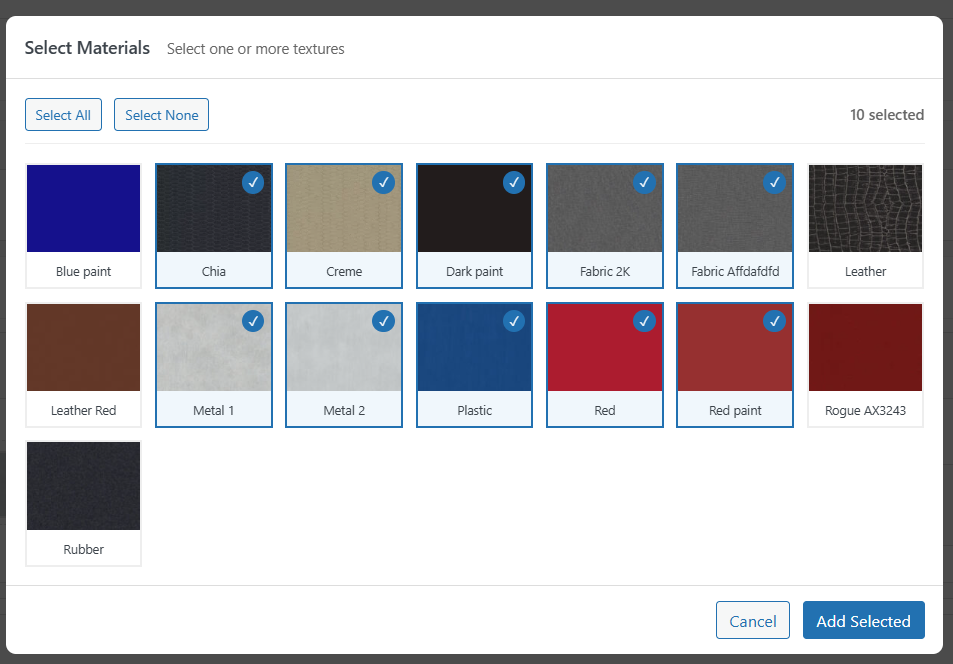
- Multiple textures per option
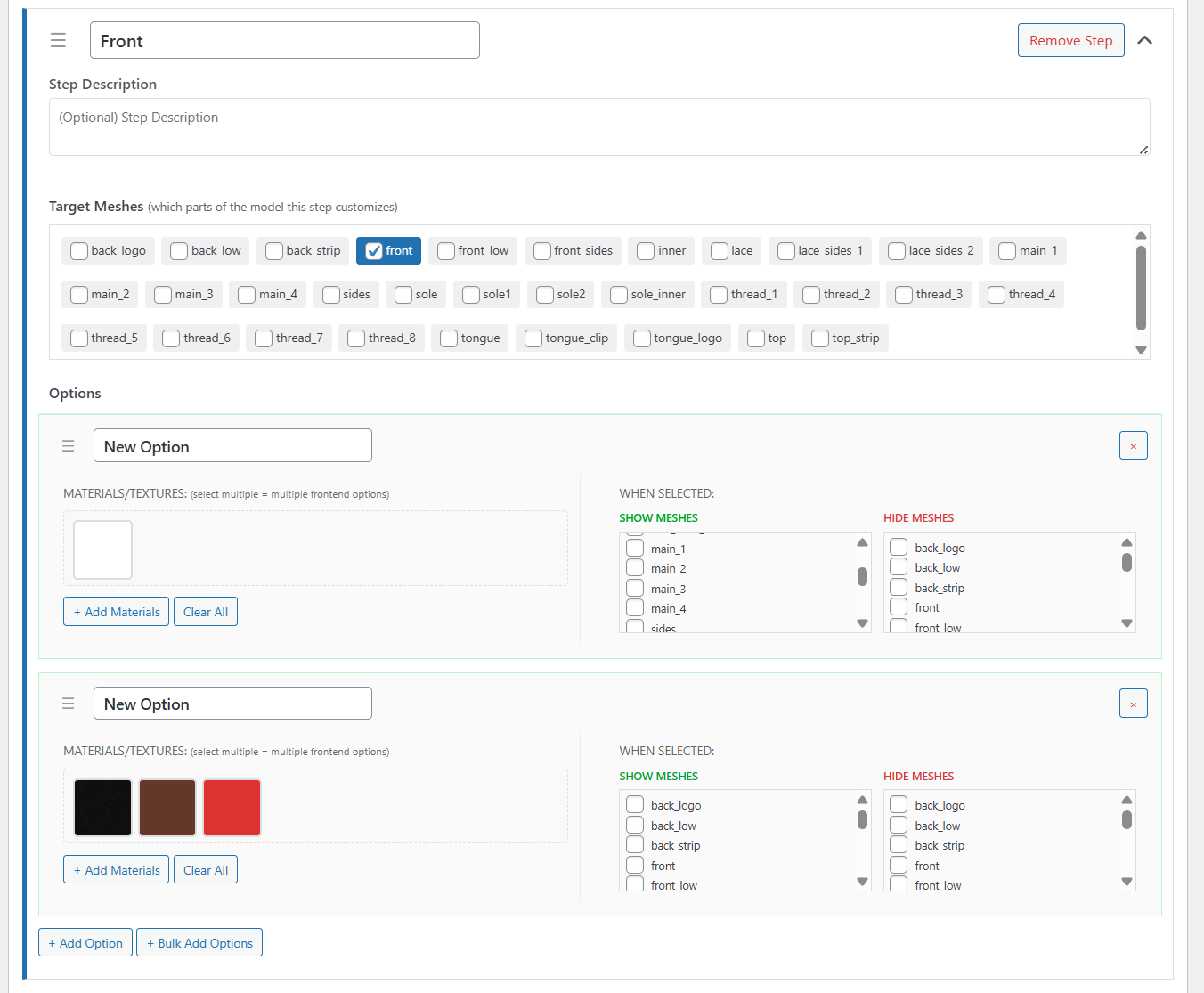
- Bulk Add Materials to a step
- Show / Hide mesh controls per option
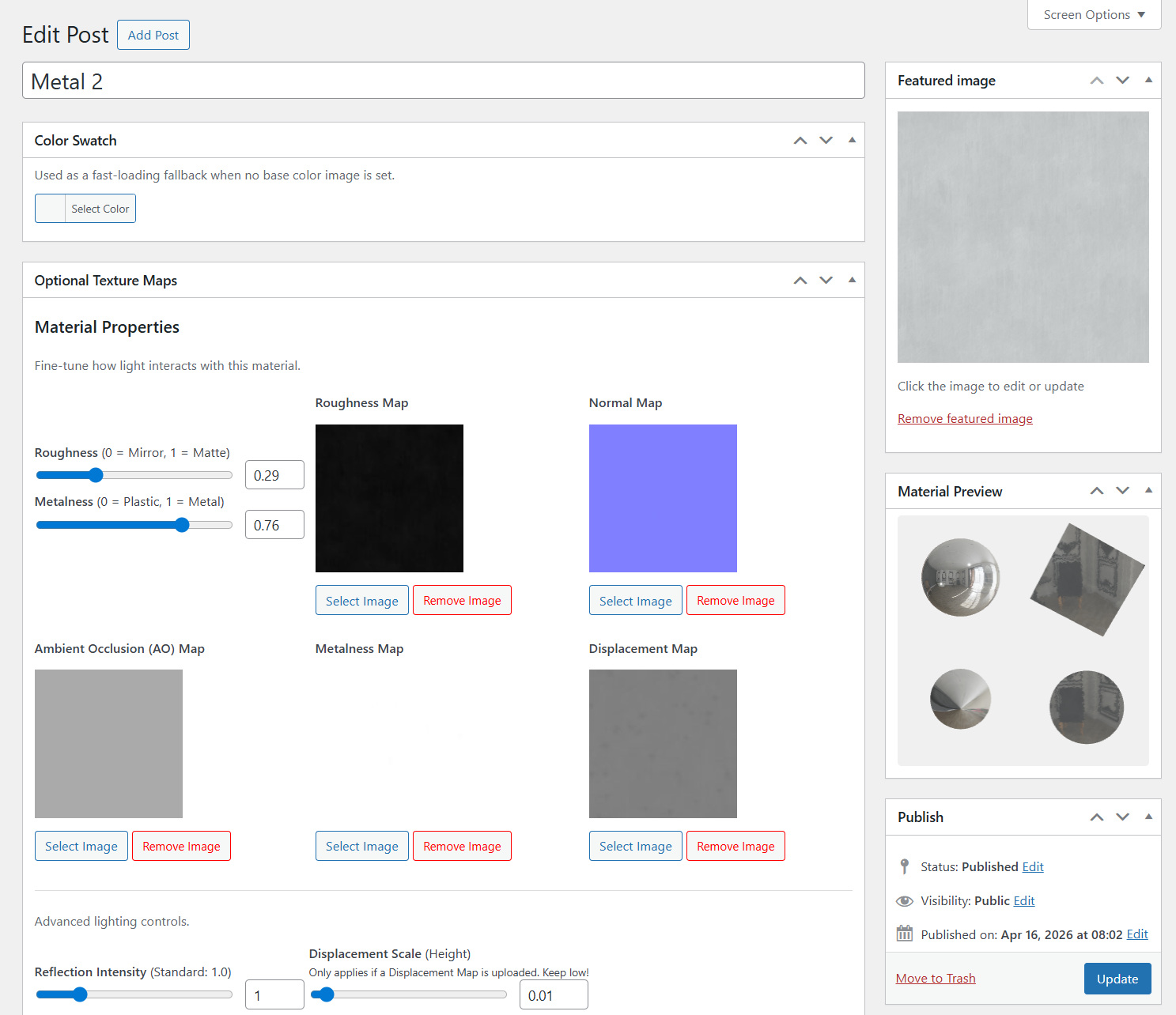
- Normal, AO, metalness & displacement maps
- Reflection intensity & displacement scale
- Hotspots/Annotations
- NEW — Usage Analytics — track customizer opens, option selections, and add-to-cart clicks per product (GDPR-friendly aggregate data, no personal information stored)
- NEW - Show / Hide steps based on the selected option
安装:
- Upload the
product-customizerfolder to/wp-content/plugins/. - Activate the plugin through the Plugins menu in WordPress.
- Ensure WooCommerce is installed and active.
- Navigate to Model Textures in the WordPress admin and create texture entries. Each texture can include a base-color image (featured image) plus optional PBR maps and scalar material properties.
- Open any WooCommerce product and locate the 3D Configurator metabox.
- Upload or select a
.glb/.gltfmodel using the Select Model button. - Click Scan Model to auto-detect mesh names from the file.
- Add one or more Steps and assign Options (textures or geometry toggles) to each step.
- Save the product. The 3D configurator will now appear on the product's front-end page.
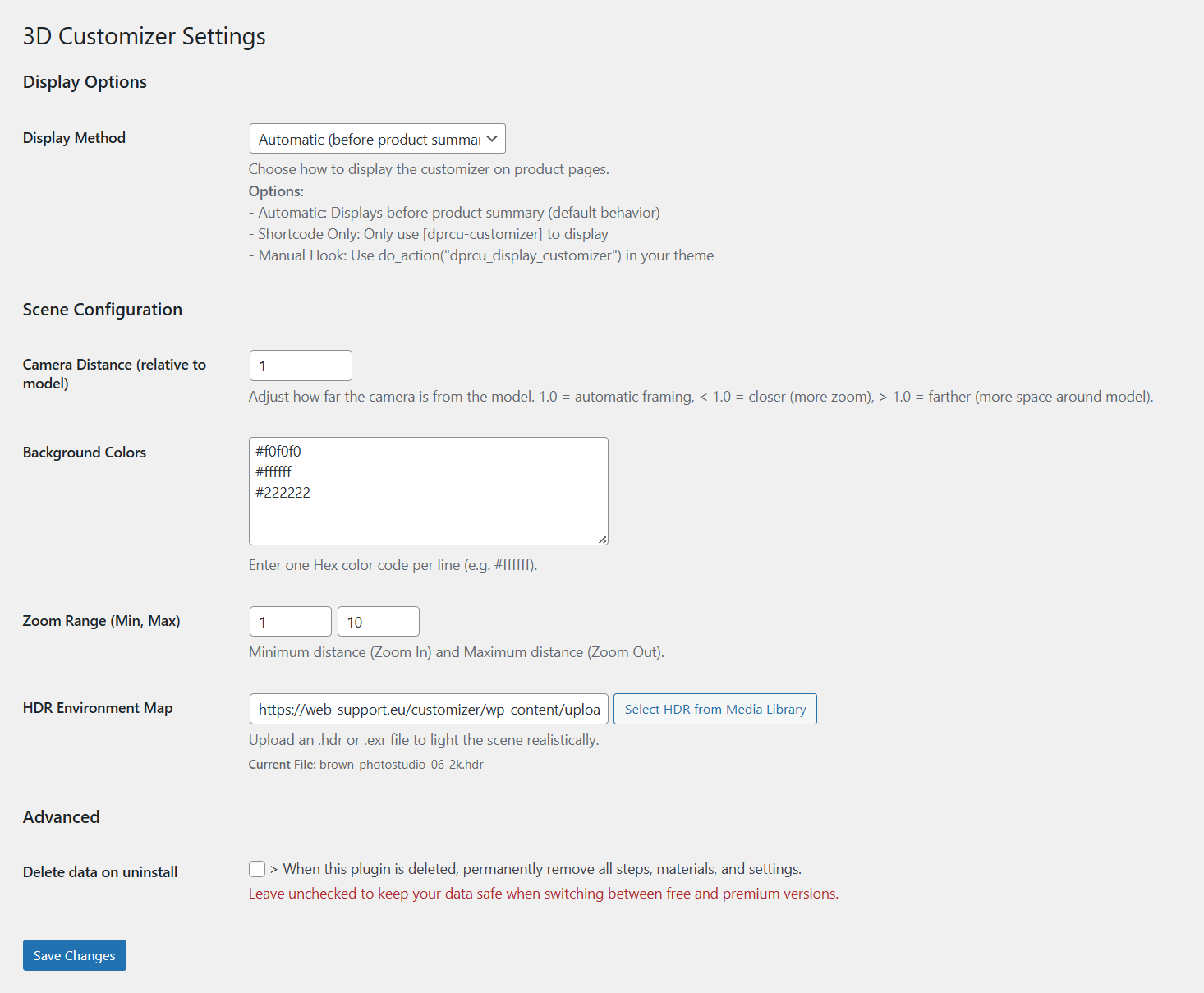
- Visit Model Textures → Global Settings to configure camera position, zoom limits, background colors, and an optional HDR environment map.
屏幕截图:
常见问题:
Do I need 3D design experience to use this?
No. Once you have a 3D model of your product, everything else is done inside the WordPress admin — upload the model, add steps, assign textures, save. No coding or 3D software required.
Where do I get a 3D model of my product?
This is the most common question and there are several practical options:
- Commission one — freelance 3D artists on Fiverr, Upwork, or CGTrader can model your product from reference photos for $50–$500 depending on complexity. Specify GLB format when you order.
- Export from existing tools — if you already use CAD software (Fusion 360, SolidWorks, Blender, Cinema 4D), you can export directly to GLB.
- Scan it — smartphone photogrammetry apps (Polycam, Luma AI) can generate a mesh from photos of a physical product.
- Download — for common product shapes (bottles, boxes, chairs) stock model sites like CGTrader, Sketchfab, and TurboSquid have ready-made GLB files.
Does it work with Elementor, Divi, or other page builders?
Yes. Use the [dprcu-customizer] shortcode (or [dprcu-viewer] for just the 3D canvas, no customization steps) — they work anywhere shortcodes are supported, including Elementor widgets, Divi modules, Beaver Builder, Bricks, and custom page templates. For block-based (FSE) themes there are also two native Gutenberg blocks: 3D Product Customizer and 3D Viewer Only.
Can I charge extra for certain options?
Yes. Every option can have an additional price (surcharge) set in the admin. The live price on the product page updates in real time as the customer makes selections, and the surcharge is applied securely server-side when the item is added to cart.
Will it slow down my site?
The 3D viewer only loads on product pages where it is configured. The JavaScript bundle (~2 MB including Three.js) is loaded once and cached by the browser. The 3D model itself (GLB file) is the main load-time factor — a well-optimized model is typically 1–5 MB. The plugin does not load anything on pages where it is not used.
How is the customization saved to the order?
When a customer clicks Add to Cart, each selected option (step name → option name) is stored as a WooCommerce line-item meta entry. It appears on the order detail page, in admin order emails, and in customer confirmation emails — so your workshop always knows what was chosen without any manual follow-up.
What 3D file formats are supported?
GLB (binary GLTF) is the recommended format. GLTF (JSON-based) is also supported. The plugin registers these MIME types with WordPress so they can be uploaded through the standard Media Library.
Does it work with WooCommerce variable products?
Yes, via the Variations Support for 3D Product Customizer addon. Install and activate the addon alongside this plugin, then map each WooCommerce variation to a set of 3D configurator defaults directly inside the variation panel on the product editor.
Why does the 3D viewer not appear on a product page?
The configurator only renders when the product has a valid .glb model URL AND at least one configured step with at least one option. Check the 3D Configurator metabox on the product.
Can I use multiple HDR environment maps per product?
The HDR environment map is a global setting. All products share the same HDR file. Per-product HDR support is planned for a future release.
Are the bundled JavaScript files minified?
Yes. The unminified source files are included in the js/ directory alongside the webpack.config.js build configuration.
更新日志:
- Products using the customizer with no base price set now hide the price display and disable the Add to Cart button on the product page, instead of showing a $0.00 total
- Added a server-side guard (
woocommerce_add_to_cart_validation) rejecting add-to-cart requests for customizer-enabled products with no base price, backing up the disabled button
- Added
[dprcu-viewer]shortcode and a3D Viewer OnlyGutenberg block to display just the 3D viewer with no customization steps, regardless of the product's Viewer Only Mode setting - Viewer Only Mode no longer auto-replaces the product gallery block on block (FSE) themes — place it explicitly with
[dprcu-viewer], the3D Viewer Onlyblock, or thedprcu_display_customizerhook instead - Viewer Only Mode now loads its own lean JS bundle instead of the full customizer bundle — camera, controls, and AR only, with no material-swap texture cache, undo/redo, cart sync, hotspots, or PDF export code loaded
- Updated bundled Freemius SDK to 2.13.4
- Removed unused code from freemius file
- Completed label list for Model Texture CPT
- Updated Admin scanner with the features from the frontend customizer
- Made the Admin scanner more compact on large screens
- Added hover effect to the Detected Meshes list to easly see where the parts are in the model
- Caught error when AR is not supported
- Reordered readme file for better content flow
- Added links to relevant questions
- Improved light when no HDR map is set in the settings
- Renamed first sub item to Settings
- Added addon support — introduced
dprcu:cartUpdatedDOM event anddprcu_customizer_configfilter so third-party addons can extend the customizer without modifying the core bundle - Fixed surcharge prices not being applied when a variation is added to cart — price lookup now uses internal option IDs instead of display names
- Fixed price display not appearing on simple products when the base product price is zero
- Enabled Freemius addon listings in the plugin dashboard
- (Premium) Add the ability to show / hide steps based on the user selection
- Fixed tracking events if the value did not change (for duplicate events)
- Added rate limit for tracking
- Added server side check if the analytics are disabled
- Fixed clear analytics data form
- Replaced checkbox array with Select2 input
- Auto-generated thumbnails for mobile step navigation buttons — each step icon is rendered directly from the 3D model, orbited to face the part with the rest of the model ghosted for context
- Fixed saving one settings tab resetting values from other tabs
- Display method option simplified to Automatic / Manual (removed redundant separate options)
- Restructured admin settings page using tabs
- Moved share and download PDF button to the customizer sidebar
- Added support for Express payment buttons (Apple Pay, Google Pay, PayPal, etc)
- Added help tab with usefull links
- (Premium) Added Usage Analytics — see how users interact with each product's 3D customizer
- Tracks customizer opens, option selections per step, and add-to-cart clicks
- GDPR-friendly by design: only aggregate counts stored, no personal data, no IP addresses, no cookies
- Per-product analytics metabox on the product edit screen with step breakdown tables and popularity bars
- Total analytics overview page under 3D Customizer → Analytics (opens, selections, cart rate across all products)
- Analytics toggle in Settings — disabling it hides the analytics page content and product metabox automatically
- Built-in consent manager integration: Cookiebot, CookieYes, or custom
window.dprcu_analytics_enabled = falseoverride - "Clear All Analytics Data" button added to the Settings page
- Improved parsing of texture array
- Improved mobile customizer style
- Code quality
- Updated presentation site url in the codebase
- Added guard to manual placement setting
- Fixed support notice not staying dismissed
- Fixed
customizerDataalready declared error on product pages when shortcode or FSE block is used - Manual hook
dprcu_display_customizernow accepts an optional product ID argument
- Added product ID attribute to shortcode — use
[dprcu-customizer id="123"]on any page - Added product search/select to the FSE block — pick any WooCommerce product from the sidebar
- Fixed FSE block not being clickable in the editor (added
useBlockProps)
- Fixed dismisable support notice
- Fixed encoding of special chars
- Added docs / support notice to admin
- Replaced Lucide icon picker with WordPress media library for step and option icon selection
- Added per-option icon image field — each option can have its own icon shown in geometry swatches
- Option icon now takes priority over texture thumbnail/color in material swatches when set
- Cached icon images in IndexedDB to avoid re-fetching on every session load
- Fixed Bulk Add Options not working — added missing bulk modal HTML and #tmpl-option template
- UI refactor
- Fixed zoom keyboard shortcuts (+/-) ignoring admin-set zoom limits (minDistance/maxDistance)
- Fixed option selection forcing targeted meshes visible when no show/hide configured
- Added Demo, Docs, and Buy Premium links to the plugin row on the Plugins page
- Regenerated pot file
- Fixed position of the additional price input in the ajax response
- Added per-option additional pricing — set a surcharge on any option within a step
- Live price display updates in real-time as the user selects different options
- Price badges shown on option swatches when a surcharge applies
- Option surcharge applied to cart total via WooCommerce before_calculate_totals
- Uses WooCommerce currency symbol and position settings
- Bug fixes and maintenance
- Renamed plugin to "3D Product Customizer & Configurator for WooCommerce" for better search visibility
- Updated plugin name references in watermarks, notices, and readme.txt
- Regenerated pot file
- Updated docs URL in the PDF
- Added 12 new i18n strings (adding, loading, PDF labels, alerts) — now translatable via
__()in PHP - Disabled OrbitControls damping for instant rotation stop on release
- Removed stale CSS selectors from metabox-styles.css
- Fixed deprecated
THREE.WebGLShadowMapwarning — switched toPCFShadowMap - Increased shadow map resolution to 4096 and tightened shadow camera frustum for sharper ground shadows
- Added camera position/angle controls in admin 3D editor — save and reset the default camera view per product
- Fixed JSON corruption when saving camera position (
sanitize_text_fieldno longer destroys JSON data) - Front-end 3D viewer now applies the saved per-product camera position on load
- Fixed garbled character encoding in the help modal close button
- Fixed help modal rendering on mobile Safari — GPU compositing, dynamic viewport height, touch event handling
- Removed nested
position: fixedon mobile modal to prevent layout issues
- Fixed all
_e()output to use proper escaping functions (esc_html_e,esc_attr_e) - Added ABSPATH guard to block render file
- Removed UTF-8 BOM from main plugin file
- Added nonce verification to review notice dismissal
- Added nonce compliance annotations to add-to-cart handler
- Fixed undefined variable warnings in PDF download and background toggle
- Normalized IndexedDB config key across URL variants
- Improved add-to-cart AJAX — applies WooCommerce fragments directly and fires proper events
- Use WooCommerce
wc_ajax_urlfor add-to-cart requests (handles subdirectory installs) - Replaced
filemtime()fallback withfile_exists()check to suppress PHP warnings - Fixed extra
>in checkbox HTML markup
- Switched PDF generation from pdf-lib to jsPDF for better clickable link support
- Renamed URL query parameter
cfgtodprcu_cfgto avoid conflicts - Cleaned
dprcu_cfgparameter from the URL after configuration load - Added multi-angle PDF captures with options summary page
- Added site logo, product name, timestamp, and URL to PDF output
- Added footer links (Plugin Page, Docs, Demo) to PDF pages
- Added option thumbnails and color swatches to the PDF options table
- Updated PDF column layout to full-width images proportional to canvas aspect ratio
- Fixed taxonomy slug in texture category filter dropdowns — categories now show up correctly in modals
- Fixed valid zero values (roughness 0.0, metalness 0.0, env intensity 0.0) being silently ignored on the frontend
- Fixed HTML validation: nonce field moved outside
<select>element in admin texture filter - Fixed duplicate
get_post_meta()call in texture color swatch metabox - Eliminated duplicate watermark rendering logic with a shared helper
- Added fallback version string for
filemtime()to prevent PHP warnings when assets are missing - Updated texture caching to correctly query the
dprcu_texture_categorytaxonomy
- Fixed the reset button
- Fixed the position of the hotspots
- Saved current config in the IndexedDB
- Added indexDB cache for repeated loads
- Added more debug to Android XR
- Added separate AR button with settings.
- Improved Android AR View
- Added FSE block to bypass content wrapping.
- Improved asset caching
- Added three display methods (Automatic, Shortcode, Manual Hook) for flexible customizer placement
- Implemented 18+ WordPress action hooks for developer extensibility
- Fixed wpautop filter interfering with shortcode output
- Added Global Settings page with display method selection
- Fixed premium notice css
- Added auto framing to the customizer
- Updated admin model scanner layout
- Introduced Material preview metabox for Premium
- Introduced color picker for materials with only basic colors
- Introduced Free vs Premium tier via Freemius licensing.
- Premium: multiple textures per option (free tier limited to one per option).
- Premium: Bulk Add Materials button in the product metabox.
- Premium: Show/Hide mesh controls per customization option.
- Premium: full PBR map set — normal, AO, metalness, and displacement map uploads.
- Premium: reflection intensity and displacement scale sliders on texture entries.
- Added custom isometric cube icon in the WordPress admin sidebar.
- Added persistent upgrade prompts comparing free and premium features.
- Freemius account menu integrated into the 3D Customizer admin menu.
- Added glass/transmission material support.
- Added bulk material assignment in the product metabox.
- Added drag-to-reorder for steps and options.
- Added geometry visibility (show/hide meshes) per option.
- Improved undo/redo history system.
- Performance: texture list now cached with a transient.
- Security: fixed text domain inconsistency across all files.
- Security: attachment IDs now sanitized with absint() instead of sanitize_text_field().
- Security: ABSPATH guard moved to top of plugin-settings.php.
- Security: all HTML attribute echoes in settings render callbacks now escaped with esc_attr().
- Multi-texture options: assign multiple textures to a single option card.
- New step/option data structure with explicit target meshes.
- Added HDR environment map setting.
- Added URL-based configuration sharing.
- Added AR export with QR code.
- Initial release.