
3task Calendar
| 开发者 | 3task |
|---|---|
| 更新时间 | 2026年10月21日 02:42 |
| PHP版本: | 7.4 及以上 |
| WordPress版本: | 7.1 |
| 版权: | GPLv2 or later |
| 版权网址: | 版权信息 |
详情介绍:
- Unlimited Events: Create as many events as you need
- Dates from Posts: A date field in the post editor (block editor and classic editor) for posts, pages and custom post types; the calendar entry stays in sync with title, link, image and date
- Existing Date Fields: Use a date you already store in a custom field (ACF, Meta Box, any plugin) and apply it to all existing posts with one click
- Date Box in Posts: Block "Date of this post" or
[threecal_post_date]shows the date with an "Add to my calendar" button, also automatically at the start or end of a post - Poster View: Upcoming dates as large tiles with the post image, for example "This week at the cinema"
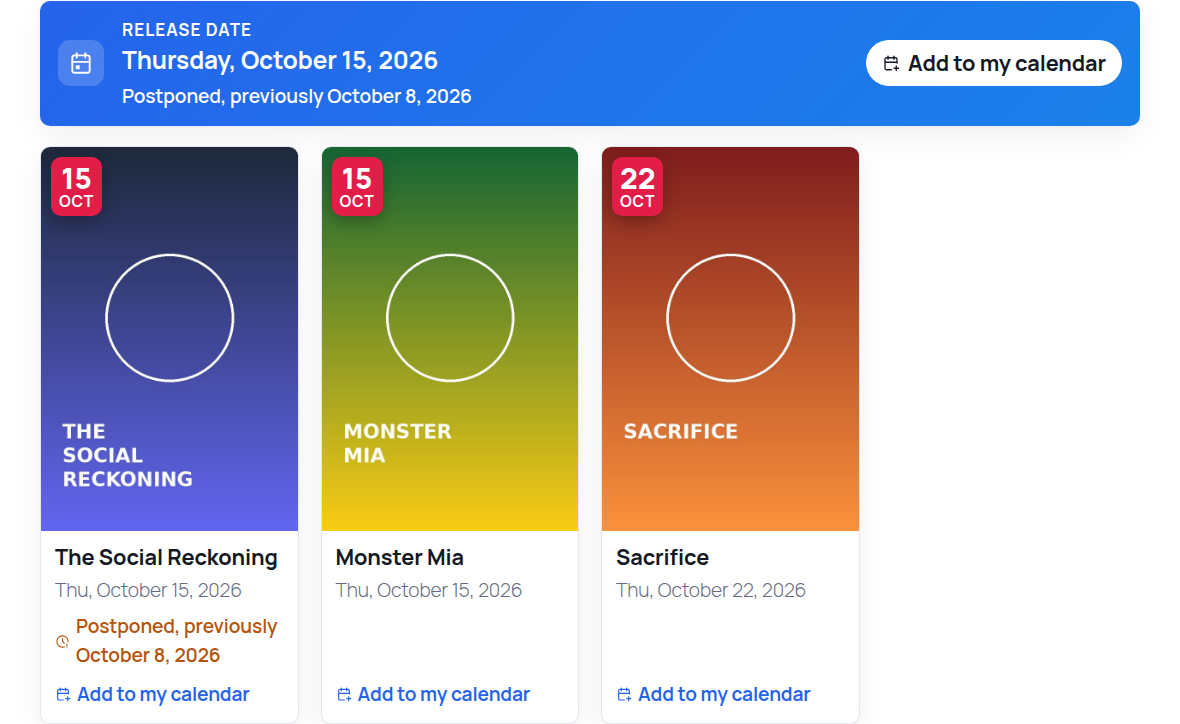
- Postponed Dates: When a published date moves, the calendar shows "Postponed, previously …" and subscribers get the new date
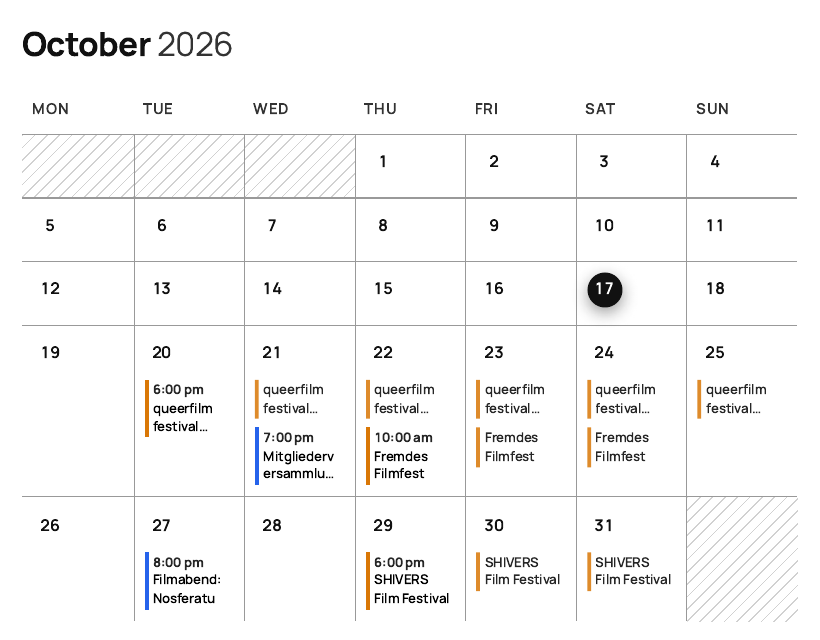
- Only the Month Known: For festivals and other dates of which only the month is set, the calendar shows "July 2027, date to be announced"; the month view lists them in a bar above the grid. Such dates stay out of the iCal feed and the event schema until the day is known
- CSV Import: Import events from a spreadsheet. A preview shows what happens before anything is saved, and importing the same file again updates the events instead of creating duplicates. Also available as WP-CLI command
wp threecal import - Recurring Events: Daily, weekly, every two weeks, monthly or yearly, with an end date; single dates can be cancelled, removed or changed on their own
- Cancelled Events: A cancelled date stays visible, crossed out, so nobody turns up in vain; subscribers and search engines get the cancellation too
- iCal Export and Subscription: "Add to my calendar" for every event and a subscription feed (all events or one category) for Google Calendar, Apple Calendar, Outlook and Thunderbird
- Translations Included: German (du and Sie) complete; Spanish, French and Italian for everything visitors see (calendar, lists, popup, calendar file, submission form)
- Unlimited Categories: Organize events with color-coded categories
- Month and List Views: Multi-day events appear on every day they cover
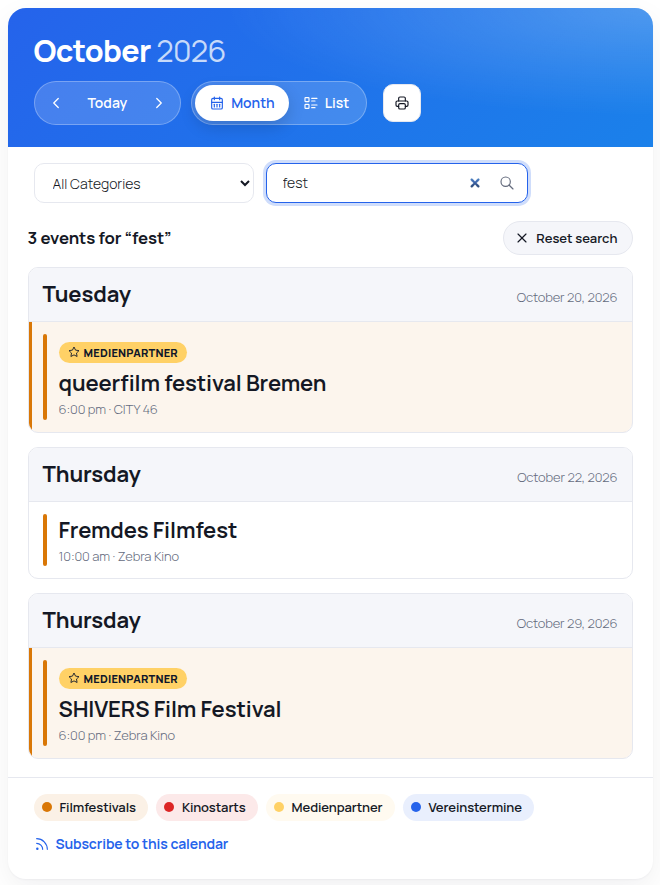
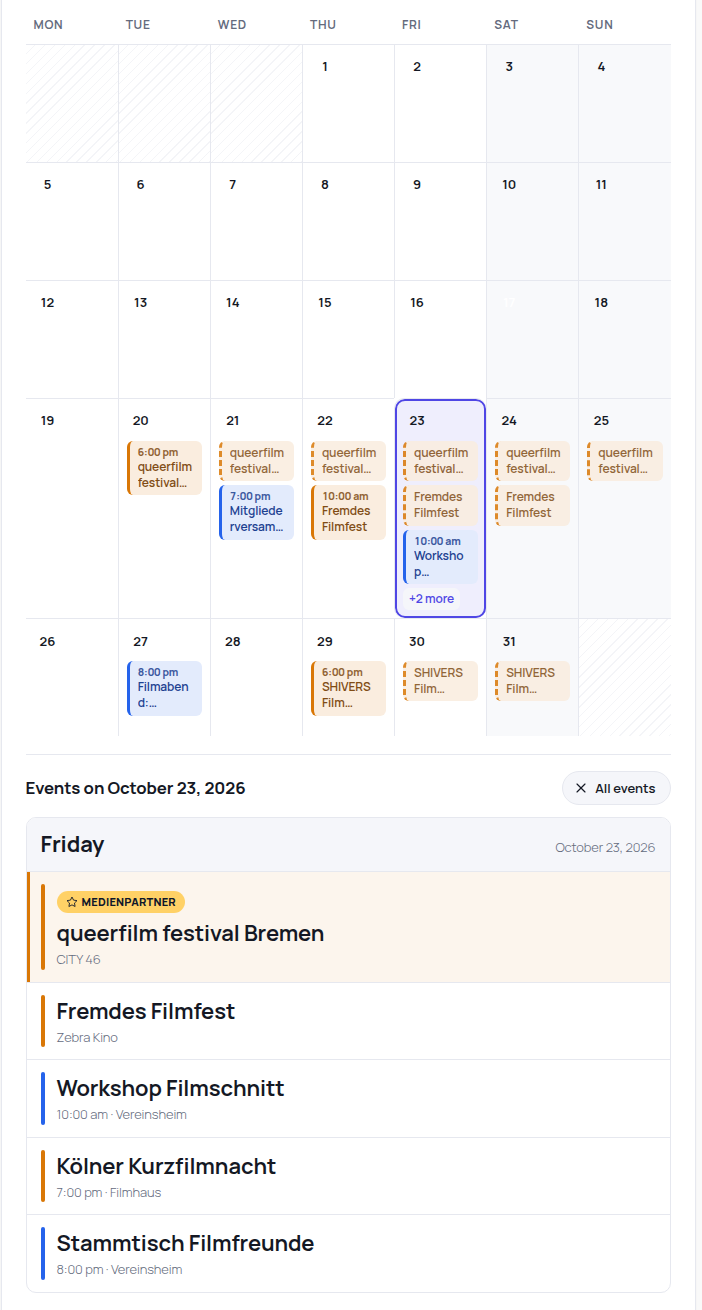
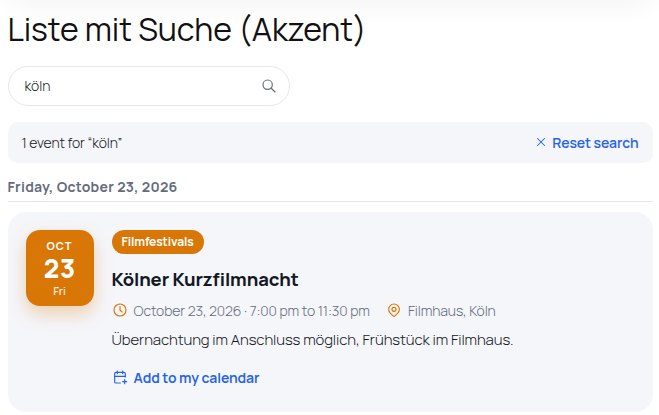
- Search and Day Filter: A search field in the calendar and in event lists finds events by title, description, location and city, with results grouped by day; a click on a day shows that day's events under the month grid. No external service, nothing is stored
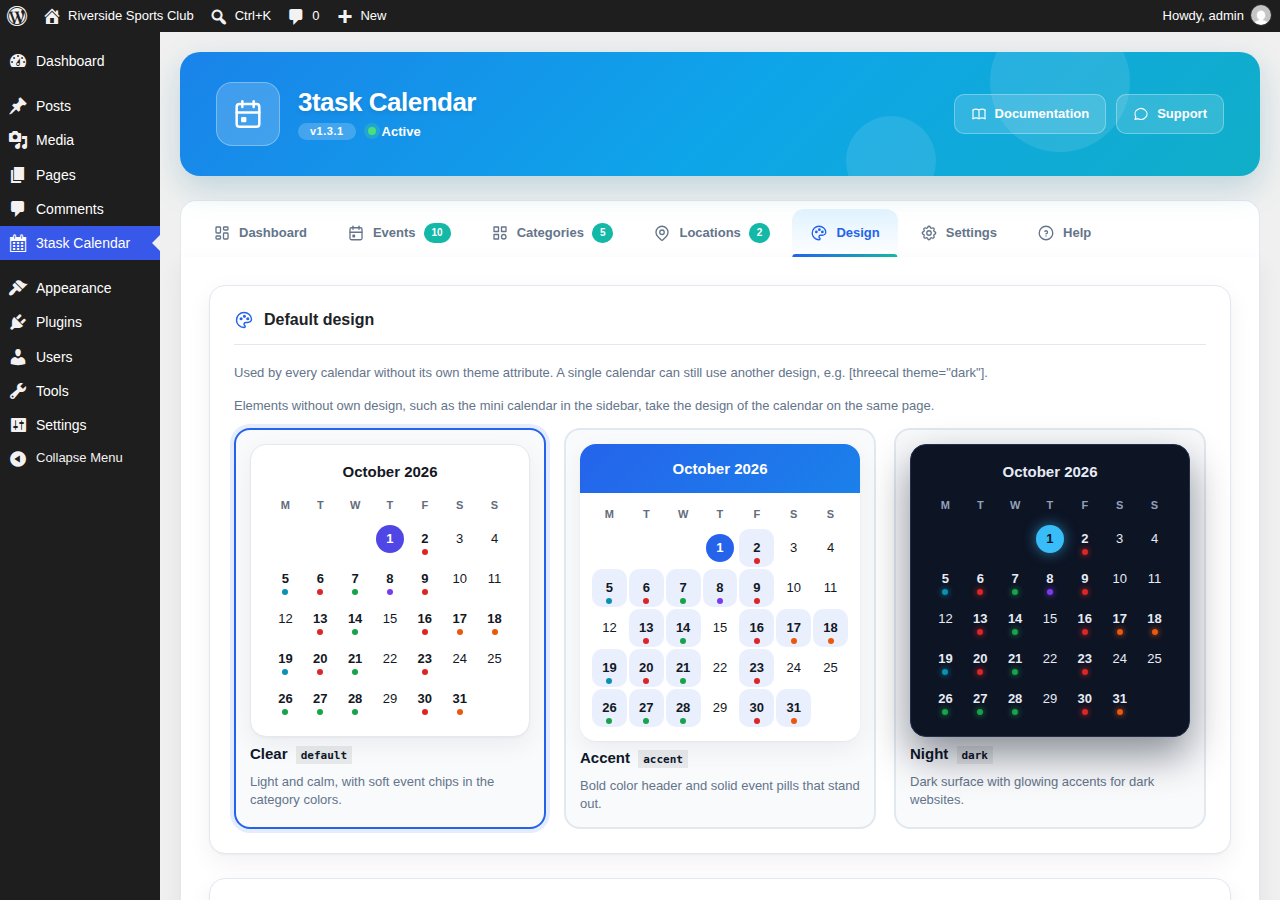
- Four Designs: Clear (light), Accent (bold color header), Night (dark) and Theme colors (takes colors and font from your theme, no own look), with your own accent color; events take their category color automatically
- Highlighted Categories: Mark a category, and its events get a frame in the category color and a badge with the category name, for partners, sponsors or your own events
- Links You Control: Links from events to other websites are nofollow and open in a new window; switch single categories or the whole calendar to follow
- Reminder Without an Account: The downloaded calendar file can carry a reminder (30 minutes to 2 days before); the visitor's own calendar app shows it, your site stores nothing
- Print: One click prints the month on screen or the list, without controls, readable in black and white
- Visitors Submit Events: Shortcode
[threecal_submit]shows a form; every submission is saved as a draft that only you can publish. Spam protection without external services, optional e-mail of the submitter for questions, no IP address stored - JSON Feed for AI Search and Apps:
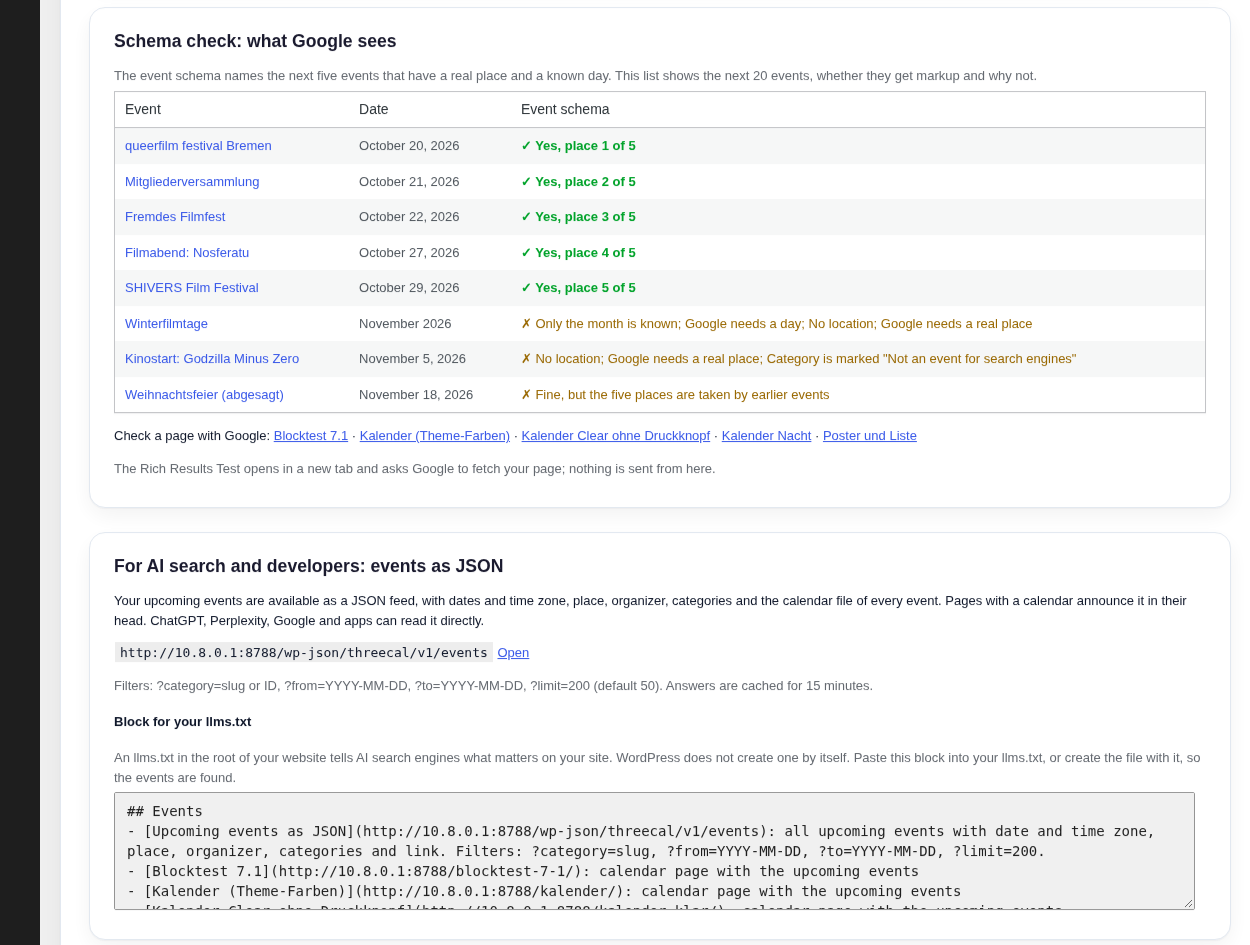
/wp-json/threecal/v1/eventslists the upcoming events with ISO dates and time zone, place, organizer, categories and calendar file; filter by category and date, calendar pages announce the feed, and the settings hand you a block for your llms.txt - Schema Check: Settings show the next 20 events and tell you which ones get event markup, which of the five places they take and why one gets none, with a link to Google's Rich Results Test
- Paste the Link, Get the Event: Enter the address of an event's website and click "Fill in from this website". Title, date, description, location and organizer are read from that page (schema.org event markup or Open Graph tags) into the empty fields
- Responsive: Adapts to small screens
- Gutenberg Block: Live preview in the editor, choose view, design and category
- Shortcodes: Flexible placement options
- Schema.org SEO: Event markup with ISO dates and time zone for events at a real place; office hours, holidays or release dates can be excluded per category, as Google requires. The organizer is set per event, a site that only lists events is never named as organizer
- Route Link: "Plan route" opens OpenStreetMap only when the visitor clicks it
- Accessible Popup: Dialog role, keyboard focus and Escape to close
- Mobile List: On small screens the calendar starts in list view
- GDPR Friendly: Made in Germany with privacy in mind
- Install and activate
- Create your first event
- Add the calendar to any page with shortcode or Gutenberg block
- Done!
[threecal]
Options: view (month, list), category, location, theme (default, accent, dark, site), show_filters, show_legend, show_subscribe, show_print, show_search, mobile_list (true/false).
With Options:
[threecal view="month" category="1"]
Event List:
[threecal_events limit="10"]
Options: view (list, grid, compact, poster), category, location, limit (per page), columns, show_past, show_pagination, show_search, month (current, next or a month such as 2026-10), day (one day such as 2026-10-24), running (number of days).
Events of One Day:
[threecal_events day="2026-10-24"]
A Whole Month, for Example "Releases in October":
[threecal_events view="poster" month="2026-10" category="1"]
Now Showing (Started Within the Last 40 Days):
[threecal_events view="poster" running="40" category="1"]
Posters with Post Images:
[threecal_events view="poster" category="1" columns="4"]
Date of a Post (with "Add to my calendar"):
[threecal_post_date]
Upcoming Events:
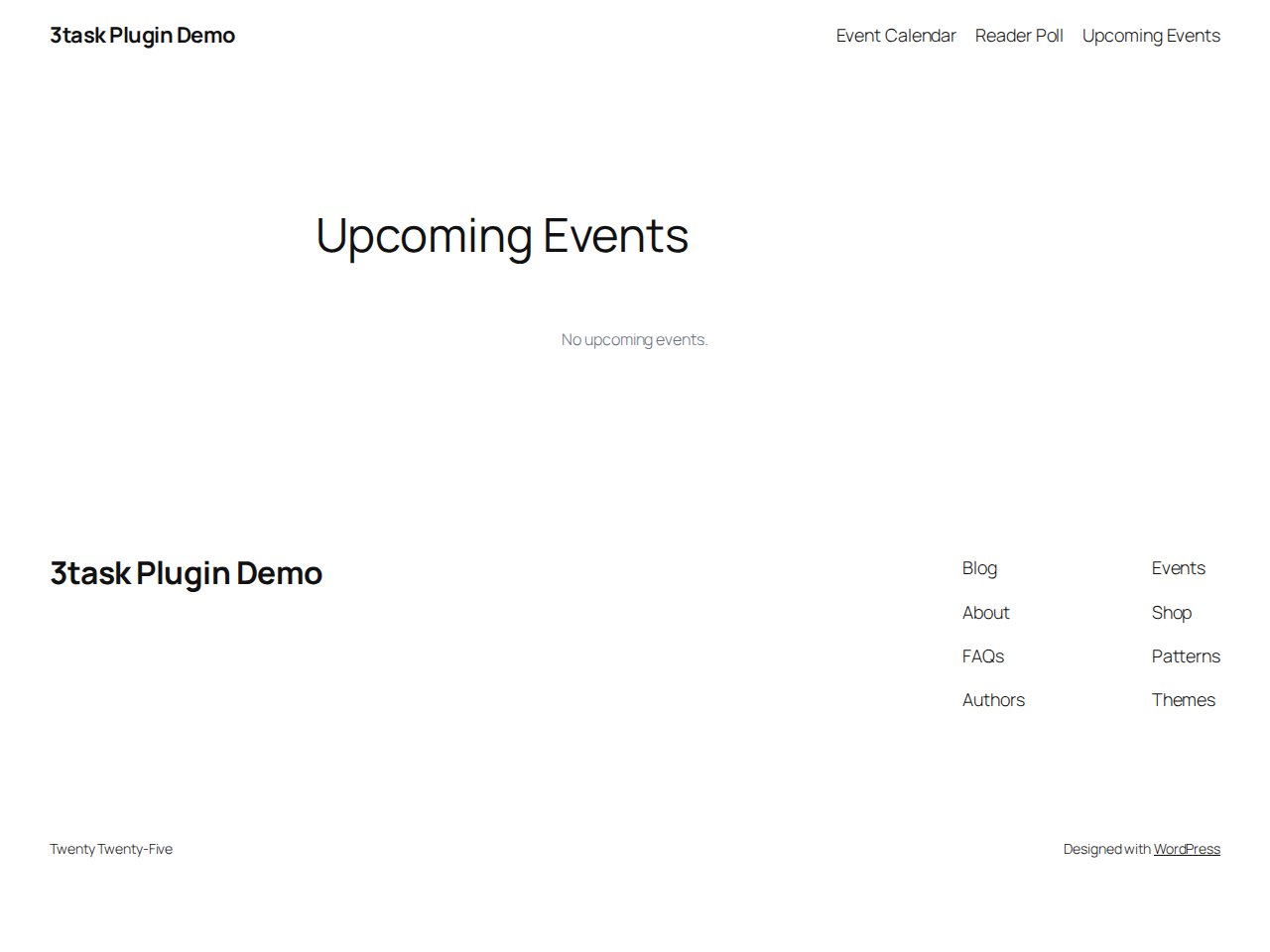
[threecal_upcoming limit="5"]
Mini Calendar (Perfect for Sidebars):
[threecal_mini]
Gutenberg Block
Simply search for "3task Calendar" in the block inserter to add a calendar to any page or post.
No feature locks
3task Calendar works completely on its own. Every feature in this plugin is unlocked.
安装:
- Upload the plugin files to
/wp-content/plugins/3task-calendar/ - Activate the plugin through the 'Plugins' menu in WordPress
- Go to 3task Calendar in your admin menu to create events
- Add the calendar to any page using
[threecal]shortcode or Gutenberg block
屏幕截图:






![Event list [threecal_events] with its own search field and result count](https://cdn.jsdelivr.net/wp/3task-calendar/assets/screenshot-9.png)
常见问题:
How do I display the calendar?
Use the shortcode [threecal] or add the 3task Calendar block from the Gutenberg editor.
Can I have multiple calendars?
Yes! Each shortcode or block is an independent calendar. You can filter by category.
Can visitors search for events?
Yes. The calendar toolbar and every event list carry a search field (hide it with show_search="false"). The search looks at title, description, location name and city, part of a word is enough, and upper or lower case does not matter, umlauts included. Results appear as a list grouped by day, together with the category filter if one is chosen. Enter searches, Escape clears the field, and screen readers get the number of results announced. Nothing is stored and no external service is involved. In the month view a click on a day number or on "+N more" shows the events of that day under the grid; "All events" closes the list again.
How do I style the calendar?
The calendar automatically adapts to your theme. You can also add custom CSS for further customization.
Is this plugin GDPR compliant?
Yes. 3task Calendar is developed in Germany with privacy in mind and makes no external requests: no web fonts, no CDN, no tracking, no account. Visitor data stays on your site.
Does the plugin send data to external services?
No. The calendar, the iCal files and the subscription feed are generated by your own site. The "Plan route" link only opens OpenStreetMap when a visitor clicks it.
Can I put posts into the calendar?
Yes. Under 3task Calendar > Posts, switch on the date for posts, pages or a custom post type and give the field a name, for example "Release date". While writing, set the date in the editor sidebar. The post appears in the calendar once it is published and disappears again as a draft or in the trash.
I already store dates in a custom field. Do I have to enter them again?
No. Choose the field under "Date comes from". The list shows every field that holds dates, how many posts use it and an example value, so the right one is easy to spot. "Apply to existing posts" puts all of them into the calendar in one go. Dates like 2026-10-01, 20261001 (ACF), 01.10.2026 and Unix timestamps are read, and changes made by imports or other plugins are picked up automatically.
What if only the month of an event is known?
Choose "Only the month is known" when editing the event and pick the month. Visitors see "July 2027" with the note "Date to be announced". In the month view the event appears in a bar above the grid instead of on the 1st. It is left out of the iCal feed and gets no event schema, because Google requires a concrete date. Once the day is known, switch back to "The date is known"; this is not shown as "Postponed". The same option exists for dates from posts with their own date field.
How do I import events from a CSV file?
Go to 3task Calendar > Import, upload the file and check the preview. Nothing is saved before you click "Run import". The file is UTF-8 (with or without byte order mark), the separator ; or , is found automatically, at most 2 MB. A sample file can be downloaded on the same page. Columns (first line, upper or lower case does not matter):
import_key: your own unique key; a row with an existing key updates that event, so a second import creates no duplicatestitle(required)start(required):2027-07-10,2027-07-10 20:00or2027-07when only the month is knownend:2027-07-12or2027-07-12 23:00all_day: 1 or 0url,descriptioncategory: name, several separated by|; missing categories are createdlocation_name,address,postal_code,city,country(two letters, e.g. DE): a location with the same name and city is used againstatus: draft, publish or cancelled; overrides the status chosen on the import pageorganizer_name,organizer_url: who runs the event; leave empty if you only list it
wp threecal import events.csv --dry-run checks the file, wp threecal import events.csv --status=publish imports it.
Why do some events not appear in the event schema?
Since 1.7.0 the settings page answers this per event: the schema check lists the next 20 events with "yes, place n of 5" or the reason (only the month known, no location, excluded category, removed by a filter, five places taken). Google only accepts events that take place at a real location on a concrete date, and it does not allow office hours or release dates as events. Events without a location or with only the month known get no markup, and every category can be excluded with "Not an event for search engines".
Who is named as the organizer in the event schema?
Only the organizer entered for the event under "Organizer" (or in the CSV columns organizer_name and organizer_url). Without an entry the markup has no organizer. Up to version 1.6.0 the plugin used the name of the website, which was wrong for events the site only lists. Developers can change the whole markup of an event with the filter threecal_event_schema; returning an empty value prints no markup for that event:
add_filter( 'threecal_event_schema', function ( $schema, $event, $page_url ) { if ( empty( $schema['organizer'] ) ) { $schema['organizer'] = array( '@type' => 'Organization', 'name' => get_bloginfo( 'name' ), 'url' => home_url( '/' ) ); } return $schema; }, 10, 3 );
Why are links to other websites nofollow?
Since 1.7.0 a link from an event to another website carries rel="nofollow noopener" and opens in a new window. Most calendars list events of other organisers, and search engines should not read every listing as your recommendation. You decide: Settings > "Links to other websites" switches the whole calendar to follow, and the category form switches single categories to follow, for example partners that link back to you. Developers can change the attributes per event with the filter threecal_event_link_attributes (since 1.6.3), and threecal_event_card_classes adds CSS classes to an event card:
add_filter( 'threecal_event_link_attributes', function ( $attrs, $event, $context ) { if ( 42 === (int) $event->id ) { $attrs['rel'] = 'sponsored noopener'; } return $attrs; }, 10, 3 );
Can visitors submit events?
Yes. Put [threecal_submit] on a page (attributes: title="…" for a heading, success="…" for your own thank-you text). A submission is saved as a draft with the typed location and an optional e-mail address of the submitter, so you can ask back. The event appears nowhere until you publish it. The event list has a "Submitted" view and the dashboard tells you how many are waiting. Spam protection works without external services: a hidden field that humans do not fill, a minimum time between showing and sending the form, a nonce, length limits and at most ten submissions per hour from one connection. The connection is only hashed for that hour and never stored with the event.
Is there a JSON feed, and what is llms.txt?
Yes: /wp-json/threecal/v1/events returns the upcoming events as JSON with ISO 8601 dates and time zone, place, organizer, categories, link and the calendar file of every event. Filters: ?category=slug, ?from=YYYY-MM-DD, ?to=YYYY-MM-DD, ?day=YYYY-MM-DD (one day, past days allowed), ?search=word (title, description, location, city), ?limit=200. Pages with a calendar announce the feed with <link rel="alternate" type="application/json">. An llms.txt in the root of your website tells AI search engines what matters on your site; the settings page gives you a ready block that names the feed and your calendar pages.
Can I fill in an event from its website?
Yes. Paste the address of the event into "Event URL" and click "Fill in from this website". The plugin reads the schema.org event markup of that page (most festival and venue sites have it) or, if there is none, the Open Graph tags, and fills in title, date, description, organizer and location. Only empty fields are filled, so you keep what you typed. A location that already exists under Locations with the same name is selected; a new one is shown as a hint so you can add it.
How do visitors subscribe to the calendar?
Every calendar shows a "Subscribe to this calendar" link. It opens the calendar app via webcal://. The address can also be copied into Google Calendar ("From URL"). Use [threecal category="2"] to offer a feed for one category only.
How do recurring events work?
Choose a repeat pattern and an end date when editing an event. The plugin creates the single dates. Below the form, "Dates of this series" lists every date: cancel one (it stays visible, crossed out), restore it, remove it or edit it on its own.
Does the calendar work with page caching plugins?
Yes. Month navigation and the event popup use public read-only requests without a nonce, so cached pages keep working.
Where can I get support?
Please use the WordPress.org support forum for questions and bug reports.
更新日志:
- FIX: The location line of an event card no longer repeats the city when it is already part of the location name ("CITY 46 Bremen" instead of "CITY 46 Bremen, Bremen")
- FIX: Formal German (Sie) translation of one block hint
- NEW: Search field in the calendar toolbar and in event lists ([threecal_events]). The search looks at title, description, location name and city, part of a word is enough, case does not matter (umlauts included). Results are listed grouped by day, combinable with the category filter, with "No events for …" and a reset button. Shortcode and block attribute show_search="false" hides the field
- NEW: Day filter in the month view: a click on a day number, a day cell or "+N more" lists the events of that day under the grid, with "Events on …" and an "All events" button. The list reuses the list view
- NEW: Shortcode attribute day="2026-10-24" for [threecal_events] lists the events of one day on the server
- NEW: JSON feed parameters search and day (same rules as the calendar)
- Search requests use the same public request as the month navigation, without nonce, so page caches keep working; the term is cleaned and cut to 80 characters, nothing is logged
- Keyboard: Enter searches, Escape clears; results and day lists are announced to screen readers
- Day numbers in the month grid are buttons now, so the day filter works with the keyboard
- German (du and Sie), Spanish, French and Italian for all new texts
- NEW: Design "Theme colors": the calendar takes background, text and accent color and the font from your theme (theme.json), so it looks like the rest of your site without any CSS of your own
- NEW: Highlight a category: its events get a frame in the category color and a badge with the category name (category form)
- NEW: Links from events to other websites are nofollow and open in a new window. Setting "Links to other websites" switches the whole calendar to follow, the category form switches single categories to follow, for example partners that link back to you
- NEW: Reminder in the calendar file: choose 30 minutes to 2 days before the event under Settings. The alarm travels with the downloaded file, nothing is stored on your site
- NEW: Print button in the calendar toolbar (shortcode attribute show_print="false" hides it) and a print stylesheet for month grid and lists
- NEW: Spanish, French and Italian for everything visitors see (admin texts follow through translate.wordpress.org)
- NEW: Shortcode [threecal_submit]: visitors submit events, you check and publish them (drafts with the submitted data, "Submitted" view and badge in the event list, notice on the dashboard, optional e-mail to the admin, default category under Settings). Spam protection: hidden field, minimum time, nonce, length limits, ten submissions per hour and connection; no IP address stored
- NEW: JSON feed /wp-json/threecal/v1/events (from, to, category, limit) for AI search engines, apps and other sites; pages with a calendar carry a link rel="alternate" to it; Settings show the address and a block for the site's llms.txt
- NEW: Schema check under Settings: the next 20 events with "yes, place n of 5" or the reason for no markup (schema off, only month known, no location, excluded category, removed by filter, places taken), plus links to Google's Rich Results Test for your calendar pages
- NEW: "Fill in from this website" in the event form: the page behind the event URL is read once on click and its event markup (schema.org Event as JSON-LD) or Open Graph tags fill the empty fields. A location that already exists under Locations is selected by name
- The filter threecal_event_link_attributes runs after the new link rule, so existing code keeps working
- Requires WordPress 6.2 or newer (theme.json reading); older sites keep 1.6.3
- NEW: Filter threecal_event_link_attributes sets the attributes of the link to an event's URL per event (for example rel="nofollow noopener" and target="_blank" for events of other organisers). It runs for the event card, the poster card, the single event view, the upcoming list and the details popup
- NEW: Filter threecal_event_card_classes adds CSS classes to an event card or poster card per event, for example to highlight partner events
- Readme: link to a live demo (watchguide.net/film-events/)
- FIXED: The five places in the event schema now go to the next five events that really get markup. Events without a location, in a category excluded from the schema or emptied by the threecal_event_schema filter took a place before and fewer than five events were marked up
- FIXED: The event schema no longer uses the site icon or logo as image of an event. It uses the image of the event, else the featured image of the page with the calendar, else no image
- FIXED: The event schema no longer names the website as organizer of every event. Events the site only lists had the site as organizer, which is wrong and against Google's event guidelines
- NEW: Organizer per event (name and website) in the event form; the event schema uses it, without an entry it has no organizer
- NEW: CSV import columns organizer_name and organizer_url
- NEW: Filter threecal_event_schema to change or suppress the markup of an event
- Repetitions of a series take over the organizer of the series
- NEW: "Only the month is known" for events such as festivals: lists, posters, upcoming events, the single event and the popup show "July 2027, date to be announced"; the month view shows them in a bar above the grid, the mini calendar leaves them out
- NEW: Events with only the month known get no event schema and stay out of the iCal feed and the .ics download until the day is known; they count as upcoming until their month is over
- NEW: Dates from posts with their own date field can be set to "Only the month is known" as well; when the day becomes known, no "Postponed" note is shown
- NEW: CSV import under 3task Calendar > Import with a preview before saving, sample file, automatic separator detection and updates by import_key instead of duplicates; categories and locations are created or reused
- NEW: WP-CLI command
wp threecal import <file.csv> [--dry-run] [--status=draft|publish] - NEW: The REST API and the calendar data contain datePrecision (day or month)
- IMPROVED: Event schema skips month-only events without losing one of the five places for events with a date
- IMPROVED: Date and time ranges read "to" instead of a dash, a location named like its city shows the city only once
- Duplicating an event does not copy its import key
- NEW: Hooks for add-ons: threecal_user_can_save_event, threecal_user_can_delete_event, threecal_admin_events, threecal_admin_category_choices, threecal_event_edit_meta_boxes, threecal_event_saved, threecal_event_deleted, threecal_event_data, threecal_event_details
- NEW: Event queries accept several categories at once (category_ids)
- FIXED: The "Add Category" link in the event form is only shown to users who may manage categories
- NEW: A whole month in a list: [threecal_events month="current"], month="next" or month="2026-10", for pages such as "Cinema releases in October"
- NEW: "Now showing": [threecal_events running="40"] lists the dates that started within the last 40 days, newest first
- NEW: Dates from posts can leave out posts in which a custom field of your choice is filled, for example a release that is on hold
- IMPROVED: Date and time format follow the WordPress settings by default; the plugin setting is only needed for a different format and shows the current result
- Fixed: the date box in posts and the calendar could show different date formats on the same site
- NEW: Dates from posts. Switch on a date field for posts, pages or custom post types; the post appears in the calendar and stays in sync (title, link, image, date, draft and trash)
- NEW: Use a date from an existing custom field (ACF, Meta Box or any plugin) and apply it to all existing posts with one click; the settings list the fields found with count and example
- NEW: Block "Date of this post" and shortcode [threecal_post_date] with an "Add to my calendar" button, optionally added automatically to the start or end of posts
- NEW: Poster view: upcoming dates as tiles with the post image ([threecal_events view="poster"] or the calendar block)
- NEW: "Postponed, previously …" when the date of a published post moves
- NEW: Sortable date column in the post list
- NEW: Event markup only for events with a location; categories can be excluded (office hours, holidays, release dates)
- NEW: "Dates of this series" in the event editor: cancel, restore or remove a single date, for example when a training is called off
- NEW: Cancelled events stay visible, crossed out and marked "Cancelled", in all views, in the event schema (EventCancelled) and in the iCal feed
- NEW: Text on event and accent colors switches to dark when the color is too light to read white text on it
- Fixed: the accent color in the Design tab was not saved
- Fixed: after deleting an event the admin showed the dashboard without a confirmation
- IMPROVED: Titles in the upcoming list link to the event page or post
- IMPROVED: Every event list on a page has its own page navigation
- IMPROVED: The month title is announced to screen readers when it changes and no longer adds a heading for every calendar to the page outline
- IMPROVED: A cancelled first date of a series can be restored from the list of dates
- IMPROVED: Event markup uses the image of the page or the site icon when an event has no image of its own
- IMPROVED: long event lists show a shortened page navigation (1 2 3 … 16)
- IMPROVED: the event dot of today stays visible in the mini calendar
- Removed: unused code for Google Maps geocoding, e-mail reminders and old admin pages; new installs no longer create the unused subscribers table
- Fixed: calendars set to the list view (shortcode view="list" or the block setting) showed the month grid
- Fixed: the list view showed dates in German order ("2. October") in every language; the format is now translatable
- Fixed: categories created without a sort order could not be saved on databases in strict mode
- NEW: Three redesigned calendar designs (Clear, Accent, Night) with accent color setting and a Design tab with preview
- NEW: Events use the color of their category automatically
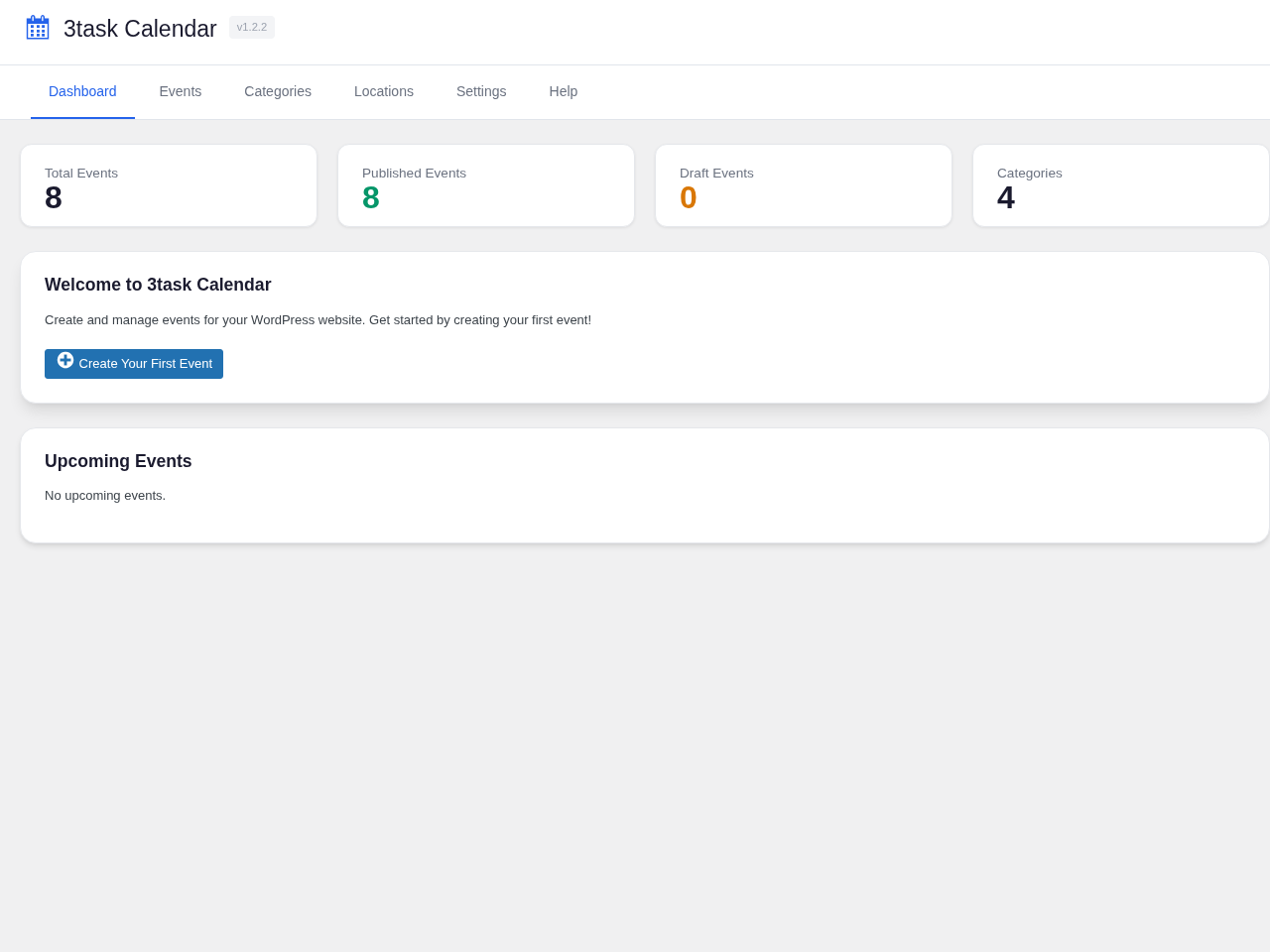
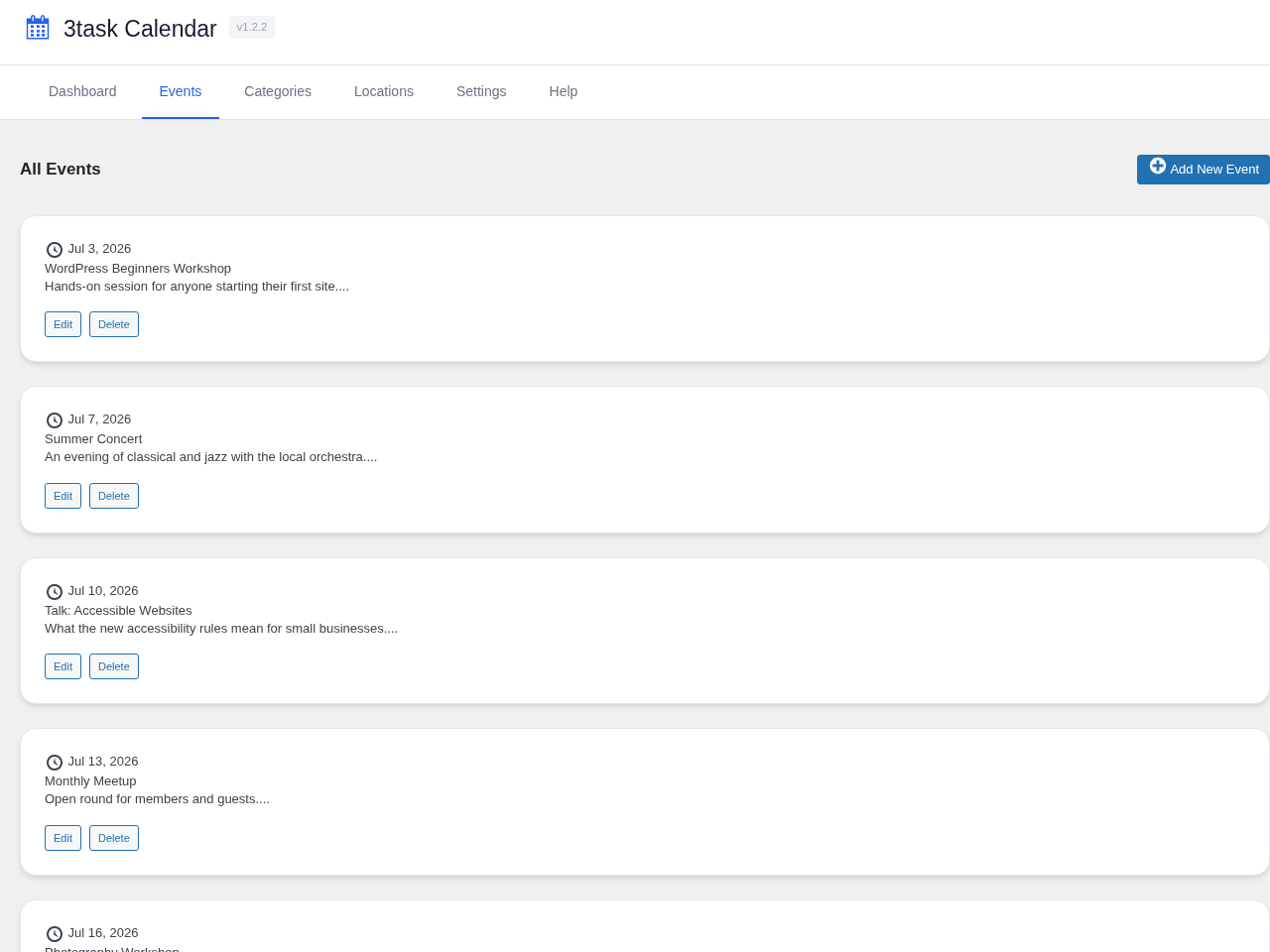
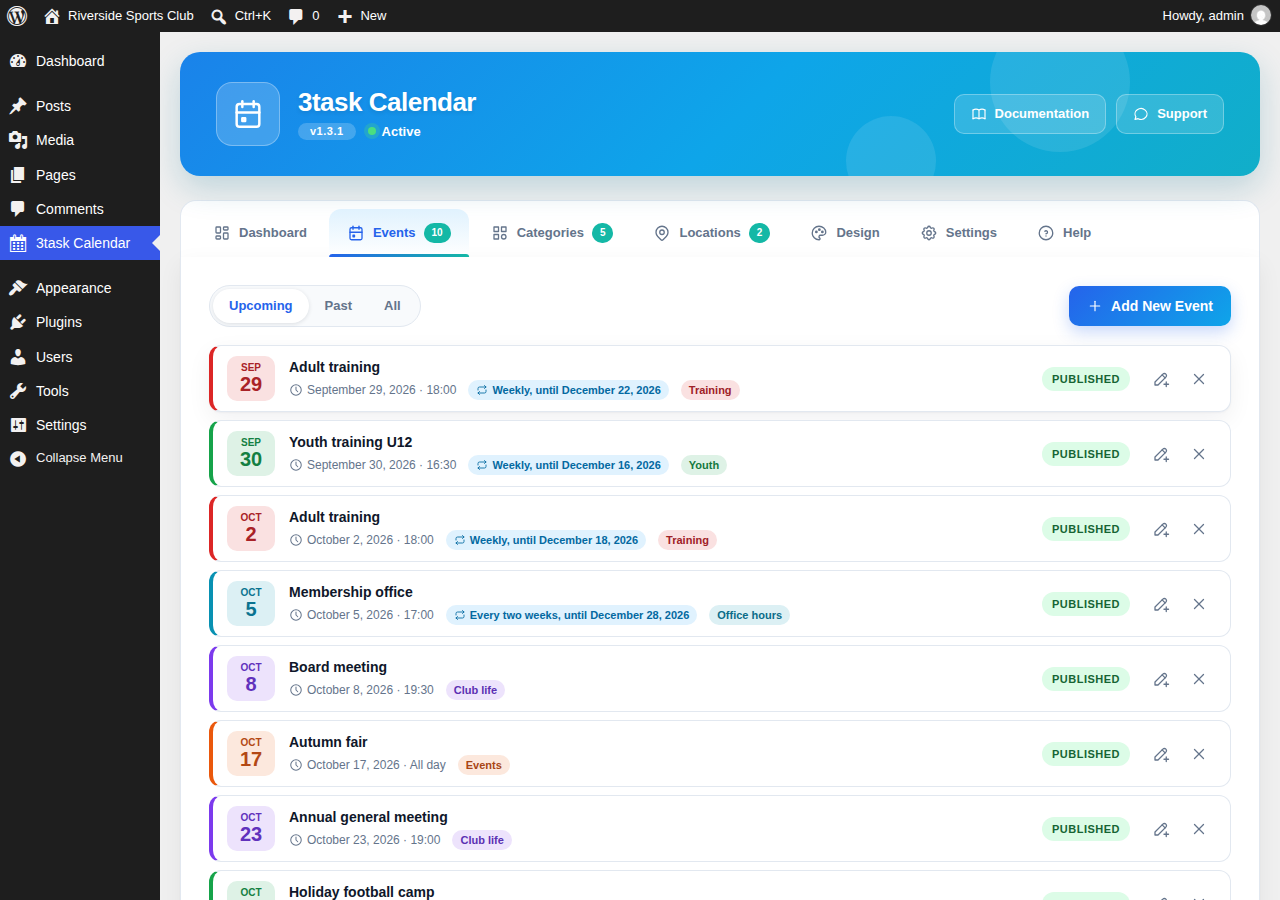
- NEW: Redesigned admin with dashboard, upcoming events, quick actions and a compact event list with filters
- NEW: Block editor shows a live preview and offers design and category
- FIXED: The block did not render on the front end (block name started with a digit); existing pages are converted automatically
- NEW: Recurring events (daily, weekly, every two weeks, monthly, yearly) with end date and editable single dates
- NEW: "Add to my calendar" (.ics) for every event and an iCal subscription feed for all events or one category
- NEW: German translation (informal and formal)
- NEW: "Plan route" link to OpenStreetMap for event locations
- NEW: On small screens the calendar starts in list view (shortcode option mobile_list)
- IMPROVED: Event popup is an accessible dialog with focus handling; keyboard support in the list view
- Fixed: month navigation did not update the calendar grid when the new month had events
- Fixed: multi-day events now appear on every day they cover and in the upcoming list while they are running
- Fixed: event list pagination links showed page 1 again
- Fixed: "today" and the current month now use the site time zone instead of UTC
- Fixed: "+N more" in the month view now shows the remaining events of that day
- Fixed: month navigation and popups keep working on cached pages
- Security: the REST API no longer returns draft events to visitors
- Security: settings can only be changed by users with the calendar settings capability; saving no longer resets other settings
- Security: the mini calendar popup no longer renders event data as HTML
- SEO: event schema now uses ISO 8601 dates with time zone, works with the block and respects the category of the calendar
- Performance: the front end no longer loads Dashicons (icons are inline SVG); fewer database queries for categories and locations
- REST API: pagination (per_page, page) and date validation for /events
- Settings: options for event schema and data removal on uninstall
- Database upgrades now run automatically after plugin updates
- Improved code quality: Replaced inline CSS/JS with properly enqueued assets
- Added External Services documentation for optional Google Maps integration
- Fixed WordPress.org coding standards compliance
- Fixed plugin name to match WordPress.org slug requirements
- Text domain now correctly matches plugin slug
- Rebranded from CalendarCraft to 3task Calendar
- Updated all shortcodes to use [threecal], [threecal_events], [threecal_upcoming], [threecal_mini]
- Updated Gutenberg block registration
- Internal code refactoring for WordPress.org compatibility
- NEW: Mini Calendar shortcode [threecal_mini] for sidebar widgets
- NEW: Clickable event popup on mini calendar days
- NEW: List view now fully functional with view switcher
- NEW: Help tab in admin with complete shortcode documentation
- IMPROVED: Events grouped by day in list view
- IMPROVED: Full weekday names in list view headers
- Initial release
- Unlimited events and categories
- Month and list views
- Gutenberg block support
- Responsive design
- Schema.org event markup
- German translation included