
3task Review Box: Star Ratings, Pros & Cons and Review Schema
| 开发者 | 3task |
|---|---|
| 更新时间 | 2026年10月28日 19:19 |
| PHP版本: | 7.4 及以上 |
| WordPress版本: | 7.1 |
| 版权: | GPLv2 or later |
| 版权网址: | 版权信息 |
详情介绍:
- 0 to 10 points, 10 stars, 5 stars or 0 to 100 percent
- Steps of 0.1, 0.5 or 1, so 9.8 and 6.7 are possible
- Stars are filled to the exact share: 4.1 stars look like 4.1, not like 4 or 4.5. Half-star rounding is one switch away.
- The number is always shown next to the stars, for screen readers and for anyone who wants the exact value
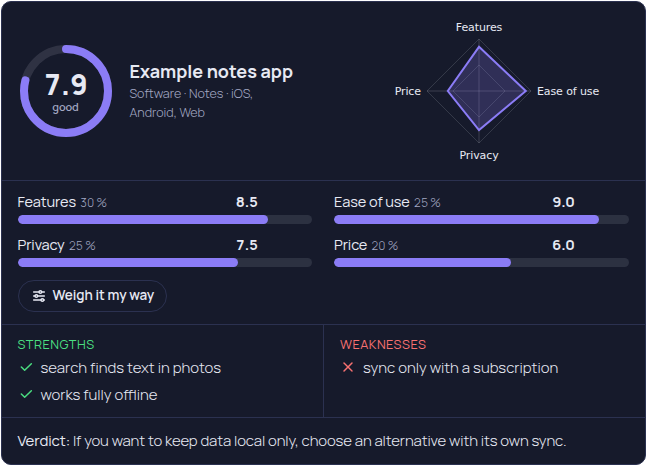
- Bars: criteria with weight, bar, score and measured value
- Stars: the same data as stars
- Profile: score ring and radar chart, drawn on the server as SVG with a text alternative
- Theme colours by default, your own main colour, or the dark Night style with three colour choices
- Text colour on the score tile is chosen by contrast, so it stays readable with any main colour
- Rounded corners, heading level and star colour in the Design tab, with a live preview
- Best or weakest first, by total score or by one criterion (for example all games by "Gameplay")
- Filter by category, tag or post type
- As a list, a table or cards with image and short verdict, with stars next to the score if you like
- Page numbers for long rankings, the rank continues on the next page
- Equal scores share a rank, and scores on different scales are compared fairly as a share of their maximum
- An authors ranking shows who wrote the most reviews and their average score
- Only published posts appear, never drafts, private or password protected posts
- Review markup only for item types Google supports (product, movie, series, game, software, book, recipe, course, event, music and others)
- Rating with your scale,
bestRatingandworstRatingalways set, decimal point in the markup - Pros and cons markup only for editorial product reviews with at least two statements, as Google requires
- No aggregate rating made from your own score
- No stars for your own business
- Markup only for published posts, never for drafts, private or password protected posts
- Works together with Rank Math and Yoast SEO: the review is added to their schema graph instead of a second block. Without them, the plugin writes its own JSON-LD once per page
- Schema diagnosis: the editor and the overview warn when another rating plugin may add review markup too, and a page check counts the review markup in a published page
rel="sponsored" automatically.
Moving from WP Review
WP Review was closed on WordPress.org in May 2025. Review Box finds its reviews, even when WP Review is already deactivated, shows a dry run with old and new values for every post (also as a CSV list), moves them in batches of 50 and can undo the move. Scores keep their scale, a hand-set total score is kept with a note, and the old [wp-review] and [wp-review-total] shortcodes show the new box once WP Review is deactivated. WP Review's own data is never changed or deleted. Posts you edit after the move are kept when you undo.
Moving from kk Star Ratings, WP-PostRatings, YASR, Absolute Reviews and WP Product Review is planned with reader ratings in version 1.1.
Blocks and shortcodes
- Blocks: review box (full or compact), short verdict, score badge for query loops and archives, ranking, authors ranking
[3task_review_box],[3task_review_score],[3task_review_summary][3task_review_toplist count="10" category="12" tag="" order="desc" criterion="" display="table" stars="1" paged="1"][3task_review_reviewers count="5"]- A "Score" column in the post list
threerb_get_score( $post_id )returns the score, scale and display text for your theme- Override the box template in your theme:
3task-review-box/box.php - Filters
threerb_schemaandthreerb_word_labels - WP-CLI:
wp threerb migrate(with--dry-runand--undo),wp threerb recount,wp threerb demo - WPML and Polylang: review fields are translated with the post (
wpml-config.xml), Polylang copies the review when a translation is created
安装:
- Install the plugin from Plugins > Add New, or upload the ZIP.
- Activate it.
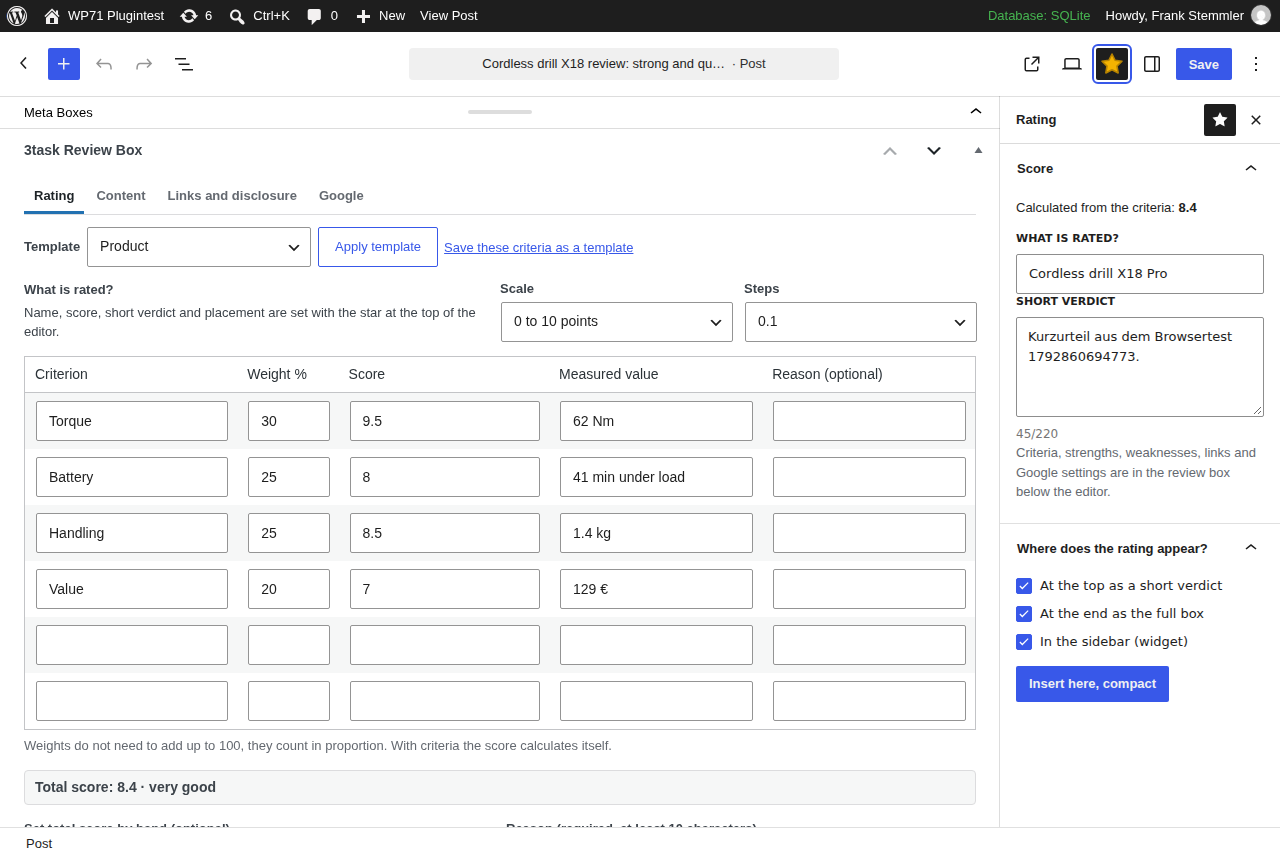
- Open a post and click the star in the editor toolbar.
- Optional: choose look, style and colours under Review Box > Design.
- Moving from WP Review: open Review Box > Move from WP Review and start the dry run.
屏幕截图:


常见问题:
Will my reviews get stars in Google?
The plugin writes markup that follows Google's documented rules. Whether stars appear is Google's decision. Pages that review your own business never get star markup, because Google does not allow it.
Can I keep my scale from 0 to 10?
Yes. Markup uses your scale with bestRating 10 and worstRating 0. Google shows the stars in proportion.
Can I use one score without criteria?
Yes. Enter the score and you are done. Add criteria later and the score calculates itself.
Does the plugin collect reader ratings?
Not in 1.0. Reader ratings shown next to the editor's score, never mixed with it, come in version 1.1.
I use WP Review. Will I lose anything?
No. Run the dry run first, then move. Deactivate WP Review, do not delete it, as long as you may want to undo the move. The plugin only reads WP Review's data and never changes it.
I use Rank Math or Yoast SEO. Will there be two reviews?
No. With Rank Math or Yoast SEO active, the review is added to their schema graph. The overview and Site Health warn if another rating plugin is active that may add its own markup.
Can I build a ranking like in Yet Another Stars Rating?
Yes. Add the "Review Ranking" block or the [3task_review_toplist] shortcode. Rank by the total score or by one criterion, best or weakest first, filtered by category or tag, as list, table or cards, with page numbers. Rankings by reader votes come with reader ratings in version 1.1.
Does the plugin contact any external service?
No. It loads no fonts, scripts or images from other servers and sends no data anywhere. The optional page check loads one of your own published pages from your own server.
What does the plugin store?
One review per post in post meta, your settings, your own templates and, after a move, a log for the undo step. Deactivating keeps everything. Deleting the plugin removes settings and templates; reviews and the move log are removed only if you switch that on.
Does it work with the classic editor?
Yes. The star is also in the classic editor toolbar, and the full input with templates and placement options sits below the editor in both editors.
更新日志:
- First release.