
AAA Autoload Optimizer
| 开发者 |
joostdevalk
aristath filipi progressplanner |
|---|---|
| 更新时间 | 2026年11月2日 20:17 |
| PHP版本: | 7.4 及以上 |
| WordPress版本: | 7.1 |
| 版权: | GPL-3.0-or-later |
| 版权网址: | 版权信息 |
详情介绍:
wp_options table on every single page request. Many of
those options belong to plugins you removed long ago, or simply don't need
to be autoloaded. The result: a bigger database query, slower page loads,
and wasted server resources.
AAA Autoload Optimizer tracks which autoloaded options your site actually
uses, then shows you the ones it doesn't — so you can safely remove them
or turn off autoloading.
安装:
- In your WordPress dashboard, go to Plugins → Add New.
- Search for AAA Autoload Optimizer.
- Click Install Now, then Activate.
- Browse your site normally for a few days — or visit every page manually if you're in a hurry.
- Go to Tools → Autoload Optimizer to review and optimize your autoloaded options.
- Download the plugin zip file.
- Upload it via Plugins → Add New → Upload Plugin, or extract it
to
/wp-content/plugins/aaa-option-optimizer/via FTP. - Activate the plugin through the Plugins menu.
- Follow steps 4–5 above.
屏幕截图:
常见问题:
Will this plugin break my site?
The safest action — disabling autoload — is non-destructive. The option remains in your database and can still be loaded on demand. Deleting an option is permanent, so only do that for options you're confident are no longer needed (e.g., from plugins you've already removed). Always back up your database before making bulk changes.
Can I undo changes?
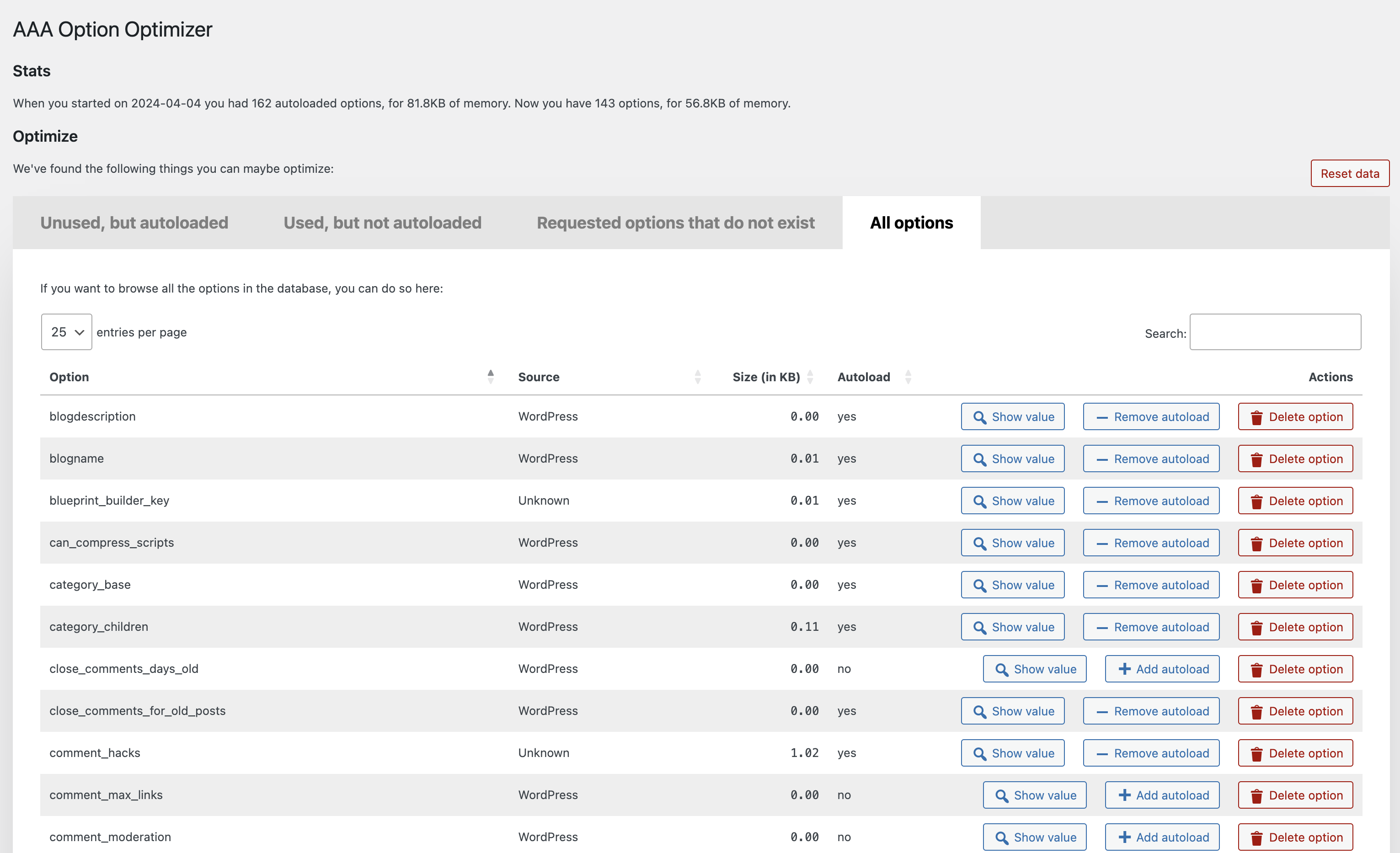
Disabling autoload can be reversed from the "All Options" tab. Deleting an option is permanent. If you need it back, you'll need to restore from a database backup.
How long should I wait before optimizing?
A few days of normal browsing is usually enough. If you have a lot of visitors, a few hours might even suffice. The goal is to visit every major page on your site (front end and admin) so the plugin can record which options are actually used. If you're thorough, you can start optimizing sooner.
Does this work with WordPress multisite?
The plugin currently targets single-site installations. Multisite compatibility has not been officially tested.
How do I know which options are safe to remove?
The plugin identifies the source of each option (which plugin, theme, or WordPress core). If an option belongs to a plugin you've already deactivated and removed, it's generally safe to delete. When in doubt, disable autoloading instead of deleting — it's the safer choice.
Do I need to take precautions?
Yes, always back up your database before optimizing. Disabling autoload is safe and reversible, but deleting options is permanent.
Why are some option names not tracked?
Names that can't be real options are ignored: empty names and names longer
than 191 characters. Developers can exclude more names with the
aaa_option_optimizer_is_trackable_option_name filter, which receives
whether the name should be tracked and the option name. Keep in mind that
an autoloaded option excluded this way will be listed as unused. The 191
character limit can't be changed.
Where can I report bugs?
Please use the GitHub repository for bug reports and code suggestions. The WordPress.org support forum works too for general questions.
How can I report security issues?
Through the Patchstack Vulnerability Disclosure Program. The Patchstack team validates, triages, and handles all security reports. Report a security vulnerability here.
How can I add my plugin to the known-plugins list?
Submit a pull request on GitHub to known-plugins.json.
更新日志:
- Hardened the escaping of option data in the admin screens (CVE-2026-119211).
- Fix the autoload toggle and delete button not updating rows when the table columns are collapsed on smaller screens.
- Fix tables on hidden tabs not fitting their panel.
- Show the correct autoload button for options with the "off" and "auto-off" autoload values.
- Fix bulk delete for option names that contain a dot.
- Fix duplicate element ids when the same option appears in more than one table.
- Add the
aaa_option_optimizer_is_trackable_option_namefilter to exclude option names from tracking.
- Rename the plugin to AAA Autoload Optimizer.
- Fix database deadlocks when concurrent requests write tracked options.
- Fix a fatal error when W3 Total Cache's database cache is active.
- Readme improvements.
- Fix infinite recursion in option access monitoring that could cause a fatal error in certain hosting environments.
- Replace using 'all' filter for monitoring option usage with 'pre_option' filter for better performance.
- Migrate tracked options data from a single wp_option to a custom database table for improved performance and reliability.
- Add "select all" checkbox.
- Fix table filtering by Source column.
- Prefix the Datatables script slug to avoid conflict with other plugins.
- Add MainWP to known-plugins list
- Add SliceWP to known-plugins list
- Add more known prefixes for WooCommerce options
- Fixed a bug in bulk-actions
- Performance improvements.
- Added bulk-actions to allow optimizing & deleting options in bulk.
- Added more known plugins.
- Performance fix: Do not autoload the plugin option.
- Fix JS error when deleting an option.
- Make plugin work with the latest autoload changes.
- Fix error in
known-plugins.json. - Prevent fatal error when there's an error in
known-plugins.json.
- Overhaul of the UX, implementing proper tabs, better buttons and more.
- Added a new "All options" tab, which, when you hit the button, loads all the options from the database and allows you to manage them.
- Added a "Reset data" button which resets the tracking data.
- Added a link to the Optimize Options page from the Plugins page.
- Much improved recognition of core WordPress options, themes and plugins under "Source", thanks in part to pull requests from Rogier Lankhorst and system4pc.
- You can now also filter all tables by Source so you can more easily find the options you're looking for.
- Many code and speed improvements under the hood, including adding a class autoloader and some i18n fixes.
false when it's being loaded but doesn't exist.
1.1
The plugin now recognizes plugins from which the options came (thanks to
a great pull by
Rogier Lankhorst).
If you're a plugin developer and want your plugin's options properly
recognized, please do a pull request on
this file.
Small enhancements:
- Column width is now automatically determined which leads to better spacing.
- Action buttons are now centered in their columns.
- If you removed autoload from or deleted an option, it'd be removed from the table but would be back when you paginated, that's fixed - thanks to Jono Alderson for reporting.
- Fixed sorting by filesize by moving the
KBto the table heading, so that you can now properly sort numbers. - Fixed issue where an empty option would result in weird size output.
- Fixed a bug where the buttons wouldn't work in a paginated state.
- Show the value of an option in a
popover, as suggested with a great pull request by @rogierlankhorst.