
Accessonaut – Accessibility Widget & Reading Aids
| 开发者 | |
|---|---|
| 更新时间 | 2026年11月14日 06:54 |
| PHP版本: | 7.4 及以上 |
| WordPress版本: | 7.1 |
| 版权: | GPLv2 or later |
| 版权网址: | 版权信息 |
详情介绍:
- Text: text size in several levels, line height, letter and word spacing, a readable or monospace font, bold text, paragraph spacing, a narrower text width, emphasized headings and underlined or highlighted links.
- Colors and media: high contrast, dark, light or inverted colors, less saturation, dimming, hidden or greyscale images, image texts, paused or muted media, calmer backgrounds and less transparency.
- Orientation: reading guide or reading mask, no animations, a clearly visible keyboard focus, an overview of all headings on the page, highlighted buttons and form fields, a larger mouse pointer, a skip link, labels and calm scrolling.
- Quick profiles that combine several settings, for example "Low vision", "Dyslexia", "ADHD" or "Less color".
- Read aloud: visitors select text on the page and their browser reads it with a local voice.
- Keyboard operation: Alt + A opens the reading tools.
- Central design: the widget follows the design you save for this website in your Accessonaut account. Changes reach your website without touching WordPress.
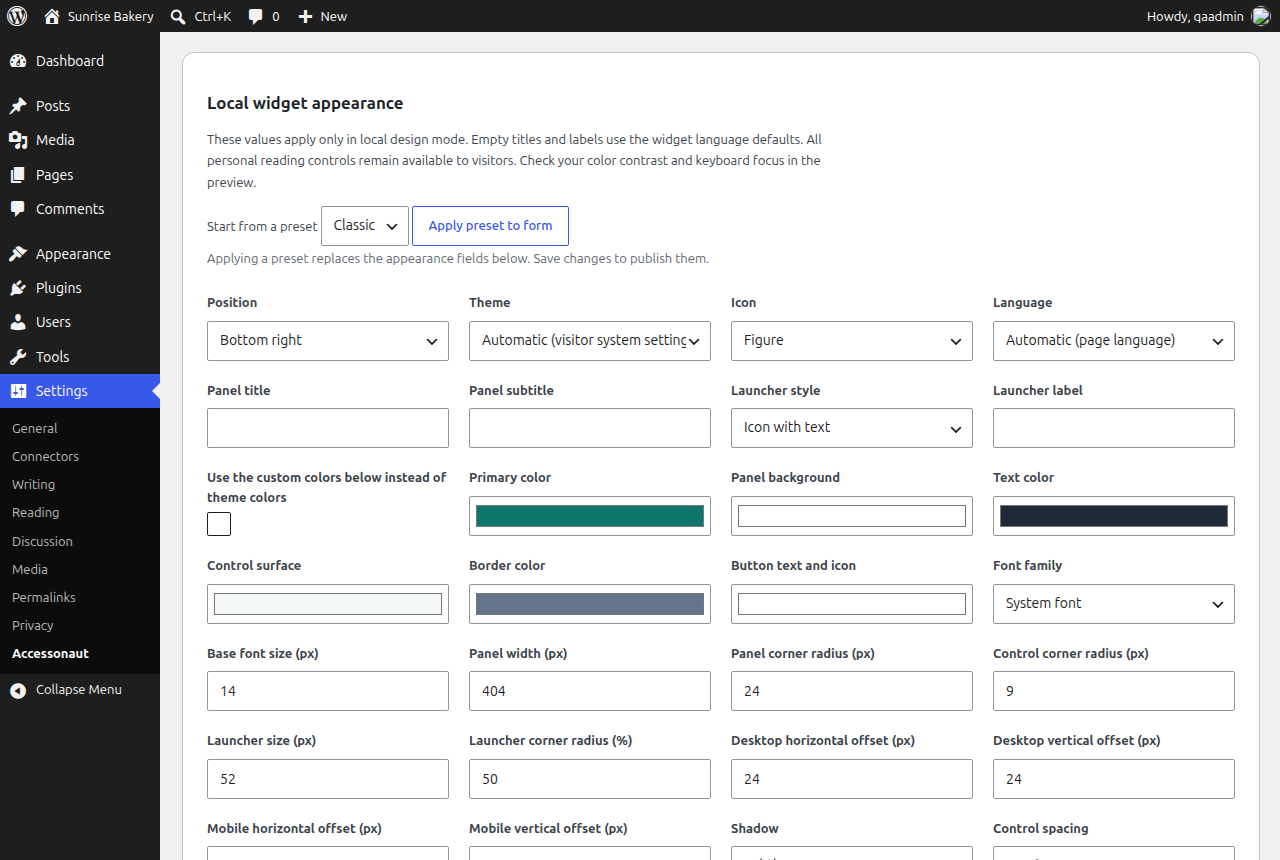
- Local design: style the widget in Settings > Accessonaut with five presets and 28 settings, including colors, light or dark theme, icon, widget language, title, a launcher with icon or text, font, font size, panel width, corners, launcher size, separate desktop and mobile offsets, shadow and spacing.
- Optional preview: a sandboxed preview of the real widget shows your unsaved changes. It loads only when you click the preview button.
- No external fonts: the widget uses system fonts or the font of your theme.
- Create a free account at accessonaut.com and add your website.
- Install this plugin and enter the service address and the public project ID from your account.
- Choose the central or local design, check "Enable" and save.
- No cookies: reading preferences stay in the visitor's browser.
- Nothing is loaded before you enable the connection.
- When the widget loads, the service receives the usual request data, such as the IP address and the website hostname. When a visitor opens the reading tools, the browser sends an anonymous usage notice without cookies, referrer or identifiers. Browsers with Do Not Track or Global Privacy Control send no usage notices.
- Accessonaut is operated from Germany and hosted in the EU. All requests are listed under "External services" below.
安装:
- In WordPress open Plugins > Add New Plugin, search for "Accessonaut", then install and activate the plugin.
- Create a free account at https://accessonaut.com and add your website.
- In your Accessonaut account open Reading-aid widget > Embed > WordPress and copy the service address and the public project ID.
- In WordPress open Settings > Accessonaut and enter the service address (https://accessonaut.com) and the project ID. Choose the central design or configure the local design; a preset fills the local form.
- Read the notes on the external service, check "Enable" and save.
- Clear page and CDN caches and test your website in a private window, including keyboard access and the mobile layout.
屏幕截图:


常见问题:
Is Accessonaut free?
Yes. The free plan covers one website with all reading aids and design options and shows a small credit link in the widget menu. It includes a monthly volume of widget views; if your website reaches it, the widget keeps working and you get a notice in your account. Paid plans add more websites, larger scans and monitoring and remove the credit link.
Do I need an account?
Yes. The widget is provided by the Accessonaut service, and the plugin needs the public project ID of your website. Creating a free account takes a few minutes.
Does the widget make my website compliant with WCAG, the BFSG or the European Accessibility Act?
No. No widget can do that. Accessibility laws such as the German BFSG and the European Accessibility Act refer to requirements like WCAG, and they are met by the website itself: alternative texts, a logical heading structure, sufficient contrast in your theme, forms with labels and menus that work with the keyboard. The reading aids are an additional help for your visitors. What helps: check your website with automated scans and a manual test, fix the problems at the source and publish an accessibility statement. Your Accessonaut account supports all three steps.
Is the widget GDPR-friendly? Does it set cookies?
The widget sets no cookies; reading preferences stay in the visitor's browser. Loading the widget transmits the usual request data, such as the IP address, to the Accessonaut service, which is operated from Germany and hosted in the EU. Usage notices are anonymous and are not sent with Do Not Track or Global Privacy Control. Whether you load the widget before or after consent is your decision based on your own privacy assessment; mention the service in your privacy policy. All requests are listed under "External services".
Does the plugin slow down my website?
The plugin adds a single deferred script tag in the footer and nothing else, so it does not block the rendering of your pages. Without an enabled connection it adds nothing to your pages at all. It makes no server-side requests and stores only its own small settings.
Does it work with page builders, block themes and caching plugins?
Yes. The plugin outputs its script through wp_footer(), which block themes, classic themes and page builders such as Elementor or Divi use. After changing the settings, clear your page and CDN cache. If a caching plugin delays JavaScript until the first interaction (for example "Delay JavaScript execution" in WP Rocket), the widget button appears late; exclude widget.js from that option if it should appear immediately.
Does it work in a multisite network?
Yes. You can activate the plugin for the whole network or for single sites. The settings are stored per site, so the widget stays off on every site until you enter the service address and project ID there. If a site has its own domain, create a separate project for it in your Accessonaut account. Deleting the plugin removes its settings on all sites of the network.
Is a secret API key needed?
No. Only the public project ID and the service address are embedded. Never paste credentials or private API keys into these fields.
Can I preview the design without enabling the visitor connection?
Yes. Save a trusted HTTPS service address and click the preview button. Only this click loads the administrator preview. It shows the current local form, including unsaved changes, and always includes the free-plan credit link. Check the central design in your Accessonaut account or on the published website.
Does the local design remove the credit link or unlock paid features?
No. The local design only controls the appearance. A paid plan removes the credit link, and functional settings stay in your Accessonaut account.
I installed an earlier version as a ZIP file. How do I switch?
Install the plugin from the directory and activate it. Versions up to 1.3 were installed in the folder "inclusiveweb": the new version switches that copy off and keeps your settings; then delete the deactivated old entry. Versions 1.4 and 1.5 update as usual.
更新日志:
- First release in the WordPress.org plugin directory, with the new name "Accessonaut – Accessibility Widget & Reading Aids".
- Settings screen now also in formal German (de_DE_formal) and informal Swiss German (de_CH_informal); Swiss German (de_CH) now uses the formal address like WordPress itself.
- Uninstalling in a multisite network removes the settings on every site.
- Sites that were never configured no longer query the database for the plugin settings on every page load.
- The settings screen and the readme now also describe the optional image description request and Global Privacy Control.
- Internal names renamed from the former product name to Accessonaut, with automatic migration of the active plugin entry, the settings and the settings address.
- The filter inclusiveweb_widget_should_enqueue still works as a deprecated alias of accessonaut_widget_should_enqueue.
- Installs into the folder "accessonaut-accessibility" and replaces an earlier copy from the ZIP, keeping its settings.
- Settings screen in English, German and Spanish; Spanish widget language.
- New default appearance matching the redesigned widget; saved local designs are kept.
- Shared appearance editor with the Accessonaut for WooCommerce plugin, which handles the shop pages.
- Central or local design with five presets, 28 appearance settings and an optional sandboxed preview.
- First version: opt-in service connection, validated settings and uninstall cleanup.