Adaptive Login Action
详情介绍:
Adaptive Login Form: Adjusting compromise between Comfort and Paranoia.
Conception:
- "Zero Trust Mode" Recommended for small groups of regular Users with a Static IP Address. Not recommended for Dynamic IP Addresses or Mobile Users. If my current IP address is not marked as Dangerous since my last successful login, then there is no need to distrust me and force me to go through Quests to solve different types of Captchas. In this case, the standard "Password" field is sufficient for one attempt.
- "Dynamics IP Mode" Recommended for mobile Users with a Dynamic IP Address. Not recommended for Static IP Addresses.
- Regardless of what kind of Authentication Error occurred, be it:
- Invalid Username;
- Invalid User Password;
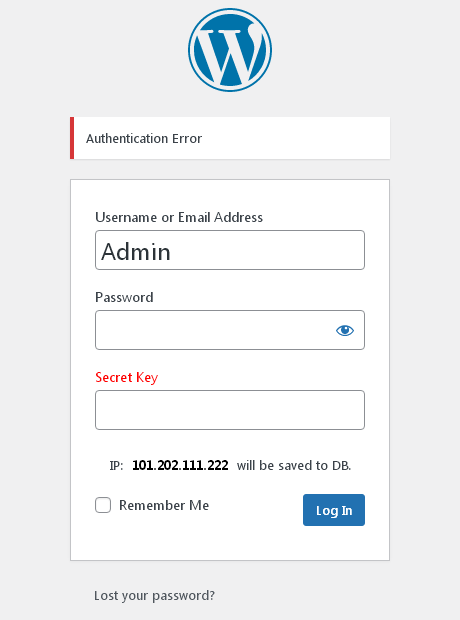
- Incorrectly specified additional security elements: "Secret Key" / Captcha / etc. This will not be indicated in the error message. There will always be only one message: "Authentication Failed". Thus, we do not explicitly indicate to the potential Villain / Bot the reason for the denial of access. And the more such Reasons there are, the more complicated the Entry procedure becomes.
- If multiple consecutive unsuccessful login attempts occur, a Restrictive Timeout may be activated for the given User.
- Integration with "New Users Monitor"
安装:
- Upload 'adaptive-login-action' folder to the
/wp-content/plugins/directory. - Activate the plugin through the 'Plugins' menu in WordPress.
- If you have any problems - please ask for support.
屏幕截图:


更新日志:
3.11
2026.03.02
* Add Restrictive Timeout.
* Add Screenshots.
2.10.1
2026.03.01
* Change Readme.txt
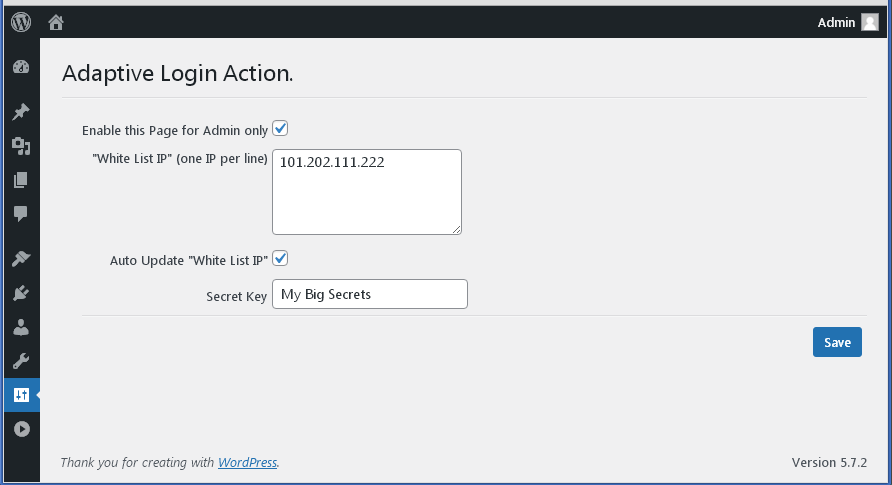
* Change Screenshot-3 ("Adaptive Login Action" Options page)
2.10
2026.03.01
* New Conception. Add "Dynamics IP Mode".
1.9.1
2026.02.03
* Fix Admin Option CSS
1.9
2026.01.28
* Fix Save Options.
* Tested to PHP: 8.4.17
1.8
2025.12.04
* Fix WhiteList Processing.
* Add WPGear_Debugger.
* Tested with WP6.9
1.7
2025.08.18
* Fix "Translation loading was triggered too early"
* Tested with WP6.8.2
1.6
2025.01.03
* Add Option "Clearing (Uninstall)".
* Add Option "Enable On/Off".
* Tested with WP6.7.1
* Update Translates;
1.5
2024.11.05
* Tested with WP6.6.2
* Add the possibility of internationalization.
* Add Translate: Russian
1.4
2021.10.01
* Fix load style.css for Frontend.
1.3
2021.09.29
* Restored compatibility with previous WP versions 4.*
* Tested with WP5.8
1.2
2021.09.28
* Update Screenshots Description.
* Integration with "New Users Monitor".
1.1
2021.05.29
* Published in the Repository. Go!
1.0
2021.05.13
* Initial release