Add as Preferred Source on Google
| 开发者 | mathewt |
|---|---|
| 更新时间 | 2026年6月8日 19:51 |
| 捐献地址: | 去捐款 |
| PHP版本: | 7.2 及以上 |
| WordPress版本: | 7.0 |
| 版权: | GPLv2 or later |
| 版权网址: | 版权信息 |
详情介绍:
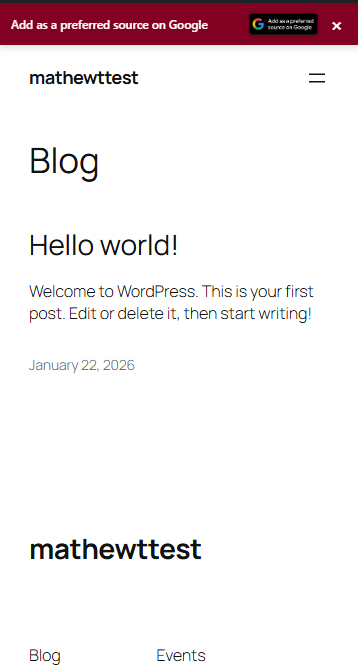
- Displays a customizable banner on your website
- Links to Google's preferred sources feature
- Allows users to set your site as a preferred source in their Google Search settings
- Provides banner customization options (colors, text, position)
- Includes device-specific display controls
- Controls exactly where the banner appears with Display Rules (all pages, posts only, pages only, or front page only)
- Excludes specific categories or individual posts/pages from showing the banner
- Triggers the banner immediately on page load, after the visitor scrolls a set percentage, or after a time delay
- Tracks impressions, clicks, and dismissals with a built-in 30-day analytics dashboard
- Custom text badge — type your own button label for any language not in the built-in list; the badge renders with the Google logo in the same style as the official badges
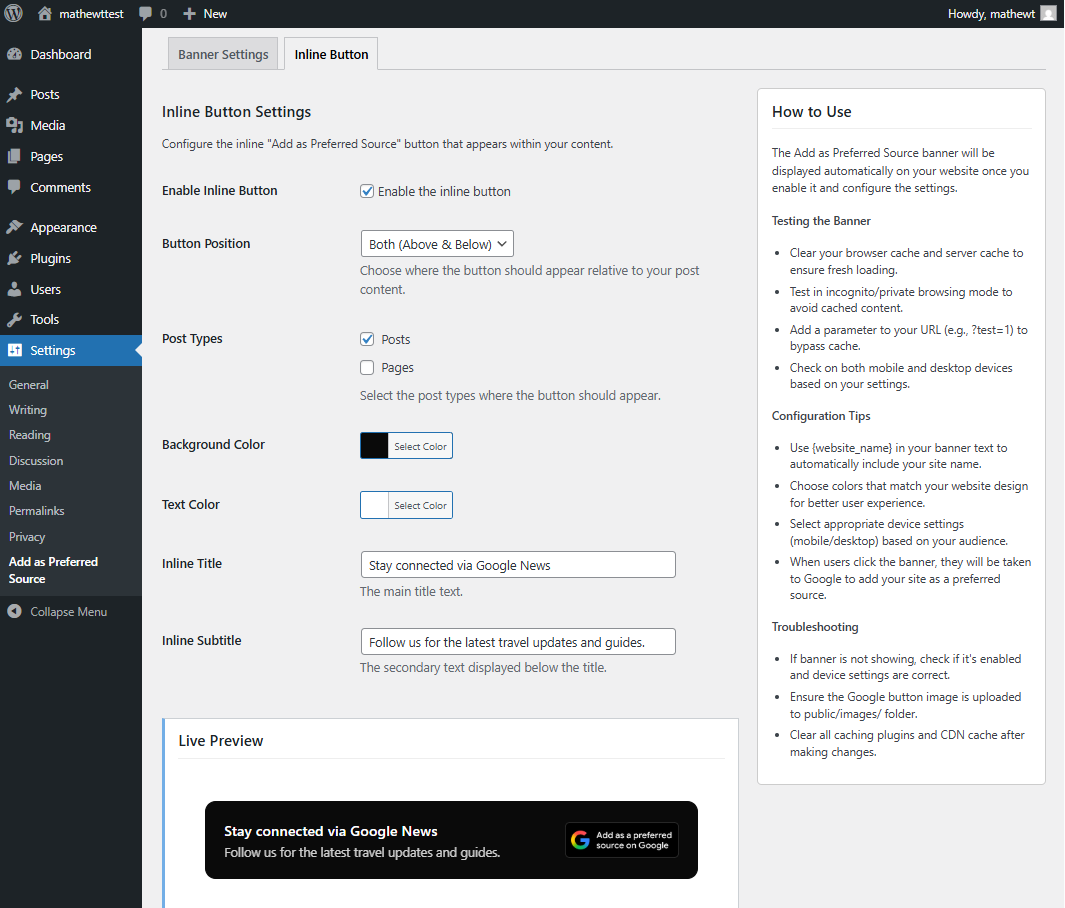
- Inline badge style switcher — choose between the full card layout (title, subtitle, badge) or a clean simple style that shows only the badge
- Custom domain override for the Google Preferred Source link
- Customizable banner text with website name variable
- Color customization for background and text
- Position control (top or bottom of page)
- Device-specific display (mobile, desktop, or both)
- Cookie-based dismissal (banner stays hidden for 7 days after user closes it)
- Responsive design
- Translation ready
- Display Rules - show the banner everywhere, on posts only, pages only, or the front page only; exclude specific categories or individual post/page IDs
- Display Trigger - show immediately on page load, after the visitor scrolls a configurable percentage of the page (10-90%), or after a set time delay (1-60 seconds)
- Click-Through Analytics Dashboard - view 30-day impressions, clicks, dismissals, and click rate with a visual bar chart directly in the admin
- Custom Badge Text - type your own button label for any language not in the built-in list; the badge renders with the Google "G" logo matching the official badge style
- Inline Badge Style - switch the inline button between "Default" (full card with title and subtitle) and "Simple" (badge image only, no card)
- WordPress 5.0 or higher
- PHP 7.2 or higher
- Modern web browser with JavaScript enabled
安装:
- Log in to your WordPress admin dashboard
- Go to Plugins > Add New
- Search for "Add as Preferred Source"
- Click "Install Now" and then "Activate"
- Go to Settings > Add as Preferred Source to configure Manual Installation:
- Download the plugin zip file
- Upload via Plugins > Add New > Upload Plugin
- Activate the plugin
- Go to Settings > Add as Preferred Source to configure Configuration:
- Enable the banner in plugin settings
- Customize banner text and colors
- Choose display position and device settings
- Save settings
屏幕截图:

常见问题:
Is this plugin affiliated with Google?
No. This plugin is not associated with Google. It was created to help website owners make a banner and inline card for adding their sites to Google's Preferred Source. The term "Google" is used solely to convey the plugin's function, and we are not related to Google in any way.
What are Google preferred sources?
Google preferred sources is a feature that lets users indicate which sources they prefer to see in their search results. This is a Google feature that affects individual users' personalized search results.
Does this guarantee better search rankings?
No. This plugin only provides a way for users to access Google's preferred sources feature. It does not guarantee improved search rankings or visibility.
How does the banner work?
The banner displays on your website according to your settings. When clicked, it opens Google's preferences page where users can add your site as a preferred source.
Can I customize the banner appearance?
Yes. You can customize the text, colors, position, and choose which devices display the banner.
How long does the banner stay hidden after someone closes it?
The banner stays hidden for 7 days after a user closes it, using browser cookies to remember the preference.
Will this affect my website's performance?
The plugin uses minimal resources and should not significantly impact website performance.
Can I translate the plugin?
Yes, the plugin is translation ready and follows WordPress internationalization standards.
Does the plugin work with all themes?
The plugin is designed to work with most WordPress themes. If you experience display issues, check for theme conflicts or contact support.
What should I do if the banner doesn't appear?
- Ensure the banner is enabled in settings
- Check device display settings match your current device
- Clear all browser and server caches
- Test in incognito/private browsing mode
- Verify there are no JavaScript errors in browser console
Can I use this on multiple websites?
Yes, you can install this plugin on multiple WordPress sites. Each installation has separate settings.
更新日志:
- New: Localized Google badge support - the "Add as Preferred Source on Google" button now displays in the site's default language automatically based on the site locale.
- New: Badge Language setting in Banner Settings - choose from 17 supported languages (Danish, German, Spanish, Estonian, Finnish, French, Hindi, Hebrew, Japanese, Korean, Norwegian, Brazilian Portuguese, Russian, Swedish, Turkish, Ukrainian, and English) or leave it on "Auto" to match your site language.
- Improvement: More languages will be added with each update! Stay tuned!
- New: Custom text badge - select "Custom text (for other languages)" in the Badge Language setting and type your own button label. The badge renders with the Google "G" logo and your text, styled to match the official badge, so any language is supported.
- New: Inline badge style switcher - a new "Badge Style" setting in the Inline Button tab lets you choose between "Default" (full card with title and subtitle) and "Simple" (badge image only, no card). The Simple style hides the card-specific fields in the admin and shows only the badge on the frontend.
- New: Custom Domain setting - override the domain used in the Google Preferred Source link based on your preference.
- New: Analytics dashboard added - track impressions, clicks, dismissals, and click-through rate over 30 days.
- New: Display Rules - restrict the banner to posts only, pages only, or front page only; exclude specific categories or post/page IDs.
- New: Display Trigger - show the banner immediately on page load, after the visitor scrolls a configurable percentage, or after a time delay.
- Improvement: Public-facing JavaScript rewritten in vanilla JS - jQuery dependency removed, script loads in footer.
- Improvement: Banner is now keyboard-accessible (
role="button",tabindex="0",Enter/Spacekey support). - Improvement: Close button selector scoped to the banner element to avoid conflicts with other plugins or themes.
- New: Refactored Inline Button with a modern card design.
- New: Added "Post Types" selection for inline button (replacing Content Type).
- New: Added Background and Text Color pickers for the inline button.
- New: Added "Inline Subtitle" option.
- Improvement: Inline button now uses standard Flexbox layout (Layout 2).
- Improvement: Fixed image display issues.
- Cleanup: Removed "Alignment" settings.
- Initial release
- Banner display functionality
- Customization options for text, colors, and position
- Device-specific display controls
- Cookie-based dismissal system
- Responsive design
- Translation support