
Add Tiktok Pixel for Tiktok ads (+Woocommerce)
| 开发者 |
the-rock
pagup freemius |
|---|---|
| 更新时间 | 2026年11月12日 22:35 |
| PHP版本: | 5.6 及以上 |
| WordPress版本: | 7.1 |
| 版权: | GPLv2 or later |
| 版权网址: | 版权信息 |
详情介绍:
- Measure your TikTok campaigns. The pixel records each page view, so you can see in TikTok Ads Manager what visitors from your ads do on your site.
- Reach your visitors again. TikTok can use pixel data to build audiences of people who visited your site, then show them your ads.
- Track the actions that matter. With the pixel in place, you can define events such as a sign-up or a contact form in TikTok Events Manager, without code, using the TikTok Event Builder.
- Keep your setup simple. One screen, one switch. Your settings stay in WordPress, independent of your theme, and you choose whether they are deleted when you deactivate the plugin.
- The pixel on your WooCommerce store. With the store option turned on, Pro adds the pixel to product, cart and checkout pages too, so you can define shopping events, such as add to cart or checkout, in TikTok Events Manager.
- An event on a specific page. A box in the editor of your posts, pages and products lets you add TikTok event code to that page only, for example on a thank-you page after a form.
- Developer mode. Paste your own TikTok code, such as the complete base code or events, and it is added to every page.
- It does not create or manage your TikTok campaigns: you do that in TikTok Ads Manager.
- It does not ask your visitors for consent. If consent is required before marketing tags load, use a consent management tool that can hold back the TikTok script until visitors agree.
- It does not use TikTok's server-side Events API.
安装:
- Go to Plugins > Add Plugin and search for "Add Tiktok Pixel".
- Install and activate the plugin by Pagup.
- Open TikTok Pixel in the admin menu.
- Switch the pixel on, paste your Pixel ID and save your changes.
- If your site uses a cache (caching plugin, server cache or CDN), clear it.
- Check the result with TikTok Pixel Helper (see the FAQ).
- Upload the
add-tiktok-advertising-pixelfolder to/wp-content/plugins/. - Activate the plugin from the Plugins screen.
- Continue with steps 3 to 6 above.
屏幕截图:
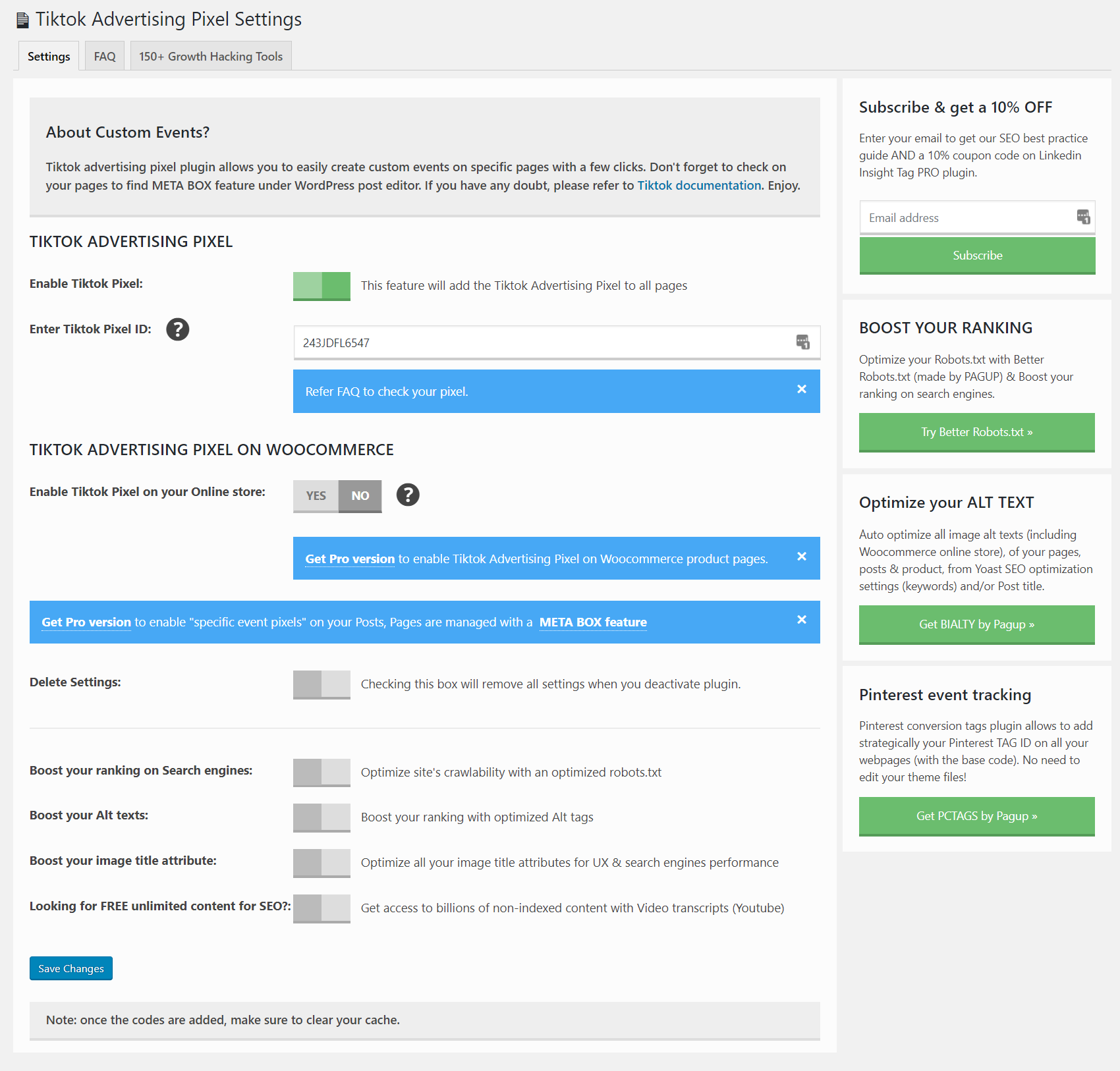
常见问题:
Where do I find my TikTok Pixel ID?
In TikTok Ads Manager, go to Tools > Events Manager and open your web pixel. Its Pixel ID is shown in the pixel details.
No pixel yet? In Events Manager, click Connect Data Source, select Web, then Manual Setup, and create your pixel. TikTok explains each step in How to Set Up and Verify TikTok Web Data Connection.
If you only have TikTok's base code, your Pixel ID is the value in quotes inside ttq.load('...').
How do I check that the pixel works?
Install TikTok Pixel Helper, the Chrome extension published by TikTok For Business, then visit your site. It checks the pixel on the page and points out errors.
You can also open the source code of a page and search for Tiktok Pixel Code.
The pixel does not show up. What should I check?
- The pixel is switched on and your Pixel ID is saved.
- Your cache is cleared (caching plugin, server cache or CDN).
- With the free version, the pixel is not added to WooCommerce product, cart and checkout pages: test another page.
- Ad blockers and some privacy extensions can block TikTok's script: test in a browser window without them.
Does it work with WooCommerce?
Yes, with one difference between versions. The free version adds the pixel to your site but leaves out product, cart and checkout pages. Pro adds it to those pages too when you turn on its store option.
Does it track purchases automatically?
No. Pro can add the pixel to your store pages; you then define shopping events in TikTok Events Manager or add your own event code. The plugin does not send order amounts or product details to TikTok by itself.
Can I add an event to one specific page?
Yes, with Pro. In the editor of a post, page or product, check Add Event-Specific Tiktok Pixel and paste your event code. It is added to that page only, as long as the pixel is switched on and your Pixel ID is saved. Only paste code generated by TikTok or code you understand and trust.
What is developer mode?
A Pro option for advanced users. The code you paste is added to every page as is. If you paste the complete TikTok base code there, switch off the standard pixel so it does not load twice.
Do I need a cookie consent banner?
It depends on where your visitors are and on the laws that apply to your site. Once you switch the pixel on, the plugin loads it for every visitor; it does not ask for consent. If you need consent first, use a consent management tool that can hold back the TikTok script until visitors agree. You remain responsible for your privacy notice and for compliance.
Will deactivating the plugin delete my settings?
No, unless you turn on Remove Settings first. With this option on, the plugin deletes its settings when you deactivate it.
更新日志:
- Security hardening of the per-page event code (Pro). An event code saved before this update may be inactive until the event is switched on and its code entered again in the event box of that page. Updated translations.
- Updated Freemius SDK to the latest version
- Add 10 locale translation catalogues.
- Update Freemius SDK to 2.13.1.
- 🐛 FIX: Security fix
- 🐛 FIX: Security fix
- 👌 IMPROVE: Updated Freemius to v2.5.3
- 👌 FIXED: Cart and checkout issue
- 👌 IMPROVE: Tiktok Booster notification
- 🐛 FIX: Tracking ID Bug (if Woocommerce is active).
- 🐛 FIX: Security issue
- 🐛 FIX: Setting links and few others bug
- 👌 IMPROVE: Top level settings page
- 👌 IMPROVE: New Tiktok Booster add-on integration
- 👌 IMPROVE: New refactored code with many improvements
- 🐛 FIX: Several bugs and issues
- 🐛 FIX: Styling, Text and some issues.
- 🐛 FIX: Added nonce for post request, fixed stable tag, escaped echo
- 🔥 NEW: Floating Button for TikTok Promotion
- 🐛 FIX: Update TikTok Script code to newer version
- 🔥 NEW: Developer Mode for adding custom code (Pro version only)
- 🔥 NEW: 21 languages added
- 👌 IMPROVE: Updated freemius to latest version 2.4.2
- 🔥 NEW: Meta Tags for SEO promotion
- 👌 IMPROVE: Updated freemius to latest version 2.4.1
- 🐛 FIX: Update TikTok Script code to newer version
- 👌 IMPROVE: Updated freemius to latest version 2.4.0
- 📦 NEW: Step 2 for TikTok Video Feed
- 🐛 FIX: Multiple undefined variable notices inside PHP log.
- 👌 IMPROVE: Updated freemius to latest version 2.3.2
- Fixed some styling issues
- Initial release.