
Add to Cart links generator for WooCommerce
| 开发者 | damasovelazquez |
|---|---|
| 更新时间 | 2026年1月11日 15:23 |
| PHP版本: | 7.4 及以上 |
| WordPress版本: | 6.9 |
| 版权: | GPLv2 or later |
| 版权网址: | 版权信息 |
详情介绍:
Generate custom links to add products to the WooCommerce cart and redirect to cart or checkout based on your configuration.
This plugin allows you to create direct "Add to Cart" links for your WooCommerce products with the following features:
- Generate direct links to add products to cart
- Choose redirect destination: cart page or checkout page
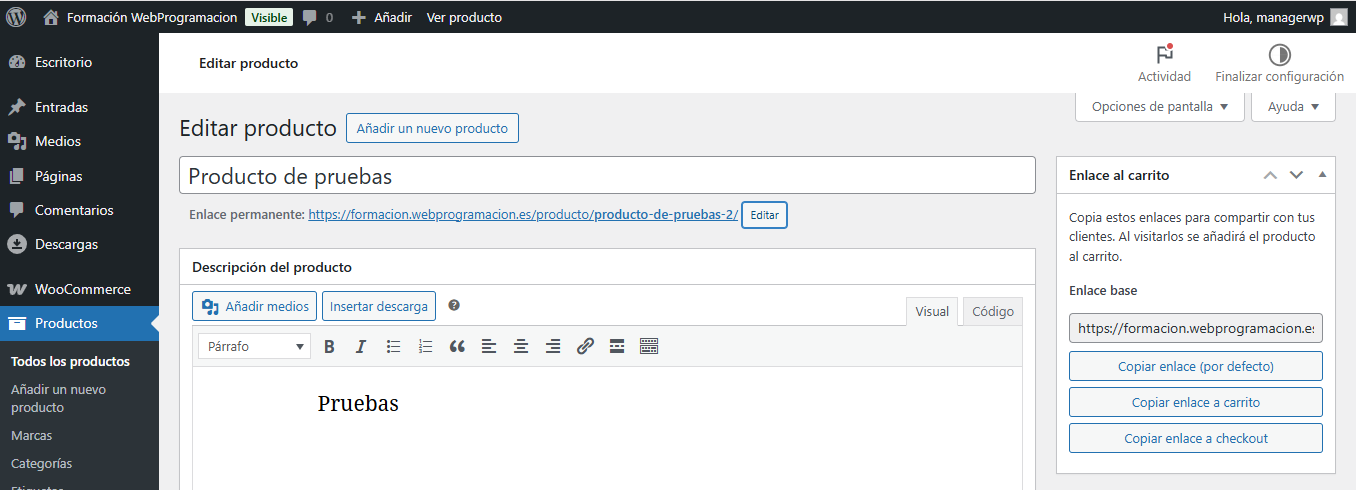
- Copy links directly from the product edit screen
- Configure default redirect behavior in WooCommerce settings
- Secure links with nonce verification
- Simple and lightweight implementation
安装:
- Go to WordPress Dashboard > Plugins > Add New.
- Search for "Add to Cart links generator for WooCommerce" in the plugin directory.
- Click "Install Now" and then "Activate".
- Make sure WooCommerce is active.
- Configure default settings in WooCommerce > Settings > Cart Links.
- Edit any product to find the link generator in the sidebar.
- Download the plugin from the WordPress repository
- Upload the plugin folder to
/wp-content/plugins/ - Activate the plugin through the 'Plugins' menu in WordPress
屏幕截图:
常见问题:
Does this plugin require WooCommerce?
Yes, WooCommerce must be installed and activated for this plugin to work.
Can I use these links for variable products?
Currently, the plugin works with simple products only. Variable products are not supported.
Are the links secure?
Yes, all generated links include nonce verification for security.
Can I customize where the link redirects?
Yes, you can choose between cart page or checkout page. Set a default in WooCommerce settings or specify it per link.
更新日志:
1.0.1
- Verificada compatibilidad con WordPress 6.9.
- Initial release.
- Generate add to cart links from product edit screen.
- Configure default redirect destination.
- Support for cart and checkout redirects.
- Nonce security verification.