
AddSynapse – AI Website & Store Assistant for WooCommerce
| 开发者 | sakkoulas |
|---|---|
| 更新时间 | 2026年10月28日 06:32 |
| PHP版本: | 7.4 及以上 |
| WordPress版本: | 7.1 |
| 版权: | GPLv2 or later |
| 版权网址: | 版权信息 |
详情介绍:
- No API key, no setup files. A short wizard on AddSynapse → Home checks your site, then you connect it from Claude and confirm the connection on this plugin's own page.
- Drafts you approve inside the chat. Price changes, sales, stock, SEO titles and meta descriptions, coupons, page and post texts, menus, featured images: Claude prepares a draft and shows it as a card with the exact before and after values. Press Approve in the card and it is applied; until then nothing on your site changes.
- Exact Undo. Every approved change can be undone from the card or from your AddSynapse account, restoring the previous values — and only if nothing else changed them in the meantime.
- All your stores in one place. Connect several stores and sites to the same free AddSynapse account and ask Claude about any of them.
- A log on your own site. Every write is listed in Settings → Approval log, and you can disconnect at any time with Disconnect AddSynapse on AddSynapse → Home.
- Locked down by design. The connection uses a key this plugin creates when you confirm, valid only on its own store routes (no users, plugins, settings or other REST routes), and every write needs a single-use approval signed at the moment you pressed Approve. It is not a WordPress Application Password: like WooCommerce's own REST API keys, it is a separate key that only this plugin accepts, and you revoke it here.
wp-config.php) and is never sent to the browser or to AddSynapse.
The chat edits one product at a time:
- Product descriptions: write, rewrite, shorten or translate a product's name, short description and description.
- Product SEO: a new SEO title, meta description and focus keyword in Rank Math or Yoast SEO, with lengths checked.
- Product images: drop or paste a photo into the chat and make it the main image or add it to the gallery.
- Prices and stock: price and sale price with dates, and the stock quantity.
- Categories, tags and brand: assign the product to existing ones.
/report low_stock or /price id=123 -10%), previews, Approve, Undo and voice input work even before you add a key.
WooCommerce reports in plain words
Search products by name, SKU, category, tag, brand, attribute, price or stock, and ask for low stock (each product's own threshold), out of stock, products missing images, descriptions or prices, best sellers, sales by day, week or month, recent orders and top customers — customers only as anonymous references; no names or emails leave your site.
Works on plain WordPress too
No WooCommerce? From Claude you can edit pages and posts (title, excerpt, text, template, publish or unpublish), menus, featured images, the look of the site, images from a web address and SEO titles and descriptions — each a draft you approve, with exact Undo. The wp-admin chat reads pages, posts, menus, media and SEO too.
Every change is a draft a person approves
The assistant only reads data and prepares drafts. A change is applied only when a logged-in user approves it in wp-admin, or when you press Approve on the draft card in Claude. The assistant never creates, edits or deletes user accounts, never changes passwords and never runs code or SQL: it can only use a fixed set of checked operations.
Store Assistant Pro (separate add-on)
Store Assistant Pro is a separate, paid add-on by AddSynapse for the wp-admin chat: bulk product edits and CSV imports, SEO at scale, pages, menus and design by chat, catalog management (categories, attributes, variations), coupons and orders, a full change history, and an AI included so you need no key of your own. Details: https://addsynapse.com/store-assistant. Pro is not included in this plugin and this plugin does not check for it: everything described above works without it. The plugin links to the add-on only on its own screens ("Upgrade to Pro" and a small card on AddSynapse → Home, "Get Pro" in its row of the Plugins list, the Pro list on the chat's start screen and a "See Pro" button when you ask the chat for something only Pro does). An installed Pro add-on can turn these links off.
How it works
With your own key (wp-admin chat): the chat, the tools and your data stay in WordPress. Your server calls your AI provider's API directly (api.anthropic.com or api.openai.com) with your key; the tools run on your server, during the chat request of the logged-in user and with that user's permissions.
From Claude: Claude talks to AddSynapse, and AddSynapse calls your site's own REST routes with the connection key you confirmed, only for the allowed read tools and — after you press Approve — to write exactly the approved values. The plugin has no job queue, no background polling and no remote-command endpoint.
AddSynapse is operated by WebOrange (Ioannis Sakkoulas).
安装:
- In WordPress go to Plugins → Add New Plugin, search for AddSynapse, find AddSynapse Store Assistant, click Install Now and Activate.
- Open AddSynapse → Home. The welcome wizard asks how you want to use it:
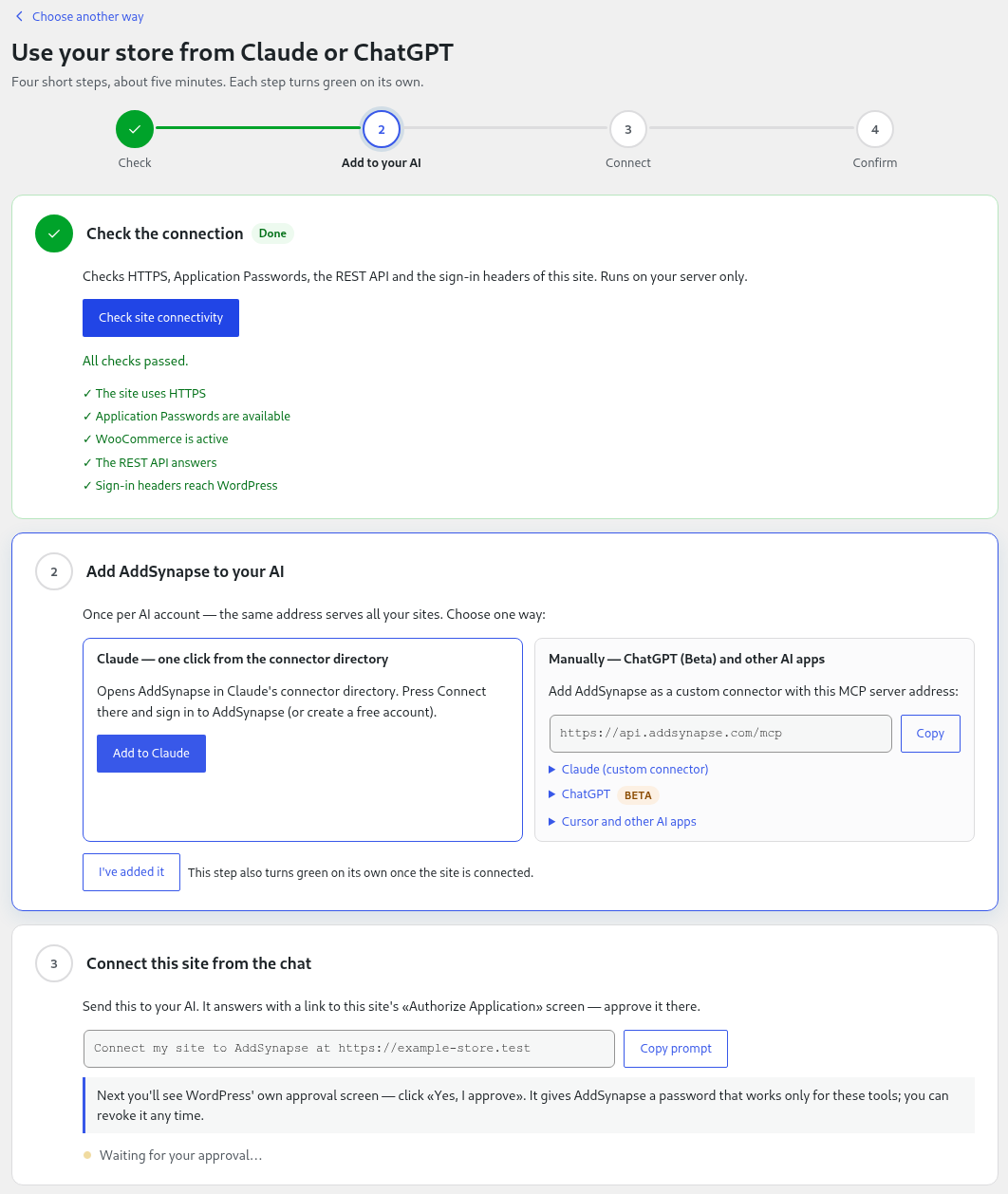
- From Claude or ChatGPT: run the connectivity check, add AddSynapse to Claude (or to ChatGPT as a custom connector, beta), then ask it to connect your site and confirm the connection on this plugin's page. The steps turn green on their own.
- With your own AI key: choose Anthropic or OpenAI, paste an API key and click Save and test, then open Chat.
- Ask something about your store, open a draft, click Approve — and try Undo.
屏幕截图:


常见问题:
Do I need an API key?
Not to use it from Claude: your Claude subscription does the AI work. For the chat inside wp-admin, yes: your own Anthropic or OpenAI key.
Do I need an AddSynapse account?
Only to use your site from Claude (the connection runs through AddSynapse); the account is free and is created during the connection. The wp-admin chat with your own key needs no account and nothing in it is locked without one.
Is it free?
The plugin is free, and so is the wp-admin chat with your own key (you pay only your AI provider). Using it from Claude needs a free AddSynapse account with a daily allowance of actions; larger allowances are on paid plans at addsynapse.com. Undo never counts.
Can Claude change my store without asking?
No. Claude can only read through the allowed tools and prepare drafts. A change is written only after you press Approve, and the write needs a single-use approval signed at that moment: even someone holding the connection key cannot write without it.
How does Undo work?
Every approved change keeps the values from before. Undo writes them back — from the draft card in Claude, from your AddSynapse account, or from the preview card in wp-admin — and only if nothing else changed the same data since, so it never overwrites a newer edit.
Does it work with ChatGPT?
Yes, in two ways. The wp-admin chat works with an OpenAI key. And you can use your site from ChatGPT through AddSynapse (beta): add https://api.addsynapse.com/mcp as a custom connector in ChatGPT's developer mode — the wizard on AddSynapse → Home shows each step. Developer mode depends on your ChatGPT plan. If ChatGPT shows no Approve button for a draft, approve it from the link in the reply (your AddSynapse account).
Can I connect more than one store?
Yes. Connect as many stores and sites as you like to one AddSynapse account and choose which one to work on in Claude.
What can AddSynapse read and write on my site?
Read: store name and structure, products and variations, categories, stock and sales reports (sales totals and best sellers — never customer names, emails or addresses), and SEO texts. Write, only after you approve (on WooCommerce stores): prices, sales and stock of products and variations, SEO titles and meta descriptions of products, pages and posts, and coupons. Every write is listed in Settings → Approval log.
How do I disconnect?
Press Disconnect AddSynapse on AddSynapse → Home. Deactivating or deleting the plugin also revokes the AddSynapse connection key (and any Application Password WordPress issued to AddSynapse with an earlier version) on this site.
Can the wp-admin chat change many products at once?
The free chat edits one product at a time (one preview per product). Bulk editing in the wp-admin chat is part of Store Assistant Pro, a separate add-on.
Where is my AI key stored, and who sees it?
Encrypted in your WordPress database (not autoloaded), or in wp-config.php if you define ADDSYNAPSE_ASSISTANT_ANTHROPIC_KEY or ADDSYNAPSE_ASSISTANT_OPENAI_KEY. Only administrators can set or remove it; the screens show only its last four characters. It is sent only to your AI provider's API, never to the browser or to AddSynapse. Remove my key (or deleting the plugin) deletes it.
How much does my own key cost?
It depends on the model and on how much you use the chat. Each question sends the AI only the instructions and tools it needs, and repeated parts are cached by your provider where it supports that. Settings shows the calls, tokens and an estimated cost for this month and the last 30 days; your provider's dashboard shows the real bill.
My host stops long requests. What can I do?
Turn on Compatibility mode in Settings → Your own AI key: the assistant then makes one AI step per request and the chat continues by itself.
Does it touch users, passwords or code?
No. It cannot create, edit or delete users, change passwords, or run code or SQL.
Does it work without WooCommerce?
Yes. Connected to Claude, a plain WordPress site gets the site tools: pages and posts (read, edit title, excerpt and text, publish or unpublish), menus, featured images and SEO titles and descriptions — each change as a draft you approve, with exact Undo. The wp-admin chat reads pages, posts, menus, the media library and SEO. Product, order and coupon tools need WooCommerce.
Which page builders and SEO plugins are supported?
Pages (read): the block editor (Gutenberg/FSE) and Elementor. SEO: Rank Math and Yoast SEO.
Who can use it?
Users who can manage WooCommerce (or, without WooCommerce, edit the theme options) can use the chat. Setting the AI key and connecting the site are for administrators only.
What is deleted when I delete the plugin?
Deleting the plugin from the Plugins screen removes its tables (conversations, change history), its settings, its scheduled tasks, unused images uploaded in the chat and your AI key, and revokes the AddSynapse connection key (and any Application Passwords issued to AddSynapse by earlier versions). Changes already applied to your products and pages stay. Deactivating the plugin also revokes them; it removes no data.
Where is the source code of the JavaScript?
The readable source of the admin app is in the src/ folder of the plugin, with package.json and package-lock.json (exact versions). Build it with npm ci && npm run build (output in build/).
更新日志:
- New: from Claude, add an image to the media library from a public web address you give (after you approve the draft; Undo deletes it).
- New: from Claude, give one page another template of your theme (for example a page without its title), with exact Undo.
- New: the site logo can be set on block themes too (the Site Logo block), and on classic themes it now stays in sync.
- Fixed: coloured words kept their transparent background, so they no longer show a yellow highlight.
- Fixed: rounded or cropped images (border radius, aspect ratio, object fit, width, height) keep their shape when built by the AI.
- Improved: coupons with a fixed discount above 50, free shipping without a usage limit, or with neither a usage limit nor an expiry date are approved on AddSynapse → Approvals in wp-admin, like coupons above 50% off.
- Fixed: connecting no longer fails on hosts with a 30-second PHP time limit.
- Improved: «You're all set!» starts with one prompt to copy into Claude, which asks it what it can do for your store with 5 examples to try, in your admin language. Two more examples below it.
- Improved: simpler setup. Step 2 is one «Connect to AddSynapse» button that links this site to your AddSynapse account; adding AddSynapse to Claude or ChatGPT moves to step 3, shown after the site is connected.
- Improved: started in Claude? Right after activation the plugin asks AddSynapse once (site address only, see External services) and goes straight to «Connect to your AddSynapse account? Yes, connect», then «Done — go back to Claude». «Other options» keeps both ways one click away.
- Improved: setup has two steps (the connection check runs by itself) and Home opens with «You're all set!»: open Claude and three requests to try.
- Fixed: sites behind an HTTPS proxy (PHP sees plain HTTP) can connect; a failed request to AddSynapse now says what failed.
- New: the connection to AddSynapse no longer needs WordPress Application Passwords. You confirm it on this plugin's page, which creates its own key, valid only for this plugin's tools. Sites where Application Passwords are turned off (for example by a security plugin's default settings) can now connect.
- New: «Disconnect AddSynapse» on Home.
- New: for safety, a coupon above 50% off that your AI prepares is approved by a site administrator on AddSynapse → Approvals in wp-admin (with Undo there), never in the chat. The site's admin email gets a short notice when a coupon is approved from AddSynapse.
- Improved: the connection key keeps working behind shared proxies, stops at once if its administrator loses admin rights, and a connection is refused when AddSynapse cannot confirm the account.
- Improved: what an administrator decides on AddSynapse → Approvals (approved, discarded, undone) also shows on AddSynapse's Changes page.
- Sites already connected keep working; reconnecting moves them to the new key.
- New: change your site's appearance by talking to Claude or ChatGPT — global styles (colors, fonts, spacing), Additional CSS, block templates and template parts (header, footer), theme settings and Elementor (pages and the site kit). Every change is a preview card with Approve and Undo.
- Improved: the account confirmation step now appears inside the setup wizard instead of a separate screen.
- Improved: after you approve the connection, you return to the setup wizard to finish.
- Fix: the authorize screen layout — long codes wrap and no longer overflow.
- Fix: two connect links approved in two browser tabs before either «Connect» now both finish — the second shows «Already connected ✓» instead of «not completed».
- Fix: going Back to the confirmation screen after connecting shows «Already connected ✓», not an error.
- Improved: Home no longer asks for a second approval when the site is already connected; connecting another AI account is a small optional section.
- New: Home shows your AddSynapse plan and today's actions (Free: 100 actions a day), with a «Change plan» link.
- New: use your store or site from ChatGPT too (beta), as a custom MCP connector. The setup wizard shows the steps, with the address to copy. Claude stays the recommended way.
- Improved: the «Add AddSynapse to your AI» step offers two clear ways — Claude in one click from its connector directory, or a custom connector by address (ChatGPT, Claude, other AI apps) — and turns «Done» only once the site is connected or you press «I've added it».
- Improved: a short note before WordPress' own approval screen explains what «Yes, I approve» gives AddSynapse.
- Fix: opening the approval return page twice no longer shows «not completed» or removes the working connection.
- New: plain WordPress sites (no WooCommerce) get the full site tools from Claude — pages and posts (title, excerpt, text, publish/unpublish), menus, featured images and SEO — each as a draft you approve, with exact Undo.
- Security: a confirmation screen before connecting names the AddSynapse account that asked («Connect this site to the AddSynapse account …?», Connect or Cancel); until you answer, the new password waits at most 10 minutes, encrypted, split between a temporary option and a cookie of your browser.
- Security: a new connection becomes active only once AddSynapse uses it (the previous one keeps working until then); an unused one is revoked after 15 minutes. Only AddSynapse's own approval key is trusted for writes, and the public check route no longer tells anonymous visitors the exact plugin version.
- Fix: setup wizard — clearer «Add to your AI» step and «Done» only when the site is really connected.
- New: use your store or site from Claude, with no API key. Claude prepares drafts — prices and sales, stock, SEO titles and meta descriptions, coupons — that you approve with one click in the chat, and every approved change can be undone exactly. Connect several stores and sites to one AddSynapse account.
- New: a welcome wizard on AddSynapse → Home. Choose how to use it — from Claude (no API key) or the chat here with your own AI key — and follow short steps that turn green on their own. The menu is now Home, Chat and Settings (old addresses still work).
- New: plain WordPress sites (no WooCommerce) can connect too, to read the SEO of pages and posts.
- New: Settings → Approval log lists every change written after your approval, and every Undo.
- Improved: low-stock reports use each product's own low-stock threshold and list products that do not track stock; variable products show their price range.
- Security: the connection uses an Application Password limited to the plugin's own routes, and every write needs a single-use approval signed at the moment you approved. Deactivating or deleting the plugin revokes every Application Password WordPress issued to AddSynapse (for all users of the site).
- Optional anonymous usage info, off by default: a one-time notice on the plugin's own screen asks whether the site may share the plugin, WordPress and WooCommerce versions, the site language and a random ID once a week. "No thanks" hides it for good; Settings → "Anonymous usage info" turns it on or off. See External services, section 6.
- Leaner AI requests: a much smaller set of instructions, and only the tools and instructions a question needs (for example about half the input of 1.1.2 for a stock question, about a quarter for a request only Pro does) — less cost per question on your own key.
- Store Assistant Pro, the separate add-on, is available: "Upgrade to Pro" in the AddSynapse menu, "Get Pro" in the Plugins list, a card in Settings, and a "See Pro" button when you ask for something only Pro does. Nothing in this plugin is locked, and an installed Pro add-on can turn the links off.
- The optional account card says what the account is for and has "Skip"; the chat no longer shows "Get notified".
- After ten approved changes, a one-time request for a review on WordPress.org, only on the plugin's own screen; "Don't ask again" hides it for good.
- For developers: tools of another plugin can declare a
group(described with the filteraddsynapse_assistant_extension_groups); a group reaches the AI only when a question needs it.
- Improved description.
- Admin bar shortcut to the assistant.
- Renamed display name to "AddSynapse – AI Website & Store Assistant for WooCommerce" (slug, settings and data unchanged).
- Free with your own AI key: paste an Anthropic or OpenAI API key in Settings (or in the chat's first screen) and every feature works. The key is stored encrypted, only administrators can change it, and it is sent only to your AI provider.
- Live (streamed) answers, a quick first step that picks the tools each question needs, and a compatibility mode for hosts with short time limits.
- Usage and estimated cost of your own key in Settings.
- The plugin no longer connects to the hosted AddSynapse service (no connection, trial or subscription in the plugin); the settings of that connection are removed on update.
- One product per change: price/sale, stock, existing categories/tags/brand, name and texts, main image and gallery, product SEO. Reads stay complete. Bulk changes, CSV imports, managing categories/tags/brands, attributes and variations, custom fields, coupons, orders, menus, page and post changes, the «Show me» picker and the change history list are no longer part of this plugin (coming in the separate Store Assistant Pro add-on); Undo stays on every preview card.
- Images: drag and drop or paste an image into the chat (like the paperclip) and ask the assistant to make it a product's main or gallery image. An attached image is sent (reduced) to your AI provider so it can see it; turn this off in Settings → "The AI sees the images you upload".
- Settings: the Model list shows only the models of the selected provider, recommended first.
- Optional: after the key works, a card offers a free AddSynapse account, to be told first when Store Assistant Pro launches. Nothing is sent unless you click Create account; with an account, short announcements on the plugin's screens (at most once a day).
- For developers: filters that let another plugin add tools and instructions to a chat request.
- No remote administration: the background job channel was removed (no polling, no wake-up endpoint, no approval links). The AddSynapse service only answers chat requests sent by a logged-in user in wp-admin; every tool runs during that request with the user's permissions, and every change is approved in wp-admin.
- Readme: a clear section on the external AI service, what it receives and that nothing changes without approval.
- The "Show me" page picker escapes the page content it returns.
- Plugin name: "AddSynapse – AI Store Assistant for WooCommerce" (slug and text domain unchanged).
- The AddSynapse dashboard can only read data and prepare drafts on your site: approving or undoing from the dashboard was removed — every change is approved in wp-admin.
- The new-block preview is a page served by the plugin with an enqueued stylesheet; draft page previews are escaped.
- Translations come from translate.wordpress.org.
- First release on WordPress.org: chat in wp-admin, read tools, previews with Approve and Undo for prices, stock, categories, attributes, variations, product details, menus, pages, SEO, orders and coupons, CSV import, 5-day free trial without sign-up, then a free read-only plan; Subscribe from the plugin. Bulk previews show how many questions they count (10 products = 1 question). Slash commands, previews, Approve, Undo, voice input and Show me work for everyone, without a connection or subscription.