AdPermit Rules
| 开发者 | onodev77 |
|---|---|
| 更新时间 | 2026年9月25日 04:42 |
| PHP版本: | 7.4 及以上 |
| WordPress版本: | 7.1 |
| 版权: | GPLv2 or later |
详情介绍:
AdPermit Rules gives WordPress publishers an easy way to control where ads are allowed, where they should be blocked, and where custom ad blocks should appear.
Use flexible exclusion rules based on content, URLs or post/page IDs, choose which Google ad formats should be blocked, and manage your own ad placements from one simple interface. AdPermit Rules is designed to give publishers more control without adding unnecessary complexity.
Main areas:
- Exclusion Rules: disable selected advertising formats when post/page content contains configured words, phrases or URLs.
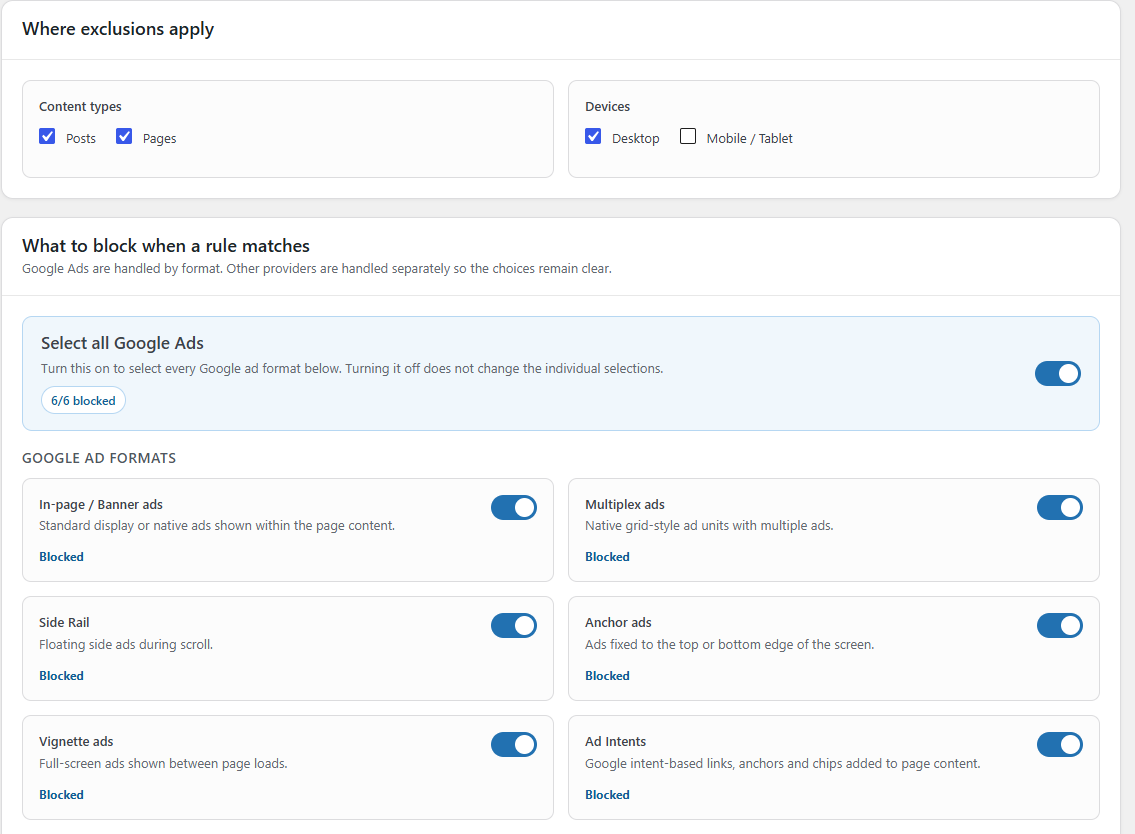
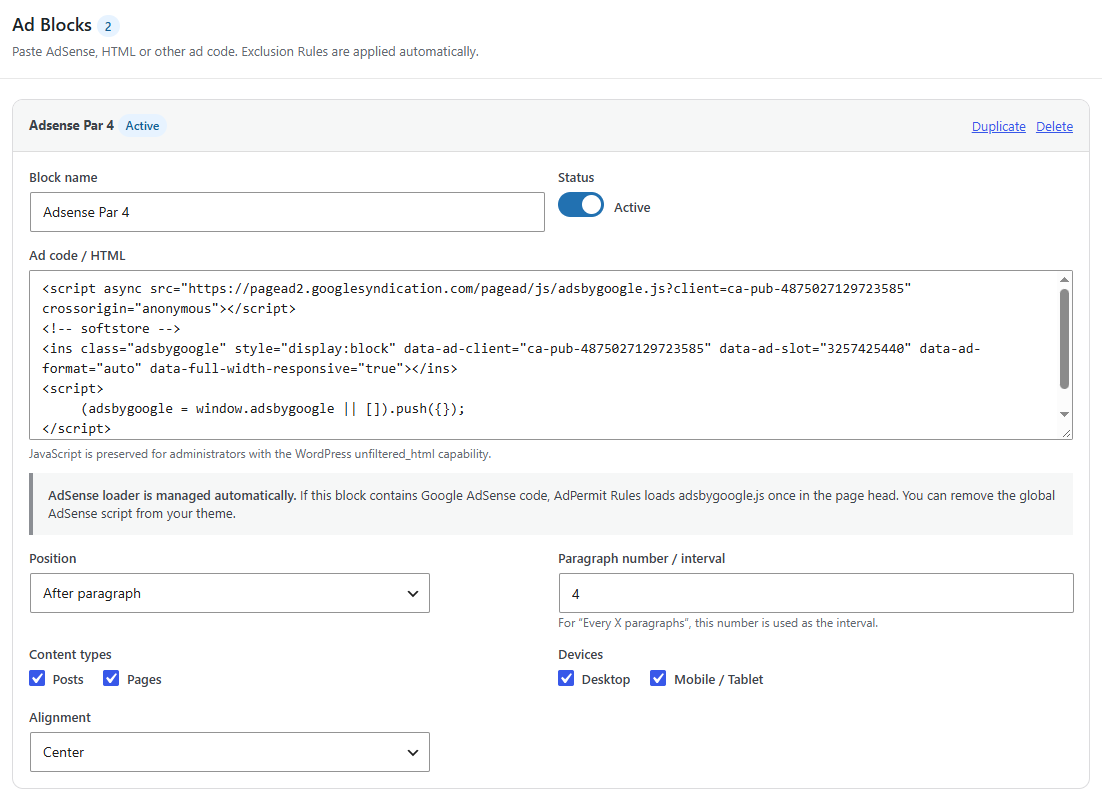
- Ad Inserter: create simple ad/HTML blocks and place them before/after content or around paragraphs. Google Ad formats can be selected individually: In-page/Banner, Multiplex, Side Rail, Anchor, Vignette and Ad Intents. A Select all Google Ads control enables every Google format at once without forcing them off when the master control is later deselected.
安装:
- Upload the plugin ZIP in Plugins > Add New > Upload Plugin.
- Activate AdPermit Rules.
- Open AdPermit Rules > Exclusion Rules and add one or more conditions.
- Choose which ad formats/sources should be blocked when a rule matches.
- Optionally create your own blocks under AdPermit Rules > Ad Inserter.
屏幕截图:
常见问题:
Does it block ads for every visitor like a browser ad blocker?
No. AdPermit Rules is an administrator/publisher tool. It suppresses configured advertising only on posts/pages that match your exclusion rules.
Can I block only some Google AdSense formats?
Yes. Google formats can be selected independently, including In-page/Banner, Multiplex, Side Rail, Anchor, Vignette and Ad Intents.
Does it support non-Google ad networks?
Does it work with Ad Inserter?
AdPermit Rules includes compatibility for the external Ad Inserter WordPress plugin and can suppress its output when a matching exclusion rule is active and that source is selected.
更新日志:
2.5.4
- Improved detection of in-content Google ads when partial exclusions are active.
- Refined the plugin readme and public description.
- Removed the full-response output buffering flow flagged during review.
- Exclusions continue to use WordPress filters, enqueue hooks and the front-end runtime guard.
- Removed obsolete pre-release short-prefix migration aliases so current plugin-owned identifiers consistently use the unique AdPermit Rules prefix.
- WordPress.org review fixes: unique prefixes, enqueued assets, and contributor metadata.
- Sanitized built-in ad block output with an explicit HTML allowlist.
- Moved public/admin CSS and runtime JavaScript to properly enqueued asset files.
- Renamed the plugin to AdPermit Rules.
- Updated the plugin slug/text domain to adpermit-rules.
- Completed the pre-release rename to the AdPermit Rules identity.
- WordPress.org Plugin Check compliance fixes.
- Improved output escaping in admin screens.
- Added nonce verification to the quick exclusion action.
- Sanitized request URI handling.
- AdSense loader now uses the WordPress enqueue API.
- Updated WordPress compatibility header.
- Improved partial exclusion diagnostics in the WordPress admin bar.
- Shows which Google ad formats remain allowed.
- Simplified Other ad networks to Ezoic and custom ad domains.
- Built-in Inserter and Ad Inserter compatibility now work automatically without technical toggles.
- Added clearer Blocked/Allowed state labels and Google format summary.
- Admin-bar status now appears on archive and paginated front-end views.
- Quick “Exclude this page?” is hidden when an exclusion is already active.
- Quick exclusion uses Content ID on singular posts/pages and a normalized relative URL path on archive/paginated views.
- Added a Save button next to Add rule on the Exclusion Rules screen for faster editing.
- Fixed Content ID exclusion rules to use exact numeric matching.
- URL rules now match only the permalink; content rules match only title/content.
- Added separate Content contains, URL contains, and Content ID rules.
- Admin bar “Exclude this page?” now creates an ID-based exclusion rule, avoiding URL variations such as www, HTTPS, trailing slashes, and permalink changes.
- Admin Bar now distinguishes full Exclusion from Partial exclusion.
- Added “Exclude this page?” shortcut that opens Exclusion Rules with the current permalink prefilled.
- Added translations for the new Admin Bar status/actions in all supported interface languages.
- Admin Bar AdSense-loader status is now calculated from the current request instead of render timing.
- Fixed Admin Bar status so applicable Inserter blocks are detected before content rendering.
- Selective Google exclusions now keep the AdSense loader active when at least one Google format remains allowed.
- Full Google-format exclusion still suppresses the loader entirely.
- Added publisher-ID fallback for allowed Auto Ads on matched exclusion pages.
- Added a live AdPermit Rules status indicator to the WordPress admin bar on singular frontend views.
- Shows whether an Exclusion Rule matched, how many built-in Inserter blocks were actually added, and whether the AdSense loader was printed.
- The status menu links directly to Exclusion Rules and Ad Inserter settings.
- AdPermit Rules now automatically loads Google adsbygoogle.js in the page head when an enabled built-in AdSense block applies.
- The AdSense publisher ID is detected from the saved block code.
- Duplicate adsbygoogle.js loader tags pasted inside ad blocks are removed automatically.
- Exclusion Rules still take priority and prevent the loader when the built-in Inserter is excluded.
- Fixed Post/Page targeting for the built-in Inserter on pages containing secondary loops or shortcodes.
- Improved exclusion matching on Pages by checking the main title, stored content, and permalink.
- Redesigned the What to block section.
- Added Select all Google Ads master selector.
- Added separate Google format controls for In-page/Banner, Multiplex, Side Rail, Anchor, Vignette and Ad Intents.
- Added separate controls for built-in Inserter and external Ad Inserter.
- Added Ezoic recognition.
- Added custom ad-network domain blocking.
- Master Google selector now reflects the individual Google selections and does not clear them when turned off.
- Improved dashboard statistic cards.
- Improved Google master-toggle behavior.