
Adrefill Post Element Visibility
| 开发者 | siljeonai |
|---|---|
| 更新时间 | 2026年11月15日 21:24 |
| PHP版本: | 7.4 及以上 |
| WordPress版本: | 7.1 |
| 版权: | GPLv2 or later |
| 版权网址: | 版权信息 |
详情介绍:
- Title
- Featured image
- Author
- Date (published and modified)
- Categories, tags and other terms
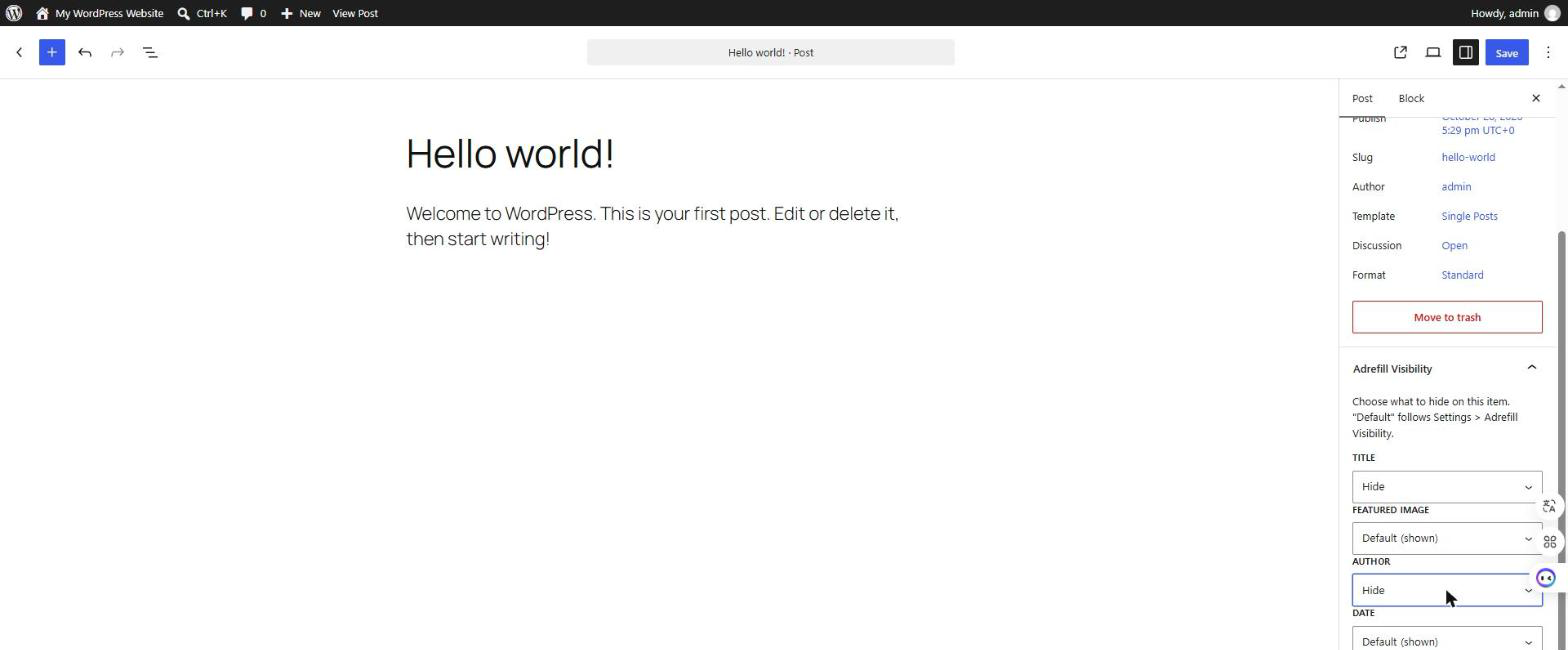
- Each element has three choices in the editor: Default (shown as "Default (shown)" or "Default (hidden)" depending on your site-wide setting), Hide or Show.
- Default follows Settings > Adrefill Visibility, where you set what is hidden for all content types at once or for each content type (posts, pages, custom post types).
- Hidden elements are removed on the server, not just covered with CSS, so the text is not left in the page for screen readers or copy-and-paste.
- Block themes (Full Site Editing): the Post Title, Post Featured Image, Post Author, Post Author Name, Post Author Biography, Avatar (post author), Post Date and Post Terms blocks are removed for that post. Small groups left holding only words such as "by" or "in" are removed too (can be turned off).
- Classic themes: the standard template tags (the_title, the_post_thumbnail, the_author, get_the_date, the_category, the_tags and friends) return nothing for hidden elements. An optional tiny stylesheet hides leftover labels such as "Posted on" that some themes print around them.
- By default hiding applies only on the single post or page view, so blog lists and archives keep their links. You can switch this to "everywhere".
- Block editor: an "Adrefill Visibility" panel in the post sidebar.
- Classic editor: an "Adrefill Visibility" box in the sidebar.
apev_should_hidefilter:( bool $hide, string $element, int $post_id ).apev_supported_post_typesfilter: change which post types get the switches.apev_block_mapfilter: map extra block names to an element.- Post meta keys:
_apev_hide_title,_apev_hide_featured_image,_apev_hide_author,_apev_hide_date,_apev_hide_termswith values''(default),'1'(hide) or'0'(show).
安装:
- Upload the
adrefill-post-element-visibilityfolder to/wp-content/plugins/, or install it from Plugins > Add New. - Activate the plugin.
- Optional: set site-wide defaults in Settings > Adrefill Visibility.
- Open any post or page and use the "Adrefill Visibility" panel in the sidebar.
屏幕截图:
常见问题:
Does it work with my theme?
It works with themes that use WordPress's own template tags (classic themes) or core blocks (block themes). Page builders and themes that print the title or date with their own code may ignore the setting. In that case please open a support topic with the theme name.
Is the title removed from the browser tab and search results?
No. Only the visible heading on the page is removed. The document title (browser tab), feeds and the REST API keep the real title, so SEO plugins and feed readers are not affected.
Hidden elements still show up after I change a setting.
If you use a page cache plugin or a CDN, clear the cache after changing site-wide defaults. Saving a single post usually clears that post's cache automatically.
What happens when I delete the plugin?
Deleting the plugin from the Plugins screen removes its settings and all per-post switches (on every site of a multisite network). Your posts themselves are not changed.
更新日志:
- First release.