
Advanced Custom Fields: Multiple Coordinates
| 开发者 |
jonashjalmarsson
web111se |
|---|---|
| 更新时间 | 2026年8月15日 16:07 |
| PHP版本: | 7.0 及以上 |
| WordPress版本: | 7.1 |
| 版权: | GPLv3 or later |
| 版权网址: | 版权信息 |
详情介绍:
google_api_key), so no extra configuration is needed if you already use ACF Map fields. If you don't have one set, you can also provide a key via the acfmc_gmaps_key filter.
Originally inspired by the single-point ACF: Coordinates field by Stupid Studio; this plugin extends the idea to multiple points per field.
Licensed under the GNU General Public License v3. See license.txt for details.
安装:
屏幕截图:
常见问题:
I am upgrading from 1.1.x. Do I have to change anything?
No. The field type name, the postmeta key and the JSON format are the same, so your field groups, your saved values and whatever your theme already does with get_field() all keep working. What changed is the editing screen, not the data.
Will the new shapes change how my existing values look?
No — and that is on purpose. Lines and areas are only drawn when the value actually says so, and a value saved before 1.3.0 says nothing at all: it has no shape, no style, no color and no markers. Those fall back to no shape, sharp, #999999 and markers on, which adds up to exactly what you had before — the numbered points, and nothing drawn between them.
It would have been possible to default old values to an area instead, since the old versions had a "Show area on map" button. That button was only ever an editor preview: pressing it drew a polygon on the edit screen but saved nothing, so there was no way to tell an old value that had it pressed from one that never did. Defaulting to an area would therefore have drawn polygons on sites that never asked for one. If you do want a shape on an older value, open the post, pick Line or Area from the shape menu and update — from then on it is stored with the value.
How do I get the plugin to show a map on the website?
By implementing a map on your own. We do not provide a frontend implementation — that is up to you. The Description section has a complete, paste-ready example for both a map and a plain text list.
更新日志:
get_field() returns the same structure, and existing field groups keep working. A value saved before 1.3.0 has no shape keys, so it draws exactly what it drew before: the markers, and nothing else. See "Will the new shapes change how my existing values look?" under Frequently Asked Questions.
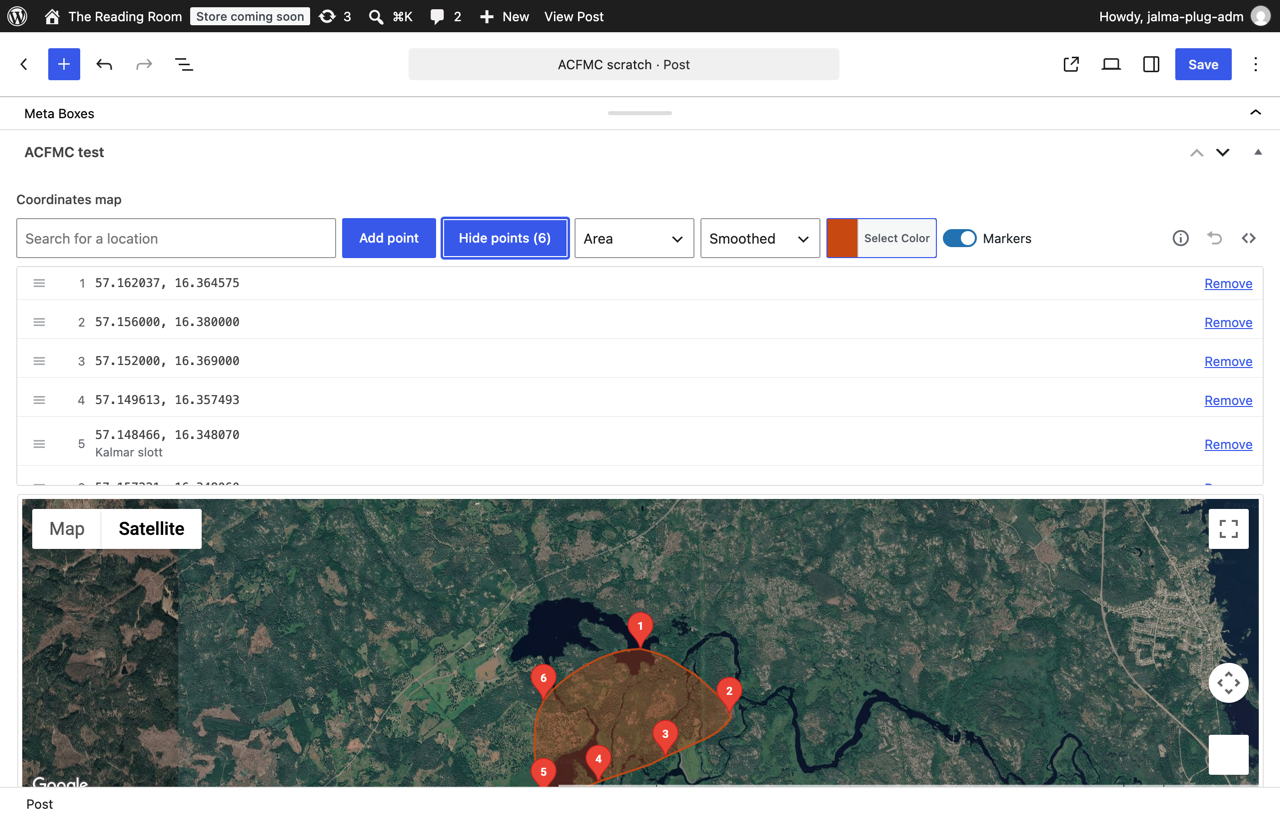
- The point list is where points are edited, and the removal mode is gone. "Remove points" used to turn on a mode: the map got a red outline and the next marker you clicked was deleted. That mode is removed. "Edit points (N)" opens the list of points instead, and a point is removed with the Remove button on its row. A marker click on the map now always means one thing — show me this point.
- Points can be reordered by dragging them. A row in the point list has a handle; drag it and the point moves. The order is what gets stored, what
get_field()returns and the order the line or area is drawn in, so the markers are renumbered and the map is redrawn as soon as the row is dropped — and a reorder can be undone like any other change. The handle is a real button, so the same move works from the keyboard with the up and down arrow keys. Drag and drop is jQuery UI Sortable, which WordPress already ships; no dependency was added. - One button, not two. "Edit" and "Points (N)" would have been two buttons opening the same list, so they are one: "Edit points (N)".
- The shape is chosen in two steps. 1.3.0 had a single menu that mixed the two questions together. The first menu now says what is drawn — nothing, a Line or an Area — and the second says how: Sharp (straight segments), Smoothed (a Catmull-Rom curve through every point, drawn as a dense polyline since Google Maps has no curves of its own, and closed for an area) or Bounding box (the rectangle the points span). A line is the outline only and an area is filled, so all six combinations mean something. "No shape" is still the default and shows only the markers.
- The colour picker floats over the map instead of unfolding inside the toolbar, which used to push the rest of the row sideways every time it was opened.
- A switch for the markers. With a shape chosen, "Markers" decides whether the front end draws the points along with the line or the area — turn it off for a clean route or outline. In the editor the markers stay visible, dimmed, because points you cannot see are points you cannot drag, click or reorder.
- A quieter toolbar. Undo is an icon at the right end of the row, next to the
ithat folds out what the field can do and the<>that reveals the raw stored value. The paragraph of instructions under the toolbar is gone — it said mostly what clicking a map obviously does. - The front end example in the readme now covers all six shape combinations and respects the marker switch.
- The two field type implementations (ACF 4 and ACF 5/6) rendered two copies of the same markup and had started to drift apart. They now render the same markup from one place.
- The stored value is extended, not changed: a point is
{"lat":…,"lng":…}exactly as before, with an optional"label", and the value carries an optional"shape","style","color"and"markers"only when a shape is chosen. A value saved by an earlier version was loaded, saved and read back byte for byte identical, andget_field()returns the same structure it always has.
- Click a point to see what it is. A marker click opens a popup with the point's number and its latitude and longitude. Until now the only way to read a point's coordinates was to open the list and count rows. Nothing is looked up when you click; the popup only shows what is already stored.
- Searched places keep their name. The search field used to only pan the map. It now drops a point where the place was found and stores the name you searched for, which the popup and the point list show. Nothing extra is asked of Google: the name is the text you typed, and the lookup is the one the search already made. Clicking the map still adds a plain point with no name, since naming those would mean a lookup per click.
- A shape can be drawn through the points. The old "Show area on map" was a button in the editor that drew a polygon but never saved anything, so the front end had no way of knowing you had pressed it. The shape is now part of the stored value, and it can be a line as well as an area. (1.4.0 splits the choice into the two menus described above.)
- The shape has a colour, picked with WordPress's own
wp-color-picker— no new dependency. The map redraws in that colour as you pick it. - The readme got front end examples worth pasting. The plugin renders nothing on the front end itself —
[acf field="…"]returns an empty string for this field type — so the readme carries a complete map example and a map-free example that lists the points as text. Both handle values saved by 1.0.x, which have none of the new keys. - The point list shows the name under the coordinates for points that have one.
- Points can be removed one at a time from the coordinates list. Every row in "Show coordinates" now has its own Remove button, so a single point can be deleted without turning on a mode and without hunting for the right marker among overlapping ones.
- Undo. A new "Undo" button takes back the last change — a point added by a stray click, a point removed by mistake, or a marker dragged to the wrong place. Up to 30 steps are kept for the lifetime of the page.
- Removal mode looks like a mode. It used to be signalled by nothing but a blue tint moving between two buttons. The button now reads "Cancel removing" while the mode is on and reports itself as pressed, the map gets a red outline, a notice explains what a click will do, and Esc leaves the mode.
- The order of the points is visible. Markers are numbered, and the numbers are reassigned when a point is removed. That order is what gets stored, what
get_field()returns and what the "Show area on map" polygon follows — it was previously impossible to see. - "Add coordinate" became "Add point" and now actually adds a point. Before, the button only switched removal mode back off, which is not what its label suggested. It is also the only way to add a point without a mouse.
- Buttons are real buttons. They were
<input type="submit">, so a click submitted the post form if the map JavaScript had not loaded. - Screen reader support: the toolbar buttons expose their pressed/expanded state, the search field has a label, and adding, moving, removing and undoing are announced through a live region.
- "Copy" now really selects the value it reveals — the old code called jQuery's
.select()event shorthand, which only fired an event. - Fixed a listener leak: marker click and drag handlers were attached outside the guard in
AddMarker(), so every map click made while in removal mode piled another copy of them onto the previous marker. - Fixed the field type label alignment properly. 1.1.1 worked around it by shortening the label. The cause is that ACF centres its field type cards with flexbox but never sets
text-alignon the label, so any label that wraps to two lines renders left aligned — the built-in oEmbed card does exactly the same with a long enough label. The plugin now supplies the missingtext-alignon the field type browser only, so the length of the label no longer matters. - The field type name (
multiple-coordinates-field) and the stored value format ({"coords":[{lat,lng},…],"zoom":N}) are unchanged, so existing field groups and existing values keep working.
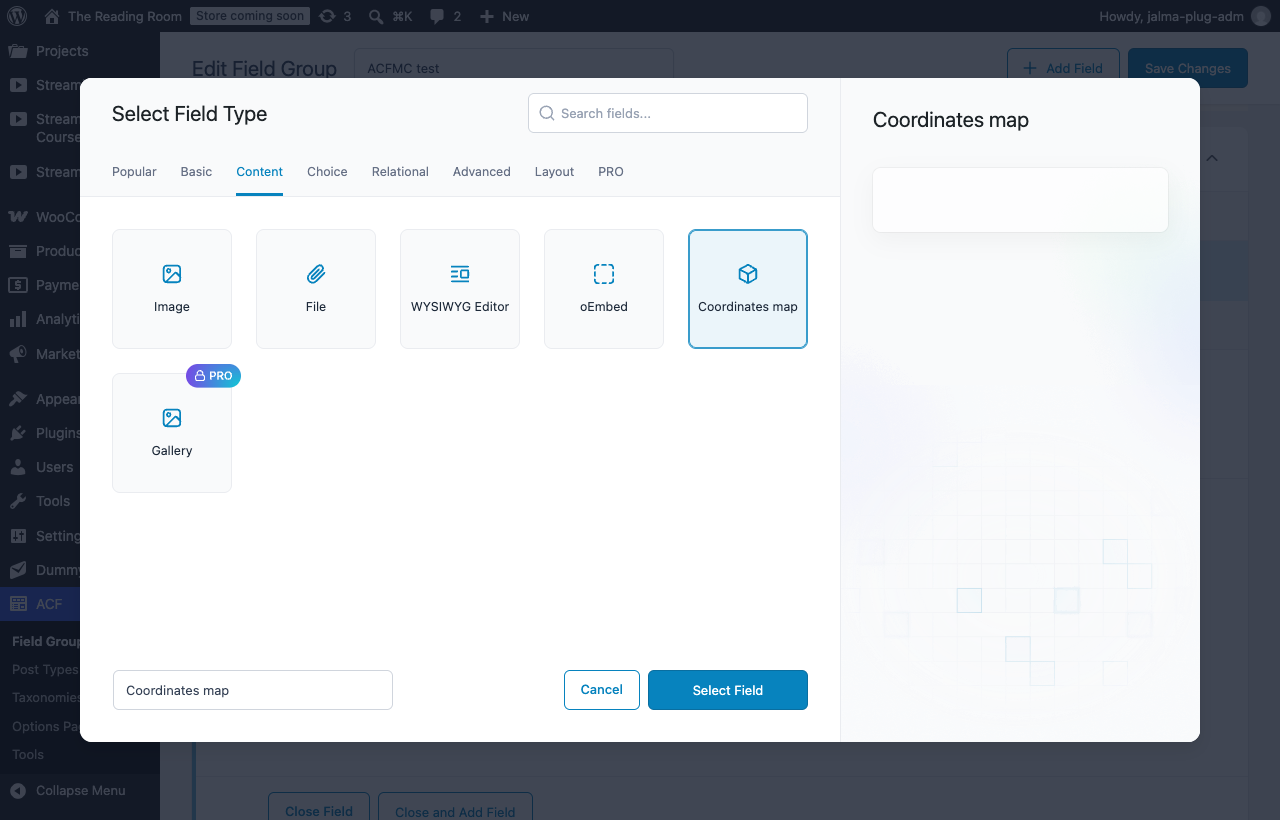
- The field type is now called Coordinates map in ACF's field type browser instead of "Multiple coordinates map". ACF gives every field type card a fixed width and only centres labels that fit on one line, so the old label wrapped and rendered left aligned next to the centred built-in field types. Only the displayed label changed — the internal field type name (
multiple-coordinates-field) is untouched, so existing field groups and stored values keep working.
- Corrected the plugin description: it claimed markers were removed by right-clicking them, which the plugin has never done. Removal works the way the Usage section describes — press "Remove coordinate", then click the marker you want gone.
- Verified on WordPress 7.1 with ACF 6.8: the field renders, the map and its markers draw, click adds a marker, dragging moves it, "Remove coordinate" deletes it, and the value survives save/reload unchanged. Tested up to raised to 7.1.
- Fixed: the field type did not exist on ACF 5 and ACF 6. The plugin only hooked
acf/register_fields, which is the ACF 4 API and was removed from ACF years ago. On any modern ACF the field type was never registered, so "Multiple coordinates map" did not show up in the field type list and existing fields rendered nothing. The field type is now registered throughacf/include_field_typesas well, and the field type implementation has been ported to the ACF 5/6 field API (initialize(),render_field(),format_value(),update_value()). The ACF 4 implementation is kept for anyone still running ACF 4. - Fixed: the JavaScript never ran on ACF 5/6. Initialization used
$(document).live('acf/setup_fields')—.live()was removed in jQuery 1.9. The map now initializes on ACF'sready_field/append_fieldactions (so it also works for fields added dynamically), with a fallback for older ACF versions. - Fixed the asset URLs: they were built with the ACF 4 helper filters
acf/helpers/get_dir/acf/helpers/get_path, which no longer exist, so the CSS and JS pointed nowhere on ACF 5/6. - Fixed the zoom level not being stored when the map had no markers, and the zoom level is now saved when you zoom the map.
- Fixed a JavaScript error in "Show area on map" (an undefined variable was passed to the polygon).
- Field values are unchanged: still the same JSON structure in the same postmeta key, so values saved with earlier versions keep working, and a malformed value is never overwritten.
- The Google Maps API key filter is renamed from
acf_multi_coords_gmaps_keytoacfmc_gmaps_key(shorter, correctly prefixed). The old name could never fire in practice, since the field type was not registered on ACF 5/6 at all.
- Google Maps API key — read from ACF's global
google_api_keysetting (acf_get_setting) and aacf_multi_coords_gmaps_keyfilter, so existing ACF users get a working map out of the box. Without a key, Google Maps falls back to limited mode (watermark). - Cleaned up leftover
console.logcalls injs/map.js. - Tested up to rolled back to WordPress 7.0: the field type has not been verified working on 7.1.
- Plugin Check compliance: added
License/License URIheaders,ABSPATHdirect-access guard, replaced<?= ?>short echo tags with<?php echo esc_attr() ?>, added explicit version arguments towp_register_style()/wp_register_script(), switched protocol-relative Google Maps URL tohttps. - Updated Author URI to https://jonashjalmarsson.se.
- Trimmed readme tags to 5.
- Tested up to WordPress 6.9.
- Press the Copy button, right click on the selection and select Copy.
- Go to the destination Multiple Coordinates value and press the Copy button, then right click and select Paste.
- Publish or update the page or post to apply the new points.
- Bugfix 1. Get lat and lng from Marker via correct API function.
- Bugfix 2. "Show area on map" button toggle now works.
- Optimized init of map when many markers.
- First release.