Agentic Admin
| 开发者 | schmitzoide |
|---|---|
| 更新时间 | 2026年10月5日 18:38 |
| PHP版本: | 8.2 及以上 |
| WordPress版本: | 7.1 |
| 版权: | GPL-2.0-or-later |
| 版权网址: | 版权信息 |
详情介绍:
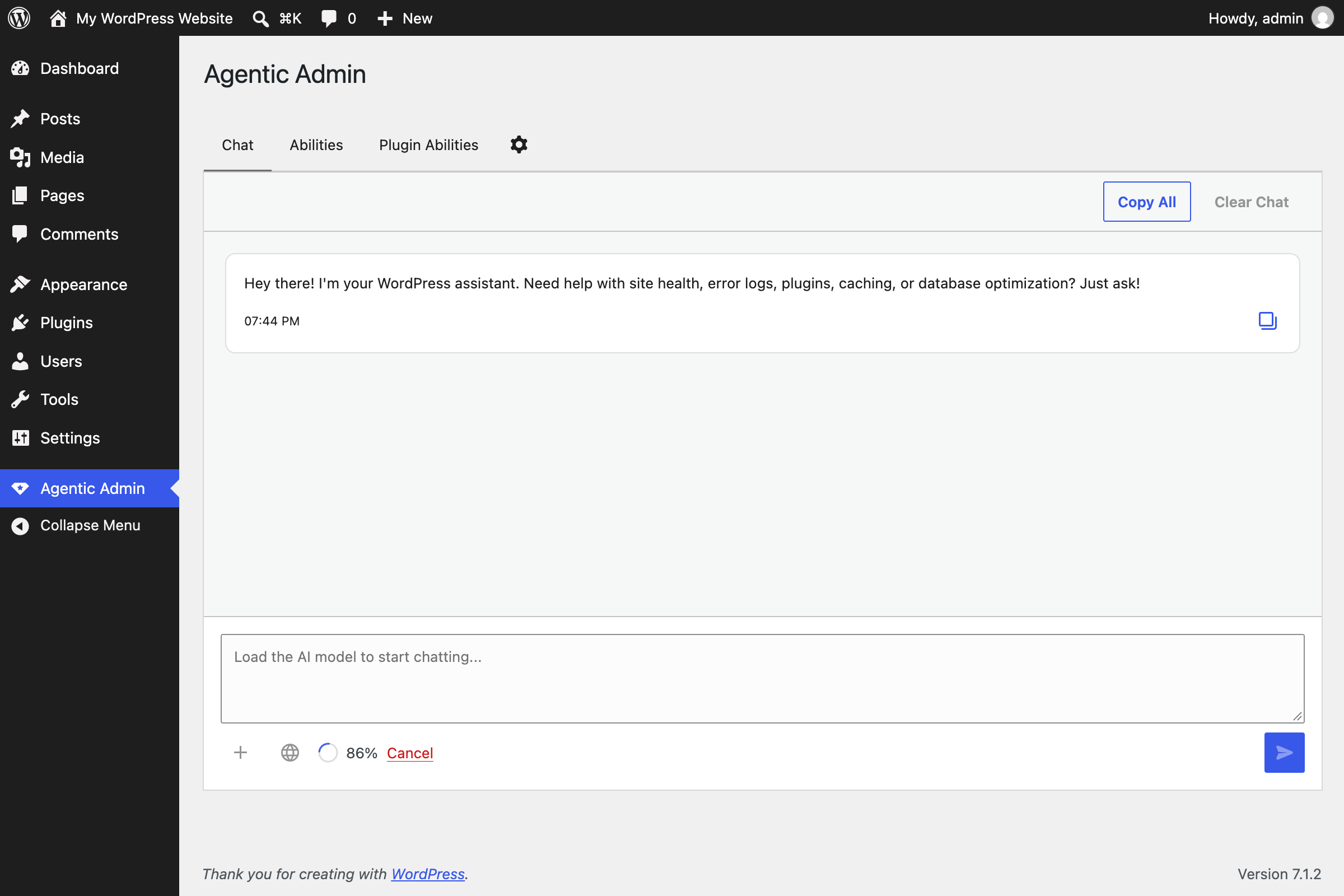
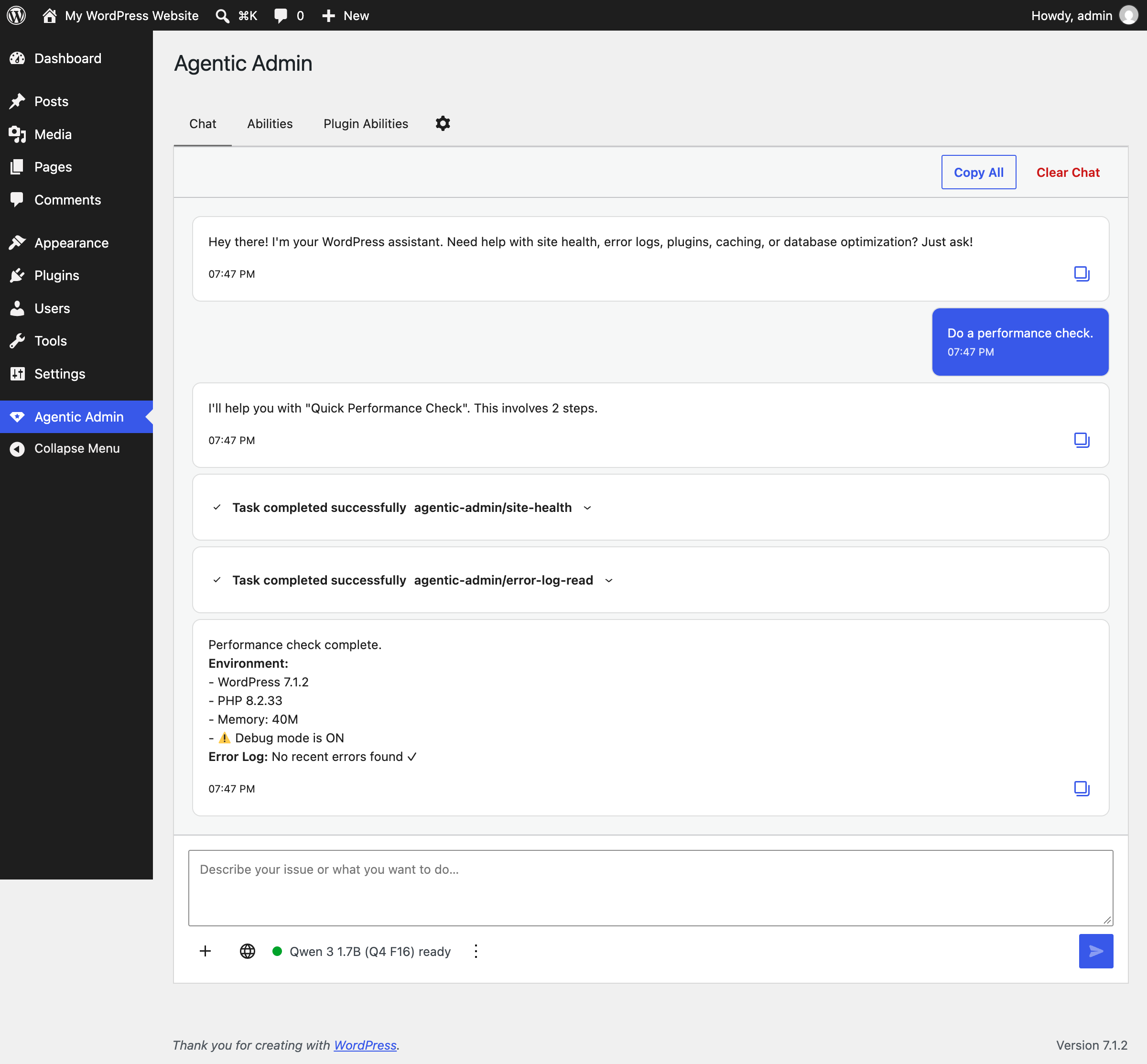
Agentic Admin transforms your WordPress admin panel into an intelligent command center. Instead of navigating through multiple screens to diagnose issues, you simply describe your problem in plain English.
Features
- 100% Local AI: Uses WebLLM to run Qwen 3 1.7B (default) or Qwen 2.5 7B directly in your browser via WebGPU
- Privacy-First: AI inference runs in your browser - your prompts and content are never sent to an AI service. A few abilities look up public data (CVE databases, WordPress.org checksums, web search); all are listed under External services
- Zero Server Costs: No GPU infrastructure needed - computation happens on the client
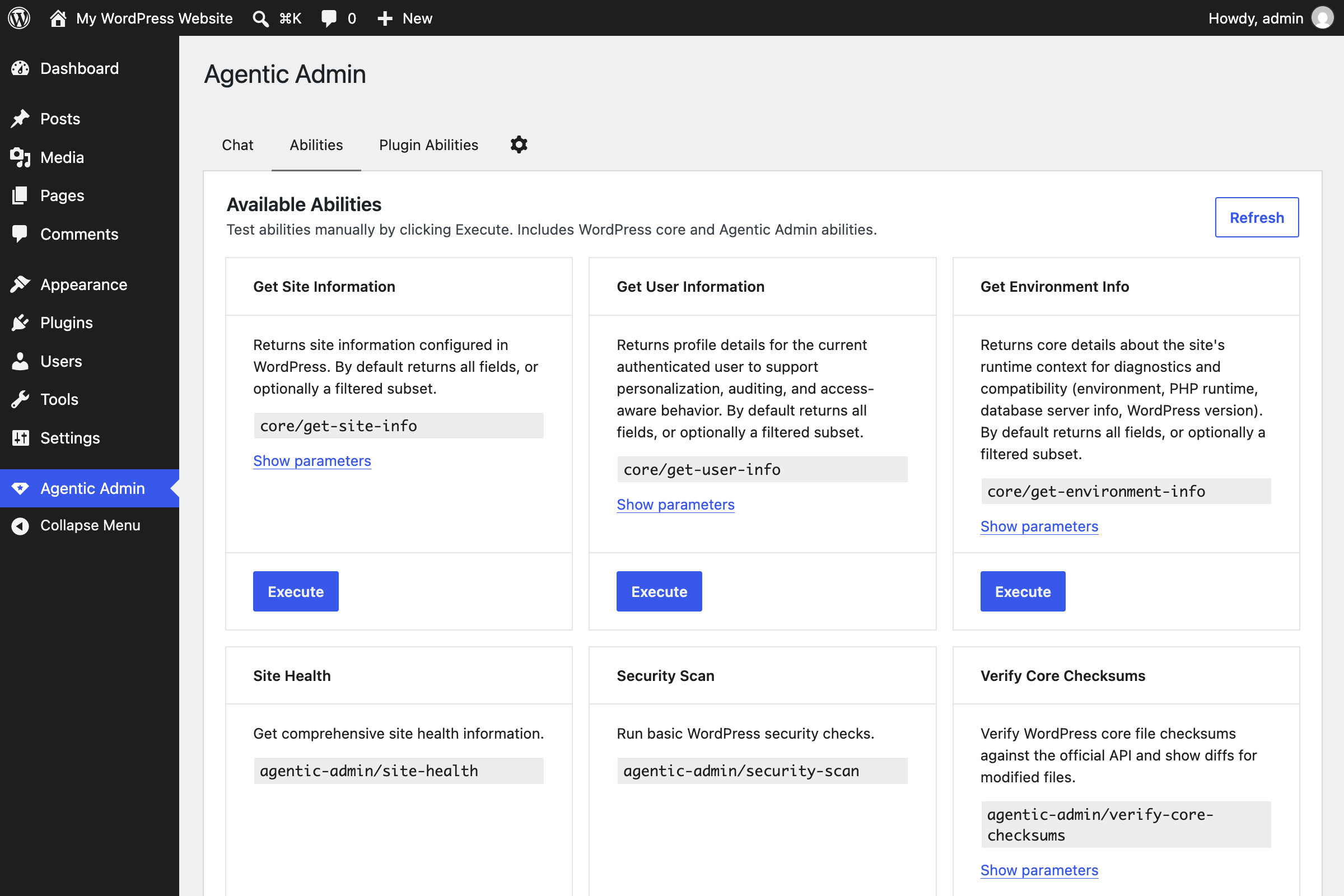
- WordPress Abilities API: Natively integrates with WordPress's official Abilities API
- Natural Language Interface: Describe problems in plain English, get intelligent solutions
- WordPress 6.9+ (includes the Abilities API)
- PHP 8.2+
- Modern browser with WebGPU support (Chrome 113+, Edge 113+)
安装:
- Upload the
agentic-adminfolder to the/wp-content/plugins/directory - Activate the plugin through the 'Plugins' menu in WordPress
- Navigate to "Agentic Admin" in your WordPress admin menu
- Wait for the AI model to download (one-time, ~1.2GB for Qwen 3 1.7B or ~4.5GB for Qwen 2.5 7B)
- Start chatting!
屏幕截图:
更新日志:
0.11.0
- Renamed: Plugin is now "Agentic Admin". Text domain "agentic-admin", function prefix agentic_admin_*. WordPress.org submission-ready.
- Removed: feedback system, WebMCP bridge, voice input, file editing (write-file), and AI content generation (content-generate), plus three low-value abilities (backup-check, opcode-cache-status, disk-usage). Agentic Admin is a site health and maintenance assistant: it does not edit files or generate content. Removed code remains available in the project's git history.
- Security: blocked sensitive-column reads (user_email, user_pass) in query-database to prevent reconnaissance attacks (#166). Hardened query length cap and read-only verb gate.
- Security: escaped output in functions-abilities.php (#121). Documented direct-DB-call rationale in db-optimize and database-check.
- Docs: corrected the External services section. The CVE lookups were attributed to a
plugin-vulnerability-scanability that does not exist; they are made bysecurity-scan. Added the previously undisclosedcore.svn.wordpress.orgfetch used byverify-core-checksumsto build diffs. Replaced two absolute privacy claims that the section's own list contradicted. - Compliance: removed deprecated load_plugin_textdomain() call, prefixed uninstall.php globals, fixed nonexistent Domain Path header, excluded CLOUDFEST_HACKATHON.md from distribution build.
- New: ability manifest as single source of truth for which abilities register, with a agentic_admin_enabled_abilities filter for selective override. PHP authoritative for PHP-backed abilities; JS adds back the JS-only ones.
- Fixed: thinking-disable setting now actually suppresses the streaming UI even when Qwen ignores /nothink (#181).
- Fixed: Settings panel is now a real tab (not a stateful cog toggle). No more lingering Chat-tab underline or stale-state regressions (#197).
- Fixed: Activate/Deactivate buttons on plugin-list rows now flip to the inverse action after a successful click (#179).
- Fixed: AI model no longer preloads on every wp-admin page, deferred until the user opens the sidebar for the first time (#116).
- Improved: post-tool summarization is brief (no re-listing items the user already sees in the tool result UI).
- Improved: ChatInput keyboard handling simplified (Space inserts a space, no push-to-talk hijacking).
- Removed: the local knowledge base (in-browser embeddings, vector store, and the codebase-index, code-search, schema-extract, wp-api-extract, docs-extract, and codebase-extract abilities). The plugin no longer loads Transformers.js from a CDN or ships any WebAssembly module.
- Security: read-file now refuses files that can hold credentials, keys, or salts (wp-config.php, .env, private keys, database dumps, and any file defining the auth keys, salts, or DB password) instead of relying on redaction.
- Security: wp-config-list now has its own PHP backend that reads constant names with the PHP tokenizer and never reads the values of credentials, keys, or salts.
- Security: removed the security-scan salts check, which read the auth salt and could never fail.
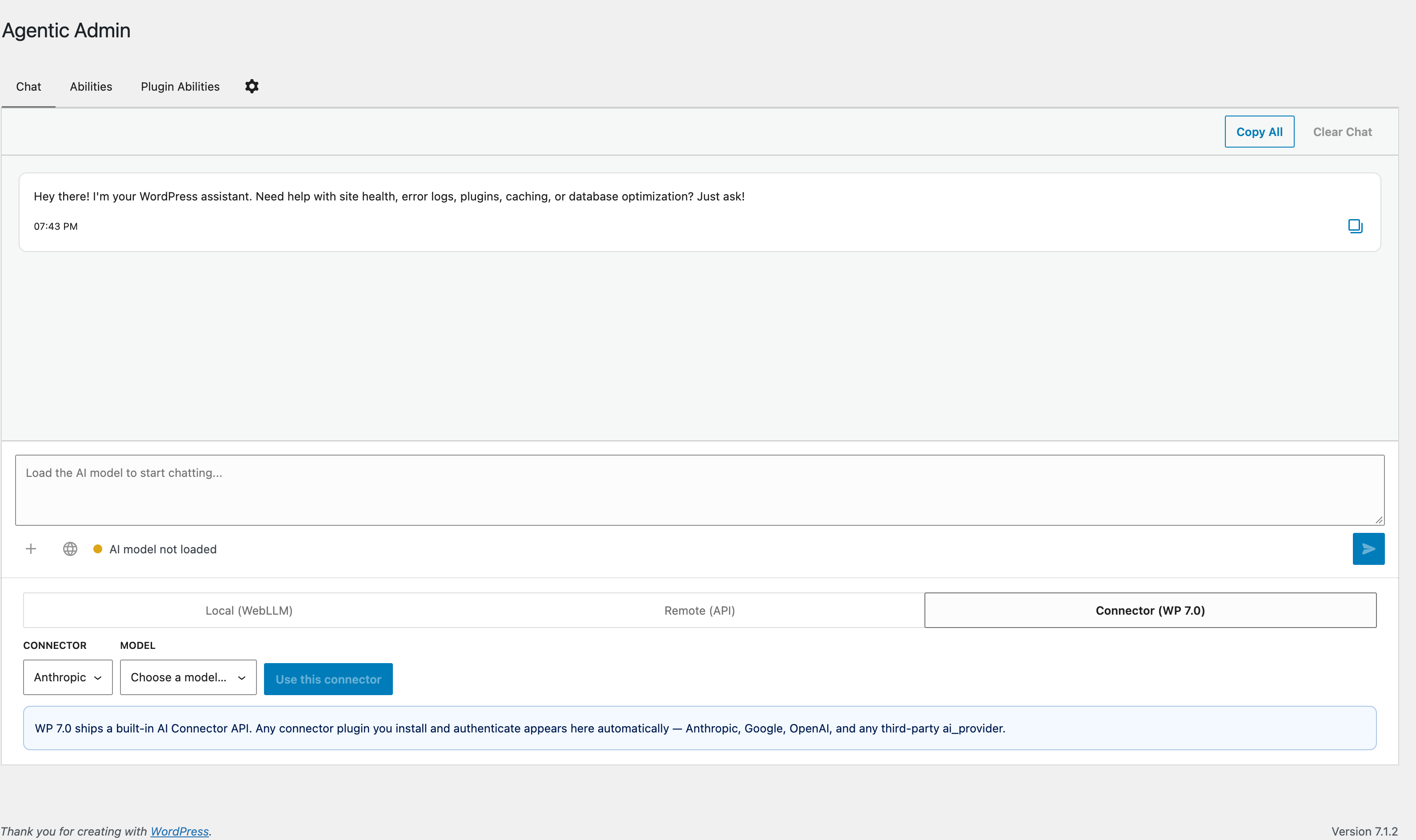
- Changed: AI Connectors are detected through the AI Client registry, as on the core Connectors screen, instead of reading API-key options.
- Fixed: plugin, must-use plugin, and content paths are derived from the plugin's own location and WordPress functions instead of WP_PLUGIN_DIR, WPMU_PLUGIN_DIR, and WP_CONTENT_DIR. Core checksum verification no longer miscounts files when the content directory is moved. The debug log path follows WordPress's own error_log setting.
- Fixed: read-file and uploads-scan resolve the site root with get_home_path(), so subdirectory installs work.
- Security: the external LLM proxy no longer relays the provider's response verbatim. Each streamed event is decoded and re-encoded as escaped JSON; anything else is dropped.
- Changed: "Tested up to" is declared only in readme.txt.
- Fixed: the model notice names where the model is downloaded from and its real size, instead of saying no data is sent to external servers.
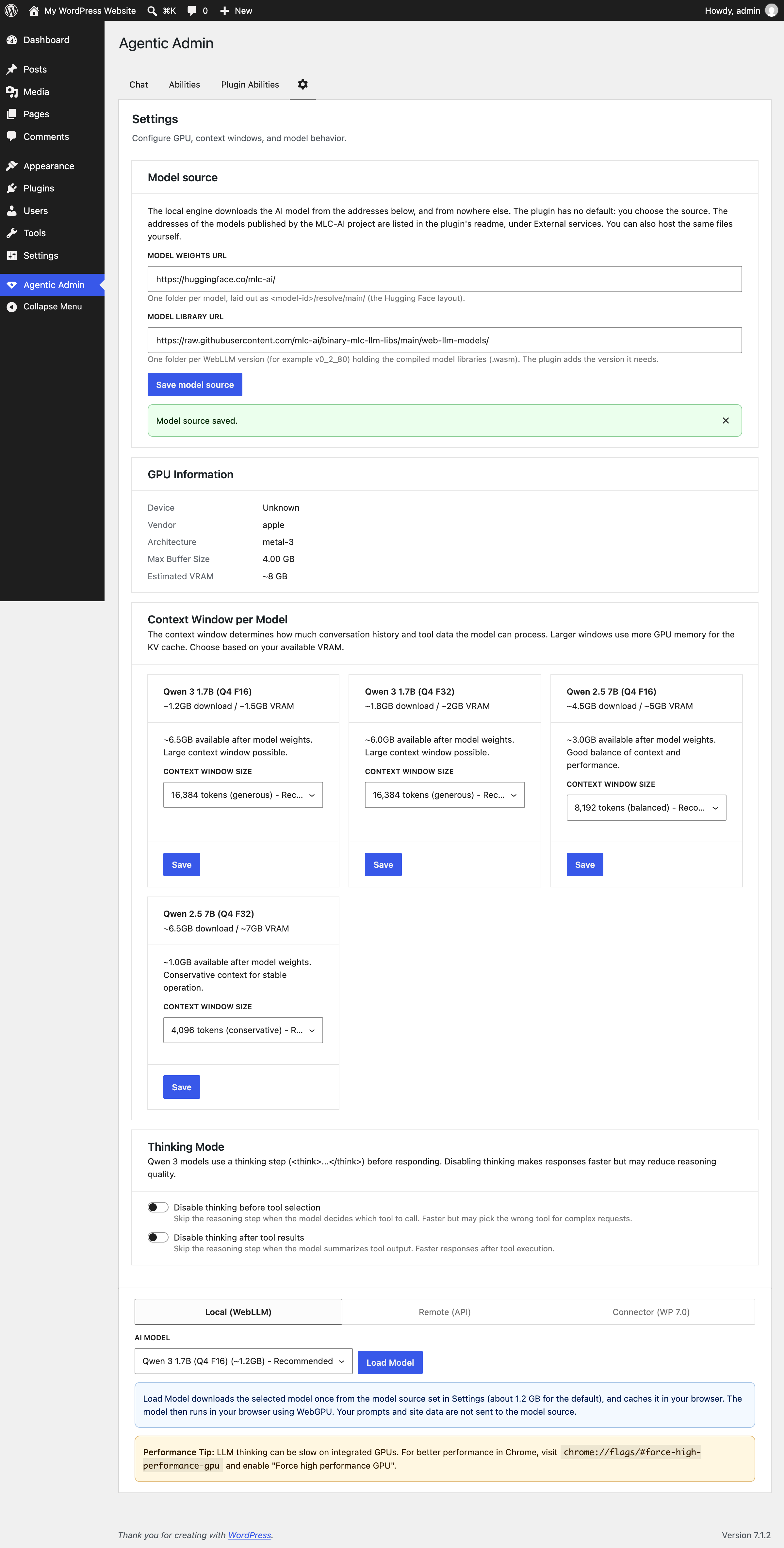
- Changed: the plugin no longer contains any model download address. The site owner sets the model source under Settings → Model source (the MLC-AI addresses are listed under External services), and the local engine stays off until it is set. WebLLM's built-in model list is removed at build time.
- Fixed:
.well-knownscanning resolves via get_home_path() instead of ABSPATH, so subdirectory installs scan the real site root. - Removed: 7 stale tab references and 6+ stale docs files (FEEDBACK-DEV.md).
- Tests: 96 unit tests passing, plus the new manifest test suite (7 cases), index test suite (6 cases), and react-agent regression tests (3 cases for the per-call state cleanup fix).
- CloudFest Hackathon 2026 release: 78 PRs merged, 42+ abilities shipped by 11 contributors
- New: Plugin Abilities Platform, third-party plugins can auto-register abilities with the AI assistant
- New: Voice input via local Whisper model, all audio stays on-device
- New: In-browser RAG knowledge base with vector embeddings computed client-side
- New: Settings UI with GPU detection, context window tuning, and knowledge base toggle
- New: External AI provider support (Ollama, LM Studio, OpenAI, any compatible endpoint) via PHP REST proxy
- New: WebMCP bridge for external AI agents via navigator.modelContext
- New: "Check if Hacked" multi-step security workflow
- New: Gutenberg editor sidebar and admin bar chat integrations
- New: 28+ new abilities including web-search, security-scan, plugin vulnerability scanning, read-file, write-file, query-database, content-generate, and more
- New: E2E test runner mirroring browser ReAct loop
- New: CI/CD via GitHub Actions (PHP lint, JS lint, unit tests, build check)
- New: Feedback system with thumbs up/down stored locally
- New: Distribution zip for WordPress Playground compatibility
- Improved: WCAG 2.2 AA accessibility compliance
- Improved: GPU capability detection with f32 precision fallback
- Improved: Fuzzy plugin name matching for activate/deactivate actions
- New: Split Gutenberg Integration into three separate goals — Block Editor Chat Window (Goal 7), Update Post Content Ability (Goal 8), WASM Dev Docs Abilities (Goal 9)
- New: Goal 9 aligned with existing
feature/wasm-sqlite-devdocsbranch work (4 abilities, 11 tests) - New: GitHub issues created for Goals 6-9 (#32-#35)
- New: Voice + Context Recording separated as Goal 1.5 (stretch)
- New: WebMCP Integration added as Goal 6 (stretch)
- Improved: CLOUDFEST_HACKATHON.md — all goals now follow consistent format, code examples stripped from stretch goals
- Updated: WebLLM upgraded from 0.2.80 to 0.2.82
- New:
/playgroundClaude Code skill for spinning up WordPress Playground with the plugin mounted and activated
- New: ONBOARDING.md — step-by-step hackathon guide with project tour and role-specific instructions
- New:
/issueClaude Code skill for creating GitHub issues via interview with codebase inspection - Improved: CLOUDFEST_HACKATHON.md simplified — removed duplicated role descriptions and project summary, now links to ONBOARDING.md
- Improved: README.md updated with
/issueskill in Claude Code integration table
- New: AI Fundamentals glossary with ~60 terms linked back to source chapters
- New: Chapter 13 — "Designing Abilities" guide for Writers and UX contributors
- New: End-to-end walkthrough in Chapter 8 tracing a message through the full system
- New: Testing guidance section in Chapter 11 for LLM Testers writing tool selection tests
- Improved: Trimmed overly theoretical content from Chapters 1, 2, and 5
- Improved: Deduplicated hardware requirements — Chapter 3 is now single source of truth
- Improved: INDEX.md updated with new "For Writers & Designers" section
- Cleaned up: Removed stale version annotations (v1.0–v2.0) from comments across 11 source files
- Fixed: model-loader.js comment incorrectly referenced Qwen2.5-7B instead of actual default Qwen3-1.7B
- Fixed: ARCHITECTURE.md listed v0.7.0 as current version, updated to v0.9.0
- Fixed: THIRD-PARTY-INTEGRATION.md referenced non-existent v1.4.1 for includeIf feature
- Improved: README.md release example updated to current versioning
- New: CloudFest Hackathon 2026 preparation with 28 GitHub issues across 7 contributor roles
- New: CLOUDFEST_HACKATHON.md with sharpened goals, team role definitions, and demo flow
- New: LICENSE file (GPL-2.0-or-later)
- New: SECURITY.md with vulnerability reporting policy
- New: GitHub labels for hackathon workflow (php, react-js, ai-ml, ux, docs, devops, testing, writers, ability, workflow, hackathon)
- New: README.md header image from CloudFest pitch deck
- Improved: CONTRIBUTING.md version requirement corrected to WordPress 6.9+
- Fixed: readme.txt changelog version numbering (internal 1.x versions renumbered to public 0.x scheme)
- New:
.claude/project config with CLAUDE.md rules, settings, and 5 contributor skills - New:
/release,/test,/new-ability,/update-docs,/prslash commands for Claude Code - New:
.mcp.jsonwith wp-devdocs, wp-blockmarkup, and wp-playground MCP servers - New: Chrome DevTools MCP plugin auto-enabled for E2E testing
- New: Pre-configured permissions (safe commands allowed, destructive commands denied)
- New: Ability metadata auto-loaded from JS source files — no static manifest to maintain
- New: Test suite expanded to 18 tests covering all 14 abilities (was 8 tests covering 5)
- Improved: JS lint fixes for test runner and helpers
- Changed: Ability test runner now uses Ollama (local LLM server) instead of Puppeteer + WebGPU browser
- Changed: Tests run in ~20s vs 5+ minutes — no browser, no WebGPU, no model download required
- Removed: Puppeteer dependency and browser-based test harness
- Removed:
build:test-harnessbuild step —npm run test:abilitiesruns directly via Node.js - Improved: Test runner auto-installs Ollama via Homebrew and pulls models on first run
- New: 4 WP-CLI-inspired abilities for common maintenance tasks:
transient-flush- Delete expired or all transients (likewp transient delete)cron-list- List scheduled cron events with overdue detection (likewp cron event list)rewrite-flush- Flush permalink rewrite rules (likewp rewrite flush)revision-cleanup- Delete old post revisions with preview mode (likewp post deletefor revisions)- New: WordPress 6.9 core abilities support - chat wrappers for
core/get-site-infoandcore/get-environment-info - New: Abilities browser now displays both Agentic Admin and WordPress core abilities
- New: Smart confirmation for revision cleanup (preview/dry-run skips confirmation)
- Improved: Better keyword separation to avoid triggering multiple abilities
- Improved: Chat session persistence across page refreshes
- Improved: Total of 14 abilities now available (12 custom + 2 core wrappers)
- Fixed: HTTP method for destructive abilities (now uses POST as required by Abilities API)
- New: Multi-step workflow engine for chaining abilities together
- New: Built-in workflows: Site Cleanup, Performance Check, Plugin Audit, Database Maintenance
- New:
wp.agenticAdmin.registerWorkflow()API for third-party workflow registration - New: Workflow progress indicator in chat UI
- New: Ad-hoc workflow creation from multi-intent messages
- Changed: Default model upgraded to Qwen3-1.7B for better reasoning with native function calling (~1.2GB)
- Improved: Confirmation dialog shows all workflow steps before execution
- Improved: Automatic rollback of completed steps if later step fails
- Initial release