
Rezolve Ai
| 开发者 | authoritas |
|---|---|
| 更新时间 | 2026年9月11日 18:51 |
| PHP版本: | 8.0 及以上 |
| WordPress版本: | 7.0 |
| 版权: | GPLv2 or later |
| 版权网址: | 版权信息 |
详情介绍:
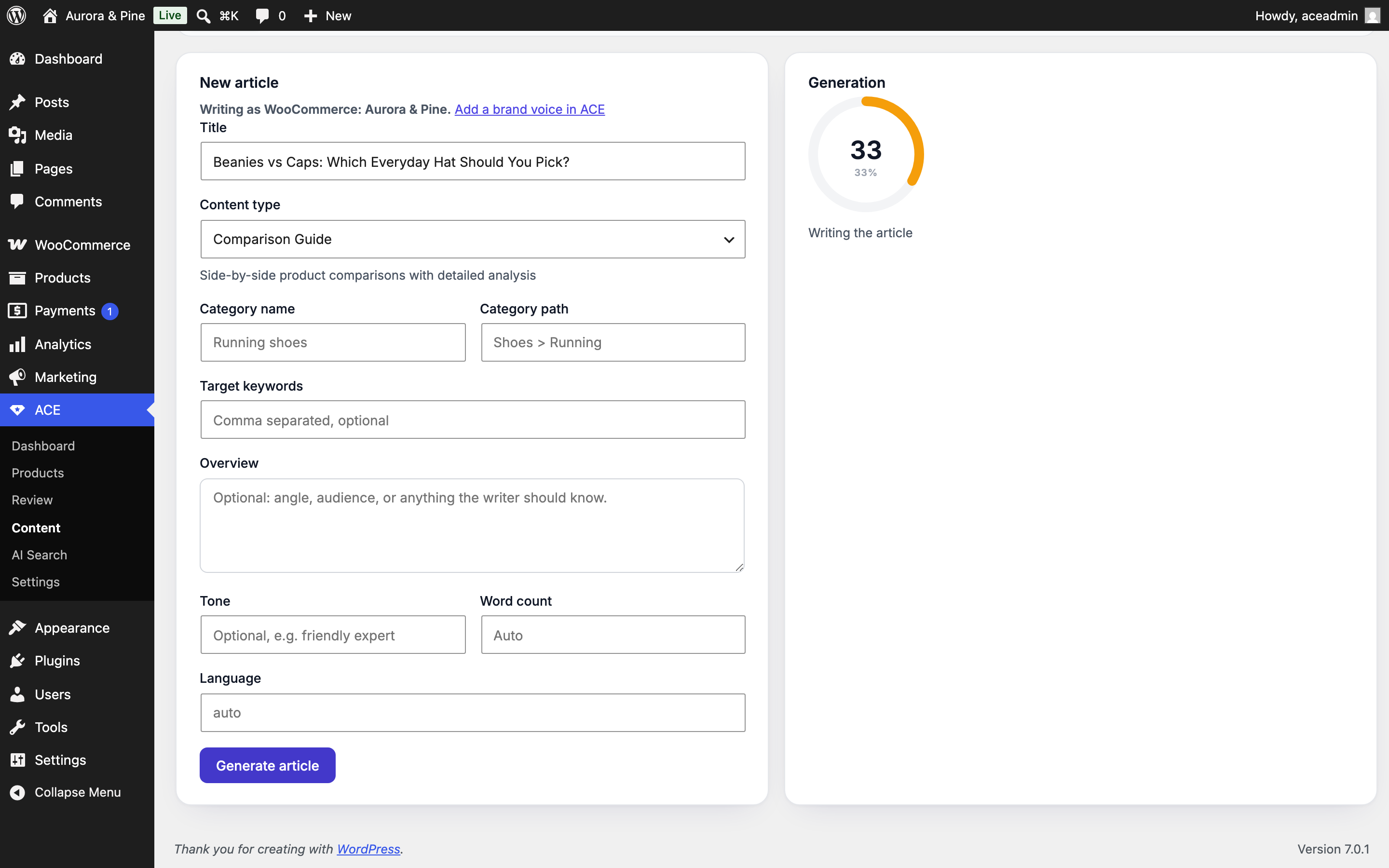
- Generate long-form articles in wp-admin: pick a content type (built-in layouts, a preset library, or your project's custom types), a topic, keywords, and a locale, and Rezolve Ai writes the article with your brand voice.
- Publish as posts with one click: articles land as drafts (or publish immediately), as Gutenberg blocks or classic HTML, with SEO title and meta description written to your active SEO plugin and Article JSON-LD attached.
- Two-way with the Rezolve Ai app: articles you generate here appear in the Rezolve Ai Content Hub, and briefs written in the app can be published to WordPress from the plugin.
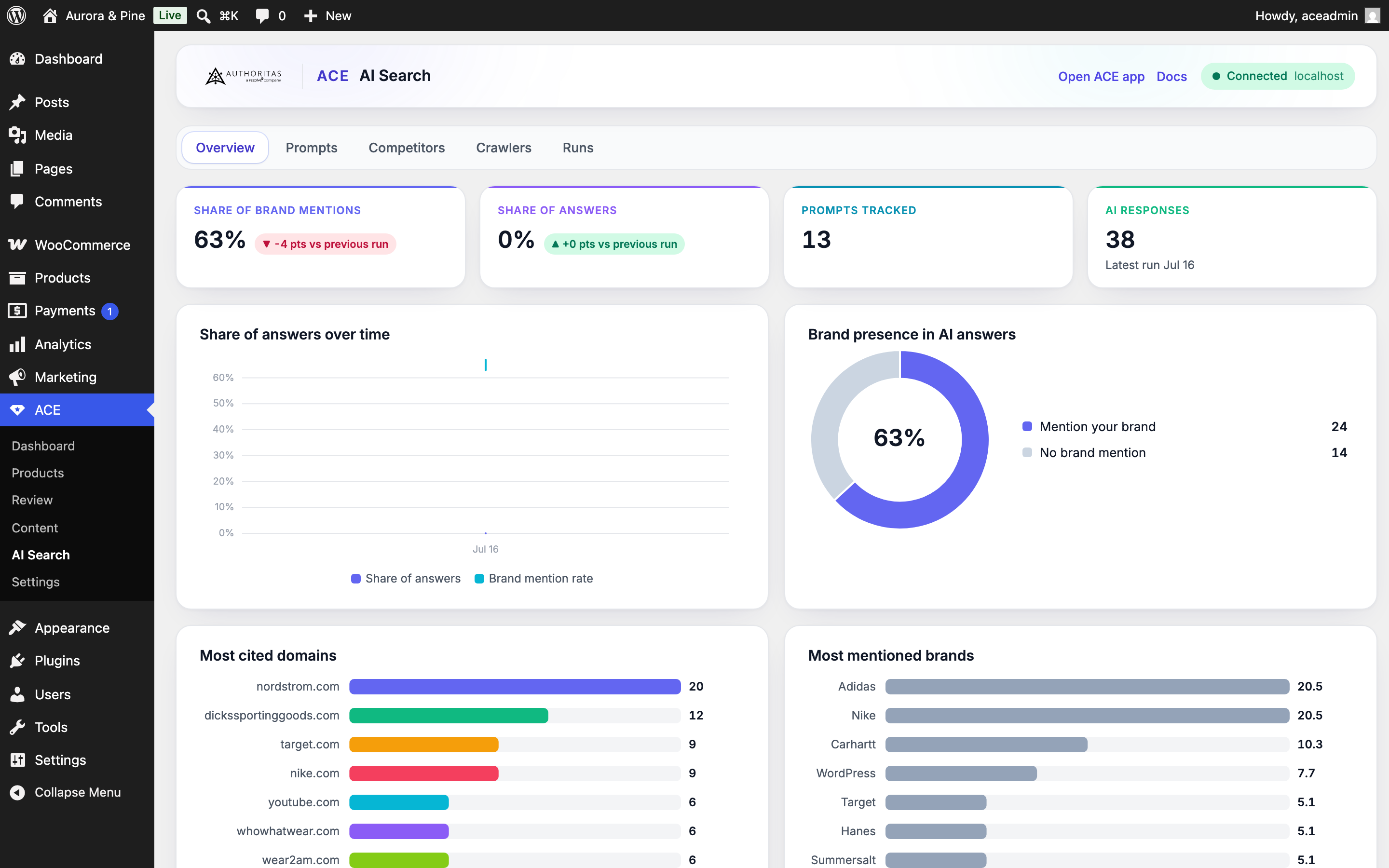
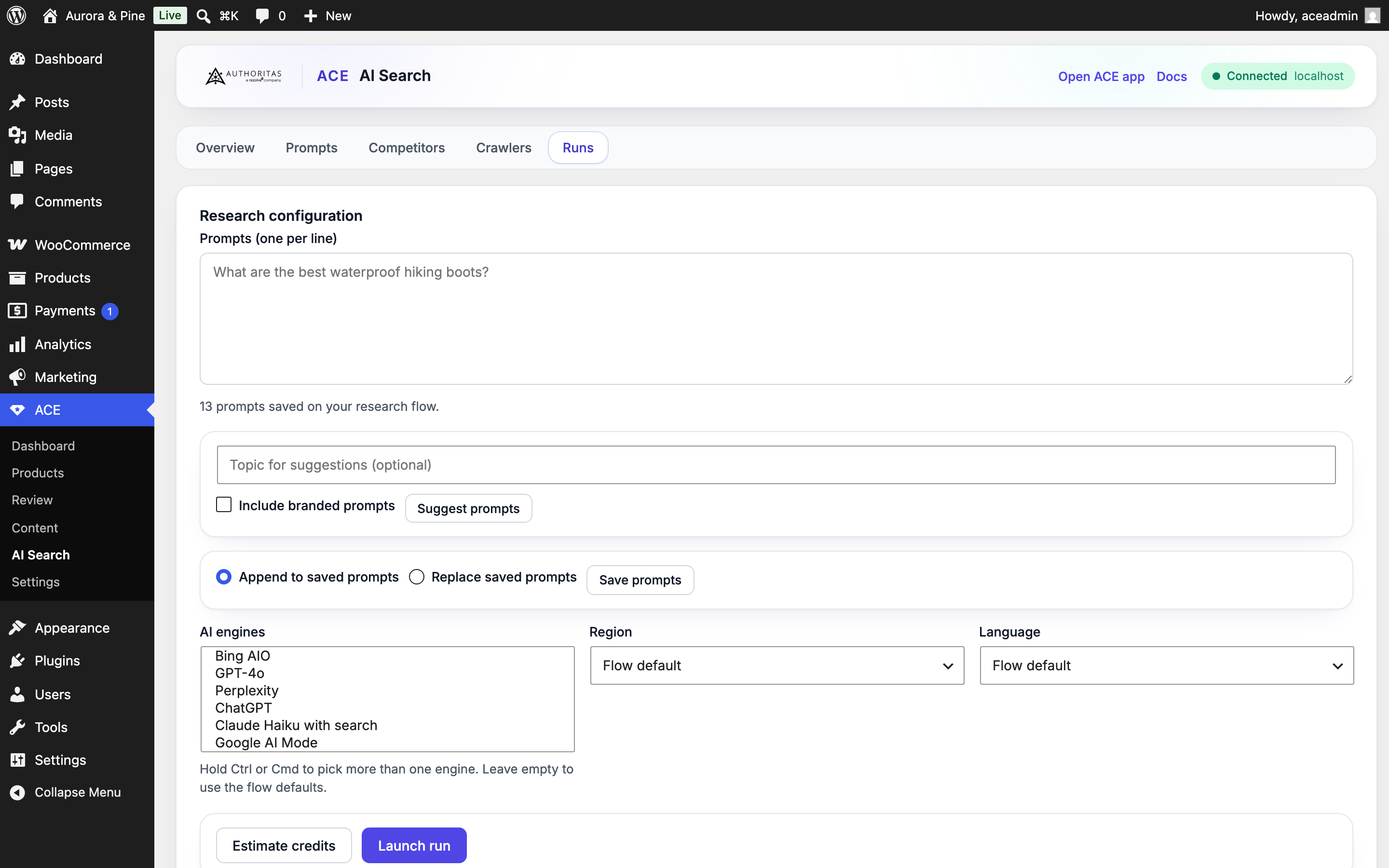
- Launch research runs against the AI answer engines (ChatGPT, Perplexity, Gemini, and more) straight from wp-admin: manage your prompt set, get AI-suggested prompts from your own catalog, pick engines and markets, estimate, and launch.
- Rich dashboards: share of brand mentions, share of answers, competitor comparison, top cited domains, per-prompt results with citations, and trends across runs.
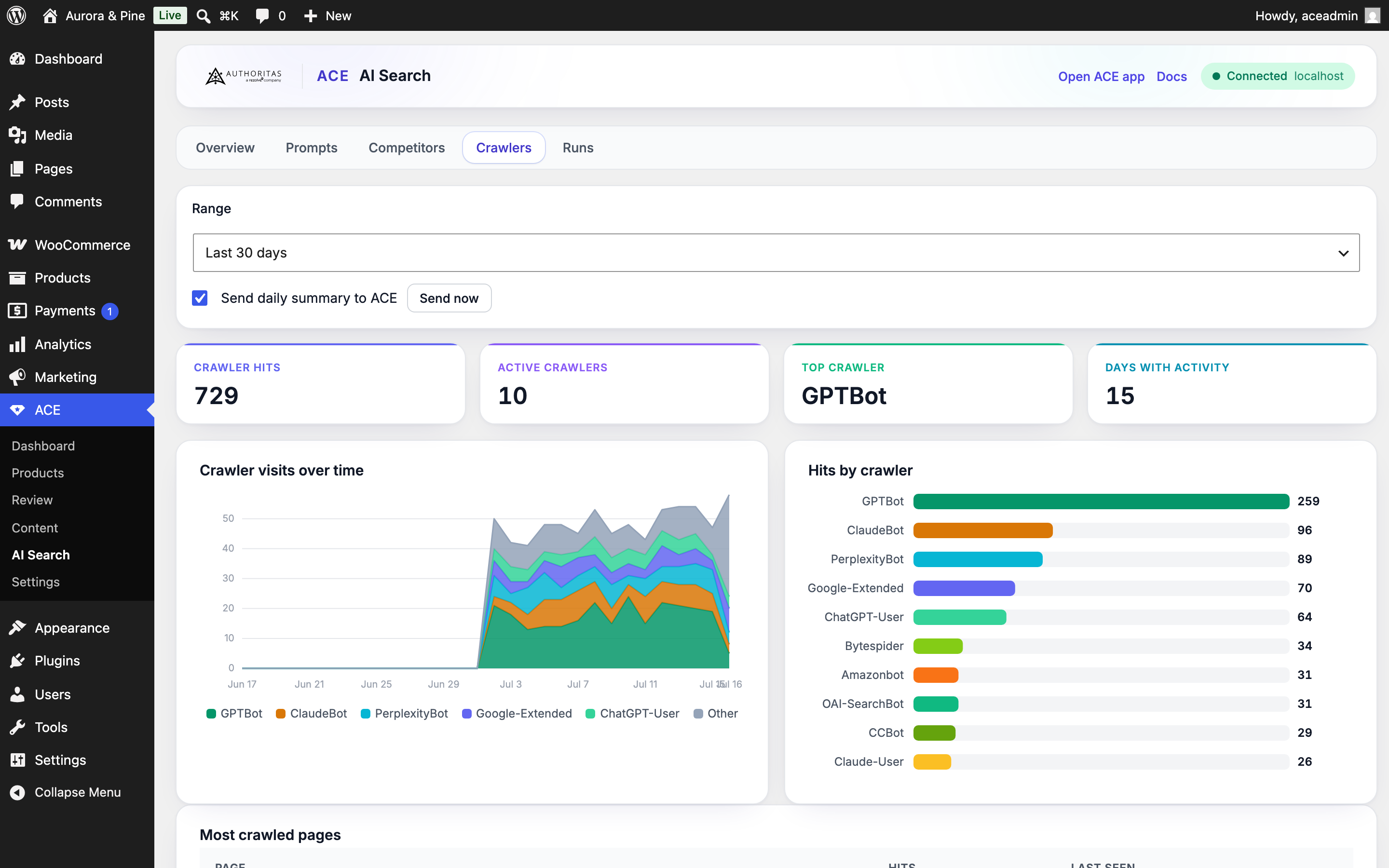
- Native tracking of AI crawlers hitting your site: GPTBot, ChatGPT-User, OAI-SearchBot, ClaudeBot, PerplexityBot, Google-Extended, Applebot-Extended, Amazonbot, Bytespider, CCBot, and more.
- Privacy-safe by design: only the date, the crawler name, the page path, and a count are stored, in your own database. No IP addresses, no full user agents, no query strings, nothing about logged-in users.
- Charts built in: trend by crawler, top crawled pages, and a day-by-day heatmap. Optionally report daily aggregates back to Rezolve Ai to see them alongside your other channels.
- Sync your products to Rezolve Ai in batches, safely, even on catalogs of thousands of products.
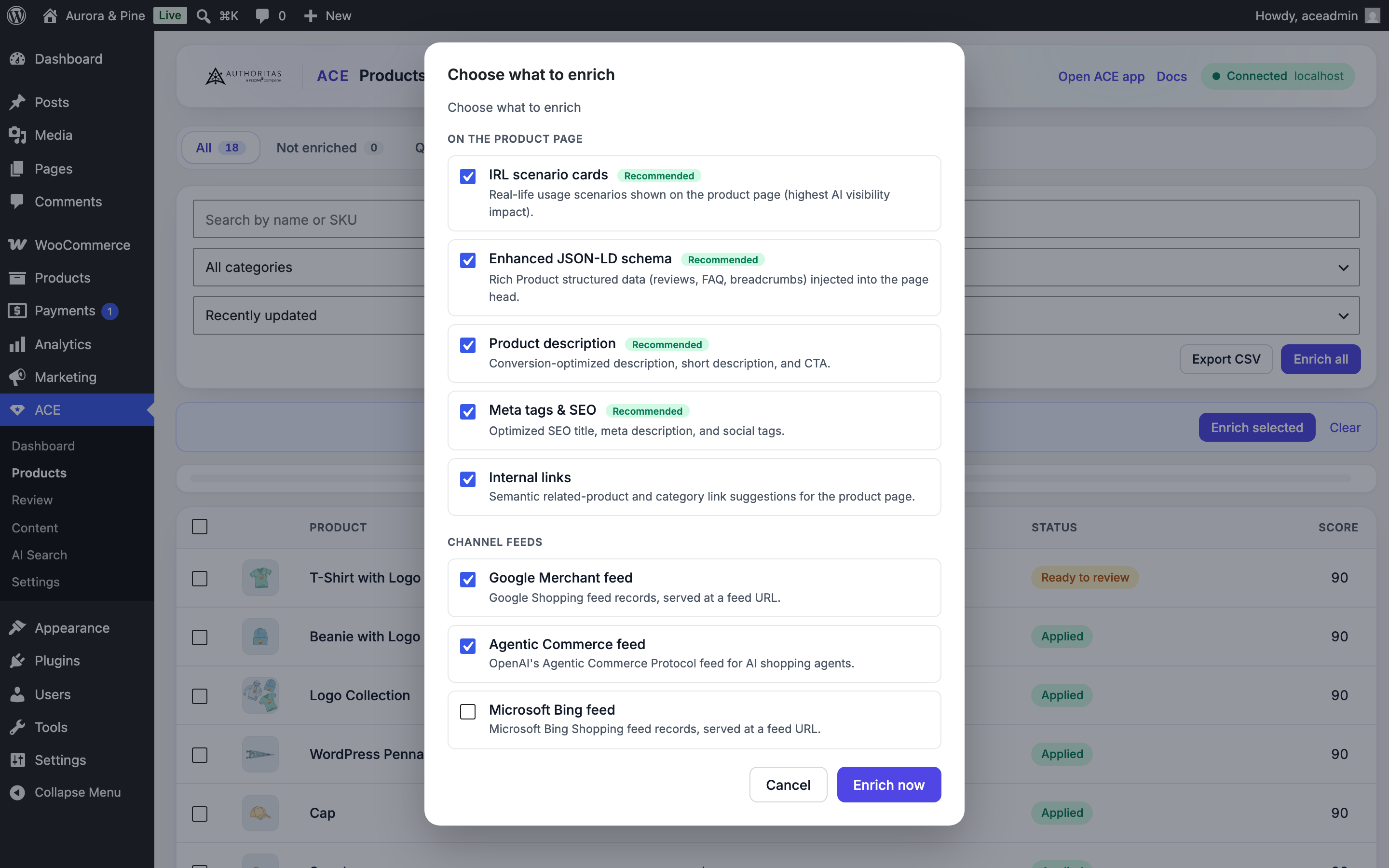
- Enrich products with AI across every content type: titles, descriptions, SEO meta, Product schema, real-life usage scenarios, internal links, and channel feeds.
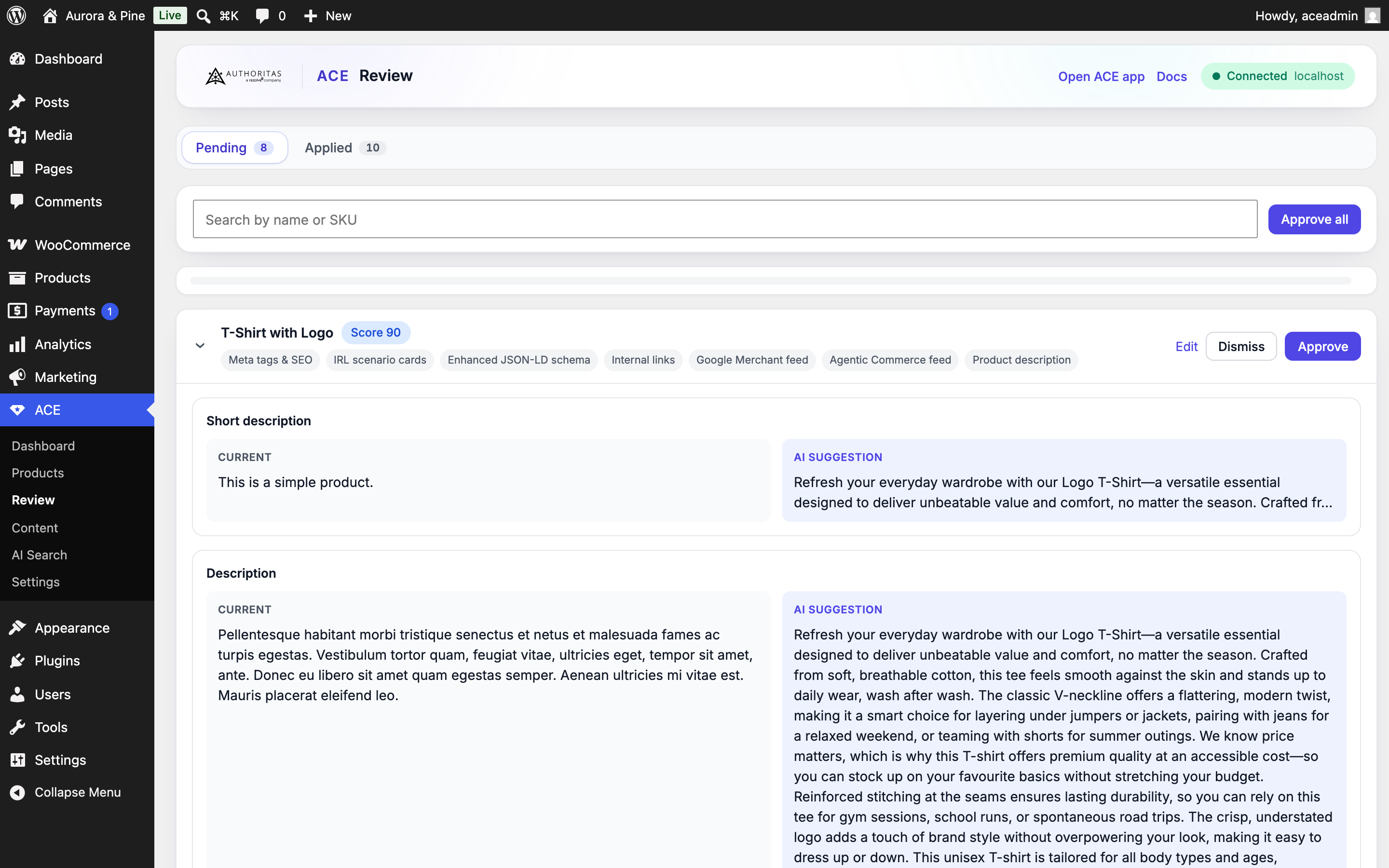
- Review every suggestion with a clear before/after diff, approve per product or in bulk, or turn on auto-apply. Revert any product with one click.
- Display the new on-page content with a block, shortcodes, or an automatic append below the product summary.
- Serve Google, Microsoft, and Agentic Commerce product feeds straight from your store as feed URLs.
安装:
- Upload the plugin to
/wp-content/plugins/or install the ZIP from Plugins, then Add New, then Upload. - Activate the plugin. WooCommerce is optional; with it active you also get the product optimization suite.
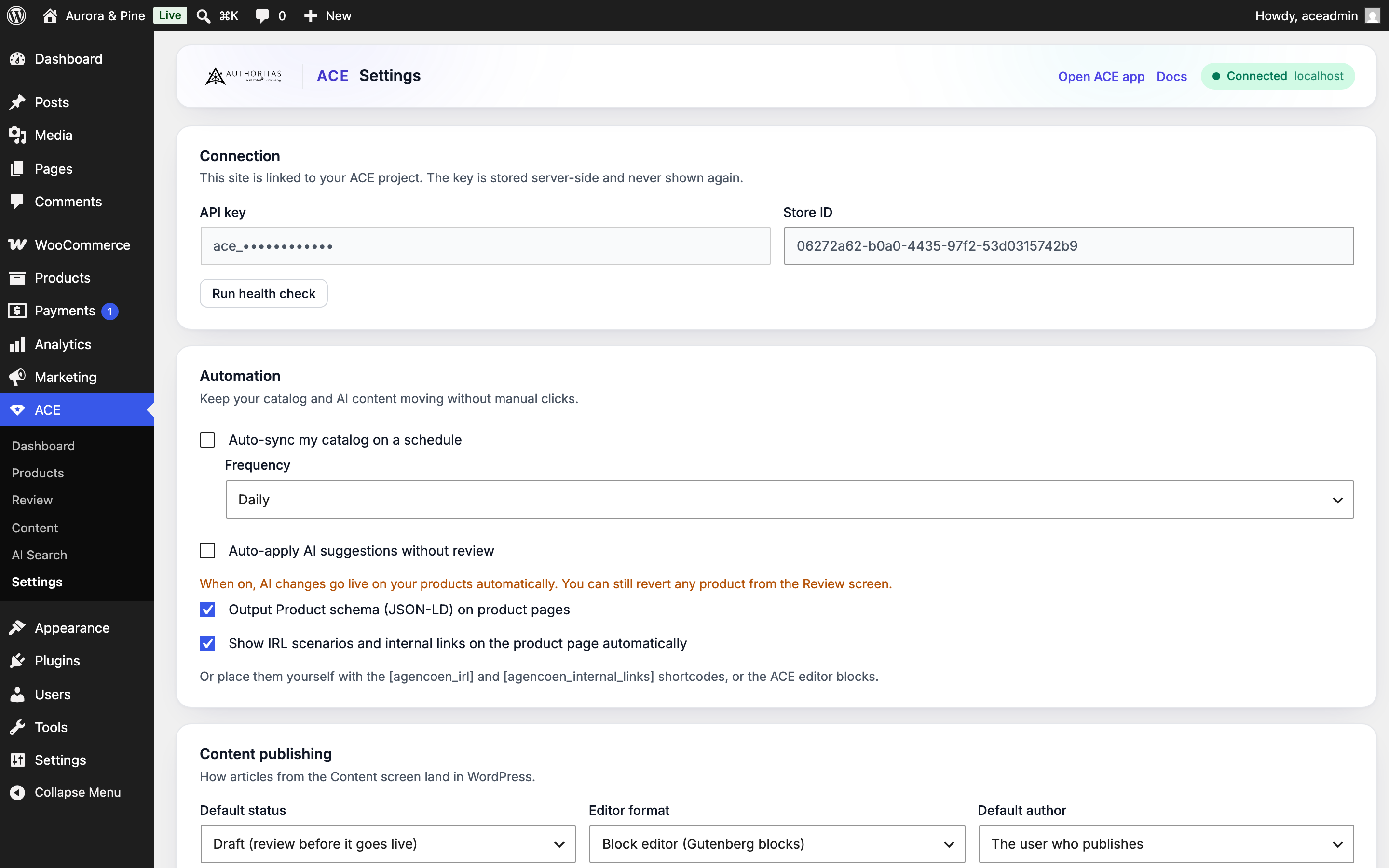
- Optional: to use article generation or AI search research, go to Rezolve Ai, then Connection, paste your Rezolve Ai API key, and click Connect. Everything else already works.
- Open Content to generate your first article, AI Search to set up research and see crawler analytics, or (with WooCommerce) Products to sync and enrich your catalog.
屏幕截图:
常见问题:
Do I need WooCommerce?
No. On a plain WordPress site you get article generation and publishing, the AI search research console, and the crawler analytics. The product sync, enrichment, review, and feeds screens are available when WooCommerce is active.
Do I need anything other than an API key?
No. Paste your Rezolve Ai API key and connect. That is all.
What does the crawler tracker store?
Only the date, the crawler name, the page path, and a hit count, in a table in your own database. It never stores IP addresses, full user agents, query strings, or anything about logged-in users. Sites behind a full-page cache will undercount, because cached pages are served without reaching WordPress.
Will it overwrite my content without asking?
No. Articles are created as drafts by default, and product suggestions wait in the Review screen until you approve them (unless you turn on auto-apply). You can revert any applied product.
Does it work with Yoast, Rank Math, or AIOSEO?
Yes. SEO titles and meta descriptions are written to the active SEO plugin's fields, and Rezolve Ai suppresses its own schema output when your SEO plugin already emits it.
Where are my product feeds?
With WooCommerce active, the Settings screen lists the public feed URLs for Google, Microsoft, and Agentic Commerce. Each one streams your enriched products so it stays fast on large catalogs.
Will it handle thousands of products?
Yes. Syncing, enrichment, review, the served feeds, and the auto-apply sweep all work in batches so the plugin stays responsive and does not time out on large stores.
更新日志:
- Added: what you approve, dismiss or revert on this site now shows up in Rezolve Ai too. Until now the two review screens could not see each other, so a product you had already dealt with here still looked untouched there, and the counts on your Rezolve Ai dashboard were missing everything you had done from WordPress.
- Added: a one-time catch-up runs after this update and sends the decisions you already made, so your history appears rather than only what you do from now on. It runs in the background, a few products at a time.
- Note: nothing new is collected about your shoppers, and nothing is applied to your products that was not already applied. This only reports decisions you had already made.
- Added: A/B tests now count the basket step. The "Where shoppers drop off" chart shows how many shoppers each version got as far as adding to a basket, not just how many read the page and how many checked out. A version that wins at the basket and loses at checkout tells you something a single conversion number cannot.
- Fixed: until now that step was never counted on WooCommerce, and the chart drew it as a flat zero, which reads as "nobody added anything to a basket". It also made the basket look like the worst step of every test. Shops still on an older version now see the step left out with a note, instead of a zero that was never measured.
- Improved: an A/B test now looks for your description in several of the usual places instead of one. If your theme names that block differently, the test used to run for weeks swapping nothing and report no difference between two versions nobody was ever shown. Setting the block selector yourself still wins; it is now tried first rather than instead of the rest.
- Fixed: A/B tests could not run at all. Fetching the live test settings and sending results back both stopped on an internal error, so a test set up in Rezolve Ai never reached the shop and never reported anything. Pausing or stopping a test from this screen failed with a critical error for the same reason.
- Fixed: even once that was past, the shop read the list of running tests from the wrong place, so it always saw an empty list and removed the test settings it already had. A test could reach a product page and then be taken back off it on the next check-in.
- Also fixed, on the Rezolve Ai side and already live for every shop with no update needed here: the test settings sent to WooCommerce shops pointed at a part of the page that only exists on Shopify themes, so a running test showed every shopper the same words.
- Fixed: shops selling variable products were being shown to AI shopping agents as out of stock, even when everything was in stock. Agents that believed it refused to buy. The plugin now sends each product's real stock status, so what agents see matches your shop.
- Fixed: prices were shown to agents in US dollars whatever currency your shop uses. Your shop currency is now sent with every sync.
- New: every variation of a variable product is now sent in full, with its own price, SKU, stock status and options. Agents used to see one generic "Default" option priced at your cheapest variation; they now see the real choice, and can send a shopper to the exact variation they picked.
- Buy links now add the exact variation a shopper chose to the basket, rather than the parent product.
- Rezolve Ai can now tell you when this site is not sending it anything to measure. If you have connected an account but left daily reporting off, the plugin says so and offers to switch it on. Nothing about what is collected has changed, and both traffic settings still start switched off: this asks, it does not decide for you.
- The hourly check-in now reports whether traffic tracking and reporting are on, so the results, A/B testing and AI referral screens in Rezolve Ai can tell "switched off" apart from "nothing happened yet".
- The plugin is now called Rezolve Ai. Same plugin, same settings, same connection: only the name has changed. You do not need to reconnect or re-enter your API key.
- New: AI shopping agents can now find your shop. The plugin publishes a Universal Commerce Protocol profile at /.well-known/ucp on your own domain, which is where agents like ChatGPT and Perplexity look when someone asks them to find a product.
- What they see is the enriched product copy you have approved in Rezolve Ai, not your raw product data.
- New: agents can send a shopper straight to a filled basket. A link with the products already chosen lands on your cart with everything in it, ready to check out.
- You stay in control of the sale. Nothing is bought through Rezolve Ai, and no payment details ever pass through it. The shopper always finishes on your own checkout.
- Turn it on per project in Rezolve Ai, under UCP. It is off until you switch it on, and switching it off stops this site publishing within the hour.
- Fixed: your SEO title and meta description were reported as applied even on sites with no SEO plugin installed, where there is no field to write them to. Rezolve Ai now says so instead, and the content stays in the queue and applies by itself once you install one. Previously it was marked done and never applied, even after you installed an SEO plugin later.
- Fixed: a product could show "Meta tags" on its applied list when nothing had actually been written.
- New: Settings now tells you when no SEO plugin is detected, so you know before you run enrichment rather than after.
- New: WooCommerce product fields. Pick it in Rezolve Ai and your enriched product data is written onto the product itself: product tags, specification attributes shown in the Additional information tab, and your SEO title and meta description.
- Tags and attributes are only ever added. Anything already on the product stays, and a specification you set yourself is never overwritten. Revert takes back exactly what Rezolve Ai added and leaves the rest alone, including anything you added afterwards.
- Product categories are never changed. Rezolve Ai can suggest one for you to look at, but it will not move your products between categories, because that would rearrange your shop menus and category pages.
- SEO title and meta description need Yoast SEO, Rank Math or All in One SEO installed, since that is where WordPress stores them.
- New: a History tab. Every test you have finished, what it found, and what it was worth, with a place to write down what you learned from each one. Filter by outcome, search by name.
- New: what testing has been worth to your shop, above that list. It counts two things: money won by keeping a version that beat your original, and money kept by not rolling out a version that lost. The second is usually the larger of the two, and both are counted only where a test reached a clear answer and your store reported real order values.
- New: a test that finished by showing your original copy was better now records what not rolling out the challenger was worth. Previously only winners carried a figure, so half of what testing gives you was invisible.
- Fixed: a lift shown on a finished test could be understated. The figure is stored on a logarithmic scale and one of the places that read it was treating it as a plain percentage.
- New: an experiment now shows what each version is worth. Revenue per shopper over time, a table per version, and what keeping the winner would be worth over a year. It appears only when your store actually reported order values, so a missing panel means revenue is not being tracked rather than that you earned nothing.
- Fixed: the progress step for going live was called "Versions live", the same name as one of the trust checks below it, and the two answer different questions. It is now "Live on your store".
- Fixed: the last two dates on a chart's bottom axis could overlap into one another.
- Fixed: on the New experiment tab, "Check this design" could appear to do nothing. When the answer was a refusal, such as no products having reached Rezolve Ai yet, it flashed in a notice that disappeared after a few seconds. The reason now stays on the page until you change the design.
- The whole plugin is now translatable. Around 120 strings across the AI Search, Content and Experiments screens were printed in English whatever your site language, because they were never passed through WordPress translation. They are now, and a test stops the same thing happening again.
- Fixed: on an experiment, the progress strip could say every product had a second version live while the checks below said fewer than two versions were live. Both were measuring something real and neither said which. The strip now waits for the same thing the check waits for, and explains that only one version being live means both groups read the same words.
- Fixed: the "% live" dial on an experiment had its label cut off at both ends.
- Fixed: a range read "likely between +6.1% to +76.9%".
- New: the Experiments screen now shows you what is happening, not just what happened. A chart of how each version is doing day by day, a range that visibly narrows as shoppers arrive, and a projected date when the result will be readable.
- New: a plain-English verdict at the top of every test. It says whether you have a winner, whether to keep waiting, or whether something is wrong that would make the numbers meaningless, and it will not call a winner while a check is failing.
- New: keep the winning version for every shopper with one button. It finishes the test, returns everyone to a single version, and queues the winning copy to replace your original.
- New: a five-step progress strip that names whatever is holding a test up, so "I set this up and nothing is happening" has an answer on the screen.
- New: a drop-off chart per version, so you can see whether a version wins at the basket and loses at checkout rather than reading one number.
- New: before you commit credits, the setup screen draws how small a change your traffic could actually detect against how long the test runs. More versions means a longer wait, and now you can see it.
- New: a short glossary of the five terms this screen cannot avoid using.
- Fixed: a chart line no longer drops to zero on a day your site reported nothing. A gap in the data now reads as a gap.
- Fixed: a finished test now takes its settings off your products instead of leaving them there.
- Fixed: the Experiments screen was blank. It loaded its tabs and then stopped before asking for your tests, so the page sat empty with nothing to click and no error to explain it. It now lists your experiments as intended.
- Fixed: status labels on that screen showed an internal word instead of the real one, and a failed check was coloured the same calm grey as one that passed. A problem with a running test now looks like a problem.
- New: an Experiments screen. Set up a test, see which version is winning, and start, pause or stop it, without leaving WordPress. Needs WooCommerce.
- Before you commit any credits, the screen tells you whether your traffic can actually settle the test you have designed. An answer that would never arrive is refused up front rather than after four weeks.
- Setting up a test does not switch on visitor splitting. That stays a separate, deliberate choice in Settings, and it stays off until you make it.
- Fixed: content you approve in Rezolve Ai now actually reaches this site, and Rezolve Ai is told when it does. Until now the plugin applied only what it had generated locally and never reported the result, so Rezolve Ai had no record of anything this site published.
- This is why A/B testing could not run here. On the Rezolve Ai side a version counts as live only once it has been reported as published, so tests set up for a WooCommerce store never received their settings and never started. Nothing looked wrong from either end.
- Your Published view in Rezolve Ai will now show WooCommerce alongside other channels, rather than being empty for stores that had in fact published.
- Checking happens hourly rather than daily, so approving a version in Rezolve Ai and seeing it live on your store is a matter of minutes rather than the next day.
- No new data leaves your site. The report says which item was applied and whether it worked, and nothing else.
- New: optional per-visitor A/B testing of product descriptions, so an experiment set up in Rezolve Ai can run on this site and be measured against real customers rather than only against crawler activity. Off by default on every site, including upgrades.
- This is the only feature in the plugin that stores a cookie, and it is gated on the WordPress Consent API rather than on a setting alone. With no consent plugin installed it does nothing: nothing is stored, nothing is sent, and every visitor sees your normal copy.
- The version a visitor sees is decided in the browser, not on the server. On a cached site WordPress often does not run at all, so a server-rendered version would be written into the page cache and then served to everyone, including crawlers. Your page therefore always contains exactly one description, and a visitor in a test fetches theirs separately.
- Crawlers are never put into a test. They carry no cookie and give no consent, which is the same rule applied to a first-time visitor: no user agent is examined anywhere.
- Visitor ids are scrambled with a secret generated for your site alone before anything leaves it. The same visitor on another site produces an unrelated value, so nothing can be joined across sites.
- New setting for the description block's CSS selector, for themes that do not use the standard WooCommerce layout. A selector that matches nothing means the test changes nothing, so this is worth checking before starting one.
- New: optional visitor pageview counting, so Rezolve Ai can show what a content change did to real traffic rather than only to AI crawlers. Off by default, with its own setting separate from the crawler report.
- Counting uses a small script on published pages rather than server-side hooks. Page caches serve most visitors without WordPress running at all, so a server-side counter would undercount heavily on exactly the sites that are busiest.
- No cookie, no session, no IP address, hashed or otherwise. Nothing stored can identify a visitor, which is why this reports pageviews and does not claim to report unique visitors. Logged-in editors and administrators are never counted, and neither are crawlers.
- New: optional daily WooCommerce sales totals, one row per product per day with units and net revenue, read from WooCommerce's own analytics tables so the figures match your Analytics screen. No orders, customers, names, email addresses or postal addresses are sent.
- The crawler setting's description now points at the new pageview setting instead of stating that human traffic is never logged, which is only true while that setting is off.
- A fresh install now opens on things to do, not on setup. The Dashboard leads with a dismissible "Start here" card of local actions (crawler analytics, catalog browsing, feed URLs, publishing preferences), tailored to whether WooCommerce is active.
- No screen mentions a Rezolve Ai account on a fresh install. The optional connect notice appears only after the plugin's own crawler analytics have recorded meaningful AI traffic, and it opens with what was measured. Nothing changes about what works: every local feature is on from activation, with or without an account, forever.
- Uninstall now also removes the plugin's per-user dismissal preferences.
- All request input is now read, unslashed, and sanitized directly inside each admin-ajax handler, immediately after its nonce check. Helper methods receive plain values and never touch request data, and no static-analysis suppressions for nonce verification remain anywhere in the plugin.
- Admin scripts and styles are now enqueued from the screen hook suffix WordPress passes to the enqueue callback instead of reading the request URL.
- Product pages no longer carry duplicate structured data: when the plugin outputs its enhanced JSON-LD graph, WooCommerce core's copies of the same entity types (Product, BreadcrumbList) are suppressed, while Woo entities the plugin does not emit are kept.
- Renamed the internal account-link field in error payloads.
- The CSV export no longer raises PHP 8.4+ deprecation notices.
- Bundled the full GPLv2 license text.
- Every admin screen now renders without a Rezolve Ai account. Nothing the plugin does on your own site is held back: AI crawler tracking and its settings, publishing preferences, Article and Product JSON-LD, the Published articles list, the product catalog and its export, and the full review queue all work on activation.
- Only the controls that call the Rezolve Ai service (article generation, product enrichment, research runs, scheduled sync, auto-apply, and the optional daily crawler report) ask for an account, and they now say so in place instead of replacing the screen.
- The API key has moved to its own Rezolve Ai, then Connection screen. Settings now opens directly on the AI crawler tracking and publishing options, which work straight after activation.
- The dashboard leads with the numbers read from your own site: AI crawler hits and article counts.
- The notice about connecting an account can be dismissed and stays dismissed.
- Nonce verification is an explicit first statement in every admin-ajax handler, checked before any input is read and before any other condition.
- admin-ajax handlers are no longer registered on front-end page loads.
- Corrected the terms of service and privacy policy links in this readme.
- Product feeds now require a private per-site token in their URLs, with one-click regeneration in Settings, and support conditional requests (Last-Modified/304) so unchanged catalogs cost nothing to re-fetch.
- Admin screens render instantly from cache and fill in live numbers after paint. No wp-admin page load ever waits on the Rezolve Ai platform, and during an outage the dashboard shows your last known credit balance instead of zeros.
- Hardened the Product JSON-LD output against markup breakout, matching the Article emitter.
- Storefront shortcodes renamed to [agencoen_irl] and [agencoen_internal_links].
- Interactive requests to the platform now fail fast (12 seconds, no retries) while background jobs keep patient retries. Faster AI crawler detection on busy sites.
- WooCommerce is now optional: the plugin activates on any WordPress site, with the commerce suite available when WooCommerce is active.
- New Content screen: generate long-form articles with your brand voice (built-in, preset, and custom content types), then publish them as posts with SEO meta and Article JSON-LD. Two-way sync with the Rezolve Ai Content Hub.
- New AI Search console: manage research prompts (with AI suggestions from your catalog), launch runs across AI answer engines, and explore share of answers, competitors, per-prompt citations, and trends.
- New native AI crawler analytics: privacy-safe tracking of GPTBot, ClaudeBot, PerplexityBot, and 20+ other AI crawlers with charts, top pages, and an optional daily report to Rezolve Ai.
- Redesigned admin matching the Rezolve Ai app: KPI tiles, segmented tabs, and a dependency-free SVG chart kit (lines, areas, donuts, heatmaps, progress rings).
- Product enrichment now runs on the platform's durable jobs API with webhook-accelerated polling.