
agentprose
| 开发者 | maxious |
|---|---|
| 更新时间 | 2026年10月26日 05:51 |
| PHP版本: | 7.4 及以上 |
| WordPress版本: | 7.1 |
| 版权: | GPLv2 or later |
| 版权网址: | 版权信息 |
详情介绍:
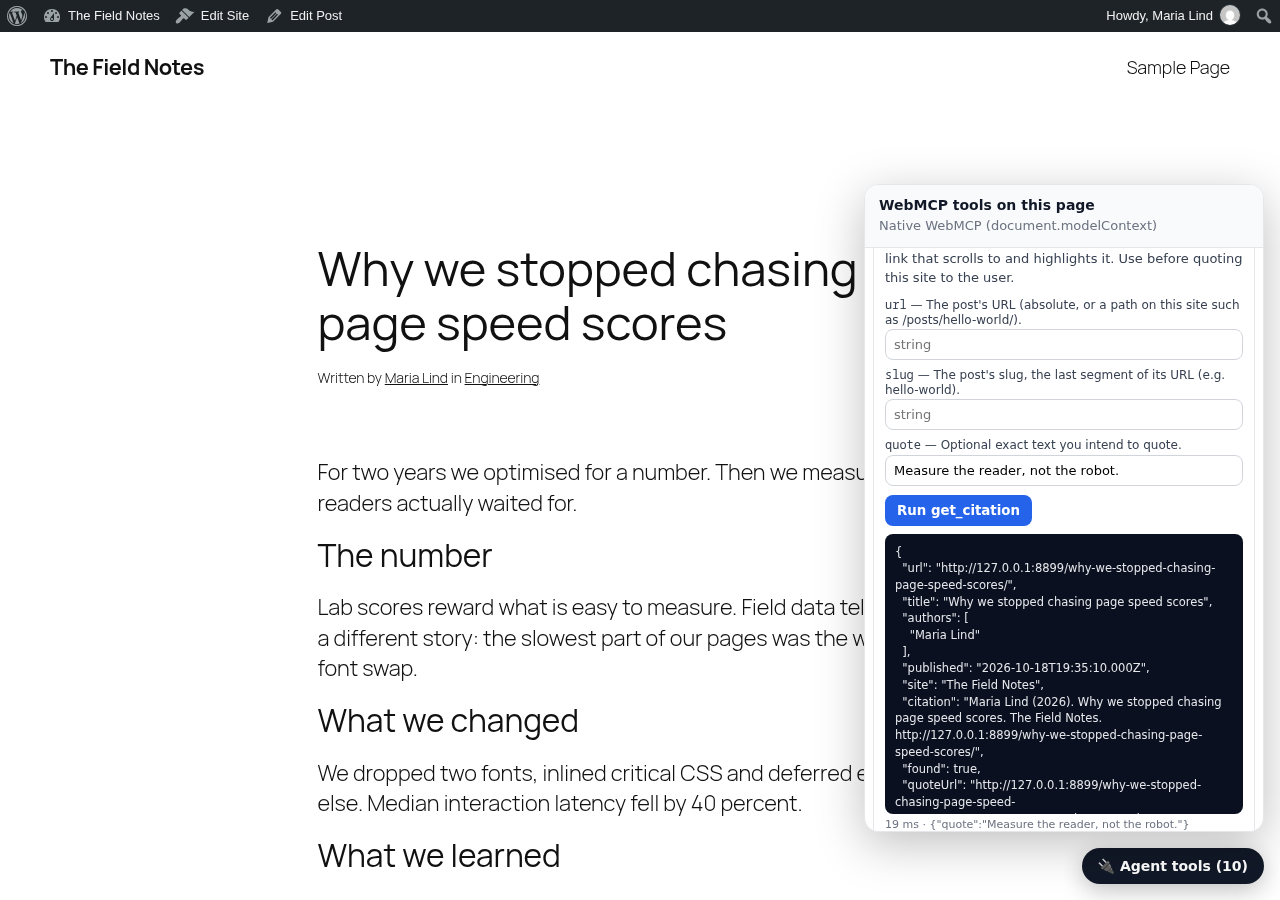
get_current_article: the post being viewed, as clean Markdown with author, dates, tags and outlinesearch_posts: full-text search through your site's REST APIlist_posts: newest posts, filterable by tag, category, author and dateget_post: any post as Markdown, paged for long posts (never silently truncated)get_sectionandget_table_of_contents: read one section of a long postget_citation: checks a quote against the post and returns a link that scrolls to and highlights it (#:~:text=)list_taxonomies,get_related_posts,get_site_info,get_subscribe_link,get_comments_linknavigate_to(optional): open another page of the site
- The script loads deferred (about 9 KB gzipped) and does nothing until an agent calls a tool.
- The tools read this site's public WordPress REST API from the visitor's browser. No new endpoints, no database tables, no server load until an agent asks.
- Every tool is read-only and marks post content as untrusted, so agents treat it as data, not as instructions.
- In browsers without built-in WebMCP, the plugin loads the bundled MCP-B WebMCP polyfill from your own site after the page has loaded, so agents that use it (for example the MCP-B browser extension) can see the tools. You can switch this off.
- Administrators get a small 🔌 inspector on the front end to list and try every tool.
js/ are the browser build of the agentprose npm release named in the changelog, unchanged. They are built from the TypeScript source at github.com/webmaxru/agentprose (MIT licence); npm ci && npm run build rebuilds them, and node wordpress-plugin/sync.mjs <version> copies a release into the plugin. The bundled WebMCP polyfill in js/vendor/ is @mcp-b/webmcp-polyfill 6.0.3 (MIT), unchanged.
安装:
- Install from Plugins → Add New (search for "agentprose"), or upload the zip under Plugins → Add New → Upload Plugin.
- Activate it. The tools are live on every front-end page.
- Optional: Settings → agentprose to choose post types, a subscribe URL, a tool prefix, switch off the polyfill, or connect agentprose Cloud.
- As an administrator, open any post and click 🔌 to list and run the tools.
屏幕截图:
常见问题:
Does this send my content anywhere?
No. The tools run in the visitor's browser and read your own public REST API. Only if you connect agentprose Cloud is a small usage message (never content) sent per tool call; see "External services".
Which browsers and agents support WebMCP?
WebMCP is a draft. Chrome supports it behind a flag and an origin trial, and some AI browsers and extensions support it or use the MCP-B polyfill, which the plugin bundles. Nothing changes for human visitors, so there is no downside to installing early.
Does it work with custom post types and pages?
Yes. Add their REST bases (for example posts,pages,docs) under Settings → agentprose. The post type must have show_in_rest enabled.
My theme's article body is not detected
Set "Content selector" to the CSS selector of the article body (for example .entry-content).
Another plugin already registers a tool called search_posts
Set a tool name prefix such as blog_; all tools become blog_search_posts, blog_get_post and so on.
How is this different from WebMCP Bridge?
Both expose WordPress content to agents through WebMCP; they focus on different things.
- agentprose is read-only and built for reading and quoting: full posts as Markdown (paged, never truncated), sections and a table of contents, related posts, and
get_citation, which verifies a quote and returns a highlight link. It needs no extra REST endpoints, and the same library works on non-WordPress sites. It uses the current WebMCP API (registerTool) and bundles the MCP-B polyfill for browsers without it. - WebMCP Bridge covers actions and server-side access: WooCommerce cart and coupon tools, Contact Form 7 submission, menus, a PHP API for custom tools, and a remote MCP endpoint plus an OpenAPI schema for desktop clients and Custom GPTs. Markdown output and llms.txt come from its companion plugin, Mescio for Agents.
How does the plugin get updates?
Through normal WordPress plugin updates from WordPress.org. Each new version of the agentprose library ships as a new plugin version with the scripts included, and WordPress shows it under Dashboard → Updates. To get fixes without doing anything, turn on auto-updates for agentprose on the Plugins screen ("Enable auto-updates"). The plugin never downloads code from anywhere else.
Is it safe?
All tools are read-only and use only public data from your REST API: what any visitor can already read. Post content is marked as untrusted for the agent. The inspector is shown to administrators only.
Who makes this plugin?
Maxim Salnikov (WordPress.org: maxious, GitHub: webmaxru, salnikov@gmail.com). He also created and maintains the agentprose library and runs agentprose Cloud; this is the official agentprose plugin for WordPress. See https://agentprose.cloud/docs/community-projects.
更新日志:
- Bundles agentprose 0.1.3 and the MCP-B WebMCP polyfill 6.0.3, served from your site.
- With an agentprose Cloud site key, agents can read the notes and contact details you enter in the Cloud dashboard (new read-only
get_contact_infotool). They are fetched only when an agent asks, never on page load.
- Bundles agentprose 0.1.1 and the MCP-B WebMCP polyfill 6.0.3, served from your site.
- First release on WordPress.org: read-only WebMCP tools for posts, pages and custom post types; settings page; bundled MCP-B WebMCP polyfill (served locally, can be switched off); optional agentprose Cloud (analytics and hosted search).