
aGo Cleanup
| 开发者 | agolab |
|---|---|
| 更新时间 | 2026年11月5日 08:27 |
| 捐献地址: | 去捐款 |
| PHP版本: | 8.1 及以上 |
| WordPress版本: | 7.1 |
| 版权: | GPL-2.0-or-later |
| 版权网址: | 版权信息 |
详情介绍:
- WordPress version meta tag and RSS feed version.
- Windows Live Writer manifest link.
- RSD link.
- Shortlinks (
?p=123). - RSS feed auto-discovery links (optional).
- Emoji fallback script and styles.
- oEmbed discovery and embed JS.
- jQuery Migrate on the frontend (optional).
- Dashicons for non-logged-in visitors (optional).
- Block editor global styles when you do not use Gutenberg (optional).
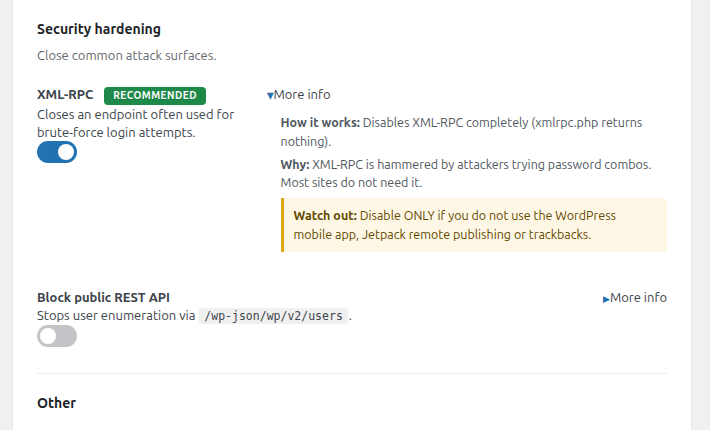
- XML-RPC (an endpoint often used for brute-force login attempts).
- Public REST API for unauthenticated users (optional, blocks user enumeration).
- Self-pingbacks (no more auto-comments on your own posts).
安装:
- Upload the
ago-cleanupfolder to/wp-content/plugins/or install via the Plugins screen and upload the zip. - Activate the plugin through the Plugins menu in WordPress.
- Go to aGo Tools, then Cleanup.
- The safe defaults are already enabled. Use the toggles to fine-tune.
屏幕截图:
常见问题:
Will this break my site?
No. Each toggle removes an optional WordPress feature. The defaults enabled on activation are conservative (head meta, emojis, XML-RPC, self-pingbacks). The toggles marked with caveats (block REST API, remove jQuery Migrate, drop Dashicons, drop block editor styles) are off by default and explain what to test before enabling.
Does it affect my admin?
Most toggles affect only the frontend output and the public REST API. The wp-admin area keeps working in full.
Why are the "recommended" toggles enabled automatically?
Because the recommended set is safe for the vast majority of WordPress sites. You can flip any of them back off, or hit Reset to start from zero.
Does the plugin send any data to a third party?
No. Zero outbound network traffic. No telemetry, no usage stats, no remote configuration. The plugin only adds and removes WordPress hooks locally.
Is there a way to switch the plugin language?
The plugin uses your WordPress site language. Translations are contributed through translate.wordpress.org, and the screen shows in English until one exists for your language.
更新日志:
- Initial release.
- 13 toggles across head cleanup, scripts and styles, security hardening and other.
- Safe defaults seeded on first activation.
- Auto-save on toggle change.
- Apply recommended / Enable all / Reset shortcuts.