
AI Content by Parallax
| 开发者 |
eparallax
mmdbsolutions 9ete hawkeye126 |
|---|---|
| 更新时间 | 2026年6月8日 03:49 |
| PHP版本: | 8.1 及以上 |
| WordPress版本: | 7.0 |
| 版权: | GPLv2 or later |
| 版权网址: | 版权信息 |
详情介绍:
- Structured SEO content generation
- Data cleanup and normalization
- Attribute and taxonomy alignment
- Conversion-focused product copy
- SEO meta titles and descriptions aligned with search intent
- Category content structured for indexing and internal linking
- Keyword-aware product descriptions
- Google Shopping category alignment
- Distributor feeds and inconsistent product data
- Thousands of SKUs
- Ongoing catalog updates
- Review and approve content before publishing
- Track changes across batches and items
- Maintain full control over your catalog
- Secure API connection to the Parallax AI Platform
- Multi-model AI content generation and optimization via Parallax's custom AI logic
- Product content generation:
- Titles
- Descriptions
- Specifications
- SEO metadata
- Category optimization:
- Meta titles and descriptions
- Short and long-form content
- Internal linking suggestions
- Batch processing for large catalogs
- Structured workflows for review and approval
- Optional request/response logging via WooCommerce's log system — errors and warnings are recorded by default; full info-level request/response payloads are gated behind the "Enable Debug Support" setting
- Native WooCommerce + WordPress admin UI integration
- No storefront UI output — interactive workflows live in the WordPress admin (a lightweight WP-Cron job polls pending batches in the background; see disclosure below)
- Growing WooCommerce stores struggling with SEO performance
- Teams managing large or messy product catalogs
- Businesses relying on distributor or supplier data
- Agencies managing multiple WooCommerce clients
- Product titles, descriptions, excerpts, and selected metadata
- Category names and descriptions
- The Client Name and Client Description you entered in the plugin settings (sent as
clientBrandandclientBrandDescriptionon every optimize request) - A per-request
clientProductIdentifierorclientCategoryIdentifierderived from your site host viaClient::get_client_identifier() - Your site URL / host (sent in the
X-Client-Websiterequest header and used as the Parallax account identifier) - The Parallax account API key you configured in the plugin settings
https://api.eparallax.com/api(configurable by defining theEPARALLAX_API_BASEPHP constant inwp-config.php)
wp parallax optimize* WP-CLI commands (see src/CLI/Commands.php). While a batch is pending, the plugin additionally runs a WP-Cron job every 15 minutes (ai_content_by_parallax_pull_all_batch_requests) that polls the Parallax API for that batch's status and results. No polling happens when there are no incomplete batches.
External Service Policy Compliance
- No visitor tracking or behavioral data collection
- Only the optimization content and the account/site identifiers enumerated in the SaaS Disclosure above are transmitted — no browsing, analytics, or customer data
- The only background network activity is the batch-status polling described above. The WP-Cron event is scheduled every 15 minutes, but the callback exits immediately when no incomplete batches exist — API requests only go out while a batch is in progress
安装:
- Upload the plugin to
/wp-content/plugins/ai-content-by-parallax/ - Activate through Plugins → Installed Plugins
- Go to WooCommerce → Parallax AI
- Enter your API key
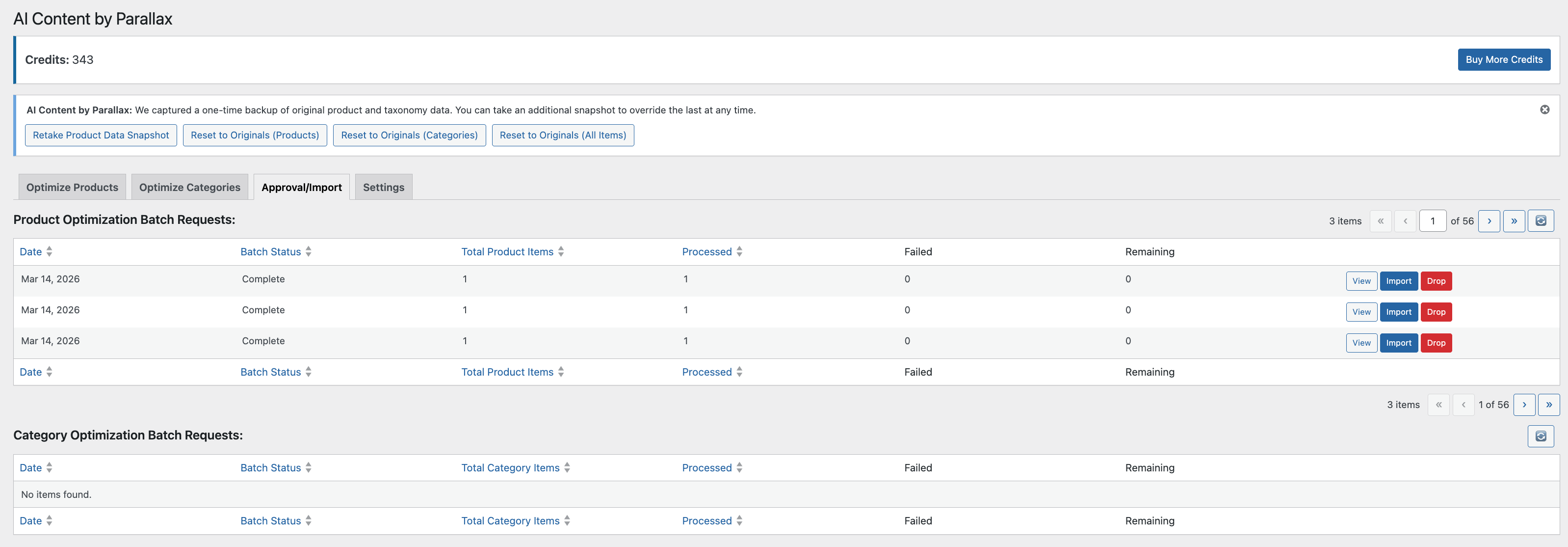
- Begin optimizing your products or categories
屏幕截图:


常见问题:
Does this plugin work without a Parallax AI account?
No. A Parallax AI account and API key are required.
Does this affect my storefront performance?
The plugin renders no storefront UI and does no optimization work on front-end requests. A lightweight 15-minute WP-Cron job polls the Parallax API for the status of any batches you've already submitted; like any WP-Cron task, it can fire on whichever request triggers the scheduler, but it exits immediately when there are no pending batches.
Is any personal customer data sent?
No customer or order data is ever sent. The plugin transmits exactly what the SaaS Disclosure section above enumerates: the product and category content being optimized, the Client Name / Client Description you entered in plugin settings, a site-host-derived client identifier, your site URL (in the X-Client-Website header and as the account identifier), and your Parallax account API key. Nothing else leaves the site.
Can I sync Parallax term SEO to Yoast SEO?
Yes. Syncing is enabled by default. Check "Disable sync term SEO to Yoast" in the settings to stop mirroring the term meta title/description into Yoast's wpseo_title/wpseo_desc fields for supported product taxonomies, and only when Yoast SEO is installed.
更新日志:
- Enable reject action in the batch request details table — reviewers can now reject individual content items with an optional comment directly from the Approval / Import screen.
- Add Tab focus trap, focus restoration on dismiss, and a destructive-action warning to the reject dialog to prevent accidental rejections and meet accessibility expectations.
- Rejection comment is sent to the Parallax middleware API when an item is rejected, giving the AI feedback for future generations.
- Fix send_item_status field names in the status-push payload; store returned parallaxId UUIDs on batch request items so downstream status lookups are keyed correctly.
- Handle 5xx middleware responses gracefully: log as warnings (not errors) and return an empty string to avoid persisting a terminal error status on transient server failures.
- Products listed in Settings → Skip Product IDs now display a muted grey lock icon in the WooCommerce product list, visually distinguishing them from manually-excluded (red lock) products; row actions (Optimize, Lock/Unlock) are suppressed for config-driven exclusions.
- Add CatalogSyncStatus backed string enum with DB-persistent case values (v2.0.0 Catalog Data Sync pre-work).
- Add schema versioning to BatchRequestItemsTableInstaller; Plugin::init() now checks the stored version before running dbDelta, making repeated plugin loads a no-op when the schema is current.
- Centralize PRODUCT_FIELD_MAP and CATEGORY_FIELD_MAP into a new Catalog\FieldMap class (v2.0.0 pre-work).
- Extract lock/iterate scaffolding from Cron\PullBatchRequest into reusable Cron\PollRunner (v2.0.0 pre-work).
- Split Admin\SettingsPage into per-tab classes implementing TabInterface; v2.0.0 catalog tabs register by adding a class to the $tab_classes registry.
- Add wp_add_privacy_policy_content hook and Privacy section to readme.txt describing current data transmission (wp.org compliance prep).
- Display batch dates in the user's local browser timezone via client-side timestamp conversion.
- Add optimization UI to the WooCommerce category list: per-row optimize button, status indicator, and credit usage display.
- Add Optimize All button to the product list for batch-submitting all visible products to the optimization queue.
- Detect and surface orphaned batch items (processing too long without a status update); show a Refresh Status CTA and wire a refresh-status AJAX endpoint to re-fetch live status.
- Harden middleware error responses: handle 410 Gone (item deleted upstream), 5xx server errors, and unexpected 4xx responses with proper logging and user-facing status.
- Refactor internal HTTP dispatch in MiddlewareRequest into a private runner, reducing duplication ahead of v2.0.0 catalog sync endpoints.
- Declare v2.0.0 Catalog Data Sync option-key names as class constants in Settings.php, pinning the key strings ahead of time so the v2.0.0 release does not need a settings migration.
- Declare the schema for
_parallax_idpost and term meta keys viaregister_post_meta/register_term_metaahead of the v2.0.0 Catalog Data Sync feature; keys are not written in 1.x. - Add Sanitize::truncate_meta() helper to enforce middleware Postgres column caps (meta_title=100 chars, product_subtitle=500, product_brand=200, client_category_identifier=200) using mb_substr for UTF-8-safe truncation; adopt in product and category meta title import paths.
- Wire AJAX dismiss handler for the reset notice to delete the server-side option on dismissal, preventing re-appearance on next page load. Add
data-notice="reset"attribute to the reset notice div for JS targeting. Clean up the option on plugin activation so reinstalls start fresh. - Move git hooks wiring out of composer post-install/post-update scripts (which ran in CI) into an opt-in
composer install-hookscommand; document the step in README.md.
- Refresh wp.org landing page copy to stress the value of Parallax's custom AI logic: sharper Description opening, stronger multi-model positioning, and a restructured Key Features list with nested product/category bullets.
- Refresh wp.org plugin description, FAQ, and screenshots section.
- Add SEO Rating and Rating Change Explanation rows to the product/category import detail popup, surfacing Google Gemini's original vs. optimized scores with a tooltip.
- Rename the Yoast term sync setting to a disable toggle and default new installs to syncing enabled.