
AI Content Generator for WooCommerce
| 开发者 | webtoffee |
|---|---|
| 更新时间 | 2026年7月30日 19:59 |
| PHP版本: | 7.4 及以上 |
| WordPress版本: | 7.0 |
| 版权: | GPLv2 or later |
| 版权网址: | 版权信息 |
详情介绍:
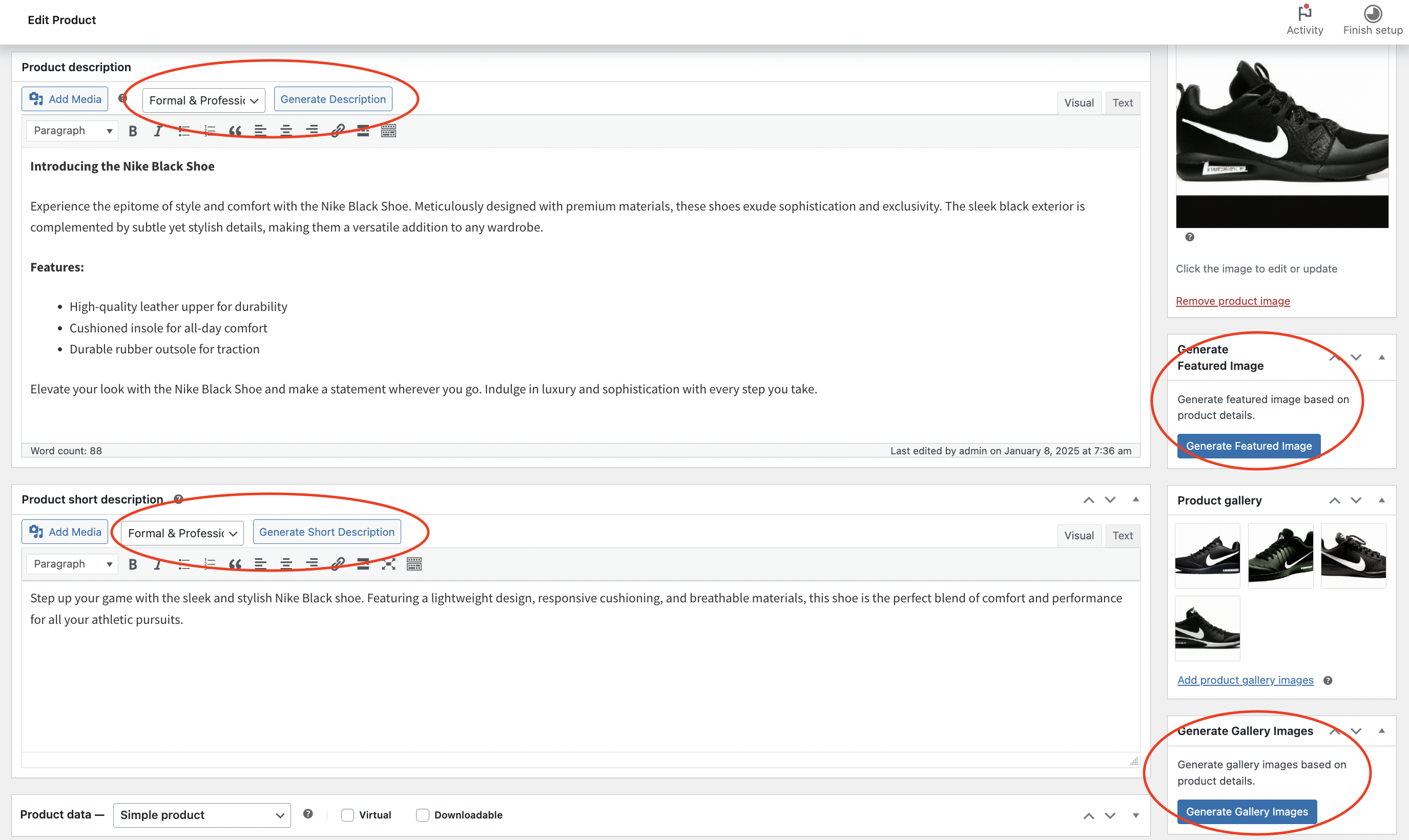
- Generate featured images for products
- Create full product gallery images
- Generate long product descriptions with tone control
- Generate short product descriptions
- Generate relevant brand suggestions
- Generate SEO-friendly product tags for better discoverability
- Formal & Professional
- Casual & Friendly
- Persuasive & Sales-focused
- Technical & Detailed
- Luxury & Premium
- Creative & Engaging
- Show the chatbot to logged-in customers, guest users, or both
- Display an admin-mode chatbot on WooCommerce admin pages (products, orders, coupons, settings) for administrators and shop managers
- Customise the chatbot name, avatar, colors, welcome message, and input placeholder
- Control which pages the chatbot bubble appears on
- Auto-delete chat history after a configurable number of days (via WP-Cron)
- Admins and shop managers can use the chatbot to create products, generate descriptions, and manage store tasks directly from the frontend
- Configurable minimum review threshold before the first summary is generated
- Automatic background regeneration via WP-Cron after a configurable number of new approved reviews
- Limits the reviews sent to the AI per generation to control token usage
- Structured output: summary paragraph, pros list, cons list, and overall sentiment
- Manual regeneration available from the product edit page
- Summaries stored as product meta, separate from user-generated content
- Create single or multiple WooCommerce coupons through the Store Assistant chatbot with a simple text command
- Supports percentage and fixed discount types
- Create BOGO (Buy One Get One) coupons with the WebToffee Smart Coupons plugin is active
- Duplicate coupon code handling built in
- Admin edit link returned in chat after coupon creation
webtoffee-ai) for easy troubleshooting.
Settings Overview
The plugin settings are organised across four tabs:
- AI Model Selection — Choose your AI provider and model for each generation feature. Enter a custom ChatGPT API key or use a configured AI Connector.
- Advanced Generation Settings — Toggle the AI-Generated Content Badge and customise the badge message.
- AI Review Summary — Configure the AI review summary feature: enable/disable, minimum reviews threshold, regeneration frequency, maximum reviews per generation, summary length, and model selection.
- Chatbot — Configure the Store Assistant chatbot: enable/disable, appearance, page visibility, AI model selection, and chat history management.
安装:
- Upload the plugin files to
/wp-content/plugins/ai-content-generator-for-woocommerce - Activate the plugin through the 'Plugins' menu in WordPress
- Go to WooCommerce > AI Content Generator
- Configure your AI provider or API key
- Start generating content from the product edit page
- Install the MCP Adapter. You can either:
- From this plugin directory run:
composer require wordpress/mcp-adapter - Or install and activate the standalone MCP Adapter plugin from WordPress.org.
- Configure your AI client (Claude Desktop, Cursor, etc.) to connect to the MCP server at:
https://your-site.com/wp-json/mcp/mcp-adapter-default-server/
屏幕截图:

常见问题:
Do I need an API key?
You need credentials for at least one supported AI provider to use the plugin. Configure an AI Connector under WordPress › Settings › AI (OpenAI, Google Gemini, or Anthropic), or enter a custom OpenAI API key in the plugin settings. When an AI Connector is configured, no per-plugin key entry is required.
Can I customise the image generation style?
The plugin uses product details including title, categories, and tags to generate contextually relevant images with a professional product photography style.
What image sizes are generated?
The plugin generates images at 1024x1024 pixels, suitable for most e-commerce needs.
What is the AI-Generated Content Badge?
When enabled in settings, a small notice is displayed below AI-generated product descriptions on the frontend, informing customers that the content was generated with AI assistance. The message is fully customisable.
What is the WordPress Abilities API / MCP Adapter?
The WordPress Abilities API (introduced in WP 6.9) provides a standard way to register and expose plugin functionality to AI systems and automation tools. The MCP Adapter builds on this to let AI clients like Claude Desktop and Cursor discover and call plugin features directly. Both are optional — the plugin works fully without them.
Can AI agents publish products directly?
The webtoffee-ai/create-product-draft ability always creates new products as drafts for review. If your workflow allows it, separate abilities can publish: webtoffee-ai/create-product-published creates a new product already published, and webtoffee-ai/publish-product-draft publishes an existing draft by product ID. All of these require a user with the manage_woocommerce capability; use publish abilities only when a human has approved the content.
更新日志:
- Added AI-powered Product Name (SEO Title) generation: suggests 5 SEO-friendly title alternatives based on the current product name, description, short description, and categories
- Added AI Review Summary module: automatically generates a concise AI summary of customer reviews for each product, displayed above the reviews list on the product page
- Review summaries are generated and updated in the background via WP-Cron once the configured minimum review threshold and regeneration frequency are reached
- Added dedicated "AI Review Summary" tab in plugin settings with controls for minimum reviews required, regeneration frequency, maximum reviews per generation, summary length, and model selection
- Added AI Review Summary meta box on the product edit page: displays the current summary with generation metadata and a manual "Generate Now" button; auto-generates on page load when enough reviews exist but no summary is stored yet
- Review summaries are stored as product meta and never mixed with user-generated review content
- Removed custom MCP server registration; the plugin now uses the shared default MCP server (
mcp-adapter-default-server) exclusively
- Fix: MCP adapter installation warning
- Refactored Store Assistant chatbot into modular integrations: BOGO, CSV import, and print/document handlers load only when their companion WebToffee plugins are active
- Admin chatbot: upload and import WooCommerce product CSVs from the admin bubble when Product Import Export for WooCommerce is active; imported product context is passed to the AI on the next message
- Chatbot: request invoice, packing slip, delivery note, and shipping label print/download links when Print Invoices, Packing Slips, Delivery Notes & Shipping Labels is active (admin and customer flows)
- Chatbot: create, list, toggle, trash, restore, delete, and duplicate BOGO coupons via the dedicated module when Smart Coupons BOGO is active
- Refactored Helper and Abilities classes into focused trait files for maintainability (no change to public behaviour)
- Backwards compatibility: existing installs with a saved API key automatically enable the custom API key toggle on upgrade
- Added built-in Store Assistant chatbot: frontend bubble on configurable pages (shop, product, cart, checkout, my account, and custom pages), optional guest access, and admin-mode bubble on WooCommerce admin screens for store managers
- Chatbot can create and manage products, generate descriptions/tags/brands/images, create WooCommerce coupons (with auto-generated codes), and update order status; customers can search products, view orders, and browse active coupons
- Chat history stored in a dedicated database table with per-user clear, admin history panel, and automatic cleanup via daily WP-Cron based on configurable retention days
- Added flexible AI provider support: OpenAI, Google Gemini, or Anthropic via official AI Connector plugins or a custom API key toggle, with per-feature model selection on a new AI Model Selection settings tab
- Settings page reorganised into AI Model Selection, Advanced Generation Settings, and Chatbot tabs
- Added Abilities and MCP tools when WebToffee Smart Coupons is active:
webtoffee-ai/create-bogo,webtoffee-ai/list-bogos,webtoffee-ai/toggle-bogo,webtoffee-ai/trash-bogo,webtoffee-ai/restore-bogo,webtoffee-ai/delete-bogo, andwebtoffee-ai/duplicate-bogo - Added
webtoffee-ai/search-product-id,webtoffee-ai/update-product,webtoffee-ai/delete-product, andwebtoffee-ai/update-order-statusAbilities for AI agents - Added “Request a feature” feedback on the settings page and uninstall feedback module
- Tested up to WordPress 7.0
- Added
webtoffee-ai/create-shop-couponAbility and MCP tool: create WooCommerce coupons with percent or fixed discount, optional fixed-cart vs fixed-product scope, duplicate-code handling, and admin edit link in the response - Admin notices for missing Abilities API (WordPress before 6.9) and missing MCP Adapter now use dismissible
wp_admin_notice()output - MCP Adapter detection: treats the standalone MCP Adapter plugin (
mcp-adapter/mcp-adapter.php) as installed, not only the Composervendorpackage - MCP server metadata version aligned with the plugin release
- Registered plugin's generation features as WordPress Abilities (WP 6.9+) under
webtoffee-ai-content, with centralized Helper static methods and thin AJAX/Ability handlers - Added MCP support via the default
mcp-adapter-default-server,composer.jsonintegration (composer require wordpress/mcp-adapter),meta.mcp.public => true, and admin notices for missing Abilities API or MCP Adapter package - Expanded product creation/publishing capabilities for AI agents:
webtoffee-ai/create-product-draft,webtoffee-ai/create-product-published, andwebtoffee-ai/publish-product-draft - Enhanced product creation flow with full WooCommerce CSV field support, shared schema methods, and consolidated Helper implementations (
create_product,publish_product, taxonomy/image helpers)
- Added AI-Generated Content Badge: optional frontend notice for AI-generated descriptions, with customisable message
- Added "Show AI Badge" and "Badge Message" fields to the settings page
- Added
_wtofe_ai_generatedpost meta flag, set automatically when a description is applied - Refactored plugin to follow WordPress Plugin Boilerplate directory structure
- Extracted shared logic into Helper, Loader, I18n, Admin, and Public classes
- HTML extracted from PHP methods into dedicated partial files
- All direct API calls removed from AJAX handlers — centralised into Helper
- Tested OK with WooCommerce 10.3.5
- Tested OK with WordPress 6.9
- Tested OK with WooCommerce 10.2
- Tested OK with WooCommerce 10.0.2
- Added product brands generation functionality
- Added product tags generation functionality
- Tested OK with WordPress 6.8 and WooCommerce 9.8
- Fixed issue with image generation not working on product edit page
- Set image alt text, caption, and description to product name
- Initial release
- Featured image generation
- Gallery image generation
- Product description generation with multiple tones
- Debug mode
- WooCommerce integration