AI Content Writer - Automatic Content Generator and Auto Poster
| 开发者 |
beautifulplugins
kawsarahmedr |
|---|---|
| 更新时间 | 2026年9月5日 23:36 |
| WordPress版本: | 7.1 |
| 版权: | GPLv2 or later |
| 版权网址: | 版权信息 |
详情介绍:
安装:
- Upload the plugin files to the
/wp-content/plugins/ai-content-writerdirectory, or install the plugin through the WordPress plugins screen directly. - Activate the plugin through the 'Plugins' menu in WordPress.
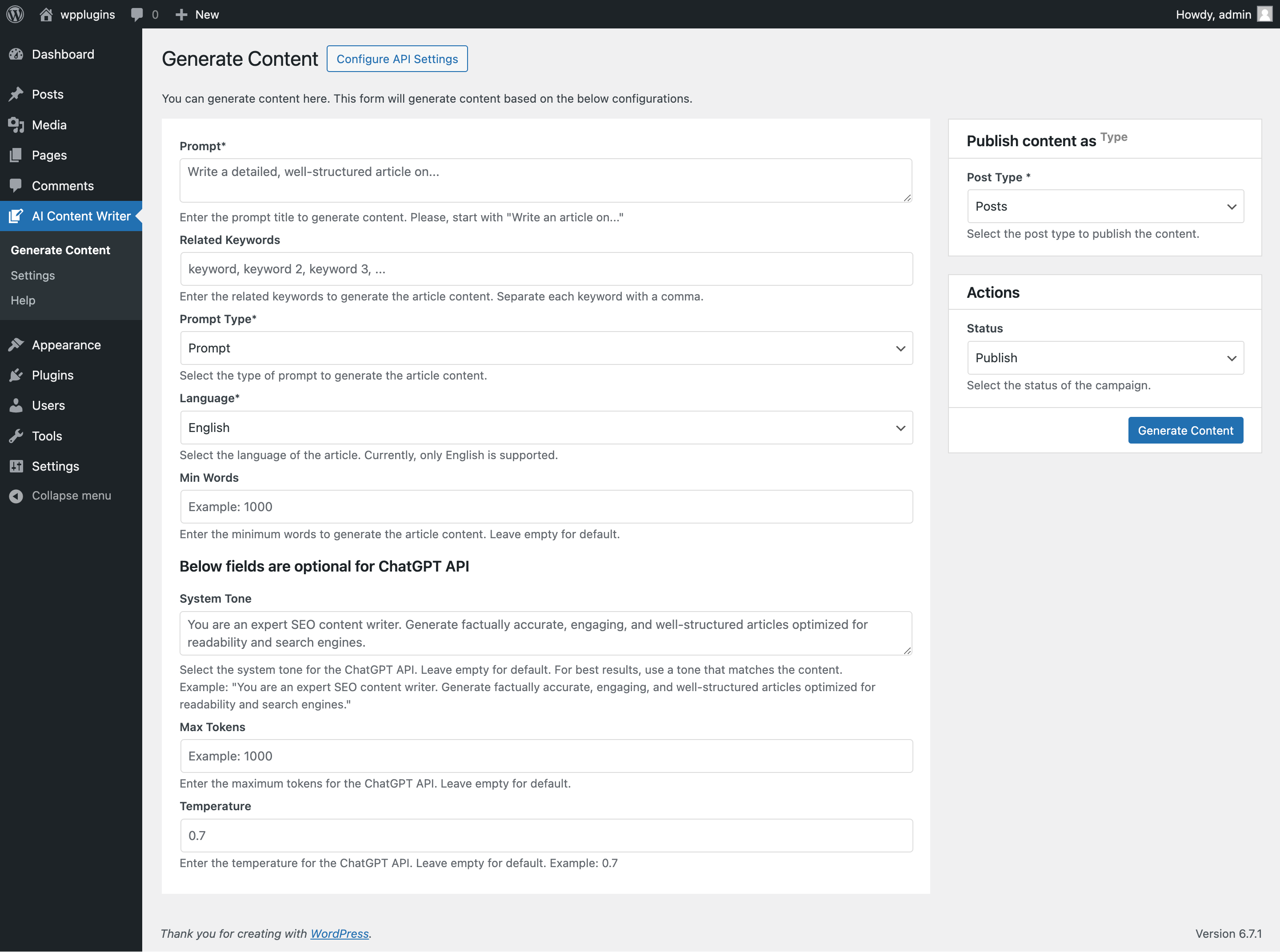
- Navigate to WordPress Admin Dashboard > AI Content Writer > Generate Content to start using the plugin and generate content using AI.
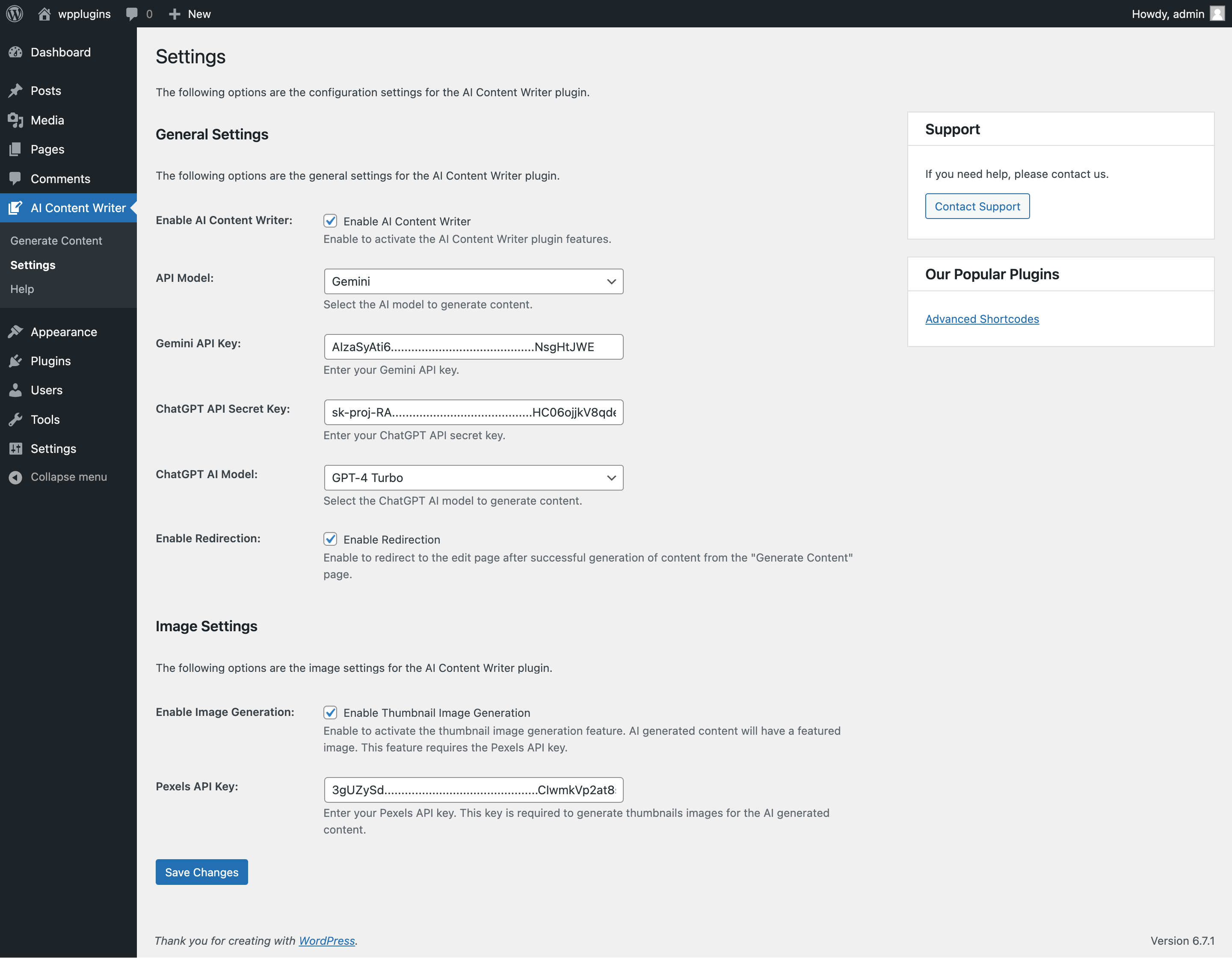
- Configure your API settings and start generating content.
屏幕截图:


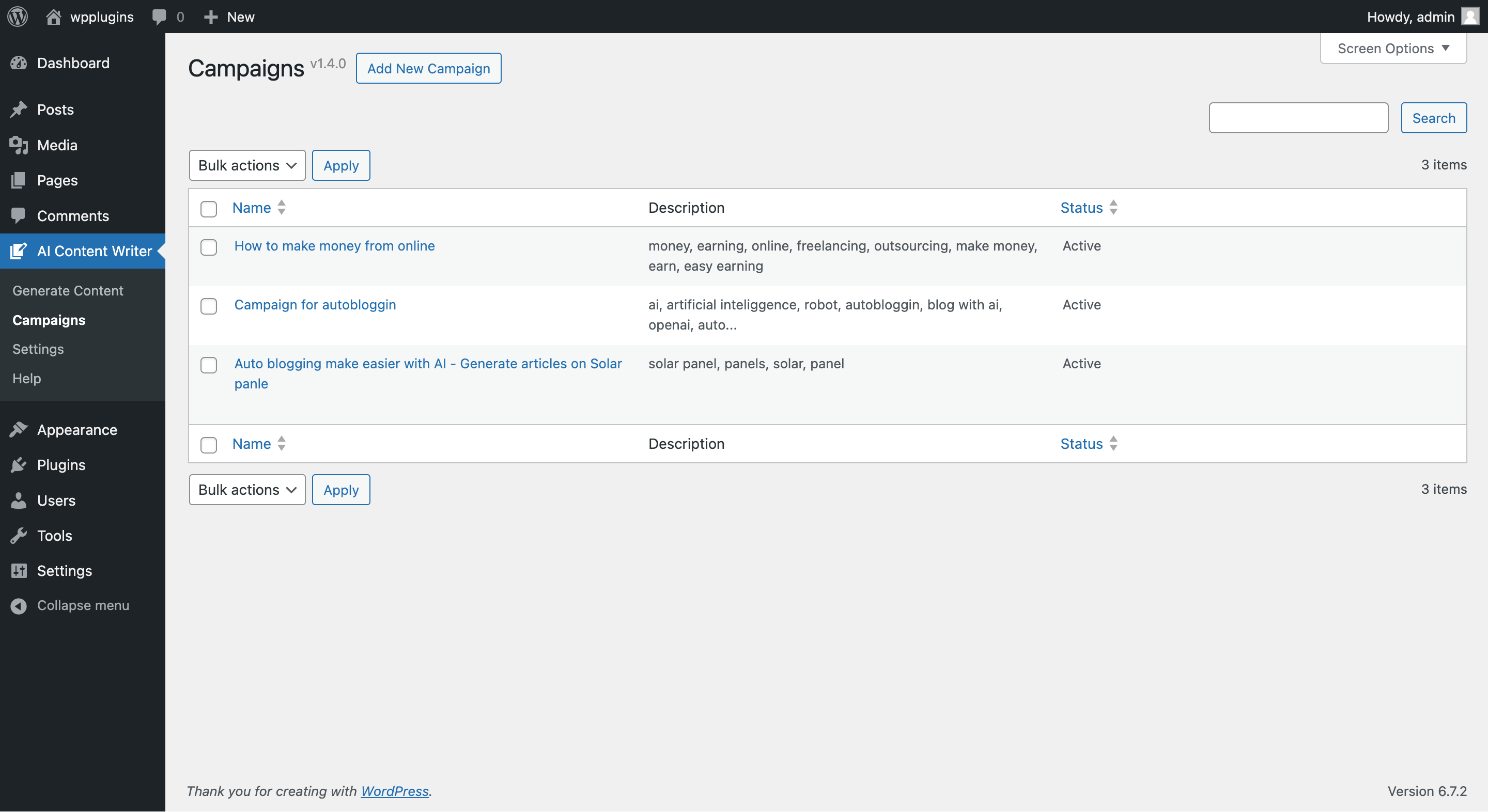
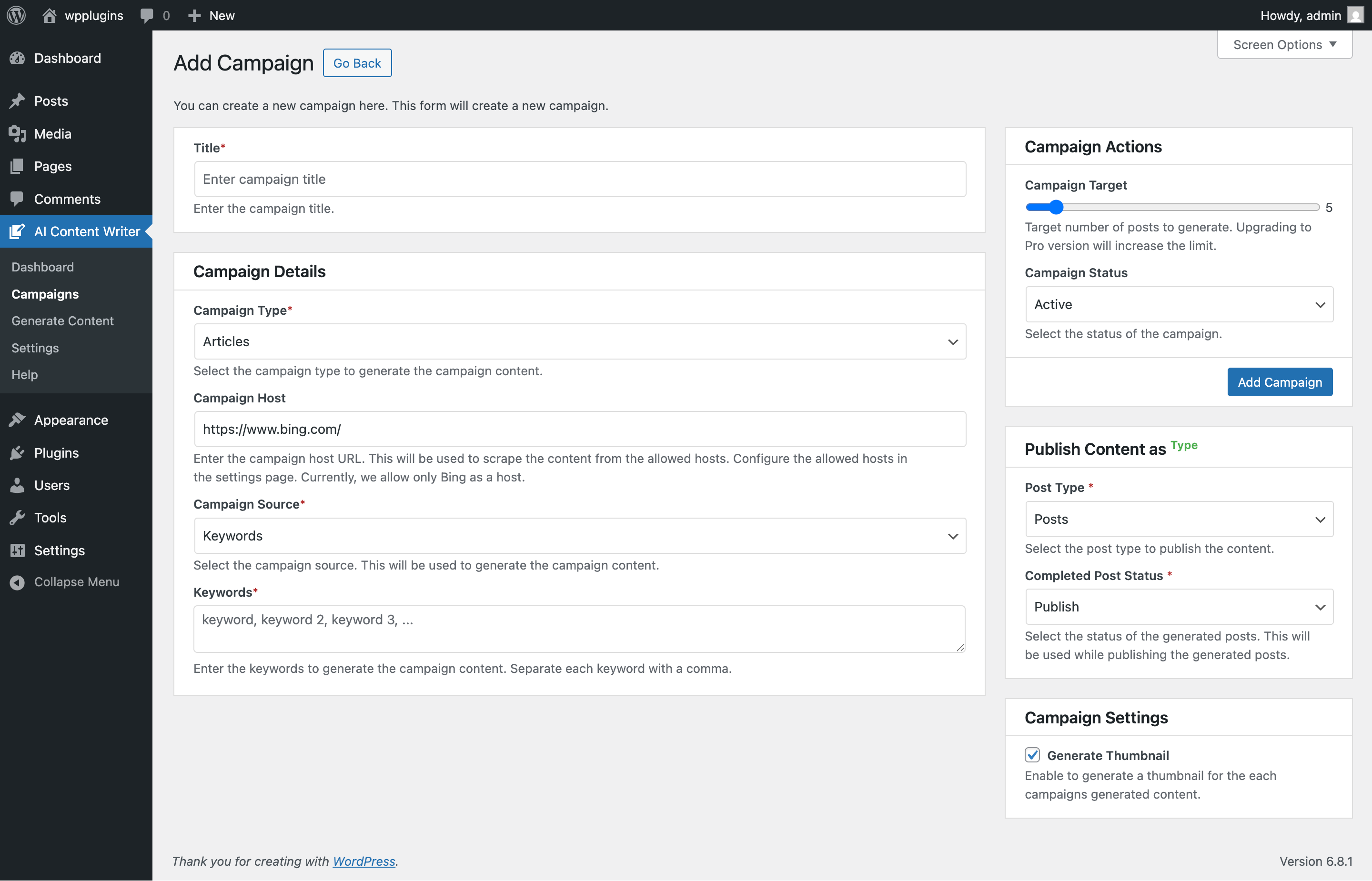
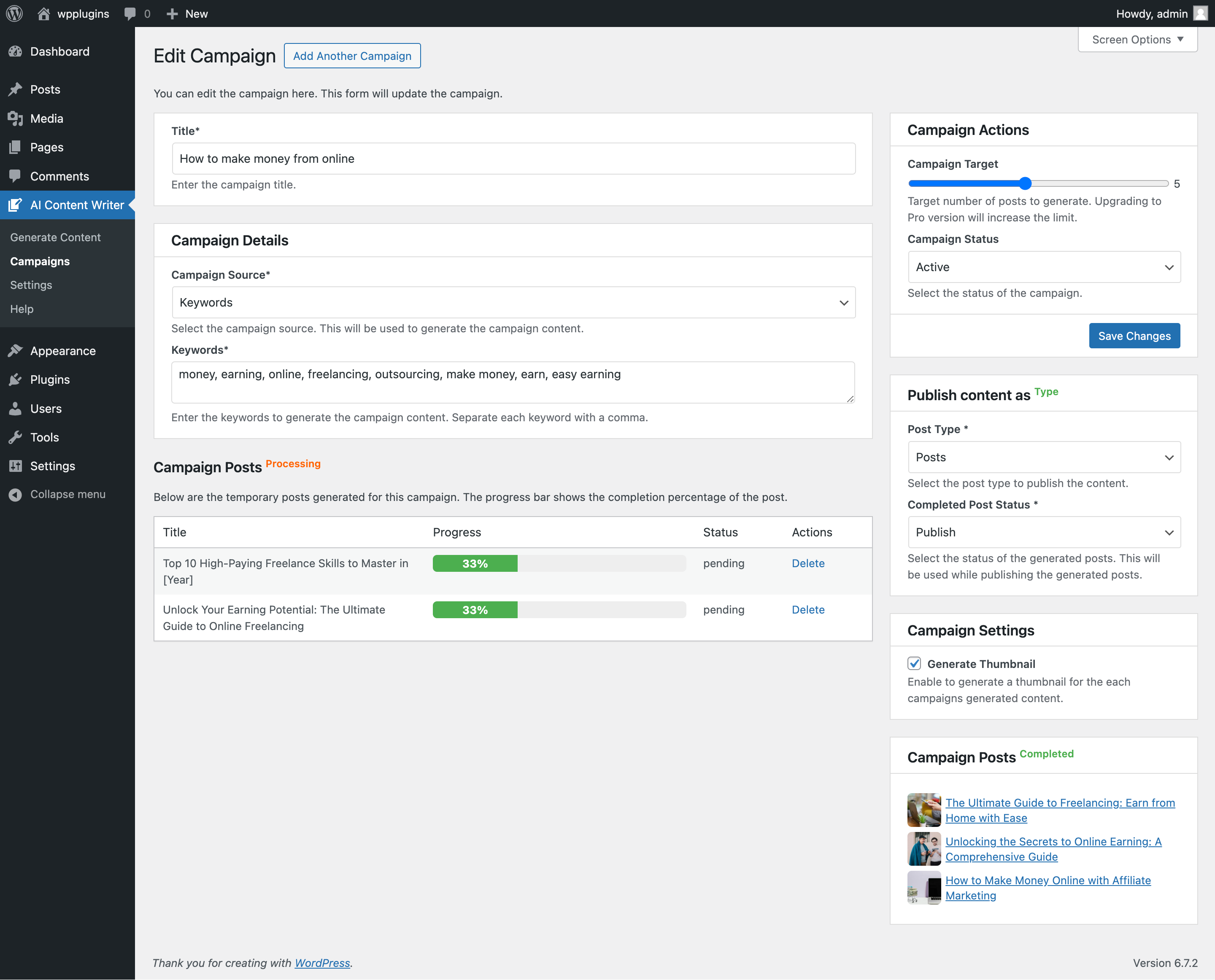

常见问题:
Is the plugin free to use?
Yes, the plugin is free to use. However, you may need to purchase a subscription to use the AI content generation feature.
How do I get started with the plugin?
To get started, install the plugin from the WordPress plugin repository and configure your API settings. Once you have done that, you can start generating content using AI.
How do I configure my API settings?
To configure your API settings, navigate to WordPress Admin Dashboard > AI Content Writer > Settings and enter your API keys in the respective fields. You can get API keys from services like Google Gemini, ChatGPT, and others.
Is the Google Gemini API free to use?
Yes, the Google Gemini API has a free tier, so you can get started right away without a subscription. You may need to upgrade to a paid plan for higher usage limits. Other AI models like ChatGPT (OpenAI) require a paid API subscription.
How do I get API keys for the Google Gemini API?
To get API keys for the Google Gemini API, you need to sign up for a Google Cloud account and create a project. Once you have created a project, you can enable the Google Gemini API and generate API keys to use with the plugin.
Is the ChatGPT API free to use?
No, the ChatGPT API is a paid service. You need to purchase a subscription to use the ChatGPT API with the plugin. You can get API keys from OpenAI to use the ChatGPT API with the plugin.
How do I get API keys for the ChatGPT API?
To get API keys for the ChatGPT API, you need to sign up for an OpenAI account and create a project. Once you have created a project, you can generate API keys to use with the plugin.
Is the Pexels API free to use?
Yes, the Pexels API is free to use. You can get started with the Pexels API right away without any subscription.
How do I get API keys for the Pexels API?
To get API keys for the Pexels API, you need to sign up for a Pexels account and create a project. Once you have created a project, you can generate API keys to use with the plugin.
Can I generate content without an API key?
No, you need to configure your API settings to generate content using AI. You can get API keys from services like Google Gemini, ChatGPT, and others to use the plugin.
Can I generate content for any niche?
Yes, you can generate content for any niche using the plugin. The plugin supports a wide range of topics and can generate content on virtually any subject.
Does the plugin work with my SEO plugin?
Yes. When Yoast SEO, Rank Math, All in One SEO, or SEOPress is active, every generated post's SEO title, meta description, and focus keyword are written directly into that plugin — no copy-pasting. Without an SEO plugin, the data is stored with the post and a basic meta description tag is output automatically.
Can I generate content in multiple languages?
Yes, you can generate content in multiple languages using the plugin. The plugin supports multiple languages, allowing you to create content in the language of your choice.
Can I customize the content generated by the plugin?
Yes, you can customize the content generated by the plugin to suit your needs. You can edit the content, add images, and make other changes as needed.
Is the content generated by the plugin unique?
Yes, the content generated by the plugin is unique and well-researched. The plugin uses advanced AI technology to create high-quality content that is ready to publish.
Can I use the plugin to generate content for commercial purposes?
Yes, you can use the plugin to generate content for commercial purposes. However, you may need to purchase a subscription to use the AI content generation feature.
Can I use the plugin on multiple websites?
Yes, you can use the plugin on multiple websites. However, you may need to purchase a subscription to use the AI content generation feature on each website.
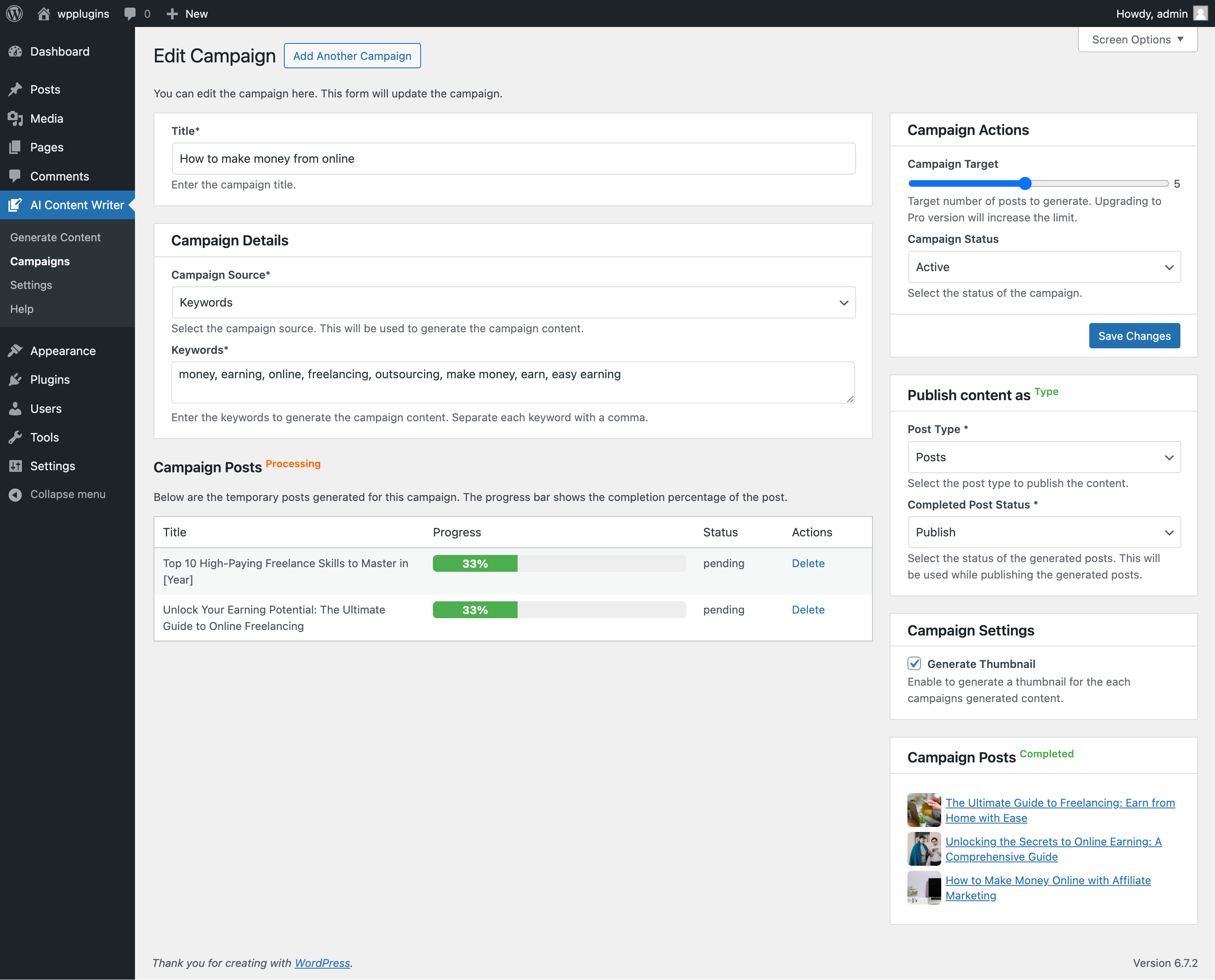
My campaign isn't publishing anything. What should I check?
First, how long it has been. A campaign's first run happens one full interval after you save it, so a weekly campaign does nothing for seven days. Each run then advances one post by one step (title, then content, then featured image, then publish), so an hourly campaign publishes its first post after a few hours. Use the Run Campaign button on the campaign edit screen to start a run straight away. Then check AI Content Writer > Logs — every failure is recorded there with the provider's own error message. The usual causes are a missing or invalid API key, a provider quota, the campaign target already being reached, or WP-Cron not firing on a low-traffic site.
A post is stuck partway through and never publishes.
Open AI Content Writer > Logs and filter to that campaign — the reason is recorded there. The two common cases are an AI provider with no valid API key (the post keeps its place and resumes once you save a key), and "Generate Thumbnail" being enabled while no image API key is saved. A post that needs a featured image waits until it gets one, so either add a valid Pexels, Unsplash, or Pixabay key under Settings > API Settings, or untick Generate Thumbnail on the campaign.
Does WP-Cron need anything special on my host?
The pipeline runs on WP-Cron, which WordPress triggers from incoming page requests. On a new or low-traffic site there may not be enough traffic to fire it on time, so runs drift late. Either hook WP-Cron into a real system cron, or use an uptime monitor that requests your site every few minutes. Managed hosts that do not offer system cron (including WordPress.com) usually provide a monitoring option that serves the same purpose.
Can I get support for the plugin?
Yes, you can get support for the plugin by visiting the plugin's support page on the WordPress plugin repository. You can also contact the plugin developers for assistance with any issues or questions you may have.
Minimum requirements
- WordPress 5.3 or greater
- PHP version 7.4 or greater
- MySQL version 5.6 or greater
- MariaDB version 10 or later
更新日志:
- Fix: Failed returns from the AI provider are now logged instead of being silently ignored, so you can see why a post is stuck and how to fix it.
- Fix: Few known issues are fixed.
- Fix: Fixed campaigns are not properly performing when manually run using the "Run Campaign" button. The button skipped the run whenever the campaign already had a scheduled one — which is always the case after saving — so it reported success while doing nothing. On long frequencies (weekly, monthly) there was no way to start a campaign by hand at all. It now cancels the pending run and starts one immediately.
- Fix: Content generation with no API key saved stored an empty article and logged it as a success. Posts stayed at the same progress forever while the log claimed they were written. Nothing is saved now unless the AI actually returns an article.
- Fix: A campaign whose AI provider has no API key now says so in the logs and keeps its queued posts, instead of failing quietly and discarding them after two attempts. The posts resume on their own once the key is saved.
- Fix: A featured image that could not be fetched returned silently, leaving the post waiting on an image forever with nothing in the logs to explain why. The reason is now logged along with the provider's own error message and how to fix it — add a valid image API key, or turn off "Generate Thumbnail" for the campaign.
- Fix: Campaigns stopped rescheduling themselves after any cycle with nothing to do, so a campaign that had reached its target never resumed when the target was raised later — it had to be re-saved by hand. Campaigns now always re-arm, and existing ones are re-armed automatically when you update.
- Fix: Stopped repeating the same "nothing to do" log entry on every cycle, which buried real entries on frequent schedules.
- Compatibility: Make compatible with WordPress 7.1.
- New: Added support for the latest Google Gemini models (Gemini 3.6 Flash, 3.5 Flash, 3.5 Flash-Lite, & 3.1 Flash-Lite). And removed deprecated 1.5 Flash, & 1.5 Pro models.
- Update: Article campaign's host is now dropdown, so you can choose the source that best fits your niche.
- Fix: Fixed few known issues and removed unused code and options.
- New: Autopilot campaign type — create a campaign with zero input: pick an AI provider and Autopilot analyzes your existing published content (titles, categories, tags), then writes new articles matched to your site's niche without duplicating existing coverage. Requires at least 5 published posts.
- New: Language selection in the block editor — the AI sidebar and block toolbar modal now offer the same 23-language dropdown as the classic editor.
- New: Support for the latest OpenAI models — GPT-5.6 (Sol, Terra, Luna), GPT-5.5, GPT-5.4 (plus mini and nano), and GPT-5.2 join the existing GPT-5, GPT-4.1, and GPT-4o options.
- Enhance: "Test Connection" now refreshes the saved model list for that provider, so newly supported AI models appear without waiting for the 24-hour cache to expire. Click Test Connection, then reload the settings page.
- New: Elementor support — the "AI Writer" button now works inside Elementor's Text Editor widget, with editor styling that matches the Elementor panel.
- Fix: The AI Writer button in the Elementor Text Editor widget did nothing when clicked because its scripts were never loaded in Elementor's editor canvas.
- Enhance: The classic editor modal is now wider for a more comfortable writing view.
- Fix: Fixed few known issues.
- Update: Updated the plugin screenshots for better user experience.
- New: SEO plugin integration — the AI-generated SEO title, meta description, and focus keyword are written automatically into Yoast SEO, Rank Math, All in One SEO, or SEOPress on publish.
- New: SEO Integration panel on the General settings page shows which SEO plugin was detected.
- New: Per-campaign "Write SEO Meta" toggle.
- New: Meta-description fallback — sites without an SEO plugin get a basic meta description tag for generated posts (toggleable, never emitted alongside an SEO plugin).
- New: Classic editor support — an "AI Writer" button on classic (TinyMCE) editor screens, including WooCommerce product descriptions, with generate and rewrite-selection modes.
- New: Structured AI responses — articles are generated as structured data (title, excerpt, SEO title/description, focus keyword, URL slug, and category/tag suggestions) and applied to posts automatically.
- New: Review queue — Approve (publish now) or Regenerate individual campaign posts from the campaign edit screen before they go live.
- New: Bulk title import — paste your own article titles into an AI campaign to queue them for content generation.
- New: Choose Unsplash or Pixabay as the featured-image source alongside Pexels.
- New: Filter the Logs page by campaign via the new "View logs" link on the Campaigns list.
- New: Content language selection — AI campaigns and instant generation can now write in 23 languages.
- New: Writing-tone presets (professional, conversational, friendly, and more) per campaign.
- New: Assign an author, categories, and tags to every post a campaign publishes.
- New: Campaign Progress and Activity (last/next run) columns on the Campaigns page.
- New: "Test Connection" buttons for Gemini, ChatGPT, and Pexels on the API settings page.
- New: Saved API keys are now displayed masked on the settings page for better security.
- New: Featured images get automatic alt text and photographer attribution from Pexels.
- New: Pluggable AI provider framework — additional providers can be registered via the new
aicw_ai_providersfilter. - Enhance: "Run Campaign" now queues the run in the background, preventing timeouts on long generations.
- Enhance: Unified Markdown-to-HTML conversion for consistent formatting across all providers.
- Enhance: Stronger duplicate detection — matching titles by normalized slug catches case and punctuation variants.
- Fix: Block editor AI generation now works when ChatGPT is the selected provider.
- Fix: Campaigns no longer stall on temporary posts that are missing a title.
- Fix: Correct API parameters are now sent to all GPT-5 family models.
- Fix: Campaign logs no longer report success when content generation has failed.
- Fix: Failed featured-image downloads are now logged instead of being silently ignored.
- Fix: The "Allowed Hosts" setting value is now saved correctly.
- Fix: Content generation no longer breaks when the AI response contains no bold title segment.
- Fix: Registered the 5 and 10 minute cron intervals used by campaign frequencies.
- New: Update the plugin UI for better user experience.
- Fix: Few known issues are fixed.
- Fix: Few known issues are fixed.
- New: Added support for campaign-based frequency control.
- Fix: Duplicate posts with the same title are no longer created when generating content.
- Compatibility: Make compatible with WordPress 7.0.
- New: Added support for generating images with the "Image Generation" plugin.
- Fix: Few known issues are fixed.
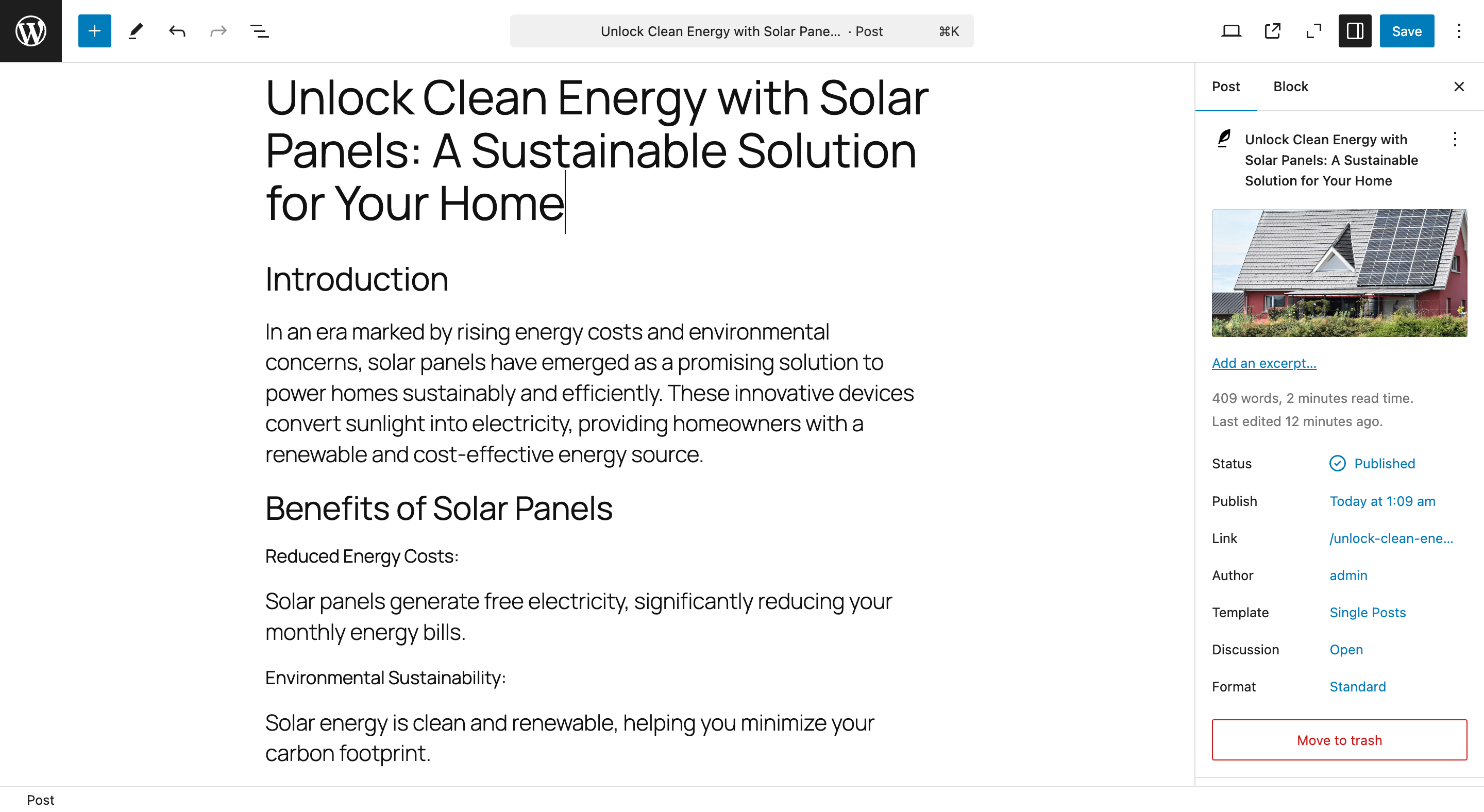
- New: Introduced block editor integration, allowing content generation directly within the editor using a standalone block or sidebar panel for instant full-article creation.
- Fix: Resolved several known issues to improve overall stability and performance.
- Enhance: Refined the user interface to provide a smoother and more intuitive content generation experience.
- Fix: Few known issues are fixed.
- Fix: Issue with campaigns that try to generate all their target posts at once.
- Compatibility: Make compatible with WordPress 6.9.
- Fix: Fixed minor bugs and improved performance.
- Fix: Gemini model is not working issue fixed.
- Enhance: Update the settings page layout for better user experience and handling of API keys and other settings.
- New: Added Gemini and OpenAI as service providers to handle the content generation process more efficiently.
- New: Added support for Admin notices to inform users about important updates and information.
- Fix: Fixed minor bugs and improved performance.
- Enhance: Adjusted the OpenAI API request header data to reduce the unexpected errors.
- New: Added logs page to view the logs of the content generation process.
- Enhance: Improved the listable layout for better user experience.
- Fix: Fixed minor bugs and improved performance.
- New: Added support for OenAI updated API models (gpt-5, gpt-5-mini, gpt-5-nano and more).
- New: Added support for running the campaign manually from the campaign edit page.
- New: Added support for decoding Bing.com or Bing.com/news source URLs to get the actual article title and content.
- Enhance: Improved the content generation accuracy and quality.
- Fix: Fixed minor bugs and improved performance.
- New: Update plugin UI for better user experience.
- Fix: Few known issues are fixed.
- Fix: Fixed a bug that caused the plugin to crash when generating instant content with Gemini.
- New: Added support for filtering content.
- New: Added support for inserting custom content into the generated content.
- Update: Increased the maximum campaign target limit to 20.
- Enhance: Improved the user interface for better user experience.
- Fix: Fixed minor bugs and improved accuracy of content generation.
- Enhance: Update the plugin banner & icon.
- New: Added new campaign types for generating content in bulk.
- New: Added support for generating content from search engines like Bing.com and Bing.com/news.
- New: Added support for generating content from RSS feeds.
- Enhance: Expand functionality, improve user experience, and streamline campaign management.
- Secure: Enhanced form validation, and improved settings handling.
- Enhance: Added SEO-Friendly title and description for AI Content Writer.
- New: Dashboard page to display the post statistics, plugin overview and features.
- Enhance: Update layout and design for better user experience.
- Fix: Minor bug fixes and improvements.
- New: Added support for automatic content generation with AI.
- New: Added campaign feature to generate content in bulk.
- Enhance: Improved user interface for better user experience.
- Fix: Minor bug fixes and improvements.
- Enhance: Added settings page link to the plugin action links.
- New: Added support for ChatGPT API for content generation.
- New: Added support for OpenAI API for content generation.
- Enhance: Enhanced the user interface for better user experience while generating content.
- New: Added spinner to indicate content generation in progress.
- Enhance: Rename the plugin initialization function to avoid conflicts.
- Initial Release