AI Scrape Protect
| 开发者 |
daanverbaan
uisce |
|---|---|
| 更新时间 | 2026年9月18日 21:43 |
| 捐献地址: | 去捐款 |
| PHP版本: | 8.0 及以上 |
| WordPress版本: | 7.1 |
| 版权: | GPLv2 or later |
| 版权网址: | 版权信息 |
详情介绍:
robots.txt file for the most common AI scraping bots and including meta tags to control how your content is used.
Version 5.0 introduces a full settings page with granular per-bot control, categorised bot management, AJAX-powered toggles, and support for custom user agents.
Features
- Adds
User-agentandDisallowrules to yourrobots.txtfile to block a comprehensive list of AI scraping bots. - Generates compact robots.txt output: all blocked bots are grouped under a single
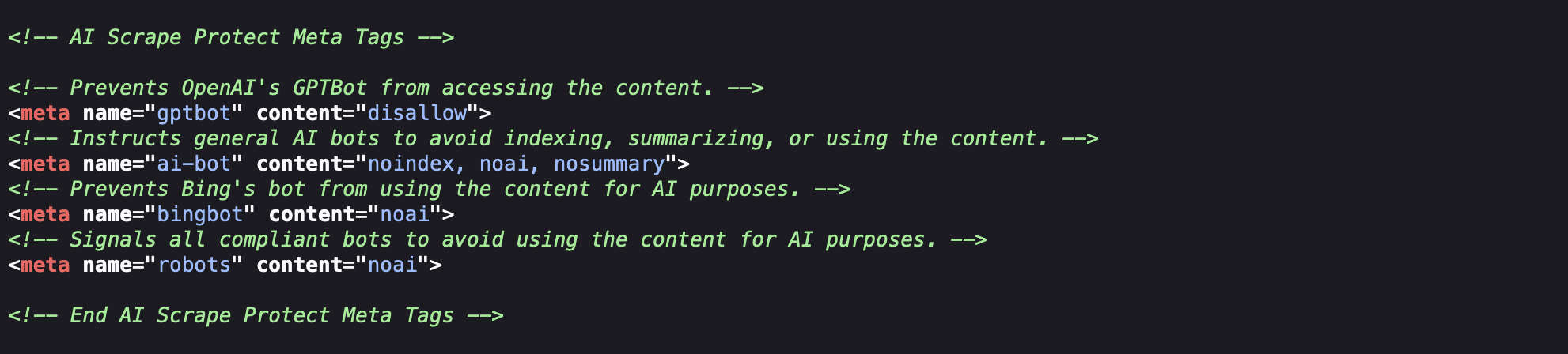
Disallow: /directive. - Introduces meta tags in the HTML
<head>to provide additional instructions to AI bots. - Separate toggles for content meta tags (
noai,nosummary,DisallowAITraining) and image meta tags (noimageai). - Settings page with five categorised tabs: Search Engines, AI Training, AI Search & Answers, General Indexing, Custom Bots.
- Group toggle per category to block or allow all bots in that category at once.
- Individual per-bot toggle with description and company information for each bot.
- Custom bots tab: add and remove your own user agent strings.
- Global enable/disable toggle and separate toggles for robots.txt and meta tags.
- "Apply default settings" button to reset all options.
- Admin bar icon linking to the settings page (visible to administrators only). Icon reflects the current enabled state.
- Physical
robots.txtdetection notice: warns you if a file in your root directory overrides WordPress's virtual robots.txt. - Fully AJAX-powered settings page: changes are saved instantly without page reloads.
- Extensible via the
aisp_user_agentsfilter for developers. - Multisite note: settings are stored per site using
get_option/update_option. Network-wide configuration is not supported.
安装:
- Upload the
ai-scrape-protectfolder to the/wp-content/plugins/directory. - Activate the plugin through the 'Plugins' menu in WordPress.
- Go to Settings > AI Scrape Protect to configure your preferences.
屏幕截图:


常见问题:
How does this plugin protect my site from AI scraping?
The plugin adds specific User-agent entries to your robots.txt file to instruct common AI scraping bots not to crawl your site. It also adds meta tags in the HTML <head> to signal AI bots that your content should not be used for training or summarisation.
Will this completely stop AI scraping of my site?
No. robots.txt and meta tag directives are voluntary signals. Most reputable AI companies respect them, but malicious or poorly behaved scrapers may not. This plugin is a measure to discourage scraping, not a technical enforcement mechanism.
I have a physical robots.txt file in my WordPress root. Will the plugin work?
No. When a physical robots.txt file exists, WordPress's virtual robots.txt is bypassed entirely, and this plugin's modifications will not be applied. The plugin will display a warning on its settings page when a physical file is detected. Remove or rename the physical file to allow the plugin to function.
Can I add bots that are not in the list?
Yes. Go to Settings > AI Scrape Protect and open the Custom Bots tab. Enter the exact user agent token as it appears in your server logs.
What is the difference between AI Training bots and AI Search & Answers bots?
AI Training bots collect your content to train language models. AI Search & Answers bots retrieve content to generate answers for users of AI search tools like ChatGPT Search or Perplexity. Blocking AI Search bots may prevent your site from appearing in AI-generated answers. Blocking AI Training bots does not affect your visibility in regular search engines.
What is the difference between Search Engines and the other categories?
Search engine bots such as Googlebot and Bingbot are allowed by default. Disabling one will add it to the blocked list and remove it from the explicit allow block in robots.txt. Only do this if you intentionally want to remove your site from that search engine.
Can I allow some bots while blocking others?
Yes. Use the individual toggles on the settings page to control each bot separately.
What does the aisp_user_agents filter do?
Developers can use this filter to add or modify bots programmatically from a theme or another plugin, without editing the plugin files directly.
Does this plugin work on Multisite?
Settings are stored per site using standard WordPress options. Network-wide configuration is not supported.
I deactivated the plugin. What happens to my settings?
Your settings are preserved in the database. Reactivating the plugin will restore your previous configuration. If you want to remove all plugin data, use the "Apply default settings" button before deactivating, or delete the options manually from the database.
更新日志:
- Added new AI training bots: MistralAI-Training, Google-CloudVertexBot, KimiBot, NavuBot, FishBot, WARDBot, BorderxBot.
- Added marketing and data broker bots to General Indexing category (disabled by default): AwarioSmartBot, AwarioRssBot, SemrushBot-SWA, QualifiedBot.
- Sorted bot list alphabetically per category.
- Updated activation hook to use named function instead of anonymous function.
- Tested up to WordPress 7.1.
- Complete rewrite with modular file structure (includes/class-robots.php, class-meta-tags.php, class-admin-bar.php, class-settings-page.php, class-ajax.php, bots.php).
- Added full settings page under Settings > AI Scrape Protect.
- Added AJAX-powered toggles: all settings save instantly without page reloads.
- Added five bot categories: Search Engines, AI Training, AI Search & Answers, General Indexing, Custom Bots.
- Added individual per-bot toggles with descriptions and company information.
- Added group toggle per category.
- Added Custom Bots tab for user-defined user agent strings.
- Added global enable/disable toggle and separate toggles for robots.txt and meta tags.
- Added "Apply default settings" button.
- Added physical robots.txt detection notice.
- Added admin bar icon linking to settings page (administrators only). Icon reflects current enabled state.
- Switched robots.txt output to compact grouped format (all bots under a single Disallow: /).
- Separated meta tags into content group (noai, nosummary, DisallowAITraining) and image group (noimageai).
- Removed duplicate meta name="robots" tags; each group now outputs one combined tag.
- Removed deprecated bot entries: anthropic-ai, Claude-Web (replaced by ClaudeBot), BardBot (Google Bard is now Gemini), NeevaBot (Neeva shut down in 2023).
- Added new bots: Claude-SearchBot, Claude-User, Google-Agent, Google-Extended, GoogleOther, GPTBot-Preview, ClaudeResearchBot, FirecrawlAgent, iAskAI-Crawler, Perplexity-User.
- Replaced Always Allowed category with Search Engines: all search engine bots are now individually toggleable, not locked. Includes Googlebot variants and Bingbot.
- Updated Requires PHP to 8.0.
- Tested up to WordPress 7.0.
- All links updated to codesurf.eu.
- Extensible via aisp_user_agents filter.
- Added six new AI scraping bots to the block list: 360Spider, ChatGLM-Spider, Sogou, Baiduspider, ErnieBot, DeepseekBot.
- Removed DuckDuckBot from the blocklist.
- Specifically allowed Googlebot, Googlebot-Image, Googlebot-News, Google-PageSpeed, Google-Site-Verification and Lighthouse.
- Improved compatibility with other plugins modifying robots.txt by no longer injecting a redundant "User-agent: *" directive.
- Increased priority for the robots.txt modification.
- Updated modify_robots_txt to add all User-agent rules in a single loop.
- Added four new AI training bots: Claude-User, DataForSeoBot, GoogleOther, TurnitinBot.
- Added two new AI bots: Amazon-AI and AnthropicBot.
- Project links moved from uisce.eu to codesurf.eu. No functional changes.
- Added new AI bots: DuckDuckBot, OpenAIContentCrawler, YandexBot, NeevaBot, AIMatrixCrawler.
- Improved admin bar icon.
- Added admin bar icon functionality.
- Updated meta tags for improved AI scraping protection.
- Updated meta tags for improved AI scraping protection.