
AICOM - AI Commander
| 开发者 | dudaster |
|---|---|
| 更新时间 | 2026年10月22日 03:19 |
| PHP版本: | 7.4 及以上 |
| WordPress版本: | 7.1 |
| 版权: | GPL-2.0-or-later |
| 版权网址: | 版权信息 |
标签
下载
详情介绍:
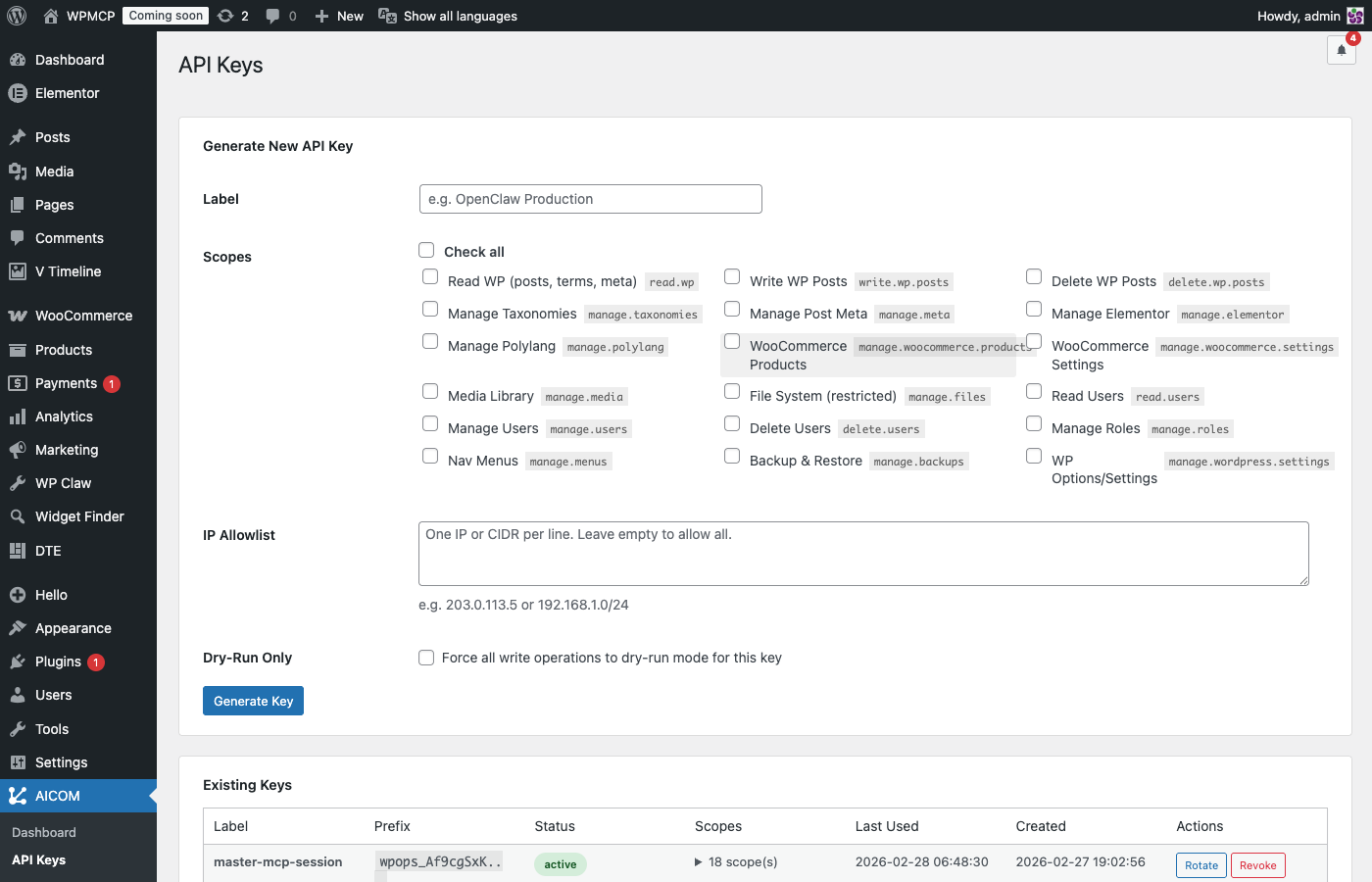
- Scope-based API keys — each key grants access only to the operations you explicitly allow. One key for read-only content review, another for full publishing access.
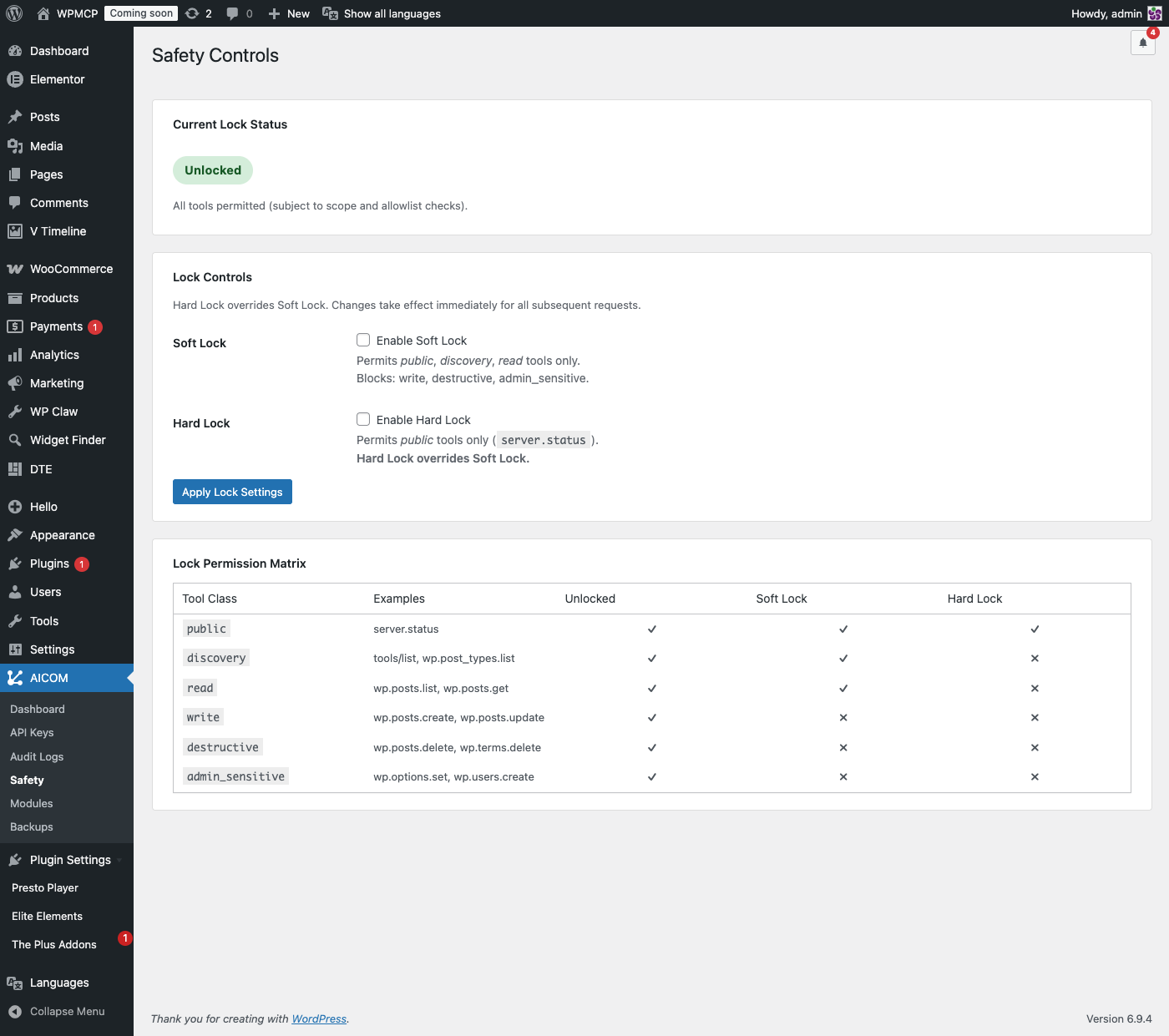
- Soft Lock / Hard Lock — freeze all write operations (Soft) or block everything except public tools (Hard) with one click from the admin bar or Safety page.
- Working Hours Schedule — automatically apply Soft or Hard Lock outside your configured working hours and days. Agents can't make changes at night or on weekends unless you explicitly override it.
- Dry-run mode — test any operation before it runs. See exactly what would change without touching live data.
- Confirm flag — destructive operations require an explicit
"confirm": trueparameter. Accidental deletions are prevented by design.
content field for full client compatibility, protocol errors use standard integer codes, and errors from a tool that actually ran are reported as isError so your agent can see and react to them. Pass an idempotency_key on any write call and a retried request (dropped connection, flaky client) returns the original result instead of repeating the action — no duplicate posts from an accidental double-send. Responses are hardened against corrupted output, so your agent always gets valid JSON back.
Works Well With Small & Local Models
Not every AI agent is Claude or GPT-4 class. AICOM is built to stay usable even for smaller, local, or context-constrained models:
tools/search— keyword search over tool names and descriptions, tuned for models that don't know exact tool names: handles full-sentence queries ("how do I add a photo to my page"), common synonyms (shop → WooCommerce, translate → Polylang/WPML), typo tolerance, and plurals.tools/describe— fetch one tool's full parameter schema by exact name, on demand — pairs withtools/searchso a model never has to load the entire tool catalog just to find what it needs.- Compact Tool List (per API key) — an optional setting that strips parameter descriptions from
tools/listto cut context size by roughly a third, while always keeping every parameter's name, type, and whether it's required — a model can still build a correct call without the extra explanatory text. Off by default; capable models see the full list as before. - Scoped discovery —
tools/listonly ever shows the tools a key can actually call. A key without WooCommerce access never sees WooCommerce tools, so a smaller model isn't wading through options it's not allowed to use anyway.
manage.skills to create or edit one.
Accessibility Audits — New in v3.2.0
AICOM now includes a dedicated Accessibility module so your AI agent can audit and fix WCAG issues across your entire site — no external tools or services required:
- Site report — instantly see how many images are missing alt text across your entire media library, with a ranked preview of the top offenders and a percentage score.
- Post audit — scan any post or page for heading hierarchy errors (missing H1, skipped heading levels), images without alt text, and links with non-descriptive anchor text ("click here", "read more"). Each issue is rated by severity and the post receives an overall accessibility score from 0 to 100.
- Fix in place — set alt text on any media library image in one call. Pass an empty string to correctly mark it as decorative (
aria-hidden). Full dry-run support so you can preview changes before saving. - Screenshot before & after — combine AICOM's audit tools with your AI agent's browser capabilities to capture a visual record of the page before and after remediation.
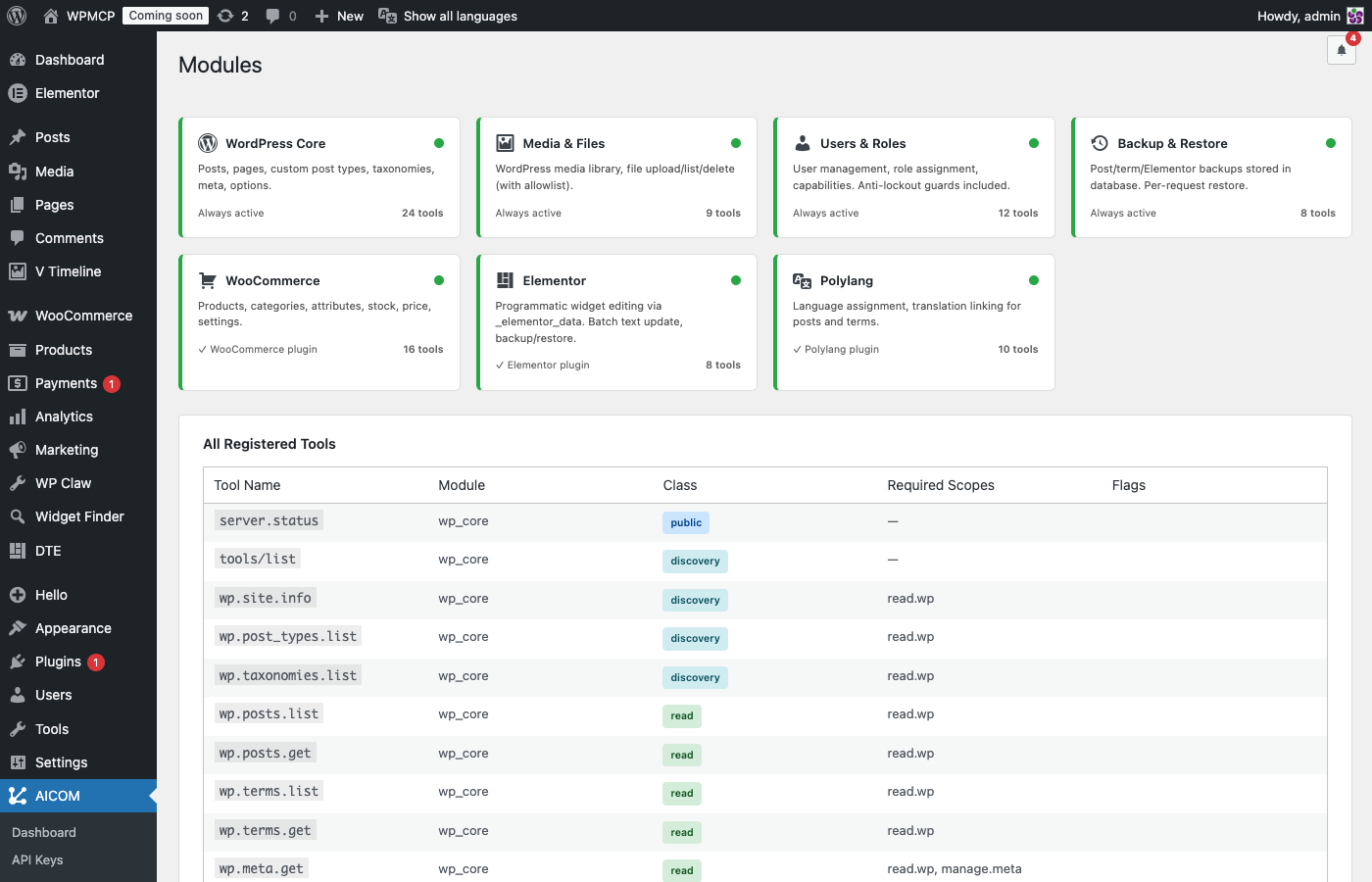
- WordPress Core — posts, pages, custom post types, terms, meta, options, menus, plugins
- Media — upload, update, delete media; direct file system access
- Users & Roles — create, update, manage users and role assignments
- Backup — automatic snapshots for posts, terms, and Elementor pages/templates before every write; session-wide restore
- Sessions — named audit sessions with grouped action history
- Accessibility — site-wide alt text audit, post-level WCAG check, alt text fixes
- WooCommerce (optional) — products, categories, settings
- Elementor (optional) — page creation from template, widget inspection, theme builder conditions
- Polylang (optional) — translations, language assignment, string management, and one-call bilingual post pair creation
- WPML (optional) — translation language assignment and translation-group linking for posts and taxonomy terms
- Yoast SEO (optional) — read and write SEO titles, meta descriptions, Open Graph and Twitter card fields; bulk audit across all posts in one session
- SEOPress (optional) — read and write SEO titles, meta descriptions, robots directives, canonical URLs, Open Graph and Twitter card fields; bulk audit across all posts in one session
- Skills (optional) — save, version, and run reusable multi-step workflows
- Clautron (optional) — capability catalog with a machine-readable manifest per capability (version, requirements, scopes, effects, reversibility), install/update/inspect/deactivate lifecycle, blueprint management, primitive verification, event analytics
- ECS (optional) — Ele Custom Skin color schemes, font schemes, custom looks
- Content teams using Claude, ChatGPT, or any AI assistant who want it to publish and update WordPress content directly
- Agencies managing multiple client sites and wanting AI-assisted workflows with a full paper trail
- Developers building AI-powered WordPress tools or automation pipelines
- Accessibility specialists who want to audit and remediate WCAG issues at scale with AI assistance
- Claude Code users — point AICOM as an MCP server from your terminal and control WordPress alongside your code
- OpenAI Codex users — connect Codex to your site via AICOM's MCP endpoint and let it manage content as part of your dev workflow
- ChatGPT, Copilot Studio, Dify, n8n users — import the OpenAPI schema URL into any OpenAPI-compatible client; all tools are discovered automatically with Bearer auth
- OpenClaw / Celine / Goose users — native MCP connector, works out of the box
AI Agent → AICOM Endpoint → WordPress
API Key Scopes
Each API key is granted specific scopes — you control exactly what each AI agent can and cannot do. Dozens of granular scopes are available, grouped by area:
read.wp, write.wp.posts, delete.wp.posts, manage.taxonomies, manage.meta, manage.media, manage.files, manage.wordpress.settings, manage.plugins, manage.backups, manage.a11y, manage.users, manage.roles, manage.skills, plus one read.*/manage.* pair per optional integration (WooCommerce, Elementor, Polylang, WPML, Yoast, SEOPress, Clautron). Built-in presets (Content Assistant, Translator, SEO Editor, Site Maintenance, Full Admin, and more) bundle the right scopes for a common role in one click — see the full list and descriptions on the API Keys page.
Endpoint
REST API:
POST /wp-json/aicom/v1/mcp
Fallback (no mod_rewrite required):
POST /?aicom=1
Health check:
GET /?aicom=1
Authentication
Authorization: Bearer aicom_XXXXXXXX_<secret>
or:
X-API-Key: aicom_XXXXXXXX_<secret>
MCP Request Example
{"jsonrpc":"2.0","method":"tools/call","params":{"name":"wp.posts.list","arguments":{"post_type":"post","posts_per_page":10}},"id":1}
安装:
- Upload the
aicomfolder to/wp-content/plugins/or install directly from Plugins → Add New by searching for "AICOM" - Activate the plugin via Plugins → Installed Plugins
- Go to AICOM → API Keys and click Generate New Key
- Give the key a label (e.g. "OpenClaw agent") and select the scopes you want to grant
- Copy the key immediately — it will not be shown again
- Point your AI agent or MCP client to
https://yoursite.com/wp-json/aicom/v1/mcp - Pass the key as
Authorization: Bearer <your-key>in every request
.htaccess:
SetEnvIf Authorization "(.*)" HTTP_AUTHORIZATION=$1
Safety tip: Start with Soft Lock enabled to limit the agent to read-only operations, then unlock once you're confident in the integration.屏幕截图:

常见问题:
Does this plugin make my site publicly accessible to anyone?
No. Every request must include a valid API key. Keys are bcrypt-hashed in the database and scoped — each key only has access to the specific operations you explicitly grant it. Without a valid key, the endpoint returns 401 Unauthorized.
Does it work without mod_rewrite or pretty permalinks?
Yes. The fallback endpoint /?aicom=1 works on any server configuration, with or without pretty permalinks or Apache mod_rewrite.
Is it compatible with WooCommerce, Elementor, Polylang, WPML, Yoast, and SEOPress?
Yes. Each plugin's tools are loaded automatically only if the corresponding plugin is active — and, for a key with the Compact Tool List setting on, only if the calling key actually has the scope to use them. If WooCommerce is not installed, no WooCommerce tools appear in the tool list or audit log. Polylang and WPML can't both be meaningfully active on the same install (they're alternative translation plugins), but AICOM detects whichever one you're running and exposes the matching tools automatically — same for Yoast vs. SEOPress.
Can I restrict an AI agent to read-only access?
Yes, in two ways: (1) assign only read.wp scopes to the API key, or (2) enable Soft Lock or Hard Lock mode from the Safety page — this blocks write and destructive operations site-wide regardless of key scopes.
What is the difference between Soft Lock and Hard Lock?
Soft Lock permits public, discovery and read class tools only — agents can browse and read content but cannot write, delete or change settings. Hard Lock permits only public tools (like server.status) — the site is effectively frozen from an AI perspective. Hard Lock overrides Soft Lock.
Can I test operations before they actually run?
Yes. Send "dry_run": true in your request parameters. The operation will be validated and simulated but no data will be changed. The audit log will record it as a dry run.
Does my agent need to remember to back things up before making changes?
No. AICOM automatically snapshots a post, term, or Elementor page before your agent updates, trashes, deletes, or edits it — this happens at the plugin level regardless of what the agent does or forgets to do. You can restore any individual snapshot, or undo an entire session (every post, term, and Elementor page it touched) in one click from the Snapshots page.
What happens if my AI agent sends the same write request twice?
Pass an "idempotency_key" in the request arguments. If AICOM sees the same key again — from a dropped connection, a retry, or a duplicate send — it returns the original result instead of repeating the action, so you never end up with two copies of the same post from one intended change.
Does it log what AI agents do?
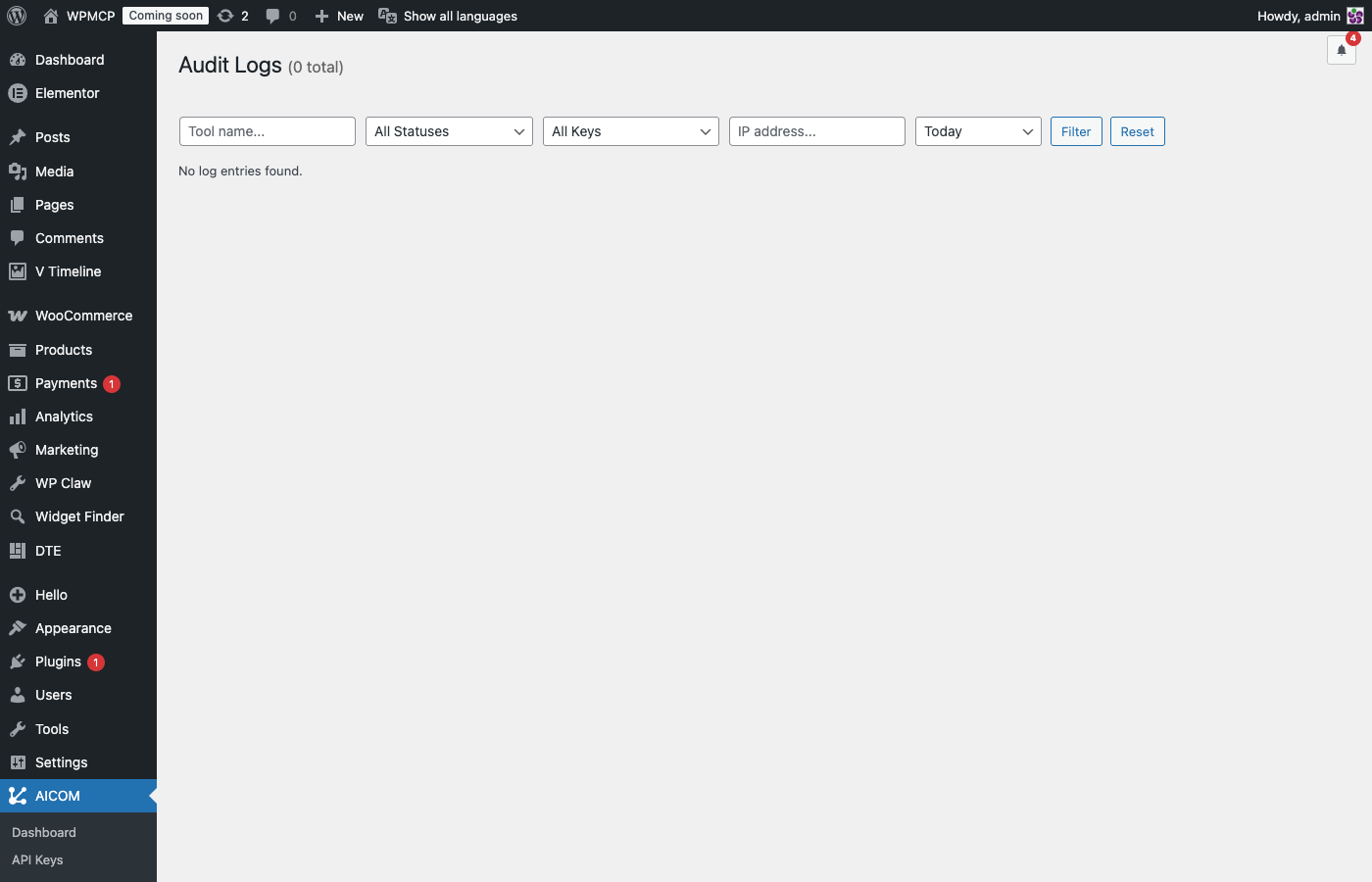
Yes. Every request is logged to the audit log with timestamp, remote IP, API key label, tool name, parameters, result summary, and response duration. The log is accessible from AICOM → Audit Logs and can be filtered by date, key, or tool name.
What is MCP (Model Context Protocol)?
MCP is an open standard created by Anthropic for connecting AI models to external tools and data sources. AICOM implements the MCP standard so any MCP-compatible AI client — Claude, OpenClaw, and others — can communicate with your WordPress site natively without custom integrations.
Is this plugin free?
Yes, completely free and open source under the GPL-2.0-or-later license.
Can I restrict which IP addresses can use an API key?
Yes. Each API key has an optional IP allowlist. If set, requests from any other IP will be rejected even if the key is valid.
更新日志:
- Fixed:
wp.cache.purgenow needs onlywrite.wp.posts(notmanage.wordpress.settings), so content-only API keys can call it, and it's reported to AICOMBase as reversible — it never touches content, so it no longer makes an otherwise-undoable session un-undoable just by having run. It also no longer flushes the shared object cache network-wide on a multisite install. - Fixed: a rare stale read right after an Elementor widget update, seen on some multisite installs with a persistent object cache — the page read back its own old data for a few minutes before catching up. Elementor reads now bypass any cached post-meta entry and go straight to the database; saves also clear the full post-meta cache bucket afterward, not just the fields Elementor itself tracks.
- New:
wp.cache.purgetool — clears the site's caching plugin (LiteSpeed Cache, WP Fastest Cache, W3 Total Cache, WP Super Cache, WP Rocket, WP-Optimize, Autoptimize — whichever is active), via each plugin's own documented purge API. A no-op if none is active. Call it after a change a visitor would otherwise keep seeing a stale cached version of. - New: "Connect to AICOMBase" is now offered earlier — one of Dudee's first three options (instead of only at the very end of his full tour), and its own button on the native WordPress dashboard widget (hidden once already connected).
- Fixed: connecting to AICOMBase could fail with a generic "Could not start the connection" on hosts without the native
sodiumPHP extension (WordPress's pure-PHP sodium_compat fallback refuses to securely wipe a key from memory and throws, which crashed the request). The wipe is now best-effort instead of fatal.
- Fixed: Dudee's guided tour now walks through each admin page's own sections (not just a one-line summary), circling the whole section and picking "Next" to actually move between pages and tabs — pages, tabs, and sections now all behave the same way, instead of some advancing in place and others requiring a manual click.
- Fixed: a tall section (e.g. a very long table) could push Dudee and his message on top of each other; the tour could also appear to "reset" on an admin page where tabs are separate links rather than in-page JS tabs (Snapshots) — both are now handled correctly.
- Fixed: his message panel is more transparent, so it blocks less of the page behind it, and if there's no room above a target it now tries beside him — left or right, whichever side has room, never on top of wp-admin's own menu, and never covering the very section he's circling — before falling back to stacking above or below; a cramped stack can no longer run his message off the bottom of the screen, and his pointing hand now aims around his own message instead of through it.
- New: Dudee, a small guide on AICOM's own admin pages. He says hello once, offers a short tour of the AICOM menu, and on the AICOMBase page shows how to connect, step by step. He runs entirely in your browser and contacts no outside server; all he keeps is, per user, whether he said hello, how the tour went and whether you hid him. "Don't show Dudee again" hides him for good (Help brings him back). Only on AICOM pages, only for administrators. To turn him off for everyone:
define( 'AICOM_DUDEE', false );in wp-config.php, or theaicom_dudee_enabledfilter. - Translations: Dudee speaks every language bundled with the plugin (de_DE, es_ES, fr_FR, nl_NL, pt_BR, pt_PT, ro_RO).
- Fix: a false "Credential anomaly" (authorization replay) when AICOMBase woke the site several times in a row. The check-in lock wasn't atomic, so simultaneous check-ins processed the same command and the second one tripped the replay guard. The lock is now atomic, and each command is claimed by id before it runs — a command delivered twice runs once and is skipped quietly. A real replay (an already-used authorization on a different command) is still reported.
- Image descriptions can now be undone: a11y.set_image_alt and media.update_meta take an automatic backup of the image (post + meta) before writing, so restoring the session puts the old alt text, title and caption back — and removes an alt text that didn't exist before. Both tools are now reported as reversible to AICOMBase.
- Session restore applies the same protection against serialized PHP objects in backed-up meta as single-backup restore.
- AICOMBase connector: AICOM now does nothing for AICOMBase outside a session AICOMBase opened — every task an AI agent was given runs in one named, described AICOM session (all its backups together), exactly like agents connected directly. These sessions are listed in AICOM → Activity → Sessions with an "AICOMBase" badge, and can be closed or restored there; AICOMBase can also close or restore them (signed commands). Remote work without an open session is refused (NO_ACTIVE_SESSION). Database 5.0.
- AICOMBase connector: the heartbeat now reports which scopes this site allows for AICOMBase-issued work (AICOMBase menu → allowed scopes), so AICOMBase can show unapproved scopes as unavailable when creating keys. Sends scope ids only — no content.
- AICOMBase connector: a new signed "wake" ping so a remote task starts almost immediately instead of waiting for the next scheduled heartbeat (which, on a quiet site, depends on WP-Cron firing from real traffic and can lag several minutes). Uses the exact same authorization-token format and verifier as remote task execution — no new credentials, single-use like everything else. Purely a latency optimization: if it's never received, the normal heartbeat still delivers the same work, nothing about what runs or what's authorized changes.
- New: optional AICOMBase connector (AICOMBase menu). Connect this site to AICOMBase to monitor it, view AICOM activity and run centrally authorized tasks. AICOM works exactly as before if you never connect, or if AICOMBase is unreachable.
- Identity: a per-site Ed25519 key pair is generated locally with libsodium; the private key is encrypted at rest and never leaves the site. Your WordPress admin password and AI API keys are never sent to AICOMBase. Pairing is confirmed by you in AICOMBase; the AICOMBase public key is pinned on the site.
- Signed heartbeat every minute (WP-Cron
aicom_minute, plus a throttled admin fallback) with versions, health, lock state and a capability hash. No site content is transmitted. - Capability inventory: AICOM's tools are grouped into capabilities (Content, Media, SEO, Commerce, Languages…) with real scopes, risk, reversibility and input schemas, uploaded when AICOMBase asks or when the set of tools changes.
- Remote tasks are executed only after verifying a short-lived signed authorization (pinned key, audience, expiry, single-use nonce) AND your local policy: the requested scopes must be inside the "Local policy for AICOMBase work" list (critical scopes off by default). Violations are refused and reported as a
scope_rejectedsecurity event. Locks and pause always win; tasks run under a fresh AICOM session with a short-lived internal key. - Durable local event queue (DB schema 4.9) reports sessions, actions, security and lock events in batches; credential-shaped values are scrubbed before anything is sent.
- Internal inspections (privacy, security, technical, accessibility) return only the evidence an audit needs.
- Credential rotation with overlap, remote pause / soft lock / hard lock, and revoke (wipes the pairing) — all audited in the AICOM log.
- New: Capability Contract for Clautron — 3 new tools (
clautron.capability.inspect,clautron.capability.update,clautron.capability.deactivate) on top of a machine-readable manifest per capability (version, platform/version requirements, required scopes, declared effects, reversibility). Requirements and scopes are validated before Clautron ever compiles anything, independent of the tool's own static scope. clautron.capability.inspectreports whether a capability is installed, its installed vs. available version, compatibility, and which lifecycle actions actually work right now (not just what the capability declares in principle).clautron.capability.updatere-syncs an installed capability to its manifest's current version in place, without creating a duplicate.clautron.capability.deactivatestops a capability without touching any data it wrote while active — the response says so explicitly (data_preserved,residual_effects). Reinstalling afterward reactivates the same capability instead of creating a new one.clautron.blueprint.smoke_testverification is no longer a fixed, hardcoded checklist — each Clautron primitive now declares its own check, and any primitive without one is reported explicitly instead of being silently skipped.
- New: WPML module — 11 tools for reading and writing WPML translation data (wpml.status, wpml.languages.list, wpml.post.get_language/set_language/get_translations/link_translation/unlink_translation, and the same 5 for wpml.term.*). Verified directly against WPML's own documented integration hooks. Requires WPML core (sitepress-multilingual-cms) with at least a second language configured. String Translation (site string translation) is a known gap, not yet included.
- The "Translator" API key preset, and a new "SEO Editor" preset, now detect which translation/SEO plugin is actually active (Polylang and/or WPML; Yoast and/or SEOPress) and grant scopes for whatever's really installed, instead of assuming one specific plugin.
- New: SEOPress module — 9 tools for reading and writing SEOPress SEO meta (seopress.post.get/set, seopress.post.social.get/set, seopress.posts.bulk_get for audits, seopress.term.get/set, seopress.site.get). Meta keys and value formats verified directly against SEOPress's own source. Requires SEOPress plugin (free or pro).
- New "Translator" API key preset with every scope a full Polylang translation workflow needs — posts, meta, taxonomies, media, and both Polylang scopes — deliberately excluding language creation (which isn't exposed as an AICOM capability at all).
- Every built-in API key preset now includes the ability to create and update Skills (
manage.skills), so a key provisioned from any preset can save reusable workflows without a separate scope grant. - Fixed a real bug: SEOPress tool calls failed with "Required plugin not active" despite the module being active — the router's dependency check was a hand-duplicated copy of the module-detector's active-plugin list that had drifted out of sync. Consolidated onto a single source of truth (
AICOM_Module_Detector::is_dependency_active()), also removing an equivalent duplicate inaicom.recipes' module-gating (which had already silently drifted for the ecs_pro case) and the tool-class taxonomy literals scattered across the lock matrix and idempotency/session gating.
- Critical fix: removed all PHP 8.0+ only syntax (
matchexpressions,str_contains/str_starts_with/str_ends_with, a union return type) that had crept into the codebase despite the plugin declaringRequires PHP: 7.4— on real PHP 7.x hosting this caused a hard parse error on plugin load, taking down the entire site's admin. Verified clean withphp -lunder real PHP 7.4, not just a newer local environment. Reported by a user running on shared hosting; thank you. - New tool
tools/search: keyword search over tool names/descriptions, tuned for weak/local models that don't know exact tool names — handles full-sentence queries, common synonyms (e.g. "photo" → featured image, "shop" → WooCommerce), typo tolerance, and plurals. - New tool
tools/describe: fetch one tool's full definition by exact name — the on-demand counterpart totools/search, useful when you already know the name but not the parameters. - New per-key setting Compact Tool List (API Keys → Create/Edit): for small/local models,
tools/listdrops each parameter's description text to cut context size, while always keeping name/type/requiredfor every tool (read and write alike) so a call can still be built correctly. Each tool's own top-level description (including worked examples) is never shortened. Off by default — capable models see the same full list as before. - Fixed
skills.runnot delivering the skill'ssteps/rules/input_schema/permissionsto MCP clients that only read thecontentfield (rather than the optionalstructuredContent, which isn't sent unless the client negotiates a newer protocol version) — the full workflow now always lands incontenttoo. - Hardened session enforcement: a write/destructive/admin_sensitive call sent immediately after
session.opennow retries the active-session check briefly instead of failing outright, and the resultingNO_ACTIVE_SESSIONerror (on the rare case it's still not visible) is now markedretryable. - New IP Rate Limits section (Safety page): see every IP currently blocked by the failed-authentication rate limiter, with time remaining, and unban one on demand instead of waiting out the cooldown.
- Fixed the Audit Logs "Today"/"7 days"/"30 days"/"Year" filters computing their date boundary in the site's local calendar day but comparing it against UTC-stored timestamps — on a site with a non-zero UTC offset this could silently return zero results for a period that actually had activity. Timestamps in the Audit Logs table are now also shown in a clearer
date / timeformat.
- Fixed a bug where
tools/listinvoked as an ordinary tool call (rather than the standardtools/listrequest) was missing the requiredcontentfield, causing strict MCP clients to reject it. tools/listnow only shows the tools an API key can actually call — a key without a given scope no longer sees (and can't waste a round-trip on) tools it would immediately get denied for. Every tool list is scoped to the calling key's real permissions.- Errors rejected before a tool runs now include a
retryablehint, so an agent can tell whether hammering the same call again could ever help, instead of assuming the server is unreachable. - New tool
pll.create_bilingual_pair: create a translated draft, set its language, link it to the source post, optionally assign a category and featured image, and verify every step — all in one call. Works from an existing source post, or from scratch (passsource_language+source_post_titleto create both language versions in a single call, with no pre-existing post needed). dry_runandidempotency_keyare now documented directly in every eligible tool's schema, instead of being accepted but invisible — some strict MCP clients validate outgoing calls against the schema and would silently refuse to send an undocumented parameter.wp.posts.createnow reportsrequested/persisted/verifiedso you can see exactly what WordPress actually stored versus what was asked for (e.g. a duplicate slug getting a "-2" suffix). Extended the same pattern towp.posts.update,wp.terms.create,wp.terms.update,wp.meta.set, andwp.meta.set_many.
- Fixed a critical
tools/listcompatibility bug: a tool with no parameters (e.g.session.close,pll.languages.list) serialized its empty schema as[]instead of{}. Strict MCP clients (Pydantic-based, including Hermes) reject the entire tool list over this single type mismatch, breaking tool discovery — and every tool call — completely. Reported and diagnosed with a full client-side validation log from a user; thank you. - Removed a non-standard
classfield that was present on every tool intools/listsince v3.8.8. It was never part of the MCP Tool schema and could trip the same kind of strict-client rejection; the same information is now exposed the spec-compliant way viaannotations(readOnlyHint/destructiveHint), only included when the negotiated protocol version supports it. - Added automated regression tests that check the raw
tools/listresponse body for both issues, across both supported protocol versions, so a future change can't silently reintroduce either one.
wp.posts.updateandwp.terms.updateno longer reportupdated: truewhen no actual field was supplied — they now returnupdated: falsewith a clear warning, andchanged_fieldslisting exactly what changed when something did.- Parameter aliasing extended (
slug,media_id) and now reported back in the response as_aliases_applied, so you can see exactly what the plugin auto-corrected instead of it happening silently. - Read-after-write verification added to the write paths where a silent mismatch is realistic: assigning/removing post terms, attaching media/setting a featured image, and every Polylang write tool (set language, link/unlink translations, string translations). Each now re-reads the actual state and reports
requested/persisted/verified, with a warning if they don't match — catches cases like WordPress re-assigning a default category, or Polylang silently rejecting a language change. session.opennow reportsavailable_scopesandmissing_scopesfor the key, scoped to the site's active modules, so an agent can tell upfront whether it has what it needs for a task like a translation workflow — before it starts, not after hitting a scope error partway through.- Polylang translation tools now include a full JSON example and the canonical 6-step workflow order (create draft, set language, link translations, assign translated category, set featured image, verify) directly in their tool descriptions.
- Automatic pre-write snapshots: posts, terms, and Elementor pages/templates now get a safety snapshot before every update, trash, delete, or field edit — automatically, even if the agent never calls a backup tool itself.
- New "Sessions with Snapshots" panel on the Snapshots page — restore every post, term, and Elementor page touched during a session back to its pre-session state with one click. Now also restores Elementor Theme Builder display conditions correctly.
- MCP responses now always include a
contentfield on successful tool calls, for full compatibility with strict MCP clients. - Clearer error handling: errors rejected before a tool runs (auth, scope, session, lock) use a standard JSON-RPC integer error code; errors from a tool that actually ran and failed are now reported as
isErrorwith a description, so agents can see and react to them directly. - New opt-in
idempotency_keyargument on write/destructive tools — pass the same key on a retried call and AICOM returns the original result instead of repeating the action (e.g. no duplicate post from a dropped connection and retry). - MCP protocol version is now negotiated from the client's request instead of hardcoded, so responses match what each client actually supports.
- Hardened against corrupted responses: a stray notice from another active plugin, or an unexpected server error, can no longer produce a broken response — agents always get back valid JSON.
- Tested up to WordPress 7.1.
- Renamed "Connect AI Agents" admin page/menu to "Manage API Keys" for clarity.
- Sidenav footer now shows a red "New version available" notice with a link to the Plugins page when an update is available.
- Fixed
manage.polylang.settingsbeing unusable: it was required bypll.term.set_languageandpll.string.setbut was never registered as a grantable scope, so no API key — not even Full Admin — could hold it. - Relabeled Polylang scopes for clarity:
manage.polylangis now "Manage Polylang Post translations" andmanage.polylang.settingsis "Manage Polylang Term & String translations", each with a tooltip explaining exactly what it does and does not allow.
- Fixed OpenAPI schema compatibility with ChatGPT Custom GPT Actions: upgraded spec from 3.0.0 to 3.1.1, serialized empty parameter objects as
{}instead of[], and addedcomponents.schemasrequired by strict validators. Thanks allanantoni for the detailed report and fix.
- JSON repair for malformed payloads from local AI models (literal control characters, trailing commas, UTF-8 BOM).
rest_pre_dispatchintercept bypasses WordPress JSON validation so weak models can connect without "rest_invalid_json" errors.- New
session.statustool — check whether a session is open before callingsession.open, avoiding SESSION_ALREADY_OPEN errors. TOOL_NOT_FOUNDnow includes fuzzy name suggestions ("Did you mean: wp.posts.create?") to guide models that hallucinate tool names.- Educational parameter warnings: unknown parameter names are flagged with the correct name and a usage example; aliases (
status,content,post_id) are resolved automatically with a hint. - Truncated API key detection with character count in the error message.
- Split
manage.polylangscope: post language assignment and translation linking remain undermanage.polylang; string translations and term language/linking now require the newmanage.polylang.settingsscope.
- Full MCP
inputSchemanow returned intools/list— each tool includes parameter types, descriptions, and required flags so models can call tools correctly without prior knowledge. - Compact tool list (name + class only) available via shorthand
toolsorlist_toolsmethod for small-context models. - Detect
method:"tools/wp.posts.create"pattern and return a corrected JSON-RPC example. - Explicit error when
tools/callis sent without anamefield.
- Server-side discoverability for weak local AI models: new
aicom.recipestool returns step-by-step task recipes filtered to the key's actual permissions and active modules. - Compact
initializeinstructions — three exact steps with copy-paste JSON-RPC format. session.statusregistered as a discovery tool (no session required, no scope required).
- New read-only scopes for Polylang, WooCommerce, and Elementor — grant an agent the ability to inspect data from these integrations without giving it write access.
- The Connect AI Agents form shows a small "included automatically" note under each read scope when its matching manage scope is ticked, so the implication is visible.
- Fixed audit log table missing
session_idcolumn on fresh installs — every request was failing the INSERT silently, leaving the Activity tab empty. The fix repairs existing installs automatically on update. - New AICOM-Only Mode (Safety page, default off) — blocks Application Passwords, XML-RPC, and unsigned REST writes so AI agents can only modify the site through AICOM. Recommended at onboarding.
- MCP standard handshake —
initialize,notifications/initialized, andpingnow return spec-compliant responses, so strict MCP clients can connect. - Onboarding wizard pre-selects a new General option marked Recommended — works with any MCP-aware agent without per-client config.
- Clearer error message when a write is attempted without an active session.
- New General tab in the Key Created modal — paste-ready snippet that explains the endpoint, fallback, and the browser-header workaround for 401s.
- New Discard key button next to Done — revoke a freshly-created key in one click if you change your mind.
- Translation polish across all 7 bundled locales.
- Translations bundled for Dutch, German, French, Spanish, Portuguese (Portugal & Brazil), and Romanian — 628 strings each, informal address throughout.
- Fixed an onboarding CSS rule that cropped the WordPress admin under the top toolbar on every page.
- First-run onboarding wizard.
- Interactive Help page with per-client setup snippets.
- WordPress dashboard widget.
- Per-key Working Hours.
- Task-oriented quick start cards on the dashboard.
- Renamed pages, client picker + Test Connection in the Key Created modal, classic pagination on Activity logs, glossary tooltips, and many smaller refinements throughout.
- New visual identity: lowercase aicom wordmark, ink + cream + coral palette.
- New plugin icon (animated SVG) and updated WordPress.org banner.
- Refined admin UI: warmer surfaces, accent only where it matters, monochrome menu icon that follows your admin color scheme.
- Tested with WordPress 7.0.
- Fixed security issues.
- Fixed security issues.
- New: JSON-RPC 2.0 batch support — send multiple tool calls in a single request as a top-level JSON array; each item is dispatched independently and responses are returned as an array. Notifications (items without id) are processed but excluded from the response per spec.
- New: Skills detail view — click Details in the action menu to see a full readable breakdown of a skill (input schema, steps, rules, tags, permissions) with an Export JSON button.
- New: Skills import — paste a skill JSON definition directly in the admin UI to create a draft skill without calling the MCP API.
- New: Skills archive & restore — archived skills are now visible in the list with Restore and Delete actions.
- Improvement: Audit Logs — merged the separate Logs and Filters tabs into a single Logs tab; the filter form is always visible at the top.
- Improvement: API Keys — preset action icons (rename ✏, duplicate ❐, delete ✕) are now grouped horizontally with CSS tooltips on hover.
- New: Skills — define reusable AI procedures (steps, rules, input schema, permissions) that agents can discover, run, and propose updates to. Includes 11 MCP tools: skills.list, skills.get, skills.match, skills.compare, skills.run, skills.create, skills.activate, skills.update, skills.archive, skills.delete, skills.import, skills.suggest_from_session, skills.propose_update.
- New: Skills admin UI — four-tab panel (Skills, Suggested, Proposals, History) with kebab action menus, search, and type/status filters.
- New: Three new API key scopes: manage.skills, read.skills, learn.skills.
- New: session.close response includes suggest_skill: true when skill suggestions are enabled, prompting the agent to offer saving the workflow as a reusable skill.
- New: OpenAPI schema endpoint — GET /wp-json/aicom/v1/schema generates a live OpenAPI 3.0 spec from all registered tools.
- New: Individual tool REST endpoints — POST /wp-json/aicom/v1/tools/{tool.name} compatible with any OpenAPI client.
- Works with ChatGPT Custom GPT Actions, Microsoft Copilot Studio, Dify, Flowise, n8n, Make.com, LangChain, Semantic Kernel, and any client that supports OpenAPI 3.0 + Bearer auth. Point at the schema URL, add your AICOM key, and all tools are discovered automatically.
- New: Accessibility module — a11y.images_missing_alt, a11y.audit_post, a11y.set_image_alt, a11y.site_report tools for AI-driven WCAG remediation.
- New: Working Hours Schedule — automatically apply Soft or Hard Lock outside configured working hours and days.
- The manual lock always takes precedence; the schedule only adds additional restrictions.
- New: Resource Boundaries UI — configure post type, taxonomy, meta key, WP option, file path, and language restrictions per API key directly from the edit/create form.
- New: Preset Rename — rename any custom preset in-place via a prompt dialog.
- New: Preset Duplicate — clone any custom preset; the copy appears instantly in the preset grid.
- Fix: Toolbar lock buttons (Unlock / Soft Lock / Hard Lock) now work on frontend pages, not only in wp-admin.
- Improvement: Session description now shown inside the expanded session card in Audit Logs (hidden when collapsed).
- Improvement: tools/list response now includes an instructions field telling the agent whether a session is active, and prompting it to call session.open with both name and description before making changes.
- Improvement: session.open tool description updated to explicitly request a meaningful name and description from the agent.
- New: Backups page redesigned into 3 tabs — Dashboard (total count, storage used, activity by period, auto-cleanup status), Cleanup Settings, and Backup Snapshots.
- New: Backup Snapshots table now shows Class badge (colour-coded by tool class) and Session column with a direct link to the corresponding session in Audit Logs, including scroll-to + highlight on arrival.
- New: Toolbar lock controls — Unlock / Soft Lock / Hard Lock buttons in the AICOM Keys dropdown; toolbar badge turns red on Hard Lock and amber on Soft Lock.
- New: Stacked bar chart in Audit Logs Sessions tab — each bar segment is colour-coded by tool class (read/write/destructive/admin_sensitive); legend shown below graph.
- New: Clicking a graph bar navigates to that day's sessions via server-side filtering (log_date).
- New: Class column added to session log tables in Audit Logs.
- New: Session filter added to Audit Logs Filters tab.
- Improvement: Cleanup Settings form redesigned — each field on its own row with description on the right; fields separated by dividers.
- Improvement: Tab navigation on Backups and Audit Logs pages now uses consistent aicom-tab-bar / aicom-tab-btn styles matching API Keys page.
- Fix: Graph bars no longer show tool classes from orphaned logs (sessions that were deleted); uses INNER JOIN to exclude them.
- Fix: DB v4.4 — added tool_class column to wp_aicom_logs with backfill migration.
- New: Named sessions — agents must call session.open(name: "...") before making any changes; all write operations blocked until a session is opened; sessions auto-close after 2h of inactivity.
- New: Session restore — Audit Logs → Sessions tab shows all sessions with a 30-day activity graph; click Restore to undo all backups from a session in reverse chronological order.
- New: Backup cleanup — set a max age (days) and/or max size (MB) for automatic backup pruning; runs daily via cron.
- Improvement: Audit Logs split into Logs / Sessions / Filters tabs for easier navigation.
- Fix: session_id now correctly populated in backup rows.
- New: API Key Lifecycle — optional expiry date (TTL) on any key; keys expire automatically via hourly cron; expired/archived status badges in the key table.
- New: Archive/Unarchive — hide inactive keys from the main list without deleting them; restore with one click (unarchived keys come back as suspended).
- New: Edit scopes — repurpose an existing key without revoking it; update scopes, IP allowlist, dry-run flag, and expiry date from a dedicated edit view.
- New: Rotate secret inside the edit form — optionally generate a fresh API key string as part of a scope-edit, with live diff preview of permission changes.
- New: Scope diff preview — while editing, the UI shows which scopes were added (+) and removed (−) compared to the original key, in real time.
- New: Full i18n — all admin strings wrapped for translation; POT template generated at languages/aicom.pot.
- New: Save custom presets — name and save any scope selection as a reusable preset that appears alongside the system presets. Custom presets are stored in the database and can be deleted with one click.
- New: Preset picker for key creation — 6 system presets (Read-only, Content Assistant, Elementor Editor, WooCommerce Catalog, Site Maintenance, Full Admin) plus Custom mode to auto-select common scope bundles with one click.
- New: Scope tree UI — scopes now grouped into 5 categories (WordPress Core, Media & Files, Users & Roles, Site Configuration, Integrations) with LOW/MED/HIGH/CRITICAL risk labels on every scope.
- New: Live search filter for scopes in the key creation form.
- New: Collapsible scope groups — click a group header to expand/collapse.
- New: AICOM Keys menu in the WordPress admin bar — lists all active and suspended API keys with one-click suspend/unsuspend via AJAX (no page reload). Shows a green badge with the count of active keys. Last item links to the full API Keys management page. Works in both wp-admin and frontend toolbar.
- New: elementor.page.create_from_template — create a new page by cloning Elementor data from a source page or template. Copies _elementor_data, _elementor_edit_mode, and _wp_page_template in one call. Supports dry_run and returns preview URL + admin edit URL.
- New: wp.posts.preview_url — get a preview URL for any post or page. Returns get_preview_post_link() for drafts/private, get_permalink() for published. Also includes admin_edit_url.
- New: Clautron module — 11 tools for blueprint and capability management (catalog.list/install, primitives.list, blueprint.examples/list/validate/create/compile/smoke_test, capability.meta.get/set). Requires Clautron plugin.
- New: Yoast SEO module — 9 tools for reading and writing Yoast SEO meta (yoast.post.get/set, yoast.post.social.get/set, yoast.posts.bulk_get for audits, yoast.term.get/set, yoast.site.get). Supports free and premium. Requires Yoast SEO plugin.
- Fix: wp.posts.create now accepts post_name (URL slug) and post_excerpt directly — no more 2-step create+update workaround.
- Fix: wp.posts.update now applies post_name and post_author — previously these were silently ignored despite returning updated:true.
- Fix: wp.posts.create defaults post_author to the user associated with the API key — prevents author=0 on REST-context requests.
- Fix: wp.posts.get now includes a terms map in the response, grouped by taxonomy (category, post_tag, custom taxonomies).
- New: wp.meta.set_many — set multiple post meta keys in one call. Accepts a meta object of key→value pairs; allowlist enforced per key.
- New: Ele Custom Skin (ECS) module — 26 tools for reading and writing ECS Color Schemes, Font Schemes, Custom Looks, Custom CSS, Alt Logos, and Dynamic Repeater Builder (DRB) presets and bindings. Works with both ele-custom-skin (free) and ele-custom-skin-pro. Activate a color scheme site-wide in one call via ecs.color_schemes.activate_global.
- Fix: wp.posts.update and wp.posts.create now support post_date parameter — previously the parameter was silently ignored and the tool returned success without changing the date. Accepts YYYY-MM-DD HH:MM:SS or ISO 8601; invalid format returns a clear error.
- Fix: wp.posts.update now also exposes post_excerpt in its input schema (was handled in code but not documented).
- Fix: replaced match() expression with if/elseif for PHP 7.4 compatibility — caused parse error on API Keys page for sites running PHP < 8.0
- New: Suspend/Unsuspend for API keys — temporarily block a key without revoking it. Suspended keys return 401 automatically (auth query filters status = active). Active keys show Suspend button; suspended keys show Unsuspend + Revoke.
- New: wp.plugins.list — list all installed plugins with version, update availability, and status. Optional force_refresh=true for a live check against wordpress.org.
- New: wp.plugins.update_all — update all plugins with available updates in one call (dry_run and include[] filter supported). Uses WordPress's native Plugin_Upgrader + Automatic_Upgrader_Skin, identical to background auto-updates.
- New scope: manage.plugins — dedicated scope for plugin management tools, separate from manage.wordpress.settings.
- New: elementor.template.set_conditions — dedicated tool that writes _elementor_conditions meta AND rebuilds the global elementor_pro_theme_builder_conditions option, then flushes the conditions cache. Uses Elementor Pro Conditions_Manager API when available, falls back to a manual option rebuild. Fixes Theme Builder templates not attaching to pages when conditions were set via wp.meta.set + wp.options.set.
- Fix: wp.meta.set now applies wp_slash() on string values before passing to update_post_meta() — prevents backslash stripping that broke Elementor JSON stored in post meta
- Fix: pll.string.set no longer calls PLL()->model->get_language() which is null in REST API context — replaced with direct pll_languages_list() lookup
- Fix: pll.strings.list, pll.string.get, pll.string.set no longer depend on pll_get_strings() (Polylang Pro only) — now works on Polylang free via direct PLL_MO access
- WordPress core strings (blogname, blogdescription, date_format, time_format) can be set per-language using wp_option parameter without Polylang Pro
- New: pll.strings.list — list all registered Polylang strings with current translations per language
- New: pll.string.get — get a specific string and all its translations
- New: pll.string.set — set the translation of a registered string for a specific language (supports dry-run)
- Fix: wp.menus.delete and wp.menus.items.remove now document confirm=true in their input schema — agents can now discover this requirement via tools/list
- Fix: wp.menus.items.add no longer requires url for custom type items — WordPress supports label-only menu items with an empty URL
- Fix: pll.post.link_translation and pll.term.link_translation now preserve existing translation group members when adding a new language — previously a third language (e.g. UK) was dropped when linking two posts
- Changed: link_translation tools now accept a translations map {"lang": id} instead of pairs, supporting any number of languages in a single call
- Complete rewrite with modular, autoloaded architecture
- 87 tools across 7 modules: WP Core, Media, Users, Backup, WooCommerce, Elementor, Polylang
- Full MCP JSON-RPC 2.0 support —
tools/callandtools/listmethods - Shorthand request format also supported for simpler integrations
- Scope-based access control per API key — 12 granular scopes
- Hard lock / soft lock / unlocked safety modes switchable from admin
- Full audit logging: timestamp, IP, key label, tool, params, result, duration
- Dry-run mode — validate and simulate without applying changes
- Confirm flag required for all destructive operations
- IP allowlist per API key
- Backup and restore for posts and terms stored in database
- WooCommerce, Elementor, Polylang modules auto-activate when plugins present
- Fallback endpoint
/?aicom=1for servers without mod_rewrite - bcrypt-hashed API keys with prefix-based fast lookup
- Admin UI: Dashboard, API Keys, Audit Logs, Safety, Modules, Backups pages