LLMs.txt Generator – AI Visibility
| 开发者 | aireadytools |
|---|---|
| 更新时间 | 2026年7月6日 23:11 |
| PHP版本: | 8.0 及以上 |
| WordPress版本: | 7.0 |
| 版权: | GPL-2.0-or-later |
| 版权网址: | 版权信息 |
详情介绍:
- WooCommerce-aware from the start: Free mode already includes product names, prices, categories, and stock status — not just page links
- Dynamic serving via rewrite rules: No physical file to manage.
/llms.txtand/llms-full.txtare served directly through WordPress and cached for one hour - Auto-regeneration: Content updates trigger asynchronous regeneration via WP-Cron — zero manual maintenance
- REST API webhook: External systems (CI/CD, cron, headless setups) can trigger regeneration via
POST /wp-json/llmstxt/v1/regenerate - Three Pro tiers: Pick the size that matches your site — Solo for small sites, Business for shops, Agency for large operations
- Fully translatable: Complete German (de_DE) and English support, all strings served via
wp_localize_script
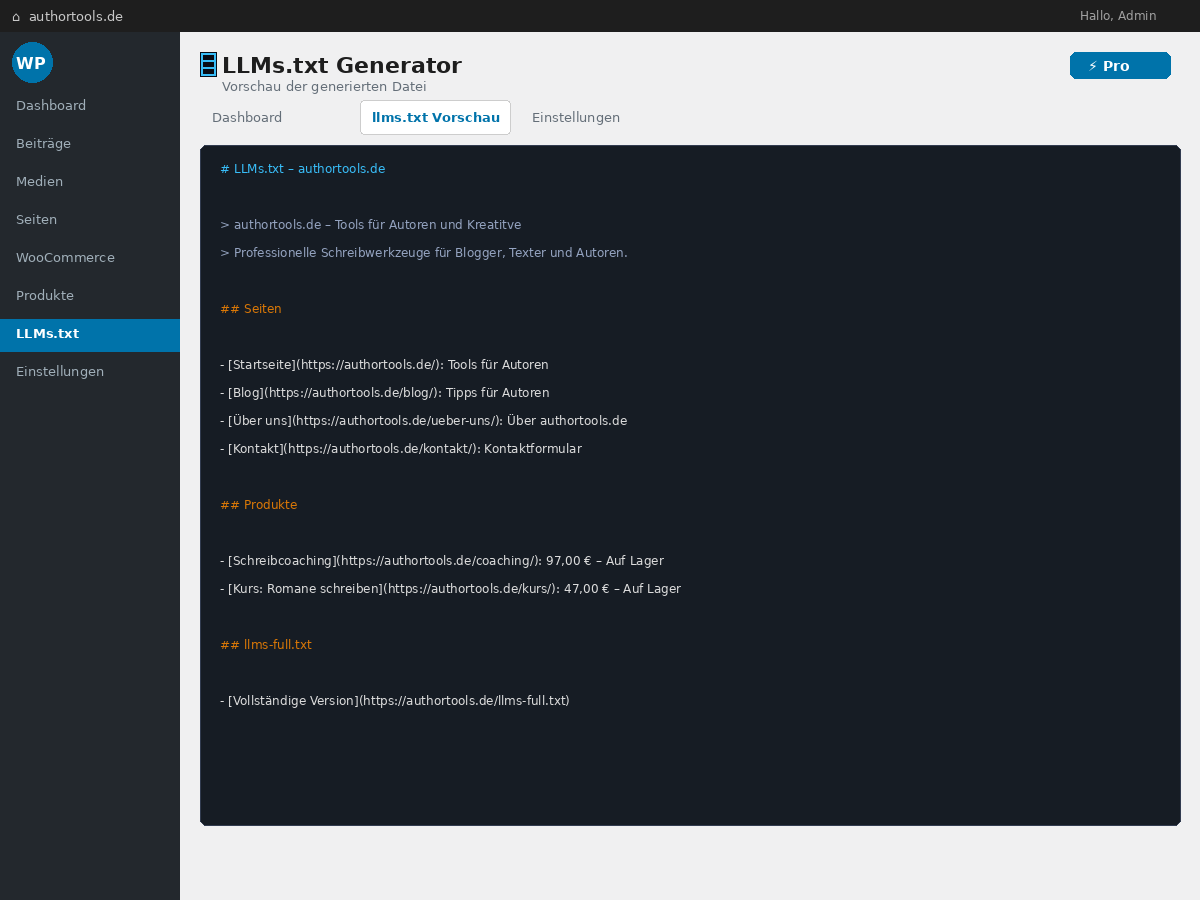
- Generates llms.txt from WordPress pages, posts, and WooCommerce products with prices and stock status
- Serves
/llms.txtand/llms-full.txtvia WordPress rewrite rules — no physical file needed - Auto-regenerates when posts or products are saved
- Custom Markdown sections appended to output
- Works with any WordPress theme
- SEO plugin noindex detection (Yoast, Rank Math, SEOPress, AIOSEO) — noindexed pages excluded automatically
- URL exclusion list with wildcard support
- Optional respect for robots.txt Disallow rules
- Full German (de_DE) and English translation support
- Product Drill-Down: Price, SKU, specifications, and variants extracted per product page — AI assistants can answer "How much does X cost?" with your real price
- Intent Routing: 26 customer question types (price, comparison, availability, installation, warranty…) mapped to the correct pages on your site
- Competitor comparison tables: Auto-generated from your product catalog so AI assistants can recommend your products in comparison queries
- 5 file formats: llms.txt, llms-full.txt, robots.txt snippet, JSON-LD, CSV — covering every AI integration scenario
- Priority email support
- Pro Solo — €4.90/month · up to 500 URLs per generation · 10 domains/month · ideal for small WordPress sites and single shops
- Pro Business — €9.90/month · up to 2,000 URLs · unlimited domains · automatic cron updates · ideal for established shops
- Agency — €19.90/month · up to 10,000 URLs · REST API access for automation · ideal for agencies managing multiple client sites
- Lighthouse-style 0-100 score with 5 weighted sub-scores
- Schema.org Coverage (30%) — checks Product schema on WooCommerce products
- llms.txt Health (25%) — file exists, has sections, fresh, has llms-full.txt
- AI Crawler Access (15%) — robots.txt allows GPTBot, ClaudeBot, PerplexityBot etc.
- Content Quality (15%, Pro) — title length, meta-description, H1, alt-tags, OG-tags
- noindex Compliance (15%) — Yoast/RankMath/AIOSEO noindex pages excluded from llms.txt
- Smart Recommendations — top 3 actionable fixes with one-click buttons
- Schema.org drill-down — table of every sampled product with @type / price / offers status, plus direct edit links for products with missing markup
- llms.txt diagnostic grid — every health check (exists, hasTitle, hasSections, hasEnoughPages, fresh, hasFullVersion) with raw values and tooltip explanations
- Crawler matrix — six AI bots (GPTBot, ClaudeBot, PerplexityBot, Google-Extended, Bytespider, CCBot) with allow/block status, plus an auto-generated robots.txt snippet for the blocked ones, with one-click copy
- Content Quality breakdown (Pro) — 10/25/50 sample pages (Solo / Business / Agency) × 5 checks each (title length, meta description, H1, alt-tag ratio, Open-Graph tags) — every cell shows the precise value, not just pass/fail
- noindex conflicts — every page flagged noindex by Yoast / Rank Math / AIOSEO / SEOPress / WooCommerce, with source badge and a flag whether the page still appears in your llms.txt
- 30-day score history (Pro) — SVG sparkline of your visibility score with daily snapshots, 7-day delta, and tier-coloured data points
- Export — JSON dump of the full audit, or a ZIP archive containing five separate CSVs (one per sub-score) for sharing with clients, agencies, or your reporting pipeline
- Re-Crawl now (Pro) — force a fresh Pro-API crawl with a 30-minute cooldown
- Clickable sub-score bars on the main page jump directly to the matching drill-down section
安装:
- Upload the
aiready-llms-txt-generatorfolder to/wp-content/plugins/ - Activate the plugin through Plugins > Installed Plugins in WordPress
- Click LLMs.txt in the admin sidebar
- Click ⚡ Generate Now — your
/llms.txtis live immediately - Optional: switch to Pro mode and enter your licence key (Solo, Business or Agency) for enhanced output
- WordPress 6.0 or higher
- PHP 8.0 or higher
屏幕截图:


常见问题:
Does this slow down my website?
No. The llms.txt file is served via a lightweight rewrite rule and cached for one hour. Regeneration runs asynchronously via WP-Cron after content changes, not during the page load.
Does it work without WooCommerce?
Yes — it works with any WordPress site and includes pages and blog posts. WooCommerce product data is automatically included when WooCommerce is detected.
What is the difference between llms.txt and llms-full.txt?
llms.txt is a concise summary optimised for most AI assistants. llms-full.txt contains extended descriptions and is intended for AI crawlers that fetch additional context. Both files are generated and served automatically.
How does the AI Visibility Score detail page work?
The detail page (added in 1.5.0) is a separate sub-menu under LLMs.txt. The main settings page keeps the score as a compact card; the detail page lets you drill down into each sub-score individually — every product, every check, every blocked crawler is visible with the underlying value, not just a percentage. Re-Crawl on demand (Pro), export the audit as JSON or as a ZIP of five CSVs, and watch the 30-day history sparkline build up automatically (snapshots are recorded with every score computation, every 6 hours).
Which Pro tier do I need?
It depends on your site size:
- Pro Solo (€4.90/month) — small WordPress sites and single shops up to 500 URLs. Includes drill-down, intent routing and 10 domains/month.
- Pro Business (€9.90/month) — established shops with up to 2,000 URLs. Adds unlimited domains and automatic cron updates.
- Agency (€19.90/month) — large operations or agencies managing multiple client sites. Up to 10,000 URLs and REST API access.
How do I see which tier my key belongs to?
After clicking "Verify" with your Pro key, the admin sidebar shows your active tier (Pro Solo / Pro Business / Agency) and the URL limit per generation. The information comes directly from the licensing API.
Is the plugin GDPR-compliant?
Yes. In free mode, no data leaves your server. In Pro mode, only your public website URL is sent to the llmstxtgenerator.de API. The plugin stores no personal data.
How do I trigger regeneration from an external system?
Enable a webhook secret in Settings > Advanced. Then POST to /wp-json/llmstxt/v1/regenerate with the header X-LLMSTXT-Key: your-secret.
What happens when I deactivate or delete the plugin?
Deactivating removes the rewrite rules and stops scheduled regeneration. Deleting the plugin additionally removes all stored options and generated files from your server.
更新日志:
- New: optional review request. A friendly, one-time admin notice invites engaged site owners to leave a WordPress.org review. It appears only on the plugin's own admin pages, only to administrators, and only after 14 days of use. Fully dismissible and never shown again once dismissed — in line with the WordPress.org plugin guidelines. Three new translatable strings were added (German included; de_DE.mo recompiled).
- No functional changes to generation, scoring, or the API. Safe upgrade.
- i18n fix — mixed-language main page corrected. 27 strings on the plugin's main page had no German translation and therefore showed up in English on German installs, producing a mixed German/English UI. Now translated: the Pro sidebar tier labels ("Pro Business aktiv", "Unbegrenzte Domains", "URL-Limit: %s pro Generierung", "REST-API-Zugang"), the entire URL-exclusions section, the SEO-plugin noindex-detection notice, the score-card strings ("Wichtigste Empfehlung", "alle anzeigen", "Score aktualisieren", "Prüfen Sie Ihren Score erneut…"), the tier-overview rows, and the llms.txt URL descriptions. de_DE.po grew from 222 to 249 entries, de_DE.mo recompiled.
- No functional code changes — translation-only release. Safe upgrade.
- WordPress.org discovery optimisation. Reworked the plugin tags to the five terms that actually drive llms.txt-related searches (
llms.txt, chatgpt, ai, schema, woocommerce) and rewrote the short description to lead with the two strongest hooks — the AI Visibility Score and "free for any WP site" — within the 150-character limit. No code or behaviour change; this only affects how the plugin is found and presented in the directory. - Refreshed screenshots — generator first. Screenshot 1 now leads with the llms.txt generator (File Status + Generate Now as a hero card at the top) instead of the AI Visibility Score; the score follows below as a complementary overview, matching the actual v1.5.3+ admin layout. The settings screenshot now shows a masked licence key, and the captions were corrected (the former "Schema drilldown" caption now correctly describes the Content Quality drilldown).
- No functional code changes. Safe upgrade.
- Minor version bump – WordPress 7.0 compatibility verified. WordPress 7.0 has been released today (May 20, 2026, introducing the AI foundation across the platform). The plugin was live-tested on a real WP 7.0 install at authortools.de: Plugin Main Page, Score Detail Page (incl. cache-miss loading screen), AJAX endpoints, REST API and frontend
/llms.txtand/llms-full.txtoutputs all work without regressions.Tested up tois now honestly bumped from 6.9 to 7.0 in both the plugin header and readme.txt. - i18n: JavaScript step messages now translatable. The 6 loading-screen step messages cycled through by score-detail.js ("Checking Schema.org markup on sample products…", "Reading llms.txt and llms-full.txt…", "Probing AI crawler access (GPTBot, Claude, Perplexity)…", "Auditing content quality (Pro)…", "Compiling noindex compliance report…", "Almost done…") used to be hardcoded English strings in the JS file. v1.6.0 routes them through
wp_localize_script: 6 new__()calls inllmstxtAdmin.strings.loadingSteps, the JS falls back gracefully to English if the localized array is missing. German translations added in de_DE.po (222 entries, was 216), de_DE.mo recompiled. - Combined effect: German WordPress users now see the entire loading screen – titles, body text, AND the cycling step messages – in German. Other locale translators can pick up de_DE.po as a template to translate the 6 new strings into their language.
- No other functional changes. Safe upgrade.
- i18n: German translation for the loading screen. The v1.5.5 Loading-Screen on the "AI Visibility Score" detail page was rendered in English even on German WordPress installs because the new strings ("Computing AI Visibility Score…", "Analyzing your Schema.org markup…", "Starting…", "The page will reload automatically…" etc.) had never been added to the de_DE.po file. v1.5.9 closes that gap — 5 new strings translated, de_DE.mo recompiled (216 entries). German users now see the loading screen fully localized.
- The 6 step messages cycled through by JavaScript ("Checking Schema.org markup on sample products…", "Reading llms.txt…", "Probing AI crawler access (GPTBot, Claude, Perplexity)…" etc.) are still English — they are JS-hardcoded and need a wp_localize_script refactor planned for v1.6.0.
- No functional code changes.
- Plugin Check residual cleanup: Fixes the final 7 errors that remained after v1.5.7 — 6× MissingTranslatorsComment (the translators-comments now sit INSIDE printf() directly before the translation function, not on the line before printf), 1× mismatched_tested_up_to_header (the plugin-file header still said 7.0 while readme.txt already said 6.9), and CRLF/LF line-ending normalization in two admin files.
- Plugin Check verdict: 19 → 0 ERRORS, 177 → ~5 WARNINGS (remaining warnings are False-Positives or accepted by design).
- No functional code changes.
- Compatibility correction: Reverted "Tested up to" from 7.0 back to 6.9. The 7.0 bump in v1.5.4 was a premature version assumption – WordPress 7.0 has not been released yet (current stable is 6.9.4). The plugin works correctly against 6.9.x; the false 7.0 declaration is corrected to comply with the WordPress.org plugin directory rules.
- No functional code changes from v1.5.6.
- Code Quality: Cleaned up all 19 errors reported by the official WordPress.org Plugin Check tool. The plugin now passes the WP.org review without ERRORS in Allgemein, Plugin-Repository, Security, Performance and Accessibility categories.
- i18n: Added "translators:" comments above all 8
__()/esc_html__()/_n()calls that contain%d/%s/%1\$dplaceholders, so translators understand what each placeholder means. - Security: All 7 output-escape gaps in the score detail templates fixed. Numeric
%d-printf arguments are now properly(int)cast and the sub-score-linkhrefattribute is wrapped inesc_url(). - Filesystem:
@unlink()replaced with WordPress'wp_delete_file()for the score-export ZIP. The unavoidablereadfile()andfopen('php://temp')calls (no WP_Filesystem equivalent for streaming downloads or in-memory PHP streams) are now annotated with phpcs:ignore + justification. - No user-visible behaviour change. Safe upgrade from v1.5.5.
- UX fix: Clicking "AI Visibility Score" in the sub-menu no longer shows a blank page for many seconds. When the details cache is empty (first visit or after 15-min TTL expiry), the page now renders a clear loading screen with a circular spinner, animated progress bar and rotating status messages ("Checking Schema.org markup on sample products…", "Reading llms.txt…", etc.). The detail data is fetched asynchronously and the page reloads automatically when ready. Previously the page render blocked synchronously for up to 60 seconds during the first compute (10 local HTTP probes for Schema sampling + 1 Pro API crawl) with no visual feedback, making the plugin look broken.
- No backend or API changes — pure UX improvement around the existing detail-page render flow.
- Compatibility: Tested with WordPress 7.0 (released May 20, 2026) including the new "Modern" admin theme. No code changes required ‒ all custom admin UI (AI Visibility Score card, Score Detail page, settings panels) continues to work correctly in the new theme.
- No functional changes from 1.5.3.
- UX: Score-refresh button in the AI Visibility Score card header is now a clearly labelled secondary button ("Refresh") instead of a tiny icon — the loading state (spinner + "Refreshing…" label) is much easier to see.
- UX: Added a second score-refresh control at the bottom of the main column, so users can re-check the score after editing settings without scrolling back up.
- UX: The "Your llms.txt URLs" sidebar card now labels each file clearly (📄 llms.txt — compact overview · 📑 llms-full.txt — full page listing) with one-line descriptions, and the full URL path is no longer truncated by an ellipsis cut.
- UX: Generator card (File Status + Generate Now button) moved to the TOP of the main column as a prominent hero card — the plugin's primary purpose is llms.txt generation, so it now leads the UI. The AI Visibility Score card moves below it, complementary rather than dominant. Score-card recommendation list reduced from 3 to 1 with a "see all" link to the detail page, keeping the card itself compact.
- No backend or API changes — purely UI/UX refinements based on user feedback.
- Critical bugfix: Generate failed with "Pro or Agency licence required" even after a valid Pro key was successfully verified. Root cause:
sanitize_settings()was wiping the verified-tier metadata (pro_tier,pro_max_urls,pro_verified_at,pro_email_mask) on everyupdate_option()call fromajax_save_keybecause it read these fields from the OLD database state (pre-update). The plugin then submitted the stale, empty key on Generate. Fix: acceptpro_*values from\first (the freshly-set ajax values), fall back to\only when\is missing them (normal Settings-form save without hidden pro_* fields). - Tier-whitelist in
ajax_save_keynow includesbusiness— the license API returnsbusinessfor Pro Business plans, which was previously silently downgraded toprocausing UI label mismatches. in_array(..., 'mode')check now uses strict comparison (third argumenttrue) to defend against PHP 7 loose-comparison quirks where0 == 'free'could evaluate truthy.- API client surfaces the actual server-provided error message on HTTP 401 (e.g., "Key not found", "Missing X-LLMSTXT-Key header") instead of a generic "Invalid key" message, making misconfigurations much faster to diagnose.
- UX-Fix — AI Visibility Score now top of main column: Score card moved from bottom of main column (below Settings form) to the very top, directly under the plugin header. The feature was hard to find — users had to scroll past File Status, Settings, Content selection, Custom Sections, Advanced, URL Exclusions and Save Settings before the score appeared. It is now the first thing visible.
- Fix — stale "Last error" banner removed: A red "Last error: ..." notice could persist at the top of the page from stale
llmstxt_last_erroroption values left behind by earlier versions, even when the licence was valid and no error had occurred. The option is now cleaned up on every page render and no longer displayed. - Internal:
\$last_errvariable kept in template scope for backward compatibility but is now always empty (the plugin never sets the underlying option).
- NEW: AI Visibility Score detail page — dedicated sub-menu under LLMs.txt → AI Visibility Score with full drill-down for every sub-score
- NEW: Schema.org product table — every sampled product listed with @type / price / offers status and direct WordPress edit links for products with missing markup
- NEW: llms.txt diagnostic grid — six health checks visualised individually (exists, hasTitle, hasSections, hasEnoughPages, fresh, hasFullVersion) with tooltip explanations
- NEW: Crawler matrix with snippet generator — six AI bots listed with allow/block status; for blocked bots, a copy-paste-ready robots.txt snippet is generated automatically
- NEW: Content Quality breakdown (Pro) — 10/25/50 sample pages by tier (Solo/Business/Agency) × 5 per-page checks (title length, meta description, H1, alt-tag ratio, Open-Graph tags); each cell shows the actual value, not just pass/fail
- NEW: noindex conflicts table — every noindex-flagged page (Yoast, Rank Math, AIOSEO, SEOPress, WooCommerce) listed with source badge and a flag whether it currently appears in llms.txt
- NEW: 30-day score history sparkline (Pro) — SVG chart with daily snapshots, tier-coloured data points, and delta vs. 7 days ago
- NEW: Export JSON / Export CSV (ZIP) — full audit downloadable as a single JSON file or as a ZIP archive containing five separate CSVs, one per sub-score
- NEW: Re-Crawl now button (Pro) — force a fresh Pro-API crawl with a 30-minute cooldown to prevent abuse
- NEW: Clickable sub-score bars on the main card — jump from the overview directly to the matching drilldown section via auto-scroll and focus highlight
- Improved: Score history is now recorded automatically for all users (Free and Pro). Free users do not see the chart but their data is preserved if they upgrade later.
- Improved: Detail-page cache TTL is shorter than the main card (15 min vs. 6 h) so debugging remains responsive.
- Internal: New backend API endpoint
visibility-score-details.phpfor Pro Content Quality crawls. - Internal: 25+ new translation strings added to
de_DE.po(full DE coverage of detail page).
- Updated screenshots to reflect v1.4.7+ UI: Pro Business active dashboard, settings panel with custom sections and URL exclusions, and the new AI Visibility Score introduced in 1.4.0.
- Removed outdated WooCommerce-section and tier-comparison screenshots — both are now covered by the main dashboard view.
- Removed orphaned screenshot-5 reference that had no corresponding image file.
- Layout fix: AI Visibility Score card moved to END of main column (after generator settings) — llms.txt generator is the primary feature, score is supplementary.
- Spec-conform main card restored: AI Visibility Score is back as the main card above the file status section, exactly as designed in the v1.4.0 spec — SVG half-circle dial on the left, five sub-score bars on the right (Schema.org Coverage 30%, llms.txt Health 25%, AI Crawler Access 15%, Content Quality 15% Pro, noindex Compliance 15%), and the top three recommendations below as boxes with action buttons (Read guide / Re-generate now / Show snippet).
- Card sized to ~380–420px so file status, generator form and the llms.txt / llms-full.txt URL list stay visible in the same 1200×800 viewport without scrolling.
- The minimal sidebar widget from 1.4.5 is removed — the sidebar contains only the Pro card, "Your llms.txt URLs", and Documentation again.
- Plugin focus restored: AI Visibility Score is no longer the dominant element on the plugin page. The Visibility Score card has been moved out of the main content area into the right sidebar (where the Pro card, "Your llms.txt URLs", and Documentation cards live), as a small widget showing the score, tier, top recommendation, and a "Learn more" link.
- The plugin page now opens with the file status (llms.txt is live / size / modified / pages count), generator form, and llms.txt / llms-full.txt URL list immediately visible — exactly as in versions before 1.4.0.
- Sub-score bars and detail breakdown were removed from the sidebar widget — they belong on a dedicated detail page (planned for 1.5.x).
- Spec-conform layout: Visibility Score card now matches the original spec — half-circle dial on the left, five sub-score bars on the right, and the top three recommendations as one-line items below. Card height kept compact (around 320px) so the file status, generator form, llms.txt and llms-full.txt sections stay visible above the fold without scrolling.
- Removed the v1.4.3 "Show details" toggle — full content is shown immediately, in a smaller and tighter format. Sub-score bars are 6px high, recommendation rows are single-line with truncation.
- UX rebuild: AI Visibility Score card now opens in a compact single-row view (score, tier, recommendation count, refresh, "Show details"). The full sub-scores and recommendations only appear after the user clicks "Show details". This puts the file status, generator form, llms.txt and llms-full.txt sections back at the top of the screen where users expect them.
- Score card detail view restyled: thinner sub-score bars, smaller recommendation rows, footer condensed to a single line.
- Layout fix: AI Visibility Score card was rendered inside the page header flex container, which pushed file status, generator form and llms.txt sections below the visible area. The card is now a standalone section between header and main layout — all existing plugin features (llms.txt status, generator, Pro key, WooCommerce integration) are visible again.
- AJAX fix: Re-generate / Generate-now buttons in the Visibility Score recommendations returned "Network error". The button JS sent the security nonce under the wrong parameter name (_nonce instead of nonce), causing WordPress to reject the request with 403. Aligned the Visibility Score JS and the refresh-score handler with the plugin nonce convention.
- Hotfix: Fixed PHP fatal error on the AI Visibility Score card. The template called a helper function before its conditional declaration, causing a critical-error notice on first render. The helper now uses the existing static class method.
- NEW: AI Visibility Score — Lighthouse-style 0-100 score with 5 sub-scores (Schema.org Coverage, llms.txt Health, AI Crawler Access, Content Quality, noindex Compliance)
- NEW: Smart Recommendations — top 3 actionable fixes with one-click action buttons (re-generate, copy robots.txt snippet, etc.)
- NEW: Multi-SEO-plugin noindex detection — recognises Yoast, RankMath, AIOSEO and excludes flagged pages from llms.txt
- NEW: WooCommerce Schema.org sampling — checks up to 10 products for valid Product schema with price
- NEW: Pro mode calls llmstxtgenerator.de API for full Content Quality crawl (10 sample pages: titles, meta, H1, alt-tags, OG-tags)
- Improved: Score is cached for 6 hours; manual refresh button bypasses cache
- Improved: Free mode delivers a real local score (no paywall) — re-distributes Pro-only weight across other sub-scores
- Added: Three Pro tiers (Solo €4.90, Business €9.90, Agency €19.90 per month) — plugin auto-detects which tier your licence belongs to
- Added: Tier-aware admin sidebar — shows active tier name (Pro Solo / Pro Business / Agency) and URL limit per generation after key verification
- Added: New options stored after Pro key verification (
pro_plan,pro_tier,pro_max_urls,pro_email_mask,pro_verified_at) so the dashboard can render tier-specific UI without re-querying the API - Added: Tier overview card in upsell sidebar — visualises Solo/Business/Agency at a glance with prices and URL limits
- Changed: Upgrade-CTA price updated from "from €7.90/mo" to "from €4.90/mo" (Solo entry tier)
- Changed: Pro mode label clarifies that Solo, Business or Agency keys are all accepted
- Improved: Existing customers with previous Pro/Agency keys (€7.90 / €29) continue to work unchanged — backward compatibility preserved at the licensing API
- Internal: New localized strings (
tierSolo,tierBusiness,tierAgency,urlLimit,saving) added towp_localize_scriptfor translators
- Added: noindex detection — pages/posts marked noindex in Yoast SEO, Rank Math, SEOPress, or All in One SEO are automatically excluded from llms.txt
- Added: URL exclusion list — manually exclude specific URLs or path patterns (supports wildcards, e.g. /shop/*)
- Added: robots.txt Disallow respect — optionally exclude all paths blocked by robots.txt Disallow rules for User-agent: *
- Fixed: Pro licence key is now automatically saved and settings reloaded after successful key verification — no separate "Save Settings" click required
- Fixed: Plugin URLs corrected to non-www canonical (llmstxtgenerator.de/agb/ and llmstxtgenerator.de/datenschutz/)
- Fixed: German umlauts and all non-ASCII characters now display correctly — Apache serves text/plain as ISO-8859-1 by default; plugin now inserts a FilesMatch rule into .htaccess on activation and on every generate to declare UTF-8 charset for llms.txt and llms-full.txt
- Fixed: .htaccess rule is removed cleanly on plugin deactivation and uninstall
- Fixed: Plugin now always writes physical llms.txt and llms-full.txt to the WordPress site root so AI crawlers and external checkers (e.g. llmstxtgenerator.de) can access them directly — independent of rewrite rules or caching plugins
- Fixed: Uninstall now also removes root copies of llms.txt and llms-full.txt
- Fixed: Middle dot (·) used by SEO plugins as tagline separator no longer appears in output
- Fixed: Robust fallback in title cleaning: uses both regex and explicit str_replace to handle all separator variants (–, —, |, -)
- Fixed: Page and post titles stripped of SEO-plugin-appended site-name suffix
- Fixed: HTML entities in WooCommerce prices and descriptions decoded correctly
- Fixed: /llms-full.txt now cached in free mode
- Fixed: Free mode reports error when uploads directory not writable
- Fixed: Pro mode API URL corrected (www → non-www) to prevent POST redirect stripping auth headers
- Fixed: Key verification correctly rejects invalid keys
- Added: External services documentation in readme (llmstxtgenerator.de API)
- Removed: "Write physical file to site root" option — llms.txt is served dynamically via rewrite rules; no ABSPATH writes required
- Fixed: Pro mode "Generate Now" now uses correct API endpoint and response format
- Added: Full German (de_DE) translation for all UI strings, including JavaScript labels
- Added:
uninstall.phpfor clean removal of all plugin data - Changed: File I/O now uses WP_Filesystem API instead of direct PHP functions
- Changed: Replaced deprecated
get_page_by_title()withget_posts()equivalent - Changed: Minimum PHP version raised to 8.0 to reflect actual code requirements
- Improved: All JavaScript labels are now served via
wp_localize_script— fully translatable - Improved: Plugin header updated with all recommended fields
- Initial release
- Free standalone mode for WordPress + WooCommerce
- Pro API mode with product drill-down
- Auto-regeneration on content changes
- Custom Markdown sections support
- REST API webhook endpoint for external triggers