
Airgentic AI Chat Overlay
| 开发者 | airgentic |
|---|---|
| 更新时间 | 2026年9月25日 06:39 |
| PHP版本: | 7.4 及以上 |
| WordPress版本: | 6.8 |
| 版权: | GPLv2 or later |
| 版权网址: | 版权信息 |
详情介绍:
- Hover widget - Chat launcher on every page after you enter your Account ID and Service ID
- Testing Mode - New installs show Airgentic only to logged-in WordPress users until you go live
- Percentage rollout - Optionally show the floating chat widget to a subset of visitors
- Service Hub - Full-width chat on selected pages via
[airgentic_service_hub] - Inline Site Search - A dedicated search results page using
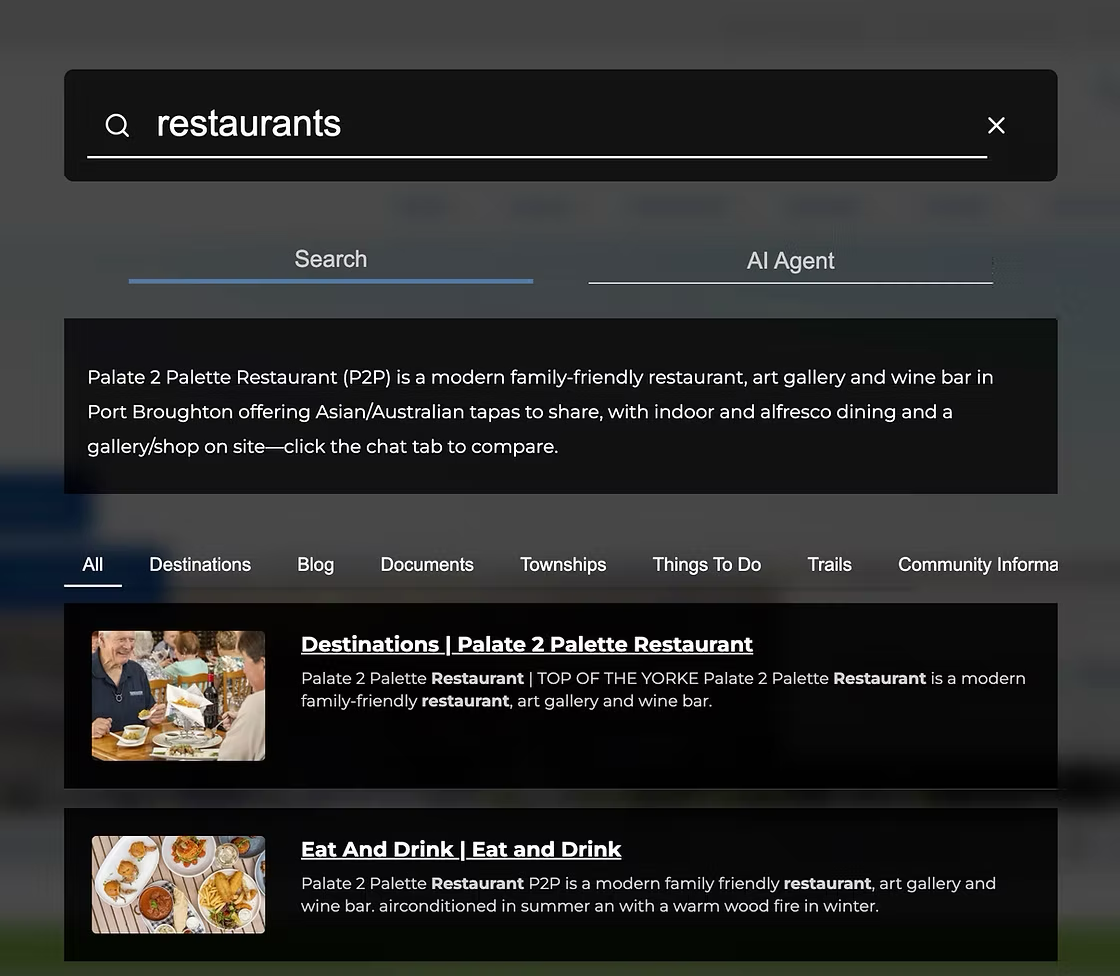
[airgentic_search] - Overlay search - Optional popup search bound to an existing search field
- WordPress search forms - Optional rewrite of the Search block, Search widget, and theme search form
- No coding required - Configure everything under Settings → Airgentic
- Install and activate the plugin
- Enter your Airgentic Account ID and Service ID (from your Airgentic dashboard)
- Enable the widget on the front-end
- Stay logged in and preview the live site (Testing Mode is on for new installs)
- Turn Testing Mode off when you are ready for visitors
- Optionally add
[airgentic_service_hub]on pages that should show the full chat window - Optionally choose Inline search, create a Search page, and let the plugin point WordPress search forms at it
- Website search with AI answers
- Customer support and FAQ automation
- Lead generation and qualification
- Product information and recommendations
安装:
- Log in to your WordPress admin
- Go to Plugins → Add New
- Search for "Airgentic"
- Click Install Now, then Activate
- Go to Settings → Airgentic
- Download the plugin ZIP
- Go to Plugins → Add New → Upload Plugin
- Choose the ZIP and click Install Now
- Activate the plugin
- Go to Settings → Airgentic
- Go to Settings → Airgentic
- Enter your Account ID and Service ID (required)
- Check Enable on Front-end
- For Site Search, choose a Search mode:
- Inline search (recommended): click Create Search page (or add
[airgentic_search]to a page), keep the form rewrite options checked, and save - Overlay search: enter the HTML id or class of your search input in Non-WordPress search input
- Disabled: chat only
- Click Save Settings
- Preview while logged in (Testing Mode is on for new installs), then turn Testing Mode off for visitors
- Optional: set Show to % of visitors (for example 20) to roll the floating chat widget out to a subset of browsers. Leave blank for everyone.
屏幕截图:
常见问题:
Where do I find my Account ID and Service ID?
They are in your Airgentic admin dashboard. If you do not have an account yet, visit www.airgentic.com.
Does this plugin work with any WordPress theme?
Yes. The hover widget is independent of the theme. Inline search works with the WordPress Search block, Search widget, and standard theme search form. Custom header HTML can be bound by entering the input id or class.
Will this plugin slow down my website?
The Airgentic script is loaded with the defer attribute so it does not block page rendering.
Can I customize the appearance of the chat or search UI?
Appearance is configured in the Airgentic admin dashboard, not in this plugin.
How do I add the Service Hub to a page?
Add [airgentic_service_hub] to the page. It outputs <div id="airgentic"></div>. You can also add that HTML in a theme template.
How do I add Site Search?
- Set Search mode to Inline search
- Click Create Search page, or create a page and add
[airgentic_search] - Leave Rewrite WordPress search forms checked so header search submits to that page as
?query=
What if my search field is custom HTML, not a WordPress search form?
Leave Non-WordPress search input and Non-WordPress search button blank. A WordPress search form is the Search block, the Search widget, or any theme form with an input named s, and the plugin finds those itself. With Rewrite WordPress search forms checked, a question typed there opens Ask and is answered straight away.
Fill in Non-WordPress search input only when the box is custom HTML with no input named s. Enter the text field’s HTML id, or a class name with a leading dot (for example .header-search). Use the text field, not the icon that opens it. For inline mode this enables autocomplete on that field; for overlay mode it opens the search popup. Non-WordPress search button is only for a button that does not submit that form.
How do I preview Airgentic before visitors see it?
New installs start in Testing Mode. Log in to WordPress and browse the live site. Only logged-in users see Airgentic, and they see it at 100% (the visitor percentage is ignored). Turn Testing Mode off when you are ready for visitors. Existing sites keep Testing Mode off on upgrade.
Can I show Airgentic to only some visitors?
Yes. After Testing Mode is off, set Show to % of visitors under Settings → Airgentic (for example 20). The same browser keeps the same outcome. Dedicated search and Service Hub pages always load. Append ?airgentic=1 or ?airgentic=0 to a URL to force on or off while testing.
Does upgrading to 1.2.0 change my current overlay search?
No. If you already filled a search input ID in 1.1.0, Search mode stays on Overlay until you change it.
Can I control which pages show the Service Hub or search UI?
Yes. Those UIs only render where you place [airgentic_service_hub] or [airgentic_search].
Is there a free trial?
See www.airgentic.com for pricing and trial options.
更新日志:
- Rewrite WordPress search forms now also covers theme header forms that WordPress does not render through
get_search_formor the Search block. They submitqueryto the search page directly, so questions typed there are answered without a second Enter and get autocomplete - Fixed the
?s=redirect dropping a trailing question mark and HTML-escaping&in the search text - The two optional search fields are now labelled as non-WordPress only. Leave them blank for a WordPress search form
- Added Testing Mode so new installs show Airgentic only to logged-in WordPress users
- Show to % of visitors is ignored while Testing Mode is on
- Existing sites keep Testing Mode off on upgrade
- Added Show to % of visitors to roll out the floating chat widget to a subset of browsers
- Emits
data-traffic-percenton the Airgentic script tag when a percentage below 100 is set
- Added inline Site Search via the
[airgentic_search]shortcode - Added Search mode: disabled, inline (recommended), or overlay
- Added optional Create Search page action (not run on activation)
- Optionally rewrite the WordPress Search block, Search widget, and theme search form to submit
queryto your search page - Optionally redirect WordPress
?s=searches to the Airgentic search page - Search input and button fields now accept a class name as well as an id
- Existing 1.1.0 overlay search settings are preserved on upgrade
- Breaking Change: Widget container is no longer automatically added to pages
- You must now manually add the widget using the
[airgentic_service_hub]shortcode or<div id="airgentic"></div>HTML - This gives you full control over which pages display the widget and where it appears
- Updated admin settings documentation to reflect the new two-step setup process
- Initial public release
- Automatic widget loading on all pages
- Configurable Account ID and Service ID
- Optional search form integration
- Service Hub shortcode
- Admin settings interface