
AJAX Loading
| 开发者 | maheshmthorat |
|---|---|
| 更新时间 | 2026年10月30日 18:19 |
| 捐献地址: | 去捐款 |
| PHP版本: | 7.4 及以上 |
| WordPress版本: | 7.1 |
| 版权: | GPLv3 |
| 版权网址: | 版权信息 |
详情介绍:
- Replaces only the content area. Automatic detection works with most themes; you can also enter your own CSS selectors or replace the whole page body.
- Keep the header and footer (default) or replace them on every navigation.
- Back and forward buttons work and return visitors to where they were on the page.
- Links to a
#sectionscroll to that section, on the same page and on other pages. - Redirects end on the right address, and "not found" (404) pages can be shown without a reload.
- WordPress search forms, and other GET forms you choose (such as product filters), are submitted without a reload. POST forms are never touched.
- Scripts inside the new content run like on a normal page load. Stylesheets and scripts that the next page needs are loaded before it is shown.
- Sites with a nonce-based Content Security Policy stay protected: a script of the loaded page only runs when that page's own policy allows it.
- Ctrl/Cmd-click, middle-click, links that open in a new tab, download links and links to files (PDF, images, archives) keep their normal behaviour.
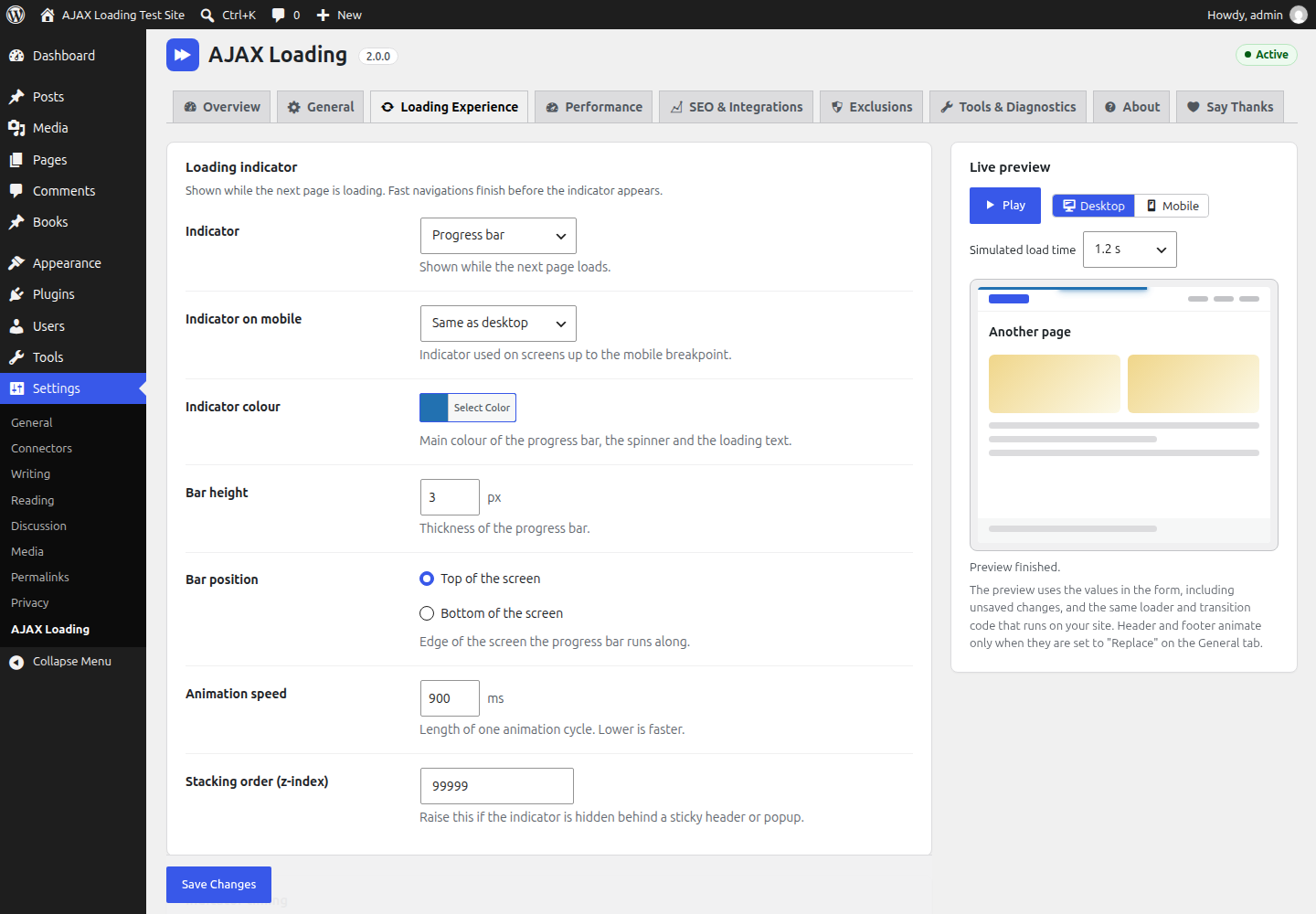
- Seven indicators: progress bar, spinner, overlay, text, your logo, skeleton placeholder, or none, with a separate choice for mobile.
- Colours, size, position, speed and stacking order. The indicator only appears when a page takes longer than a delay you choose, so fast pages do not flicker.
- Nine leave and enter animations (fade, fade through, slide left/right/up/down, scale, smooth, none) with adjustable duration and easing, and an optional simpler animation on mobile.
- A live preview in the dashboard that uses your unsaved settings and the same code that runs on your site.
- Animations are skipped for visitors who ask their device to reduce motion.
- Optional link prefetching when a link is hovered, focused with the keyboard, touched or scrolled into view. It respects data saver and very slow connections and is never used for logged-in visitors or personalised pages.
- Optional in-browser cache of recently visited pages, with limits for the number of pages, their lifetime and memory use.
- Prefetching and the cache are both off by default.
- WordPress 6.8+ speculative loading is turned off on pages where AJAX navigation runs, so pages are not downloaded twice (you can change this).
- One script and one small stylesheet, loaded deferred in the footer and only on pages where AJAX navigation runs: about 169 KB minified (about 58 KB gzipped) plus 8 KB of CSS (2 KB gzipped). jQuery is not required.
- The page title is always updated.
- Meta description, robots, Open Graph, Twitter cards, canonical URL, previous/next links and hreflang alternates in the
<head>, and JSON-LD structured data in the<head>or printed directly in the page body (such as WooCommerce product schema), are kept in sync (each group can be switched off). - The
<html lang>attribute, body classes and the "current page" highlighting of your menus are updated too. - Search engines get the same real URLs and server-rendered pages as before. The plugin does not treat crawlers differently.
- After each navigation, keyboard focus moves to the main heading, to the content area, or stays where it is (your choice).
- Screen readers hear "Navigated to" followed by the new page title.
- The content area is marked busy while loading, and menu
aria-currentstates stay correct. - Reduced-motion preferences are respected by default.
- WooCommerce: shop, category and product pages load with AJAX; product galleries, variation forms, tabs and sorting are re-initialised and cart fragments refreshed. With the default "Protect WooCommerce pages" option, cart, checkout, My Account and order pages load normally, and add-to-cart, remove-from-cart, coupon and logout links are never intercepted.
- Page builders: Elementor (including Pro popups), Divi 4, Beaver Builder and Bricks are re-initialised. Pages built with Divi 5 load normally.
- Forms: Contact Form 7, Gravity Forms, WPForms, Fluent Forms and Formidable Forms are re-initialised. Pages with Ninja Forms or ACF front-end forms load normally, because those cannot be started again after a page has loaded.
- Multilingual (WPML, Polylang, TranslatePress and others): switching language always uses a normal page load.
- Also handled: X (Twitter), Instagram, Facebook and WordPress post embeds, lazysizes and vanilla-lazyload, threaded comment replies, and the jQuery
post-loadevent many plugins listen to. - Membership and login pages of WordPress, Paid Memberships Pro, Ultimate Member, MemberPress and BuddyPress load normally (default "Protect login and membership pages" option).
- WordPress interactive blocks (Interactivity API) make their pages load normally by default.
- Multisite: links to another site of the same network always use a normal page load.
- AJAX navigation never runs in the Customizer preview, page builder editors, AMP pages, feeds, embeds or the admin area.
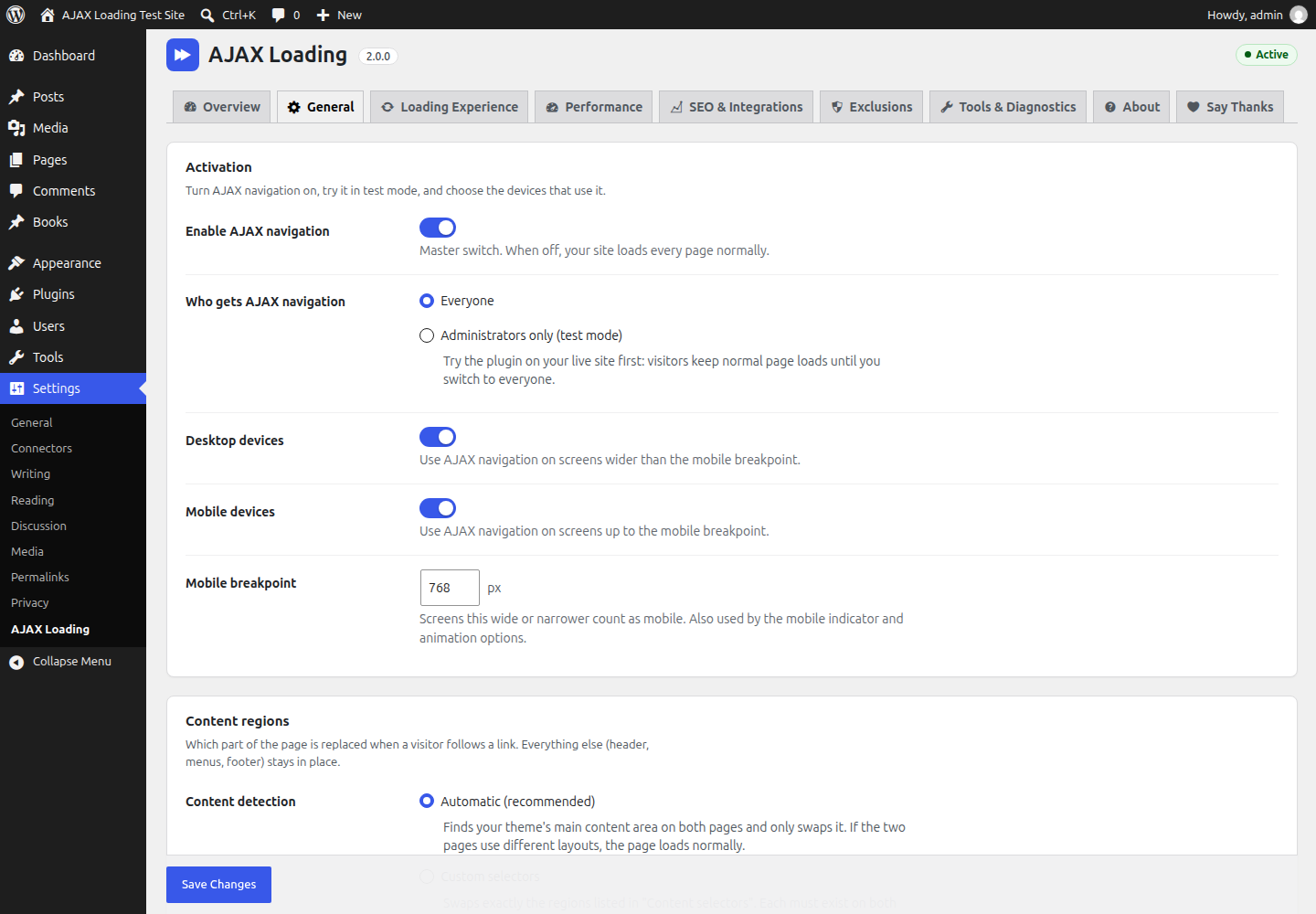
- Test mode: only administrators get AJAX navigation while you try it on your live site.
- Pause for 1 or 24 hours, and safe mode for conservative behaviour while you investigate a problem.
- Automatic fallback: if navigation keeps failing for a visitor, that visitor gets normal page loads for a while.
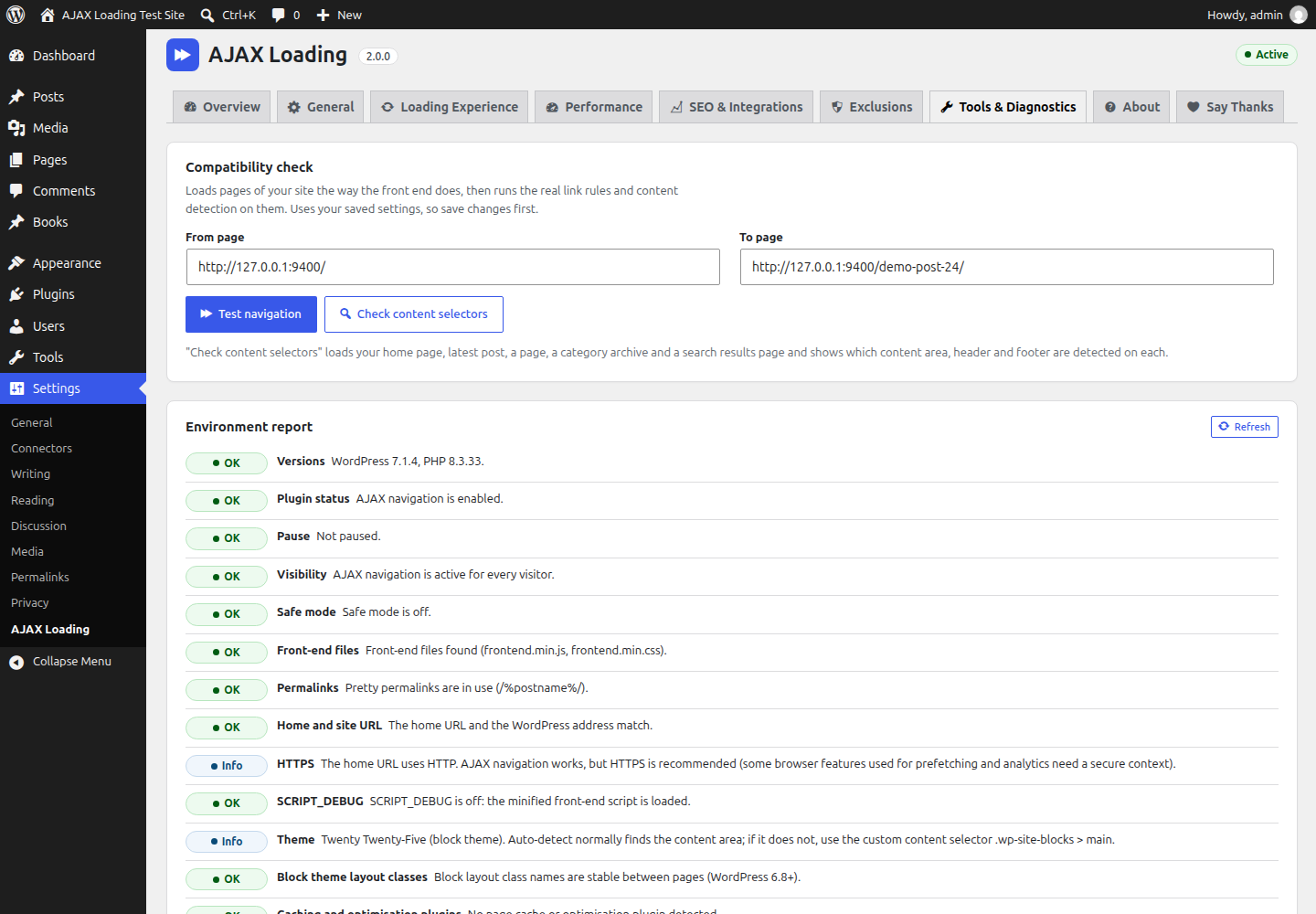
- Compatibility check: tests a navigation between two pages of your site and shows which content area, header and footer are detected on sample pages.
- Environment report, optional error log, and settings export, import and reset.
- JavaScript events on
document(mirrored to jQuery when it is loaded):wp_ajax_load_ready,wp_ajax_load_before,wp_ajax_load_start,wp_ajax_load_before_replace,wp_ajax_load_replaced,wp_ajax_load_complete,wp_ajax_load_error,wp_ajax_load_cancelandwp_ajax_load_popstate. - A small JavaScript API,
window.AjaxLoading(navigate, prefetch, reload, clear the cache, enable, disable). - PHP filters and actions to change exclusions, content selectors, head tags, integrations and the browser configuration.
- The 1.x callback
wp_ajax_load_complete = function () { … }still works.
docs folder.
Privacy
- No telemetry, no tracking and no external services. Neither your server nor your visitors' browsers contact any third-party server because of this plugin. (The About tab in your dashboard shows the author's Gravatar and plugin icons from wordpress.org, which your browser loads when you open that tab.)
- No cookies are set. The browser tab keeps a few small values in session storage (scroll positions, the automatic-fallback counter and, only if you enable it, values typed into forms, never passwords).
- Analytics are optional and only feed tools that are already on your site (
gtag, the Google Tag ManagerdataLayer, or your own function). The plugin never loads tracking scripts and can require statistics consent through the WP Consent API. - Error recording is off by default. When you turn it on, it stores the error code, page path (without query string), HTTP status, a short message and the navigation type. No IP address, user agent or cookie is stored. The log keeps the last 50 entries and is deleted when you uninstall the plugin.
安装:
- Go to Plugins → Add New Plugin and search for "AJAX Loading".
- Click Install Now, then Activate.
- Open Settings → AJAX Loading.
- Download the plugin zip from WordPress.org.
- Go to Plugins → Add New Plugin → Upload Plugin, choose the zip and click Install Now (or unzip it into
/wp-content/plugins/ajax-loading/). - Activate it on the Plugins screen and open Settings → AJAX Loading.
- On the Overview tab, click Test mode (administrators only) so visitors keep normal page loads.
- On Tools & Diagnostics, run Check content selectors and Test navigation.
- Browse your site as an administrator. When everything works, click Enable for everyone.
- If you use a page cache, purge it after activating the plugin and after changing its settings.
屏幕截图:
常见问题:
Does it work with my theme? Which part of the page is replaced?
By default the plugin finds your theme's main content area automatically (for example #content, main or .site-main) and replaces only that. If two pages use different layouts, the second page simply loads normally.
To see what is detected, go to Settings → AJAX Loading → Tools & Diagnostics and click Check content selectors. If the wrong area is found, either add the attribute data-ajax-loading-container to your theme's content wrapper, or choose Custom selectors under General → Content regions and enter the selector of the area to replace.
A slider, form or widget stops working after navigation
Scripts that set things up when a page first loads have to run again after an AJAX navigation. Try these in order:
- If it belongs to a plugin listed on SEO & Integrations, make sure that integration is set to Auto.
- If only some pages are affected, set the integration to Exclude, or add those pages to your exclusions, so they load normally.
- Re-initialise it from your own code after each navigation (example below).
- As a last resort, turn on General → Advanced → Fire page-load events again (some scripts may then start twice).
document.addEventListener( 'wp_ajax_load_complete', function ( event ) { /* start your slider inside event.detail.container */ } );
The developer guide in the plugin's docs folder has more recipes.
How do I make a page or a link load normally?
- For one link or a whole area in your templates: add the attribute
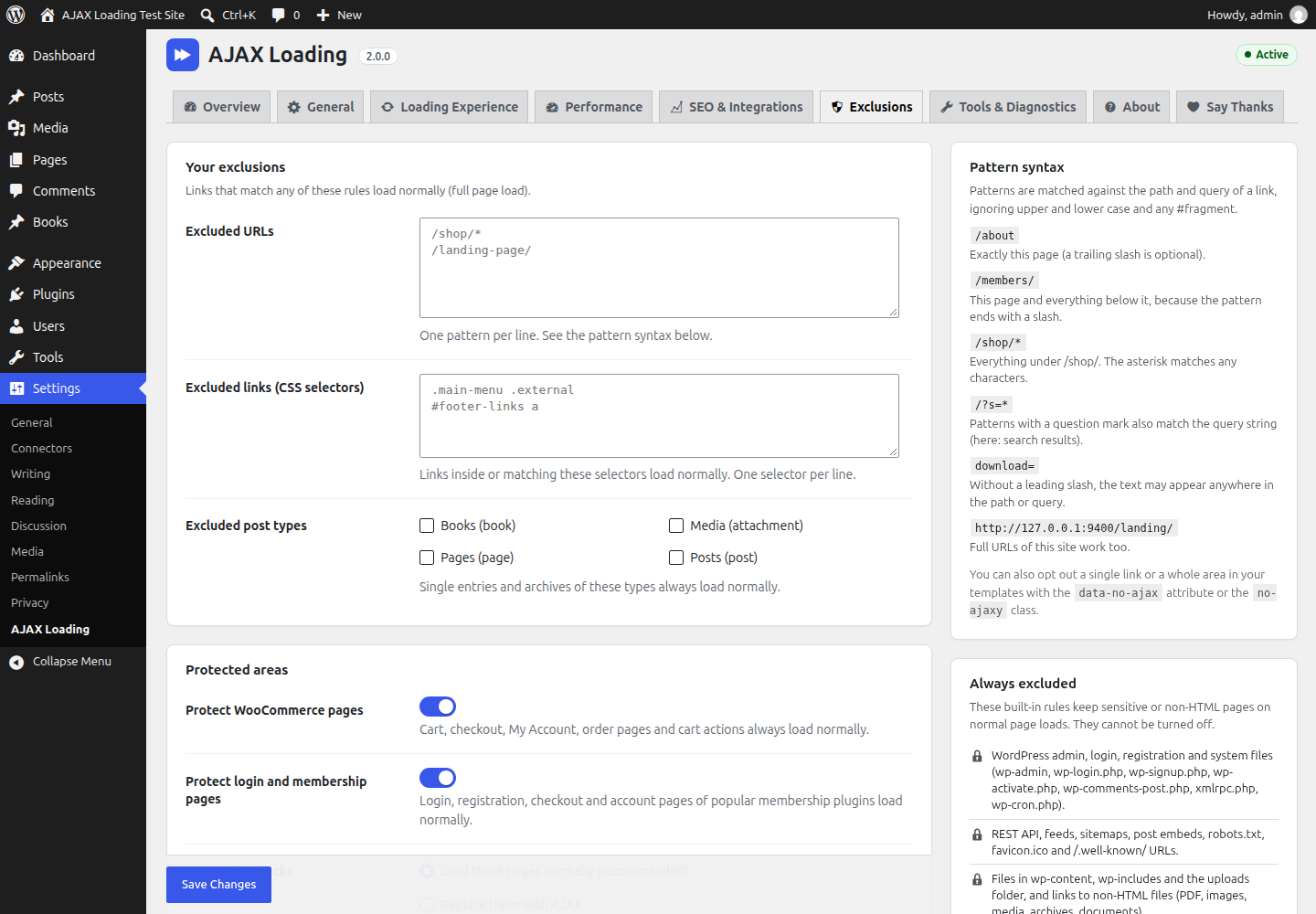
data-no-ajaxor the classno-ajaxy(alsono-ajax) to the link or to a parent element. - For URLs: add patterns under Exclusions → Excluded URLs, one per line. For example
/members/excludes that page and everything below it,/shop/*excludes everything under/shop/, anddownload=excludes any URL containing that text. - For links matched by CSS: add selectors under Exclusions → Excluded links.
- For a whole content type: tick it under Exclusions → Excluded post types.
Does it work with WooCommerce?
Yes. Shop, category and product pages load with AJAX and the WooCommerce integration re-initialises galleries, variation forms, tabs and sorting. With the default Exclusions → Protect WooCommerce pages option, cart, checkout, My Account and order pages load normally, so payments, sessions and nonces behave exactly as without the plugin. Add-to-cart, remove-from-cart, coupon and logout links are not intercepted either, and WooCommerce's own AJAX add-to-cart buttons keep working. Keep this option on unless you have tested those pages with AJAX navigation.
Is it bad for SEO?
No. Every URL remains a real page rendered by WordPress, links stay normal links, and the plugin does not show search engines anything different from what visitors get (no cloaking, no #! URLs). It only adds a small <meta name="ajax-loading"> tag, its script and its stylesheet to your pages (and, by default, turns off WordPress's speculative loading rules on those pages). For visitors, the title, meta tags, canonical URL, hreflang links and structured data are updated on every navigation, so share buttons, browser extensions and analytics see the right values.
Does it work with caching plugins?
Yes. The plugin requests pages exactly as a browser does, without special headers, so your page cache serves them as usual. Two things to keep in mind:
- Purge the page cache after activating or updating the plugin and after changing its settings. Cached copies from before can make navigations fall back to normal page loads. When the plugin detects a page cache, its notices remind you after each change.
- If an optimisation plugin delays, combines or defers JavaScript and navigation stops working, exclude the AJAX Loading script (
assets/dist/frontend.min.js, handleajax-loading-WPajaxLoad) and its inline configuration from those features.
Will my analytics still count page views?
By default (Automatic), the plugin sends nothing itself. Google Analytics 4 with Enhanced Measurement ("Page changes based on browser history events") or a Google Tag Manager History Change trigger counts each navigation. You can instead let the plugin send a GA4 page_view event or push a Tag Manager dataLayer event (SEO & Integrations → Analytics). Use only one method; if you choose the GA4 option, turn off the history-based page views in GA4, otherwise every navigation is counted twice.
How do I turn it off temporarily?
On the Overview tab you can Turn off AJAX navigation, Pause it for 1 or 24 hours, switch to Test mode (administrators only), or turn on safe mode. All of these keep your settings.
I use the wp_ajax_load_complete callback from version 1.x. Does it still work?
Yes. A global function named wp_ajax_load_complete is still called once after every successful AJAX navigation (never on the first page load). It now runs as soon as the navigation has finished instead of about one second later, and it receives the navigation details as its first argument. New code should listen for the wp_ajax_load_complete event instead, which allows several listeners.
Is jQuery still required?
No. The new script has no dependencies. Sites upgraded from 1.x keep loading jQuery (setting General → Advanced → Load jQuery for custom callbacks) because old custom callbacks often use it; turn it off if your own code does not need it.
Where is the source code of the minified files?
The readable source is in assets/src/, and an unminified build is shipped as assets/dist/frontend.js (loaded automatically when SCRIPT_DEBUG is on). The build tools are in package.json and tools/build.mjs: run npm install, then npm run build.
更新日志:
- Vanilla JavaScript navigation engine without jQuery or History.js, loaded deferred in the footer and only on pages where it runs.
- Replaces only the content area (automatic detection, custom selectors or whole body), with keep or replace options for the header and footer.
- Runs the scripts of the new content, loads missing stylesheets and scripts before the swap and refreshes WordPress script data.
- Keeps the head in sync: title, meta description, robots, Open Graph, Twitter cards, canonical, previous/next, hreflang and JSON-LD (also JSON-LD printed in the body), plus the
<html lang>, body classes, menu highlighting and the admin bar's edit links. - Back/forward scroll restoration, cross-page
#hashlinks, 404 pages, and AJAX search and GET filter forms. - Seven loading indicators, nine page transitions, mobile overrides, reduced-motion support and a live preview.
- Accessibility: focus moves to the new content and screen readers announce each page.
- Optional prefetching and in-browser page cache (both off by default); WordPress speculative loading is turned off where AJAX navigation runs.
- Exclusions by URL pattern, CSS selector and post type, built-in protection for WooCommerce, login and membership pages, and an option for Interactivity API blocks.
- Integrations for WooCommerce, Elementor, Divi, Beaver Builder, Bricks, Contact Form 7, Gravity Forms, WPForms, Fluent Forms, Formidable Forms, Ninja Forms, ACF forms, BuddyPress, embeds, lazy loading, comment replies, the
post-loadevent and multilingual plugins. - Analytics: optional GA4
page_viewor Tag ManagerdataLayerevents, navigation timing, WP Consent API support and a custom callback. - Safety: any problem falls back to a normal page load; automatic per-visitor fallback after repeated failures; test mode; safe mode; pause; desktop and mobile switches.
- Content Security Policy support: scripts of a loaded page run only when that page's own nonce-based policy allows them.
- Multisite: pages of another site of the same network always load normally.
- New tabbed settings screen with Overview, live preview, compatibility check, environment report, error log, and settings export, import and reset.
- Developer events (
wp_ajax_load_*), thewindow.AjaxLoadingAPI and PHP filters and actions. - Uninstalling now removes all plugin data.
- Scripts on loaded pages never ran, so sliders, forms, galleries and checkout fields stayed broken after navigation.
- The whole fetched document,
<head>included, was injected into<body>; the head was never updated. - Links to files, feeds and other non-HTML URLs froze the page.
- Links to a
#sectionon another page changed the address but loaded nothing, and some in-page#links led to a 404. - Non-ASCII (for example Hindi or Cyrillic) URLs were garbled.
return falsein the click handler blocked other scripts: mobile menu toggles and WooCommerce AJAX add-to-cart stopped working.- Ctrl/Shift/Alt-click, links with
targetordownload, and protocol-relative links to other sites were taken over. - After a redirect, the old URL stayed in the address bar; fast repeated clicks could show the wrong page.
- Sites with WordPress in a subdirectory were not handled correctly (
rootUrlnow uses the home URL). - Every
.headerelement was overwritten, inline SVG icons with a<title>broke, and the body was dimmed and forced toposition: relative. - Back and forward always jumped to the top of the page.
- Analytics only notified long-retired trackers.
- Navigation broke the Customizer preview; the plugin now stays off there and in page builder editors and AMP pages.
reload_helper.idsnow really excludes the matching links.- Security: settings could be saved without a capability check; script data from fetched pages could be turned into live HTML; the bundled polyfill containing
evalwas removed; output is escaped. - The plugin no longer switches itself back on, and never overwrites a saved "off" setting.
- The admin stylesheet is only loaded on the plugin's own screen.
- Pages stay eligible for the browser's back/forward cache (no unload handlers, no once-per-second storage timer).
- Requires WordPress 6.0 and PHP 7.4.
- jQuery is no longer loaded for new installs. Upgraded sites keep it through a new setting, which you can turn off.
- Emoji script removal is now a setting: on for upgraded sites (as in 1.x), off for new installs.
- The
wp_ajax_load_completecallback now runs right after a navigation completes (1.x waited about one second) and receives the navigation details. Developers can add a delay with theajax_loading_legacy_callback_delayfilter. window.History(History.js) and itsstatechangeevent no longer exist.- Of the
reload_helperkeys, onlyidsandcontainer_idare used. - Removed old unused plugin files.
- Security Update
- Tested with WordPress 6.4.3
- Minor Fixes
- Tested with various themes and plugins.
- Bug fixes of JS and CSS animations.
- Added callback function for javascript after page loaded.
- Initial Public Release