
Akkedli Connector
| 开发者 | akkedli |
|---|---|
| 更新时间 | 2026年7月27日 19:15 |
| PHP版本: | 7.4 及以上 |
| WordPress版本: | 7.0 |
| 版权: | GPLv2 or later |
| 版权网址: | 版权信息 |
详情介绍:
- A customer places an order on your store
- Akkedli instantly sends a WhatsApp message asking the customer to confirm
- The customer taps Confirm or Cancel — takes 5 seconds
- Your WooCommerce order status updates automatically
- Automated WhatsApp Verification — Customers confirm orders instantly via WhatsApp
- Real-Time Status Sync — Order status changes in WooCommerce are instantly reflected in Akkedli
- Reduce Fake Orders — Stop shipping to unverified customers and save on returns
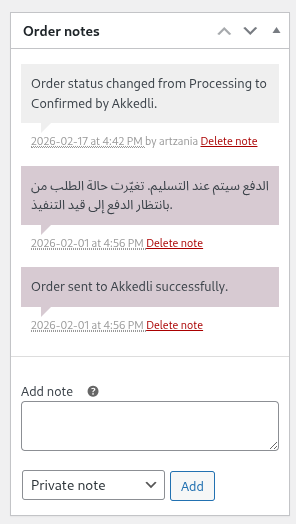
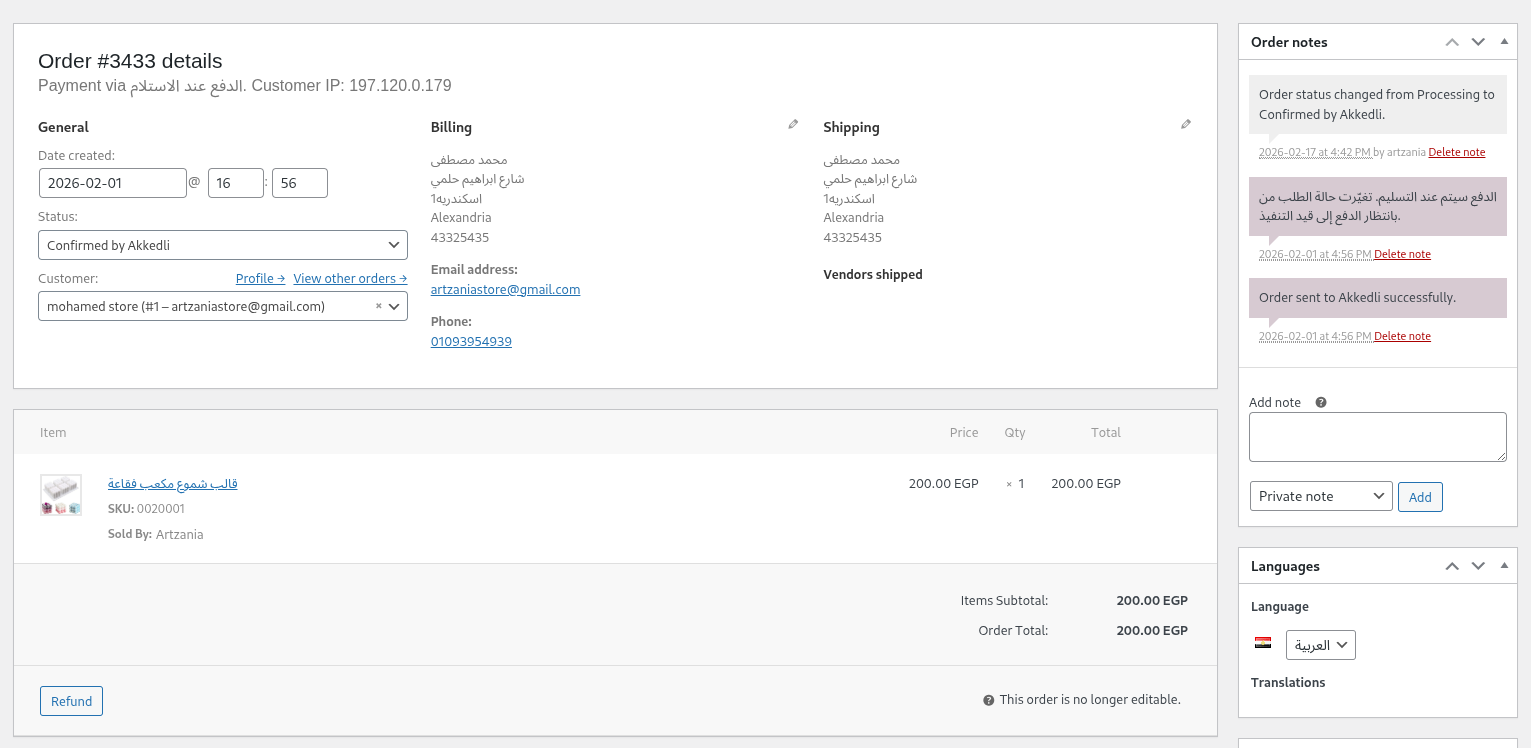
- Custom Order Status — New "Confirmed by Akkedli" status to easily track verified orders
- One-Click Setup — Connect your store in seconds from the Akkedli Dashboard
- HPOS Compatible — Full support for WooCommerce High-Performance Order Storage
- Flexible Triggers — Choose to verify orders on "Pending" or "Processing" status
- Secure REST API — Receive real-time status updates from Akkedli with API key authentication
- HMAC-SHA256 Signed Webhooks — All outgoing status syncs are cryptographically signed
- Order Notes — All verification and sync events are logged as WooCommerce order notes
- COD merchants in the Middle East, North Africa, and emerging markets
- Dropshippers looking to reduce return rates
- Any WooCommerce store that wants to confirm orders before fulfillment
- WordPress 5.8 or higher
- WooCommerce 5.0 or higher
- PHP 7.4 or higher
- An active Akkedli account
- Service URL: https://api.akkedli.com
- Terms of Service: https://akkedli.com/terms
- Privacy Policy: https://akkedli.com/privacy
- Order details (ID, total, currency, items, shipping method)
- Customer contact information (phone number, name, address)
- Store domain and timestamp
安装:
- Go to Plugins > Add New in your WordPress admin
- Search for "Akkedli Connector"
- Click "Install Now" and then "Activate"
- Initiate the WooCommerce connection from the Akkedli Dashboard
- Use the "Akkedli" menu to manage order-trigger settings
- Download the plugin zip file from WordPress.org
- Go to Plugins > Add New > Upload Plugin and select the zip file
- Click "Install Now" and then "Activate"
- Initiate the WooCommerce connection from the Akkedli Dashboard
- Use the "Akkedli" menu to manage order-trigger settings
- Log in to your Akkedli Dashboard
- Go to Integrations > WooCommerce
- Enter your store URL and click "Connect"
- You'll be redirected to your WordPress admin to confirm the connection
- Done! Your store is now connected and orders will be verified automatically
屏幕截图:

常见问题:
How do I connect my store?
Sign up or log in at merchant.akkedli.com, then go to Integrations > WooCommerce and start the connection from the Dashboard. A one-time enrollment code is used only when the plugin explicitly requests connection recovery.
Is this plugin compatible with HPOS?
Yes! The plugin is fully compatible with WooCommerce High-Performance Order Storage (Custom Order Tables).
What order data is sent to Akkedli?
The plugin sends order details including customer info, billing/shipping addresses, line items, totals, and payment method. No sensitive payment data (credit card numbers, CVV, etc.) is ever transmitted.
Can I choose which orders trigger verification?
Yes. In the plugin settings, you can toggle whether to verify orders when they reach "Pending" or "Processing" status — or both.
What happens if Akkedli is unavailable?
Orders will still be created in WooCommerce normally. If the webhook fails, an order note is added so you know which orders were not sent. You can always manually verify orders through the Akkedli Dashboard.
Does this work with other eCommerce plugins?
Akkedli Connector is designed specifically for WooCommerce. Support for Shopify and other platforms is available as separate integrations.
Is my customer data secure?
Absolutely. All communication uses HTTPS encryption. API key authentication secures every request. Akkedli never stores sensitive payment information.
更新日志:
- Security: Keep callback replay tombstones beyond the complete Backend retry horizon
- Reliability: Retain paused and exhausted events for authority-verified operator recovery
- Operations: Verify local outbox, encryption, Action Scheduler, and worker readiness
- Privacy: Remove Legacy connection credentials from setup URLs
- Security: Bind WooCommerce V2 callbacks to the verified HTTPS store host
- Reliability: Add durable binding state, bounded polling, and stale-response protection
- Fix: Recover interrupted binding polling and prevent callback status regression
- Enhance: Redesigned the One-Click Setup to be a secure 2-step process to prevent unauthorized connection overrides
- Fix: Addressed connection failures (HTTP 401) during initial setup
- Feature: Real-time order status synchronization from WooCommerce to Akkedli
- Feature: HMAC-SHA256 signed webhooks for secure status sync
- Feature: Automatic WhatsApp notifications on shipped/delivered status changes
- Feature: Status mapping (processing, completed→delivered, cancelled, refunded→returned)
- Feature: Duplicate sync prevention with WordPress transients (2-minute cooldown)
- Feature: Detailed order notes logging for all sync events (success/failure)
- Security: Added nonce verification for One-Click auto_connect handshake (CSRF protection)
- Security: All user inputs now sanitized with sanitize_text_field() and esc_url_raw()
- Security: API key authentication uses constant-time comparison via hash_equals()
- Security: REST API endpoint validates nonce and admin permissions
- Compatibility: Tested up to WordPress 6.7.5
- Compatibility: Tested up to WooCommerce 9.6
- Initial release
- Automated webhook integration for new WooCommerce orders
- Custom "Confirmed by Akkedli" order status
- Secure REST API endpoint for receiving verification results
- One-Click setup from the Akkedli Dashboard
- Full HPOS (High-Performance Order Storage) compatibility
- Flexible order trigger settings (Pending / Processing)
- Complete internationalization (i18n) support