
Task & Project Management – Alba Board
| 开发者 | alejo30 |
|---|---|
| 更新时间 | 2026年10月21日 14:29 |
| PHP版本: | 7.4 及以上 |
| WordPress版本: | 7.1 |
| 版权: | GPLv2 or later |
| 版权网址: | 版权信息 |
详情介绍:
[alba_board id="123"] shortcode. Logged-in users can create cards, comment, and manage tasks according to their WordPress permissions. Publishing a board does not grant access to protected card details or permission to edit tasks.
Watch it in action: https://www.youtube.com/watch?v=nCBS9oGEhEo
安装:
- Install the plugin from the WordPress Plugins screen, or upload the
alba-boardfolder to/wp-content/plugins/. - Activate Task & Project Management – Alba Board from the Plugins screen.
- Open Alba Board in the WordPress admin menu.
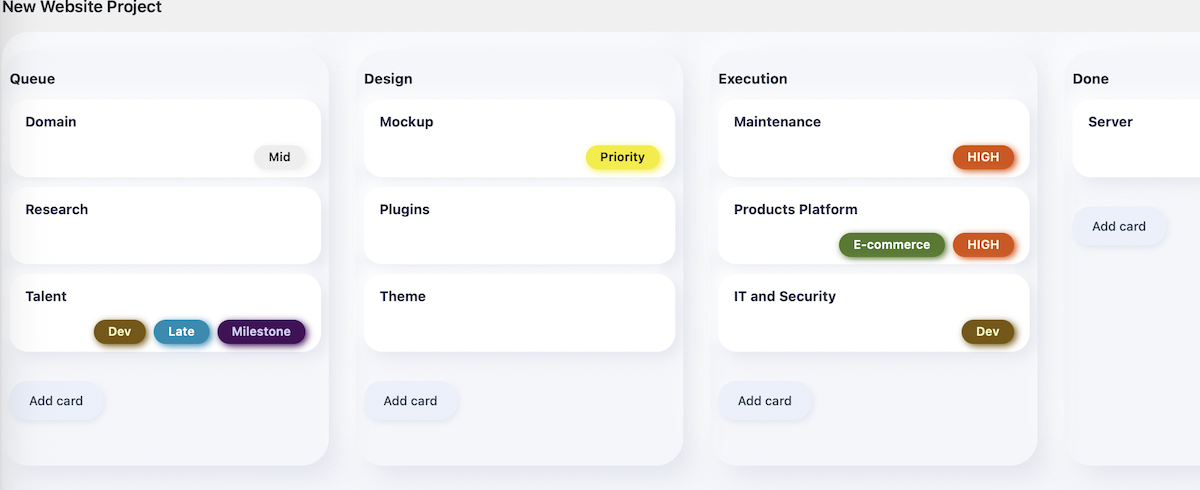
- Create your first board, or use Create a Sample Board to explore a working example.
- Adjust appearance and card limits under Alba Board > Settings.
- To display a board on a page, copy its shortcode or add
[alba_board id="123"], replacing123with your board ID.
屏幕截图:
常见问题:
Can I use Alba Board as a Kanban board?
Yes. A Kanban board organizes tasks into lists that represent stages of work. Create lists such as To Do, In Progress, and Done, then drag task cards between them as work progresses. You can use this board in the WordPress dashboard or display it on a page with the board shortcode.
🙋♂️ How can I suggest a new feature or report a bug?
We love suggestions! Since Alba Board is actively being developed, your input is highly valued. Please drop us a quick message via our website: https://albaboard.com/
🌍 Is Alba Board available in my language?
Yes! The plugin is completely translation-ready. If it hasn't been translated into your language yet, you can easily translate it using plugins like Loco Translate, or contribute to the community translations.
= 🌐 How do I enable frontend card creation? =\
Add the [alba_board id="123"] shortcode to a page. Frontend creation, comments, and deletion are included in the free plugin. Log in with the appropriate card and list permissions to use them. The older Frontend Interactions add-on is no longer required; the core prevents its client and handlers from duplicating these actions.
📦 How do I restore an archived card?
In Alba Board > Boards, open More > Archived Cards and click Restore beside the card. It returns to the list it came from and its previous status. If the card says Restore the original list first, that list is in the WordPress Trash. Open Alba Board > Lists, choose the Trash view, and restore the original list. Then return to More > Archived Cards and restore the card. The archive view also has an Open Lists Trash link for this case. If the original list was permanently deleted, restore it from a site backup before restoring the card. Deleting a list from a board moves the list to Trash and archives its cards. The cards remain recoverable from Archived Cards after the original list is restored.
👥 How do guest assignees work?
In a card, enter one or more guest email addresses in Guest Assignee, separated by commas. When assignment notifications are enabled, Alba Board sends an email to each newly added valid address. To include a public card link, create a published page containing that board’s [alba_board id="123"] shortcode. Without a public board page, guest links fall back to the site homepage. Guests cannot use the WordPress admin. Click the Guest Assignee field to see missing-page guidance; you can click and copy its shortcode without the message disappearing. An assignment email does not grant permission to view card details or edit cards; access still requires the appropriate WordPress permissions.
🗑️ How do I delete or restore a card?
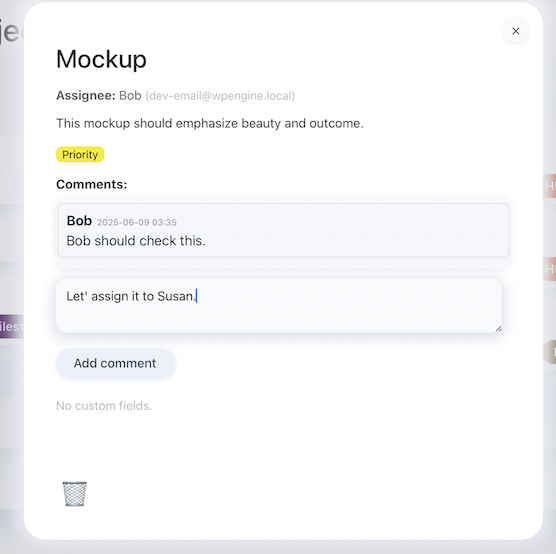
Board Managers, Editors, and Administrators can delete cards. Board Members cannot delete cards on either the public board or the WordPress admin, including cards they created. In the admin board, open the card and click the trash icon; on the public board, use Delete card. Confirm to move the card to WordPress Trash. To recover it, open Alba Board > Cards > Trash and click Restore. If WordPress Trash is disabled, the control will not permanently delete the card.
Which Board roles are available?
Board Member: Create cards and edit, comment on, move, or archive their own cards. Members can create and edit lists, but cannot delete cards, lists, or boards. They cannot change plugin settings. Board Manager: Create and manage boards, lists, and cards, including other users' cards and recoverable deletion. Editors have the same board-management permissions. Administrators can also change plugin settings. Other WordPress roles do not receive protected card access automatically. A published board or a guest assignment does not grant these permissions. If a user has multiple roles, WordPress combines their permissions; a Member who is also an Editor, Manager, or Administrator retains that higher role's deletion access. Legacy duplicate Board roles are consolidated automatically while retaining users' additional roles.
🔗 How do I share a direct link to a card?
Open the card on an admin or public board and copy the page URL, which includes ?alba_card=ID. Opening that link selects the card on the corresponding board. For guest assignees, use the public board page URL.
↔️ How do I use a board across the full page width?
Use the shortcode attribute [alba_board id="123" fullwidth="1"] on the public page.
= 🎨 How do I unlock Premium Themes and colored tags? =\
Enable the “Alba Board Pro: Customization & Smart Tags” add-on to unlock 12 premium themes and intuitive inline tag management.
= 💻 Can developers extend Alba Board? =\
Yes! We've implemented a robust Hooks/Actions API (do_action), allowing developers to extend functionalities via custom code or add-ons without modifying core files.
= 🔒 Is frontend card management secure? =\
Frontend card creation, comments, and deletion require a logged-in user with the appropriate permissions and a valid WordPress security token. Publishing a board or assigning a guest email address does not grant permission to access protected card details or change cards.
更新日志:
- Improved Feedback & Privacy button placement and added a one-time administrator announcement for existing installations about optional usage insights. Sharing preferences are never enabled automatically.
- Fixed: Count membership activity only when people are added or removed, excluding empty, unchanged and reordered selections.
- New: Add several Board users to a card from one Card Members field on the frontend or backend, while preserving existing card ownership.
- New: Mention someone by typing @ in a comment and choosing a name. Eligible recipients receive a card-link email when mention notifications are enabled.
- Notifications: Notify card members about new comments when enabled. Send one email per recipient when a member is also mentioned, exclude the sender, and use the assignment-notification setting for newly added members.
- Privacy: Suggest only Board Members and Board Managers who can access the card. Membership and mentions do not grant private-card access or change editing and deletion permissions.
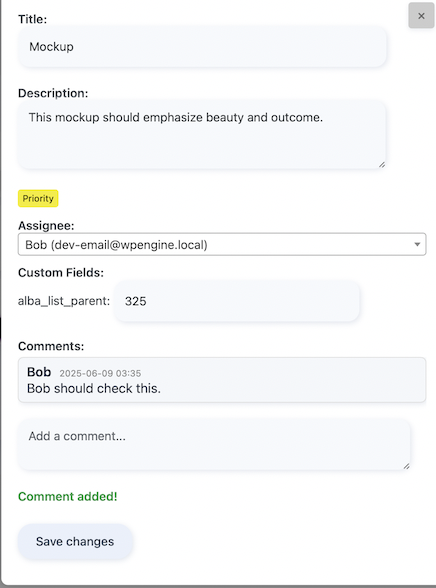
- Improved: Keep the card title in the fixed header while scrolling. The backend title remains editable and saves with the card, without a redundant Title label.
- Fixed: Reserve space for the close button so it stays clear of card fields and scrollbars on desktop and mobile. Add an accessible Close card label.
- Improved: Grow description and comment text boxes to fit their content, including when opening a card or changing its width. Empty or cleared text boxes keep their original height; saved comments use the main card scroll area.
- Improved: Place Card Members and Guest Assignee side by side on desktop, align their empty fields, and stack them on smaller screens.
- Improved: Show saved mentions as bold names, with guidance inside the comment box. Keep full names visible in suggestions that open above or below the field without clipping.
- Accessibility: Use Up/Down to navigate name suggestions, Enter to select, and Escape to dismiss. Ctrl/Command+Enter keeps the existing comment shortcut.
- Fixed: Renew expired card security tokens once when needed, preserving login and card permissions. Show session and connection errors without silently retrying changes after a network failure.
- Fixed: Keep same-host board requests on the current site address, including alternate Local ports, and reject request redirects that could forward board data elsewhere.
- New: Add an administrator-only Feedback & Privacy page with a voluntary survey and a preview of optional usage summaries.
- Privacy: Keep automatic reporting off until explicit opt-in. Share approximate usage ranges and future activation/deactivation events without card content, names, emails, or site URLs. Include controls to stop reporting and delete linked pseudonymous usage and lifecycle reports.
- Improved: Invite an honest review after two days of use and feedback after seven days, only on Alba Board admin pages. Remind me later and Do not ask again save in place; the native fallback returns to the originating board or settings page.
- Improved: Keep feedback summaries short and full privacy and retention disclosures available in expandable sections.
- Reliability: Require a successful JSON acknowledgement for optional reports and allow up to 20 seconds for server responses. Failed feedback delivery still permits deactivation. Provide an explicitly labeled test destination for controlled non-production use without enabling sharing consent.
- Appearance: Use active theme colors for member controls and thinner frontend board and My Tasks Only highlights while preserving bottom-right shadows.
- Appearance: Add a compact Kanban sidebar icon with animation across all three columns and respect reduced-motion preferences.
- Compatibility: Offer Grayscale Glass as a separate premium theme with Card Tags 2.0.6 while retaining colorful Celestial Glass. Premium styles and List Focus remain in the add-on.
- Reliability: Refresh cached member names after profile or role changes and refresh frontend stylesheets when they change.
- Documentation: Clarify task organization, project progress, and optional add-on features in the product title and description.
- Fixed: Keep themed admin card dialogs above WordPress navigation and make shared-card headings readable.
- Improved: Board Members can read and comment on published cards in published shared boards on the front end and back end, while editing remains restricted to their own cards.
- Fixed: Members can move their own cards in mixed-owner lists; server validation preserves other users' relative card order and rejects unauthorized moves.
- Fixed: Show a clear card access error instead of leaving the back-end modal on Loading.
- Security: Separate shared reading/commenting from editing, uploads, archiving, deletion, and time tracking. Private or unpublished shared content remains restricted.
- Security: Isolate cached card details by viewer and permissions, and invalidate all views when a card changes.
- Keep cards draggable while previous moves save in the background; save drops in order without blocking the board.
- Recover confirmed positions if a failed save invalidates subsequent queued moves.
- Fixed: Restore a visible, themed card preview that follows the pointer while dragging above scrollable columns, with an insertion placeholder and animated neighboring cards.
- Improved: Use consistent pointer-based card dragging on the frontend and backend, including Safari and scrollable lists. Only cards can be dragged, excluding empty-list placeholders and creation controls.
- Reliability: Prevent overlapping card moves while the new list and position are saving. Restore the original position on a rejected or failed request, then allow dragging again.
- Improved: Show the server-provided reason when a frontend card move is rejected.
- Performance: Admin card saves and comments update the open card and board summary without reloading the entire board.
- Improved: Refresh titles, assignees, avatars, due dates, and add-on tags in place while preserving card position and click behaviour.
- Fixed: A delayed save response no longer replaces another card opened while the save was processing or reopens a closed dialog.
- Compatibility: Reinitialize card attachment and add-on controls after saving. Emit the alba_card_updated JavaScript event with the card ID and save response for integrations.
- Performance: Stop card-limit queries at the configured limit and fetch export cards together instead of querying each list separately.
- Security: Reject malformed card and list ordering values before changing positions.
- Improved: A subtle, wordless indicator shows pending card moves without blocking dragging. Warn before leaving while moves are unsaved; respect reduced-motion preferences.
- Reliability: Bundle Flatpickr 4.6.13 locally, including its license and unminified source, instead of loading the date picker from an external CDN.
- Improved: Keep cards draggable while previous moves save in the background; save drops in order without blocking the board.
- Fixed: Recover confirmed positions if a failed save invalidates subsequent queued moves.
- Fixed: Restore a visible, themed card preview that follows the pointer while dragging above scrollable columns, with an insertion placeholder and animated neighboring cards.
- Improved: Use consistent pointer-based card dragging on the frontend and backend, including scrollable lists. Only cards can be dragged, excluding empty-list placeholders and creation controls.
- Improved: Show the server-provided reason when a frontend card move is rejected.
- Performance: Admin card saves and comments update the open card and board summary without reloading the entire board.
- Improved: Refresh titles, assignees, avatars, due dates, and add-on tags in place while preserving card position and click behaviour.
- Fixed: A delayed save response no longer replaces another card opened while the save was processing or reopens a closed dialog.
- Compatibility: Reinitialize card attachment and add-on controls after saving. Emit the alba_card_updated JavaScript event with the card ID and save response for integrations.
- Improved: Clearer optional deactivation feedback with separate testing and Other reasons, no preselected answer, and helpful comment prompts. Recent user-requested improvements are linked from the form.
- Fixed: Show the optional comment field for every selected reason, including Other. Canceling or deactivating without feedback sends no response.
- Reliability: Prevent duplicate feedback submissions and let deactivation continue if the feedback service fails or takes longer than five seconds. Add keyboard navigation and a dialog that fits smaller screens.
- Security: Board Members cannot delete cards on the frontend or backend. Card deletion is reserved for Board Managers, Editors, and Administrators.
- Fixed: Consolidate legacy duplicate Board Member and Board Manager roles, preserve user assignments, and register current board capabilities.
- Improved: Board Members can open the WordPress admin board to work with their own cards without receiving board-management permissions.
- New: Frontend card creation, commenting, and deletion are now included in the free plugin. The Frontend Interactions add-on is no longer required.
- Improved: Frontend deletion moves cards to WordPress Trash with confirmation, so they can be restored.
- Security: Preserve per-card and per-list permissions, security token checks, and server-side card limits.
- Compatibility: Prevent duplicate clients and actions when the older Frontend Interactions add-on remains active.
- New: Delete cards from the WordPress admin board using a compact trash icon. Confirmation moves the card to WordPress Trash; restore it under Alba Board > Cards > Trash. Permission checks protect each card, and deletion is blocked when WordPress Trash is disabled.
- New: Archive individual cards without archiving their list. Restore them under Alba Board > Boards > More > Archived Cards. If their original list is in Trash, restore that list under Alba Board > Lists > Trash first.
- New: Assign guests by email, including multiple comma-separated addresses. When assignment notifications are enabled, newly added valid addresses receive emails. Publish a page containing the board shortcode to include a public card link. Guest assignment does not grant permission to view protected card details or edit cards.
- New: Share direct card links by copying the URL after opening a card. The URL includes
?alba_card=ID. - New: Copy a board's shortcode from the admin board header, or use
[alba_board id="123" fullwidth="1"]to display a public board across the page width. - Improved: Clearer card layout with due date and tags aligned on the same row on desktop when those add-on fields are available. Fields stack on smaller screens, and the card dialog scrolls vertically without a horizontal scrollbar.
- Improved: Compact archive, delete, and upload icons with accessible labels and tooltips. The upload icon sits directly beside Attachments. Existing theme colors are preserved.
- Improved: Show missing-public-page guidance only when the Guest Assignee field is selected. The message uses theme colors and stays visible while its shortcode is clicked or copied.
- Improved: A compact, responsive top bar for board selection, search, filters, and board actions.
- Improved: Connect five additional premium themes through the Card Tags add-on: Celestial Glass, Neo-Brutalism, High Contrast, Solarized Hacker, and Physical Corkboard. Premium styles remain in the add-on.
- Fixed: Add the moving aurora background to Celestial Glass on backend and frontend boards. Users who prefer reduced motion see a static background.
- Fixed: Theme settings now enable only themes registered by the installed add-on. Newer premium themes remain listed with an update-required message until a supporting add-on is installed, preventing selections that would reset to the default theme.
- Fixed: Restore readable light text on the dark frontend comment button in Zen Monochrome, using the theme's existing colors.
- Fixed: Rapid clicks and repeated Enter or Command/Control + Enter shortcuts no longer create duplicate cards. Frontend creation buttons no longer accidentally submit surrounding page forms.
- Fixed: Cards created on the frontend can be opened immediately without refreshing the page.
- Fixed: Repeated clicks on Save no longer submit duplicate comments.
- Fixed: Hide the archive control on frontend card dialogs; archiving remains available in the WordPress admin.
- Fixed: Improved attachment uploads and error handling so failed uploads are reported instead of failing silently.
- Fixed: Card details refresh after comments, tags, or other card information changes, including changes made by add-ons.
- Security: Require valid security tokens and the appropriate permissions before frontend card creation, comments, or deletion. Enforce configured card limits on the server.
- Security: Check permissions before creating boards, lists, or cards in the admin. Correct missing permissions for administrators and editors working with published or private items.
- Security: Keep card details protected by permission checks in both frontend and admin requests. A published board does not bypass these checks.
- Performance: Load core frontend board scripts and styles only on pages containing a board shortcode. Other integrations can opt in using the
alba_board_should_enqueue_frontend_assetsfilter. - Performance: Fetch board cards together and avoid unnecessary database updates when card or list ordering has not changed.
- Performance: Reduce repeated work while searching and filtering admin boards, and reuse valid cached card details. These changes reduce unnecessary processing; overall speed gains depend on the board size and hosting environment.
- New: Added more Premium themes and updated some comments within the code.
- Security: Improved authorization checks to prevent unauthorized data access.
- Security: Fixed an authorization vulnerability that could allow unauthorized users to view private card details.
- Security: Improved security token (nonce) validation and generation strictness across the board.
- Enhancement: Overhauled CSV and JSON export engines for backend boards. Exports now include comprehensive card data: Assignee, Due Date, Tags, Attachment URLs, and full Conversation/Activity logs.
- Security: Corrected the IDOR patch in REST API and AJAX endpoints. Migrated away from the flawed 'read_card' meta capability mapping to a strict 'edit_cards' fallback, enforcing rigorous role-based access for non-public boards.
- Security: Patched an IDOR (Insecure Direct Object Reference) vulnerability in the REST API and AJAX endpoints that allowed unauthorized users to view private card details.
- Feature: Ultra-Slim List Collapsing. Users can now collapse lists to a slim view to maximize board space.
- Feature: Dates are now available, whether you want to see them from the card on the list or when opening your card.
- UX/UI: User-Specific Persistence. Collapsed states are saved per-user using LocalStorage, ensuring a personalized workspace that doesn't affect other team members.
- UX/UI: Intuitive Geometric Icons. Pure CSS-driven symmetric arrows for collapsing (><) and expanding (<>) that adapt perfectly to vertical titles.
- Architecture: Deep REST API Integration. Finalized the migration for card data fetching to bypass legacy admin-ajax.php, significantly reducing server overhead.
- Performance: Optimized Front-end & Back-end synchronization. List states are now perfectly mirrored between the public board and the admin dashboard.
- Feature: New Visual Theme Engine! Alba Board has been redesigned from the ground up with a dynamic theme selector featuring beautiful UI styles.
- Feature: Independent List Scrolling. Columns now adapt to your screen height with elegant, independent vertical scrollbars. The board no longer stretches infinitely!
- Feature: 100% Integrated Front-End. The
[alba_board]shortcode now perfectly inherits your selected Premium Themes, shadows, and glass modals for a seamless user experience. - Feature: Launched "Alba Board Pro: Customization & Smart Tags" Add-on! Unlocks 7 exclusive premium themes (Cyberpunk Neon, Stellar Earth, Vaporwave, etc.) and dynamic Smart Tags.
- UX/UI: Implemented a smooth, cache-proof frontend card deletion flow. Cards now vanish gracefully without reloading the page or showing duplicate alerts.
- UX/UI: Neumorphic comments section with sculpted design and modern buttons for cleaner readability.
- Fix: Prevented cards from squishing or compressing when a list gets too full.
- Enhancement: Added a deactivation feedback system to help us listen to your needs, gather insights, and continuously improve the product.
- Feature: List Reordering! You can now drag and drop entire lists by their header to reorganize your board seamlessly.
- Feature: Delete Lists. Added a quick-action 'X' button (visible on hover) to easily delete a list and its cards directly from the board.
- Feature: Inline Tag Creation. Create new tags on the fly simply by typing them into the card modal's tag selector and hitting Enter.
- UX/UI: Unified Admin Menu. All Alba Board options and databases are now elegantly nested under a single master menu for a cleaner WordPress dashboard.
- UX/UI: Contextual List Creation. The "Add List" action is now a seamless phantom column at the right edge of your board.
- Fix: Prevented the "Add Card" footer button from shifting out of place while dragging cards.
- Architecture: Implemented a robust Hooks/Actions API (
do_action) across the frontend and backend. - Enhancement: Added JavaScript custom events (
alba_modal_loaded) to allow Add-ons to reliably initialize scripts. - Accessibility (Frontend): Synchronized power-user keyboard shortcuts to the frontend view (Esc to close, Ctrl+Enter to submit).
- Feature: File Attachments! You can now upload and manage files directly inside cards.
- Feature: Dashboard Widget. Added a native WordPress dashboard widget "My Alba Board Tasks".
- Feature: Data Export. Administrators can now export entire boards to CSV or JSON formats with a single click.
- Feature: User Avatars! Cards now display the assigned user's profile picture on both the frontend and backend boards.
- Feature: 1-Click Onboarding. Added a "Create a Sample Board" empty state for new users to instantly generate a fully functional demo board.
- First stable release — backend Kanban, modal editing, AJAX, comments, add-ons.