
AllTerrain Forms – Survey Builder, Quiz Builder & Contact Form
| 开发者 |
allterraindeveloper
juanml |
|---|---|
| 更新时间 | 2026年10月19日 21:52 |
| PHP版本: | 7.4 及以上 |
| WordPress版本: | 7.1 |
| 版权: | GPL-2.0-or-later |
| 版权网址: | 版权信息 |
详情介绍:
[allterrain_form id="12"]
Conditional logic you can actually see
Show and hide fields, pages, emails and confirmations based on answers. Most
form builders tell you a field has a rule and leave you to go and find out
what it says. This one writes it on the card — Shown when · Can you make it?
· is · Yes — and draws a line from the question that decides to the fields it
decides, labelled with the answer that triggers them.
Hover a field and everything it does not touch fades. A rule pointing at a
question you deleted turns red, because that form is stuck and you would never
otherwise know.
Multi-step forms, calculations and totals
Break long forms into pages with per-step validation and a progress indicator.
Add calculated fields and running totals — an order form that adds up, a quote
form that quotes. Payment-style product and option fields keep their prices.
File upload forms and signatures
Accept file uploads with per-field type and size limits, stored in a protected
directory and attached to the entry. Collect a real drawn signature. Uploads
are parented to their submission, so deleting the entry cleans up after itself.
Survey builder, quiz builder and NPS
The survey builder makes survey forms with rating scales, opinion scales,
Likert matrices and 0–10 questions. The quiz builder adds scoring and
per-answer feedback. The Analytics window turns responses into answers: submissions over time,
conversion and completion rates, per-question distributions, a Net Promoter
Score panel, and any question broken down by any other question.
Entry management, search and CSV export
Every submission is saved as an entry. Search answers, filter by form, status
and star, read one beside the list, add private notes, and export to CSV or
JSON. Unread counts, a spam folder, and bulk actions included.
Email notifications, confirmations and webhooks
Send conditional notification emails with CC, BCC, reply-to and attachments.
Show a message, redirect, or send visitors to a page — conditionally, per
answer. POST every entry as JSON to any URL, signed with HMAC-SHA256, and
hook alltfo_entry_created for anything else.
Grows your MailPoet lists
With MailPoet installed, any form can subscribe visitors to your lists —
bound to an opt-in box they actually tick, with MailPoet's own double opt-in
confirming every address. Map the email and name fields, pick the lists, done.
The kind of integration that is a paid addon elsewhere, free here.
Every email and confirmation has an Insert a value button that lists your
own questions by the label you wrote — not {field:f2} — with a live preview
of the finished text.
Import from Contact Form 7, WPForms and Gravity Forms — entries too
Switching form plugins? You do not have to go looking. Activate AllTerrain
Forms and it tells you what it found — "AllTerrain Forms found 6 forms in
Contact Form 7" — with one button that migrates all of them. Conditional
logic carries across, payment fields keep their prices, an order total keeps
calculating, and a Gravity Forms List becomes a real repeater.
The stored submissions come too. Messages Flamingo kept for Contact Form 7,
Gravity Forms entries, and WPForms Pro entries can all be brought across after
their form is — each with its original date, spam filed as spam, and the
originals left untouched. Running an import twice never imports anything
twice, and everything still works after the old plugin is deactivated, because
the data outlives the plugin.
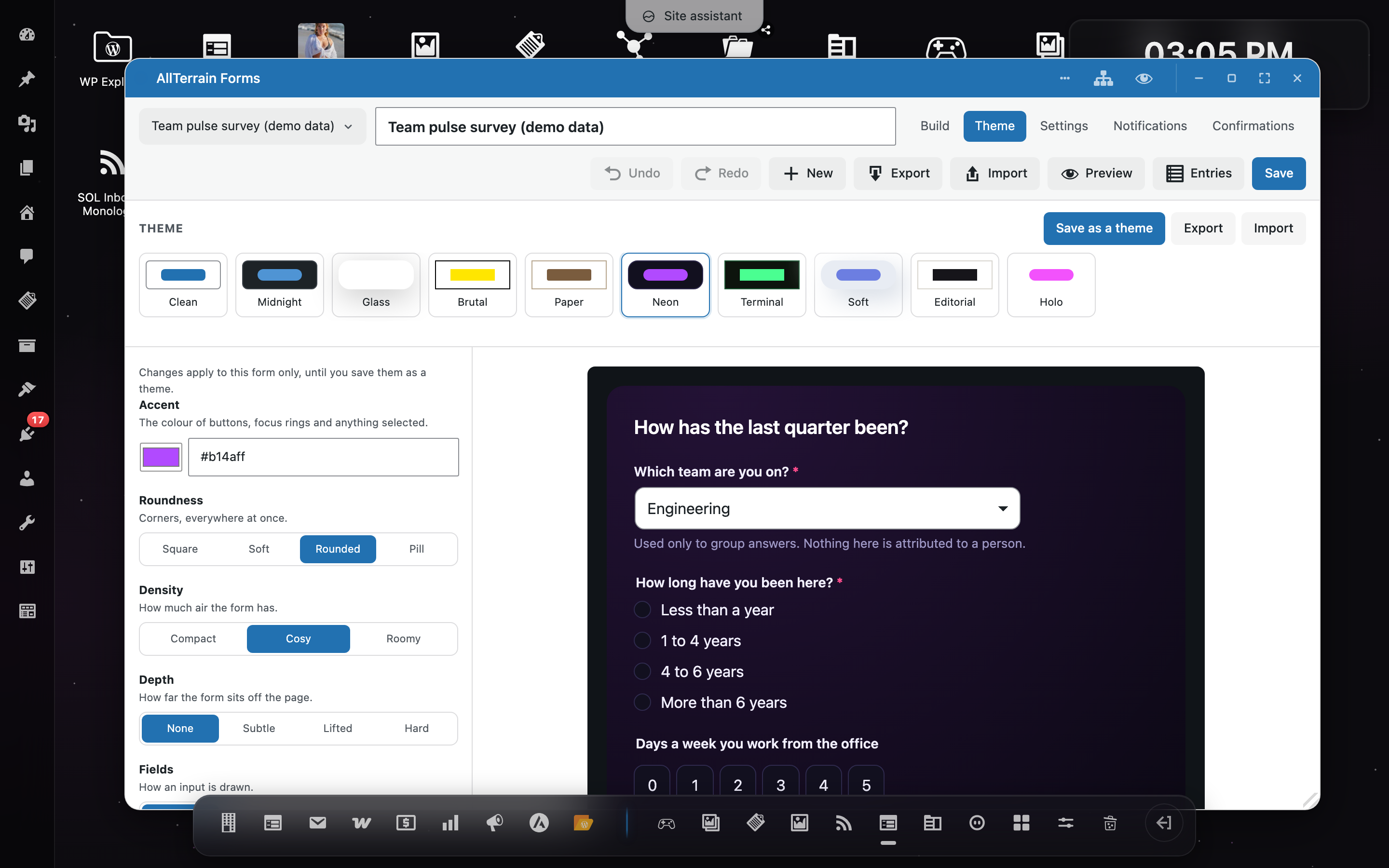
Ten form themes, and an eleventh you make yourself
Clean, Midnight, Glass, Brutal, Paper, Neon, Terminal, Soft, Editorial and
Holo. A theme here is a flat list of 69 design tokens — no theme PHP, no
template, no stylesheet to edit.
Theme Studio gives you a control for every token and a live preview that
updates the instant you click. Six plain-language dials cover the common case:
Accent, Roundness, Density, Depth, Fields, Labels. Nobody thinks
"radius-field: 14px" — they think rounder. Save your changes as a theme,
pick it on any form, export it as JSON, import it on another site.
Spam protection without a CAPTCHA
A honeypot, a signed time trap, a per-address rate limit, a word blocklist,
and — if you already have it and switch it on for a form — Akismet. Nothing
asks a visitor to identify traffic lights, because a CAPTCHA charges the
visitor for the site's spam problem and fails accessibility for a good number
of people.
Anything judged spam is kept, in a spam folder, never silently thrown away.
Accessible (WCAG AA) and works without JavaScript
Real labels bound to real controls. Grouped inputs in a fieldset with a
legend. Hints and errors wired with aria-describedby. An error summary that
takes focus. Every theme meets WCAG AA contrast, and the test suite fails if
one stops.
And the form works with JavaScript switched off — a real POST, real
server-side validation, errors against the right fields, answers still in the
boxes.
GDPR-friendly by structure
A form is a post. An entry is a post. A note on an entry is a comment. Nothing
lives in a custom table, so WordPress's own privacy exporter and eraser, user
capabilities, search and the trash already work on your form data. A consent
field, IP anonymisation and per-form storage controls are built in — and
nothing is ever sent to us. The only third parties your data can reach are the
ones you configure yourself, listed under External services below.
Ready for AI agents — WordPress Abilities API and MCP
AllTerrain Forms describes itself to AI agents. Nine abilities registered
through WordPress's Abilities API let an agent — over MCP or the REST API —
list your forms, read a form's questions, build a whole form from a
description, apply a theme, submit entries through the same validated
anti-spam pipeline a visitor uses, query submissions with human-readable
answers, and pull the full analytics report (conversion, distributions, NPS)
as structured data.
The nine, by name:
- list-forms — every form with its id, title, theme, shortcode, entry count and questions. The starting point; its ids feed everything else.
- get-form — one form's questions in full: field ids, types, labels, required flags and choices. Read it before submitting or interpreting entries.
- list-field-types — the vocabulary for building: all 37 field types with what each stores.
- create-form — builds a form from a title and a plain list of fields, and returns the shortcode ready to paste.
- set-form-theme — dresses a form in any installed theme, by slug.
- submit-form — submits answers through the visitor pipeline: availability, validation, anti-spam, storage, notifications. Refusals return per-field errors and store nothing.
- list-entries — queries submissions with search, date range, status and pagination; answers come back raw and human-readable.
- get-entry — one submission in full, every answer labelled and formatted.
- form-report — the analytics as data: views, conversion, completion, a 90-day timeline, per-question distributions, NPS, and breakdowns by any grouping question.
- Akismet — off by default on every form, even when the Akismet plugin is installed and configured on your site. Only when you switch it on for a form is each submission to that form (the answers, plus the sender's IP and user agent) sent to Akismet's servers for a spam verdict, with spam/ham corrections you make in the entries screen reported back. Corrections obey the same per-form switch: marking an entry spam or not-spam on a form that has Akismet off sends nothing. Without the Akismet plugin, or with the per-form switch off, nothing is ever sent. See the Akismet Terms of Service and the Automattic Privacy Policy.
- Webhooks — a form can POST each entry as JSON to a URL you enter, signed with HMAC-SHA256. Entries go only to the address you configured, and the feature is off until you configure one.
安装:
- Install through Plugins → Add New, or upload the ZIP under Plugins → Add New → Upload Plugin. WordPress installs OpenStation alongside it automatically.
- Activate it.
- Open AllTerrain Forms from the dock and build a form by dragging.
- Paste the shortcode it shows you into any page or post, or add the Form block.
屏幕截图:


常见问题:
Is AllTerrain Forms really free? What's the catch?
It is, and there isn't one. There is no Pro version and no paid add-on. Conditional logic, multi-step forms, file uploads, entry management, CSV export, webhooks, quizzes, surveys, analytics — everything described on this page is in this plugin.
How do I create a contact form?
Activate the plugin, open AllTerrain Forms from the dock, and drag fields from the palette onto the canvas — or start from the contact form template. Paste the shortcode into a page, or use the Form block. The whole thing takes about a minute.
Do I need the OpenStation plugin?
Yes. The builder is an OpenStation desktop app — a real window you can drag things between — and WordPress installs and activates OpenStation for you when you install this plugin. Your visitors never need it: published forms render and submit on the front end without any of the admin machinery.
Can I import forms from Contact Form 7, WPForms or Gravity Forms?
Yes, and it offers before you ask: if the plugin finds forms from Contact Form 7, WPForms or Gravity Forms it says so and gives you a single button that imports all of them. Forms → Import lists them individually whenever you want it, including forms whose plugin has already been deactivated, because the data outlives the plugin. Each import creates a new AllTerrain form and leaves the original untouched.
Can I import my old entries and submissions too?
Yes. Stored submissions from all three sources — Flamingo's messages for Contact Form 7, Gravity Forms entries, WPForms Pro entries — can be brought across after their form is imported, each keeping its original date, with spam filed as spam and the originals left untouched. Running it twice never imports anything twice.
Will my forms keep working if I deactivate the plugin?
Your data stays: forms and entries are ordinary posts, so deactivating leaves them in your database untouched. Uninstalling removes them, which is what uninstalling should do — export your entries to CSV first if you want them.
Can I move a form to another site?
Yes. Export the form as YAML and import it on the other site. The package includes its base theme, only changed design tokens, form settings and image-choice attachments. Validate YAML checks a file first; import creates a new draft. Versioned JSON packages are accepted too. Standalone Theme Studio exports remain JSON.
Does it work with page builders and the block editor?
Yes. Use the Form block in the block editor, or the shortcode anywhere a shortcode works, including page builders and widgets.
Does it send my data anywhere? Is it GDPR-friendly?
Nothing is sent to us, ever. Entries are ordinary WordPress posts, so the privacy exporter and eraser already cover them; a consent field, IP anonymisation and per-form storage controls are built in. The two optional features that can send data elsewhere — Akismet spam checking and webhooks — are off until you configure them, and are documented under External services above with links to Akismet's terms and privacy policy.
Is it accessible?
That was a design requirement rather than an afterthought — real labels,
fieldsets, aria-describedby, a focus-taking error summary, WCAG AA contrast
in every theme, and a form that works without JavaScript. If you find
something that is not accessible, please report it on the support forum; it
will be treated as a bug.
Where do I get help?
Ask on the AllTerrain Forms support forum here on WordPress.org — the Support link under the plugin's name on your Plugins screen goes straight there. Questions are answered in the open, so the next person with the same question finds the answer too. Bug reports with steps to reproduce are welcome on the forum or on GitHub.
Can developers extend it?
Yes, and it is documented. 55 filters and 15 actions, a field-type registry that built-in fields use exactly as a third-party plugin would, a theme token API, importer hooks, and a REST namespace. Full reference in the repository.
更新日志:
- A Support link under AllTerrain Forms on the Plugins screen opens the WordPress.org support forum. Sites can point it elsewhere with the
alltfo_support_urlfilter. - Refreshed the plugin description, including the list of built-in form templates and a new "Where do I get help?" FAQ.
- Type { in any box that takes a value to pick it from a list: labels, hints, placeholders, headings, HTML blocks and consent text — in the field settings and directly on the canvas — as well as notifications, confirmations, the success screen and formulas.
- Show a visitor's earlier answers inside the form: "Nice to meet you, {field:name}" in a label, hint or placeholder fills in live as they answer. Choices show the option they picked; passwords, files and signatures are never shown.
- The value list now explains every entry and shows an example of what it becomes. Formula references say what they count as (an option's price, 1 or 0 for a switch, quiz points), and the formula editor explains every function.
- Required-field errors read a label with its recalled answer filled in.
- Fixed answers to fields hidden by conditional logic being stored with the entry and used by confirmation, notification and action rules.
- New colour picker for Colour fields on the front end: a hex box with a colour chip that opens a picker built from the form theme's own tokens, so it fits every theme. Optional colours can now be left empty instead of posting black.
- Colour fields can offer suggested colours as one-click swatches.
- Date and time settings in the builder (earliest/latest date and time, defaults, and the form's open/close schedule) are now picked from a calendar instead of typed, and can be cleared with one click.
- Loads a dedicated, 1 KB title-bar preview provider at OpenStation startup instead of the 505 KB form builder bundle.
- Keeps the Preview button available on builder windows and saves unsaved edits before opening the preview.
- Thanks to Juan Lentino for the performance improvement in PR #58.
- Fixed the Recent submissions desktop widget failing to mount in OpenStation because its callback was absent from the widget registry.
- Preserved other plugins' registered widgets and compatibility with older Desktop Mode builds.
- Thanks to Juan Lentino for the fix in PR #60.
- Build forms on your phone: open "Add a field", tap a field type, and edit it in a full-width inspector with a Done button to return to the canvas.
- Keep Save and other toolbar actions within reach on narrow screens, with wrapping controls and horizontally scrollable tabs.
- Fixed folded side panels leaving clipped text over the canvas and field cards overflowing their available width.
- Name fields and multi-column rows now adapt inside builder previews as they do in published forms.
- Added keyboard activation for palette fields and larger mobile editing inputs to avoid unwanted zoom on iOS.
- Thanks to Juan Lentino (@juanml) for the mobile builder improvements in PR #56.
- Added private MIO form creation/editing with linked Markdown help, precise validation errors and two correction retries.
- Added a Preview reply action on compatible MIO shells, with no extra save or AI request.
- Guarded assistant updates with revision checks and durable save receipts for read-only recovery after an uncertain response.
- Added versioned YAML form packages, JSON Schema validation and a local validator command.
- Packages include a base theme with sparse design-token changes, complete form configuration and embedded image-choice attachments.
- Imports create a new draft and isolated theme, preserving dark-theme metadata.
- Old schema-only JSON files need a new export from their source site to include dependencies; the legacy schema creation API is unchanged.
- Align Copy condition with the condition settings and use the desktop theme's dialog palette and textures.
- Open conditional logic directly into rule editing, without a separate enable checkbox.
- Add Clear to remove and disable conditions, and hide Cancel for new conditions with no rules.
- Display calculated totals as plain text or disabled inputs while preserving live calculations and submitted values.
- Open the searchable value selector by typing { in calculation and merge-tag inputs.
- Preview references as descriptive values instead of invented answers.
- Edit conditional logic from a compact field-header dialog with Save and Cancel.
- Copy complete conditions from another field, notification or confirmation.
- Add, edit, delete and clear rules directly below each field on the canvas.
- Select predefined condition answers from dropdowns, including opinion scales, ratings and checkbox choices.
- Widen the form canvas by 100px and give condition value controls a 100px minimum width.
- Preserve selected references across autosaves and prevent picker arrow keys from triggering desktop shortcuts.
- First release.