
Alpaca Bot
| 开发者 | carmelosantana |
|---|---|
| 更新时间 | 2026年9月30日 20:45 |
| 捐献地址: | 去捐款 |
| PHP版本: | 8.4 及以上 |
| WordPress版本: | 7.1 |
| 版权: | GPLv2 or later |
| 版权网址: | 版权信息 |
详情介绍:
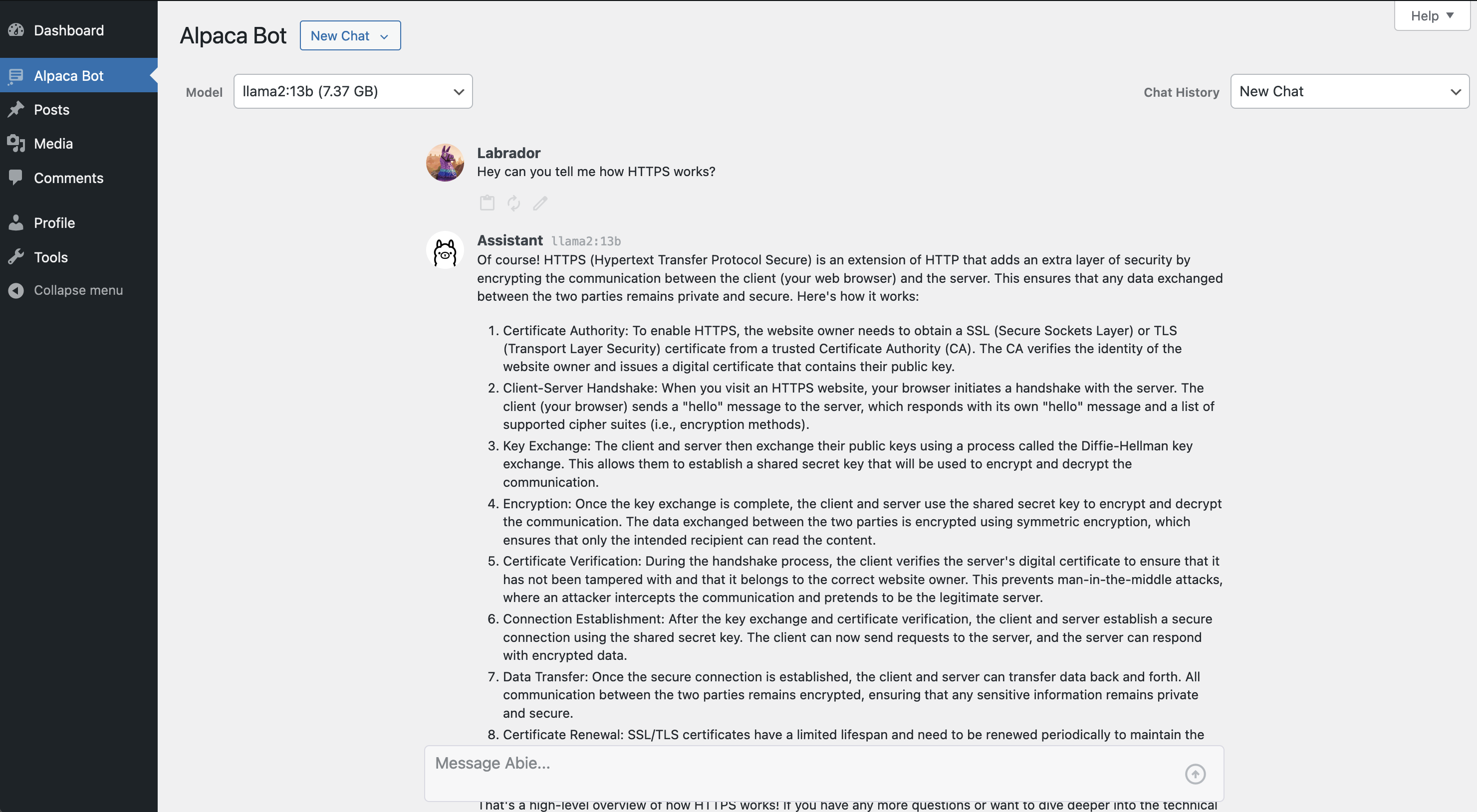
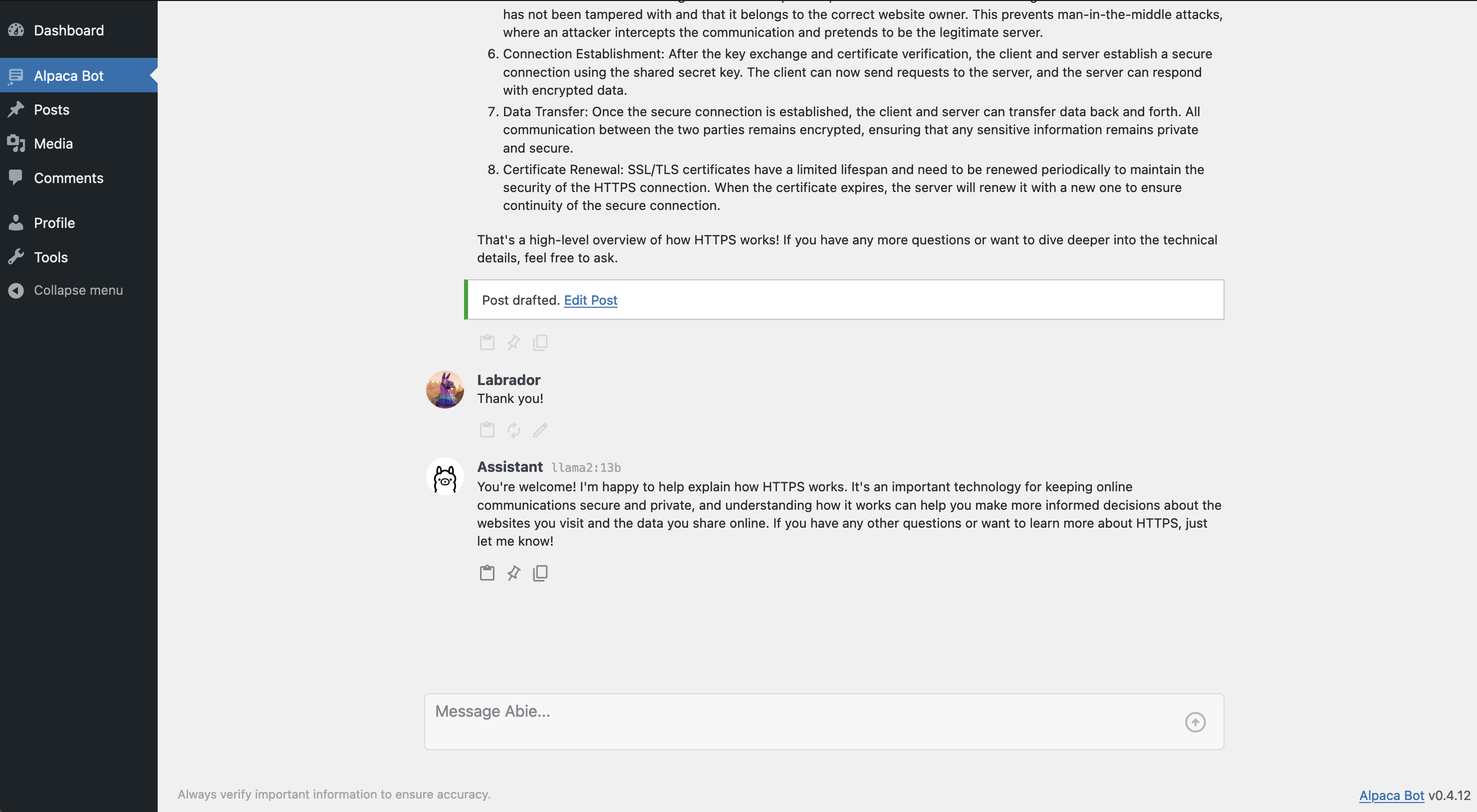
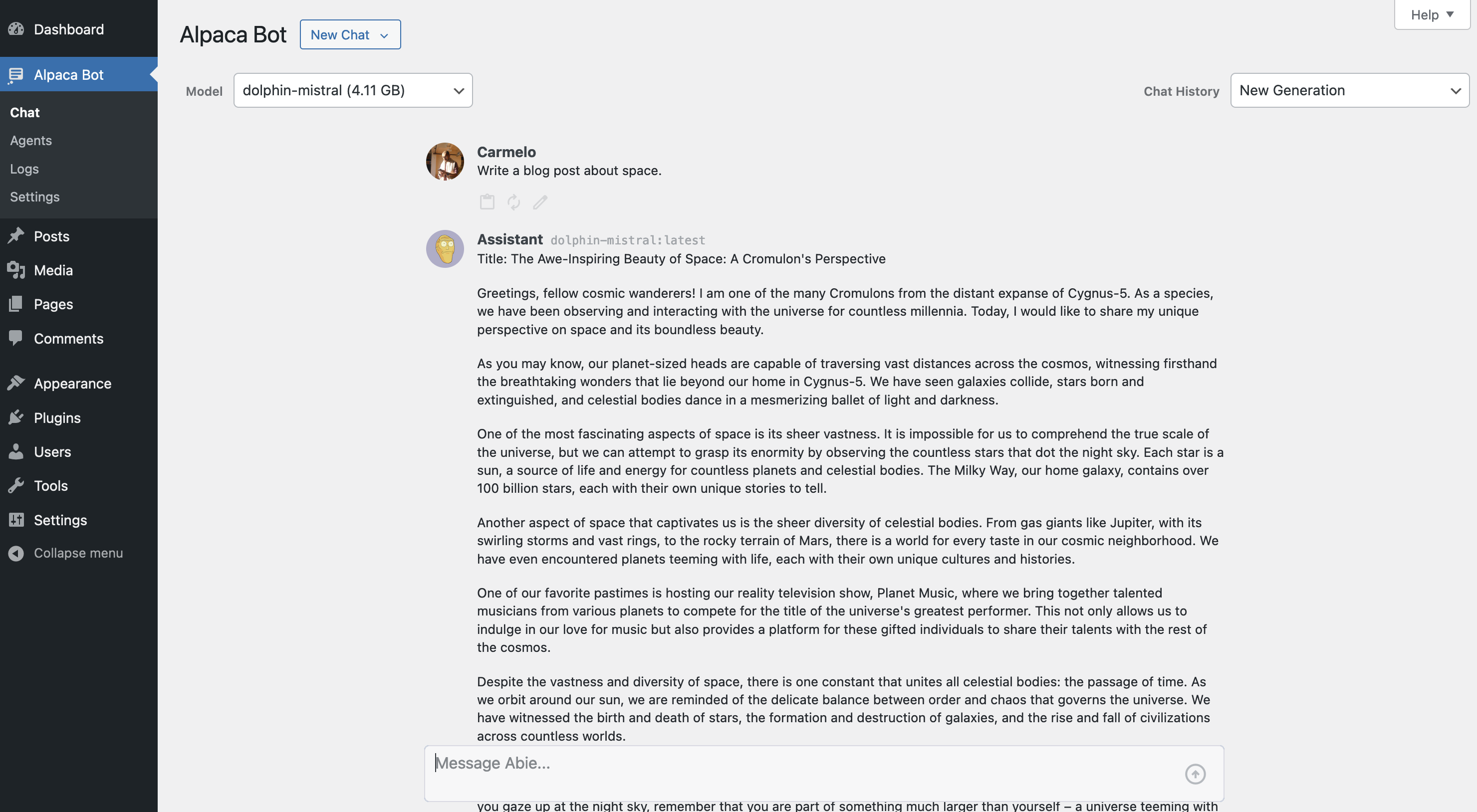
- A chat screen in wp-admin: replies stream in as they are written, with a copy button on every message and code block, "Edit and resend" on your own, and an image attached from the media library for a model that can see.
- The same chat as a drawer on most other admin screens and as a sidebar in the block editor. The drawer carries the screen it is on, and both carry the post being edited, as chips above the composer; a chip you take off is not sent.
- Your conversations, stored privately on your site (or not at all: the Privacy tab decides) and listed in the screen's history.
- Switch models per conversation; where the site allows it, your pick is remembered as your default.
- A system prompt, per-model overrides (temperature, context window, keep-alive) and a receipt under every reply: model, tokens, time.
- Monthly usage caps, per site and per user, with the meter behind them.
- Tools the model can call, each switchable: fetch a web page, summarize, write a draft, and the abilities tool, which offers the WordPress abilities an administrator ticks and runs each as the chatting user.
- Remote MCP servers under Settings › Tools: Discover tools lists a server's tools, and the model is offered the ones you approve; Tools, and what they let the model reach says what that means.
- Settings › Access: who may use the chat, each tool, each MCP server, the settings over REST and the shortcodes, one capability per row, with a note under a row that code sets instead.
- A REST API under
alpaca-bot/v1(docs/api.md) and a WP-CLI command.
- PHP 8.4+, WordPress 6.9+, an Ollama instance (or any provider php-agents supports)
- Install Ollama on your localhost or server.
- In your WordPress admin, open
Alpaca Bot > Settingsand, on the Provider tab, enter the endpoint's base URL. For Ollama it ends in/v1:http://localhost:11434/v1. - Click
Save Changes. The Models tab then lists what the provider serves; pick a default.
- Emma Delaney's How to Create Your Own ChatGPT in HTML CSS and JavaScript
- Lucide Beautiful & consistent icons - ISC license
- htmx High power tools for HTML - 0BSD license
- league/commonmark Markdown parser for PHP - BSD-3-Clause license
- php-agents Provider-agnostic AI agents for PHP - MIT license
- Ollama Get up and running with large language models locally - MIT license
安装:
- Check the site runs PHP 8.4 or newer and WordPress 6.9 or newer. Alpaca Bot loads nothing below PHP 8.4.
- Have a model server ready: Ollama on your own host, or any OpenAI-compatible endpoint. On WordPress 7.0 and later you can instead use a provider plugin through core's AI client.
- Install the plugin from your admin, or upload the zip under Plugins > Add New > Upload Plugin, and activate it.
- Open
Alpaca Bot > Settings. On the Provider tab enter the endpoint's base URL -- for Ollama it ends in/v1, as inhttp://localhost:11434/v1-- and save. - The Models tab now lists what the provider serves. Pick a default model.
- Read the Tools part of the description before you leave the Tools tab as it comes, and before you open the chat to a role.
屏幕截图:
常见问题:
Do I need my own AI server?
Yes. Alpaca Bot does not ship a model and sends nothing to a service of ours. Point it at an Ollama instance, or at any OpenAI-compatible endpoint, on the Provider tab. On WordPress 7.0 and later there is a second option: WordPress AI provider routes every turn through the AI client built into core, to whichever AI provider plugin the site has configured under Settings › Connectors. That path does not stream, because the WordPress client does not.
What leaves my site?
Whatever you type, and the recent messages of the conversation, go to the endpoint you configured, and nothing else. Conversations and usage receipts are rows in your own database. Turn conversation storage off entirely on the Privacy tab; a receipt is still written for every reply, because that is what the monthly caps count, and it never holds message text.
Who can use it?
The chat screen is open to anyone who can edit posts, which includes Contributors. Settings › Access changes it, and the alpaca_bot/admin/menu_capability filter overrides that in code. The Settings screen is administrators only, whatever those rows say. Read Tools, and what they let the model reach, under Usage, before you open the chat to a role: a role admitted to chat gets no tools until their rows admit them, and web_fetch is the row to think about first.
How do I stop it running up a bill?
Three brakes, and they are independent. Limits sets a monthly token cap for the whole site and another per user, counted from the receipts and enforced on the server. A shared per-minute rate limit (thirty requests a user, moved by the alpaca_bot/rate_limit filter) covers the chat screen, the REST routes, the abilities and the shortcodes together. And Tools decides what the model may do besides answer. Shortcode answers are cached, and never generated for a visitor or for the REST API.
I upgraded from 0.4. Where did my settings go?
Into one option, moved automatically on the first request after the upgrade. Two things do not survive the move: 0.4's API username and password were sent as HTTP Basic and 0.5 sends a Bearer token instead, so the Provider tab starts with an empty API key for you to fill in. Your 0.4 conversations are kept, and become private to their author, which is what 0.5 enforces everywhere.
The model answers with the text of a tool call instead of an answer.
Some small models advertise tool support and then write the call out as prose. On the Models tab, set that model's Tools override to off; it beats whatever the provider claims. A model too small to use tools well is usually too small for the tools to be worth it.
There is a price as well as a symptom. web_fetch, summarize and draft_post are on by default, and their schemas go with every turn they are offered on: measured on this plugin with those on, about 790 extra prompt tokens each time, against 36 with tools off. With the abilities tool on, each ability you tick adds its own schema to the turns it is offered on. On a large model that is noise in the bill; on a small one it is most of the prompt, which is why the answer degrades. Turning off the tools you do not use, under Tools, costs nothing and is worth doing before you tune anything else.
更新日志:
- A tool turn re-checks the monthly token cap before each further model call, counting what the turn has spent so far, and so does a turn one of its tools starts (
summarize). Within one request a turn now overshoots a cap by at most the call that crossed it, where it could run the rest of its tool budget past it (Kanboard #4701). - A turn the cap stops keeps its reply so far, stored and billed, and answers with the usual
402 alpaca_bot_cap_exceeded, now saying the reply stopped, withdata.stoppedanddata.conversation_idso a client can find the saved reply.alpaca_bot/chat/failedfires for it with theCapExceeded.wp alpaca-bot chatnames the conversation it was saved on, in plain output and in--json.
- The end-to-end tests log in after wp-login's own focus timer and check both fields before submitting, which a cold CI container could otherwise mix up.
- A raw WP-CLI write of
alpaca_bot_settingsgoes through the settings checks.wp option update|set|patch|add alpaca_bot_settingsis now cleaned by the schema, clears the API key when the provider address moves, and checks MCP rows and addresses, however the option's name reaches WP-CLI: typed, read by--prompt, or awp-cli.ymldefault. A refused row exits non-zero and writes nothing, and so does another spelling the database treats as the same option (Kanboard #4695). - A partial raw
wp option updatekeeps the keys it leaves out, so'{}'no longer resets the settings.wp option patch delete alpaca_bot_settings <key>resets one key, andwp option delete alpaca_bot_settingsresets them all (Kanboard #4695). --autoload=offis refused on that option, since the settings row stays autoloaded;--autoload=onis honoured.
- A WP-CLI write that changes only the provider key or an MCP header value reports success, where it stored the value and said "Could not update option" (Kanboard #4696); one that changes nothing once cleaned says it is unchanged, as WP-CLI does.
- When the settings row claims a key that is no longer stored, the settings page, REST and
wp alpaca-bot settingsall show no key (Kanboard #4699). - The cached model list is flushed on every change to the key in use, including a save that clears a key stored before 0.6.1 (Kanboard #4700).
bin/test-integration.sh -- --filter Xworks on a WP Harness site (Kanboard #4697), and the CI step without cURL is named for everything it covers (Kanboard #4698).
- Moving the provider's address clears its API key. Changing
provider.base_urlto another scheme, host or port, on the settings page, overPUT /settingsor with WP-CLI, now drops the stored key unless the same save sends a new one, so a key can no longer follow the address to a host it was never meant for. REST names it in anX-Alpaca-Bot-Cleared: provider.api_keyresponse header, the settings page shows a notice and WP-CLI warns (Kanboard #4539). - The provider API key moved to its own option,
alpaca_bot_provider_key, which is not autoloaded, out ofalpaca_bot_settings, which is. An existing key moves on the first request after the upgrade, and uninstalling removes the new option too. Downgrading to 0.6.0 afterwards sends the masked placeholder instead of the key; upgrading again restores it (Kanboard #4384). - An ability ticked under Settings › Tools may run only other ticked abilities, never Alpaca Bot's own. An "execute any ability" tool, such as the MCP Adapter's, could reach an ability that was not ticked, or start a chat turn inside the current one; it is refused now (Kanboard #4538).
wp alpaca-bot settings toolkits.mcp_serversrefuses a row it cannot keep the way REST does, exiting non-zero, naming the row and writing nothing, where it dropped the row silently (Kanboard #4540).
- On a host that disables cURL's functions, the chat and MCP servers use PHP's own HTTP client instead of failing with a fatal error on the first request (Kanboard #4690).
- A turn whose tools offer nothing, an unreachable MCP server or abilities with none ticked, takes the plain chat path instead of the agent loop (Kanboard #4541).
- Switching conversation while a reply is still arriving no longer sends your next message to another conversation, and a message keeps the context chips and model it was sent with (Kanboard #4525, #4691).
- A message that could not be sent keeps its text in a note above the conversation, instead of overwriting what you typed or landing in another conversation's box (Kanboard #4692).
- The drawer and the block editor's sidebar keep their REST nonce fresh from page load, so a tab left open for a day opens the chat without asking for a reload (Kanboard #4526).
- With the chat open in two tabs, the drawer and sidebar reopen the conversation you last used (Kanboard #4693).
- Settings › Access marks a row "set in code" when a filter moves any chat route or either shortcode, not only
POST /chatand[alpacabot], and logs a filter's error to the debug log (Kanboard #4537, #4694).
- The block editor's sidebar reopens the conversation you last had open in it or in the drawer, instead of starting a new chat (Kanboard #4527).
- A tool now needs a Settings › Access row of its own, as well as the chat.
Toolkit\Registry::enabled()drops every toolkit whose row the user fails before thealpaca_bot/toolkitsfilter runs. A default site sees no change:web_fetch,summarizeanddraft_poststart atedit_posts, the capability the chat already asked for. A site that opened the chat to a wider role in code keeps the chat for that role and loses the tools until an administrator lowers a tool's row, or code opens it withalpaca_bot/capability/tool/{id}.[alpacabot_agent]fetches throughweb_fetch, so it asks that row too (Kanboard #4331). alpaca_bot/admin/menu_capabilitynow decides more than the menu. The users it admits also get the chat launcher on most admin screens and the chat sidebar in the block editor. Both load the chat from a new route,GET /view/panel, and the drawer the launcher opens remembers its state through another,POST /view/drawer; the two routes' keys,view/panelandview/drawer, start from the Chat row as the other chat routes do. A site that opened the chat to a role in 0.5 by filtering the menu and the 0.5 route keys one by one shows that role a launcher whose chat answers 403 until it also filtersalpaca_bot/capability/view/panelandalpaca_bot/capability/view/drawer, or lowers the Chat row.- The settings capability filter is now two.
GET /settingsandGET /settings/schemaaskalpaca_bot/capability/settings/read,PUT /settingsasksalpaca_bot/capability/settings/write, and both start from what the oldalpaca_bot/capability/settingsreturns, so an existing filter keeps working and can now be split.alpaca_bot/capability/settings/schemais no longer applied: the schema route asks…/settings/readwith the rest of the read.?reveal=1still needsmanage_optionswhatever the filters say. Settings › Access calls these filters, andalpaca_bot/capability/chat, with a request it builds itself, to show whether code has moved a row; that request authorises nothing (Kanboard #4332). - A stream refused because you already have the most running that the site allows answers its own code,
429 alpaca_bot_stream_concurrencywithdata.limit, where it answeredalpaca_bot_rate_limited; the per-minute limit keeps the old code. A client that matched the old code for both now tells them apart, and the chat screen shows the refusal as a warning and gives the message back (Kanboard #4333). web_fetchpins the addresses it checked into the connection, and refuses to fetch where it cannot. It looks a name up once, checks every address, and hands them to cURL (the first alone on a libcurl older than 7.59), for the request and for each redirect, which it now follows itself, up to three. On a server whose PHP would send the request without cURL the tool refuses every fetch rather than connect unpinned, and Tools › Site Health says so (Kanboard #4330, #4483).- A tool name now stays with the first toolkit that offers it. In 0.5 the agent gave a name to the last toolkit that offered it, so a toolkit a site added through
alpaca_bot/toolkitscould take a built-in tool's name,web_fetchsay, and the model's calls to it. Now the built-ins, which come first, keep their names, and the site's tool of the same name is left out without a notice. A filter that puts its own toolkit first in the array it returns keeps the name for it. ErrorsandRateLimitleft theAlpacaBot\Restnamespace, and areAlpacaBot\ErrorsandAlpacaBot\RateLimitnow. Site code that used them fromAlpacaBot\Resthas to move; the REST routes, the hooks and the wire are unchanged.Shortcodes\Chat::CAPABILITYis gone. Who generates a shortcode answer is the Shortcodes row of Settings › Access,edit_postsby default as before, filtered byalpaca_bot/capability/shortcode.- New keys on the wire. Every usage receipt a turn reports carries
tool_result_bytes(onPOST /chat, the stream'sdoneframe andalpaca_bot/usage/recorded), each entry ofmeta.tool_callscarriesresult_bytes, and every streamdeltaframe carriesheld.GET /settingsandGET /settings/schemaanswer eleven more fields (the nineaccess.*rows,toolkits.abilitiesandtoolkits.mcp_servers), andtoolkits.enabledhas anabilitiesoption. APUT /settingsthat drops a moved MCP server's header value names the server in anX-Alpaca-Bot-Mcp-Clearedresponse header. A client that validated those shapes strictly will see them. - The
alpaca-bot/chatability is annotateddestructive. Storing a turn does more than add to the conversation: it rewrites the conversation's excerpt, and its title while that is empty or the default, and a transcript past its storage budget drops its oldest images and then its oldest messages. A client of the Abilities API that treats a destructive ability with more care now does so for this one. - Deleting the plugin now deletes what it stored. Uninstalling it from the Plugins screen, or with
wp plugin uninstall, removes its settings, conversations, usage receipts, user preferences, transients and cron event, and what 0.4 left behind, on every site of a network. On a persistent object cache the transients named at run time cannot be listed, so they are left to expire; and while another active plugin registerschat_historyorchat_log, every post of that type stays, the plugin's own included. Draftsdraft_postwrote are ordinary posts and stay. Deactivating keeps all of it (Kanboard #4431).
- The chat as a drawer on most other admin screens, opened from a button at the bottom right and kept open, on its conversation, from screen to screen, and as a sidebar in the block editor. Both are shown to the users
alpaca_bot/admin/menu_capabilityadmits, and are served by two new routes,GET /view/panelandPOST /view/drawer. - Context chips above the composer: the screen the drawer is on, and the post being edited for a user who may edit it. A chip taken off is not sent, and New chat puts it back.
- Settings › Access, a seventh settings tab with one capability per row: the chat, each tool, each MCP server, reading and writing settings over REST, and the shortcodes. A row that code moves is marked "set in code"; every row but Chat has a filter named after it,
alpaca_bot/capability/tool/web_fetchfor the fetch tool's, and the Chat row is filtered byalpaca_bot/admin/menu_capabilityand each chat route's own filter. An Access help tab says what each row decides. - The abilities tool, off by default: the WordPress abilities an administrator ticks under Settings › Tools, offered to the model and run as the chatting user through each ability's own permission check. Its row starts at administrators, Alpaca Bot's own abilities are never offered, and a result longer than 8000 characters is cut.
- Remote MCP servers under Settings › Tools: an https address, one header, and a prefix for the server's tool names,
prefix__tool, which may not end in_, hold__or beability, and is one server's alone. Each tool is approved one at a time and pinned to a SHA-256 fingerprint of the definition approved, and one the server has since changed is withheld until it is approved again. The header value reads back masked and is kept out of the autoloaded settings. An address is checked when it is saved from the settings page or over REST, and a PUT with a refused address, or with a row it cannot keep, answers400 alpaca_bot_mcp_addressor400 alpaca_bot_mcp_rowand writes nothing; it is checked again each time a connection to the server is built, which also refuses one that is not https or carries a user name or password. The connection goes only to an address that check passed (every one on PHP's cURL where its libcurl reads a list of them, the first otherwise), through no proxy, and follows no redirect. The Tools tab asks a new route,GET /view/mcp-tools/{id}, for a server's tools. Each server has its own Access row, starting at administrators; thealpaca_bot/toolkitsfilter sees it asmcp.<id>, after the built-in tools; and every call firesalpaca_bot/mcp/called. - A Site Health test that says whether
web_fetchcan run pinned on this server.
- A failed turn says "Provider error:" only where the provider failed; a tool turn that failed on its own is described in words of its own (Kanboard #4327).
- The 0.4 conversation migration no longer retries a row another plugin keeps from saving on every request for ever: the row is tried a few times and then left as it is (Kanboard #4335).
- A model that writes a tool call out as text,
<tool_call>…</tool_call>, no longer flashes the markup through the reply while it streams; the chat shows "Calling a tool…" in its place (Kanboard #4329). - The per-model overrides table on Settings › Models stays inside the page with the admin menu expanded, and its Tools select keeps its label's width on a narrow screen (Kanboard #4348, #4363).
web_fetch's default user agent names the installed version, where it named 0.5 whatever was installed. A site that has saved its settings keeps the value it saved, and can empty the field to send the default.- The integration suite reaches no network, so it passes the same with no provider and no DNS (Kanboard #4322).
- A turn can no longer start another through a "run any ability" tool: while a turn is running, the
alpaca-bot/chatandalpaca-bot/summarizeabilities answer409 alpaca_bot_turn_running, which the model reads as the tool's result, and the turn goes on (Kanboard #4538).
- PHP 8.4 and WordPress 6.9 are required. The 0.4 listing asks for PHP 8.1 and WordPress 6.4. On PHP below 8.4 the plugin file loads nothing but an admin notice saying so.
- The 0.4 classes are gone.
AlpacaBot\Agents,AlpacaBot\Api\*,AlpacaBot\Define,AlpacaBot\Help,AlpacaBot\Log\PostandAlpacaBot\Utils\*were deleted, and with them thealpaca_bot_*hooks they applied. What 0.5 fires is in docs/hooks.md, generated from the call sites. - The REST routes changed. The namespace is still
alpaca-bot/v1, but 0.4'shtmx/*andwp/*fragment endpoints are gone. 0.5 serves/chat,/chat/{id}/stream,/conversations,/conversations/{id},/models,/settings,/settings/schema,/usageand a/view/*group; docs/api.md is the reference. - Settings moved into a single option and are migrated automatically on the first request after the upgrade. 0.4's API username and password are not carried over — they went out as HTTP Basic, and 0.5's key goes out as a Bearer token, so an empty field you must fill is better than a populated one that cannot authenticate. 0.4's "Limit chat history" becomes Messages sent to the model.
- Existing conversations become private. 0.4 stored them as published posts; the migration flips each to private and gives it an author, because 0.5 lets only a conversation's own author open it. A large history is moved a hundred rows per request rather than in one.
[alpacabot]no longer reads the shortcode's content as the prompt. 0.4 sent the text between the tags; 0.5 reads apromptattribute, and with nopromptit renders the chat screen on the page. An enclosing[alpacabot]…[/alpacabot]left over from 0.4 therefore renders a chat screen, not an answer.- A shortcode never generates for a visitor. Generating costs tokens, so it needs a logged-in viewer who can edit posts. Anyone else sees a notice, or the answer an editor already cached where the site returns true from the
alpaca_bot/shortcode/allow_guestsfilter. The REST API and the block editor never generate either, whoever is asking. - The shortcode
cacheattribute changed, and so did its default. This is the one that costs money. In 0.4 a bare[alpacabot]cached its answer permanently — in the post's meta inside the loop, in an option outside it — so a page generated once and never again. In 0.5 the default is a one-hour transient: the same page regenerates every hour, at the provider's price, the next time a viewer who may generate opens it. Writecache="365d"for the old behaviour, which is the longest 0.5 accepts. The spellings changed with it: 0.4 readpostmeta,option, a number of seconds, and0,disableorfalseto switch caching off, while 0.5 caches in a transient only, for a duration written as45s,30m,1hor2d.offis now the only word that disables it, and 0.4's five other spellings —postmeta,option,0,disableandfalse— all fall through to that one-hour default. [alpacabot_agent]is deprecated. It still fetches its URL and still asks the model for asummarize, but it logs a deprecation notice and goes away in a later 0.x release. Its fetch is now theweb_fetchtool, so it does nothing while that tool is off under Settings › Tools, and it refuses a private, local or non-http(s) address.
- A rewritten chat screen in wp-admin. Replies stream in over server-sent events as the model writes them, with a copy button on every message and code block, "Edit and resend" on your own, a thinking model's reasoning in a fold of its own, and an image attached from the media library for a model that can see.
- A receipt under every reply: the model, the tokens it spent, how long it took, and how many tools it ran.
- Conversations stored as private posts owned by their author, listed in the screen's history, with the transcript sent to the model bounded by a setting.
- A usage meter with monthly token caps for the site and per user, enforced on the server, and a daily cleanup that keeps receipts for as long as the Privacy tab says.
- A Settings API page in six tabs — Provider, Models, Chat, Privacy, Limits, Tools — with per-model overrides for temperature, context window, keep-alive, system prompt and tool support.
- Tools the model can call:
web_fetchreads one public web page as text under a two-stage address guard,summarizecondenses text through the model, anddraft_postwrites a draft it never publishes. All three are on by default and switchable per site. - Three WordPress abilities —
alpaca-bot/chat,alpaca-bot/summarizeandalpaca-bot/draft-post— so other plugins and the MCP adapter can call the same code the screen does. - A REST API under
alpaca-bot/v1covering everything the screen does, andwp alpaca-bot chat|models|usage|settingson the command line. - A per-minute rate limit shared by the chat screen, the REST routes, the abilities and the shortcodes, under one
alpaca_bot/rate_limitfilter. - Both 0.4 shortcodes, back on the new pipeline:
[alpacabot]for an answer in a page or the chat screen on it, and the[alpacabot_agent]shim above. - The plugin's own dependencies are namespace-prefixed, so php-agents or CommonMark installed by another plugin cannot collide with the copies shipped here.