
ambera Theme Builder
| 开发者 | amberagmbh |
|---|---|
| 更新时间 | 2026年10月29日 23:56 |
| PHP版本: | 8.1 及以上 |
| WordPress版本: | 7.1 |
| 版权: | GPLv2 or later |
| 版权网址: | 版权信息 |
详情介绍:
- Visual builder. Drag blocks onto the page, style them in a design panel, and see the result at once — on desktop, tablet and phone in the same window.
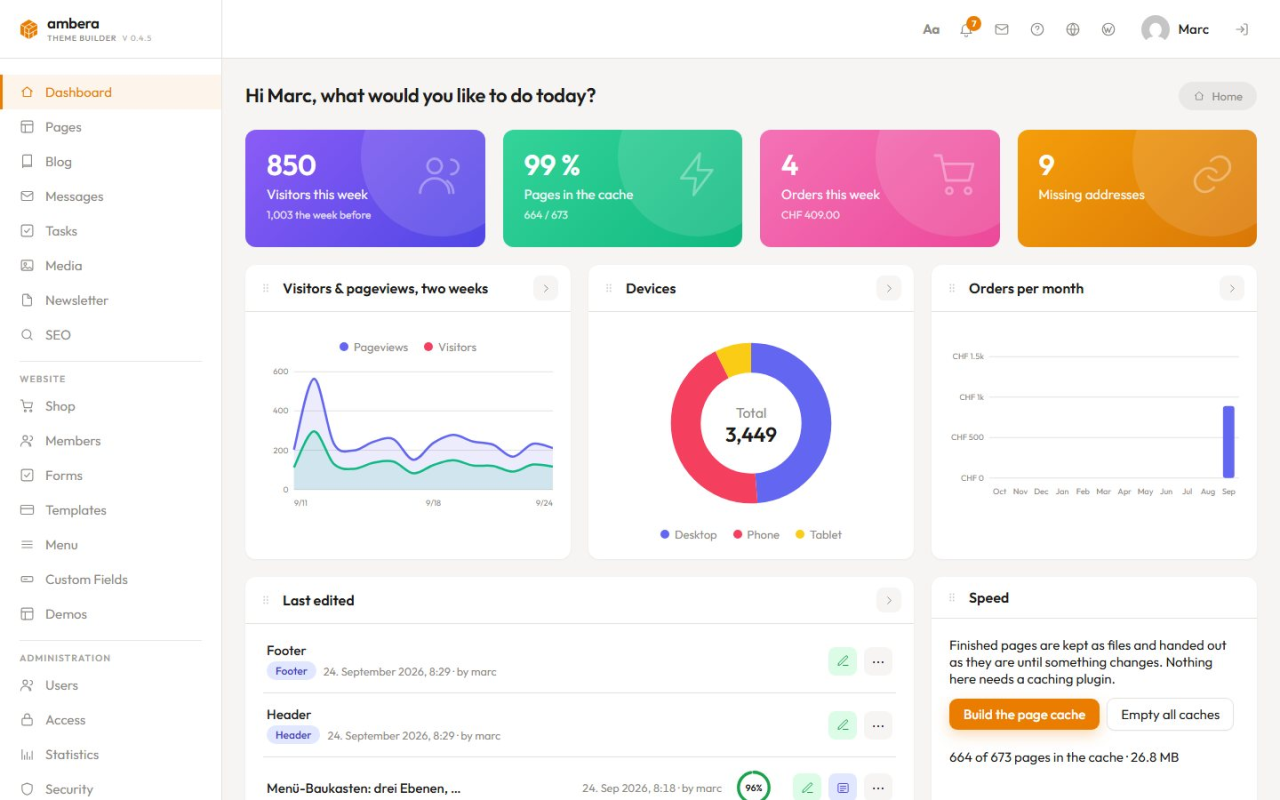
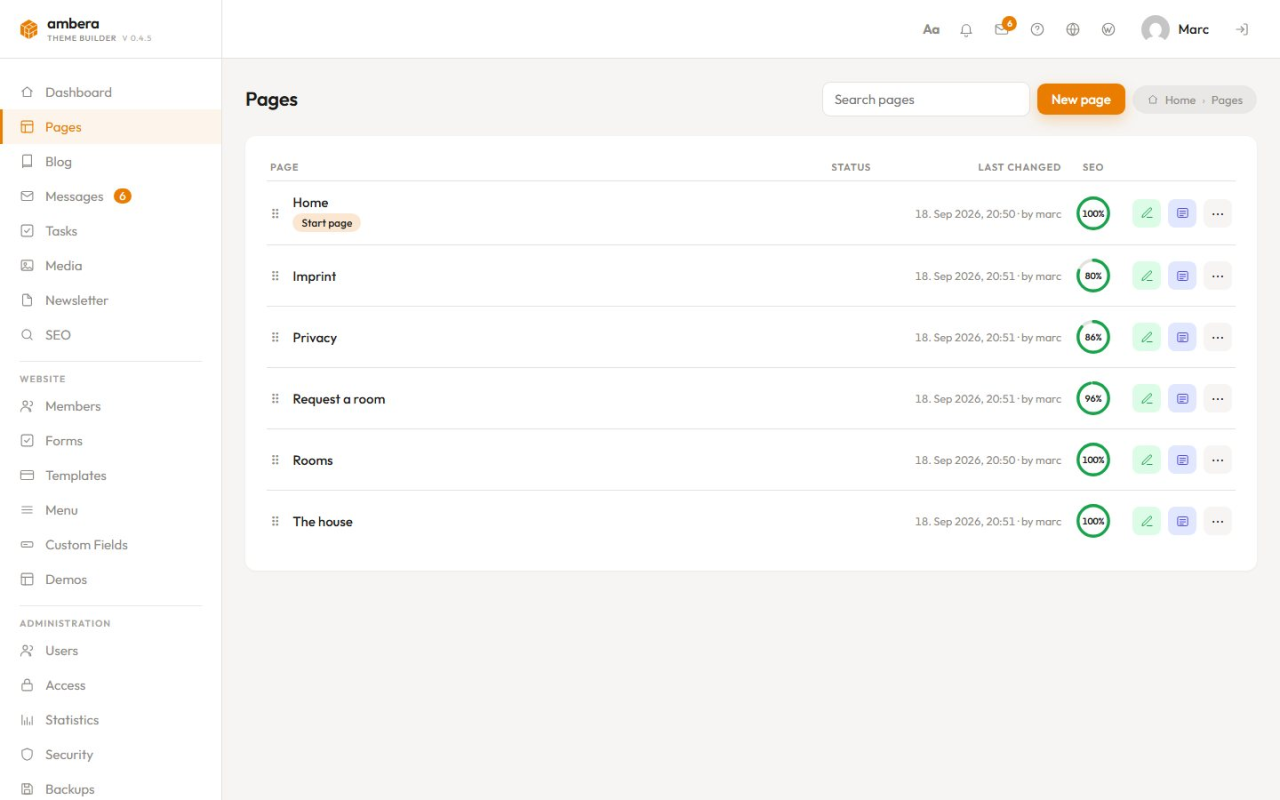
- A back end your client can use. Pages, blog, messages, media, forms and statistics in plain words — and no wp-admin behind it.
- Complete theme builder. Header, footer, single posts, archives, search and 404 in the same editor, with conditions that say where each one applies.
- 100 blocks, 55 of them free. Layout, text, media, menus, blog, forms — and with Pro a shop, memberships, appointments, events, jobs and downloads.
- A design system, not a stylesheet. Colours, fonts, spacing and text styles are set once and used everywhere. Change one, and the whole site follows.
- Work on a page that is already online. Saving keeps a draft; you publish when it suits, now or at a time you set. Two versions side by side, with what changed marked in green, red and orange.
- Page builder: blocks, a design panel, three screen widths, a layer tree, undo and versions.
- Theme builder: header and footer free; post, archive, search, 404 and menu templates with Pro.
- Client area: pages, blog, messages, media, forms, statistics, tasks and users — in plain words, with your logo on top.
- Access control: per role and per area — see and change, see only, or hidden — down to publishing, deleting and changing an address, and rules for a single page.
- Forms and inbox: contact, booking and application forms, an inbox with every field, and a log of every mail sent.
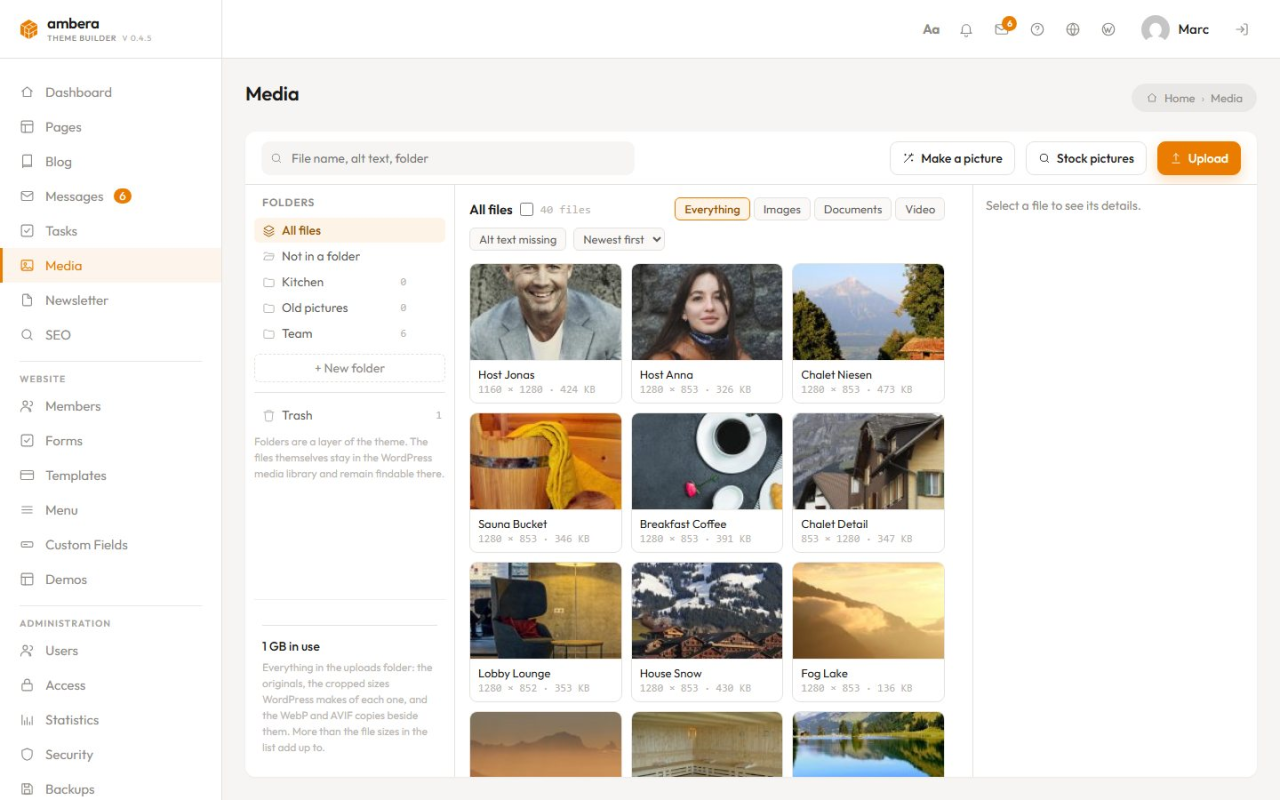
- Media manager: folders, search, cropping, alternative texts — and WebP and AVIF in every size, served to the screen that asked.
- SEO: titles, descriptions, sitemap, structured data, and a ring on every page that says in per cent what is missing.
- Statistics: visitors, pages, referrers, devices and countries — counted on your own server, without a cookie or a third party.
- Security: a firewall in front of every request, a counted sign-in, two-factor authentication with a passkey or an app, hardening, a file scan and a log.
- Spam protection: five checks under every form, comment and sign-up — a hidden field, a signed clock, a brake per address, a link limit, your own word list. No captcha, no cookie.
- Speed: finished pages kept as files, images in WebP and AVIF, fonts from your own site. No caching plugin to configure.
- Tasks and reminders: what has to be done, with a day and a time, and a notice in the client area when it is due.
- Redirects and 404 list: rules from an old address to a new one, and what visitors asked for and did not get, one click from becoming a rule.
- Maintenance mode: a switch that closes the site behind a page you designed, while anybody who may edit still sees it.
- Accessibility: a button visitors use to set the page up for their own eyes — larger text, more contrast, no motion.
- Shop [Pro]: products with variants and stock, cart, checkout, orders, invoices — Stripe, Payrexx with TWINT, PayPal or on invoice.
- Memberships and courses [Pro]: sell access monthly, yearly or once; lock a page, a category, a block or a file; courses with a quiz and points.
- Appointments [Pro]: visitors take a free time themselves — services with a duration, people with their own hours, confirmation and cancellation by email.
- Events [Pro]: dates many people come to, with places, a price and a waiting list that moves up by itself.
- Jobs [Pro]: adverts with the details Google Jobs asks for, and the application next to them.
- Downloads [Pro]: files in groups, under an address that survives replacing the file, counted per day.
- Reviews [Pro]: the site asks once after an order or an appointment, and you decide what shows.
- Chatbot [Pro]: a window that answers visitors from your own answers and the pages of the site; what it cannot answer waits for you.
- Ranking [Pro]: how fast the site is, how Google rates it for search and how the business shows on Google Maps for your keywords — once a day, with a history.
- Legal pages: an imprint and a privacy policy written from what the site actually does. GDPR for the EU and the EEA.
- Opening hours: the week, closed days and public holidays in one place, shown by the blocks "Opening hours" and "Next date".
- Newsletter [Pro]: written with the same blocks as a page, sent from the site itself, with lists, double opt-in, opens and clicks.
- Thirty languages [Pro]:
/fr/contactis a real page — translated on first view, then stored, with hreflang. - Custom fields [Pro]: sets of fields per kind of post, written into a template by a block.
- AI assistance [Pro]: a section, a whole page, a blog post or a picture from a description — with your own key.
- AI tools over MCP [Pro]: Claude, Cursor or Codex build pages here as real blocks, through one key you hand out and take back.
- Backups: the whole site in one file, on a plan, checked after every run, restored with one click.
- Snippets [Pro]: CSS, JavaScript or HTML with a name, a place and a condition, instead of another plugin.
- Early firewall [Pro]: the rules load before WordPress does, for every file of the site.
- Country blocking: whole countries allowed or turned away.
- Shop: categories, CSV import, six customer emails with a designer, invoices and credit notes.
- Memberships and courses: free plans, trials, and renewals that run by themselves.
- Appointments: a break after each service, days off, and per service free slots or a request.
- Events: sign-up without an account, and confirmations with a calendar file and a link that cancels.
- Jobs: a screen that says what is still missing, and application papers behind an address that asks first.
- Downloads: files that can be locked to members.
- Reviews: written without an account; nothing shows until you let it through.
- Newsletter: sending in batches at a time you choose, with header, footer and content templates.
- Thirty languages: every language its own address, and corrections that survive a retranslation.
- Custom fields: filled in by whoever writes the post.
- AI: nothing runs without your own key.
- Connections (MCP): reading or writing, no access to users, orders, settings or files, every change undoable.
- Snippets: an error stays with the snippet instead of taking the page down.
- Content: Carousel, Popup, Table, Figure, Accordion, Accordion entry, Tabs, Tab, HTML, Price, Price switch, Currency switch, Countdown, Timeline, Station.
- Media: Google Maps, Facebook embed, Video playlist, Video in the list, Image hotspots, Point.
- Shop: Products, Product, Cart, Cart button, Checkout, Account.
- Memberships and courses: Memberships, Members only, Course, Courses, Learning points, Save it, Saved and seen.
- Modules: Appointment, Events, One event, Event calendar, Jobs, One job, Downloads, Download button, Newsletter, Unsubscribe, Custom field, Languages.
安装:
- Upload the plugin to
/wp-content/plugins/or install it from the plugin directory. - Activate it under Plugins.
- Open ambera in the admin menu. The dashboard walks you through the first steps: pick a demo or start blank, set your colours and fonts, edit the header and footer.
- Set up the client area if someone else will run the website.
屏幕截图:
常见问题:
Is ambera Theme Builder free?
Yes. This plugin is free and complete: the builder, the theme layer, the client area, forms, media, SEO, statistics, redirects, security, spam protection, tasks and thirty-five demo websites. There is no key, no account and no trial period.
What is the difference between Free and Pro?
Free builds and runs a whole website — including legal pages, backups and country blocking. Pro adds what a commercial or multilingual site needs: shop, memberships and courses, appointments, events, jobs, downloads, reviews, newsletter, thirty languages, custom fields, AI, editable templates for posts and archives, more blocks. See the feature comparison.
Do I need Elementor, Divi or another page builder?
No. ambera has its own visual builder for pages and for the theme around them. It is not an add-on for another builder.
Do I still need a theme?
No. ambera renders header, footer and every template itself. A block theme can stay installed — WordPress needs one to be active, and ambera works with any.
Can I use ambera for client websites?
Yes, and that is what it is built for. The client area gives the people who run the site a back end of their own, and you decide what they may change.
Can clients manage their website without wp-admin?
Yes. Pages, blog, messages, media, forms, statistics and users are in the client area, in plain words. The WordPress dashboard stays with you.
Can I import a complete website?
Yes. Thirty-five demo websites install with one click, with pages, templates, menus and pictures, and can be removed just as easily.
Does it work with the block editor (Gutenberg)?
Yes. Posts written in the block editor are shown inside the templates you build. Pages can be built with either editor; ambera's editor is used for the layout of the site itself. Posts can also be written in the classic WordPress editor.
Does the plugin send anything home?
Nothing without your action. There is no tracking and no licence check — this plugin has no key, no account and no licence server; updates come from wordpress.org through WordPress' own update check. The demo catalogue, Google Fonts, the stock-photo search and the files an HTML import names are loaded only when you open those screens or press those buttons; see "External services".
Is the statistics module GDPR-friendly?
It counts on your server, sets no cookie and stores no IP address. The visitor's country comes from your CDN's header if there is one; the optional lookup at an external service is off by default.
Can I switch an existing site built with Elementor or Divi?
Yes. The screen "Switch" lists every page and post still built with Elementor, Divi, WPBakery, the block editor or the classic editor, and rebuilds each one from blocks — read as it stands on the site, with its pictures, forms and styles. Leave the old builder active until the switch is through. The old content stays with every page, and "Put back" returns it. Moving from a website that stands somewhere else? Under "From another website" on the same screen, give its address: the plugin reads its start page, lists the pages it links to (up to 40), and rebuilds the ones you tick as drafts here, with their pictures; the header and footer of the start page become the header and footer of this site. Nothing is fetched until you press the buttons, and "Put everything back" moves the drafts to the trash.
更新日志:
- Switch from another website: the card "From another website" on the Switch screen takes the address of a website that stands somewhere else, lists the pages its start page links to, and rebuilds the ones you tick as drafts here, with their pictures; the header and footer of the start page become the header and footer of this site. "Put everything back" moves the drafts to the trash.
- The help explains the set-up and the switch from another website.
- Set up a fresh site in three steps: choose a finished website for your trade, give it your logo and colours, done. The card on the dashboard leads there, and the logo goes into the header in place of the site name.
- Switch from another builder: the screen "Switch" rebuilds pages from Elementor, Divi, WPBakery, the block editor or the classic editor from blocks, with their pictures, forms and styles; a report says what to know, and "Put back" returns any page.
- The help has its own pictures of every screen of the free plugin, and the chapter "What Pro adds" says what the separate plugin brings.
- A security review of the whole plugin. Signing in with a second factor: the password alone opens nothing until the code fits, and ten codes that do not fit pause the sign-in for fifteen minutes.
- SVG pictures in the media library keep only what a picture needs. Styles written into a block, a text or a page load pictures only from this site.
- Behind a proxy or a CDN, the limits for form attachments, passkeys and the statistics count each visitor.
- The bell in the client area says when the PHP of this server is older than the version that fixes known security bugs.
- Backups: downloading and restoring belong to administrators; the mail log and the sign-in log stay out of the database dump.
- XML-RPC is off on a site that has never saved the Security screen; switch it on there when the WordPress app needs it.
- A demo brings only its own fields to a page or a post.
- Blog posts can be written in the classic WordPress editor, next to the block editor and the theme builder. It opens inside the client area, in the fonts and colours of the site.
- "⋯" moves a post to either of the other two editors; from the block editor to the classic editor the text comes along without its blocks, and switching back before changing the text returns them.
- Settings → Client area → "Editor for new posts" chooses the editor offered first under "New post".
- In the classic editor, the switches of a role for publishing, categories and the trash apply as in the block editor.
- Accessibility button in a corner: when a bar is fixed at the bottom of the screen — a row of buttons on a phone, a cookie notice — the button stands above it, and back in the corner when the bar goes.
- Accessibility button in a corner: on a low screen, such as a phone held sideways, the open panel ends below the top of the screen and scrolls.
- Accessibility button in the menu or as a block: the icon stands on the line of the other entries.
- Headings in Japanese break between phrases, not inside a word, in Chrome, Edge and other Chromium browsers; headings in Korean break between words.
- Client area: the card of a screen begins right under the name and the buttons of the screen.
- Client area in dark mode: Redirects, Statistics and the other screens with a card show their text, the open tab, tables and fields in the dark colours.
- Client area on a phone and with "Larger" under "Aa": every screen fits the width — the top bar, the lists of "Aa" and the bell, "Due now", screen names, fields and buttons; wide tables scroll inside their card.
- Statistics → Cities: the country code stands before each city, and region and country below it.
- "Due now" leaves room at the end of a screen for the last buttons of a page; "Done" or "Later" on a task that was removed in the meantime refreshes the list.
- Client area: "Cancel" in the windows is in the language of the client area.
- The bell counts new messages, comments waiting for approval and blocked sign-in attempts since you last opened it, also when earlier ones were dealt with.
- The windows "Back up now", "Import the demo" and "Export this site as a demo" leave space between their explanation and the first field.
- Page cache: it keeps its pages when the firewall, the spam check or the sign-in lock turn someone away, while the bell counts, when a message arrives through a form — files included — and when a task is added or done.
- Help: every chapter describes what this plugin has — the section library with its groups, the demos of its catalogue, films that come with an update, "Legal pages" and "Backups" —, and "Light and Pro" names tasks, opening hours, legal pages, backups and the country block as part of it. Each chapter describes its screens in words, with their places listed.
- Fonts: when a font file cannot be downloaded, the font stays as it was, and no page loads it from Google.
- HTML import brings in much more of a template: its own fonts (every weight and italic, served from your site), Tailwind 4 stylesheets, a header that stays on top, a bar that appears after the hero, "show more" grids, forms and videos.
- Pieces of a template that need a block of the paid version come in as free blocks (an icon, an image, text), and the import report names what was left out.
- Block "Grid": "Entries shown at first" with a "Show all" button. Block "Group": "Appears once the first section has scrolled past". Block "Form": classes for fields, labels and the button.
- In wp-admin the block editor keeps an administrator's own settings (full screen, welcome guide), and leaving it stays in wp-admin.
- Scripts and styles of the editor frame are printed through WordPress' own functions.
- New module "Opening hours" (switch it on under Modules): schedules with their week, several spans a day and past midnight too, "Closed or different" for a day or a range of days, and the public holidays of Switzerland, Germany or Austria to tick. The next 14 days stand under the form as visitors will see them.
- Blocks "Opening hours" and "Next date" → "Times from": a schedule of the module instead of times typed into the block — change them once, and every page follows. "Opening hours" shows the week, only whether it is open now, or the week in one line, and lists the holidays of the next two weeks; "Next date" can add the closing time.
- The opening hours of the business go to search engines with the address when the website is set up as a local business.
- Block "Post content": ticks for Excerpt and Content instead of a choice. When a post begins with its excerpt, untick Excerpt and the content starts after it.
- Blog posts can be written in the WordPress block editor, right inside the dashboard: the menu stays on the left, and saving, publishing and going back keep you there. "New post" asks for the editor — block editor or theme builder — and "⋯" switches a post to the other one; its content comes along as text, and switching back before changing anything returns the earlier version as it was.
- The block editor takes the site's colours, fonts and text sizes. Pictures come from the media library of the dashboard. No WordPress bar, no welcome guide.
- On the site, a post from the block editor keeps its columns, spacing and alignment; buttons take the brand colour.
- In English the blog screen is called "Posts", as WordPress calls it.
- An empty coloured shape behind a picture keeps its look in the editor and can be selected.
- Group with a link: a picture, a button, an icon box or a text with a link of its own stays inside the group — in the editor no empty box beside it any more. The link of the group applies, also for a picture that opens large.
- Icon box with "Links to": a link in its text no longer breaks the box apart.
- Security: a thorough review hardened the editor, file uploads, the firewall and the sign-in. We recommend updating.
- Security: behind a proxy or a CDN other than Cloudflare, enter its addresses under Security → The way in → "Proxy addresses".
- Editor, Style tab and blocks: saving and undo are more reliable, every block setting takes effect, and settings that do not apply are hidden.
- Forms, Backups, Demos, Redirects, Pages and Blog: many smaller fixes.
- From a template: a stylesheet the page links (a style.css in the zip, or one from the web) is read like a style block.
- Dashboard: after two weeks with ambera, a stripe asks for a review on wordpress.org — "Later" asks again in a month, "Don't ask again" never.
- Redirects: a rule can lead to another website.
- Help → Pages: the entry on "From a template" is titled with the HTML import, so a search for the import finds it.
- From a template: a header menu lies in a row as on a desktop, and the list item of an archive shows each post's own date and excerpt. A phone menu that spans the header becomes a full-width bar, and the template's menu button hands its look to ours.
- Post list: pick the list item template per list, skip the first posts; button and group can lead to the post they show. Menu: "A bar under the header, full width" and classes of the menu button.
- New block "Next date": the next date of something that comes round, moving on by itself. Blog: a post can be duplicated. From a template: a hover rule no longer beats a link's own inline colour, and !important rules keep all their values.
- The version keeps step with Pro: a formatting bar on the product description, demos that carry their newsletters.
- Pages → "From a template": a .html file or a .zip with the page and its pictures becomes a page of blocks, every style of the template as a setting on a block; the fonts, colours and widths of the template become those of the site, its header and footer the header and footer of the site, and a post or a list file becomes the template for posts or for the blog.
- Group: the whole group can link somewhere. Table: the first column as the heading. Text: span and li as tags. An SVG stays in the Html block as drawn.
- From a template: a becomes the Menu block and, in a header, a menu template under Templates; a tab strip becomes the Tabs block; a menu entry whose panel is a list opens a list.
- Timeline: an element on the page can show the date and the title of the station in view — a clock beside the timeline runs along as you scroll. Off-canvas: classes of the button.
- A header that stays at the top: a jump to an anchor lands below it. Loop: a word in a huge size runs at its full width. Video: the preview picture stays in its frame whatever classes the block carries. Search results in a grid: the headline and the page numbers take the whole row.
- Demos carry their languages, their accessibility button, the groups of their lists and the products' own pages; the version keeps step with Pro.
- The version keeps step with Pro, which gains a Ranking module.
- The W in the top bar of the client area opens the ambera settings in wp-admin.
- The version keeps step with Pro: a list on a translated page shows its titles in that language.
- The free edition is called Light in every language — a name, not the colour.
- The version keeps step with Pro, which gains a Chatbot module.
- Accessibility: where the button sits is a choice — bottom right or left corner, as the last entry of the menu, or only where the new block "Accessibility button" stands (in the header next to the logo, say). In the menu or from the block the window opens below the button.
- Every ambera screen in wp-admin has the same head, a menu on the left with every screen, one kind of title and one kind of tabs inside a screen.
- Redirects, Backups and Reviews have tabs instead of one long page; long lists (missing addresses, emails, demos, the page list) come in pieces.
- The sidebar under "ambera" lists the screens in the same order as that menu.
- Release notes: the installed version is open, the earlier ones unfold on a click.
- The counters on the Security screen stand clear of their words; Settings → Languages has its white card; the two tick boxes under Reviews are the width of their words.
- Style tab: a second state "On hover" (colour, background, border, shadow, opacity, size, lift) and a group "Motion", for every block, without CSS.
- Shift+click selects several blocks; Style, Delete, Duplicate and Move act on all of them. Ctrl+Shift+C / Ctrl+Shift+V copy and paste a styling.
- The editor saves a draft by itself half a minute after the last change. Keyboard shortcuts are listed behind the question mark (Ctrl+/).
- Structure: the pointer on the list outlines the block on the page, and a handle sets the height of the list. My templates are in the sidebar under the blocks.
- Dragging: a column lands beside a column and a section beside a section; a column without a neighbour changes its span; Escape cancels.
- Every screen of the client area has the same head: name, lead, main button, way back.
- With text marked on the page, Delete and Backspace remove the text, Ctrl+C copies and Ctrl+X cuts it; without a mark, Delete removes the block.
- Pasted text keeps words, paragraphs, headings, lists, bold, italic and links. "Remove formatting" with nothing marked cleans the whole field.
- A button "HTML" in the text field and in the bar above a text on the page switches to the code.
- A width from the Style tab takes effect against your own CSS too; the field says when it needs priority.
- The handles stay while you write and can widen a centred box; an empty size field keeps the unit you choose.
- Signing out works on hosts with the 7G firewall.
- Clicking "ambera" in the WordPress menu led to a page that does not exist (/wp-admin/ambera-legal). The Legal module added its entry to the menu before the ambera menu itself was there; WordPress then took that entry for the first one, could not find its page and made a plain file link of it — for the entry and for "ambera" above it. The ambera menu is now set up before any module adds to it, and every entry opens its screen.
- Switching on Pro next to the free version left Pro doing nothing. The two are the same plugin under two names, and WordPress loads "ambera-theme-builder" before "ambera-theme" — so the free version always started first, claimed the plugin's folder, and Pro's own code never ran: no shop, no Pro blocks, four warnings in the log on every request. Pro now switches the free version off as it is switched on, and the free version steps aside whenever Pro is on — which also puts right every site on which both have been on since 0.4.14.
- Deleting the free version after moving to Pro deleted your settings. Both versions share every setting and every table, and the free version's clean-up removed them all: licence key, design, SEO texts, statistics. Deleting one version now leaves all of it in place as long as the other is still installed; deleting the last one cleans up as before.
- Legal pages are free: an imprint and a privacy policy from what the site does, as drafts you edit like any page — GDPR, with the duties of Switzerland, Germany and Austria.
- Backups are free: the whole site in one file, now or on a plan, full or only what changed, back with one click.
- Country blocking is free; the early firewall stays with Pro.
- The page cache keeps its pages when the site is visited in another language.
- A dash in a page title reaches search engines and the SEO screen as one character.
- Four new blocks: Opening hours, Contents (a table of contents from the headings), Before and after, and Locations (several addresses with one map).
- The menu of the client area is sorted into areas that fold away.
- Deleting the plugin removes its settings, tables, roles, scheduled jobs and files; people with its roles become editors or subscribers. Settings › General decides whether backups and personal records go too; pages, templates and forms stay.
- "Build the page cache" tries each page twice and names the ones that do not answer.
- Statistics keeps accents in city names (Zürich).
- Text typed straight into an empty block is saved without the editor's placeholder; descriptions for screen readers take no space on the page.
- Translations updated.
- The rest of this version is Pro.
- An update that cannot succeed is refused before anything is deleted. WordPress clears the old plugin folder first and only notices halfway through when it is not allowed to — what is left is a folder without its main file, which WordPress no longer recognises as a plugin: it drops out of the list, switches off, and the site stands there without its theme. The plugin now looks over its own folders first and stops the update with a message naming the one in the way, so the running version stays and the site keeps working.
- A plugin folder that is only a link to somewhere else is refused as well. Updating it would rewrite the files it points at — where several sites share one folder, that takes down the sites nobody touched.
- Help now has a chapter for every part of the plugin, the ones that come with Pro included — so the screen tells you what a thing does before you have to decide whether you need it. Each chapter has its own films where one exists.
- The rest of this version happens in Pro; the free plugin keeps step with it.
- Support without an account. "Support ticket" and "Feature request" on the Help screen used to open a sign-in page — the free plugin has no account there. They now lead to an open form: you write your question, the answer comes by email, and you answer by replying to it. Version, WordPress, PHP and the site are filled in before you arrive, and screenshots may come along.
- A header template can stay at the top while the page scrolls, so the menu and the search stay within reach on a long page. The switch sits on the template, beside "Lies over the content".
- Tasks are part of the free plugin now: what has to be done, with a day and a time, and a reminder in the client area when it is due.
- The post list can carry filter buttons — one for each category among the posts shown — and filters without loading the page again.
- The search block can suggest matching pages while a visitor types.
- The Security screen has tabs instead of seven sections under one another; one button still saves the whole screen.
- The builder is set in Open Sans. The font ships with the plugin; nothing is fetched from Google.
- Fixed: "No programs in the uploads folder" took a file written by an earlier version for a stranger's and asked the owner to edit the .htaccess by hand.
- Fixed: where that file really belongs to somebody else, the rule now goes in as its own block between two marker lines, the way WordPress writes its own.
- Spam protection under every form, every comment and every sign-up: a hidden field, a signed clock, a brake per address, a limit on links and a word list of your own. No captcha, nothing from Google, no cookie.
- Sections, groups, columns and grids can end in a shape instead of a straight line — a wave, a slant, a triangle, mountains — drawn in the page, so nothing is loaded and nothing is blurry.
- The date a page was last changed follows its layout, which is what search engines and caches read.
- Compatibility improvements and internal hooks.
- Compatibility improvements and internal hooks.
- Two-factor sign-in keeps "Remember me": the tick on the first form now survives the code on the second.
- Compatibility improvements and internal hooks.
- A button can lead to a file from the media library (a download).
- Compatibility improvements and internal hooks.
- The early firewall (loader in the site root) is a Pro file; the free plugin writes nothing outside the uploads folder.
- The residual stylesheet of an HTML import is kept only with its checker, which is Pro; the free plugin drops it.
- External services: PayPal button and share links are documented.
- Login hiding is off on a fresh installation; switch it on under Security.
- The finished page goes through wp_kses with an allow-list of what the blocks output before it is printed.
- Drawings and icons are escaped; an uploaded demo package is checked file by file.
- Security: a firewall, a login lock and two-factor sign-in with a passkey or a code.
- Support and update notices point to the right place for the free plugin.
- First release on wordpress.org.