
Ambiscale Activity Manager
| 开发者 | ambiscale |
|---|---|
| 更新时间 | 2026年2月23日 22:37 |
| PHP版本: | 7.4 及以上 |
| WordPress版本: | 6.9 |
| 版权: | GPLv2 or later |
| 版权网址: | 版权信息 |
详情介绍:
- Track all user activities - Monitor logins, password changes, content edits, media uploads, and more. Keep a clear record of all key actions to stay informed and in control.
- System event logging - Automatically capture system-level actions like WP-CLI commands, plugin installations, auto-updates, and changes to site-wide settings. Stay ahead of unexpected issues.
- Centralized log dashboard - Filter, search, and manage logs easily from your WordPress admin panel. Choose between file or database storage based on your performance and backup needs.
- Automated & manual log cleanup - Logs auto-delete after 30 days - or clear them manually beforehand to keep it clean.
- Readable error logs - View error logs in a clean, readable format right within your dashboard - no need to dig through raw files or external tools.
- Built-in support for popular plugins - Automatically capture plugin-specific activities from tools like WooCommerce, Yoast SEO, Contact Form 7, and more. Log key actions such as setting changes, form updates or price adjustments - helping you track who made changes, what was changed, and when.
- Site health insights - Stay ahead of problems by tracking site health and identifying technical issues before they impact performance or visitors.
- Anti-spam filters - Prevent log clutter by filtering out repetitive or irrelevant actions, keeping your logs clean and focused.
安装:
- Install Ambiscale Activity Manager by Ambiscale either via the WordPress.org plugin repository or by uploading the files to your server.
- Activate the Plugin.
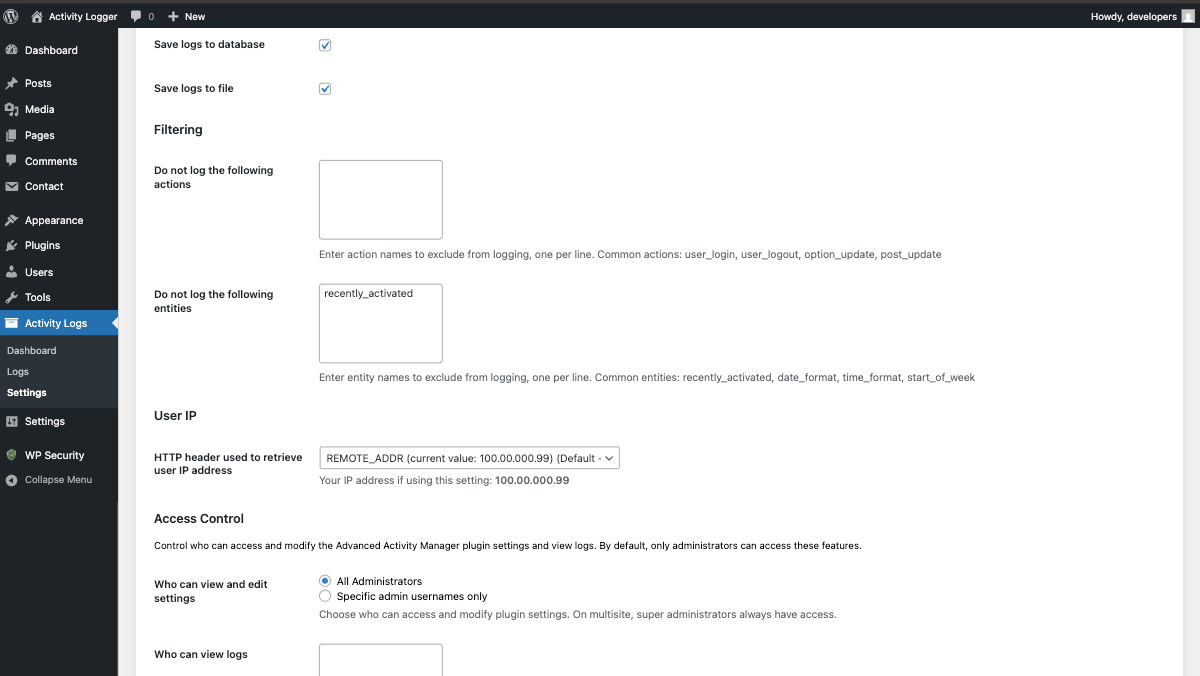
- Navigate to Plugin\'s Settings page and choose storage option (.log files by default).
屏幕截图:
常见问题:
How does the plugin impact site performance?
Ambiscale Activity Manager is designed with performance in mind. It uses efficient logging mechanisms and offers configurable storage options to minimize impact on your site speed.
Can I choose where logs are stored?
Yes, you can choose between file-based storage (.log files) or database storage depending on your performance and backup preferences.
How long are logs kept?
By default, logs are automatically deleted after 30 days. You can also manually clear logs at any time to keep your system clean.
Does this work with WooCommerce and other plugins?
Yes, Ambiscale Activity Manager has built-in support for popular plugins including WooCommerce, Yoast SEO, Contact Form 7 and many more, automatically capturing plugin-specific activities.
Is this plugin suitable for multisite networks?
Yes, Ambiscale Activity Manager is fully compatible with WordPress multisite networks. The plugin automatically detects multisite environments and handles logging for each site independently, ensuring proper data separation and network-wide functionality.
Can I filter out specific types of activities from being logged?
Yes, the plugin includes anti-spam filters and customizable settings that allow you to exclude specific actions or activity types from being logged, helping keep your logs clean and relevant.
Is the plugin GDPR compliant?
The plugin includes features to help with GDPR compliance, including user IP logging controls and data retention settings. However, compliance depends on your specific use case and local regulations.
Can I export or backup my activity logs?
Yes, when using file-based storage, logs can be easily backed up as part of your regular file backups. Database logs can be exported through standard WordPress database backup methods.
Development & Source Code
This plugin includes minified JavaScript and CSS files for optimal performance. The original source code is included in the plugin package:
- JavaScript source:
/src/js/main.js - SCSS source:
/src/scss/main.scss - Compiled assets:
/dist/js/main.jsand/dist/css/main.css
- Install Node.js (version 18.20.0 or higher recommended)
- Navigate to the plugin directory
- Install dependencies:
npm install - Build assets:
npm run build - For development with file watching:
npm run watch
webpack.config.js and package.json.
更新日志:
- Added ability to change log storage directory (wp-content or uploads) via settings
- Resolved an issue where pagination input in the logs table would not work when pressing Enter
- Addressed a layout issue where the WordPress footer could overlap the bottom pagination on certain screens
- Fixed an issue where the "Clear" button was missing when filtering logs by "WP-CLI" user
- Corrected log filtering behavior for "WP-CLI" user actions when using file storage mode
- Restored missing action types in the filter dropdown when logs are stored in files instead of the database
- Unified styling for top and bottom table navigation for a more consistent interface
- Security: Enhanced log file storage security
- Security: Improved protection against unauthorized access
- Feature: Full multisite support with network-wide log management
- Improvement: Better cross-platform compatibility
- Improvement: Automatic migration of existing data
- Bug fixes and stability improvements
- Fixed PHP Fatal error in Health::log_directory_size(), Health::log_table_size() and Health::log_debug_size() methods returning string instead of float
- Improved cache handling to prevent type inconsistencies across different server configurations
- Fixed autoloader path to use absolute path (DIR . '/vendor/autoload.php') for better compatibility
- Initial release
- Track all user activities including logins, password changes, content edits, and media uploads
- System event logging for WP-CLI commands, plugin installations, and auto-updates
- Centralized log dashboard with filtering and search capabilities
- Automated and manual log cleanup options
- Readable error logs display within WordPress dashboard
- Built-in support for popular plugins (WooCommerce, Yoast SEO, Contact Form 7)
- Site health insights and monitoring
- Anti-spam filters to prevent log clutter
- Choice between file or database storage
- Performance-optimized design