Anti Browser DDoS Protection
详情介绍:
- Rate limiting based on IP for subscribers and non-logged-in users, with configurable maximum requests and time window.
- Excludes non-subscriber logged-in users (e.g., administrators, editors) from rate limiting.
- Advanced bot detection to identify suspicious bots (bots using trusted User Agents but from unverified IPs).
- Suspicious bots are subject to the same rate limiting as regular users and logged with User Agent in the Blocked IPs Log.
- Immediate blocking of malicious bots by User Agent (e.g., MJ12bot, SemrushBot, DotBot by default) with customizable settings and logging.
- Configurable rate limiting for verified excluded bots (default: 100 requests per minute), with logging for bots exceeding this limit.
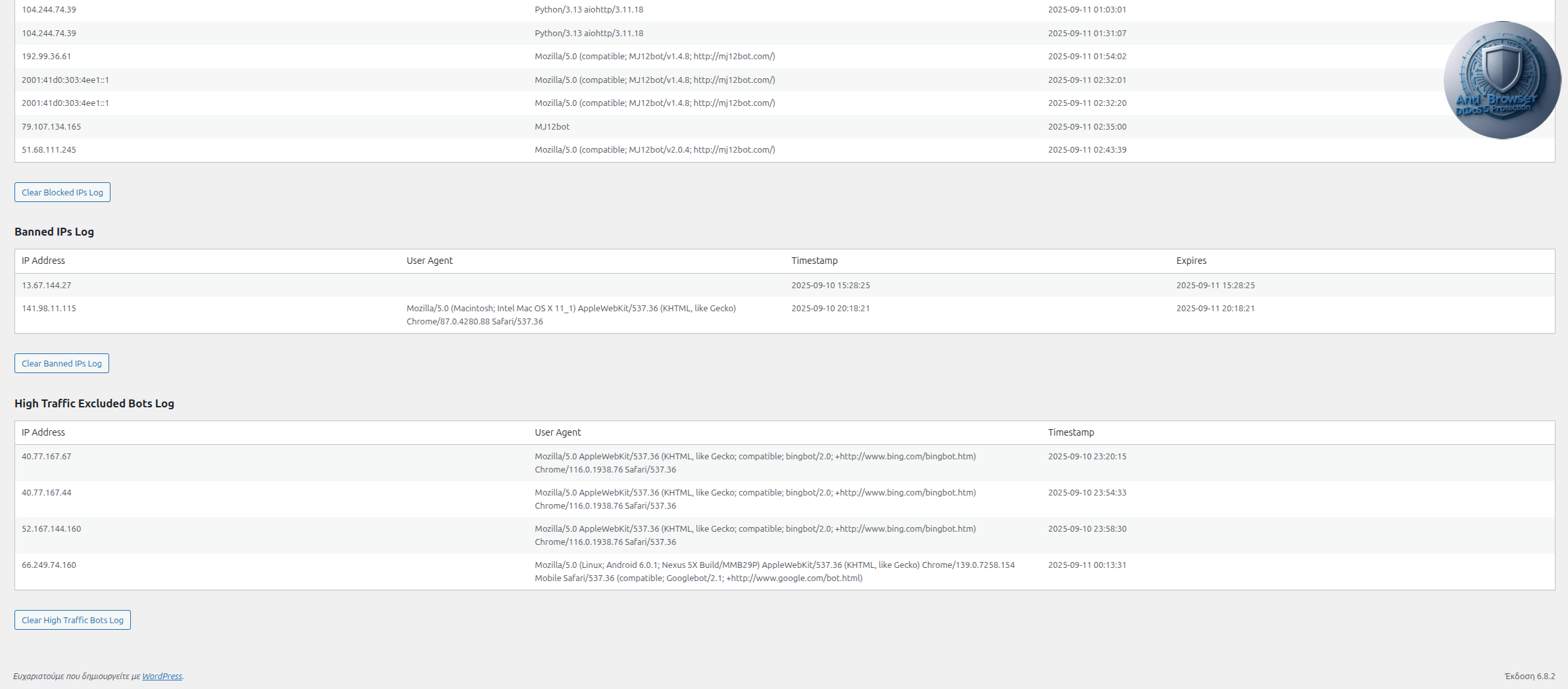
- High Traffic Excluded Bots Log to track verified bots with excessive requests, including IP, User Agent, and timestamp.
- Admin panel to configure maximum requests, time window, excluded bots, trusted bot IP ranges, blocked bots (User Agents), blocks before ban, ban duration, high traffic bot limits, and log expiration (days).
- Export Excluded Bots, Bot IP Ranges, and Blocked Bots lists to .txt files for backup or transfer.
- Import .txt files for Excluded Bots, Bot IP Ranges, and Blocked Bots to append new entries to existing lists, with automatic duplicate removal.
- Automatic removal of duplicate IP ranges in the Bot IP Ranges field on save, keeping the first occurrence.
- Support for Cloudflare real IP detection using
CF-Connecting-IPandX-Forwarded-Forheaders. - Excludes static assets (CSS, JS, images, fonts, etc.) from rate limiting to optimize performance.
- Logs blocked IPs, banned IPs, and high traffic bots with IP, User Agent, and timestamps using the WordPress timezone, viewable in the admin panel with options to clear logs and auto-refresh every 30 seconds.
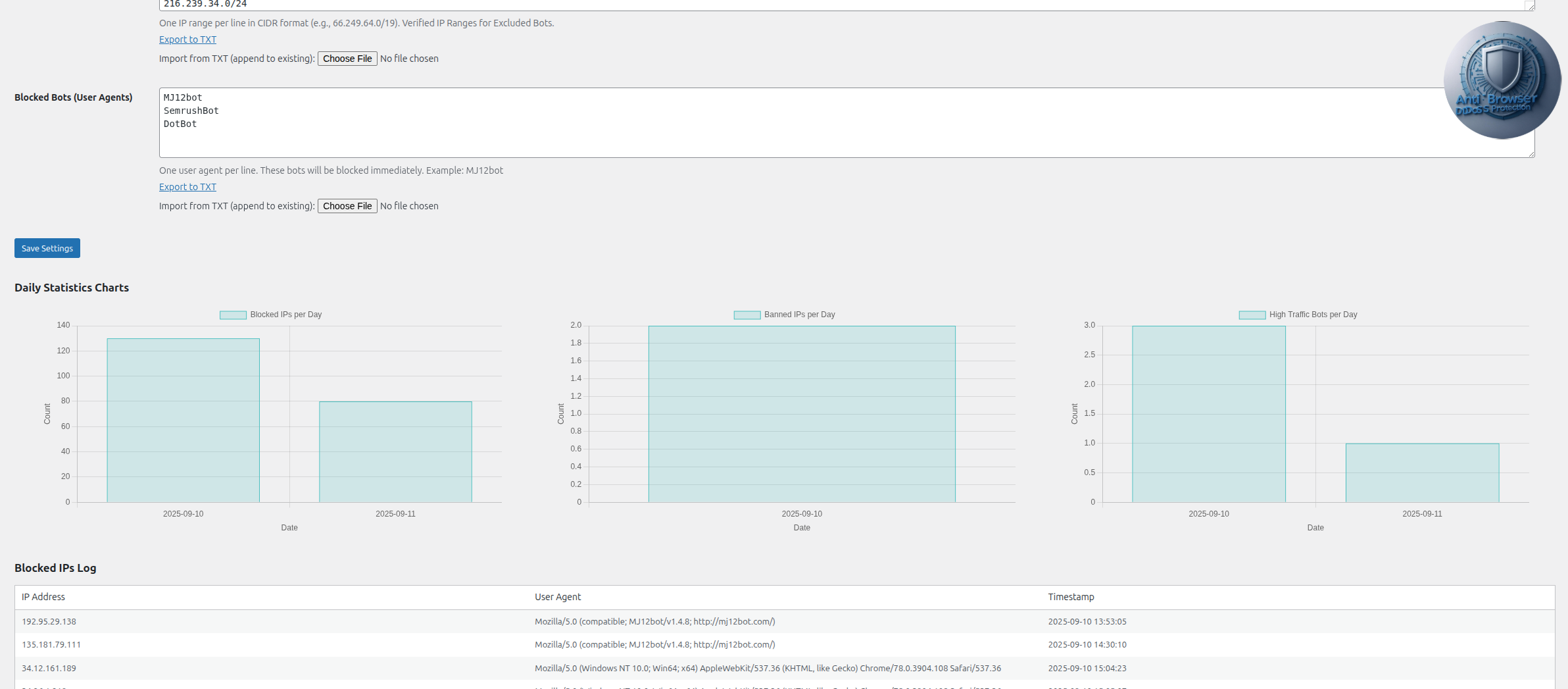
- Daily bar charts for Blocked IPs, Banned IPs, and High Traffic Bots displayed above the logs in the admin panel for visual statistics.
- Automatic log expiration (Blocked IPs, Banned IPs, High Traffic Bots) after a configurable number of days (default: 5 days), with hourly cleanup via WordPress Scheduler.
- All error messages and logs prefixed with "Anti Browser DDoS Protection: " for clarity.
- Donate link in the admin panel to support the project.
- Automatic cleanup of transients, blocked IPs, banned IPs, high traffic bots, blocked bots, bot IP ranges, and log expiration settings on plugin deactivation to prevent database bloat.
安装:
- Upload the
anti-ddos-protectionfolder to the/wp-content/plugins/directory, or install the plugin directly through the WordPress plugins screen. - Activate the plugin through the 'Plugins' screen in WordPress.
- Disable any WordPress caching plugins (e.g., WP Super Cache, W3 Total Cache) to ensure the Anti Browser DDoS Protection functions correctly, as caching plugins may bypass DDoS protection checks.
- Enable Browser Caching using a service like Cloudflare and set DNS Records Proxy Status to Proxied.
- Go Caching > Configuration : and set Standard type Caching and Configure Cloudflare Browser Cache TTL. (e.g., 8 days)
- Set DNS Records Proxy Status to Proxied For More DDoS Security.
- Navigate to Settings > Anti DDoS to configure the plugin settings:
- Set the Maximum Requests (Regular Users) (e.g., 10 requests).
- Set the Time Window in seconds (e.g., 60 seconds).
- Set the Maximum Requests (Excluded Bots) (e.g., 100 requests per minute).
- Set the Log Expires (Days) (e.g., 5 days) for automatic cleanup of logs.
- Add Excluded Bots (User Agents, one per line, e.g., Googlebot, Bingbot). Export to .txt or import from .txt to append new entries (duplicates are removed).
- Add Bot IP Ranges (trusted IP ranges in CIDR format, one per line, e.g., 66.249.64.0/19). Export to .txt or import from .txt to append new entries (duplicates are removed). Update every 6 months (next update: March 2026).
- Add Blocked Bots (User Agents) (e.g., MJ12bot, SemrushBot, DotBot) to block malicious bots immediately. Export to .txt or import from .txt to append new entries (duplicates are removed).
- Set Blocks Before Ban (e.g., 30 blocks) and Ban Duration (e.g., 24 hours).
- Test the rate limiting by sending multiple requests (e.g., refreshing a page rapidly) using a subscriber account or non-logged-in IP to ensure blocking works.
- Test suspicious bot detection by sending requests with a bot User Agent (e.g., Googlebot) from an unverified IP.
- Test blocked bot detection by sending requests with a blocked User Agent (e.g., MJ12bot) to verify immediate blocking and logging.
- Test high traffic bot logging by sending over 100 requests per minute from a verified bot IP (e.g., Googlebot from a trusted IP range).
- Test export functionality by clicking "Export to TXT" for Excluded Bots, Bot IP Ranges, and Blocked Bots to download .txt files.
- Test import functionality by uploading .txt files for Excluded Bots, Bot IP Ranges, and Blocked Bots to append new entries without duplicates.
- Test log expiration by setting Log Expires (Days) to a low value (e.g., 1 day), generating log entries, and checking if they are automatically removed after the specified time.
- Check the Blocked IPs Log, Banned IPs Log, and High Traffic Excluded Bots Log sections in the admin panel to view logs (including User Agent) with auto-refresh every 30 seconds and clear them if needed. Daily charts are displayed above the Blocked IPs Log for visual statistics.
- Ensure the WordPress timezone (Settings > General > Timezone) is set correctly (e.g.,
Europe/Athensfor Greece) for accurate timestamp display.
屏幕截图:
其他记录:
- Cloudflare Compatibility: Ensure Cloudflare is configured to pass
CF-Connecting-IPheaders for accurate IP detection. Check your Cloudflare dashboard if logged IPs are incorrect. - Bot IP Ranges: Update the Bot IP Ranges field every 6 months (next update: March 2026) using official sources (e.g., Google, Bing, Yandex documentation). Duplicate ranges are automatically removed on save. Export to .txt for backup or import from .txt to append new ranges.
- Blocked Bots: Add malicious bots to the Blocked Bots (User Agents) field (e.g., MJ12bot, SemrushBot, DotBot) to block them immediately. Blocked bots are logged with their IP and User Agent. Export to .txt for backup or import from .txt to append new entries.
- Excluded Bots: Add trusted bots (e.g., Googlebot, Bingbot) to the Excluded Bots field to exempt them from regular rate limiting (if from verified IPs). Export to .txt for backup or import from .txt to append new entries.
- High Traffic Bots: Verified bots exceeding the configured limit (default: 100 requests per minute) are logged for monitoring but not blocked. Check the High Traffic Excluded Bots Log regularly.
- Log Expiration: Set the Log Expires (Days) setting to control how long logs are retained (default: 5 days). Cleanup runs hourly via WordPress Scheduler. Logs older than the specified days are automatically deleted.
- Timezone: Set the WordPress timezone correctly (e.g.,
Europe/Athensfor Greece) in Settings > General > Timezone to ensure accurate timestamp display in logs and charts. - Performance: For high-traffic sites, clear the Blocked IPs Log, Banned IPs Log, and High Traffic Excluded Bots Log regularly, or set a lower Log Expires (Days) value to prevent database growth.
- Customization: Contact the author for additional features like custom error pages, email notifications for high traffic bots, or advanced logging.
- Support the Project: If you find this plugin useful, consider supporting its development via the donation link in the admin panel or plugin page.
常见问题:
Does this plugin work with Cloudflare?
Yes, the plugin supports Cloudflare by using the CF-Connecting-IP header to detect the real client IP, ensuring accurate rate limiting and logging.
Can I exclude specific bots from rate limiting?
Yes, you can add User Agents (e.g., Googlebot, Bingbot) in the Excluded Bots field in the admin panel. Bots from trusted IP ranges (configured in Bot IP Ranges) are exempt from regular rate limiting but are subject to a separate limit (default: 100 requests per minute). You can export the list to .txt or import from .txt to append new entries.
Can I block specific bots immediately?
Yes, you can add User Agents (e.g., MJ12bot, SemrushBot, DotBot) in the Blocked Bots (User Agents) field in the admin panel. These bots are blocked immediately, logged in the Blocked IPs Log with their User Agent, and receive an "Anti Browser DDoS Protection: Blocked Bot Access Denied" message. You can export the list to .txt or import from .txt to append new entries.
How are suspicious bots handled?
Bots with trusted User Agents (e.g., Googlebot) but from unverified IPs are flagged as suspicious, logged in the Blocked IPs Log with their User Agent, and subjected to the same rate limiting as regular users (e.g., 10 requests per 60 seconds).
How are high traffic excluded bots handled?
Verified excluded bots (from trusted IP ranges) exceeding the configured limit (default: 100 requests per minute) are logged in the High Traffic Excluded Bots Log with their IP, User Agent, and timestamp. They are not blocked but monitored for high activity.
Can I manage trusted bot IP ranges?
Yes, you can configure trusted bot IP ranges in the Bot IP Ranges field in the admin panel (Settings > Anti DDoS). Enter ranges in CIDR format (e.g., 66.249.64.0/19), one per line. Duplicate ranges are automatically removed on save. You can export the list to .txt or import from .txt to append new entries. Update every 6 months.
Are static assets like CSS and JS rate-limited?
No, the plugin excludes common static assets (e.g., .css, .js, .jpg, .png) to prevent performance issues.
Are logged-in users rate-limited?
Only users with the subscriber role are rate-limited. Administrators, editors, and other non-subscriber roles are exempt.
How do I view blocked, banned, or high traffic bot IPs?
Go to Settings > Anti DDoS to see the Blocked IPs Log, Banned IPs Log, and High Traffic Excluded Bots Log tables, which list IPs, User Agents, timestamps, and ban expiration times with auto-refresh every 30 seconds. Daily bar charts are displayed above the Blocked IPs Log for visual insights. You can clear the logs using the provided buttons.
How does log expiration work?
The Log Expires (Days) setting (default: 5 days) automatically deletes Blocked IPs, Banned IPs, and High Traffic Bots logs older than the specified number of days. Cleanup runs hourly via the WordPress Scheduler.
Can I export or import bot lists?
Yes, you can export Excluded Bots, Bot IP Ranges, and Blocked Bots lists to .txt files via links in the admin panel. You can also import .txt files to append new entries to these lists, with duplicates automatically removed on save.
What happens when I deactivate the plugin?
The plugin automatically deletes its transients, blocked IP logs, banned IP logs, high traffic bot logs, blocked bots, bot IP ranges, and log expiration settings from the database to prevent bloat.
更新日志:
- The structure of the application has been corrected.
- Added Icons and Screenshots to wordpress plugin repository.
- Fixed a bug that not auto-delete the expired logs.
- Fixed a bug that returned a critical site error to bots like facebookexternalhit when Cloudflare's Proxy Status was Proxied.
- Added plugin logo to the admin panel and plugin page for better branding.
- Fixed an issue where an admin notice was displayed repeatedly on every admin panel refresh.
- Added export functionality for Excluded Bots, Bot IP Ranges, and Blocked Bots lists to .txt files via links in the admin panel.
- Added import functionality for Excluded Bots, Bot IP Ranges, and Blocked Bots lists from .txt files, appending new entries to existing lists with automatic duplicate removal.
- Added daily bar charts for Blocked IPs, Banned IPs, and High Traffic Excluded Bots per day, displayed above the logs in the admin panel using Chart.js.
- Added Log Expires (Days) setting in the admin panel to configure automatic deletion of Blocked IPs, Banned IPs, and High Traffic Bots logs after a specified number of days (default: 5 days).
- Implemented hourly log cleanup via WordPress Scheduler to remove expired log entries.
- Added cleanup of Log Expires (Days) setting and scheduled cleanup event on plugin deactivation.
- Added auto-refresh of Blocked IPs, Banned IPs, and High Traffic Excluded Bots logs every 30 seconds in the admin panel using REST API endpoints.
- Improved log display with dynamic updates without manual page refresh.
- Added Blocked Bots (User Agents) setting in the admin panel to block malicious bots immediately, logs them to the Blocked IPs Log, and prefixes all error messages and logs with "Anti Browser DDoS Protection: ". Update to enhance bot blocking and improve message consistency.
- Added User Agent logging to Blocked IPs and Banned IPs logs for improved tracking and a Donate link above the settings in the admin panel to support the project. Update to enhance monitoring capabilities.
- Fixed timezone handling to use the WordPress timezone setting for accurate timestamp display and removes "Greece time" references from logs. Update to ensure timestamps reflect your site's configured timezone.
- Added configurable rate limiting for verified excluded bots, logs high traffic bots with IP, User Agent, and timestamp, and fixes timezone issues for accurate Greece time (Europe/Athens). Update to monitor high traffic bot activity and ensure correct timestamps.
- Added automatic removal of duplicate IP ranges in the Bot IP Ranges field, simplifying IP range management. Update to ensure duplicate ranges are automatically handled on save.
- Added Bot IP Ranges field in the admin panel for easy management of trusted bot IPs. Update to simplify bot IP range updates every 6 months.
- Updated suspicious bot handling to use standard rate limiting settings. Update to ensure consistent rate limiting behavior.
- Added comprehensive bot IP ranges and suspicious bot detection. Update to enhance bot verification.
- Modified rate limiting to exclude non-subscriber logged-in users from rate limiting. Update to ensure only subscribers and non-logged-in users are rate-limited.
- Added IP banning functionality for IPs exceeding block threshold.
- Added Banned IPs Log with timestamps and expiration times.
- Improved admin panel with ban threshold and duration settings.
- Added Cloudflare real IP detection using
CF-Connecting-IPandX-Forwarded-Forheaders. - Improved IP logging to use real client IPs for Cloudflare users.
- Added validation to ensure only Cloudflare IPs can use forwarded headers.
- Added IP logging of blocked IPs with timestamps, displayed in the admin panel.
- Added a "Clear Blocked IPs Log" button in the admin panel.
- Improved sanitization for blocked IP logs.
- Reintroduced static asset exclusion using
$_SERVER['REQUEST_URI']. - All text updated to English.
- Added cleanup of transients on plugin deactivation.
- Added alternative static asset exclusion using WordPress functions.
- Improved database cleanup on deactivation.
- Added admin panel for configuring rate limits and bot exclusions.
- Added bot exclusion functionality based on User Agents.
- Improved rate limiting logic.
- Initial release with basic rate limiting functionality.