Antimanual - Compact AI Agent for Content, Chat & SEO Automation
| 开发者 |
spiderdevs
mdjwel niloymahmudapu |
|---|---|
| 更新时间 | 2026年9月25日 18:29 |
| PHP版本: | 7.4 及以上 |
| WordPress版本: | 7.1 |
| 版权: | GPLv2 or later |
| 版权网址: | 版权信息 |
详情介绍:
- Antimanual Cloud AI — Built-in multi-model routing with free monthly credit quota and automatic failover. No API key required to start.
- OpenAI — GPT-5, GPT-5 Mini, GPT-4.1, and compatible models
- Google Gemini — Gemini 3.1 Pro / Flash, Gemini 3 Pro / Flash, and Gemini 2.5 series
- Anthropic Claude — Claude Opus 4.7, Claude Sonnet 4.6, Claude Haiku 4.5
- xAI Grok — Grok 4, Grok 3, Grok 3 Mini
- DeepSeek — DeepSeek V4 Pro, DeepSeek V4 Flash
- OpenCode Zen — Qwen 3.6 Plus, Kimi K2.6, MiniMax M2.7, GLM 5.1, and free community tiers
- Zero Setup Required — Start chatting and generating content immediately with free monthly credits.
- Smart Routing & Failover — Intelligent multi-model routing ensures high uptime and dependable responses.
- Real-Time Usage Tracking — Live credit balance, monthly quotas, and low-credit notifications in your dashboard.
- Flexible Hybrid Setup — Seamlessly connect your own custom API keys whenever you choose.
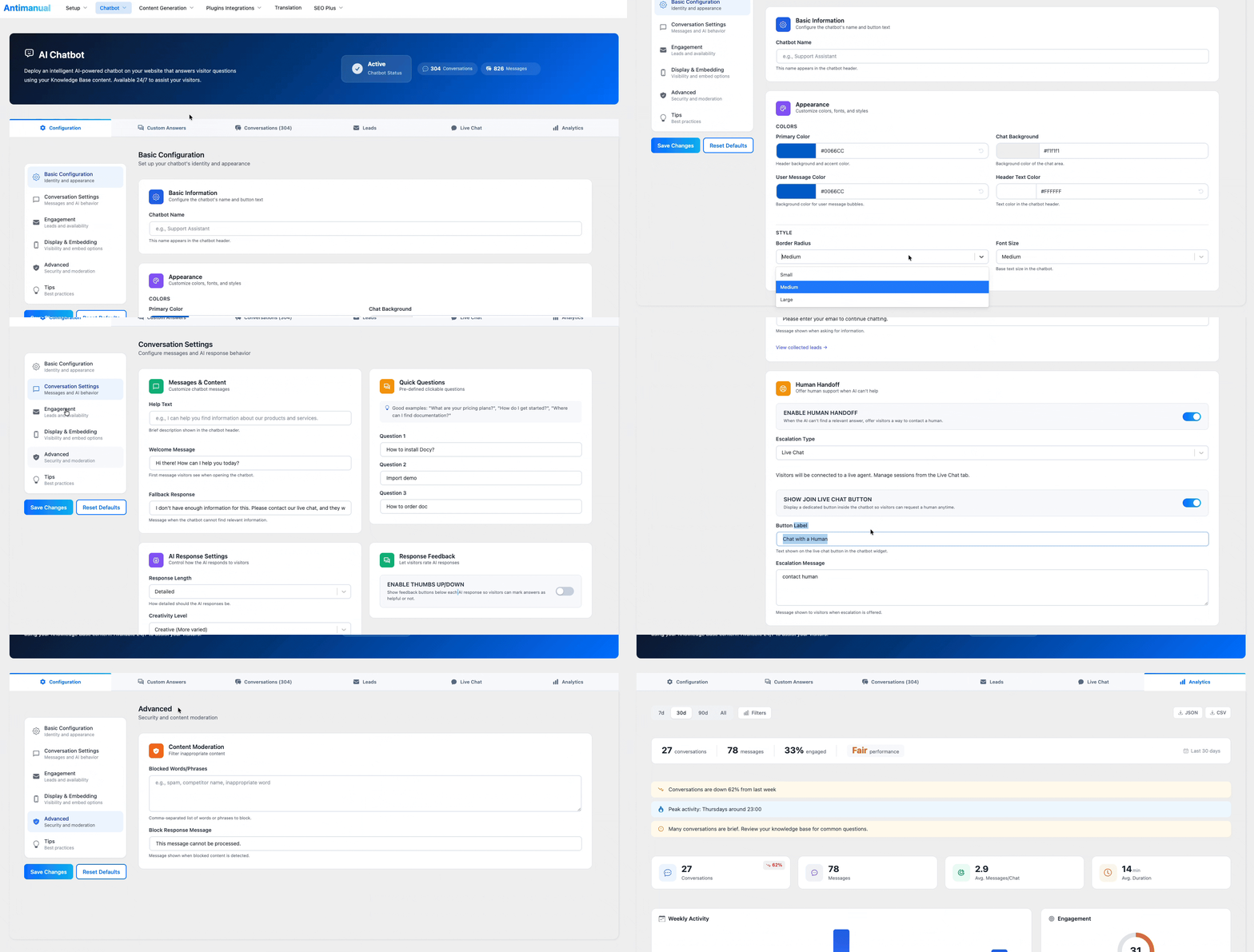
- 1-Click Training — Index any post, page, or custom post type instantly.
- Multi-Provider Support — Compatible with Cloud AI, OpenAI, Gemini, Claude, Grok, DeepSeek, and OpenCode Zen.
- Role Access Control — Restrict visibility and messaging permissions to specific roles or logged-in users (Pro Max).
- Brand Customization — Tailor colors, avatar icons, position, greeting messages, and suggested starter questions.
- Full-Page & Embed Options — Display as a floating widget, full-page chat via shortcode, or cross-domain iframe (Pro).
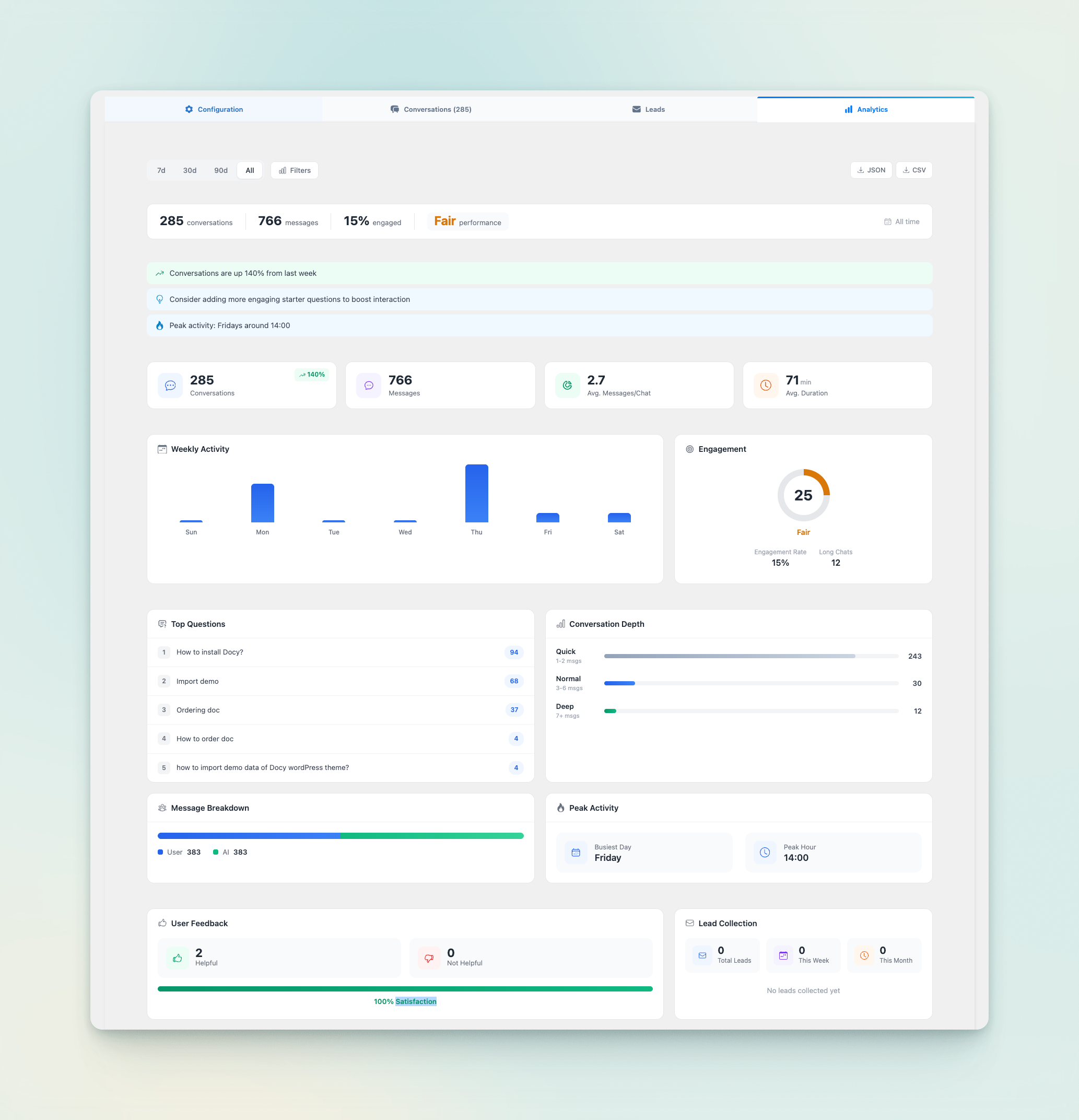
- Leads & Conversation History — Capture visitor leads and inspect full conversation threads from the admin.
- Free plan includes up to 60 conversations per month.
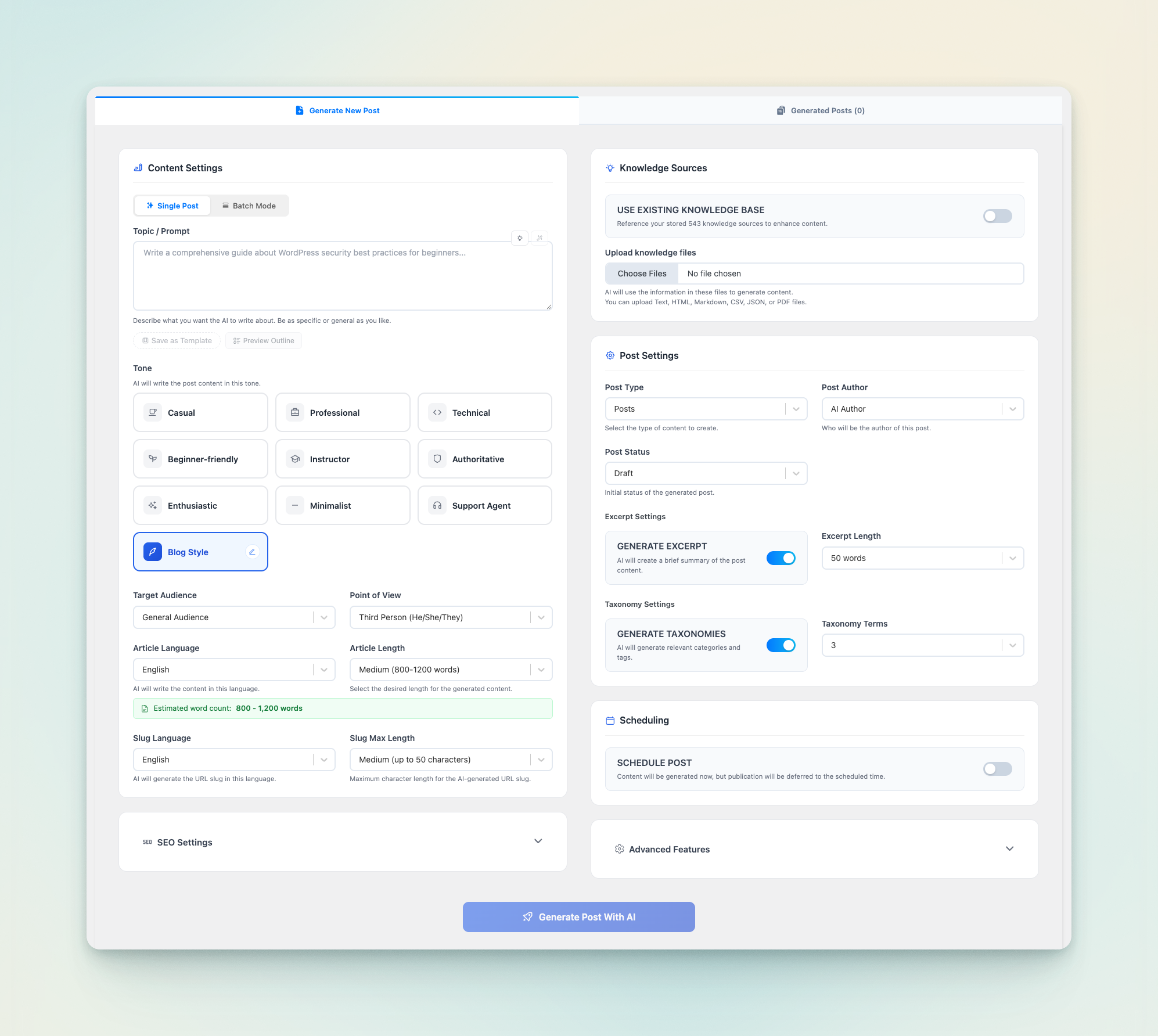
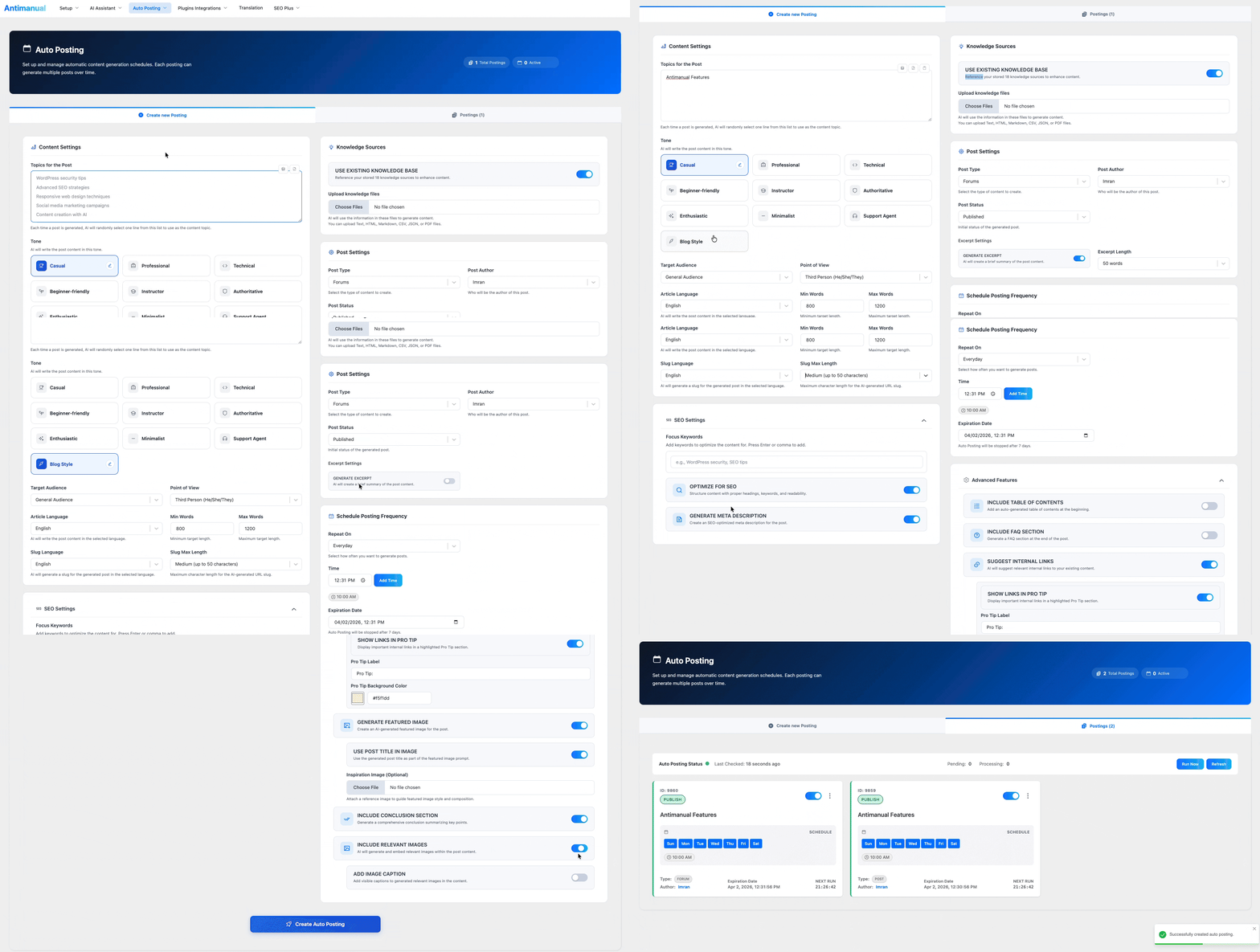
- AI Topic Suggester — Automatically generate content calendars based on your site niche.
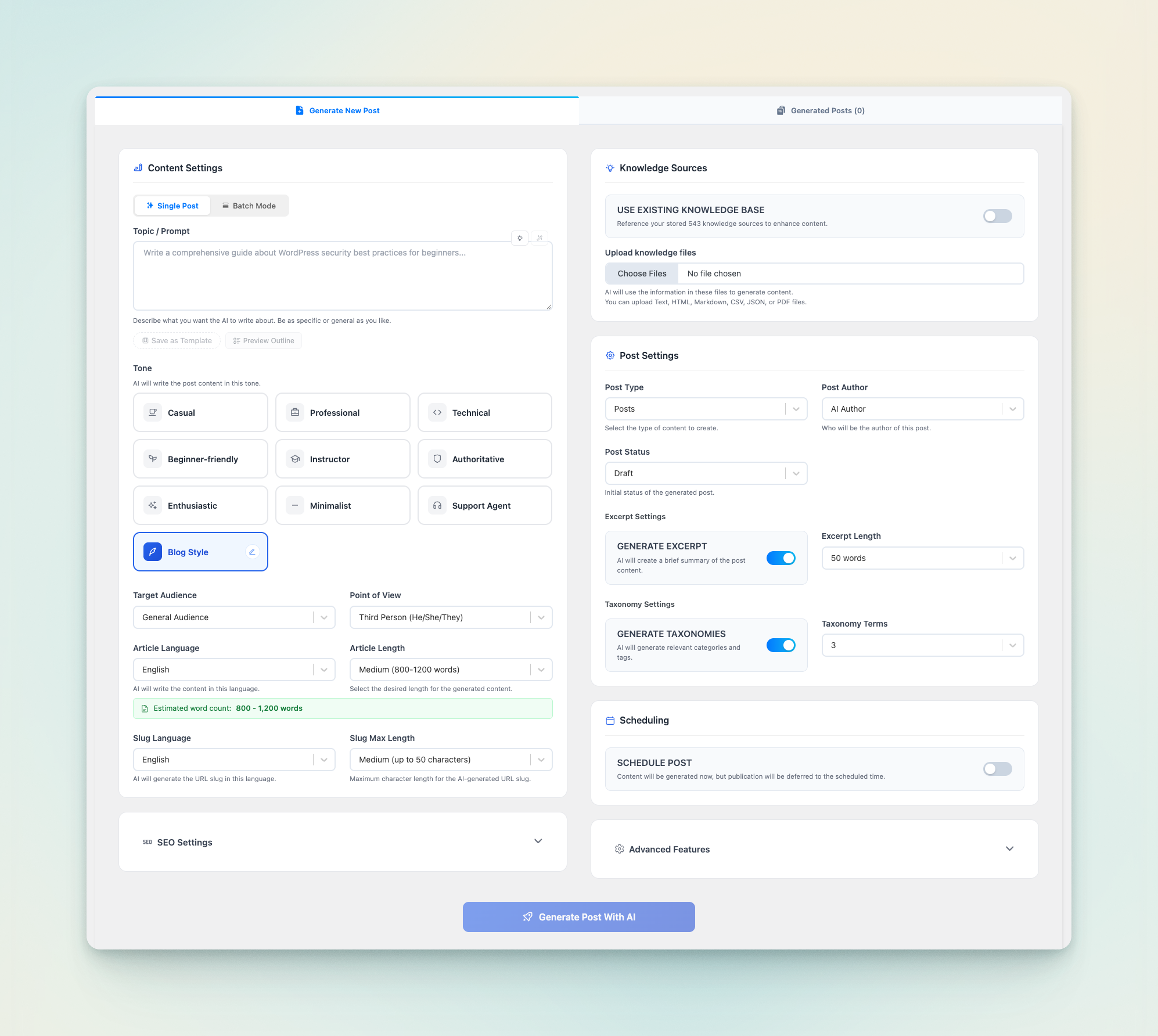
- Native Gutenberg Blocks — Produces clean headings, paragraphs, lists, and tables — never unformatted blobs.
- Customizable Tone & SEO — Select writing style, language, target keywords, and article depth.
- Flexible Schedules — Set posting days, intervals, and optional expiration dates with automatic queue retries.
- Free plan supports up to 2 active auto-posting schedules.
- Complete Structure — Generates title, Gutenberg block content, excerpt, slug, categories, and tags.
- Built-in SEO Tools — Focus keywords, meta descriptions, table of contents, and internal link suggestions.
- Featured Images — Generate context-aware featured images directly during post creation.
- Draft or Publish — Review content before publishing or send straight to your live blog.
- Context-Driven FAQs — Generates relevant questions based on your site's knowledge base.
- Interactive Editing — Add, edit, reorder, or delete questions and answers before saving.
- Gutenberg Block Integration — Inserts native accordion blocks or Advanced Accordion blocks.
- Automatic FAQ Schema — Outputs validated JSON-LD schema for Google rich search results.
- Multi-Platform Output — Generate posts for X (Twitter), LinkedIn, Facebook, and Instagram.
- Email & Video Scripts — Create email newsletters, YouTube scripts, hooks, and call-to-actions.
- Built-In Quick Presets — Ready-to-use presets for Product Launches, Summaries, Case Studies, and Tutorials.
- Guided 6-Step Wizard — Configure subject, depth, target audience, writing tone, and knowledge sources.
- Structured Hierarchy — Generates topics, lessons, sub-lessons, tables of contents, and FAQs.
- Ideal for Software & SaaS — Quickly create knowledge bases for products, plugins, and services.
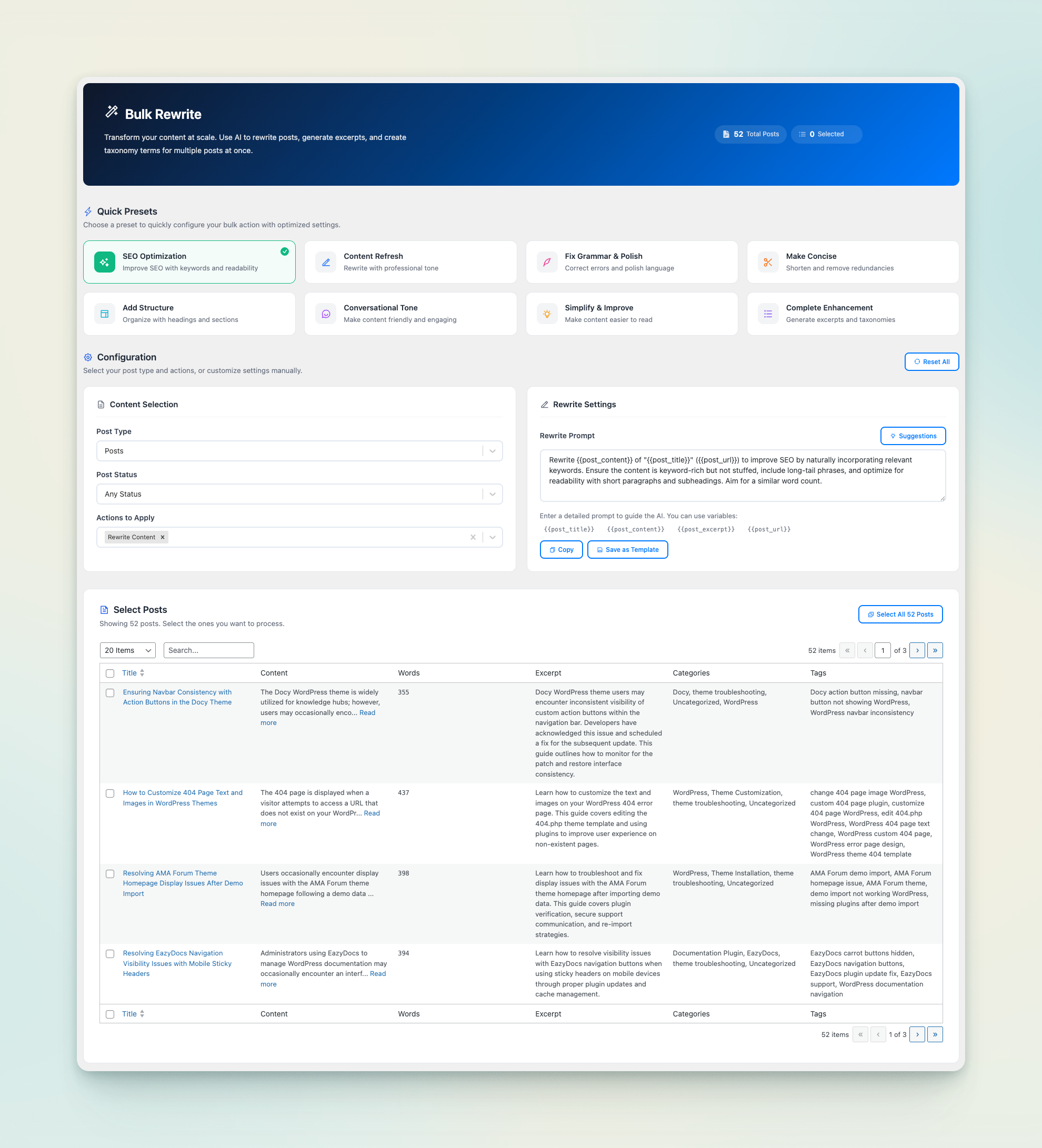
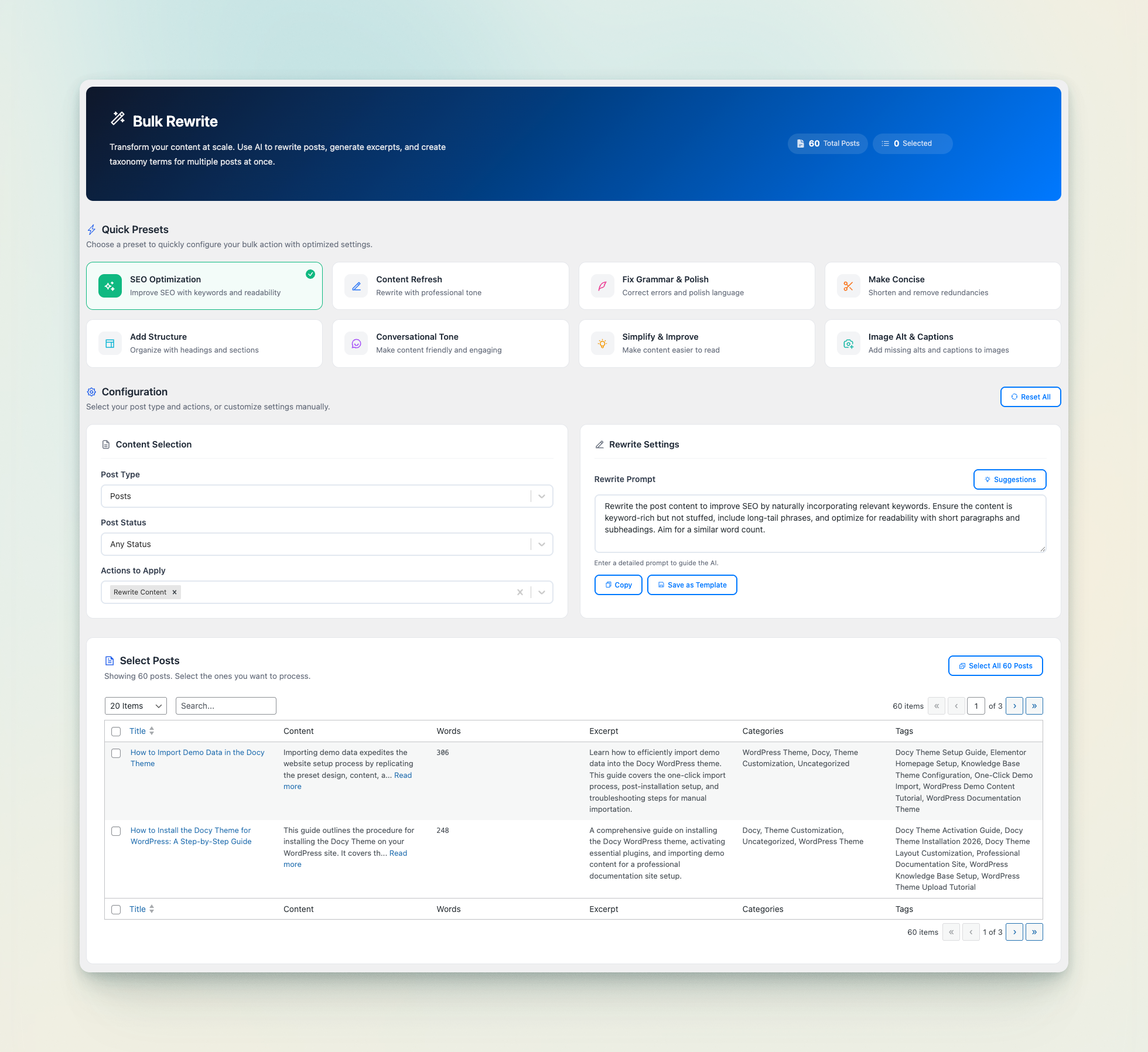
- 8 Quick Presets — SEO Optimization, Content Refresh, Fix Grammar, Make Concise, Simplify, and more.
- Gutenberg Preservation — Keeps existing block styling, layouts, and image placements intact.
- Scheduled Auto-Updates — Set criteria (e.g. posts older than 6 months) to automatically update aging content.
- Free plan includes 100 bulk rewrites per month.
- AI Auto-Replies — Generate helpful replies to new forum topics and discussions automatically.
- Thread to Article — Convert resolved forum topics into published blog posts or knowledge base articles in one click.
- Smart Filtering — Set minimum word thresholds and exclude specific user roles.
- Free plan includes 100 AI forum answers and 100 topic conversions per month.
- Semantic Answers — Understands natural language queries and summarizes answers from your knowledge base.
- Detailed Analytics — Review search queries, zero-result terms, and visitor helpfulness ratings.
- Customizable Design — Configure colors, placeholder text, suggested prompts, and layout.
- Instant Indexing — Add any WordPress post, page, or custom post type with a single click.
- Intelligent Chunking — Automatically segments content into optimized vectors for high retrieval accuracy.
- Auto-Sync (Pro) — Automatically re-indexes content whenever posts are created or updated.
- Toolbar "Magic Wand" — Highlight any text in a paragraph, heading, or list block to trigger AI actions.
- Instant Transformations — Improve writing, fix grammar, adjust tone, shorten, expand, or translate.
- Custom Instructions — Provide custom prompts directly in the editor for tailored rewrites.
- Real-Time Dashboard — Monitor total requests, token volume, and estimated spend across all providers.
- Role-Based Spending Limits — Set monthly token budgets per user role (e.g., limit Authors or Editors).
- Detailed Breakdowns — Inspect usage by feature, AI provider, model, and individual team members.
- CSV Data Export — Export detailed usage logs for external reporting and auditing.
- 8 Built-In Tools — Search knowledge base, inspect posts, create draft posts, retrieve site info, and query WooCommerce products/orders.
- Secure Authentication — Generate and revoke bearer tokens with granular read-only or read-write access.
- Selective Tool Exposure — Toggle individual tools on or off according to your security requirements.
- Zero Page Reloads — Fluid navigation across all tools and settings.
- Encrypted API Keys — AES-256-CBC encryption ensures credentials are never exposed in browser code.
- Dynamic Model Validation — Automatically detects key capabilities and filters unsupported model options.
- Unlimited Usage — Removes all monthly caps on chatbot conversations, rewrites, and schedules.
- Multimodal File Support — Process images, PDFs, audio, and video files in supported workflows.
- Expanded Knowledge Base — Index external URLs, uploaded PDFs, raw text, and GitHub repositories.
- Knowledge Base Auto-Sync — Automatically updates embeddings whenever content changes.
- AI Translation in 34 Languages — Bulk translate posts with custom glossaries, frontend language switcher, and full RTL support.
- Multilingual SEO — Dedicated
/xx/URLs, automatichreflangtags, self-referencing canonicals, and dedicated hreflang XML sitemaps. - Cross-Domain Chatbot — Embed your trained chatbot on external domains, docs sites, or client platforms via iframe.
- Batch Post Generator — Generate multiple articles simultaneously from bulk topic lists.
- SEO Agent — Comprehensive audits for On-Page SEO, Technical SEO, Performance, Accessibility, Security, and Mobile. 1-click fixes for titles, metas, image alt text, and lazy loading.
- Bulk Site Audit & Competitor Compare — Audit up to 50 pages at once and benchmark your scores side-by-side against competitor URLs.
- Broken Link Checker — Automated scans for 404s, broken links, and redirect chains with 1-click URL fixes.
- Content Brief Generator — AI-researched outlines with target word counts, heading hierarchies, keywords, entities, and FAQs.
- Content Freshness Scoring — Pinpoints decaying content and recommends update, rewrite, or pruning actions.
- Schema Generator — Generates and validates JSON-LD structured data across 11 schema types with multi-schema support.
- Keyword Cannibalization Detector — Detects competing pages and provides canonical and content consolidation plans.
- Internal Linking Suite — Complete link audit, orphan page detection, visual link graph, AI-powered link suggestions, and bulk auto-linking.
- Google & Search Engine Integrations — Connect Google APIs (Search Console, GA4, Core Web Vitals, Indexing API) and IndexNow for instant search engine indexing notifications.
安装:
- Upload the
antimanualfolder to/wp-content/plugins/, or install directly from the WordPress plugin repository. - Activate the plugin through the Plugins menu in WordPress.
- Navigate to Antimanual > Settings in your dashboard.
- Get started immediately with built-in free credits via Antimanual Cloud AI, or enter your own API key for any supported provider.
- Add content to your Knowledge Base and enable the Chatbot — you are ready to go.
屏幕截图:


常见问题:
What is Antimanual?
Antimanual is an all-in-one AI WordPress plugin that automates the most time-consuming parts of running a website. It includes a trainable AI chatbot, automated content publishing, bulk content rewriting, FAQ generator, documentation builder, repurpose studio, forum automation, AI-powered search, AI translation (Pro), SEO auditing tools (Pro Max), and an internal linking suite (Pro Max) — all managed from a single, fast admin dashboard.
Do I need an API key to use Antimanual?
No setup is required to get started. Antimanual includes free monthly credits powered by Antimanual Cloud AI. You can also connect your own API key from OpenAI, Google Gemini, Anthropic Claude, xAI Grok, DeepSeek, or OpenCode Zen for direct provider billing with zero markup.
Which AI models does Antimanual support?
Antimanual currently supports seven AI providers and these built-in models: Antimanual Cloud AI — multi-model cloud routing with monthly free credits; OpenAI — GPT 5.4, GPT 5, GPT 5 Mini, GPT 4.1 Mini; Google Gemini — Gemini 3.1 Pro Preview, Gemini 3.1 Flash-Lite Preview, Gemini 3 Pro Preview, Gemini 3 Flash Preview, Gemini 2.5 Pro, Gemini 2.5 Flash, Gemini 2.5 Flash Preview, Gemini 2.5 Flash-Lite, Gemini 2.5 Flash-Lite Preview; Anthropic Claude — Claude Opus 4.7, Claude Sonnet 4.6, Claude Haiku 4.5; xAI Grok — Grok 4, Grok 3, Grok 3 Mini; DeepSeek — DeepSeek V4 Pro, DeepSeek V4 Flash; OpenCode Zen — Big Pickle, MiMo V2.5 Free, MiniMax M2.5 Free, Qwen 3.6 Plus, Qwen 3.5 Plus, Kimi K2.6, Kimi K2.5, GLM 5.1, and MiniMax M2.7. The plugin validates your API key and only shows supported models available for your account.
Can I train the chatbot on my own website content?
Yes. The free version lets you add any WordPress post or page to the knowledge base with one click. The chatbot then uses AI vector embeddings of that content to give accurate, context-specific answers — not generic AI responses. Antimanual Pro extends the knowledge base to support PDFs, external website URLs, custom text, and GitHub repositories.
Is auto-posting fully automated?
Yes. Once you set up a schedule — choosing topics, tone, language, article length, and publishing time — Antimanual generates complete Gutenberg posts and publishes them automatically. The free plan supports up to 2 active schedules; Pro removes the cap entirely.
What are the usage limits on the free version?
The free plan includes: 60 AI chatbot conversations per month, 2 auto-posting schedules, 100 bulk rewrites per month, 100 forum AI answers per month, 100 forum topic conversions per month, and 100 lifetime AI search queries. Features with no usage limits on the free plan include: Generate Post with AI, Repurpose Studio, FAQ Generator, Docs Generator and Auto Update. Upgrading to Pro removes all usage caps.
What exactly is in the Pro Max plan?
Pro Max includes everything in the free and Pro plans, plus an expanded SEO toolkit. The SEO Agent runs AI-powered audits on any internal or external page, covers On-Page SEO, Technical SEO, Performance, Accessibility, Security, and Mobile Friendliness, and can auto-fix many common issues with a single click. It also includes advanced SEO workflows like Broken Link Checker, Content Brief Generator, Content Freshness scoring, Schema Generator, Cannibalization Detector, and Google & Search Integrations (Core Web Vitals, Search Console, GA4, Indexing API, and IndexNow). The Internal Linking module provides a full link audit, AI link suggestions, bulk auto-linking, a visual site map, topic cluster builder, and anchor manager.
How does Internal Linking work?
The Internal Linking module (Pro Max) analyses all posts and pages on your site to build a complete link report — showing total posts, orphan pages, inbound/outbound link counts, average links per post, and a Link Health Score. You can then generate AI-powered internal link suggestions for any post, apply links in bulk, visualise your entire site's link structure, and manage all anchor texts from one place.
What languages does AI Translation support?
Antimanual Pro includes AI translation for 34 languages. You can run bulk translations across all your posts, enable auto-translate on publish, add a custom glossary to protect brand terms, control tone and formality, and display a frontend language switcher. RTL languages are fully supported.
Are my translations visible to Google?
Yes. Each translated post is served on its own URL under a language prefix — for example /es/my-post/ for Spanish — and the language switcher links to those URLs so search engines can find them. Every language version outputs the full hreflang set (including x-default) plus a self-referencing canonical, and Antimanual publishes an hreflang XML sitemap at /atml-hreflang-sitemap.xml that is listed in your robots.txt. Pages that are not translated, such as archives, are marked noindex under a language prefix so they never compete with your real content.
Can I embed the chatbot on another website or domain?
Yes. Cross-domain chatbot embedding via a simple iframe embed code is included with Antimanual Pro. This lets you deploy the same trained chatbot on multiple domains, documentation sites, or client properties — without any additional configuration.
Does Antimanual integrate with community forum plugins?
Yes. Antimanual integrates with Forumax for AI-powered automatic responses to forum topics and replies. It also lets you convert closed forum threads into WordPress posts or knowledge base articles with a single click.
Is my API key stored securely?
Yes. All API keys are encrypted at rest using AES-256-CBC encryption tied to your WordPress secret keys. Keys are never sent to the browser unmasked — the admin UI shows only a masked preview with a connection status indicator.
Can I use Antimanual with Google Gemini instead of OpenAI?
Yes. You can use Google Gemini instead of OpenAI, and you can also switch to Anthropic Claude, xAI Grok, DeepSeek, or OpenCode Zen from the API Configuration page. Antimanual validates the selected provider and model, then automatically disables unsupported options so your setup stays valid.
Does Antimanual add any SEO markup automatically?
The FAQ Generator adds structured FAQ Schema markup (JSON-LD) to FAQ blocks for Google rich results. The SEO Agent (Pro Max) can auto-add missing meta descriptions, fix image alt text, add Open Graph tags, and enforce proper canonical URLs — all editable before saving.
What is the AI Content Copilot?
The AI Content Copilot adds a "Magic Wand" toolbar button to the WordPress block editor. Select any text in a paragraph, heading, or list block, choose a transformation — improve writing, fix grammar, shorten, lengthen, simplify, change tone, translate, or apply a custom instruction — and the AI rewrites it instantly without leaving the editor.
What is the MCP Server and who is it for?
The MCP (Model Context Protocol) Server turns your WordPress site into a structured tool provider for AI applications like Claude Desktop, Claude Code, and ChatGPT. Once enabled and configured with a bearer token from the Integrations settings page, external AI agents can search your knowledge base, read posts, create drafts, and fetch site information — within your chosen access level and enabled tool set. It is designed for developers and power users who want to drive their WordPress site from an AI assistant.
Can I monitor how much AI my site is consuming and at what cost?
Yes. The AI Usage & Cost Analytics dashboard shows total requests, tokens consumed, and estimated cost for any selected date range. You can break down usage by feature, AI provider, model, or individual user, view a daily trend chart, and export the full history to CSV. You can also set monthly token limits for specific user roles — such as Editors or Authors — to prevent unexpected cost overruns.
更新日志:
- Added: Custom provider – Connect an OpenAI-style endpoint, pick a model, and test the connection before you save.
- Added: One-click presets for OpenRouter, Groq, Together, Mistral, Manifest, OmniRoute, Ollama, LM Studio, vLLM, and FreeLLMAPI.
- Added: Cloud AI image generation – Create featured images through Antimanual Cloud AI without a separate image API key.
- Added: Cloud AI can now use attached and inspiration images when generating content.
- Added: Extra monthly Cloud AI credits when Antimanual Builder or Antimanual Campaign is active, with a Get more credits option to install them.
- Added: Log out of Cloud AI on this site so you can connect a different email without being signed back in automatically.
- Improved: Cloud AI now uses email verification on every plan, with clearer inbox instructions, a resend action, and the option to use a different address.
- Fixed: Generating a post no longer signs you out of Cloud AI when a request returns an error.
- Fixed: Pro and Pro Max Cloud AI quotas now update to the paid allowance after you connect or click Sync Quota.
- Fixed: Gemini image generation now saves the image when the reported file type does not match the actual image data.
- Fixed: Antimanual could AI not syncing with Freemius license changes
- Added: Antimanual Cloud AI – Use hosted multi-model AI with monthly credits, live balance tracking, and automatic failover without providing your own API key.
- Added: Cloud AI email verification – Confirm an email from this WordPress site to unlock the free monthly quota.
- Added: Cloud AI Pro quotas – Pro and Pro Max monthly credits follow your current Antimanual license and return to the free quota if that license is no longer valid.
- Added: Member Credits & Top-Ups – Manage per-user credit quotas, role-based allowances, bonus credits, and top-up packages from the admin dashboard (Pro Max).
- Added: Full-Page Chat – Embed a dedicated full-page chat experience on any post or page with the [antimanual_chat] shortcode (Pro Max).
- Added: Chat Widget Access Control – Restrict chatbot visibility and messaging to logged-in members or specific WordPress roles (Pro Max).
- Added: AI Website Builder – Discover, install, and activate Antimanual Builder from a new integration showcase in the admin.
- Added: AI Email Marketing – Discover, install, and activate Antimanual Campaign from a new integration showcase in the admin.
- Added: llms.txt & AI Crawlers – Publish llms.txt and llms-full.txt for AI answer engines, manage AI bot access in robots.txt, monitor citation risk for outdated content, and pin or exclude posts from the block editor.
- Added: IndexNow – Instantly notify Bing, Yandex, Seznam, Naver, and Yep when you publish or update content, with key verification, manual and bulk submission, a sitewide queue, and an activity log under Google & Search Integrations.
- Added: Interactive User Guides – Step-by-step guides inside Google & Search Integrations and Conversion Insights for setup, goals, and checkout examples.
- Added: WooCommerce Quick Setup – Install and activate WooCommerce in one click from plugin requirement notices.
- Added: Heuristic SEO Fallbacks – Core Web Vitals fixes, Search Console quick wins, and Opportunity Ranker still return recommendations when AI is unreachable or out of quota.
- Improved: Broken Link Checker – Site-wide scans and one-click URL fixes are now available in the free version.
- Improved: Bulk Rewrite Quick Presets – SEO Optimization, Content Refresh, Conversational Tone, and other presets are now available in the free version.
- Improved: SEO Monitoring – Monitoring Preferences now has its own admin page for automated SEO audits, crawl health, uptime tracking, and email or Slack alerts.
- Improved: Marketing Tools – Renamed the SEO Tools admin menu group to Marketing Tools, and Google Integrations to Google & Search Integrations.
- Improved: AI Provider Settings – Provider cards now show API key portal links and model tiers alongside your own keys.
- Improved: GitHub Knowledge Base – Repository connection now uses a step-by-step setup guide with permission scope badges and clearer live status.
- Improved: Broken Link Management – Scan results include one-click URL copying, post edit shortcuts, pre-filled replacements, and a searchable multi-select post type filter.
- Improved: Post Generator – Streamlined New Post controls and dynamic section, introduction, conclusion, and FAQ counts so articles land closer to your target word count.
- Improved: FAQ Generation – Automatically uses Advanced Accordion Block styling when that plugin is active.
- Improved: AI Response Reliability – Stronger multi-pass repair so outlines, topics, and other structured replies parse reliably across providers.
- Improved: Conversion Insights – Settings for behavior capture, goals, daily AI analysis, weekly digests, and retention now live in a dedicated Settings tab.
- Improved: Google & Search Integrations – GA4 properties load automatically, Analytics and Search Console paths match more accurately, and newly published posts can be submitted to Google Indexing automatically.
- Improved: Translation Workspace – Redesigned Translation screens with clearer progress, history, and controls.
- Improved: Content Freshness Scoring – Freshness scores now follow the period you set in Monitoring Preferences.
- Improved: Usage Cost Estimates – Updated pricing for GPT-5.6 Sol and GPT-5.5 so Usage & Cost stays accurate.
- Improved: Reasoning Model Performance – Tuned reasoning settings and token limits to reduce mid-generation cutoffs on long-form content.
- Improved: Search Indexing Safety – Expanded noindex detection across Rank Math, Yoast, SEOPress, and Genesis so noindexed posts are not submitted to search engines.
- Improved: Chatbot Follow-ups – Knowledge Base answers now use recent conversation context so follow-up questions stay on topic.
- Fixed: Topic suggestions on an empty Knowledge Base now show a clear notice instead of a generic error.
- Fixed: Importing HTML into the Knowledge Base now extracts readable text instead of saving raw markup.
- Added: API Call Log – Inspect every AI request under Usage & Cost, with model, tokens, duration, estimated cost, and filters by type and feature.
- Added: Support for Gemini 3.6 Flash, Gemini 3.5 Flash, Gemini 3.5 Flash-Lite, MiMo V2.5 Free, Grok Build 0.1, and more OpenCode Zen models (including free-tier options).
- Added: API log filters for all, successful, and failed requests, making failed AI calls easier to identify and troubleshoot.
- Improved: AI Provider configuration now shows every provider and its models at once, with official logos and a clear default-provider indicator.
- Improved: API keys are verified with the provider before they are stored; invalid keys are not saved, and the error appears next to the key field.
- Improved: New Gemini and xAI setups now default to Gemini 3.6 Flash and Grok 4.5.
- Improved: Usage cost estimates now account for cached input tokens, long-context pricing, and free-tier models, and past totals are recalculated so Overview, charts, and exports stay accurate.
- Improved: Usage costs now match the exact model, or the longest matching model name, so cheaper variants such as GPT-5.4 Nano and Mini are billed using their own pricing instead of the parent model's rate.
- Improved: Failed AI requests no longer receive fabricated token counts, and successful and failed request totals are now shown separately in the Usage & Cost overview.
- Fixed: Live Chat now shows each agent's name and a distinct avatar when multiple agents reply in the same conversation.
- Fixed: Model descriptions now show apostrophes correctly instead of HTML character codes.
- Fixed: Failed API calls are now clearly marked in API logs, with the corresponding error message available in the log details.
- Fixed: Configuration settings can now be saved without querying missing module database tables.
- Fixed: Stored usage costs are recalculated to correct previously inflated totals caused by incorrect model-price matching.
- Removed: Retired Gemini preview models and outdated Grok and OpenCode Zen options that no longer work with current providers.
- New: Live Chat – Added support for connecting multiple Telegram agents to a single shared Telegram bot, making it easier to manage conversations across multiple AI agents.
- New: Added support for GPT 5.6 Sol, GPT 5.6 Terra, GPT 5.6 Luna, Gemini 3.5 Pro Preview, Claude Fable 5, Claude Opus 4.8, Claude Sonnet 5, Grok 4.5, Grok 4.3, Grok 4.1 Fast, MiniMax M2.5, and MiniMax M3.
- Updated: Conversion Insights Agent Preview – Redesigned the upgrade page with a clearer step-by-step workflow, refreshed feature highlights (behavioral cohorts, segment comparison, goal tracking, and AI drop-off explanations), and value stats, consistent with the other SEO tools.
- Improved: AI Post Generation – Significantly improved generation speed across all AI providers with parallel processing, batch generation, live job status, and more reliable background processing.
- Improved: AI Error Handling – Added clearer error messages, smarter retry logic, and improved generation reliability.
- Improved: Generated Posts – Added delete and bulk delete actions, fixed generation progress getting stuck, and improved the generated posts management interface.
- Improved: AI Image Generation – Unified image saving across providers and enhanced image validation and security.
- Improved: Content Length Accuracy – AI-generated posts now aim for a target length within your chosen word-count range, so articles land closer to the size you requested instead of running too short or too long.
- Fixed: Resolved a TypeError that could interrupt AI post generation.
- Fixed: Admin Menu Navigation – The category you're currently viewing now stays clearly highlighted in the grouped admin menu.
- Improved: Admin Menu Navigation – Antimanual's admin pages are now grouped into collapsible categories (Setup, AI Assistant, Content, Integrations, Translation, and SEO Tools) for faster navigation, and your open groups are remembered between visits.
- Improved: AI Request Reliability – Strengthened AI request handling so simple text prompts work consistently across every connected provider.
- New: AI Content Copilot – Added an inline "Magic Wand" tool to the block editor for improving, summarizing, translating, and fixing grammar in your posts instantly.
- New: AI Usage & Cost Analytics – Monitor your AI consumption with a detailed dashboard showing token usage, estimated costs, and trends across features and models.
- New: Model Context Protocol (MCP) Server – Turn your WordPress site into a smart tool for AI agents with a secure, token-protected MCP interface.
- New: Per-Role AI Limits – Control your AI spending by setting monthly token caps for specific user roles (e.g., Editors, Authors).
- New: Added support for GPT 5.5, GPT 5.4 Mini, GPT 5.4 Nano, GPT 5.3 Codex, and GPT 4.1.
- Improved: Usage Analytics Export – You can now export your full AI usage history to CSV for deeper analysis and reporting.
- Improved: Chatbot Moderation – Added IP-based access restriction to prevent abuse and block unwanted visitors from using the assistant.
- Improved: Admin Reporting – Usage summaries now include average cost per request and percentage trends compared to the previous period.
- Improved: Enhanced migration reliability with concurrency protection and lower memory usage during upgrades.
- Improved: Reduced database load by caching embedding conversion checks and preventing unnecessary scans.
- Updated: AI Search Streaming – Search answers now stream in real time for a smoother, more natural reading experience while results are being generated.
- Updated: Language Support – Expanded translation loading across admin and frontend interfaces for Arabic, Bengali, German, English (UK), Spanish, French, Korean, Russian, and Chinese.
- Improved: AI Search Relevance – Short keyword searches now return clearer topic-based answers with more reliable source matching.
- Improved: AI Search Accessibility – Refined keyboard interactions, focus behavior, and close controls to make search easier to use for all visitors.
- Fixed: Search Feedback Voting – Strengthened vote validation and duplicate prevention so helpfulness feedback is recorded more reliably.
- Fixed: Search Output Safety – Added stricter response sanitization for links and rich content to keep AI search results safer to display.
- Updated: AI Provider Setup Guidance – Added a clear dashboard warning and one-click shortcut to connect an AI provider when no API key is configured.
- Updated: Admin Notice Delivery – Refreshed the remote notice service integration for more consistent admin announcements.
- Improved: Chatbot Interface – Refined message presentation, system message styling, and interaction flow for a cleaner chat experience.
- Improved: Chatbot Answer Relevance – Enhanced context-aware retrieval so replies stay better aligned with embedded knowledge.
- Optimized: Chatbot Response Pipeline – Streamlined frontend and backend processing to keep responses faster and more stable during active conversations.
- Fixed: Chatbot Context Handling – Resolved edge cases where context blending could reduce answer quality for some queries.
- New: Conversation Inbox Controls – Added search, smart filters, sorting, pagination, and bulk actions so you can find, export, and manage conversations much faster.
- New: Broken Link Ignore Manager – You can now add URL or domain patterns directly to the ignore list and quickly clear or manage them from one place.
- Updated: Generate Post Design Step – Reorganized SEO and content feature controls into clearer grouped sections for a smoother content creation flow.
- Updated: Live Chat Composer – Reworked reply states with clearer locked-session messaging and a cleaner input experience for active chats.
- Updated: AI Model Capability Locks – Plugin features now automatically lock or unlock based on the selected AI provider and model, and unsupported options are disabled to prevent invalid configurations.
- Improved: Batch Post Generation – Added schedule preview, keyboard shortcut support, and live progress logs so long generation runs are easier to monitor.
- Improved: Visitor Context Panel – Live chat now surfaces richer visitor context, including readable session timing and location details when available.
- Improved: SEO Workflow – Refined embedded SEO controls and keyword research interactions for a more consistent setup experience inside Generate Post.
- Optimized: Chatbot Reply Speed – Accelerated AI reply performance with smarter knowledge retrieval and caching so visitors receive answers faster.
- Optimized: Knowledge Base Processing – Added background embedding migration and matrix cache rebuild workflows to improve speed and stability on large knowledge bases.
- Fixed: Block Validation – Resolved invalid block recovery prompts by normalizing generated list, heading, and accordion markup before saving.
- Fixed: Generate Post Reliability – Prevented malformed JSON responses caused by unexpected third-party output during generation requests.
- Fixed: Chatbot Escalation Card – Resolved reply finalization inconsistencies so escalation prompts display reliably after successful responses.
- New: Multi-Provider AI Engine – Added support for Anthropic (Claude), xAI (Grok), and DeepSeek AI providers in addition to OpenAI and Gemini, complete with automatic fallback logic for embedding generations.
- New: OpenCode Zen Provider – Added support for the OpenCode Zen AI provider, unlocking 8 new curated models including DeepSeek, Qwen, and Kimi.
- New: Generate Post Shortcuts – Added convenient "Generate Post" call-to-action buttons directly on the post list and editor screens.
- New: Broken Link Checker Demo – Free users can now explore a fully interactive, read-only preview of the Broken Link Checker, powered by realistic sample data.
- New: Pro Max Teaser Pages – Redesigned the upgrade pages for SEO Agent and Internal Linking with clearer step-by-step workflows, feature highlights, and value stats.
- New: Live Chat File Attachments – Agents can now preview and send image attachments directly to visitors from the admin live chat panel.
- New: Visitor Context Panel – Live chat sessions now display the visitor's current page URL, title, referrer, and browser information for better support context.
- New: Live Chat Audio Alerts – Added a toggleable notification sound when a visitor requests a live chat or sends a new message.
- New: Live Chat Archive – Added the ability to archive inactive chat sessions or permanently delete them with their transcripts.
- Updated: Article Outline – Redesigned the outline preview with clear heading tags, section-count indicators, and a modern card-based layout for better readability.
- Updated: Plan Rename – The "SEO Plus" plan has been renamed to "Pro Max" throughout the dashboard, navigation, error messages, and upgrade prompts for a clearer pricing structure.
- Updated: Chatbot Image Attachments – Visitor image uploads now require Live Chat Handoff to be enabled, ensuring images route only to a connected human agent. The setting has been moved into the Live Chat Handoff card.
- Improved: Chatbot Conversations – Conversation counts now display as a styled badge next to the tab name, and the count only appears when there are conversations.
- Improved: Chatbot Upgrade Prompts – Pro-locked tabs (Custom Answers, Leads) now show context-specific upgrade titles and descriptions instead of a single generic message.
- Improved: Chatbot Embed – The generated embed code now uses the configured header text color for the launcher icon so it stays readable on any color combination.
- Improved: Live Chat Attach Button – The image attach button stays visible when attachments are enabled and provides clearer guidance when handoff is not yet configured or available.
- Improved: EazyDocs Integration – The integration now respects the EazyDocs Assistant visibility setting and only activates with the EazyDocs Promax plan.
- Improved: Chatbot Header – Refined the chatbox header layout in the EazyDocs Assistant for a cleaner, more compact appearance, and hide the help text line when empty.
- Improved: Bulk Rewrite – Added an Action History tab so you can review past rewrites, image generations, and taxonomy assignments with one-click access back to the edited post.
- Improved: Admin Interface – Polished form controls, tooltips, range sliders, and alerts across the dashboard for a more consistent, accessible feel.
- Improved: Range Slider – The selected value now appears in a floating tooltip above the slider thumb that tracks your position as you drag, making the chosen value easier to read at a glance.
- Improved: Chatbot Lead Capture – The chatbot now intelligently skips the lead capture form if the visitor is already logged into WordPress.
- Improved: Plugin Uninstall – Added dedicated cleanup options to securely wipe stored Google API credentials and Core Web Vitals history upon uninstallation.
- Optimized: Generation Jobs – Switched from transients to a dedicated database table for tracking AI generation jobs, improving reliability and preventing state loss during long tasks.
- Fixed: Chatbot API Error – Removed the API error response when querying an empty knowledge base, returning a helpful system message instead.
- Fixed: Chatbot Conversations – The delete progress spinner now appears on the row being deleted instead of the currently selected conversation.
- Fixed: Gemini Chatbot – Resolved an issue where plain-text inputs could fail to generate replies in some chat configurations.
- New: Background Tasks – A new notification bell in the navbar to track the progress of AI generation and background tasks.
- New: Conversation Memory – The chatbot now remembers previous messages in the conversation, allowing for natural follow-up questions.
- New: Featured Image Generation – Added the ability to automatically generate featured images in bulk using the Bulk Rewrite feature.
- Updated: Features – The Email Campaigns module has been removed to streamline the plugin and focus on core AI features.
- Improved: AI Generation Queue – Refined the background generation process using WP-Cron for more reliable and resilient post creation.
- Improved: Post Generation – Enhanced support for taxonomy and SEO settings when generating posts and auto-posting.
- Improved: Humanize Content – Improved the prompt instructions to produce even more natural, human-like text that bypasses AI detection.
- Improved: Bulk Rewrite – Replaced the "Make Concise" preset with "Humanize" to help rewrite existing content in a more natural, conversational tone.
- Improved: Content Limits – Adjusted content length constraints so generated articles aren't discarded if they slightly miss the requested word count.
- New: Keyword Research – AI-powered keyword generation replaces manual tags in SEO settings.
- New: Keyword Metrics – Added search volume, ranking difficulty, and search intent metrics to assist in content planning.
- New: Prompt Suggestions – Discover relevant keywords instantly with a single click across Generate Post, Auto Posting, and Knowledge Base features.
- New: Humanize Content – A new anti-AI detection toggle that automatically applies human-like conversational styles and sentence structures to generated articles.
- Updated: Writing Tones – Removed the "Authoritative" tone to streamline options, with existing defaults automatically swapped to "Professional".
- Improved: Auto Posting Layout – Redesigned the configuration form into a streamlined, step-by-step wizard matching the Generate Post interface, complete with a final configuration summary.
- Improved: Auto Posting Defaults – The "Humanize Content" tone is now automatically selected by default to ensure scheduled posts bypass AI detection out of the box.
- Improved: Humanize Content – Enhanced the underlying AI instructions with a comprehensive anti-AI detection guide to produce even more natural, human-like text.
- Improved: Campaign Reports – The reports dashboard now displays detailed metrics for replies, forwards, and spam reports.
- Optimized: Admin Architecture – Consolidated table styles for faster loading and better consistency across the dashboard.
- New: Campaign Reports – Detailed campaign analytics with summary stats, delivery rates, open and click metrics, and campaign-to-campaign comparison in a single dashboard.
- New: Opens by Location – Interactive, responsive chart and country table showing where subscribers open your emails, with percentage breakdowns.
- New: Opens by Time – Hourly area chart visualizing when subscribers are most active opening your emails throughout the day.
- New: Click Activities – Tracked link extraction from email content with a visual link click map overlay and per-link tracking indicators.
- New: Delivery Log – Paginated recipient activity log with status-based filtering (delivered, opened, clicked, failed, unsubscribed, and more).
- New: Apple MPP Detection – Distinguishes reliable opens from Apple Mail Privacy Protection pre-fetches, giving you more accurate open rate insights.
- New: User Agent Analytics – Breakdown of email client and device usage across your campaign recipients.
- New: Email Preview – Live preview of your campaign email content directly within the report view.
- Updated: Chatbot UI – Completely modernized the chat interface with a premium, minimalist design, circular launcher, auto-expanding text area, and pill-shaped suggestion buttons.
- Updated: Email Subscribers – Enhanced all bulk actions with real-time per-contact progress indicators and the ability to safely stop actions mid-run.
- Improved: Chatbot – Refined the mobile layout for better responsiveness, ensuring a consistent and engaging user experience across all smaller screens.
- Improved: Email Settings – Added support for {{first_name}} and {{last_name}} dynamic variables to the email template preview.
- Improved: Subscribers – Made the lists sidebar sticky so it remains visible when scrolling down long subscriber lists.
- Improved: Campaign Reports – Report filters and active tabs are now preserved in the URL, so refreshing the page or sharing the link retains your current view.
- Improved: Campaign Reports – Date range filtering now validates input dates and auto-corrects reversed ranges for reliable results.
- Fixed: Campaign Reports – Resolved an issue with the "Share Report" button to ensure campaign reports can be correctly shared via generated tokens.
- Fixed: Live Chat – Image attachments shared by visitors now display correctly in the admin live chat panel.
- New: Doc Generation – Added the ability to generate or regenerate individual documentation sections independently.
- New: Doc Generation – AI can now automatically generate and assign excerpts and categories or tags to documentation pages.
- New: System Info – A new diagnostics tab in Configuration shows your server health, environment details, and requirement checks at a glance.
- New: Uninstall Cleanup – Each module now has a cleanup toggle so you can choose whether to keep or delete its data when the plugin is uninstalled.
- Updated: Post Generation – Reorganized the Knowledge Sources and Scheduling settings for a clearer creation flow.
- Improved: AI Search – Source links now use smarter matching, so only genuinely related articles appear as references.
- Improved: AI Search – Queries in languages with different alphabets (like Arabic, Chinese, Japanese, Korean, and Cyrillic) are now counted and handled accurately, improving answer quality for multilingual sites.
- Improved: Alert Component – Enhanced with action buttons, screen reader support, and more flexible styling options.
- Improved: Admin UI – Updated and matched the design of statistics and empty screens across all features for a more consistent look and feel.
- Improved: Admin UI – Cleaned up the design of the API key setup box.
- Improved: Chatbot Settings – Updated the settings layout for an easier and cleaner experience.
- Improved: Knowledge Base Context – Upgraded the AI behind the scenes so it gives smarter, faster, and more consistent answers across all features.
- Improved: Post Generation – Expanded the tone selector layout for better visibility.
- Improved: Admin UI – Added category icons to the main navigation menu for quicker finding.
- Optimized: Connection Stability – The plugin will now automatically retry connecting if your server gets temporarily busy, reducing errors.
- Optimized: Knowledge Base – Managing many posts at once is now handled one by one to prevent server overload.
- Fixed: Chatbot – Disabling the Chatbot module from the Modules tab now correctly removes the chatbot widget from the frontend.
- Fixed: Connection – Fixed an issue that could cause connection problems on certain website setups.
- Updated: Admin Menu – the plugin menu is now positioned lower in the WordPress admin sidebar, below the core content menus, following WordPress plugin guidelines.
- Fixed: AI Search Block – the feedback voting feature no longer relies on a hardcoded AJAX path and will now display a clear message if the endpoint is unavailable in non-standard server configurations.
- Fixed: Chatbot – the welcome message now correctly renders formatted text including bold and links, instead of displaying raw HTML.
- Fixed: Security – Strengthened output escaping across the chatbot shortcode to ensure all dynamic values are safely rendered in their correct HTML context.
- Fixed: Security – Tightened input handling across all AJAX endpoints and API request handlers to ensure every field is properly unslashed and sanitized before use.
- Fixed: Security – Added direct-access protection to additional plugin files to prevent them from being loaded outside of WordPress. See changelog for all versions.