
AnyAPI – Send Orders to Any REST API, Webhook & Email for WooCommerce
| 开发者 | anyapi |
|---|---|
| 更新时间 | 2026年9月16日 00:47 |
| PHP版本: | 7.4 及以上 |
| WordPress版本: | 7.1 |
| 版权: | GPLv2 or later |
| 版权网址: | 版权信息 |
详情介绍:
- Point it at a recipient and it runs — set who should receive the order, and from then on every new order goes out on its own.
- One order, wherever it needs to go — the same details can be sent to a REST API, a webhook, or an email address, so changing or adding a destination later isn't a rebuild.
- It leaves the moment the order does — a new order, a payment, or a status you choose is enough to trigger it; you don't press anything.
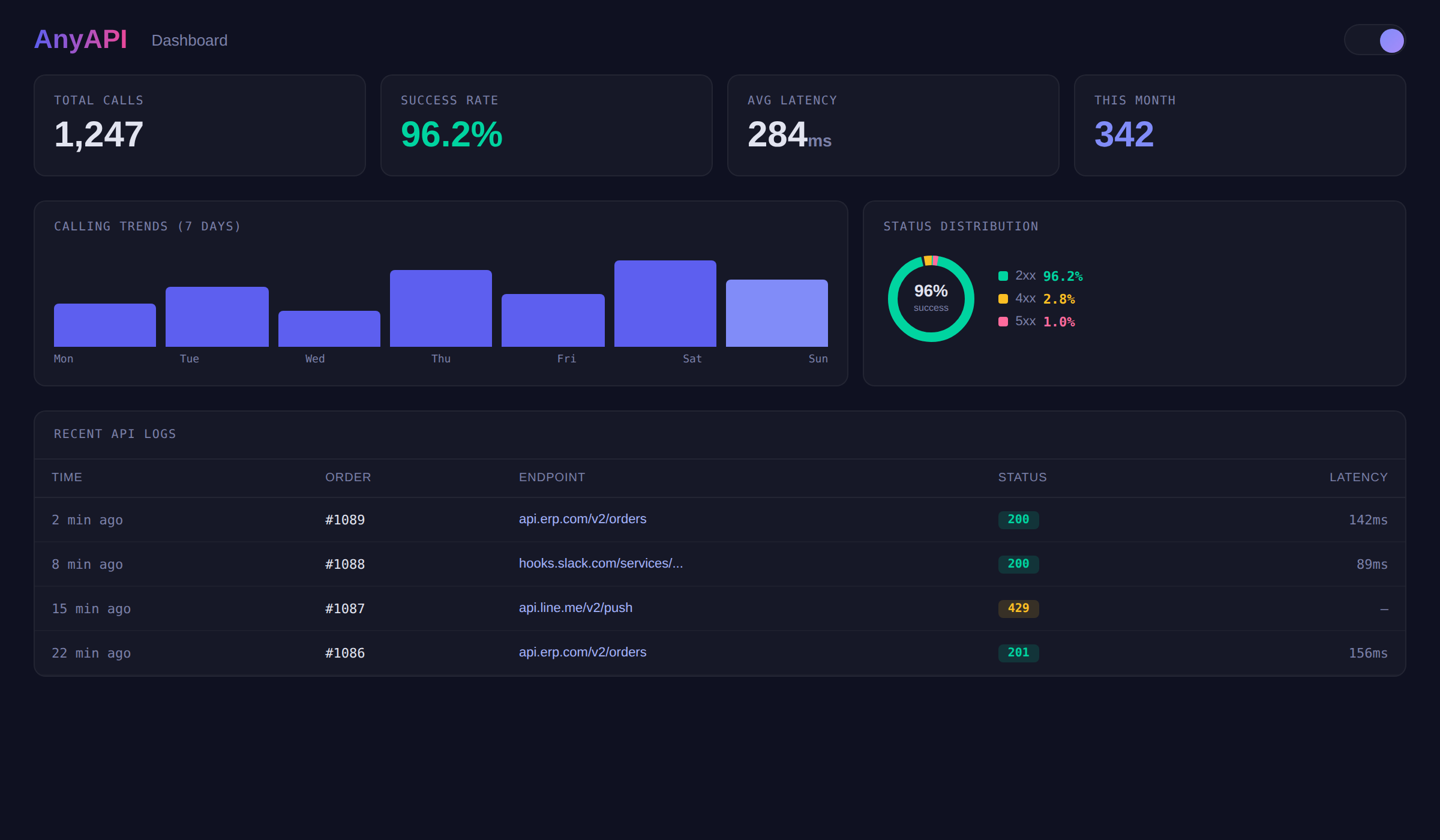
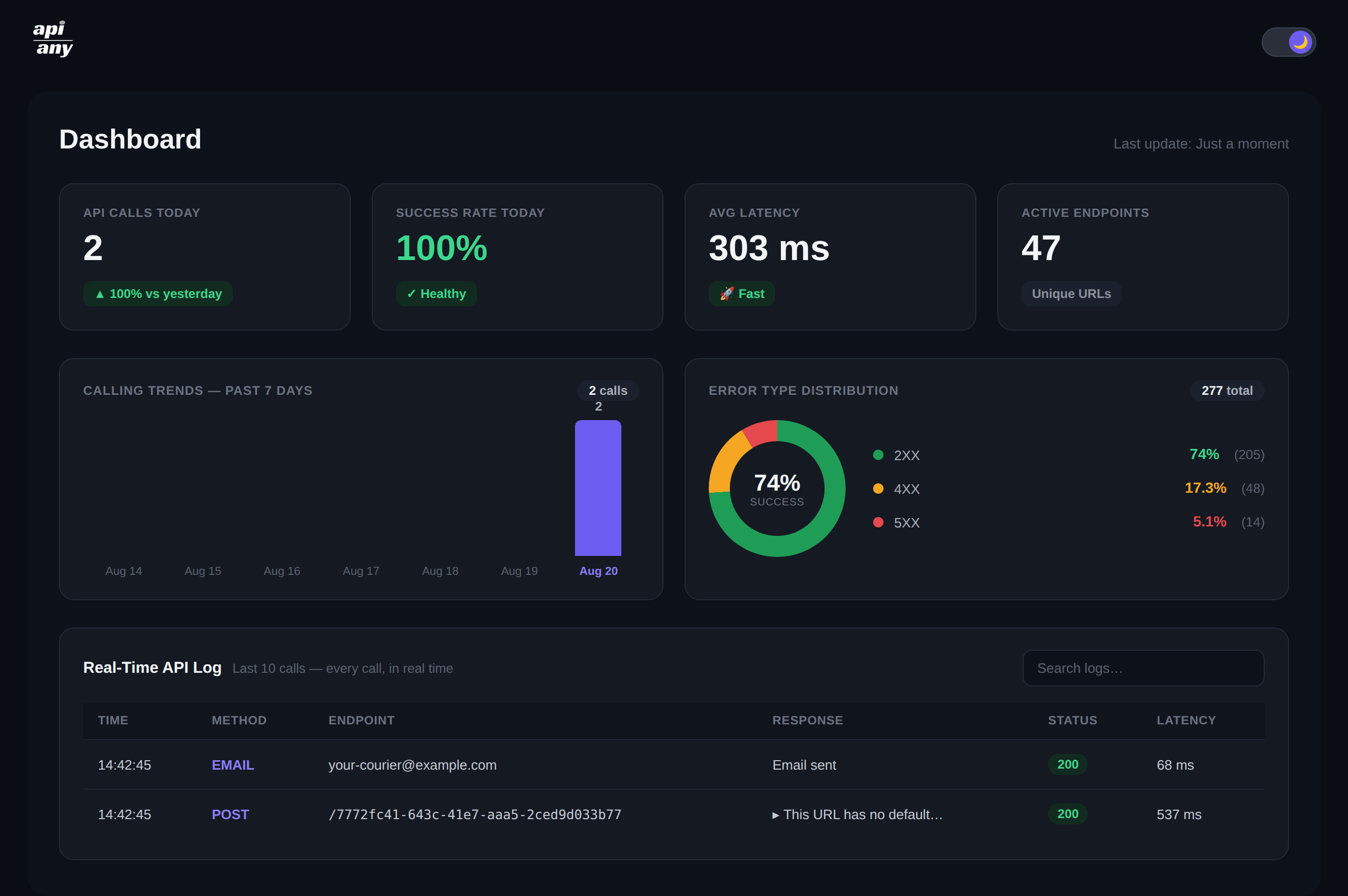
- You can see it arrived — every attempt is recorded with the response it got, shown in your dashboard, and a momentary failure on the other end is retried on its own.
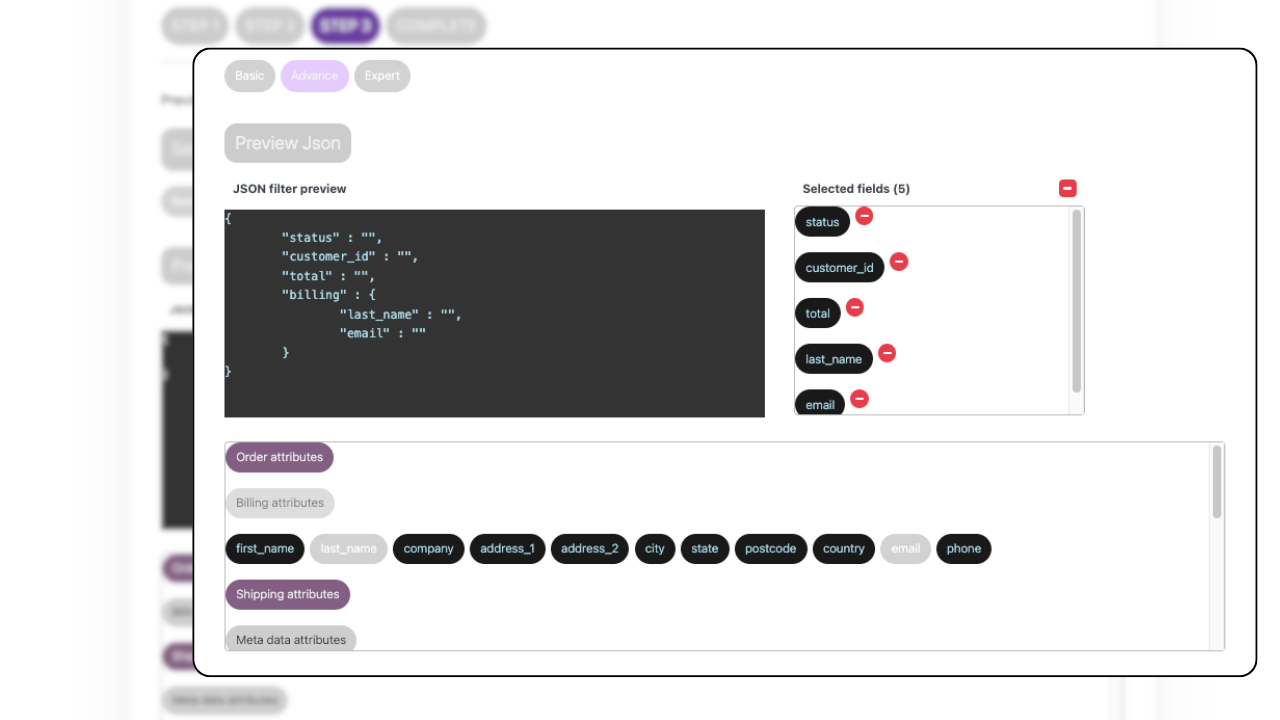
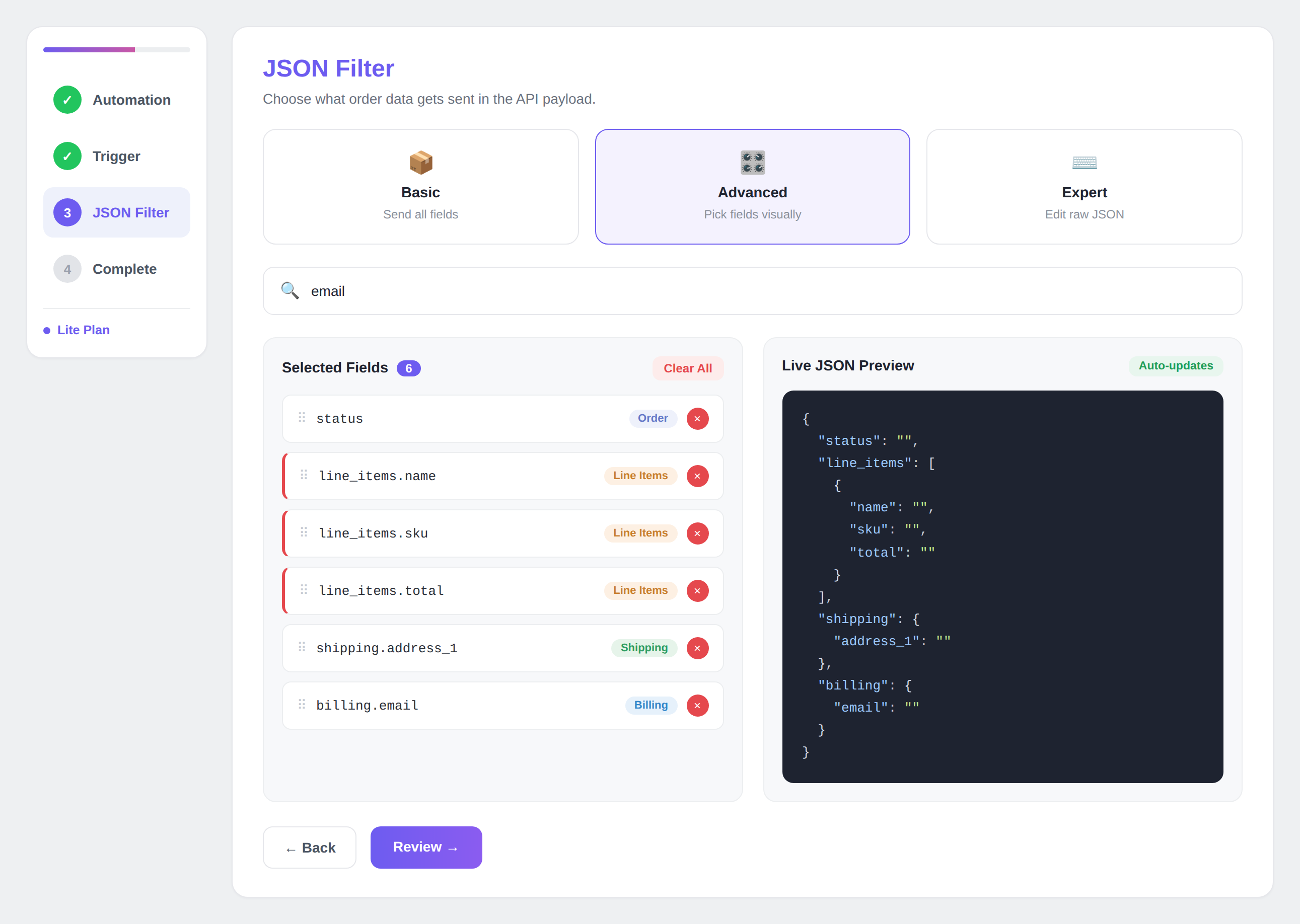
- Sending only the fields the receiving system expects, not the whole order.
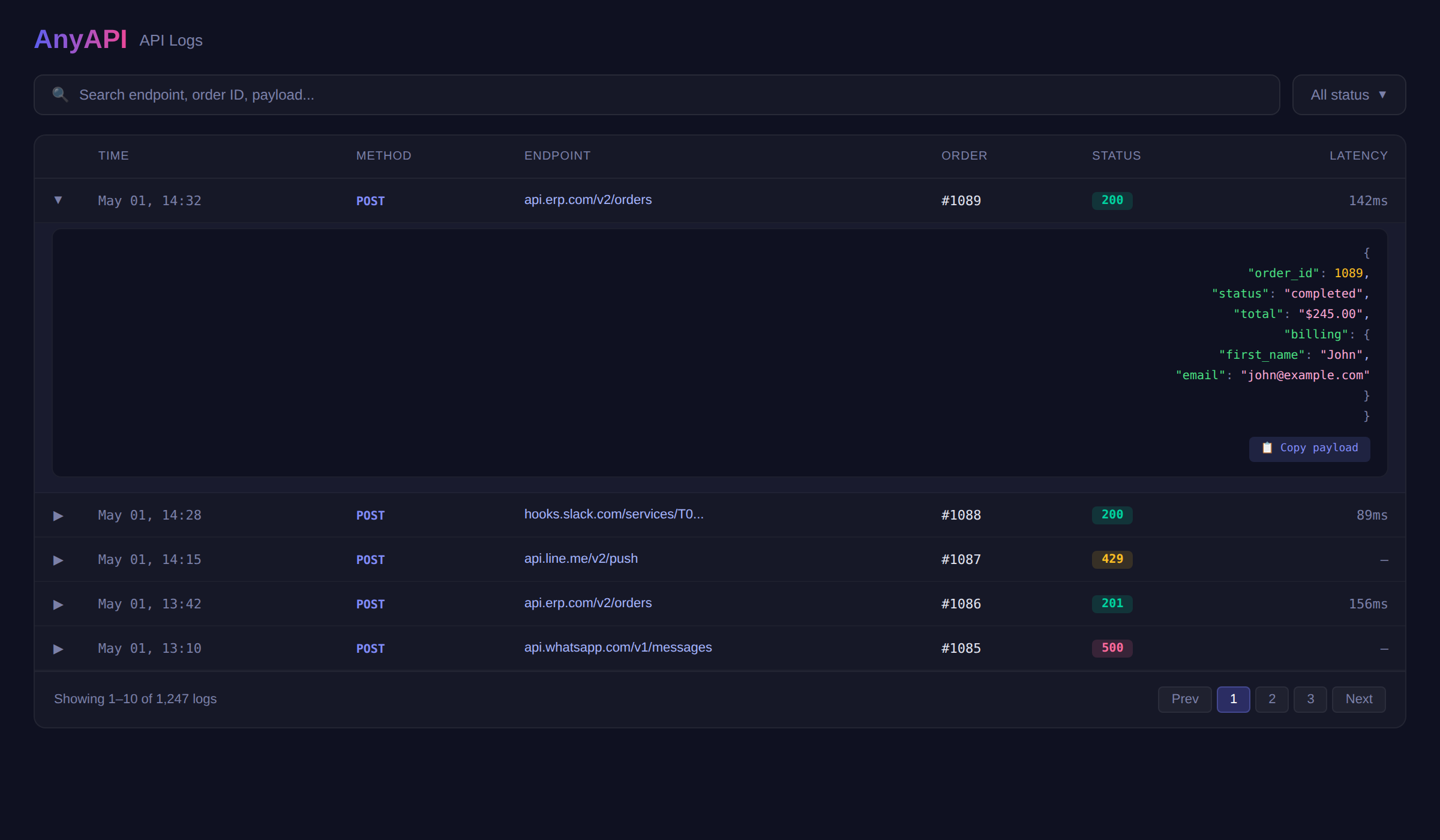
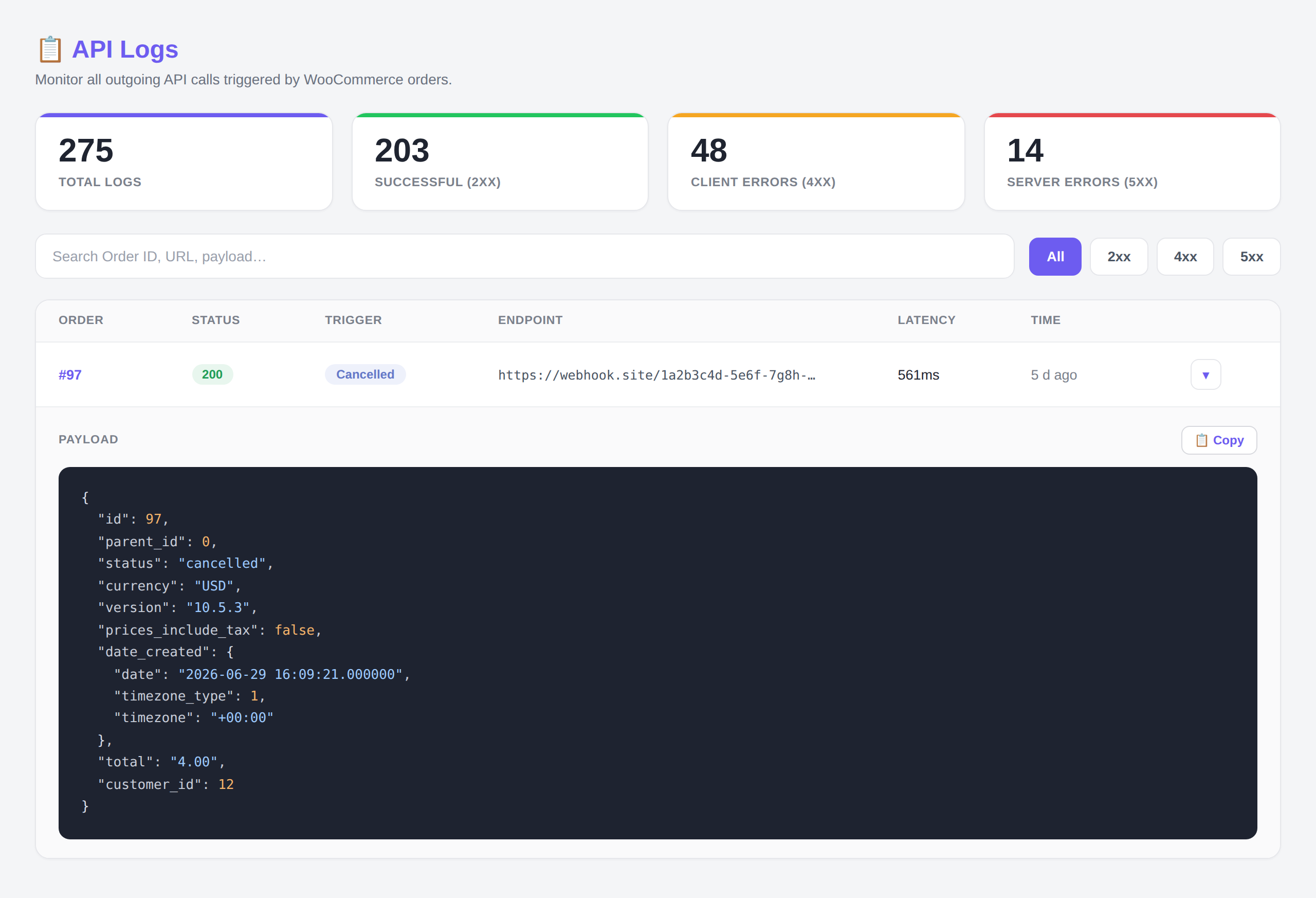
- Finding an order that failed days or weeks ago, instead of only seeing the latest calls.
- Knowing how many of your integrations are succeeding.
- Reaching more than one recipient, on more of your order events.
- JSON Filter — choose exactly which order fields to send, rename them, or set fixed values.
- Full order log — keep every call you've ever made, and search your history by order ID, URL, or payload to open any call and see the exact data that was sent.
- More order triggers — fire on more of WooCommerce's order events, not just the main three.
- Multiple email recipients — send the same order to several addresses.
- Direct email support — email help from Author.
安装:
- Upload the
anyapifolder to/wp-content/plugins/, or install directly from the WordPress plugin directory. - Activate the plugin through the "Plugins" menu in WordPress.
- Go to AnyAPI in the WordPress admin sidebar.
- Open the Templates page and choose the Email template.
- Enter who should receive the order and pick the trigger status.
- Place a test WooCommerce order, then check the API Log to confirm it was sent.
- Add an API Key (the credentials for your external API).
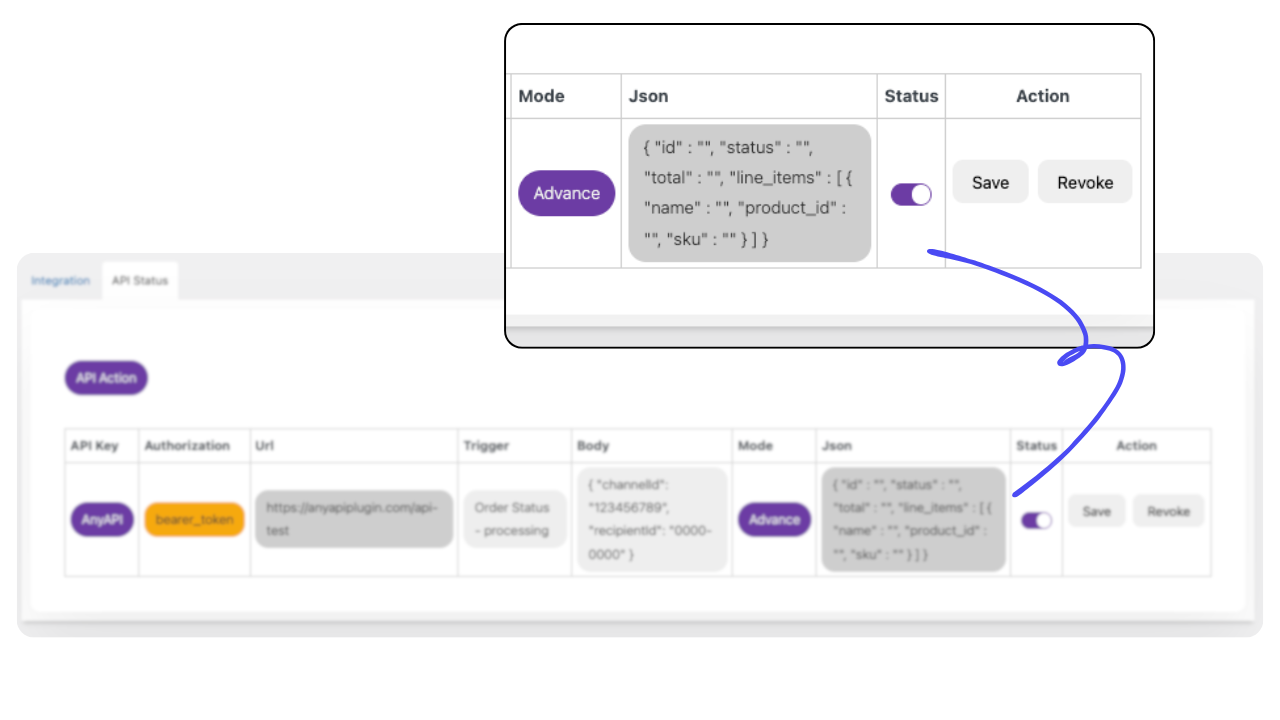
- Create an Order API integration — choose a trigger, set your endpoint URL, and configure authentication.
- Place a test order and check the API Log to confirm your data arrived.
屏幕截图:
常见问题:
Is AnyAPI free to use?
Yes. The free version on WordPress.org includes 1 API Key, the three main order triggers, unlimited API calls (throttled after 500/month), and a real-time API Log of your last 10 calls.
Do I need coding skills to use AnyAPI?
No. You configure everything through a visual interface inside your WordPress admin — endpoints, authentication, triggers, and payload filtering. No code at any point.
Can AnyAPI email order details automatically?
Yes. AnyAPI can email the full order details to any address the moment an order reaches the status you choose — useful for sending new orders to a fulfilment partner, a warehouse, or your own inbox. The recipient gets the order laid out and ready to act on, without logging into WooCommerce. This works on the free version.
Does the free version include ready-made templates?
Yes. The free version includes a ready-made Email template — pick who should receive the order, choose the trigger status, and it runs on the next matching order. There's nothing to design from scratch and no API to configure first.
Can I connect WooCommerce to any REST API?
Yes. If your external system has a REST API that accepts HTTP requests, AnyAPI can send WooCommerce order data to it. This includes ERPs, CRMs, messaging platforms, spreadsheets, fulfillment systems, and any custom API endpoint.
Can AnyAPI send data to a webhook URL?
Yes. AnyAPI can send WooCommerce order data to any webhook URL — including Slack Incoming Webhooks, Zapier Webhooks, Make Webhooks, and custom webhook endpoints. Configure the URL, authentication, and payload just like any other REST API integration.
How does AnyAPI automate WooCommerce orders?
AnyAPI sends WooCommerce order data to your REST API when an order event fires — a new order, payment completion, or a status change you choose. No manual action needed; it runs in the background.
How is AnyAPI different from WooCommerce's built-in webhooks?
WooCommerce's built-in webhooks send the full order payload with no filtering, no visual configuration, and no logs. AnyAPI adds a no-code visual UI, JSON Filter to shape payloads, real-time API Logs for debugging, and authentication helpers — making integrations far easier to set up, monitor, and maintain.
What is the JSON Filter and why does it matter?
The JSON Filter lets you choose exactly which WooCommerce order fields to send in your API request payload. Instead of sending the full order object (100+ fields), you select only what your external system needs — reducing errors, improving security, and making debugging easier.
How do API Logs help me debug failed integrations?
Every API call is recorded in AnyAPI's API Log with its HTTP status code, the API response, and latency, so you can see whether each call went through and what came back. The free version keeps your last 10 calls. AnyAPI Lite keeps your full history and adds the full request payload, search by order ID, URL, or payload, and filtering by status (2xx / 4xx / 5xx).
What happens if the receiving API is temporarily down?
If the receiving service returns a temporary error — such as 429, 502, 503, or 504 — AnyAPI retries the call once on its own, following the service's Retry-After header where one is provided. That way a brief outage on the other end doesn't quietly cost you the order. The retry runs in the background and never blocks the order from being saved.
Does AnyAPI support WhatsApp Business API?
Yes. If you have access to the WhatsApp Business API — for example through a provider like Woztell — AnyAPI can send a POST request to it whenever a WooCommerce order is placed or updated.
Can I send WooCommerce orders to LINE Messaging API or Slack?
Yes. AnyAPI works with any REST API that accepts HTTP requests — including LINE Messaging API, Slack Incoming Webhooks, Telegram Bot API, Discord Webhooks, and more.
Can AnyAPI connect WooCommerce to an ERP system?
Yes. If your ERP system (SAP, Oracle NetSuite, Microsoft Dynamics, or a custom ERP) has a REST API, AnyAPI can push WooCommerce order data to it automatically on any order event.
What authentication methods does AnyAPI support?
AnyAPI supports Basic Auth (username + password) and Bearer Token authentication. Compatible with any REST API that uses standard HTTP authentication methods.
Is AnyAPI a Zapier or Make alternative for WooCommerce?
For sending WooCommerce order data to external APIs, you can start on the free version. AnyAPI runs entirely inside your WordPress installation, with no per-task pricing, no external platform dependency, and your order data never leaves your server. It's built to do order-to-API automation well, rather than to be a general-purpose automation platform.
更新日志:
- Fixed - Upgrade links across the plugin now behave consistently.
- Added - Settings page now shows Lite's changelog when a Lite update is available.
- Fixed - Removed an unused internal message that described monthly call limits inaccurately.
- Changed - Upgrade prompts now explain what you gain, instead of naming plan limits.
- Changed - Feature list no longer references plans that are not yet available.
- Added - Integration Templates: a new Templates page lets you open a prefilled setup wizard in one click. The Email template is ready to use on every plan.
- Added - Failed order integrations now retry automatically once after a temporary error (HTTP 429/502/503/504 or a connection failure), respecting Retry-After when the server sends it.
- Added - Order Integrations list now has an expandable row showing each integration's method, auth, full endpoint and filter, plus a Key column, creation time, and a label for integrations created from a template.
- Added - The API Key form now warns if you paste something that looks like a license key into the token field, and points you to the License page.
- Improved - Clearer upgrade messaging across Order Integrations, API Keys, Integration Templates, the JSON Filter and the API Log.
- Improved - New installs now see a "Set up your first integration" panel with a template shortcut when no integrations exist yet.
- Improved - The branded header and the Plugin Info card (now showing AnyAPI Lite's version and update status) appear across all admin pages.
- Changed - Email destinations now use tokens ({{order_summary}}, {{order_id}}) in the message body. If you already have an email integration, add {{order_summary}} to its body to keep the order details — they are no longer added automatically.
- Fixed - Dark mode no longer flashes the light theme on load, and Dashboard and Templates page titles are now readable.
- Fixed - Expert-mode integrations no longer send an empty payload when an advanced filter fails to apply; those attempts are now logged as errors.
- Fixed - Corrected several admin links (API Keys page slug, documentation redirect loop, dead changelog link) and the plugins-list links.
- Added - Email destination for order integrations: send order notifications by email (recipient, subject, intro message) with an automatic order summary including per-item weight and dimensions. {{order_id}} is supported in the To and Subject fields.
- Added - API Log now records and shows the response body for each call, so failed integrations are self-diagnosable.
- Fixed - Order integrations now follow HTTP 3xx redirects correctly (301/302/303 convert to GET), fixing false 400 errors with endpoints like Google Apps Script.
- Fixed - API Log now shows the real request method (GET/POST/Email) instead of always POST.
- Improved - Review prompt now appears only after recent successful automations, not during error troubleshooting
- Fixed - Dashboard success rate no longer shows a red "0%" when there are simply no orders yet today
- Tweak - Refined the review banner layout for a cleaner dashboard header
- Added - Custom static payload override for Starter integrations: send a fixed JSON body instead of full order data.
- Improved - JSON preview now refreshes correctly when switching filter modes.
- Fixed - Editor scrolls to top after saving an integration.
- Fixed - API Logs page link corrected.
- Added: Debug Mode toggle in Settings — enable detailed logging for troubleshooting API integrations
- Added: Debug log points covering the full integration lifecycle: status change detection, trigger matching, authentication, payload building, JSON filtering, and HTTP response
- Redesign - Complete UI/UX overhaul across all admin pages
- Redesign - New dashboard with dark mode toggle and usage statistics
- Redesign - Order API wizard with step-by-step integration setup
- Redesign - API Key management with secure credential storage
- Redesign - API Logs with real-time status cards and latency tracking
- Redesign - Settings page with plan comparison and license management
- Added - Multiple API Key support with Bearer Token and Basic Auth
- Added - Custom HTTP headers per integration
- Added - HTTP method selection (POST, PUT, PATCH) per integration
- Added - Integration naming for easier management
- Added - WP Cron throttle retry when monthly call limit is reached
- Added - Dark mode across all admin pages
- Added - Version update notification bar on dashboard
- Improved - API Key credentials now stored centrally and referenced by ID
- Improved - Starter plan includes real-time log of last 10 API calls
- Improved - SCSS design token system for consistent theming
- Fixed - Plugin Check (PCP) compliance: escaping, sanitization, i18n
- Fixed - Dark mode initialization on Starter plan
- Fixed - Duplicate menu slug registrations removed
- Update - Dashboard real-time API log section
- Added - Search field for endpoint, payload, and order ID filtering
- Added - HTTP status code filter (2xx / 4xx / 5xx)
- Tweak - Improved loading experience for Real-Time API Log
- Added - Dashboard page
- Added - Real-time API log viewer
- Tweak - API monitoring improvements
- Added - JSON field filter and JSON preview in advanced mode
- Added - API log notice
- Tweak - Tooltips, feature descriptions, and Order API UI improvements
- Fix - API Development Tools request timeout issue
- Tweak - Feature content and UI improvements
- Added - Links to documentation on feature cards
- Added - Notice when Order API status is toggled OFF
- Added - API Logs for all API integrations
- Initial release