
API Puller for WooCommerce
| 开发者 | excesspronet |
|---|---|
| 更新时间 | 2026年11月12日 23:29 |
| PHP版本: | 8.0 及以上 |
| WordPress版本: | 7.1 |
| 版权: | GPLv2 or later |
| 版权网址: | 版权信息 |
详情介绍:
- Any number of connections and products with no caps of any kind
- Three feed types covering REST JSON, REST XML and remote CSV files
- Three auth methods covering API Key (custom header), Bearer Token and HTTP Basic Auth
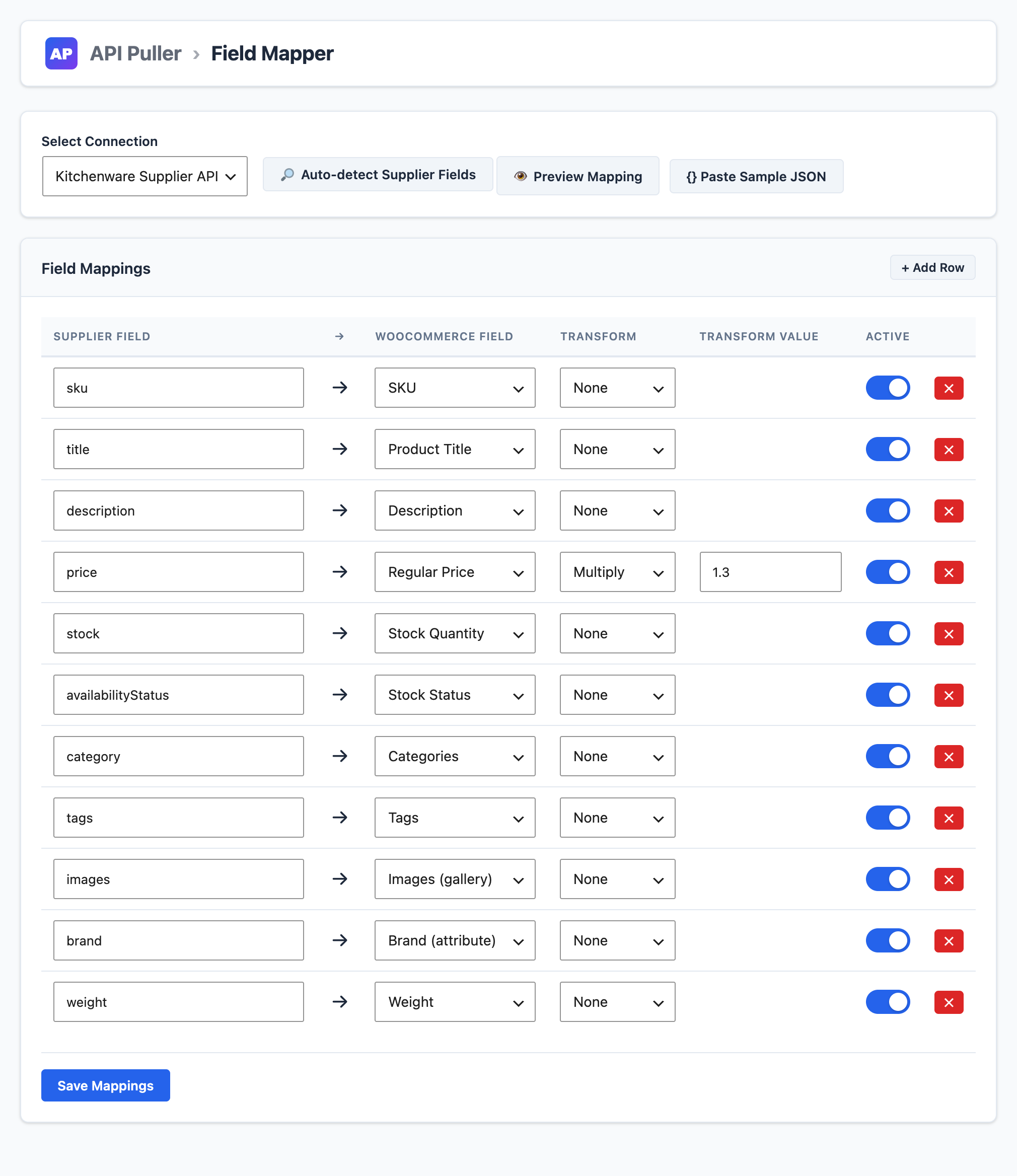
- Field Mapper to map supplier fields to WooCommerce fields with 13 transform types
- Auto-Detect fields from a live sample product, or from a pasted JSON sample
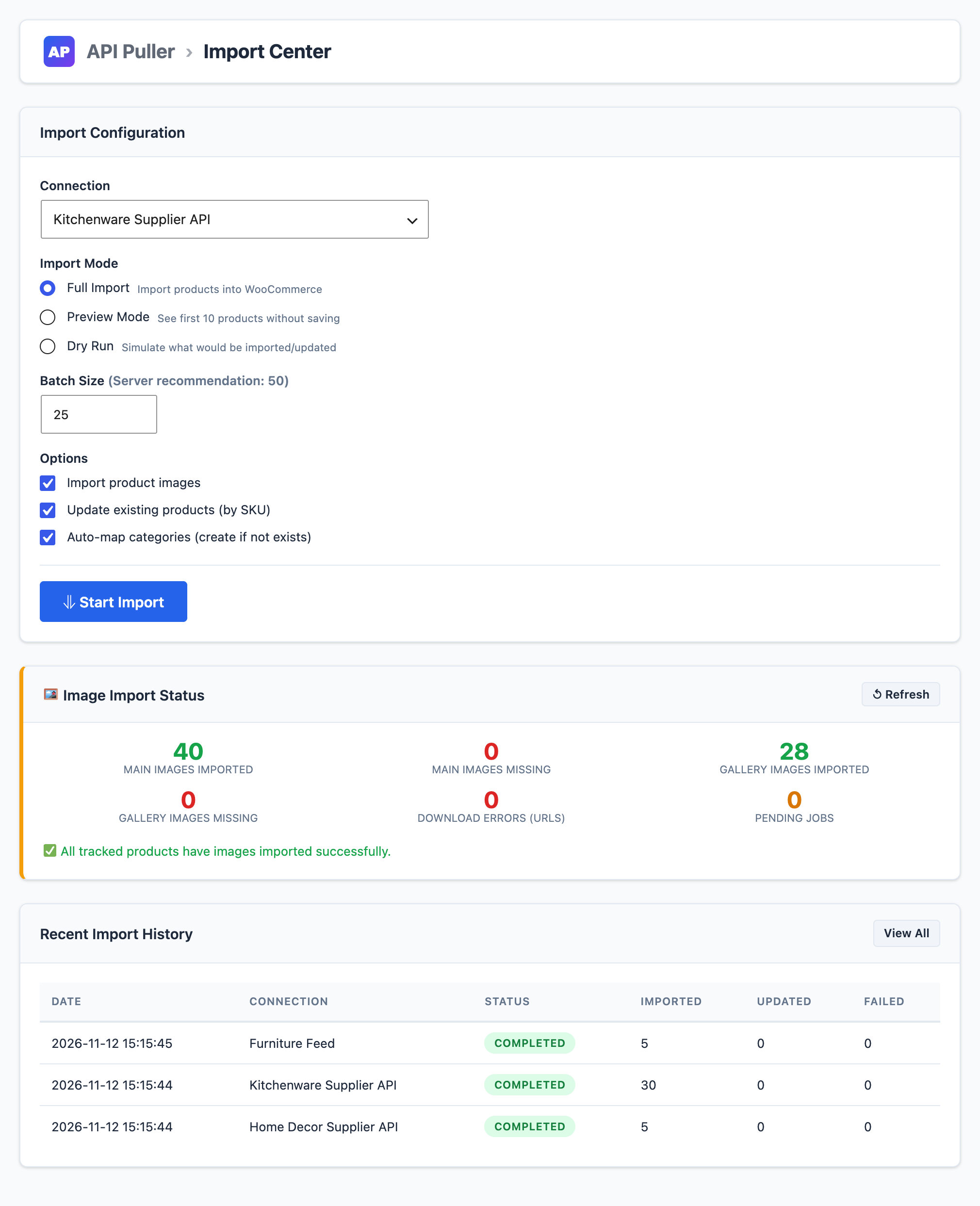
- Preview and Dry Run to check the mapped products and what would be created or updated before anything is saved
- Background imports in Action Scheduler batches, with a live progress bar and per-status counters
- Update on demand: run the import again, or pick products in the Product Manager, to refresh prices, stock and details of products already in your store (matched by SKU)
- Product images downloaded from the supplier's image URLs into the media library, with a status panel and a retry for failed downloads
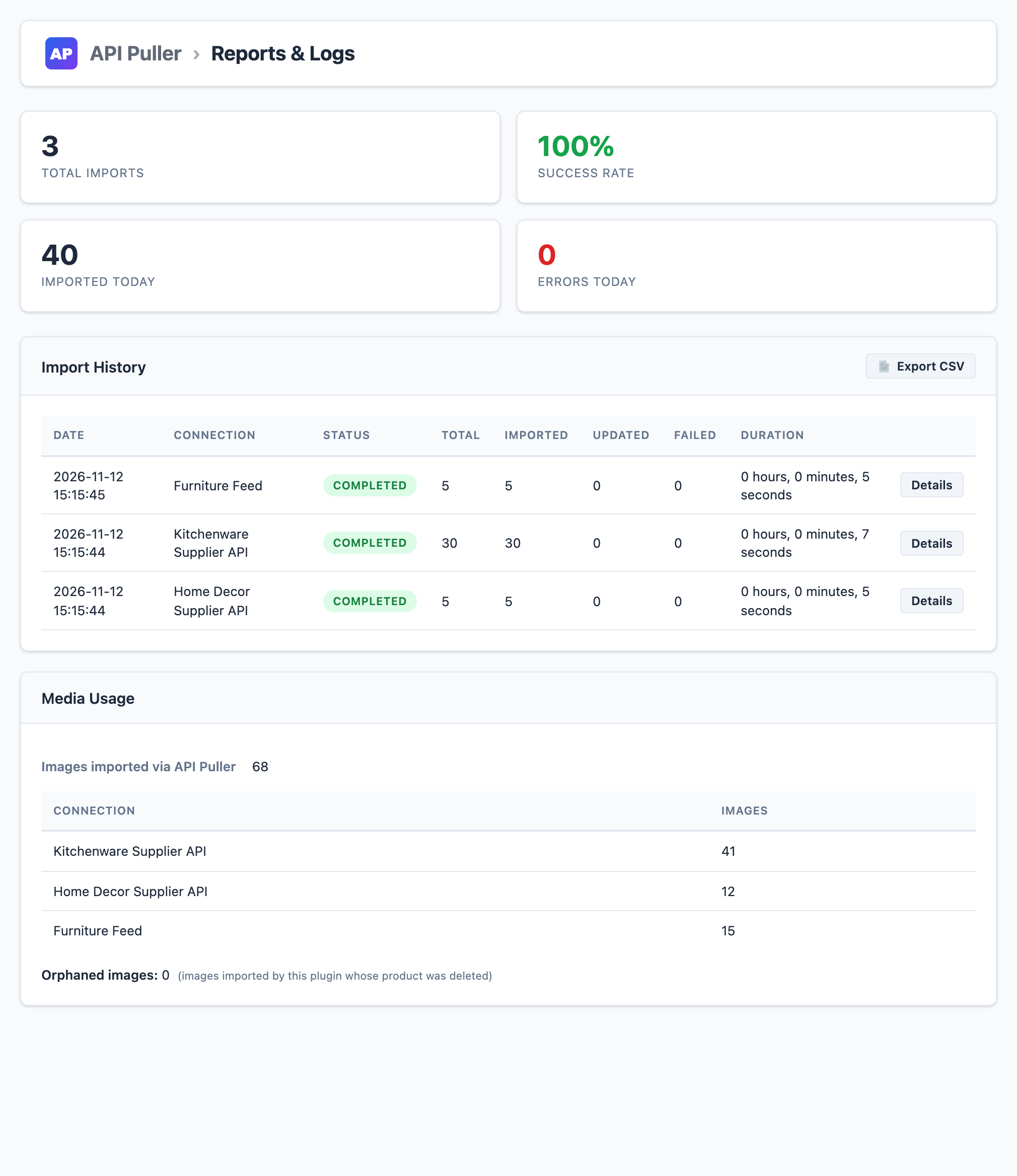
- Full import history with timing, counts, errors and CSV export
- Product Manager to update, untrack, trash or export imported products
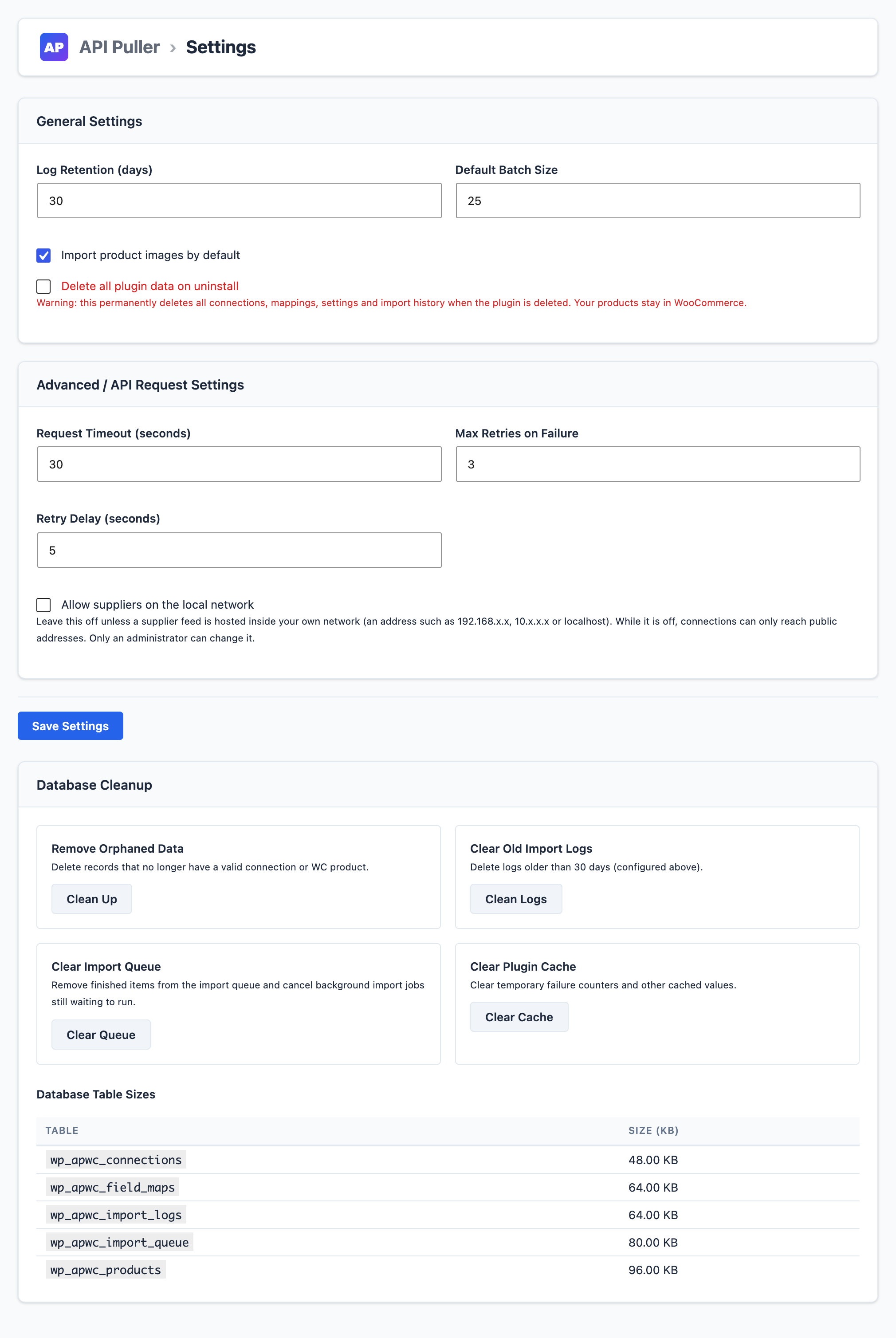
- Database cleanup for orphaned records, old logs, images of deleted products and cached data
- Server health dashboard showing PHP memory, execution time, object cache and queue size
- WooCommerce HPOS compatible
- None (public APIs)
- API Key (any header name)
- Bearer Token
- HTTP Basic Auth (username + password)
- Background processing via Action Scheduler (bundled with WooCommerce)
- AES-256-CBC encryption for stored API credentials; saved secrets are never sent back to the browser
- All admin actions require the
manage_woocommercecapability and a nonce - A WordPress REST API status endpoint, for store managers only
安装:
- Upload the
api-puller-for-woocommercedirectory to/wp-content/plugins/, or install it from the Plugins screen. WooCommerce must be active. - Activate the plugin through the Plugins menu in WordPress.
- Navigate to API Puller in the WordPress admin menu.
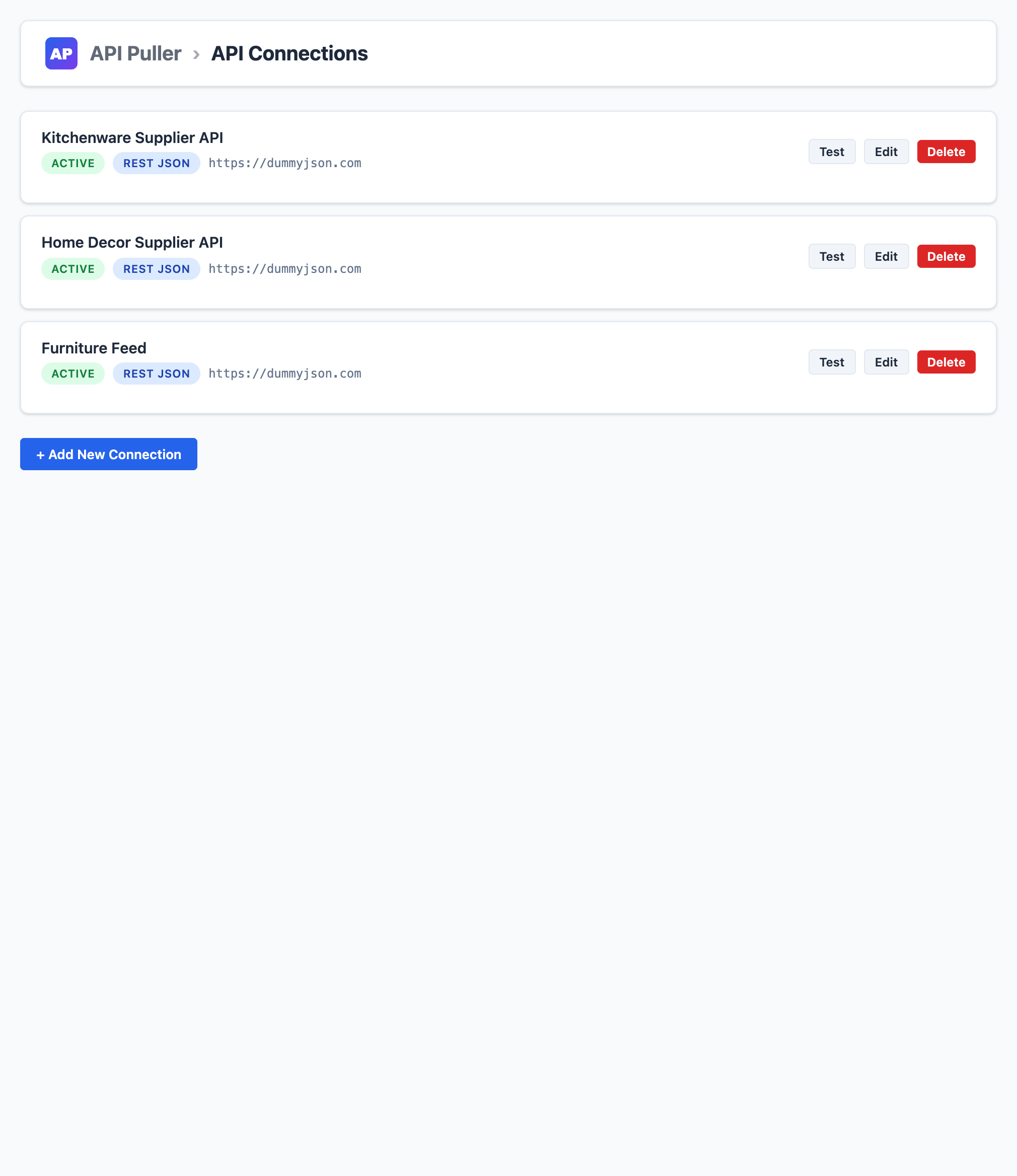
- Go to API Connections and click Add New Connection.
- Enter your supplier API URL, choose an auth method, click Test Connection, then Save Connection.
- Open Field Mapper, select your connection, and click Auto-detect Supplier Fields.
- Review the suggested mappings and click Save Mappings.
- Go to Import Center, choose Preview Mode or Dry Run and click Start Import to verify the data.
- Choose Full Import and click Start Import to import all products.
屏幕截图:
常见问题:
What API types are supported?
API Puller supports REST APIs returning JSON or XML, and CSV file feeds. Authentication methods include API Key, Bearer Token and Basic Auth.
Is anything limited in this plugin?
No. Connections, products, imports, logs and every screen in this plugin are unlimited and free. A separate Pro plugin adds automation, such as scheduled sync, webhooks and price markup rules, but nothing here depends on it.
Will existing products be overwritten?
Products are matched by SKU. If a matching WooCommerce product is found, it is updated, unless you untick "Update existing products" in the Import Center.
How do I keep imported products up to date?
Run the import again from the Import Center with "Update existing products" ticked, or select products in the Product Manager and choose "Update Selected from Supplier". Updates run when you start them. Automatic scheduled sync is part of API Puller Pro, a separate plugin.
I updated from 1.5 and something is missing. What happened?
Since 1.6.0 this plugin does one job: importing and updating products when you start it. Automatic scheduled sync, the webhook endpoint, OAuth 2.0 sign-in and description and gallery enrichment are no longer part of it; they are in API Puller Pro. The update deleted nothing: your connections, mappings, settings and products are unchanged, and schedules were only stopped. A connection that used OAuth 2.0 needs another sign-in method before it can connect again.
What happens if my server runs out of memory during import?
API Puller uses Action Scheduler to process products in background batches. Each batch is processed as a separate scheduled action, so large imports do not time out. The recommended batch size is calculated from your server's memory limit and max execution time.
Can I import product images?
Yes. When "Import product images" is enabled, API Puller downloads images from the supplier URL, skips images it already downloaded, and attaches them to the product through the WordPress media library. Only real image files are accepted.
Can I delete all plugin data when uninstalling?
Yes. In Settings, enable "Delete all plugin data on uninstall". When you delete the plugin from the WordPress Plugins page, its tables, options, transients and tracking meta are removed. Your products stay in WooCommerce.
Does it work with WooCommerce High Performance Order Storage (HPOS)?
Yes. API Puller declares HPOS compatibility using WooCommerce's FeaturesUtil::declare_compatibility() API.
Where is my API key stored?
All credentials are encrypted with AES-256-CBC using a key derived from your WordPress security salts before being stored in the database. Saved secrets are never sent back to the browser.
How do I report a security issue?
Please email contact@excesspronet.com rather than posting in the public support forum.
更新日志:
- Changed: this plugin now does one job, importing and updating products when you start it. Connections, products, field mapping, Preview, Dry Run, background imports, images, history and the Product Manager all stay, with no limits.
- Removed: automatic scheduled sync and the Sync Settings screen, the webhook endpoint, OAuth 2.0 sign-in, and description and gallery enrichment with the supplier URL backfill. These are now only in API Puller Pro, a separate plugin.
- Updating deletes nothing. Sync schedules are stopped and remembered, and settings, connections, mappings and products are kept. A site that was using one of the removed features sees one notice that says which.
- A connection that used OAuth 2.0 cannot connect until another sign-in method is chosen for it.
- "Resync Selected" in the Product Manager is now "Update Selected from Supplier" and starts an update run for the connection of the selected products.
- The Dashboard shows the last import of each connection in place of the sync schedule.
- Fixed: importing a product a second time added its featured image to the product gallery, so the product page showed the same image twice. The next import with "Import images" on removes the duplicate from products that already have it.
- Fixed: a site with this plugin and an old API Puller Pro (before 1.3.5) both switched on stopped with an error. This plugin now switches itself off when Pro is running, because Pro already contains it. Data and settings are kept.
- Fixed: a transform value containing "<", ">" or "%" was altered when it was saved. A regular expression such as // became an empty pattern, which put the replacement between every character of the text. Empty patterns are now refused.
- Fixed: a supplier sale price of 0 made the product free, and a blank sale price never ended an old sale.
- Fixed: a supplier stock status of false or 0 was ignored, so the product stayed in stock. A blank or non-numeric quantity is no longer read as zero stock.
- Fixed: a sync could bring back a permanently deleted product as an empty, published product.
- Fixed: Clean Orphaned Images deleted images that another product still used.
- Fixed: with no Products Endpoint, an import requested a different URL from the one Test Connection checked.
- Fixed: CSV feeds with line breaks inside quoted fields, or saved by Excel as "CSV UTF-8", were read wrongly.
- Fixed: a password, key or token containing "%" or "<" was altered when it was saved.
- Fixed: Re-queue Missing Image Downloads did nothing for products that only had a stored image URL.
- Fixed: Resync Selected queued a full sync for every selected product. It now queues one per connection.
- Fixed: one malformed product could stop an import and leave it shown as running.
- Fixed: Add Row in the Field Mapper made a row that could not be filled in before fields were detected.
- Security: connections can no longer reach addresses on the server's own network (localhost, 10.x.x.x, 192.168.x.x and similar) unless an administrator switches on "Allow suppliers on the local network" in Settings. It is switched on automatically if one of your connections already uses such an address. Public suppliers are not affected.
- Fixed: on a multisite network, activating the plugin for the whole network only set up the main site. Every site now gets its own tables, including sites added later.
- Security: a saved secret is no longer reused when the API host is changed and the secret field is left blank. Enter the secret again for the new host. OAuth tokens are cached per set of credentials.
- Auto sync schedules come back when the plugin is deactivated and activated again. Quick Edit and Bulk Edit now count as manual edits for Store Wins.
- Deleting this plugin while the separate Pro plugin is installed leaves the shared data and schedules in place.
- Corrected: the note about the optional Pro plugin no longer lists variable products or multisite sharing.
- All usage limits removed: connections, products, sync frequency and logs are unlimited, and no feature checks for another plugin.
- Backfill Supplier URLs, the per-connection image breakdown and orphaned image cleanup are now available to everyone.
- Fixed: Preview Mode and Dry Run ran a real import. They now save nothing.
- Fixed: Sync Now did nothing, custom headers could not be added, and Fields to Sync and the conflict setting were not saved or applied.
- Fixed: switching off auto sync left the recurring job running.
- Fixed: Find & Replace, Regex and Category Map transforms ignored their values. Invalid regular expressions are now refused on save.
- Fixed: a failed supplier request could wait 100 seconds or more before retrying.
- Fixed: a stock-only sync could set stock to zero when the supplier sent no stock value.
- Fixed: updating a product could change its status back to published.
- Fixed: CSV exports stopped at 100 rows.
- Fixed: a webhook secret generated in Settings was not the one the endpoint checked.
- Security: OAuth access tokens are never cached without an expiry.
- Security: saved secrets are no longer sent to the browser, in page data or in the Edit form.
- Security: supplier page and image requests use the safe WordPress HTTP API, always verify SSL, identify the plugin honestly and accept only real image files.
- Security: request data is sanitized after decoding, XML parsing cannot fetch network resources.
- Removed: the Cloudflare loopback option, the unauthenticated ping endpoint, the licence stub, a temporary bulk delete handler, and settings that had no effect (task scheduler, response cache, proxy).
- Admin scripts are now fully translatable.
- CSV feeds and CSV exports no longer raise deprecation notices on PHP 8.4.
- Uninstall now removes everything the plugin stored when you opt in, and keeps everything when you do not.
- Out-of-stock products are no longer imported as in stock when a supplier reports availability as text such as "Out of Stock" or "sold out".
- Added the
apwc_product_changedandapwc_sync_completedaction hooks for developers.
- Field Mapper no longer wipes transform values on save; live import progress panel, counters, speed and ETA fixed; script-added mapping rows aligned and labelled correctly.
- Security hardening: CSV exports neutralize spreadsheet formula injection.
- Added the
Requires Plugins: woocommerceheader and moved all scripts to proper enqueueing. - Hardened every
$_POSTand$_GETread with WordPress sanitization.
- Initial release.