
Arik Sahaj Checkout
| 开发者 | wcblogs87 |
|---|---|
| 更新时间 | 2026年7月5日 15:01 |
| PHP版本: | 7.4 及以上 |
| WordPress版本: | 7.0 |
| 版权: | GPLv2 or later |
| 版权网址: | 版权信息 |
详情介绍:
- Creates a real WooCommerce order with the selected product, quantity, and variations
- Reduces stock immediately (atomic no race conditions)
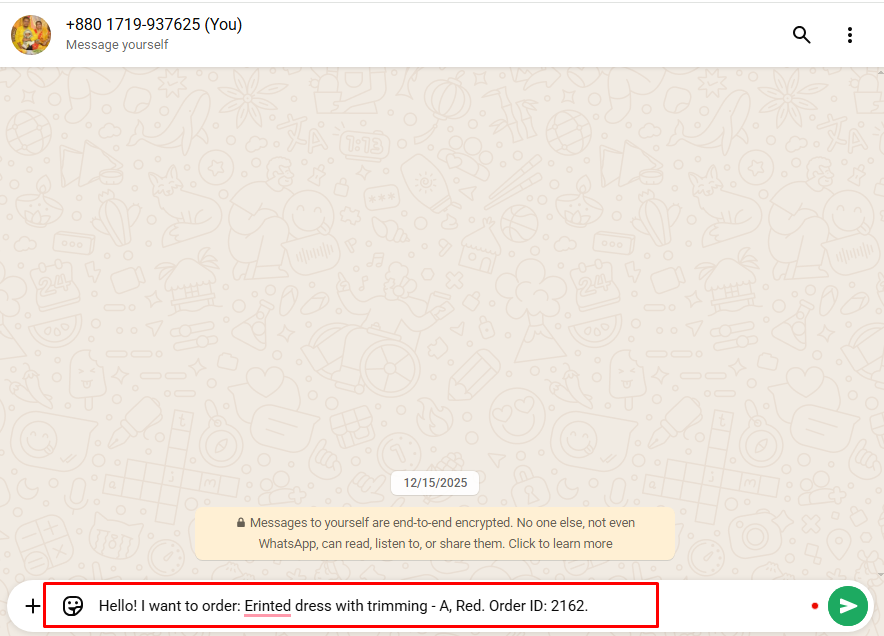
- Opens WhatsApp with a pre-filled message including the Order ID
- Suppresses transactional emails so admin and customer aren't notified prematurely
- Real WooCommerce Orders: Every click creates a trackable WooCommerce order.
- Atomic Inventory Protection: Stock reduced via
wc_reduce_stock_levels()— safe under concurrent load - Variable Product Support: Captures size, color, and other variation selections
- High-Performance Order Storage (HPOS) compatible: Full support for WooCommerce HPOS.
- Cart & Checkout Blocks compatible: Works alongside the WooCommerce Blocks experience
- Popup-Blocker Safe: Opens WhatsApp tab synchronously on click; never blocked.
- Honeypot Anti-Spam: Built-in bot protection without CAPTCHA.
- Rate Limiting: Per-IP and per-user, configurable, with HTTP 429 responses.
- Customizable Message Templates: Use placeholders for product name, order ID, total, variations, date
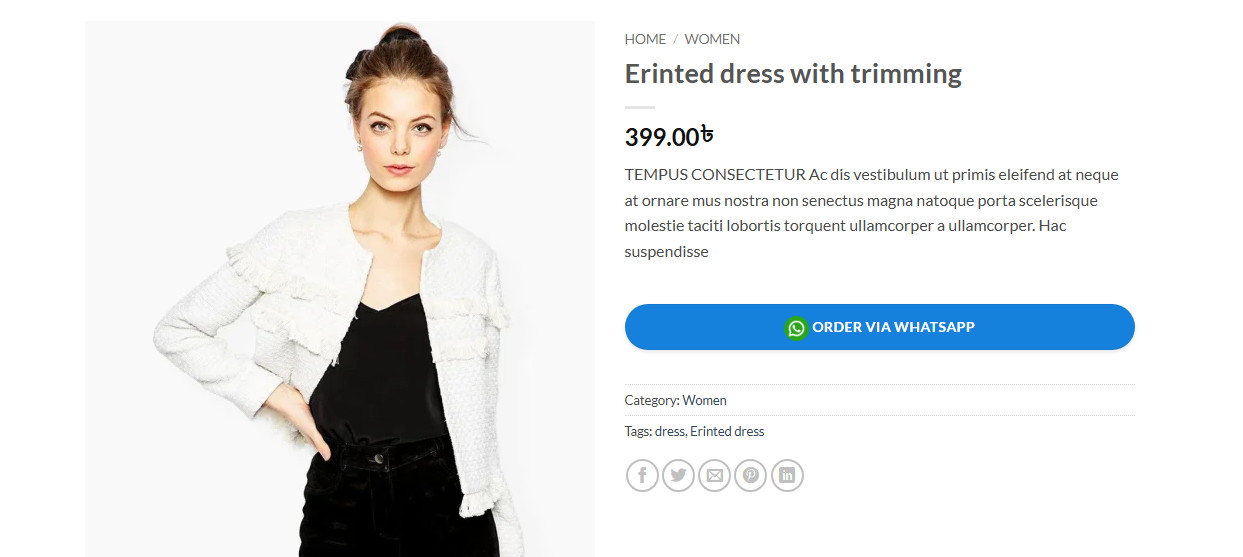
- Flexible Button Positioning: Before, after, or replace the Add to Cart button
- Configurable Order Status: Choose any valid WooCommerce status for shadow orders
- Email Suppression: Shadow orders never trigger admin/customer emails
- Block Theme Support: Compatible with Twenty Twenty-Four and other block themes
- Translation Ready: Full i18n/l10n support
- Multisite Compatible: Network activation with per-site settings
- Accessibility-First: ARIA attributes, keyboard navigation,
prefers-reduced-motion, high-contrast mode - RTL Support: Right-to-left languages fully supported
- WP-CLI Compatible: Plugin activation via
wp plugin activateworks correctly
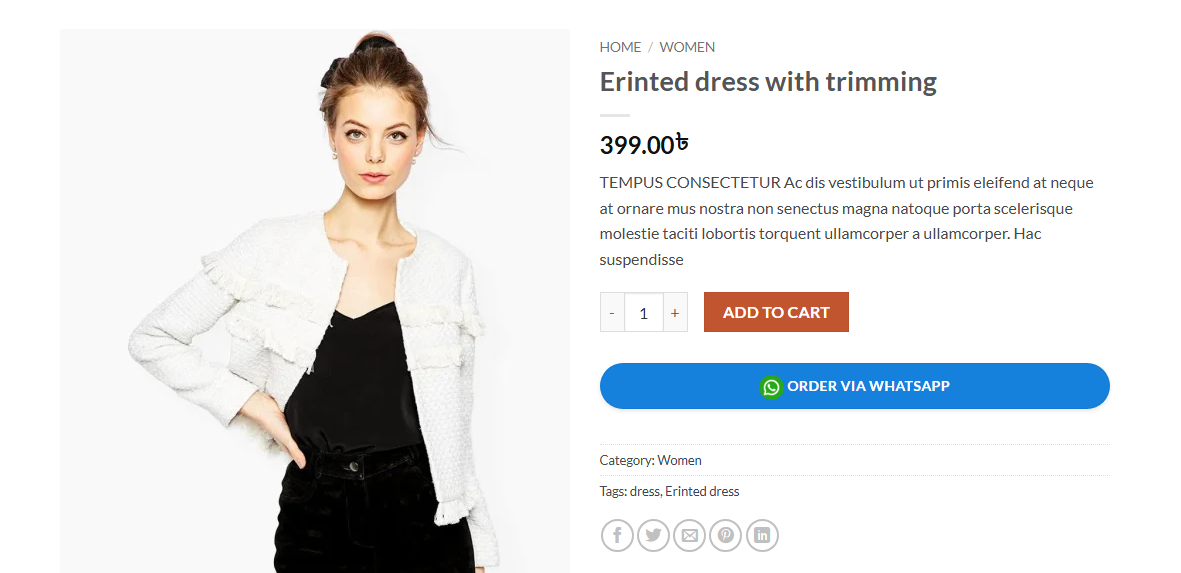
- Customer browses your shop and selects a product
- Clicks "Order via WhatsApp"
- Plugin creates a real WooCommerce order with status of your choice (default: On Hold)
- Stock is reduced automatically
- WhatsApp opens in a new tab with a pre-filled message including the Order ID
- Customer messages you on WhatsApp you reference the Order ID in your WooCommerce dashboard
- Stores that primarily take orders via WhatsApp (common in South Asia, MENA, Latin America)
- Businesses with limited online checkout (no payment gateway, no shipping calculator)
- Shops wanting inventory protection without complex multi-step checkout
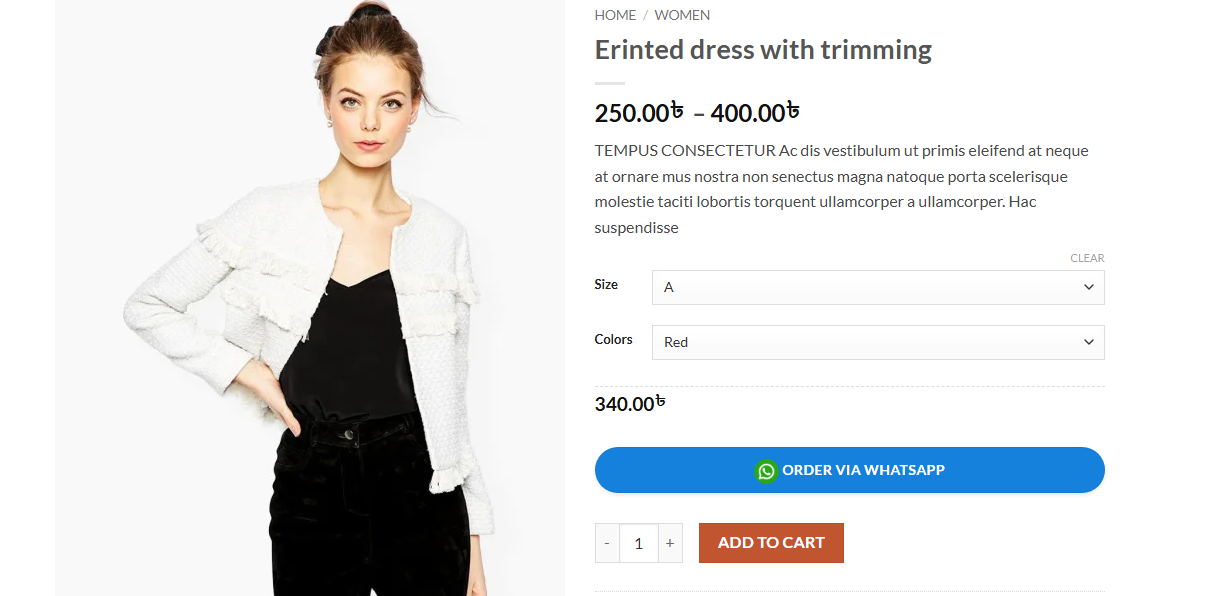
- Stores selling variable products via WhatsApp
- Brick-and-mortar businesses using WordPress as a catalog
- Storefront
- Astra
- OceanWP
- Divi
- The7
- Flatsome
- Avada
- GeneratePress
- Kadence
- Blocksy
- Block theme
!important button rules from popular themes without breaking other site styles.
Technical Highlights
- Object-oriented PHP architecture with singletons
- PHP 7.4+ compatible (no PHP 8.x-only syntax)
- Follows WordPress Coding Standards (WPCS)
- Security-first: nonce verification, capability checks, input sanitization, output escaping
- WooCommerce email hooks safely wrapped in try/finally
- Cryptographically secure token generation via
random_bytes() - Atomic stock reduction (no race conditions)
- HPOS-aware uninstall (cleans both
wc_orders_metaandpostmeta) - Multisite-aware uninstall (loops all sites in network)
- No
wp_cache_flush()abuse — targeted cache invalidation only wc_get_logger()integration for production debugging- Defensive class/function existence checks throughout
安装:
- Go to Plugins → Add New
- Search for "Arik Sahaj Checkout"
- Click Install Now
- Click Activate
- Download the plugin ZIP file
- Go to Plugins → Add New → Upload Plugin
- Choose the downloaded file and click Install Now
- Click Activate
- Go to WooCommerce → WhatsApp Checkout
- Enter your WhatsApp number with country code (e.g.,
+8801719937625) - Customize the message template using available placeholders
- Configure the button text, position, and style
- Save settings the button appears on product pages immediately
屏幕截图:
常见问题:
Do I need the WhatsApp Business API?
No. The plugin uses the free wa.me deep-link protocol. No API keys, no business verification, no per-message fees.
What happens to stock when someone clicks the WhatsApp button?
A real WooCommerce order is created and stock is reduced via WooCommerce's built-in wc_reduce_stock_levels(). This is atomic and safe under concurrent customer load.
Does it work with variable products?
Yes. On shop archive pages, variable products redirect the customer to the single product page so they can select size, color, etc. On single product pages, the WhatsApp button is only enabled once a valid variation is selected.
What if the customer doesn't actually message me on WhatsApp?
The shadow order remains in your WooCommerce dashboard with the status you configured (default: On Hold). You can follow up with the customer or cancel the order — cancelling automatically restores stock.
Will shadow orders send email notifications?
No. The plugin suppresses all WooCommerce transactional emails during shadow order creation. The customer and admin only receive emails when an order is processed through the normal checkout flow.
Does it work on servers where PHP mail() is disabled?
Yes. Because the plugin suppresses all email hooks during shadow order creation, mail() is never called. No PHPMailer errors regardless of server configuration.
Does it work with WooCommerce HPOS (High-Performance Order Storage)?
Yes. The plugin declares HPOS compatibility and uses only HPOS-safe APIs (no direct postmeta access on orders).
Does it work with the new Cart & Checkout Blocks?
Yes. The plugin declares cart_checkout_blocks compatibility and doesn't interfere with the Block-based checkout flow.
Can I customize the WhatsApp message?
Yes. Use placeholders like {product_name}, {order_id}, {quantity}, {total}, {variations}, and {date} in the message template setting.
Can I change the button color and style?
Yes. The plugin includes a Button Style section with color pickers, padding, border radius, font size, icon size, and a custom icon uploader.
Is the plugin translation-ready?
Yes. The plugin is fully internationalized and ready for translation via WordPress.org's Translate platform or .po/.mo files in /languages.
Does it support multisite?
Yes. Activation, deactivation, and uninstall all handle multisite correctly. Each site has its own settings.
Is it accessible?
Yes. The plugin supports keyboard navigation, ARIA attributes (aria-busy, aria-label, role="alert"), prefers-reduced-motion, and Windows High Contrast Mode.
Does the plugin collect personal data?
No external data is transmitted. The plugin only stores order data locally in your WooCommerce database, which you control. Customer IP address and user agent are stored on the order for fraud prevention (a standard WooCommerce practice).
更新日志:
- Compatibility: Confirmed against WordPress 7.0 — Tested up to raised from 6.7 to 7.0 (clears the "not tested with the latest 3 major releases of WordPress" notice).
- Compatibility: Tested with WooCommerce 10.9 — WC tested up to raised from 9.5 to 10.9. Continues to declare HPOS compatibility and uses standard WooCommerce order APIs.
- Housekeeping: Plugin header Version and the ARIKSAC_VERSION constant bumped to 1.0.5; Stable tag updated to 1.0.5.
- Readme: Refreshed search tags for discoverability.
- Fixed fatal error on activation caused by PHP 8.0+ syntax used without proper version requirement. Removed
matchexpressions,mixedtype hint,int|WP_Errorunion return types,: neverreturn type,str_contains(), anddeclare(strict_types=1)from all files. Plugin now requires PHP 7.4+ which matches the declared header. - Fixed
is_product_archive()fatal error — this function does not exist in WooCommerce. Replaced withis_woocommerce()plus standard archive checks. - Fixed
'replace_add_to_cart'button position breaking variable products by removing the entire add-to-cart template (including variation dropdowns). Now uses CSS-based hiding that preserves variation selection. - Fixed
woocommerce_is_sold_individuallyfilter being applied globally, affecting all products on the site. Removed entirely. - Fixed race condition where stock could be oversold between the stock check and stock reduction. Stock reduction now runs before status change to close the window.
- Fixed email suppression filters leaking if
update_status()threw an exception. Wrapped in try/finally to guarantee filter restoration.
- Added HTTP method enforcement on AJAX endpoint (POST-only).
- Added honeypot anti-spam field with
ariksac_honeypot_fieldandariksac_ajax_pre_checkfilters for reCAPTCHA/hCaptcha integration. - Added per-user rate limiting in addition to per-IP rate limiting (CDN/proxy-safe).
- Added
ariksac_trust_proxy_headersfilter (default false) —REMOTE_ADDRis now the authoritative IP source. PreventsX-Forwarded-Forspoofing of rate limits and order IP records. - Added strict sanitization callbacks for button position, yes/no settings, and order status (whitelisted against
wc_get_order_statuses()). - Changed message template sanitizer from
wp_kses_posttosanitize_textarea_field— WhatsApp messages should be plain text. - Added phone number validation with inline admin error feedback.
- Replaced
wp_die(-1)fromcheck_ajax_refererwith proper JSON 403 response.
- Fixed popup blocker preventing WhatsApp from opening — window now opens synchronously on click and is navigated after AJAX response.
- Added HTTP 429 rate-limit detection with dedicated error message.
- Added HTML entity decoding for server-returned error messages.
- Added
aria-busytoggle during loading state for screen reader accessibility. - Added smooth fallback notice container for block themes without
.woocommerce-notices-wrapper. - Added 30-second AJAX timeout to prevent indefinite hangs.
- Added double-click prevention via
aria-busystate check. - Added WC logger integration — errors viewable at WooCommerce → Status → Logs.
- Added Twenty Twenty-Four and block theme compatibility selectors.
- Added Flatsome, Avada, GeneratePress, Kadence, Blocksy compatibility patterns.
- Added
box-sizing: border-boxto prevent padding overflow in strict themes.
- Added
prefers-reduced-motionmedia query for spinner animation. - Added Windows High Contrast Mode (
forced-colors: active) support. - Added
aria-liveregions for notices. - Added print stylesheet (hides WhatsApp UI from printed pages).
- Added focus-visible states throughout admin and frontend.
- Added RTL stylesheet rules for Arabic, Hebrew, Urdu, and other RTL languages.
- Removed translated strings from default database storage — translation now happens at output time, language-switch safe.
- Logged-in customers now have orders attached to their WordPress account.
- Pre-fills billing email and name from user profile when available.
- Added
_ariksac_order_source = 'whatsapp'meta for filtering in admin. - Added
{date}placeholder for message templates. - Added
ariksac_message_placeholdersfilter for custom placeholders. - Improved
wc_price()output cleaning — currency symbols and - User agent truncated to 200 characters for DB column safety.
- Multisite-aware uninstall loops through all sites in network.
- Cleans both HPOS
wc_orders_metaand legacypostmetaregardless of current mode. - Cleans rate-limit transients with proper prefix-based queries.
- Cleans cron events, user meta, and custom capabilities.
- Replaced
wp_cache_flush()with targetedwp_cache_delete()— no longer impacts other plugins' Redis/Memcached cache.
- Bumped minimum WordPress version requirement to 6.0.
- Bumped tested WooCommerce version to 9.5.
- Added
wp_color_pickerpalette support in admin. - Added Help & Documentation tab with placeholder reference and system requirements check.
- Fixed fatal error caused by WooCommerce email notifications firing during shadow order creation on servers with PHP mail() disabled.
- Fixed
update_meta_data()warning on_customer_ip_addressand_customer_user_agent. Replaced with proper WC setter methods. - Fixed button style settings not applying due to CSS specificity wars with theme
!importantrules. Added high-specificity selector list. - Fixed CSS notice selectors mismatched with JS-applied classes.
- Fixed debug data exposed in production AJAX error responses.
- Added button style result caching for performance on archive pages.
- Added The7 theme compatibility.
- Added dark mode support for notice styles.
- Initial release
- Shadow order system with WhatsApp integration
- Variable product support
- HPOS compatibility
- Security features (nonce, rate limiting, input sanitization)
- Customizable message templates
- Flexible button positioning