
AR for WooCommerce – Augmented Reality & 3D Product Viewer for Art (ArtInAR)
| 开发者 | roesware |
|---|---|
| 更新时间 | 2026年10月8日 18:48 |
| PHP版本: | 7.4 及以上 |
| WordPress版本: | 7.1 |
| 版权: | GPLv2 or later |
| 版权网址: | 版权信息 |
详情介绍:
- True scale. The size comes from the dimensions of your WooCommerce product, so 80 × 60 cm looks like 80 × 60 cm.
- A real canvas. Your 2D image becomes a 3D canvas with depth, edges and a shadow on the wall. From the side it looks like an object, not a sticker.
- Native AR on the phone. AR Quick Look on iPhone and iPad, Scene Viewer on Android. These are the AR viewers built into the phone itself, so placement is stable and the result looks sharp.
- No 3D skills needed. The conversion is fully automatic. You upload a photo of the work, as you already do.
- Install and activate the plugin. The setup wizard opens by itself.
- Tick the product categories that hold your artwork and approve the connection on WooCommerce's own approval screen.
- ArtInAR turns each artwork photo into a 3D model. The AR column in your Products list shows the progress.
- A "View on your wall" button appears on every product whose model is ready.
- On a phone, the visitor taps the button and sees the work on their wall. On a computer, they scan the QR code and continue on their phone.
- Artists selling originals or prints from their own WooCommerce shop
- Galleries and art dealers with a larger collection online
- Art lending and rental services, where customers choose for a specific wall
- Photographers and print shops selling canvas prints, posters and wall art
- Canvas and wall-decoration stores that sell framed or stretched work
- "View on your wall" button on the product page, in the visitor's own language
- Native AR in the mobile browser on iPhone, iPad and Android, with no app
- A short guided preview page that explains the three steps before the camera opens
- A 3D preview to rotate on devices without AR
- A QR code on desktop that opens the same preview on the visitor's phone
- Works from Facebook and Instagram in-app browsers: visitors are guided to their normal browser, where AR works
- Setup in one click, with no account and no API keys to copy
- Automatic 2D-to-3D conversion of your existing product photos
- Choose which product categories get AR
- Choose which product photo the 3D model is built from, or let the plugin pick the photo that matches the artwork's proportions
- Variable products supported, with AR per variation (for example per size)
- An AR status column in the Products list and a status indicator in the product editor
- The button matches your shop: follow your theme, or pick a style, accent colour, width and icon
- A fully styleable QR card: shape, size, colours, gradient, logo in the middle and card design, with a live preview in the settings
[art_in_ar_buttons]shortcode to place the button anywhere, with per-placement attributes- Five filters for developers to change what is shown and how
- Lightweight: no 3D model is loaded on your product page. The model only loads when a visitor opens the preview.
- No tracking, no ads and no third-party CDN on your product page
nl_NL, nl_BE), German, French, Spanish, Italian, Portuguese (pt_PT, pt_BR), Japanese, Polish, Swedish, Danish and Russian. The AR preview page your customers see is available in 23 languages and follows the visitor's browser language. More translations are welcome at translate.wordpress.org.
安装:
- In your WordPress admin, go to Plugins → Add New and search for "ArtInAR".
- Click Install Now, then Activate. WooCommerce must be active.
- The setup wizard opens. Tick the product categories that hold your artwork (or tick nothing to include every product).
- Click Connect and approve the connection on WooCommerce's approval screen. Conversion to 3D starts straight away.
- Done. The "View on your wall" button appears on each product as soon as its 3D model is ready.
artinar folder to /wp-content/plugins/ and activate it under Plugins. Then continue with step 3 above.
After setup
- Change the button, the QR code and where they appear under Settings → Art In AR.
- Rerun the setup wizard at any time from Settings → Art In AR to change the categories.
- Follow progress in the AR column of your Products list.
屏幕截图:
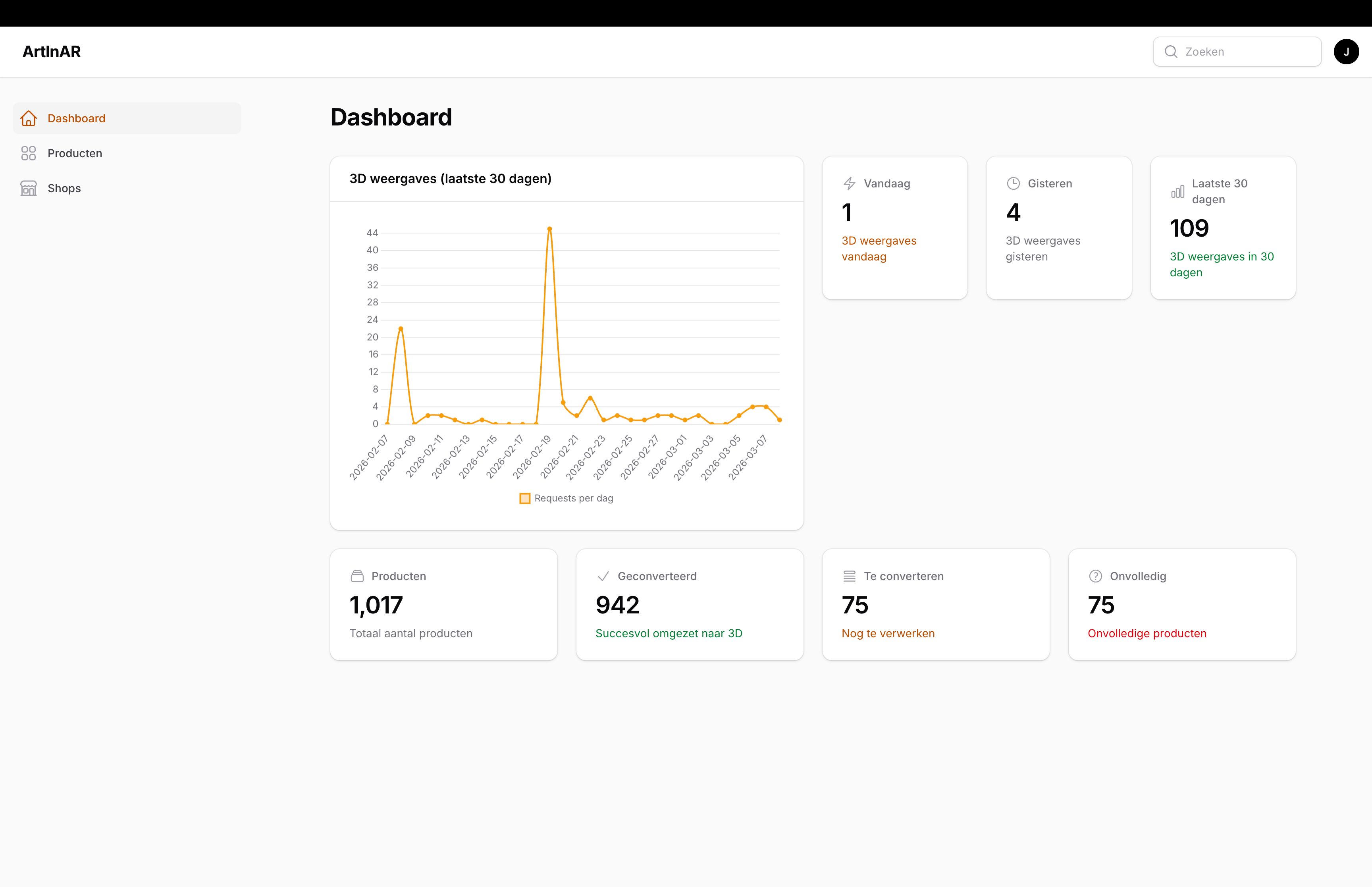


常见问题:
Do I need an account?
No. Activate the plugin, approve the connection once in the setup wizard and your store is connected. No sign-up, no email address and no keys to copy. An email address is optional and only needed if you want to sign in to the ArtInAR dashboard from another device, upload artwork by hand, or move to a paid plan. You can add it at any time without losing anything.
Is ArtInAR free?
Yes, for up to 5 artworks. The free plan has no end date and needs no credit card, and its AR previews stay live on your product pages. The plugin itself is free and open source (GPL). Larger catalogues need a paid plan on the ArtInAR service, because the 3D models are generated and hosted there. See artinar.app for current plans.
What happens when I have more artworks than my plan covers?
ArtInAR converts as many products as your plan holds. The plugin tells you how many were left out and links to the plan picker. Artworks that already have AR keep it.
Do my customers need to install an app?
No. AR runs in the mobile browser using the AR viewer built into the phone: AR Quick Look on iPhone and iPad, Scene Viewer on Android. The visitor taps "View on your wall" and the artwork appears on their wall.
Which phones support AR?
iPhones and iPads with iOS 12 or later, and most Android phones that support Google Play Services for AR (ARCore). That covers the large majority of phones in use. Devices without AR get a 3D preview they can rotate instead, and desktop visitors get a QR code to continue on their phone.
How accurate is the size?
The model is built at the dimensions of your WooCommerce product (Product data → Shipping → Dimensions), in the unit your store uses. As long as those dimensions are right, the artwork appears at its real size. You can also adjust the dimensions per product in the ArtInAR dashboard.
Which photo is used for the 3D model?
By default, ArtInAR compares each product photo's proportions with the product's dimensions and picks the photo that matches the artwork. That way a photo of the work hanging in a room is not turned into a 3D model of that room. You can also pick the photo yourself in the "ArtInAR — image for the 3D model" box in the product editor.
Which of my products are converted to 3D?
The ones in the product categories you tick in the setup wizard. Conversion starts by itself the moment you connect. Tick nothing and every product in your store is included. Because the free plan covers 5 artworks, choosing the category that holds your work makes sure those five go to the right products.
How do I change which products get AR?
Open Settings → Art In AR → Run setup wizard and adjust the categories on the Connect step. Saving sends the new selection to ArtInAR and starts converting straight away. Nothing that was already converted is lost.
Does it work with variable products?
Yes. Each variation can have its own 3D model, for example when you sell the same work in several sizes. The button follows the variation the customer selects.
Does it work with my theme or page builder?
The button is added through a standard WooCommerce hook, which works with most themes. If your theme or page builder (Elementor, Divi, Bricks, a block theme) does not show it where you want it, switch off automatic display and place the [art_in_ar_buttons] shortcode wherever you like.
Will it slow down my product pages?
No. The product page only loads a small script and stylesheet for the button. The 3D model loads only when a visitor opens the preview, on the ArtInAR preview page.
Does it work for visitors coming from Facebook or Instagram?
Yes. The in-app browsers of Facebook and Instagram cannot start AR themselves. The preview page detects this and shows a button that opens the page in the phone's normal browser, where AR works.
Nothing shows on the product page
The button only appears once the product (or, for variable products, the selected variation) has a ready 3D model. Check the AR column in your Products list: "Queued" and "Processing" mean the model is still being made, "Failed" means the conversion did not work; the product editor shows why. If the column shows "No AR yet", make sure the product is in one of the categories you selected in the setup wizard and has a product photo.
Can I change the button position?
Yes. Under Settings → Art In AR you can pick a different WooCommerce hook, or switch off automatic display and use the shortcode.
Can I change how the button looks?
Yes. Under Settings → Art In AR → Appearance you choose the button style (follow your theme, filled, or outlined), an accent colour, the width, and whether an AR icon is shown. Each of these can be overridden for a single placement with a shortcode attribute.
Which shortcode attributes are available?
[art_in_ar_buttons] accepts:
product_id— which product to show, so you can place the button on a page, post or template instead of only on the product page. Defaults to the current product.text— the button label for this placement.style—theme,filledoroutline.color— accent colour as a hex code, for example#4f39f6.width—fullorauto.icon—yesorno, to show the AR icon on the button.qr—yesorno, to show the QR code on desktop.qr_titleandqr_note— the texts around the QR code.qr_color— the colour of the code itself as a hex code. Defaults to the accent colour, then to black.qr_bg— the background behind the code: a hex code, ortransparent.qr_size— how large the code appears, in pixels (120–400).qr_style—rounded,square,dotsorclassy.qr_logo— URL of a small logo to place in the middle of the code.fallback— the text shown when neither AR nor the QR code is available.class— extra CSS classes on the wrapper.
[art_in_ar_buttons product_id="123" style="filled" color="#4f39f6" width="auto"]
Anything you leave out follows your site-wide settings, so several placements can each look different on the same page. The settings screen lists every attribute, including the QR-card ones.
Can I change how the QR code looks?
Yes. Under Settings → Art In AR you set the shape of the code, its size, colour (or a gradient), background, corner colour and an optional logo in the middle, plus the card around it: background, text colour, border, corner radius and shadow. A live preview shows the result as you type, and you get a warning when a colour combination is too light for phone cameras to read.
Will a logo in the QR code stop it from scanning?
Not if you keep it modest. The plugin raises the error correction level as soon as a logo is set and keeps the logo to under a third of the code's width. A simple, square, high-contrast logo works best. Always scan the result with a real phone before you leave it live. If the logo image cannot be loaded, the code is drawn without it.
Can I customise the output in code?
Yes. The plugin exposes five filters: artinar_should_display (render this placement at all), artinar_preview_url (the AR URL for a product), artinar_button_text (the label, per product), artinar_settings (all resolved settings for one placement) and artinar_markup (the final HTML).
Where is the AR preview URL stored?
In the product meta field art_in_ar_preview_url (the key can be changed under Settings → Art In AR). ArtInAR fills it automatically. The value is read with get_post_meta(), so an ACF field with the same key works too.
How do I disconnect?
Deactivate the plugin, and revoke the ArtInAR key under WooCommerce → Settings → Advanced → REST API. ArtInAR can then no longer read your products.
Does the plugin track my visitors?
No. The plugin adds no tracking, no ads and no external scripts to your product pages, and the QR-code library is bundled with the plugin. What the plugin does send to the ArtInAR service, and when, is listed under "External services" below.
更新日志:
- Your house style in two clicks. Under Settings → Art In AR you now pick your brand colour and one of five styles — Soft, Minimal, Bold, Dark or Classic. That fills in the QR code and card colours in one go, and the live preview shows the result before you save. Every setting stays adjustable afterwards.
- The ring and the pulse around the QR code now follow the colour of the code, so they sit naturally inside a tinted card.
- The AR button switches to dark text on a light brand colour such as yellow, where white text was hard to read.
- The "ArtInAR is almost ready" notice now has a Dismiss button. Once you dismiss it, it stays away for your user account; you can still open the setup wizard from Settings → Art In AR.
- The AR button no longer overflows its column when set to full width in block themes such as Twenty Twenty-Five.
- Tested with WordPress 7.1 and WooCommerce 11.1.
- The setup wizard page now carries its own title, so it no longer triggers a PHP deprecation notice on recent PHP versions.
- Connecting now goes through WooCommerce's own approval screen. Instead of the plugin quietly creating an API key on your behalf, WooCommerce asks you to approve the connection and shows exactly what is being granted. The key is generated by WooCommerce and handed straight to ArtInAR, so it never travels through a form — and you can revoke it any time under WooCommerce → Settings → Advanced → REST API, where it now appears like any other connected app.
- Your category selection travels along with the approval, so the first conversion still starts on the products you picked.
- Nothing changes for stores that are already connected; existing keys keep working.
- The QR card is yours to design. Under Settings → Art In AR you now set the card's background, text colour, border, corner radius and shadow, and you can switch off the pulsing ring around the code. Until now the card was always a white box with a hairline border and a soft shadow, which sat awkwardly inside a dark or minimal theme.
- You can see what you are choosing. The settings screen shows a live preview of the card, drawn by the same code your shop uses, and it updates as you type — no more saving and jumping to a product page to find out what a colour looks like.
- Choose where the code sits. Pin the card to a single column or to a row at every width, and align its contents left, centred or right.
- Show both, if you want both. A computer can now show the button next to the code, opening the 3D preview on the big screen, and a phone can show the code next to the button.
- Richer codes. A second colour fills the code with a gradient, and the three corner markers can take a colour of their own. The corner markers stay flat whatever you pick, because a camera locks onto those first. One click also drops your site logo into the middle of the code.
- Fixed: the QR size setting did nothing on desktop. The code was pinned to 150 pixels on screens wider than 600px — exactly where the code is shown — so raising the size only ever had an effect on a narrow window. It now follows the size you set.
- Every new setting also works per placement as a shortcode attribute; the settings screen lists them all.
- You choose which photo becomes the 3D model. Products with more than one image now have an "ArtInAR — image for the 3D model" box in the product editor, where you pick the photo the model is built from. Until now the featured image was always used, so a shop that leads with a photo of the artwork hanging in a room ended up with a 3D model of that room.
- Products you never touch get fixed by themselves. Left on "Automatic", the platform compares each photo's proportions with the product's width and height and picks the one that matches — a photo of the artwork itself is cropped to its real proportions, a room shot almost never is. Your featured image is only passed over when it clearly does not fit and another photo clearly does.
- Your choice is also visible and editable in the ArtInAR dashboard; both sides write to the same product setting.
- Changing the image starts a new 3D conversion automatically.
- The desktop QR code is now yours to style. Under Settings → Art In AR you choose its shape (rounded, square, dots or classy), how large it appears, its colour and its background — and every one of those also works per placement as a shortcode attribute:
qr_style,qr_size,qr_color,qr_bg. - You can put your logo in the middle of the code. Pick it from your media library; the code's error correction is raised automatically so it still scans, and if the image cannot be loaded the code is drawn without it rather than not at all.
- The QR code no longer has to be your button's accent colour. It used to take that colour whatever it was, so a shop with a light accent published a code that phone cameras could not read. It now has its own colour setting, and the settings screen warns you when the combination is too light to scan.
- The code is drawn at twice its displayed size, so it is sharper on high-density screens.
- All new texts are translated into the 13 bundled languages.
- The plugin has a new name: "AR for WooCommerce – Augmented Reality & 3D Product Viewer for Art (ArtInAR)". It is the same plugin by the same author — nothing about your setup, settings or AR previews changes. The old name said "2D to 3D Art", which described the technique rather than what the plugin is, so shop owners looking for augmented reality for WooCommerce never found it. Inside WordPress you will still find it under Settings → Art In AR.
- Tested with WordPress 7.0.3.
- The setup wizard now picks up where you left off. Reopening it dropped you back at step one, even on a store that was set up months ago. It resumes at the step you reached, and the step bar is clickable so you can go back.
- The final step tells you what is actually happening. It used to guess: two hours after connecting it flipped to "no products have AR yet" and told you to upload artwork by hand, even while conversion was still queued. It now shows real progress ("3 of 12 done"), and says so plainly when something is stuck, when a product has no usable image, or when your keys were refused.
- Fixed: the heading said "You're all set" while the line right below it warned that nothing had AR yet. The heading now matches the actual state.
- Fixed: "Check again" showed the same cached numbers for up to twelve hours. It now fetches fresh status.
- Every step explains what it does and why. The difference between connecting your store and choosing which products get AR was easy to miss — they are one step, and the wizard now says so.
- Products without a SKU are no longer skipped. A SKU is optional in WooCommerce and art shops often leave it empty, which silently kept whole catalogues out of AR.
- The free plan now covers 5 artworks instead of 10.
- At the end of setup, a short note on what a paid plan adds — with a "Keep it simple" link for anyone who would rather not see it again.
- All new and changed texts are translated into the 13 bundled languages.
- The AR button now matches your shop. New appearance settings under Settings → Art In AR: pick a button style (follow your theme, filled, or outlined), a width, an accent colour, and whether the AR icon shows. Leave the colour empty and the button keeps using your theme's own colours.
- Every one of those settings can be overridden per placement with a shortcode attribute, so a button in a sidebar can look different from the one on the product page.
- The
[art_in_ar_buttons]shortcode now takes a product, so you can place the AR button on pages, posts and templates instead of only on the product page itself. - Choose which products get AR. The setup wizard now asks which product categories to convert. Only those are sent to ArtInAR — handy because the free plan covers 10 artworks, and this makes sure they go to the work you actually want to show in AR. Tick nothing to convert everything.
- While conversion is running the wizard says so, instead of showing an empty result: the AR button appears on each product as its model becomes ready.
- All 36 new texts are translated into the 13 bundled languages.
- No account needed to get started. The setup wizard used to ask for an email address before it would do anything, which is exactly where most people stopped. One click now connects your store, converts your first artworks and puts the AR button live. Nothing to sign up for, nothing to copy.
- An email address is now optional and asked for later — once you have seen AR working on your own shop — because that is all it is for: signing in to the dashboard from elsewhere, uploading artwork by hand, or moving to a paid plan. Adding it later keeps everything you already have.
- Translated all the new wizard texts into the 13 bundled languages.
- Fixed: the button text, fallback text and QR texts now follow your site language. They were saved in English when the plugin was activated — before the plugin's own translations were loaded — so shops in the other twelve bundled languages saw English texts even though the translation was there. Already have those texts saved? Clear the field under Settings → Art In AR to get the translated default back.
- The setup wizard and the settings screen now show the default text as a greyed-out placeholder instead of filling it in. That keeps the text following your site language, so it stays correct if you ever switch languages.
- Clearer about pricing: the description and a new FAQ entry now state up front that the free plan covers 10 artworks, has no end date and needs no credit card.
- Added a one-time, dismissible review request that appears only after your store is connected and already has an AR-ready product — a gentle nudge at a good moment, never incentivised.
- Sharpened the description and FAQ for discoverability, and translated the new texts into all 13 bundled locales.
- You can now see each product's AR status directly in WordPress: a new "AR" column in the Products list and a status indicator in the product editor (AR ready / processing / queued / failed / no AR yet), so you no longer need to open the ArtInAR dashboard to check where a product stands.
- Translated the new admin texts into all 13 bundled locales.
- Added six new bundled translations: Brazilian Portuguese (pt_BR), Japanese (ja), Polish (pl_PL), Swedish (sv_SE), Danish (da_DK) and Russian (ru_RU). ArtInAR now ships in 13 locales.
- Confirmed compatibility with the latest WordPress (7.0.2) and updated the WooCommerce compatibility to the current 10.9 release line.
- The desktop QR code is now enabled by default, so visitors on desktop can immediately scan to view artwork in AR on their phone. You can still turn it off under Settings → Art In AR.
- When connecting your store, your WordPress site title is now sent as the shop name in ArtInAR.
- The setup wizard now shows which ArtInAR plan your store is on and how many of its products are in use.
- Added a notice for when your plan is full. ArtInAR only converts as many products as your plan holds; until now the artwork that didn't fit was skipped without WordPress telling you. The notice reports how many were left out and links straight to the plan picker.
- Tested for compatibility up to WordPress 7.0.2.
- Added a setup wizard that opens on activation: start a free demo and connect your store to ArtInAR (one-click, email only — it provisions the account and creates the WooCommerce REST key automatically), choose how the button is displayed, and see a final readiness check.
- Added a "Setup" link on the Plugins screen and a "Run setup wizard" button on the settings page.
- Added translations for French (fr_FR), Spanish (es_ES), Italian (it_IT) and Portuguese (pt_PT), and refreshed the Dutch and German translations. Bundled translations are now loaded for self-hosted installs.
- The button and QR code now link to a hosted AR preview page (interstitial) via a per-product
art_in_ar_preview_urlmeta key, instead of launching native AR directly. On-boarding and the 3D/AR experience now live on that page. - Settings: replaced the GLB/USDZ meta keys with a single "Preview URL meta key".
- Removed the in-plugin native AR launch and QR hash auto-open (now handled by the preview page).
- QR fallback redesign to boost AR engagement: larger, more scannable QR code, a product image teaser with an AR badge, a benefit-led default title, and an attention-drawing pulse.
- Fixes for WooCommerce
- Add support for WooCommerce variable products: AR/3D models can now be set per variation.
- Refactor model URL retrieval into a reusable helper method.