
Askledge
| 开发者 | abourri |
|---|---|
| 更新时间 | 2026年9月27日 07:23 |
| PHP版本: | 7.4 及以上 |
| WordPress版本: | 7.1 |
| 版权: | GPLv2 or later |
| 版权网址: | 版权信息 |
详情介绍:
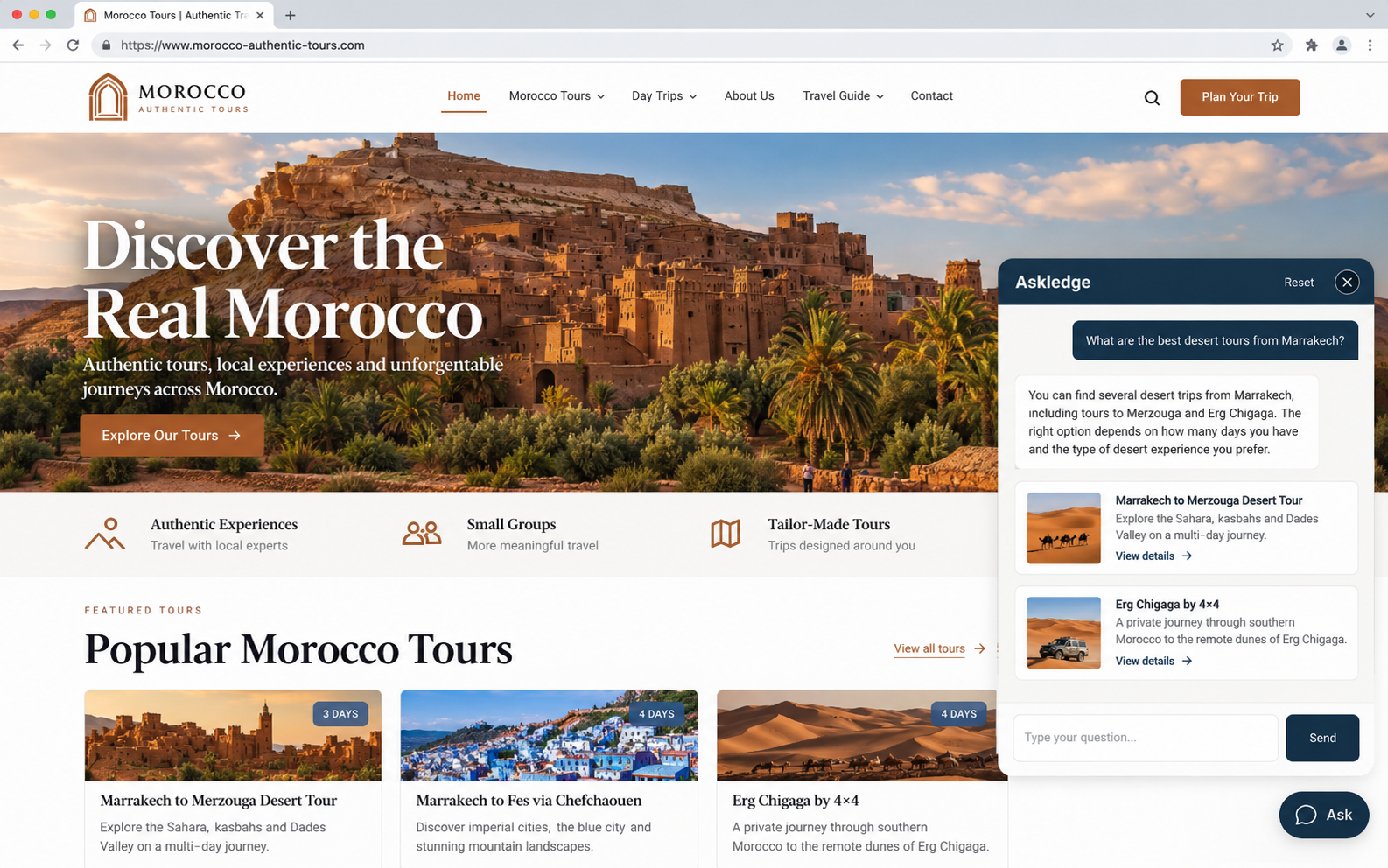
- Curated Answers — rich answers you design yourself: plain text, numbered steps, cards (typed by hand or picked from your own posts, pages or products), or a set of links, each with an optional button. Stored as structured data and drawn by the plugin, so no admin-entered HTML is ever placed on the page.
- Manual Q&A — question and answer pairs you type on one line each, returned exactly as written.
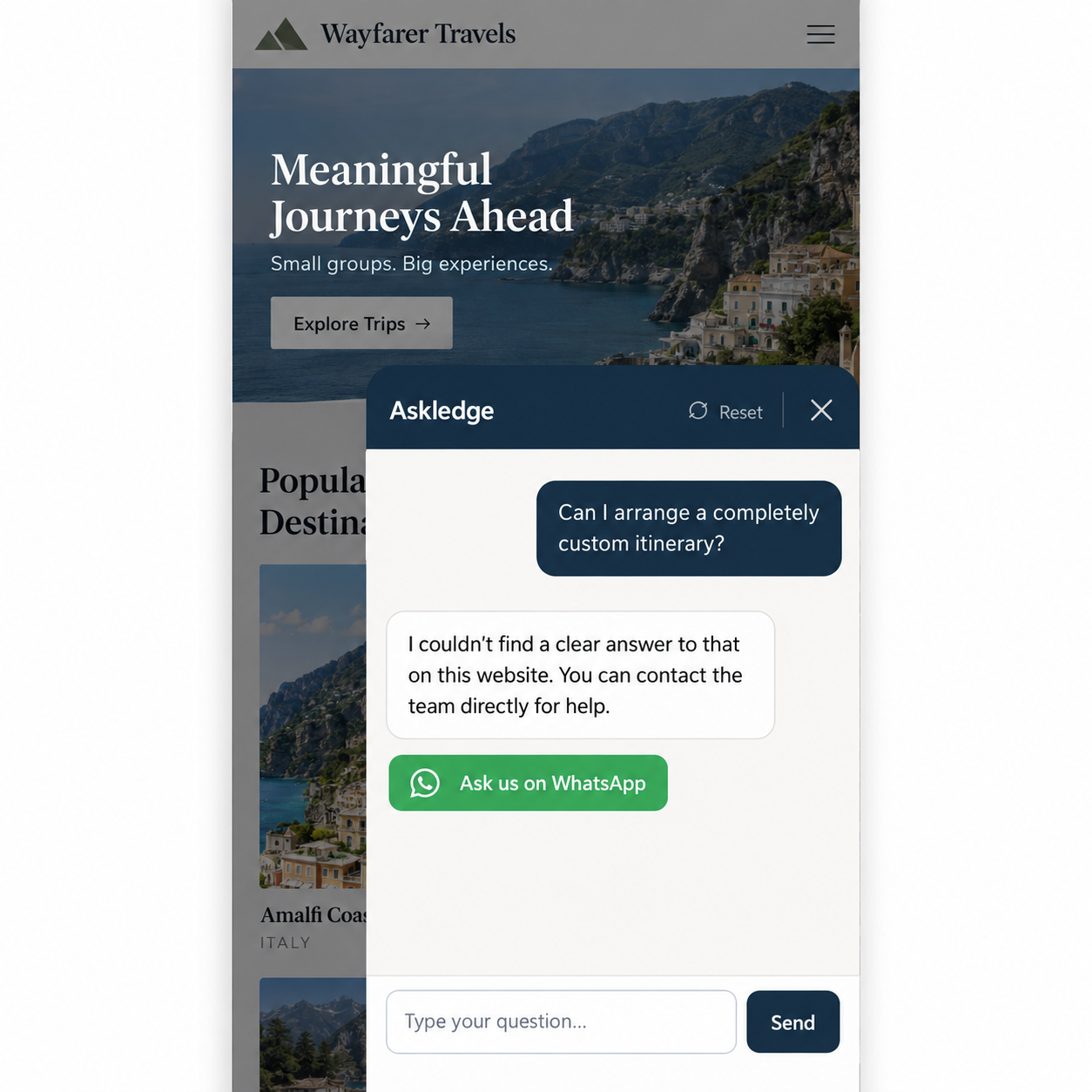
- Human handoff — a visitor asking for a person gets your configured contact actions: email, telephone, WhatsApp, a contact page or a custom link. Existing WhatsApp settings remain supported.
- Local answers — for common questions (contact details, location, opening hours, what you offer, prices, what the site is about) the facts are read out of your own pages. Recognised in English, French, Spanish and Arabic. Entirely on your server.
- Search — the question is matched against your content index and answered with the best-matching page and a ranked list of links, each with an excerpt.
- It never searches the web and never calls an external search service.
- It never answers from an AI model's general knowledge — only from your indexed excerpts, which are treated as data, never as instructions.
- Every link it shows is a real WordPress permalink from your own site.
- It indexes no ACF field until you tick that specific field, and field or post-type names that look like personal or order data (password, email, phone, token, customer, order, invoice, booking, payment…) can never be selected at all.
- Works with any public custom post type registered on the site, with no prior knowledge of it.
- Polylang-aware: content is indexed per language, with a setting for whether another language may be used when nothing matches.
- Arabic-aware text normalisation, plus RTL support throughout.
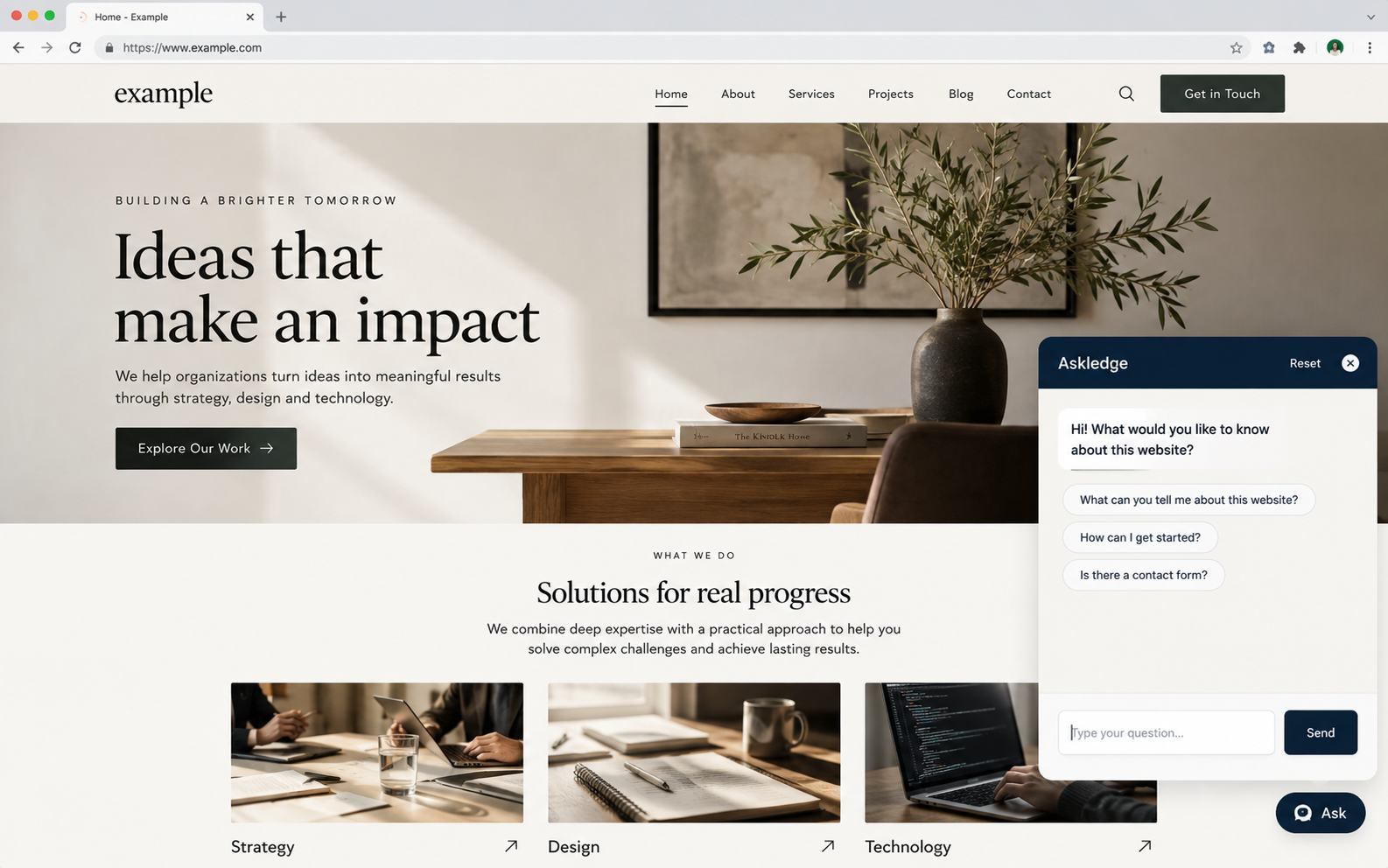
- Placement: a floating "Ask" button site-wide, the
[askledge]shortcode, the native Askledge block, or the Askledge widget under Appearance → Widgets. Display Rules control where each appears. - Optional, off-by-default question log: question text, language, and whether it was answered. No IP address, no user id. A short-lived salted hash of the IP is used for rate limiting only, and is never stored in the log.
- API keys are stored with AES-256-GCM authenticated encryption derived from the site's own salts. If that is unavailable on the host, the plugin refuses to save a key rather than storing it more weakly.
- Resumable indexing in bounded batches with a database lock, and automatic re-indexing when content is published, updated, trashed or excluded.
安装:
- Install through Plugins → Add New, or upload the ZIP under Plugins → Add New → Upload Plugin.
- Activate Askledge.
- Go to Askledge → Overview and switch the assistant on. Nothing else is required: the default answer mode is Search, which needs no key and no account.
- Go to Content Sources, tick the post types and taxonomies the assistant may read (and, if you use ACF, the individual fields), then press Build index. Press Rebuild index after changing these choices.
- Optional: under Curated Answers, write the answers you want returned first, and mark any you want offered as buttons when the assistant opens.
- Optional: under Human Handoff, configure contact actions so a visitor can reach a person.
- Optional: under Answers & Behaviour, switch to Composed by AI and enter the address, key and model of the service you have chosen, then use Test connection.
屏幕截图:
常见问题:
How do Display Rules work?
Entire site includes archives and singular content. Selected content includes the chosen public post types OR explicit pages/posts. Exclusions always win. Rules also apply to the block, shortcode and classic widget, and prevent frontend assets loading on excluded pages. They are placement rules, not access control for the public chat endpoint.
What happens during an interrupted index build?
The cursor and progress are saved after each post. Build/resume continues from that position; Rebuild starts a new pass without emptying the live index. Batches pause when the admin page is closed. MySQL/MariaDB connection locks serialize writes. Custom donated extra documents retain the existing extension contract.
How do I configure proxies or a private AI endpoint?
Forwarded headers are ignored by default. Trusted server integrations can use askledge_client_ip or askledge_rate_limit_identifier; only accept forwarding headers from a verified proxy. Private AI endpoints require the explicit advanced opt-in. HTTPS remains required except for loopback development endpoints. Redirects never receive the API key.
What do analytics and conversation context store?
Anonymous counters and feedback are optional and off by default. They count questions, outcomes, source post IDs and contact usage without storing question text or visitor identifiers. Signed feedback receipts are single-use and expire after one hour. Rate-limit hashes and used receipts are purged by daily cron after expiry. The separate optional question log retains its existing controls. The last three recognized intent names live only in each widget on the current page and are cleared by Reset or navigation.
What does JSON export include?
Settings and curated answers with schema askledge/config version 1. Keys, AI endpoints, private-endpoint permission, logs and analytics are excluded. Import needs explicit confirmation, validates values, and retains the site's current AI credentials and private-network permission. Content IDs refer to this WordPress site's posts: review selectors/cards when moving to a different site, then rebuild the index.
Which hooks can integrations use?
askledge_avoid_selectors receives an array of CSS selectors. askledge_client_ip and askledge_rate_limit_identifier integrate verified proxies. askledge_intent_languages extends supported language codes; the existing site_answers_intent_dictionaries, site_answers_intent_registry, site_answers_intent_retrieval_terms and site_answers_followup_markers extend language vocabulary. Existing site_answers_* public hooks and shortcode aliases remain available.
Do I need an API key or an AI account?
No. The default Search mode answers entirely from your own indexed content. A key is only needed if you deliberately switch to AI mode, and the service is your choice.
Where do the answers come from?
From the content you selected under Content Sources, from the Curated Answers and Manual Q&A pairs you wrote yourself, and from nowhere else.
What happens if the answer isn't on my site?
The assistant shows your configured "not found" message and, if you have configured a contact action and left the no-answer handoff on, buttons to reach you. It never invents an answer, a price, a date or a link.
Are my ACF fields indexed automatically?
No. ACF inclusion is off by default, and even once switched on only the individual fields you tick are ever read. Field names that look personal or sensitive can never be selected.
Can order, booking or customer data be indexed?
No. Post types whose name contains patterns such as order, booking, customer, cart, payment, invoice, user or subscription are permanently excluded from the picker, regardless of settings.
Does it work with WooCommerce?
Yes. With WooCommerce active and product selected under Content Sources, each product's title, price, descriptions and visible attributes are indexed.
Does it work with Polylang?
Yes. Each post is indexed under its own language, and a setting controls whether the assistant may fall back to another language.
I was using the plugin under its previous name. Will I lose anything?
No. Settings, Curated Answers, Manual Q&A, the API key, the content index, the question log and widget instances are all kept. The [site_answers] and [site_knowledge_assistant] shortcodes keep working as aliases of [askledge].
更新日志:
- Verified compatibility with WordPress 7.1.2.
- Fix classic widget output handling and namespace warnings in admin views.
- Cache aggregate displays and document required atomic/schema queries.
- Remove the development release report from the installation package.
- Generic mobile bottom-element collision detection, custom selectors and integration filter.
- Searchable display inclusion/exclusion rules covering every placement.
- Contact page, email, phone, WhatsApp and custom URL actions with a primary action.
- Native dynamic Gutenberg block with title, suggestions and wide/full alignment.
- Optional first-install setup, protected answer test console and copyable diagnostics/Site Health.
- Resumable ID-cursor index batches with server-side progress and serialized writes.
- Atomic per-site rate-limit buckets and trusted-proxy integration filters.
- HTTPS endpoint validation, private/reserved-address checks, safe HTTP requests and no redirects.
- Dedicated manage_askledge capability, granted automatically to administrators.
- Readable accent foregrounds, placement controls, scoped temporary intent history and Reset.
- Optional anonymous aggregate analytics and signed, single-use helpfulness feedback.
- Versioned JSON configuration and curated-answer import/export, excluding AI credentials.
- Per-site network initialization and network deactivation/uninstall cleanup.
- Preserve existing hooks, settings, index data, curated answers and shortcode aliases.
- DB schema 1.6.0 adds site_answers_limits and site_answers_metrics only.
- Renamed to Askledge. The plugin slug and text domain are now
askledge, and[askledge]is the shortcode. Nothing you have configured changes: settings, Curated Answers, Manual Q&A, the stored API key, the content index, the question log and widget instances are all kept under their existing names, and the[site_answers]and[site_knowledge_assistant]shortcodes still work. - Security: a Curated Answer is now rebuilt field by field from its known schema immediately before it is saved, after any
site_answers_curated_sanitize_itemfilter callback has run. Previously a callback on that filter could return data that had not been through the plugin's own sanitisers, and it would be stored as returned. - Security: every settings field is now reduced to a value of its expected type before a WordPress sanitiser sees it, so a field submitted as an array (
welcome_message[]instead ofwelcome_message) is discarded instead of raising a PHP warning. Saving settings also discards any submitted key that is not one of the plugin's own settings. - Security: the values returned by the
site_answers_curated_types,site_answers_curated_payload,site_answers_small_talk_contact_actionandsite_answers_allowed_answer_languagesfilters are validated before use. In particular the human-handoff button's URL is re-checked against the http/https allow-list after filtering, since it becomes a link a visitor is invited to click. - The settings form now verifies its nonce before anything else about the request is read.
- Fixed a PHP warning when the classic widget was saved with no title, and when a theme called the widget without the standard wrapper arguments.
- Rewrote readme.txt: a short description within the directory's length limit, a description that explains where answers come from and how to configure a fresh installation, and a single changelog.
- The floating button no longer sits on top of a theme's fixed booking bar on a phone. When a bar is on screen the widget measures how much of the bottom edge it occupies — from the bar's own box, so its height is never assumed — and keeps the button 16px above it; the answer sheet rests on the bar's top edge rather than covering it. When the bar is hidden, slid away, scrolled past, or the visitor is on a desktop, everything returns to its usual place. The bar itself is never restyled and no z-index was raised.
- The measurement is repeated whenever the bottom of the screen can have changed: the bar changing size, being shown or hidden (including by a class on
<body>), appearing on scroll, finishing a transition, being added late, the phone being turned, or the page finishing loading. No polling and no timers. - If scripts are deferred or delayed, the button already avoids a booking bar on the first paint, from CSS alone, until the real measurement replaces that estimate.
- First version of the booking-bar avoidance described above.
- AI mode is now vendor-neutral. No AI company's address is built into the plugin: you enter the endpoint, key and model name of whichever service you have chosen — hosted, a gateway, or a model on your own server. Out of the box it connects to nothing. If you were using the previous build's built-in provider choice, open Answers & Behaviour once and enter your service's endpoint address; your key and model are kept. Two filters,
site_answers_ai_request_bodyandsite_answers_ai_request_headers, tune the request for a service that needs it. - WhatsApp when there is no answer: a question the assistant cannot answer now shows your "not found" message with a WhatsApp button underneath. Off with one switch, and never shown unless a valid number is saved.
- The handoff button's text can be your own wording, and the WhatsApp message it opens with can be pre-filled, including the visitor's own question via a
{question}placeholder. Both are registered with Polylang's String Translations, and both are empty on a fresh install. - Analytics counts a visitor as having gone to WhatsApp only when the button is clicked, never because it was shown, and counts it beside the answered/unanswered split rather than inside it. The click sends only a signed reference to the question just asked.
- Redesigned settings screen: eight named sections in a card layout, with a short description under every setting and settings that appear only once the option they depend on is on. No framework and no web font.
- Overview: a readiness checklist and an at-a-glance summary.
- Unanswered questions are grouped by question and language, ordered by demand, each with a "Create answer" button that opens the Curated Answers form pre-filled.
- Appearance preview: a live impression of the widget, updating as you type.
- Upgrading changes nothing you have configured; the question log gains one column in place.
- First public release.
- Answers visitor questions strictly from the site's own indexed content — posts, pages, any public custom post type, WooCommerce products, taxonomy terms, and only the ACF fields explicitly ticked.
- Search by default: no AI, no API key, no external request.
- Local answers for common questions (contact details, location, opening hours, offerings, prices, what the site is about) in English, French, Spanish and Arabic, read out of the site's own pages.
- Curated Answers: text, numbered steps, cards or links, matched before anything else, with optional suggested-question buttons.
- Manual Q&A: exact answers for exact questions, returned verbatim.
- Human handoff to WhatsApp, offered only when a number is configured.
- Optional AI mode, off by default.
- Mobile: the assistant opens as a half-height bottom sheet; follows the visible area when the keyboard opens; RTL and safe-area aware.
- Privacy: question logging off by default and never recording an IP address or user id; API keys stored with AES-256-GCM encryption; a suggested paragraph added to the site's Privacy Policy page.