AstrologyAPI
| 开发者 | vivekrt9 |
|---|---|
| 更新时间 | 2026年10月15日 14:26 |
| PHP版本: | 7.4 及以上 |
| WordPress版本: | 7.1 |
| 版权: | GPLv2 or later |
| 版权网址: | 版权信息 |
详情介绍:
- Horoscopes – daily (today / tomorrow / yesterday), weekly and monthly sun-sign horoscopes with a zodiac sign picker. Server-rendered and SEO friendly.
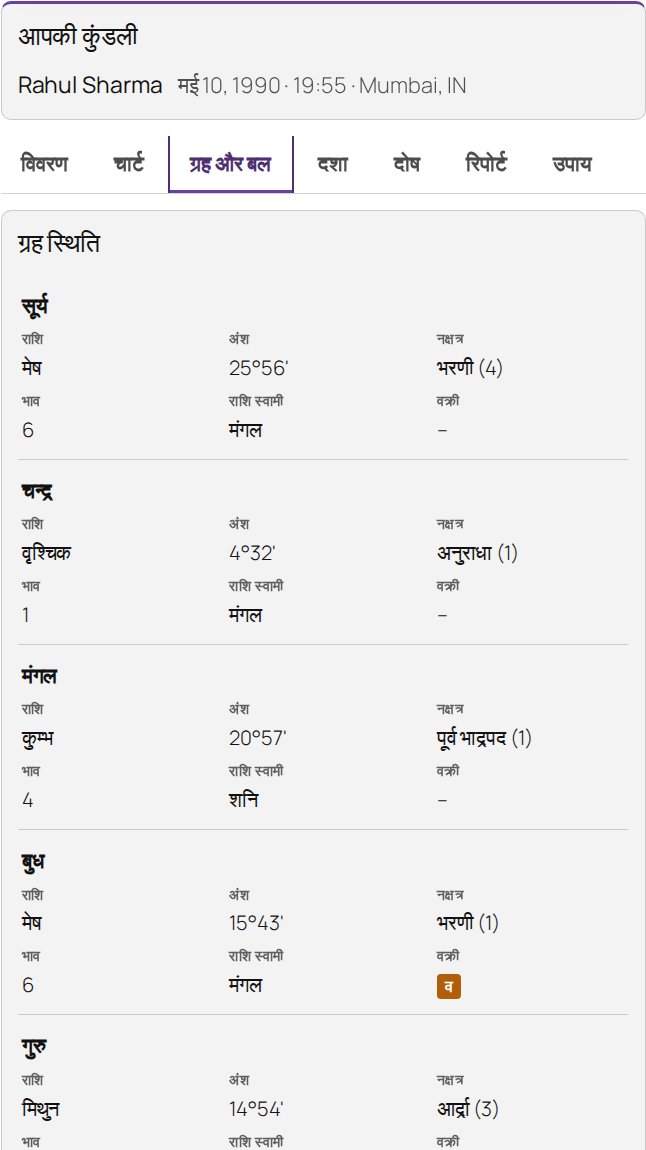
- Kundli / birth chart – Basic, Advanced or Custom reports: birth details, Lagna & Navamsa (and other divisional) charts, planets, Vimshottari / Yogini / Char dasha, Manglik, Kalsarpa, Sadhesati, Pitra dosha, ashtakvarga, shadbala, gemstone, rudraksha and puja suggestions — in tabs or an accordion.
- Kundli matching – Ashtakoot (36 guna) milan with a score ring, match summary, Rajju/Vedha dosha and Manglik comparison.
- KP astrology – KP chart, cusps with star, sub and sub-sub lords, planets and significators.
- Lal Kitab – kundli, planets, houses, ancestral debts (Rin) and remedies.
- Varshaphal – annual horoscope with year and monthly charts, Mudda dasha, Tajik yogas, sahams and strength.
- Hora & Chaughadiya – today’s (or any date’s) muhurta, with the running period highlighted.
- Western natal chart – natal wheel, planets, houses, aspects, chart balance (elements, modes, hemispheres), personality and romantic reports, planets in signs and houses, today’s and this week’s transits, life forecast.
- Solar return – solar return chart, aspects to the natal chart and yearly forecast.
- Love compatibility (synastry) – love, karma & destiny, friendship and couple forecast reports, synastry aspects and composite chart.
- Western numerology – life path, expression, soul urge, personality, subconscious self, challenge numbers, personal day and month.
- Moon phase – today’s phase drawn to scale, illumination, moon sign and distance.
- Chinese zodiac – animal sign, element, traits and this year’s forecast.
- Numerology – radical, destiny and name numbers, favourables, report and daily prediction.
- Tarot – a fanned deck with card-flip reveals for three-card (love, career, finance) and yes/no readings; use your own card artwork.
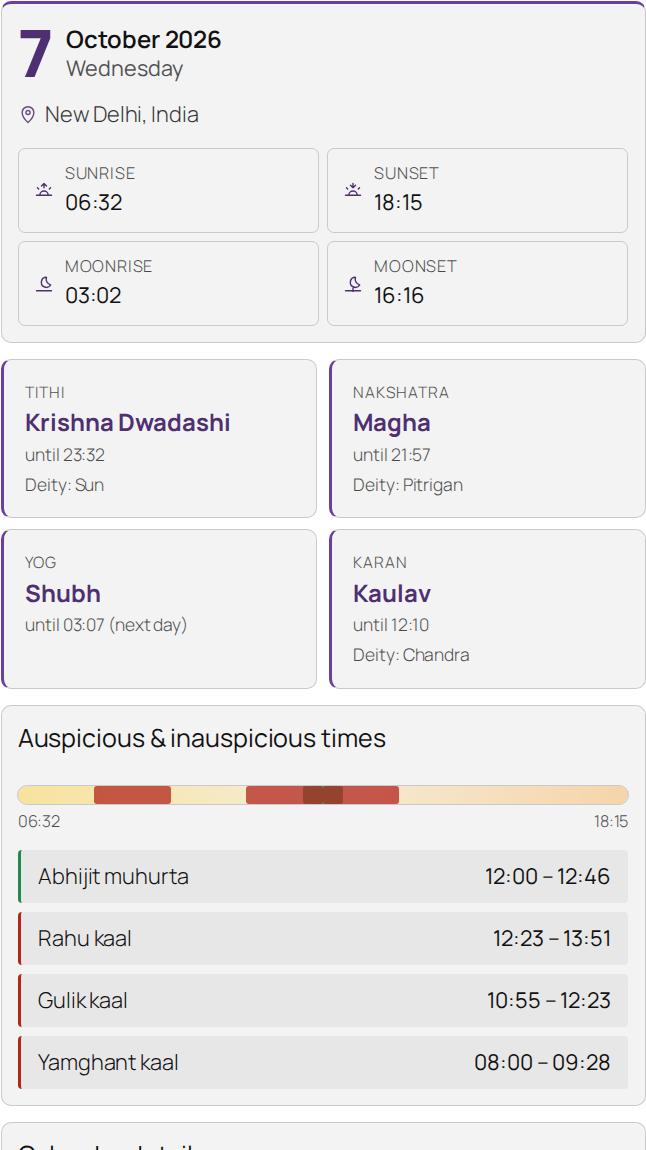
- Panchang – today’s panchang or a date & place picker, in three styles (cards with a day timeline, classic table, compact widget).
- PDF reports – 12 branded PDF reports with your logo and contact details. Vedic: basic, mini and professional horoscope, match making, gemstone, numerology and Varshaphal. Western: natal horoscope, solar return, life forecast, synastry (couple) and star sign compatibility. Visitors can pick the chart style (Vedic) and the PDF language where the report supports it. Optional email delivery.
- Sell reports with WooCommerce – link a product to a report; the PDF is generated automatically after payment and delivered on the order page and in the order email.
- 8 languages – English, Hindi, Marathi, Bengali, Tamil, Telugu, Malayalam, Kannada (site-wide default plus a per-shortcode override).
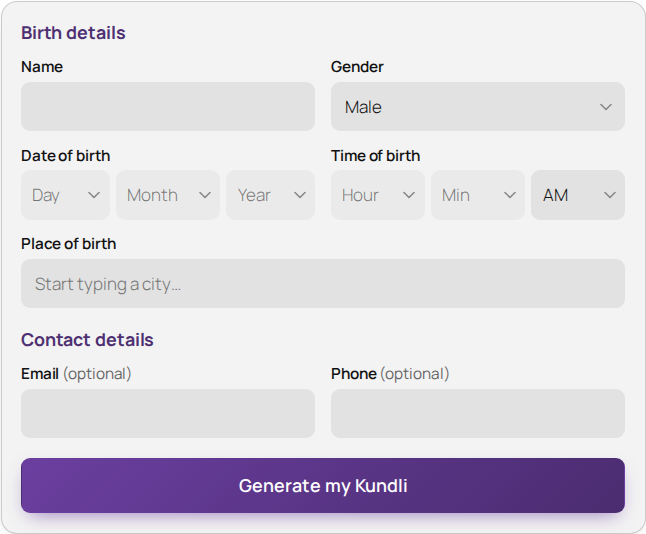
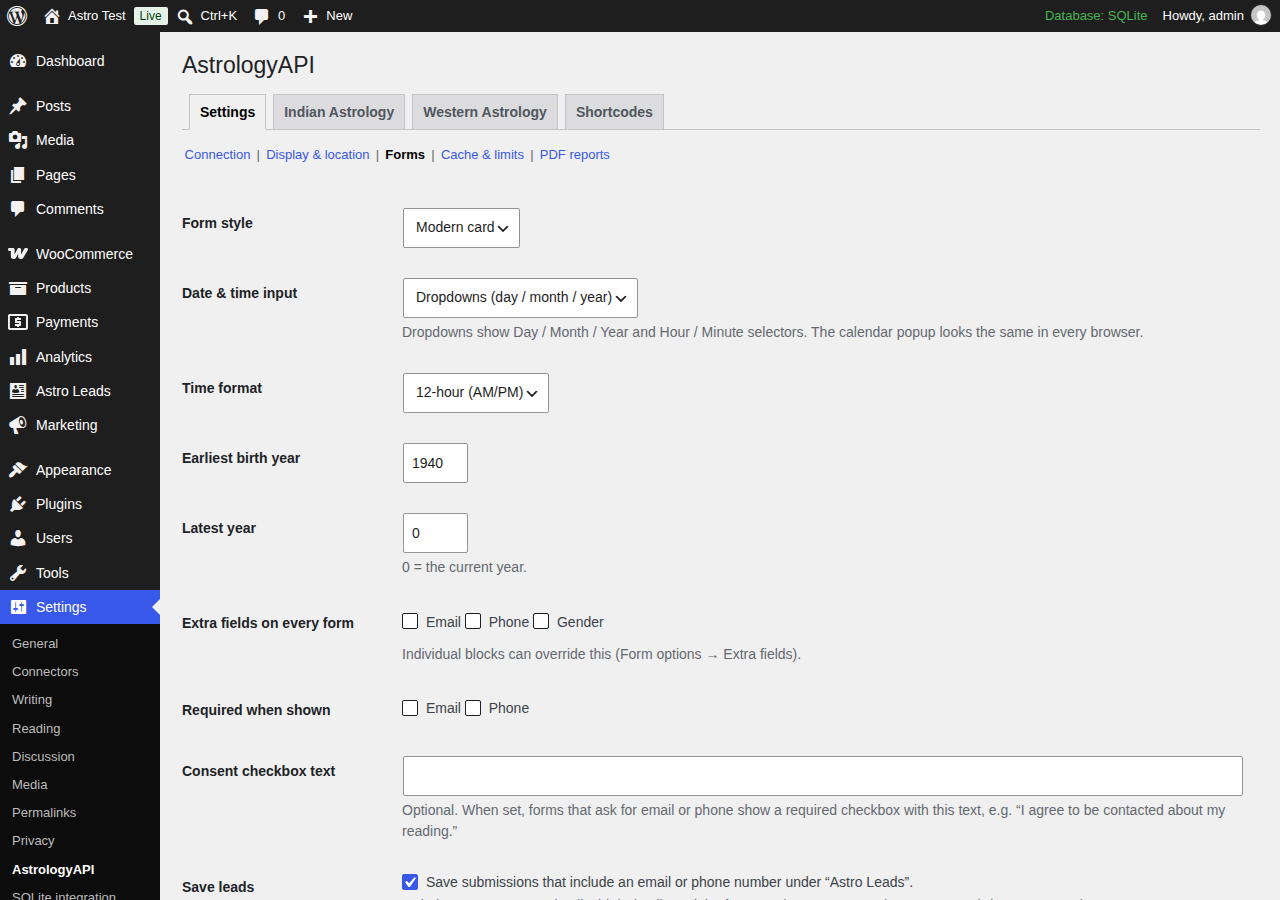
- Form styles & lead capture – Modern card, Classic or Minimal forms; day/month/year dropdowns, a calendar popup or browser pickers; optional email, phone and gender fields saved as private leads you can export as CSV.
- Place autocomplete with automatic, DST-aware time zones.
- Works with every theme and page builder – shortcodes plus native Gutenberg blocks; styles inherit your theme’s fonts and colours.
- Credit saver – smart caching (daily content until midnight, birth charts for days) and per-visitor rate limiting.
- Secure – your API credentials stay on your server; the browser only talks to your own site.
- Developer friendly – override any template from your theme, plus filters for requests, responses and template data.
- Demo mode – build and style your pages with sample data before you subscribe.
[astrologyapi_horoscope] · [astrologyapi_kundli] · [astrologyapi_matchmaking] · [astrologyapi_kp] · [astrologyapi_lalkitab] · [astrologyapi_varshaphal] · [astrologyapi_panchang] · [astrologyapi_muhurta] · [astrologyapi_numerology] · [astrologyapi_natal] · [astrologyapi_solar_return] · [astrologyapi_synastry] · [astrologyapi_western_numerology] · [astrologyapi_moon_phase] · [astrologyapi_chinese] · [astrologyapi_tarot] · [astrologyapi_pdf_report]
Every attribute is documented under Settings → AstrologyAPI → Shortcodes. Examples:
[astrologyapi_horoscope sign="leo" period="weekly"]
[astrologyapi_kundli sections="basic,chart,dasha" charts="D1,D9" pdf="yes" lang="hi"]
[astrologyapi_pdf_report type="pro" product_id="123"]
安装:
- Install and activate the plugin.
- Go to Settings → AstrologyAPI → JSON API Settings and enter your User ID and API key (or access token) from your AstrologyAPI.com dashboard. Click Test connection. If your PDF plan has its own credentials, enter them under PDF API Settings.
- Add a block from the AstrologyAPI block category, or paste a shortcode into any page.
屏幕截图:
常见问题:
Do I need an AstrologyAPI.com account?
Yes. The plugin displays data from the AstrologyAPI.com service, which requires a paid plan. Demo mode lets you try everything with sample data first.
Will it work with my theme / page builder?
Yes. Shortcodes work in any theme, widget area or page builder (Elementor, Divi, Beaver Builder, etc.), and there is a native block for each feature.
How do I change the colours?
Pick an accent colour under Settings → AstrologyAPI → Display. Everything else inherits your theme. For deeper changes use the CSS variables on .aapi or copy a template into yourtheme/astrologyapi/.
How do I sell PDF reports?
Install WooCommerce, create a product, choose a report under Product data → General → AstrologyAPI report, then add [astrologyapi_pdf_report product_id="ID"] to a page. Turn off “Free PDF downloads” so reports can only be bought.
Note: reports are generated when an order reaches Processing. With Cash on Delivery or bank transfer, set orders to Processing only after payment is received. Report links are hidden on unpaid, cancelled or refunded orders.
My site is behind Cloudflare or a proxy — are visitors rate-limited together?
The per-visitor limit uses the connecting IP address. If your site is behind Cloudflare or a reverse proxy, choose where the real visitor IP comes from under Settings → AstrologyAPI → Cache & limits → "Visitor IP comes from". Developers can also use the aapi_client_ip filter. You can raise or disable the limit on the same screen.
Can I keep my API key out of the database?
Yes — define AAPI_USER_ID, AAPI_API_KEY and/or AAPI_ACCESS_TOKEN in wp-config.php. For separate PDF API credentials use AAPI_PDF_USER_ID, AAPI_PDF_API_KEY and/or AAPI_PDF_ACCESS_TOKEN.
Can the labels be in Hindi or another Indian language?
Yes. Set the language in Settings → AstrologyAPI → Display (or per block / lang="hi" on a shortcode). Both the astrology data from the API and the plugin's own labels then use that language. Translations for Hindi, Marathi, Bengali, Tamil, Telugu, Malayalam and Kannada are included in the plugin's languages folder.
Does the plugin store visitors' personal data?
Only if you add email or phone fields to a form (Settings → AstrologyAPI → Forms). Those submissions are saved as private "Astro Leads" visible to administrators, together with the birth details entered. You can turn lead saving off, add a consent checkbox, export leads as CSV, and they are included in WordPress's Export/Erase Personal Data tools. When the plugin is deleted, settings and cached results are removed; leads are removed too if you tick "When the plugin is deleted" under Settings → Forms. Birth details are always sent to AstrologyAPI.com to calculate results (see External services).
更新日志:
- Output is escaped at the point of echo everywhere (report sections, templates).
- PHP 8.4 compatibility for the leads CSV export.
- New PDF reports: Gemstone, Numerology and Varshaphal (Vedic), and Natal horoscope, Solar return, Life forecast, Synastry (couple) and Star sign compatibility (Western) — free or sold through WooCommerce.
- PDF Report block: "PDF language" option (adds Portuguese, German, French, Spanish, Italian and Russian for Western reports); report-year picker for Varshaphal and Solar return; two-person form for Synastry.
- Visitors can choose the chart style (North / South / East Indian) for their PDF report — on the PDF form, next to the "Download PDF report" button and for paid reports. The PDF Branding setting is preselected; turn the choice off per block with
chart_choice="no".
- Settings are now split into "JSON API Settings" and "PDF API Settings". The PDF tab can hold separate PDF credentials (User ID + API key, or access token — or reuse the JSON API ones), plus PDF branding and the free-PDF / email options.
- Security: block settings are now signed, so visitors can only submit birth details — they cannot change which sections, charts, PDF type or form fields a block uses.
- Security: report types sold through WooCommerce are never given out as free PDFs; report links are hidden on unpaid, cancelled or refunded orders.
- Security: PDF emails are limited per recipient and per hour and only go to the address typed into the form.
- Security: API requests never follow redirects; chart images and PDF links are only accepted from AstrologyAPI's storage hosts; report text allows only basic formatting.
- New setting "Visitor IP comes from" for sites behind Cloudflare or a proxy; IPv6 visitors are rate-limited per /64.
- Privacy: report details on WooCommerce orders are included in personal-data export/erasure; leads export/erasure handles any number of leads; optional "delete all data" on uninstall (multisite aware).
- Demo mode no longer contacts any remote server.
- The setup notice can be dismissed.
- Blocks now adapt to the width they are placed in (columns, sidebars, narrow content areas), not just the screen size.
- Panchang cards, info tiles and detail lists re-flow cleanly in half-width columns; words no longer split mid-word.
- In narrow blocks, data tables (planetary positions, dashas, KP, Lal Kitab…) turn into easy-to-read cards, one per row.
- Labels follow the report language: when a block shows a Hindi (or Marathi, Bengali, Tamil, Telugu, Malayalam, Kannada) report, its tabs, headings, table columns, form fields, buttons, calendar and dates are shown in that language too — even on an English site. Bundled translations for all 7 languages (machine-assisted; corrections welcome). Switch back to the site language under Settings → Display.
- Chart planet abbreviations now come from the API in the selected language (e.g. सू, चं).
- Forms: cleaner two-column layout (date and time side by side), equal-height controls, consistent select arrows on every browser, and a size cap for themes with very large body text.
- Theme compatibility: the plugin's buttons, inputs and calendar now keep their look on themes that style every button or table (tested with Astra, GeneratePress, Kadence, OceanWP, Hello Elementor, Twenty Twenty-One and Twenty Twenty-Five).
- Calendar popup: shorter date label ("Nov 23, 1988") that no longer wraps.
- Form styles: Modern card, Classic and Minimal — set a site default in Settings → Forms and override per block or shortcode (
form_style). - Date & time input modes: Day / Month / Year and Hour / Minute dropdowns, a keyboard-accessible calendar popup, or the browser's own pickers (
date_input). Configurable year range and 12/24-hour time. - Optional extra fields: email, phone and gender (
fields="email,phone,gender"), with required flags and an optional consent checkbox. - Leads: submissions with contact details are saved privately under Astro Leads, with CSV export and WordPress personal-data export/erase support.
- Custom button text per form (
button_text).
- New Western astrology blocks: Natal chart (wheel, planets, houses, aspects, chart balance, reports, transits, life forecast), Solar return, Love compatibility (synastry & composite), Western numerology, Moon phase and Chinese zodiac.
- The Western Astrology admin tab lists all Western blocks.
- New: KP astrology block — KP chart, Placidus cusps with star/sub/sub-sub lords, planets, house & planet significators.
- New: Lal Kitab block — kundli, planets, houses (khana), ancestral debts and remedies for every planet.
- New: Varshaphal block — year overview, year chart + 12 monthly charts, Mudda dasha, Tajik yogas, saham points, Panchavargeeya & Harsha bala; visitor chooses the year.
- New: Hora & Chaughadiya block — day and night periods, colour-coded, with the current period highlighted.
- North Indian charts are drawn as crisp SVG for APIs that return chart data.
- Kundli: Basic / Advanced / Custom reports with 23 sections (Yogini & Char dasha, ashtakvarga, shadbala, bhavabala, pitra dosha, gemstones, rudraksha, puja and more).
- Kundli: tabs or accordion layout.
- Panchang: three display styles — cards with a sunrise-to-sunset timeline, classic table, compact widget.
- Tarot: redesigned fanned spread, pick order (love → career → finance), card flip reveal and support for your own card images.
- Admin: Settings / Indian Astrology / Western Astrology / Shortcodes tabs; default time zone for the default location.
- Clear notice when a feature is not included in your AstrologyAPI plan.
- Initial release.