Atlant Security
| 开发者 | xorred |
|---|---|
| 更新时间 | 2026年9月19日 23:01 |
| 捐献地址: | 去捐款 |
| PHP版本: | 8.0 及以上 |
| WordPress版本: | 7.1 |
| 版权: | GPLv2 or later |
| 版权网址: | 版权信息 |
详情介绍:
- Early-Request WAF - Firewall, rate limiter, and IP blocking inspect every request at
initpriority 0, early in WordPress's load - before the page is queried or rendered and before other plugins process the request. - Application-Aware - Login security, custom login URL, two-factor authentication, session hardening, cron monitoring, and REST API policies.
- Content & Config - WordPress hardening, security headers, AI crawler management, and honeypot traps.
- Outbound & Data - SSRF prevention, malware scanning (files and database).
- Response & Recovery - Post-breach recovery, notifications, visitor log, and audit log.
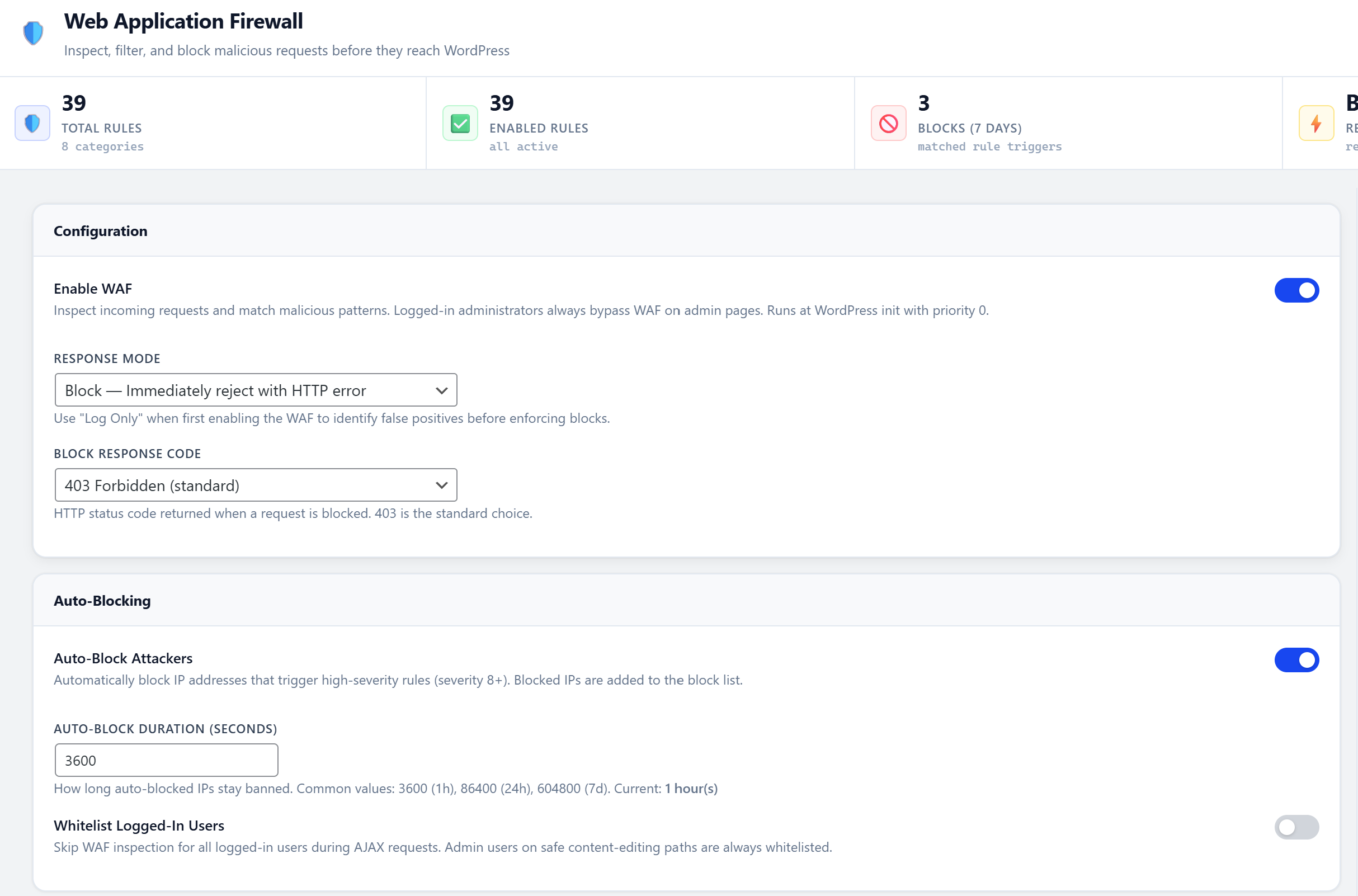
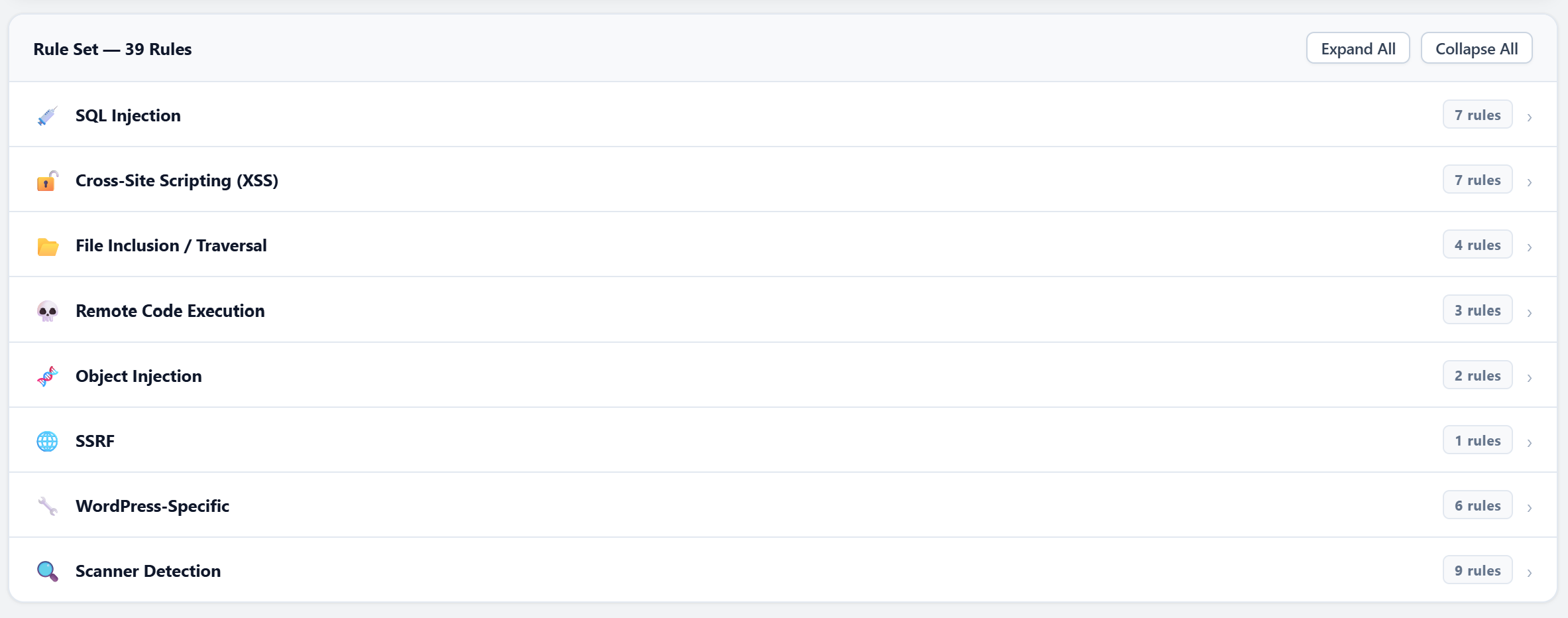
- Early-Request WAF - Inspects and blocks malicious requests at
initpriority 0, before the page renders and before other plugins handle the request - Outbound HTTP Monitor - Detects SSRF attacks and unauthorized outbound connections
- Database Backdoor Scanner - Scans wp_options and wp_posts for eval(), base64, and hidden backdoors
- Client-Side Bot Detection - JavaScript challenges and browser fingerprinting catch sophisticated bots
- AI/LLM Crawler Blocking - Identify and block AI training crawlers scraping your content
- Honeypot Traps - Hidden links, fake login pages, invisible form fields that only bots trigger
- Cron Guard - Monitors wp-cron for unauthorized scheduled tasks planted by malware
- Post-Breach Recovery - Guided recovery toolkit with 12 emergency actions in one place
- Session Fingerprint Binding - Binds sessions to IP + User-Agent so stolen cookies are useless
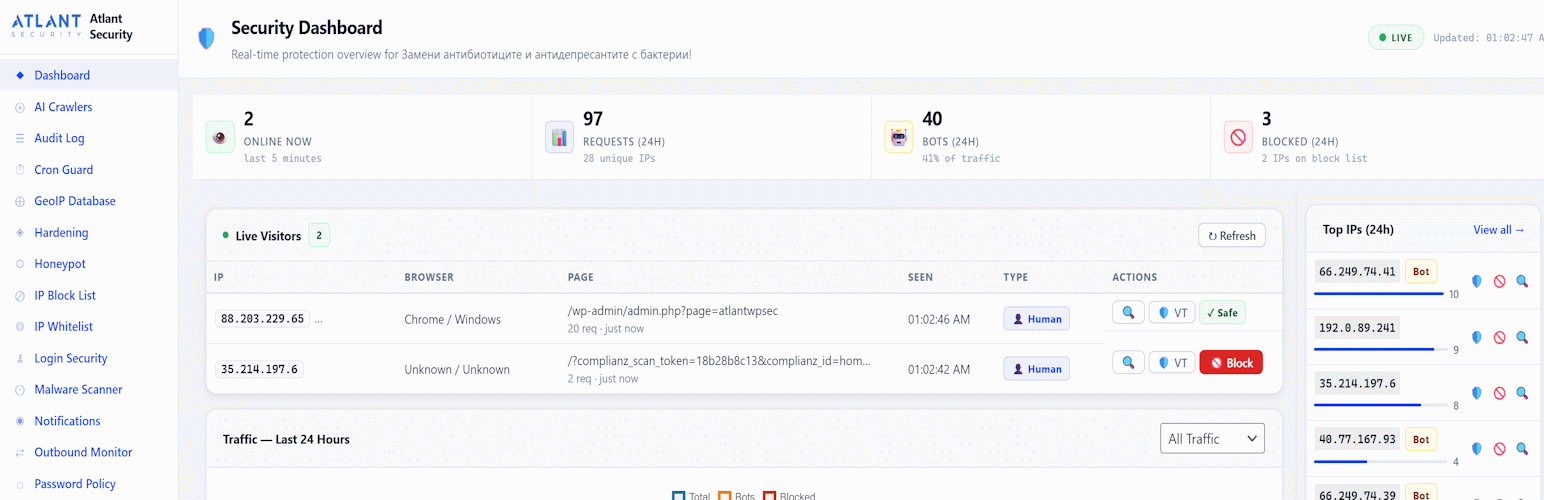
- Real-Time Visitor Dashboard - Live visitor feed updated every 15 seconds
- Smart Password Policy - Minimum length, complexity, common-password blocking, and passphrase support
- Granular REST API Policies - Per-endpoint control, not just a global on/off switch
- Safe Mode Override - One constant in wp-config.php disables all blocking features instantly
- Deactivation Data Control - Choose to keep or wipe all security data when deactivating
- Zero phone-home - No telemetry, no tracking, fully GDPR-compliant (external services used only when explicitly enabled by the admin - see External Services section)
- All-in-one - Replaces 5-6 separate security plugins
- No external dependencies - Core security features run locally on your server
- Zero phone-home - No telemetry, no tracking (optional features like GeoIP use external services only when explicitly enabled - see External Services section)
- GDPR-friendly - No external fonts, no CDN resources
- Setup wizard - Configure core security in under 2 minutes
- Clean uninstall - Removes all database tables and options when deleted (opt-in)
- Safe Mode - Emergency override if you get locked out of your site
安装:
- Upload the
atlant-securityfolder to/wp-content/plugins/. - Activate the plugin through the Plugins menu in WordPress.
- Navigate to Atlant Security in the admin sidebar to access the dashboard.
- Optionally run the Setup Wizard from the sidebar to configure core security settings quickly.
- WordPress 6.0 or higher
- PHP 8.0 or higher
wp-config.php:
define( 'ASWP_SAFE_MODE', true );
This disables all blocking features (custom login URL, IP blocking, WAF, rate limiting) while keeping the admin interface accessible so you can fix settings.屏幕截图:
常见问题:
I locked myself out with the Custom Login URL
Add define( 'ASWP_SAFE_MODE', true ); to your wp-config.php. This disables all blocking features while keeping the admin accessible. Alternatively, rename the plugin folder via FTP to atlant-security-disabled, log in normally, rename it back, then whitelist your IP.
The WAF is blocking my page builder (Elementor, Divi)
Switch WAF to Log Only mode, reproduce the issue, then check the Audit Log for the triggered rule. Page builders may trigger false positives due to base64-encoded content in their save payloads.
Users keep getting logged out unexpectedly
This is caused by Session Binding with IP binding enabled. Go to Session Security and disable "Bind to IP" while keeping "Bind to User-Agent" enabled. Mobile and VPN users frequently change IPs. You can also enable "Exempt Administrators" to bypass all session restrictions for admin users.
Will this slow down my site?
No. The WAF runs at init priority 0 with optimized pattern matching. Rate limiting uses APCu when available for microsecond lookups. The visitor log is a single lightweight INSERT per request.
Email notifications are not arriving
WordPress default wp_mail() uses PHP mail() which many hosts block. Install an SMTP plugin like WP Mail SMTP or FluentSMTP to route emails through a proper mail provider.
The malware scan is running slowly
Reduce "Files per Batch" to 20-30 on shared hosting. The scanner processes files in AJAX batches to avoid timeouts. Files larger than 5 MB are automatically skipped.
How does the honeypot protect legitimate crawlers?
Three layers of protection: (1) Trap URLs are added as Disallow rules in robots.txt, (2) hidden links use rel="nofollow", and (3) 35+ known-good bot user agents (Googlebot, Bingbot, etc.) are pattern-matched and receive a 404 instead of a ban. AI crawlers marked "allowed" in your settings are also protected.
Does this plugin work with multisite?
The plugin is designed for single-site WordPress installations. Multisite support is planned for a future release.
What happens to my data when I deactivate the plugin?
Nothing is deleted on deactivation. When you delete the plugin, a dialog asks whether to keep or remove all data. You can also control this in Settings > "Delete data on uninstall".
更新日志:
- Fixed (important): the feature could write an empty or meaningless author slug when a user's display name was written in a non-Latin script - Cyrillic, Greek, Chinese, Japanese, Arabic, Hebrew or emoji. Cause: WordPress percent-encodes those names when building a slug, and then strips the encoded characters again when saving the user, so what reached the database was empty. WordPress then handed out "-2", "-3" and similar to each following account. Display names in Latin scripts, including accented ones, were never affected.
- Fixed: non-Latin display names are now transliterated to Latin before the slug is built, so they produce a readable URL. Where the server cannot transliterate (the PHP intl extension is missing), the plugin now refuses to change the slug at all and tells you on the Hardening page, instead of writing something meaningless.
- Fixed: the feature could not repair its own damage. It only ever acted on slugs that still matched the username, and a broken slug does not, so an affected account was stranded with no way back except editing the database. It now recognises and rebuilds unusable slugs.
- New: every slug change is verified after writing. The user is re-read from the database and, if WordPress stored something other than what was requested (which happens when another security or privacy plugin filters user_nicename), the original slug is put straight back and the reason is recorded in the Audit Log. No more mystery URLs.
- New: "Rebuild author URLs from display names" on the Hardening page. This rewrites every author URL from the current display names, including slugs you set by hand and slugs that something else mangled. This is the repair action for any site already affected.
- New: "Restore original author URLs" on the Hardening page. The slug each user had before Atlant Security first changed it is now recorded, so the change is fully reversible. Previously, disabling the setting only stopped future changes and left the existing slugs in place, with no way back.
- New: previous author URLs keep working. When a slug changes, the old URL is redirected to the new one, so links already published, bookmarks and search results do not start returning 404. This stays active even after the feature is switched off, so turning it off never orphans a link it created.
- New: enabling the setting now warns you first that public author URLs will change, that existing links are redirected, and that it can be undone.
- Improved: the Hardening page now shows how many author URLs are hidden, lists any that are broken, and lists any account whose display name still cannot produce a different URL, each with a direct link to fix it.
- Duplicate display names were already handled (WordPress appends a numeric suffix) and accents were already handled correctly; both are now covered by tests.
- Fixed (important): "Block Author Enumeration" did nothing on almost every site. WordPress core registers its own canonical-redirect handler on the same hook at the same priority, and because core loads before any plugin it always ran first - sending /?author=1 straight on to /author// before our block was ever reached. It only ever worked for authors with no published posts, because core's redirect requires one. The block now runs ahead of core and does what the setting always claimed. Renamed to "Block Author ID Scans" so the name matches the scope.
- Changed: the ?author=N bounce is now a temporary (302) redirect rather than a permanent (301) one. A permanent redirect is cached by browsers and CDNs, so turning the setting off later used to leave visitors stuck on a cached bounce to the home page.
- Fixed: on sites using plain permalinks the author archive IS ?author=N, so the block would have removed author archives altogether. It now stands down on those sites instead.
- New: "Hide Usernames in Author URLs" (Hardening). Author archives are legitimate content, so they stay exactly where they are - but their URL no longer has to spell out a valid login name. WordPress builds /author/... from each user's nicename, which by default is just the username; with this on, it is rebuilt from the display name instead. Because the users sitemap, oEmbed and feeds all read the same two fields, this closes those routes at the same time, with no per-request cost.
- For this to work each author needs a display name that is not their username. Turn the setting on, then check the Hardening page: it lists any author whose display name is still identical to their login, with a direct link to fix each one (Users > edit > First/Last name > "Display name publicly as"). Authors with no published posts are not listed - WordPress does not expose an archive or a sitemap entry for them. The login name itself never changes, so nobody has to learn a new sign-in name.
- This setting is off by default and only ever applied when you switch it on, because rewriting author URLs changes public links on an established site. New and edited users are kept masked automatically from then on, and every change is written to the audit log.
- Corrected the wording across the Hardening page, Settings, the Setup Wizard, the vulnerability audit and the About page. The old copy promised that username enumeration was "blocked" while only covering the ?author=N probe, which is what prompted this report.
- Fixed: a fatal error ("Uncaught TypeError ... must be of type string, null given" or similar) could be triggered inside Atlant when WordPress or another plugin/theme called one of the hooks we listen to with an argument type we did not expect. Two cases were guaranteed to break: on multisite,
network_site_url()passes a null scheme to its filter, which fataled whenever the Custom Login URL was enabled; and any theme or plugin callingsite_url( null )fataled on every page. Reported on WordPress 7.1 / PHP 8.3 as a dashboard crash with the plugin named in WordPress's recovery-mode email. - Every hook callback in the plugin (URL filters, redirects, outbound HTTP hooks, login/logout actions, audit-log actions, comment honeypot, robots.txt, REST endpoint and SSL filters) now validates what it receives and passes anything unexpected through untouched instead of crashing. Older plugins that fire
wp_loginwith only the username no longer cause an argument-count fatal. - If you received a "Your site is experiencing a technical issue" email naming Atlant Security: update to this version. If it persists, send us the "Error Details" block at the bottom of that email (file, line and message) - that pinpoints it exactly.
- Fixed: 1.1.29 was published with the plugin header still reading 1.1.28 (the internal version constant was correct), so WordPress kept offering the 1.1.29 update to sites that already had it. Sorry about the nag - this release corrects the header.
- Fixed: the documented emergency switch
define( 'ASWP_SAFE_MODE', true );in wp-config.php now really pauses EVERY blocking feature. It previously skipped the WAF, brute-force login lockouts, REST API policies and honeypot bans - so an admin who followed the instructions stayed locked out. - Fixed: a shared office/home IP that an attacker (or your own typos) pushed into the 24-hour login lockout no longer locks the site's administrator out too. Any browser that opened wp-admin as an administrator within the last 3 days carries a signed cookie that bypasses the lockout - the attacker on the same IP does not have it.
- The "Request Blocked" and "Access Denied" pages, and the setup wizard, now tell a locked-out site owner exactly what to do. Two-factor authentication
- Fixed: "Disable 2FA" on the profile page silently did nothing (wrong security token, and the confirmation code the server requires was never asked for). You now enter a current code or a recovery code next to the button, and it works.
- New: an administrator can reset another user's 2FA from that user's profile page (lost phone + used-up recovery codes used to require editing the database).
- Fixed: a rare white-screen crash if an account was deleted while its 2FA challenge was open.
- Fixed: when the email code cannot be sent (broken outgoing mail), the challenge page now says so and points you to your recovery codes instead of silently waiting for a code that never arrives. The failure is logged under Security Events.
- Security: authenticator (TOTP) secrets are now encrypted at rest. Existing secrets are upgraded transparently on first use; rotating your wp-config salts does NOT affect them. Security fix
- Fixed (important): the Post-Breach "Emergency Database Scan" results table rendered the matched content without escaping - so a site that had been injected with a malicious script could have that script run in the administrator's browser the moment they ran the scan. All fields are now escaped. Please update. Buttons and settings that did nothing
- Fixed: REST API "Add Policy" button (wrong element ids - it never did anything), and the "Edit" button, which had no code behind it at all. Policies can now be added and edited in place.
- Fixed: Outbound Monitor "Save Allowlist" button was not wired up - none of that page's settings could be saved.
- Fixed: Malware Scanner "Scan Settings" (core/plugins/themes/uploads toggles, batch size) had no Save button and were silently discarded even when saved from elsewhere.
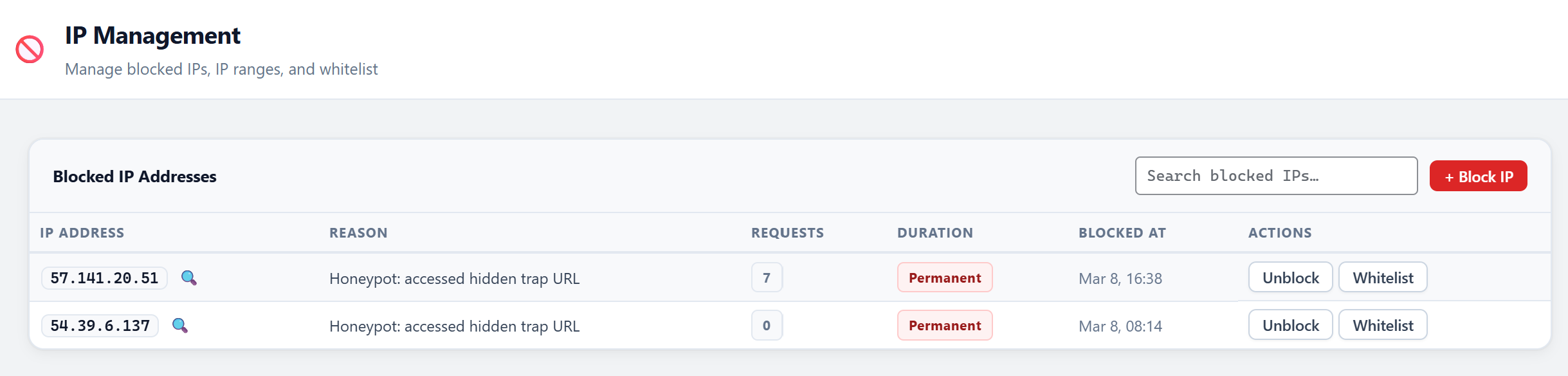
- Fixed: the "✕" remove button in the IP Management whitelist panel did nothing, leaving IPs whitelisted while appearing removed.
- Fixed: the "+ Block IP" header button did nothing.
- Fixed: saving the CAPTCHA panel for any reason wiped the stored secret key (the field is blank by design; blank now means "keep").
- Fixed: passphrase generator word count / separator could not be saved as defaults.
- Fixed: re-running the Setup Wizard reset every customised setting back to the wizard's hardcoded values. It now shows your current settings, defaults the firewall to Log mode (test first, then block), and asks for confirmation before "Apply Recommended Settings" (which enables HSTS for a year).
- Improved: error messages from the server now reach you instead of a generic "Error" - and an expired session tells you to reload. Things that were blocking legitimate traffic
- Fixed: WooCommerce checkout - the rate limiter counted every checkout page load and every shipping/coupon/payment refresh against a 5-per-minute limit, so real customers could get "Too Many Requests" mid-purchase. Only the actual order-placement submission is counted now (20/min).
- Fixed: WAF - logged-in editors and authors saving content inside wp-admin, the block editor or admin-ajax are no longer inspected (administrators already were). In Block mode, an Editor saving a post containing a
<script>example had the whole save refused. - Fixed: WAF "SQL comment" rule matched any text ending in
#or--(searching for "C#" was blocked). It now requires SQL context. - Fixed: session binding used the exact browser version string, so a routine Chrome/Firefox auto-update logged every non-admin user out. Version numbers are ignored now; existing sessions are upgraded in place (no logout on update).
- Fixed: CAPTCHA on login blocked every login form that isn't wp-login.php (WooCommerce My Account, membership plugins, themes using wp_login_form) because those forms never show the challenge. Verification now only applies where the CAPTCHA was actually displayed.
- Fixed: the outbound monitor's private-IP protection blocked WordPress's own loopback requests on hosts where the site resolves to 127.0.0.1 internally - which silently killed WP-Cron (and every scheduled task). Requests to the site itself are never SSRF and are now allowed.
- Fixed: Enforce mode of the outbound monitor cut off this plugin's own MaxMind GeoIP download and Slack/Discord/Telegram alerts; those hosts (and any webhook you configure) are always allowed, and WordPress.org is allowed even if you replace the default list.
- Changed: honeypot bans are 24 hours for a first trip and permanent only for repeat offenders (your own SEO crawler following a hidden link no longer earns a permanent block).
- Fixed: AI crawler blocking now exempts logged-in administrators (so you can test it with a spoofed user agent) and whitelisted IPs, and warns you when a physical robots.txt file means the generated rules are not being served.
- Fixed: custom login slug is refused if it collides with an existing page or post (the login form would have silently replaced that page) or with a path WordPress owns.
- Fixed: Emergency Lockdown now also blocks wp-admin for non-administrator sessions (previously an already-logged-in Editor kept full access during "lockdown"). wp-login.php stays reachable so administrators can sign in to lift it. Malware scanner
- New: scheduled background scans (weekly by default; daily or off in Scan Settings). The "batched cron" scanning described in the docs did not actually exist - a scan only progressed while the scanner page was open. Scans started manually now also continue after you close the tab.
- Fixed: database scan reported YouTube/Vimeo/Maps embeds and Google Tag Manager snippets in ordinary posts as "critical" and re-emailed the same findings on every scan. Known embed hosts are ignored, findings are deduplicated, and you are only alerted about NEW ones.
- New: quarantine warns (and requires a second confirmation) before touching a WordPress core file, the active theme, or an active plugin - these take the site down. New "Restore" button puts a quarantined file back with one click.
- Fixed: quarantine and download refusals now show the real reason instead of a generic error.
- Changed: under wp-content/uploads, large media files are skipped (executable-type files and anything under 100 KB are still scanned); media-heavy sites no longer queue hundreds of thousands of images.
- Fixed: unreadable subdirectories no longer abort the whole scan.
- Fixed: the "recently created administrator" check compared a site-local timestamp against WordPress's GMT registration column, missing accounts created in the first hours of the window on sites east of UTC.
- Fixed: the vulnerability audit could crash ("Run Audit" did nothing) when the core checksum function had not been loaded. Multisite, install and upgrade
- Fixed (security): after a plugin update, the very first visitor to the site had their IP removed from the block list - the "unblock the activating admin" safety net ran on every internal upgrade, not just on a real activation. A blocked attacker who kept retrying unblocked themselves the moment the site auto-updated. Same for the "lift lockdown on activation" step.
- Fixed: the 5-minute blocked-count reconciliation job was never scheduled (its custom cron interval was registered too late). It is scheduled now.
- Fixed: network activation and deactivation now run for every subsite, and subsites created later are provisioned automatically.
- Fixed: uninstall with "Delete data on uninstall" now cleans every subsite, not just the main one.
- Fixed: deactivation flushes the custom-login rewrite rule and clears every scheduled job.
- Fixed: Cron Guard silently trusted every scheduled task that existed when it was first enabled - including malware persistence on a site that installed Atlant after a compromise. Those tasks are now listed once on the Cron Guard page for you to review.
- Fixed: Post-Breach page showed "Keys Rotated: 57 years ago". Performance
- Fixed: a legacy-migration check ran 7 database queries on every single request of every site, forever. It now runs once.
- Fixed: ~80 small settings were stored as non-autoloaded, costing one extra query each per page view (roughly 20-25 queries per request). They are autoloaded now; the change applies itself once.
- Fixed: log retention cleanup deleted in one unbounded statement, which could lock the visitor log table for minutes on busy sites. Deletes now run in batches.
- Dashboard statistics are cached for 20 seconds so several open admin tabs share one query set.
- Added an index for the login-attempt cleanup query. Housekeeping
- "Tested up to" is now WordPress 7.1. The audit log is described accurately (it is an audit trail, not a cryptographically tamper-evident ledger).
- Compatibility: CAPTCHA script loading works on WordPress 6.0-6.2 as declared; password length check no longer requires the mbstring extension; tarpit mode tolerates hosts that disable set_time_limit().
- Dashboard shows a dismissable prompt to run the Setup Wizard on new installs.
- Fixed: on the GeoIP Database page, the "Download Database" button stayed greyed out even after you entered your MaxMind license key. The button only came alive after clicking the separate "Save GeoIP Settings" button in the sidebar - which the on-screen instructions never mentioned - so people pasted a key and hit a dead button. The button now activates the instant a key is typed or pasted, and clicking it saves the key and downloads the database in one step. No separate save required.
- The on-page instructions were reworded to match the actual (now one-step) flow.
- Fixed: existing sites that were getting the unwanted morning "daily digest" email now stop automatically on update - no wp-config edit, no visiting each site. On the first load after updating, the digest is switched off and its scheduled job is removed. On multisite this happens independently on every subsite. If you actually want the digest, re-enable it in Notifications with one toggle.
- The digest cron is now only scheduled while the digest is enabled, and is removed the moment it's turned off - so a disabled digest can never fire.
- (From 1.1.26, still in effect: all notification channels are opt-in for new installs; the ASWP_DISABLE_NOTIFICATIONS constant / aswp_disable_notifications network option remain available as an optional global mute, but are no longer required to stop the digest.)
- Changed (default): all notifications are now OFF until you explicitly enable them - including the Daily Digest and email alerts, which previously defaulted to ON and mailed the site admin every morning. Nothing is sent unless you turn a channel on in Notifications. (New installs only; a site that already had email/digest enabled keeps its setting.)
- New (multisite): silence Atlant emails across EVERY subsite from one place instead of toggling each site. Add
define( 'ASWP_DISABLE_NOTIFICATIONS', true );to wp-config.php, or set the network optionaswp_disable_notificationsto 1. This mutes all email, Slack, and webhook notifications network-wide immediately - handy for existing multisite networks that are already sending digests. - Safe Mode (
ASWP_SAFE_MODE) now also mutes notifications.
- Fixed: the REST API Policies editor was unreliable - new rules didn't stick, deleting a rule reset the whole list back to the defaults, and saving could quietly blank out the built-in rules. Root causes: the "Save" button read policy data from table attributes the server never rendered (so it saved empty rules), an empty saved list was treated as "never configured" and silently restored the defaults, and per-rule fields like the Gutenberg exemption and IP allowlist weren't carried through a save. The editor now works from the real rule data end to end; adding or deleting a rule saves immediately, and every field is preserved.
- Improved: when adding a rule, you can now type a plain route path (e.g. /sibs/v1/callback) instead of a regular expression - it is converted to a matching pattern automatically instead of being discarded. This makes it straightforward to allow a payment-gateway or other third-party webhook that the default rules were blocking.
- Changed (defaults): Session idle timeout now defaults to 0 (off) and "Exempt Administrators" defaults to ON, so a fresh install no longer logs admins out of wp-admin on a timer or subjects them to session binding by default. Tighten either in Session Security if your threat model calls for it. (New installs only; existing sites keep their current settings.)
- Changed (default): "Bind to IP Address" under Session Security now defaults to OFF. When on, it invalidates the session whenever the visitor's IP changes - which happens constantly on mobile networks, CGNAT, VPNs, dynamic ISP IPs, and rotating IPv6 addresses - so admins were being logged out of wp-admin every few minutes. User-Agent binding stays on and protects against most cookie theft without this side effect. Sites where every admin connects from a fixed IP can re-enable it in Session Security.
- This only changes the default for NEW installs. If you are already affected, go to Atlant Security > Session Security and turn OFF "Bind to IP Address" (that alone stops the repeated logouts).
- Clarified the Session Security help text and the "Block /wp-admin/ for non-logged-in visitors" behavior: that option only affects logged-OUT visitors (it returns a 404 for them) and never logs an admin out - it is not related to the logout issue above.
- Fixed: on the Login Security page, changing "Max attempts before lockout" (or the lockout durations) and clicking "Save Brute Force Settings" did nothing - the value did not persist. The page has two save buttons (CAPTCHA and Brute Force) that shared the same HTML id, and the click handler only bound to the first one, so the Brute Force save button had no handler at all. Save buttons are now wired by class, so every save button on every settings page works, including pages with more than one. No settings change; your existing values are unaffected.
- Fixed (bug): "Hide WP Version" stripped the
verquery string from every enqueued script and style across the whole site, including wp-admin. Removingverbreaks browser cache-busting, so a browser could serve a stale copy of a core file (e.g. wp-includes/js/dist/data.min.js) indefinitely. On admin screens built with @wordpress/data - such as My Jetpack - that produced a version-incompatible mix of the @wordpress/* packages and the screen rendered blank ("isShallowEqual is not a function", private-apis opt-in errors). Thanks to the detailed report that pinpointed this. - The option still hides the WordPress version (the generator meta tag is removed as before). For assets, the version in the
verstring is now MASKED with a stable token instead of stripped: wp-admin assets are never touched, and on the front end the token still changes on every WordPress update, so cache-busting keeps working while the literal version stays hidden. Plugin and theme asset versions are left untouched.
- Fixed (accuracy): corrected the WAF description across the readme, the About page, and the WAF settings page. Earlier copy described a "Pre-WordPress WAF" that filters requests "via auto_prepend_file before WordPress even loads" - that is not how the plugin works and no such mechanism ships in the plugin. The WAF is a WordPress-integrated firewall that inspects every request at
initpriority 0: early in the request (before the main query, page rendering, and before other plugins process the request), but after WordPress core and plugin files have loaded - not before WordPress loads. No functional change; the copy now matches the implementation. Thanks to the user who reported the mismatch.
- Fixed: Emergency Site Lockdown appeared to do nothing on sites running a page-cache plugin or CDN. The lockdown screen is rendered by PHP, but a page cache serves stored HTML without running PHP, so cached visitors kept seeing the normal site. Activating lockdown now flushes the object cache and every supported page-cache plugin (WP Rocket, W3 Total Cache, WP Super Cache, WP Fastest Cache, LiteSpeed, SiteGround, Cache Enabler, Breeze, Nginx Helper, and more), and sets the standard no-cache constants so the maintenance page is never stored. Lifting lockdown flushes again so normal content returns immediately.
- Note: if you put HTML behind an external CDN edge cache (e.g. a Cloudflare "Cache Everything" rule), purge it there too - the plugin cannot evict a cache it has no API access to. The lockdown confirmation message now says this.
- Reminder: the always-visible "Lift Lockdown Now" button (added in 1.1.17) lets you turn lockdown off from the Post-Breach page; reactivating the plugin also clears a stuck lockdown. If you were on an older build with no off-switch, updating resolves it.
- Fixed (lockout): turning on "require 2FA" for a role locked out every user in that role who had not yet set up 2FA. They were sent to a code-entry screen they could never pass (no code exists yet) with no way to reach the setup page. Enrollment-pending users now keep a session confined to their profile page so they can actually set up 2FA; the REST API and XML-RPC are blocked for them until they do, so the confined session cannot be used to bypass 2FA.
- Fixed: a code entered immediately after finishing 2FA setup could be rejected as a "replay" for up to 30 seconds. The setup step is no longer pre-recorded against the replay guard.
- Fixed: after the Post-Breach "Deactivate All Non-Essential Plugins" action, an admin who reinstalled the plugin instead of clicking Restore had no obvious way back. A dismissable admin notice now links to one-click restore whenever a plugin backup is present.
- Hardening: the author-enumeration block now only redirects GET requests, so it can never drop the body of a POST that merely carries an author query parameter.
- Fixed (security): two-factor authentication could be bypassed during an active "Force Password Reset for All Users" window. The force-reset login redirect ran before 2FA enforcement and exited without destroying the session, so a 2FA-required user could log in with only a password. The redirect now runs after 2FA.
- Fixed: "Force Password Reset for All Users" could get permanently stuck with no off-switch - the flag only self-cleared when the very last flagged account reset its password, so one abandoned/never-logging-in account pinned every admin to the profile page (and it survived reinstall). Added an always-visible "Cancel Forced Reset" button, and the flag is now cleared on (re)activation and deactivation (same as Emergency Lockdown).
- Fixed: brute-force lockout escalated permanently. The per-IP failed-attempt counter was never reset on a successful login and never aged out, so an IP that accumulated enough lifetime failures (common on office/shared NAT) got stuck in the 24-hour lockout tier - locked out by a single later typo. The counter now resets on successful login and decays after 24h of no failures.
- Fixed: the firewall could block legitimate logins whose password happened to contain attack-like characters (e.g. an apostrophe-and-OR sequence, ../, or a script tag). Password fields are no longer pattern-inspected on the login/reset form (WordPress verifies them by hash, never as SQL or HTML); all other protections are unchanged.
- Fixed: when Emergency Site Lockdown was active, the "Lift Lockdown" button could disappear, leaving no way to turn lockdown off from inside the plugin. The unlock button lived inside the Critical Actions grid section, which collapsed once the only critical action ("Activate Lockdown") was hidden. An always-visible "Lift Lockdown Now" button now sits in the lockdown status bar, independent of the grid.
- Fixed: a stuck lockdown could survive uninstall/reinstall and could only be cleared by leaving the plugin deactivated. Activating (or reactivating) the plugin now always lifts any active lockdown, guaranteeing a recoverable state. (Activation only runs on a manual admin action, not on routine auto-updates.)
- Fixed (critical): with a Custom Login URL enabled, valid credentials bounced back to the login form and never reached the dashboard. The custom slug redirected the login POST to wp-login.php, and a 302 redirect turns a POST into a GET - silently discarding the username and password. The slug now serves wp-login.php in place (no redirect), preserving the POST body, nonces, and the login test cookie. This also varied by server (Nginx/Apache/LiteSpeed) for the same reason.
- Fixed: /wp-admin was still reachable on subdirectory installs because the guard only matched paths starting with "wp-admin" and missed "/subdir/wp-admin/...". It now matches the wp-admin segment anywhere in the path.
- Fixed: clearing the slug field appeared to do nothing and the old slug "reappeared". The slug field now only changes the URL; to remove the custom login URL entirely, turn the feature OFF (which clears the stored slug). The behavior and on-screen message are now explicit.
- Compatibility: serving wp-login.php in place fires all standard login_* hooks, so two-factor and other login add-ons work correctly on the custom URL.
- Fixed: Post-Breach > "Reinstall WordPress Core" did nothing and reported "already installed" / "WordPress is at the latest version" regardless of the actual state. Core_Upgrader was being called with a version string instead of the update object it requires, so it bailed before downloading anything. The action now forces a fresh update check against WordPress.org, installs a newer version if one is available, and otherwise performs a true re-install of the current version (re-downloads the package and overwrites on-disk core files). wp-content/ is never touched.
- Fixed: legitimate users could get HTTP 429 "Too Many Requests" on /wp-login.php even without submitting wrong credentials. The login rate limiter counted every hit to the page (GETs, the lostpassword and resetpass flows, the logout link) toward a 10-per-5-min budget. It now counts only credential POST submissions, and skips already-authenticated users. Brute-force defense (the real one - 5 failed attempts locks out) is unchanged.
- Fixed: admin times displayed several hours off on non-UTC sites - the display layer double-converted stored timestamps. New FortressWP\Time helper; the admin JavaScript now shows times in the site timezone, not the visitor's browser.
- Fixed: GeoIP "last updated", the brute-force lockout countdown, and the 08:00 daily digest schedule now all use the correct timezone.
- New: quarantine now opens a review modal - file details, a forensic download button, VirusTotal / Hybrid-Analysis links, and three required acknowledgment checkboxes (also enforced server-side).
- Improved: CSV export includes confidence and matched-signature columns.
- New: per-signature fidelity ratings and per-finding confidence; quarantine is gated to HIGH confidence and single ambiguous hits are review-only.
- New: regex matches inside string literals or comments are treated as data, not malware - eliminates self-match false positives.
- Fixed (critical): the scanner could quarantine its own files and take the whole site offline; it now hard-excludes known security plugin directories.
- Fixed (critical): the plugin bootstrap survives a missing module file instead of fataling the site.
- Fixed: AI crawler defaults flipped to "allow" - legitimate vendor bots (Google, OpenAI, Anthropic, Bing) are never blocked unless the operator opts in.
- Fixed: the Honeypot reverse-DNS check now fails open, so a transient DNS error can't ban a real Googlebot.
- Fixed (critical): fatal-at-login bug in concurrent-session enforcement; IPv4-mapped-IPv6 IP-block bypass; outbound SSRF DNS-rebinding race; CIDR trusted-proxy parsing; over-broad Cloudflare auto-whitelist; web-accessible quarantine directory and wp-config key backups; a WAF-rule ReDoS; plaintext Custom Login URL recovery token; unvalidated plugin-restore input.
- Fixed (high): 2FA enrollment-session bypass and cross-user nonce reuse; 2FA disable without re-authentication; racy IP blocking; Googlebot user-agent-spoof honeypot exemption; notification webhook SSRF; scan symlink escape; WAF encoded-escape and capability bypasses; and more.
- Fixed: malware scanner false-positive flood on fresh installs - WordPress core checksum verification, a known-safe path allowlist, and tightened signatures.
- New: "Mark as False Positive" and Undo on file findings, recorded to the audit log.
- New: CAPTCHA on the login, registration, and lost-password forms - reCAPTCHA v2, reCAPTCHA v3, and Cloudflare Turnstile, with per-form toggles and a theme picker.
- New: CSV export of full, untruncated scan findings; white-label filters for the Enterprise add-on. Tested up to WordPress 7.0.
- Security: HMAC-signed Custom Login URL grace cookie; enforced 2FA for required roles; webhook-secret redaction in the outbound log; always-on SSRF blocking of private ranges; IPv6 DNS checks.
- New: trusted proxy IP setting and a weekly cron schedule.
- New: About page with defense architecture and feature overview.
- Fixed: setup wizard no longer auto-redirects on activation.
- Improved: visitor log layout and filter bar spacing.
- Improved: denser, more compact admin layout.
- Fixed: session timeout now respects the "Exempt Administrators" setting.
- Improved: compact sidebar, shorter table headers, and denser global spacing.
- Fixed: visitor log and dashboard table column widths.
- New: inner sidebar navigation - all plugin pages in one persistent panel with a single WordPress menu entry.
- Improved: no-cache headers on admin pages; Top IPs / Top Pages widget fixes.
- Fixed: HTML entity rendering bug in the admin JavaScript.
- New: GeoIP country resolution, Custom Login URL, Password Policy, Force SSL Admin, and auto-update toggles.
- Internal: codebase prefix migration to aswp_ with automatic database migration on upgrade.
- New: Honeypot, Security Headers, Two-Factor Authentication, and Notifications modules.
- New: AI Crawlers, REST API Policies, Session Security, Outbound Monitor, and Cron Guard modules.
- New: Setup Wizard and IP Detail Modal.
- Initial release: 17 security modules - WAF, brute-force protection, malware scanner, post-breach recovery, IP blocking, visitor log, audit log, hardening, rate limiter, and real-time dashboard.