
Atomic Framework Forge for Elementor
| 开发者 | mijstrebor |
|---|---|
| 更新时间 | 2026年8月23日 05:05 |
| PHP版本: | 8.2 及以上 |
| WordPress版本: | 7.1 |
| 版权: | GPL-2.0-or-later |
| 版权网址: | 版权信息 |
详情介绍:
- HEX, RGB, HSL, and alpha editing with a visual color picker
- Generate tints, shades, and transparency variants
- Organize into categories and sub-categories
- Add notes and classifications to variables
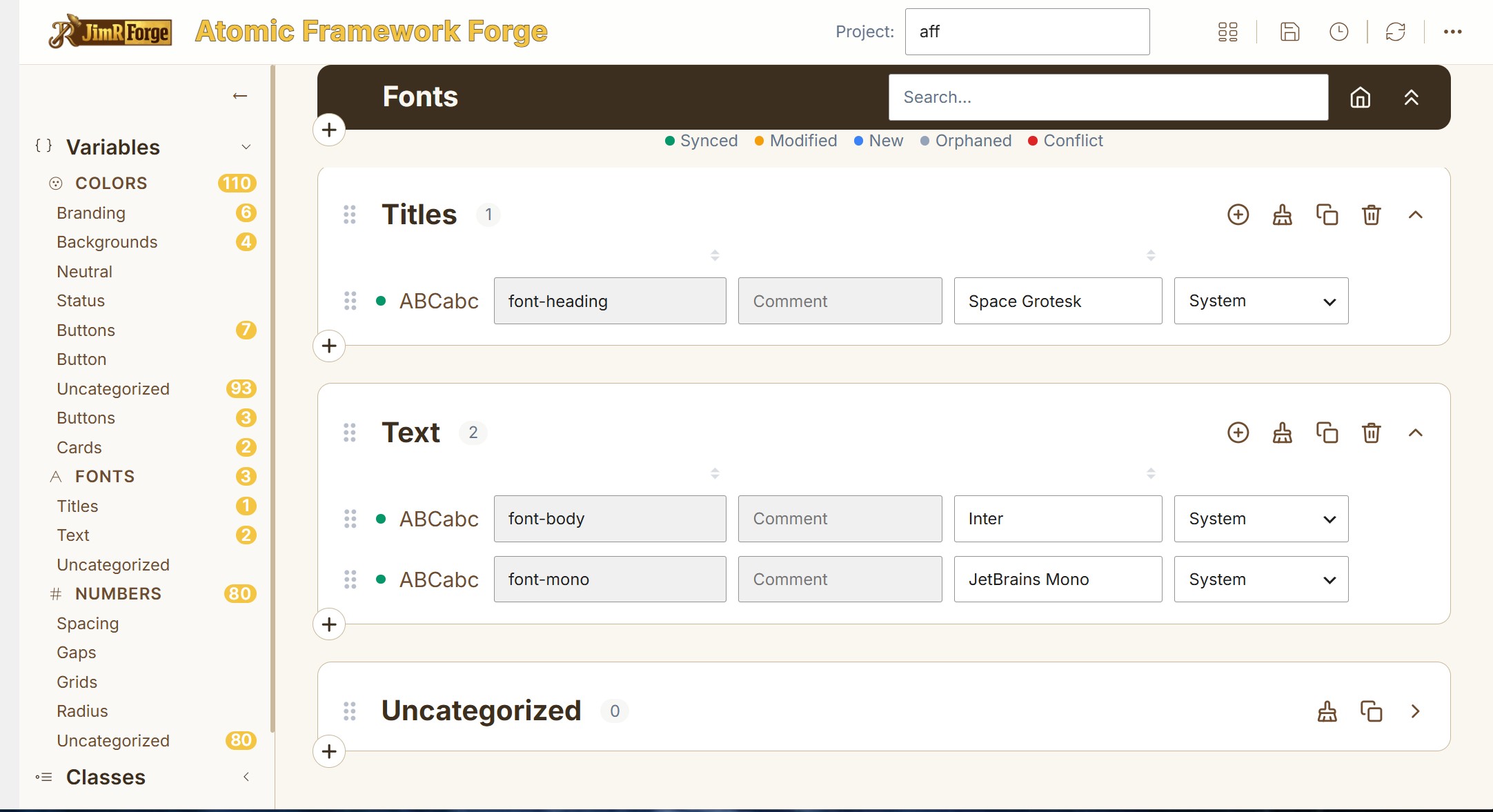
- Manage Elementor font variables, organized by category and sub-category
- Edit font-related CSS custom properties
- Preview font values within the management interface
clamp()) when needed.
Organize your design system
AFF is not limited to a flat list of variables. Create your own categories and one level of sub-categories to reflect the design system you actually use — for example, Colors organized into Brand / Neutral / Status / Surface, or Numbers into Spacing / Radius / Layout / Sizing. The categories are yours to define.
Work with Elementor — not around it
AFF reads Elementor's V4 variable data and brings it into a dedicated management environment: fetch the variables from your active Elementor kit, organize and edit them in AFF, review which variables are synced, modified, new, orphaned, or in conflict, then commit — explicitly, when you're ready — to write the changes back.
A deliberately controlled write process
AFF is designed around a read-first workflow. Reading Elementor data does not modify Elementor. Writing changes back is always a deliberate, user-triggered action — never automatic or in the background — preceded by a summary showing exactly what will change (modified, new, and deleted variables).
Recommended: use AFF on a staging or local development site, and export a project backup before committing changes to Elementor.
How AFF interacts with Elementor
Read: AFF reads global variables directly from the active Elementor kit's _elementor_global_variables post meta -- the same authoritative data store Elementor itself uses. This happens only when you click "Fetch Elementor Data". It is purely read-only; nothing in Elementor is touched.
Write: When you click "Write to Elementor", AFF writes the current variable values back to _elementor_global_variables on the kit post -- the same authoritative data store, updated the same way Elementor itself updates it. This is the primary and authoritative write. As a secondary, best-effort step, AFF also patches the active kit's generated CSS file directly, so the page reflects the change immediately instead of waiting for Elementor's own regeneration on next load; if this secondary step is skipped or fails for any reason, Elementor's own cache-clear and regeneration (triggered by the post meta update) still produces the correct CSS. AFF writes to no other Elementor data.
Every write is user-triggered (no background or automatic writes, ever), preceded by a confirmation dialog showing exactly what will change, and limited to variables you have managed in AFF. AFF does not touch anything else in your Elementor configuration.
Use on staging or a local development environment only. A corrupted write could damage your Elementor kit's variable data. Always export a project backup before writing to Elementor.
Bringing an existing Elementor site into V4?
AFF can import Elementor V3 Global Colors into your AFF project — both system and custom colors. The four standard Elementor system colors are identified with their familiar roles (Primary, Secondary, Text, Accent), so you never lose track of what each color controls. Bring those colors into your V4 variable-management workflow and map your existing color system as you rebuild your site.
Projects, backups, and portability
AFF supports multiple independent projects within a WordPress site. Each project can be:
- Saved — create a persistent project containing your managed variables
- Backed up — every save creates a timestamped backup snapshot; up to 50 backups per project (configurable)
- Restored — return to a previous backup from the project/backup picker
- Exported — downloaded as a portable
.atfrfo.jsonfile - Imported — brought into another WordPress site running AFF
- Synced — the AFF value matches Elementor
- Modified — the value has been changed in AFF
- New — the variable exists in AFF but hasn't been committed to Elementor yet
- Orphaned — AFF has a variable that no longer corresponds to current Elementor data
- Conflict — AFF and Elementor contain differing information that needs your attention
安装:
- Install and activate Elementor and Elementor Pro.
- Install and activate Atomic Framework Forge for Elementor.
- Open AFF from the WordPress administration menu.
- Create or select an AFF project.
- Fetch your Elementor data.
- Organize and manage your variables.
- Export a backup before committing significant changes to Elementor.
屏幕截图:



常见问题:
Does AFF require Elementor Pro?
Yes. Atomic Framework Forge requires both Elementor and Elementor Pro to be installed and active.
What version of Elementor is required?
AFF is designed for Elementor V4 and its atomic widget architecture. The 1.4.3 release was developed and validated against Elementor 4.1.3 and Elementor Pro 4.1.1.
Does AFF automatically change Elementor?
No. AFF reads Elementor data when you request it. Changes are written back to Elementor only when you explicitly initiate a commit and confirm the operation.
Does AFF modify my Elementor CSS files?
Not by default. AFF is read-first and non-destructive — it reads your Elementor kit data but never modifies it unless you explicitly click ↑ Variables (Commit to Elementor) in the right panel. A summary dialog shows exactly what will be written before you confirm. When you do commit, AFF updates Elementor's authoritative global-variable data and uses a secondary CSS update where appropriate so changes can appear immediately; Elementor remains responsible for its own normal cache clearing and CSS regeneration.
Can I undo changes?
AFF maintains timestamped project backups, restorable from the project/backup management interface. You should also export a project backup before committing significant changes to Elementor.
Can I move an AFF project to another site?
Yes. Each AFF project is saved under its own folder in your WordPress uploads directory — for example, a project named brand-colors is stored at /uploads/atfrfo/brand-colors/, with timestamped save files such as brand-colors_2026-08-16_09-15-00.atfrfo.json. Export any saved snapshot and import it into another WordPress site running AFF to bring that project's variables along.
Can I import Elementor V3 Global Colors?
Yes. AFF includes a V3 → V4 color migration feature that imports Elementor V3 Global Colors, including system and custom colors.
Can I organize variables into groups?
Yes. AFF supports categories and one level of sub-categories.
Are Classes and Components available?
Not yet. Version 1.4.3 focuses on Variables. Classes are in beta on a separate development line and Components are planned for a future release.
更新日志:
- Added: Drag a category onto another to nest it as a subcategory; drag a subcategory out to promote it back to top-level, or onto a different category to move it there.
- Added: Category headers list their subcategory names inline; click anywhere in a header to collapse/expand it.
- Fixed: Several category reorder/move actions were missing a required parameter and could silently fail to save.
- Fixed: Merge Conflicts dialog showed a blank "AFF value" column due to a property-name mismatch; dialog also widened and its scrollbar is no longer hidden below the visible area.
- Fixed: WordPress.org review — icon SVG output now escaped via wp_kses() at the actual point of echo, not only upstream inside the icon-lookup helper (19 call sites).
- Includes all 1.4.2 fixes: LOCK_EX file locking, ID-based Elementor commit matching, backup filename collision fix.
- Fixed: Project file writes now use LOCK_EX, preventing JSON corruption from concurrent writes (two tabs, an overlapping autosave) to the same project file.
- Fixed: Commit to Elementor now matches Variables by their stored Elementor ID first, not name alone — renaming a Variable and recommitting now updates the existing entry in place instead of silently creating a new one and orphaning any class or widget already referencing the old ID.
- Fixed: Backup filename collisions during Copy Project no longer require a blocking sleep() retry loop.
- Fixed: Critical — every AJAX endpoint (Save, Load, Sync, and all other admin actions) was non-functional due to a method-naming mismatch introduced during the 1.4.0 prefix rename. All endpoints restored.
- Added: "Take a look" notify sign — rising notification pointing new users at the Quick-Start guide, capped at 3 lifetime shows per user.
- Changed: Brand assets — logo and favicon replaced with new blacksmith-hammer artwork.
- Changed: Help panel — Media Inventory Forge now shown as available on WordPress.org, added Fluid Button Forge as In Development, corrected stale references, updated for jimrforge.com being live.
- Fixed: Weak HTML-escape functions consolidated to the canonical, fully-correct implementation (security).
- Fixed: Font-size default mismatch between PHP and the actual CSS baseline corrected.
- Fixed: Two dead dev-only patch scripts removed from the plugin repo.
- Added: V3 import result modal — shows import count, Close button, auto-closes after 4 seconds.
- Added: System color auto-notes — first four V3 imports receive a "System Colors: ..." description automatically.
- Added: Print sub-category hierarchy — sub-categories indented with gradient band and accent bar; swatches align under sub-category title.
- Added: Print comments toggle — "Print comments" checkbox in print options modal; comments print as italic second line per variable.
- Changed: Color expand modal restructured to two-row header (Row 1: controls; Row 2: notes field).
- Changed: Sticky group header — filter bar and status legend now pin together as one unit when scrolling.
- Changed: Print document title — removed "V4"; now reads "Atomic Framework Forge for Elementor".
- Changed: Comment field placeholder — shows "Comment" instead of "Add a note…".
- Changed: Informational modals (Fetch, Clean Up, V3 Import) unified into ATFRFO.Modal.info() helper with auto-close and Close button.
- Fixed: App top bar scrolled off screen due to WordPress padding on #wpbody-content.
- Fixed: Brand name title faded on scroll — fade animation removed.
- Added: Sub-categories — one level of sub-categories under any top-level category, with full CRUD and cascade collapse.
- Added: Tints/Shades/Transparencies generated into named sub-categories rather than flat into the parent.
- Added: Delete Variable button — trash icon on hover in every variable row, with confirmation modal.
- Added: Status legend (Synced / Modified / New / Orphaned / Conflict) shown under the filter bar in all variable views.
- Added: Print/PDF — top-bar printer button with set-selection modal; opens browser print dialog.
- Added: Home icon replaces the ✕ close button on the type filter bar for clearer back-navigation.
- Fixed: Delete button column overflow — PHP inline style was emitting 7 columns, now correctly 8 for all views.
- Fixed: Google Fonts loaded for font preview cells.
- Fixed: Uncategorized badge catch-all, font classification, soft-deleted variable counts, delete-category variables bug, scroll-to-top after delete, smart quotes parse error.
- Changed: Category count badges roll up sub-category variables. New categories insert at top of list.
- Fixed: Plugin Check errors resolved — is_writable() replaced with WP_Filesystem, Requires PHP header aligned, hidden .gitkeep removed, filename with spaces renamed.
- Fixed: False-positive nonce/sanitization warnings suppressed (nonces verified centrally via verify_request()).
- Changed: Elementor dev version constants updated to 4.0.8 / 4.0.4.
- Added: Elementor commit now writes to _elementor_global_variables post meta as the primary target; CSS file patch applied as secondary for immediate visual preview.
- Fixed: CSS variable names normalized to -- prefix on Elementor commit; bare identifiers (sp-s) are now written as valid custom properties (--sp-s).
- Fixed: ATFRFO now stores bare identifiers internally, preventing double-prefix on round-trip commit/import.
- Fixed: Elementor V4 import preserves labels unchanged; strips only one -- prefix per name.
- Fixed: Renaming a category no longer causes its variables to disappear from the edit view.
- Fixed: Add Category works correctly in Fonts and Numbers panels; modal handler now removed on close.
- Fixed: Deleting a project clears the active display; native confirm() replaced with modal dialog.
- Fixed: Project file auto-saved after Clear and Replace sync operations.
- Fixed: Left panel category count badges now match by category_id in addition to category name.
- Fixed: Take-a-look sign image converted to true PNG with transparent background.
- Changed: Duplicate utility methods extracted into shared ATFRFO.Utils and ATFRFO.Icons (Phase 1, ~520 lines removed).
- Changed: Six category-management methods consolidated into ATFRFO.CatMixin applied to both Colors and Variables (Phase 2, ~290 lines removed).
- Fixed placeholder sign background: transparent PNG areas now render against the page theme colour instead of showing a checkerboard pattern.
- Numbers editing overhaul: pure number storage, autofill unit suffix on entry (px, rem, em, %, vw, vh, ch, x=PX), FX function mode with auto-close, invalid suffix error.
- New unitless
—format type for Numbers (z-index, opacity, line-height, etc.). - Variable counts in left navigation: per-category counts on category items; total counts on Colors/Fonts/Numbers subgroup headers.
- Collapse/expand all buttons on all three sets now use double-chevron icons with state-aware tooltips.
- Fixed drag/drop broken on Numbers and Fonts (undefined setLower caused ReferenceError in strict mode).
- Fixed scroll-to-top on Add Variable (wrong scroll container; also added preventScroll on focus).
- Fixed Numbers sort header column misalignment.
- Placeholder panel image changed from cover to contain; forge-themed arch banner prompts new users to read QUICK-START.md.
- QUICK-START.md corrected: button names, step numbering, section table, stale notes removed.
- fₓ display label for FX format throughout UI (stored value remains 'FX' for backward compatibility).
- Load Project modal: project list now shows folder structure with save count, last-saved date, and inline rename. Copy and delete project actions added.
- Fixed cross-module event contamination between Colors and Variables/Numbers views (drag, click, and focusout handlers now guarded per-view).
- Fixed drag snap-back and cross-module drag switch in Numbers view.
- Write to Elementor: auto-regenerates missing kit CSS file instead of erroring.
- Prevented duplicate variable names (JS and PHP validation).
- Removed forced
--prefix while typing variable names.
- Plugin renamed from Elementor Framework Forge (EFF) to Atomic Framework Forge for Elementor (ATFRFO) for WordPress.org compatibility. All internal prefixes updated.
- Sync now reads Elementor kit meta directly via read_from_kit_meta(); CSS file parsing retained as fallback.
- Fixed font and number category defaults not loading correctly on fresh installs.
- Fixed two AJAX action name call sites still using eff_sync_from_elementor after rename.
- Auto-regenerate Elementor kit CSS via Elementor's CSS API when the file is missing, preventing 0-variable sync on fresh installs or after cache clears.
- Fixed drag-and-drop color reorder failing when no project file was loaded (
atfrfo_save_fileAPI mismatch after versioned backup refactor). - Fixed column sort state not persisting when switching between Colors and Numbers tabs.
- Fixed
resolve_file()rejecting valid subdirectory paths when the project directory did not yet exist, causing auto-load to silently fail.
- Versioned backup system with timestamped snapshots and two-level project/backup picker.
- Right panel reorganized into five named sections: Active Project, Save & Backups, Elementor Sync, Elementor V3 Import, Export / Import.
- Sync options dialog (Sync by name / Clear and replace) before pulling from Elementor.
- Commit summary dialog showing modified / new / deleted counts before writing to Elementor.
- Elementor V3 Global Colors import from kit post meta.
- Export and Import moved from top bar to right panel.
- Multi-project support with per-project backup limits (default 10, max 50).
- Auto-select project name in Manage Project modal.
- Elementor sync now lowercases all variable names on import.
- Fixed stacked .atfrfo suffix in filenames.
- Pickr visual color picker (HEX / RGB / HSL + alpha).
- Tint / shade / transparency generator.
- Export / Import project as .atfrfo.json.
- USER-MANUAL.md added.
- Initial release — Variables (Colors, Fonts, Numbers), Sync, Organize, Save, Commit, Dark Mode.