
Atomic Studio – Figma to Elementor V4 Converter
| 开发者 | heinvanvlastuin |
|---|---|
| 更新时间 | 2026年10月28日 04:17 |
| PHP版本: | 8.0 及以上 |
| WordPress版本: | 7.1 |
| 版权: | GPL-2.0-or-later |
| 版权网址: | 版权信息 |
详情介绍:
- Connect Figma once, under Atomic Studio → Connect Figma.
- Paste the link to a Figma frame and select "Import to Elementor".
- Review the draft in Elementor, and publish it when you are ready.
- Faithful to your design — layout, spacing, color and type come straight from the frame.
- Native Elementor elements — headings, containers, text and images with their own styles, edited like anything you built in Elementor.
- Desktop, tablet and mobile — import a design's tablet and mobile frames alongside desktop.
- Images in your Media Library — the design's images are added to your site, not loaded from Figma.
- Drafts first — every import lands as a draft. Nothing goes live until you publish it.
- WordPress 7.0 or newer, PHP 8.0 or newer
- Elementor 4.2.0 or newer, with the Atomic Editor switched on (Elementor → Settings → Atomic Editor → Activate). Elementor 4.3 or newer for tablet and mobile designs. Elementor Pro is not needed.
- A Figma account with access to the file you want to import
安装:
- Make sure Elementor is installed and active.
- Go to Plugins → Add New Plugin, search for "Atomic Studio", then select Install Now and Activate.
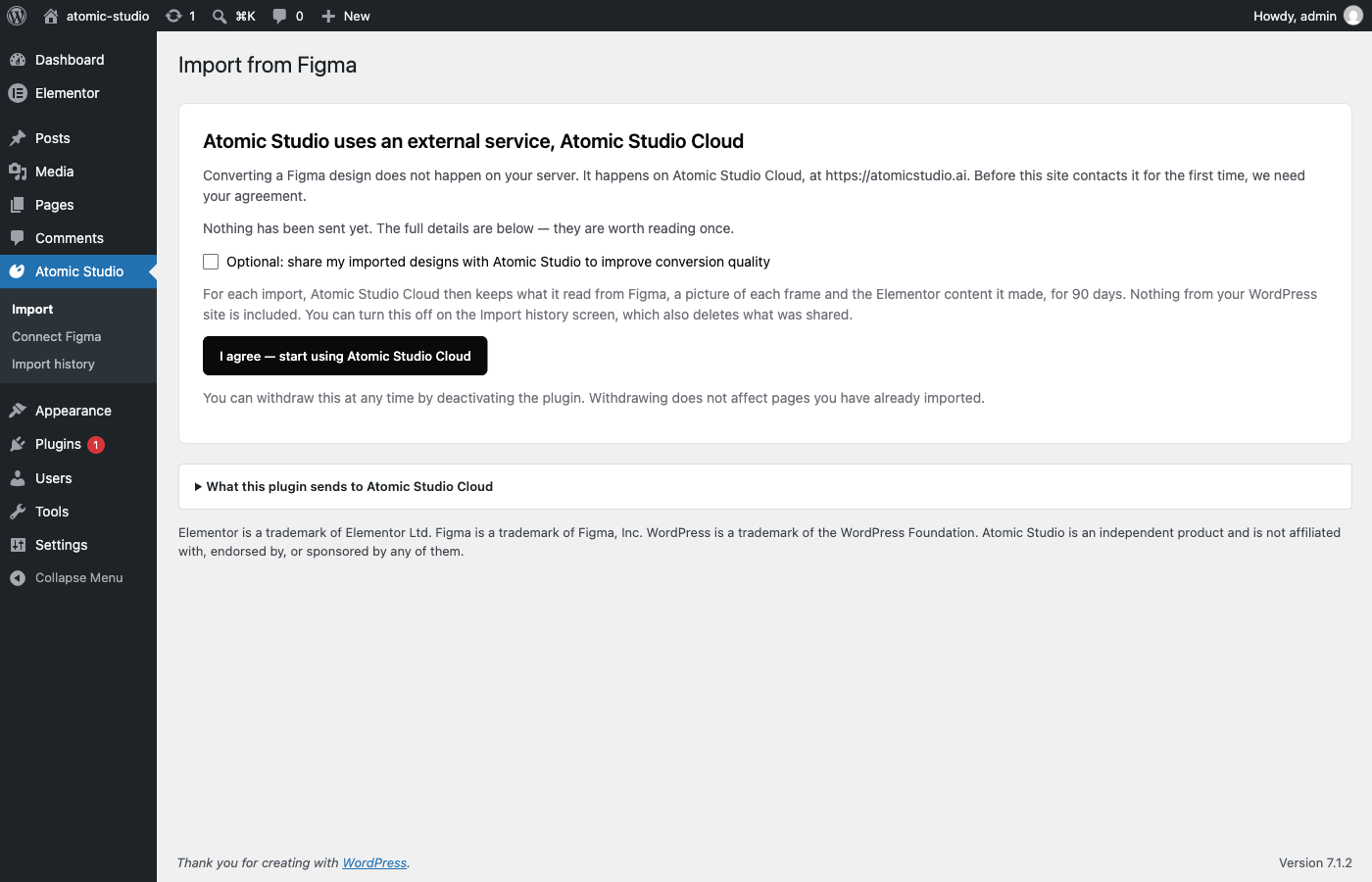
- Open Atomic Studio in the admin menu. "Set up Atomic Studio" opens: select "Agree and continue".
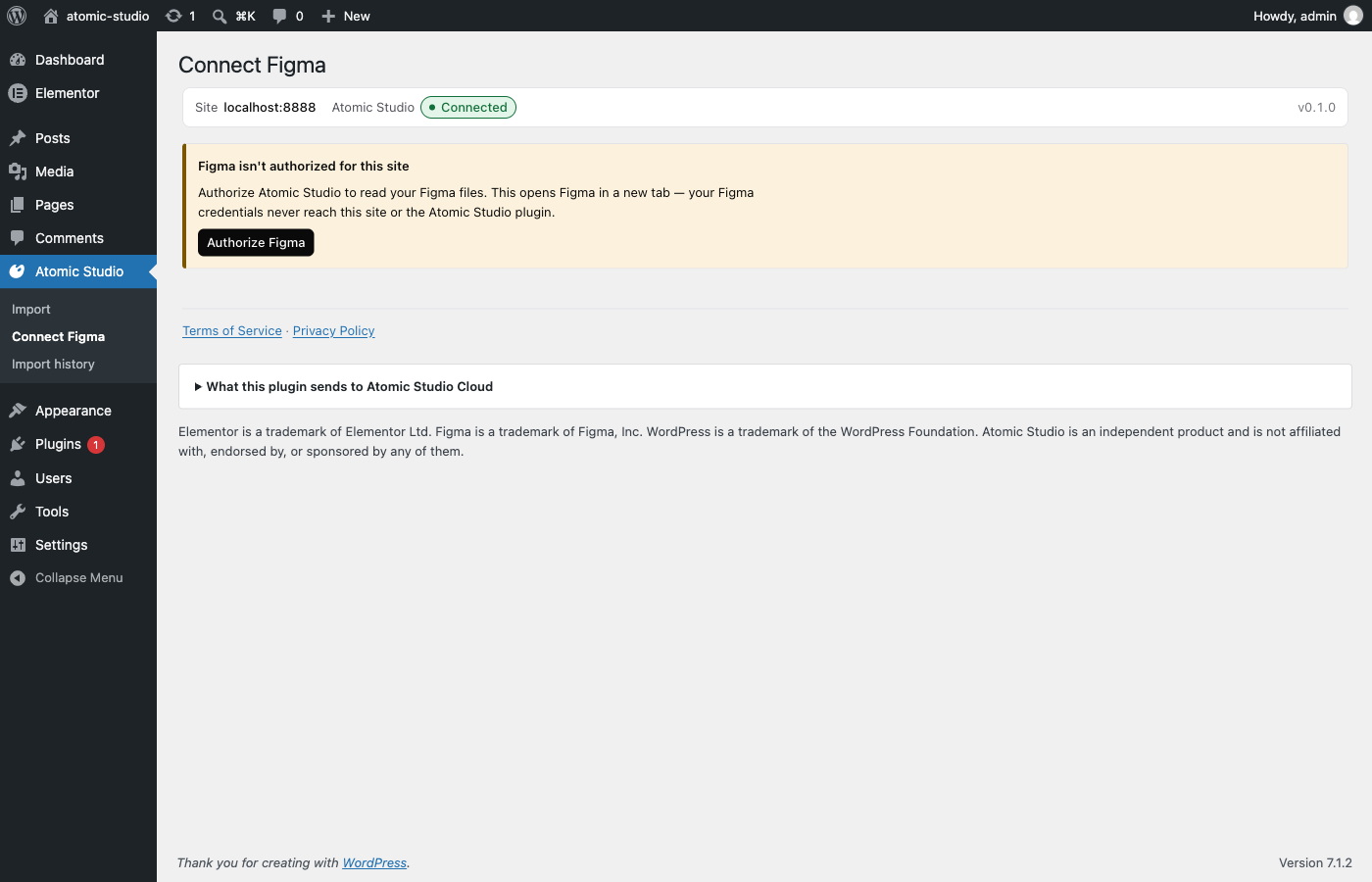
- Select "Authorize Figma" and allow access in the Figma tab that opens. Go back to the WordPress tab; it updates on its own. Then select "Start importing".
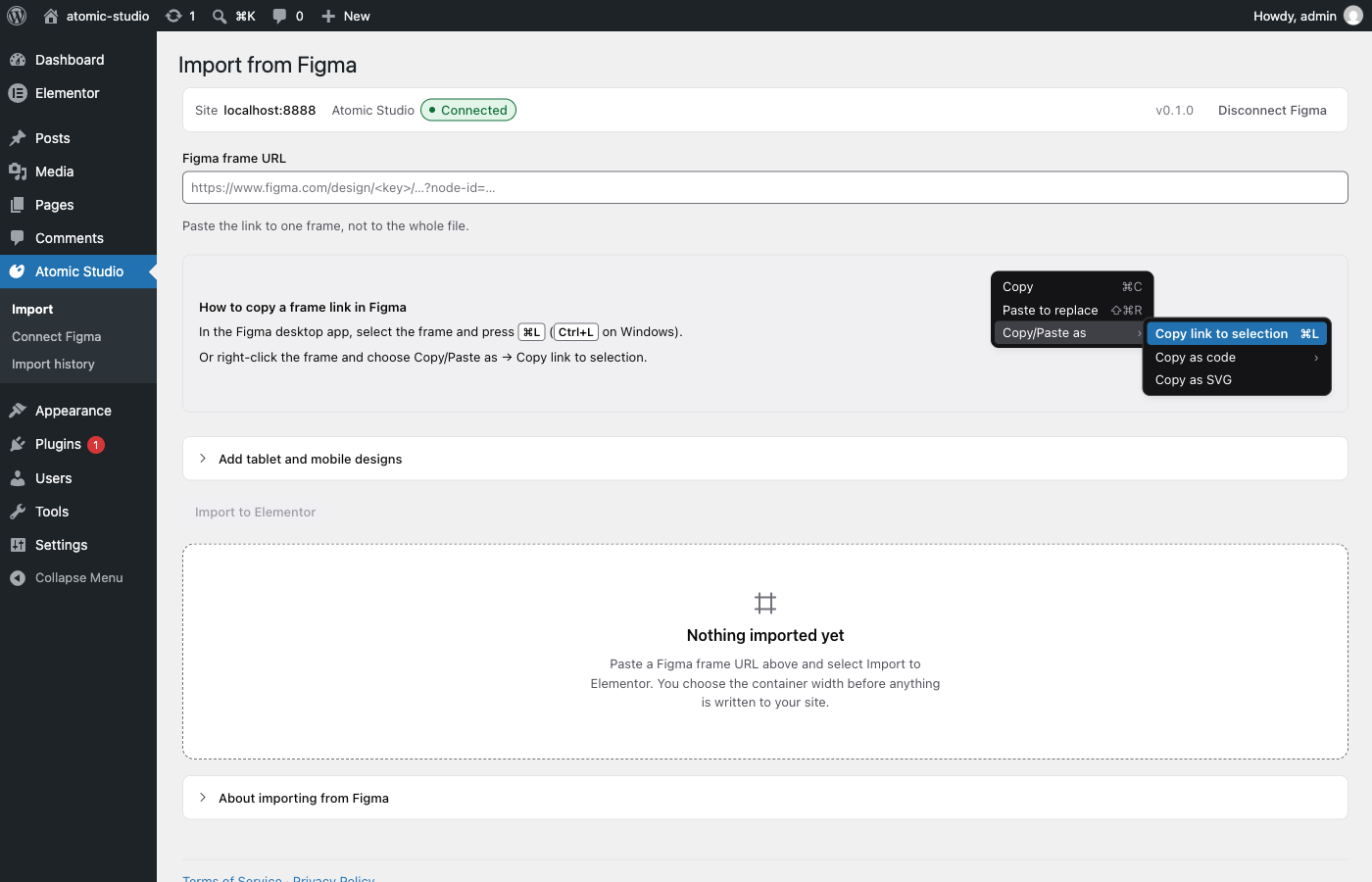
- In Figma, select a frame and press Cmd+L (Ctrl+L on Windows) to copy its link. Paste it into "Figma frame URL" and select "Import to Elementor".
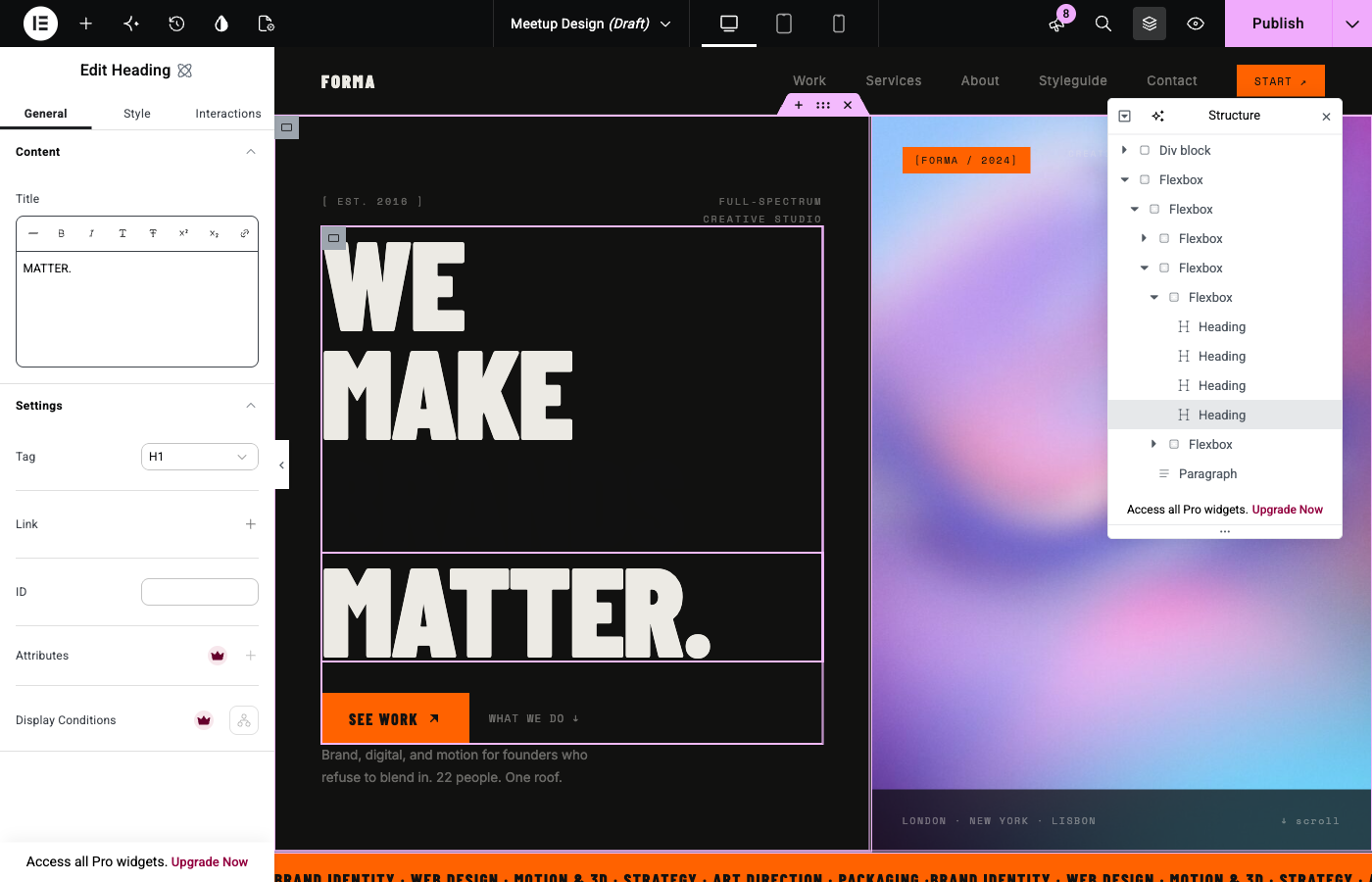
- Select "Edit in Elementor" to review the draft page, then publish it.
屏幕截图:
常见问题:
Is my design published right away?
No. Every import is a draft. If you re-import into a page that is already published, the import creates a new draft and leaves the live page unchanged.
What access to Figma does Atomic Studio need?
Read access to the files your Figma account can open. It cannot change anything in Figma, and it reads a file only when you import from it.
Does the plugin store a Figma password or token?
No. The plugin stores one encrypted private key that signs your site's requests. It never leaves your site, and deleting the plugin deletes it.
Does it work on a local or password-protected site?
Yes. It works the same, with a lower hourly import limit.
Does it work with Elementor V4 and the Atomic Editor?
Yes. It needs Elementor 4.2.0 or newer with the Atomic Editor switched on (Elementor → Settings → Atomic Editor → Activate). Tablet and mobile designs need Elementor 4.3 or newer.
Does it work with Elementor V3 and its classic widgets?
No. Atomic Studio builds Elementor V4 atomic elements only. It does not create classic widgets.
Do I need Elementor Pro?
No. The free Elementor plugin is enough.
How do I stop using Atomic Studio?
Select "Disconnect Figma" under Atomic Studio → Connect Figma, or deactivate the plugin. Pages you already imported stay as they are.
更新日志:
- Google Fonts in an imported design are now copied to your site and served from it, instead of loaded from Google. When a later import needs a weight your site's copy lacks, it is added.
- A font your site cannot load no longer shows in the browser's default font (Times). The import keeps the first font in the design's font list that your site can load, and otherwise uses your site's own font.
- Spacing written as two values, and the row gap of grid layouts, are now kept instead of dropped.
- On sites with Elementor Pro, a word drawn in its own colour in Figma, such as one gold word in a heading, now keeps that colour. Without Pro, the import report names the word: Elementor keeps bold, italic and underline inside a text, but not a colour.
- The Privacy Policy now lists the font files your site downloads from Google Fonts during an import, and both it and the Acceptable Use Policy cover pages imported with the Atomic Studio browser extension. Because the policy changed, an administrator is asked to agree to Atomic Studio Cloud again after updating.
- When a Figma design has desktop and mobile frames but no tablet frame, the import confirmation now asks "Optimize the page for tablet?". Choose "Optimize for tablet" and Atomic Studio generates the tablet layout from the desktop frame. Your mobile frame stays as drawn.
- The Privacy Policy now lists the short record Atomic Studio Cloud keeps when Figma refuses an import: the reason, such as no access to the file or a Figma rate limit, and when. It is deleted after 30 days and never holds the file or your Figma token. Because the policy changed, an administrator is asked to agree to Atomic Studio Cloud again after updating.
- When a Figma design has only a desktop frame, the import confirmation now asks "Optimize the page for tablet and mobile?". Choose "Optimize for tablet and mobile" and Atomic Studio generates the tablet and mobile layouts from the desktop frame: rows that don't fit stack, and large text and spacing shrink. Choose "Keep the layout as drawn" to import the desktop frame only, as before. When the design has a tablet frame but no mobile frame, it offers to generate only the mobile layout.
- The import result says which layouts were generated, so you know which ones to check in Elementor's responsive mode.
- Optimizing for tablet and mobile needs Elementor 4.3 or newer. On older versions the question is not shown.
- The first time you open Atomic Studio, "Set up Atomic Studio" takes you through three steps: agree to use Atomic Studio Cloud, authorize Figma, then start importing. It shows once per site. Until it is finished or skipped, the plugin's row on the Plugins screen has a "Get started" link to it.
- Sites that already agreed to use Atomic Studio Cloud skip setup and keep opening Import.
- The plugin is now named "Atomic Studio – Figma to Elementor V4 Converter".
- Clicking "I agree — start using Atomic Studio Cloud" now returns to the screen you were on with Atomic Studio loaded, and confirms that Atomic Studio Cloud is on for the site. Before, the page stayed empty until you opened it again. On Connect Figma, the next step, Authorize Figma, shows right away.
- Reloading the page after agreeing no longer sends the agreement a second time.
- The plugin is now named "Atomic Studio for Elementor – Import Figma Designs".
- The Atomic Studio menu now stays in place when Elementor is not active, is older than 4.2, or has the Atomic Editor switched off. Its screens say what to change instead of the menu disappearing. The notice outside Atomic Studio still shows on the Plugins screen only.
- When an image from Figma cannot be added to the Media Library, the import result now says why, for example that the download failed or that the file is not a JPEG, PNG, GIF or WebP image.
- Images from Figma larger than 20 MB or 40 megapixels are no longer added to the Media Library, and the import result says which limit they crossed. Before, one oversized image could fill the server's temporary folder or run it out of memory.
- When an image from Figma cannot be added to the Media Library, it is left out of the page instead of being linked from Figma. Visitors' browsers no longer load images from Figma, and the page no longer shows a broken image once Figma's link expires.
- An image address that already points at your Media Library uses that image instead of downloading a copy. This also keeps those images on local and intranet sites, where the site's own address cannot be downloaded from.
- A user who can import but cannot view Atomic Studio no longer gets a menu whose screens all refuse them.
- Frames without auto layout in Figma are listed before and after an import, because they keep fixed positions and do not adapt to tablet and mobile screens.
- Imports now follow Elementor's "Enable Unfiltered File Uploads" setting. When SVG uploads are off, which is Elementor's default, SVG files are skipped and the import result counts them and links to how to allow them. Atomic Studio no longer switches the setting on for its own uploads.
- Re-importing a design into a page you are not allowed to edit is refused before anything changes. It no longer deletes that page's older revisions first.
- Re-importing a design into a published or scheduled page no longer turns it back into a draft. The import creates a new draft page and leaves the live page unchanged.
- The Figma connection status updates by itself after you authorize or disconnect Figma, without reloading the page.
- Global classes written by an import stay listed in the Elementor editor and in logged-in previews.
- Small layout fixes on the Atomic Studio screens.
- Initial release.