
Attic — Safe Database Cleanup (Undo-Friendly)
| 开发者 | rainynewt |
|---|---|
| 更新时间 | 2026年10月4日 21:55 |
| PHP版本: | 7.4 及以上 |
| WordPress版本: | 7.1 |
| 版权: | GPLv3 or later |
| 版权网址: | 版权信息 |
详情介绍:
- Nothing is deleted up front. Tables are renamed, options are backed up. Restore anything in one click for 30 days (configurable).
- Nothing is guessed. Before Attic calls something orphaned, it checks that the owning plugin's files are really gone and searches your code for any reference to it. Uncertain items stay marked "review".
- Nothing changes until you say so. The scan is read-only.
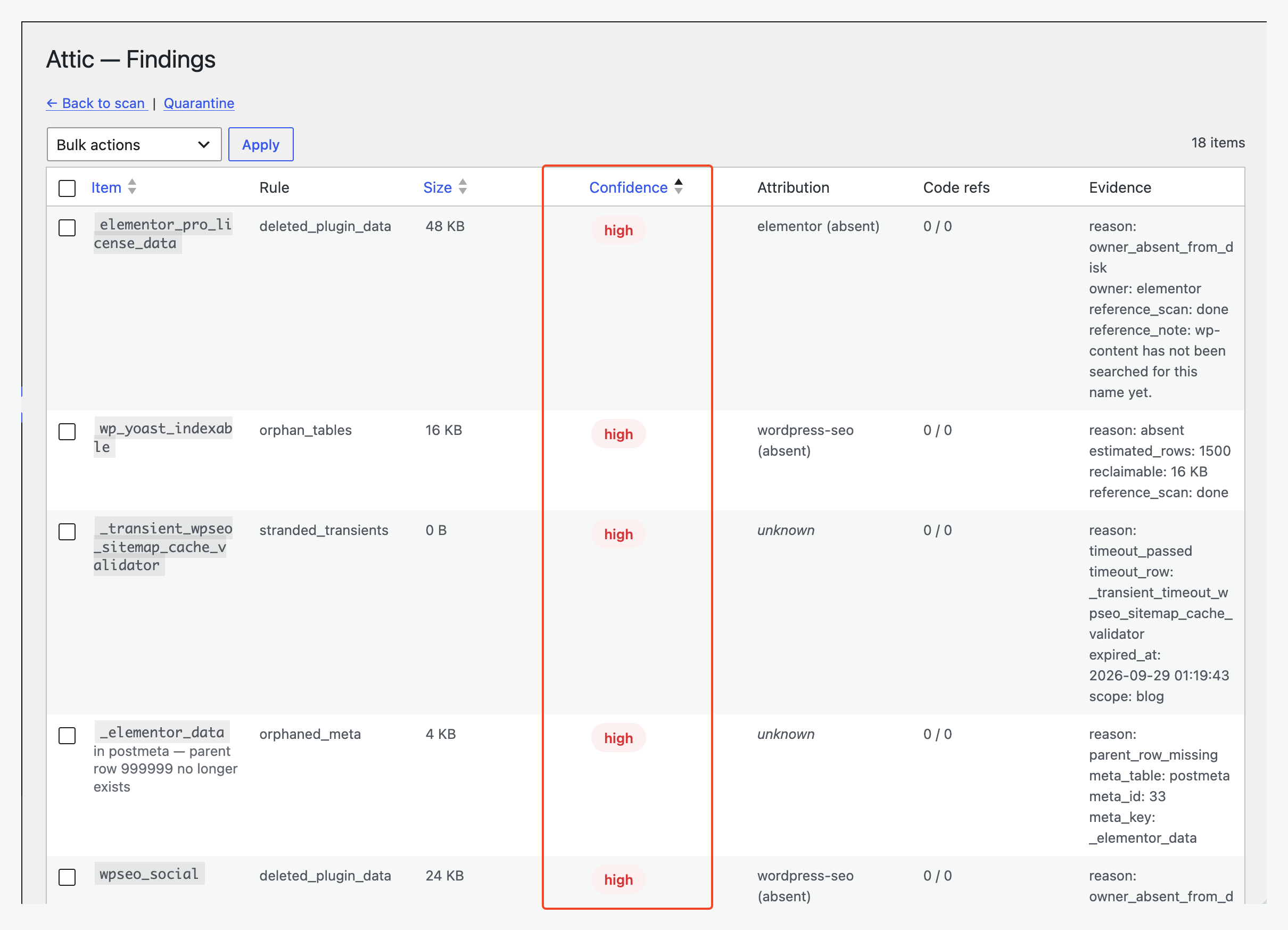
- Autoloaded option bloat: oversized options that load on every page, ranked by size against Site Health's 800 KB limit.
- Leftovers from deleted plugins: options, tables and cron jobs whose plugin is no longer on disk.
- Orphaned tables: tables no installed plugin claims, with the megabytes you'd get back.
- Ghost cron events: scheduled jobs with no code behind them, firing forever and doing nothing.
- Stranded transients: expired cache rows that never got cleaned up.
- Orphaned meta: post, comment, user and term meta whose parent row is gone.
- Site owners who've installed and removed a lot of plugins over the years
- Agencies doing housekeeping on client sites (WP-CLI and scheduled scans included)
- Anyone whose Site Health page flags autoloaded options and doesn't know what to do about it
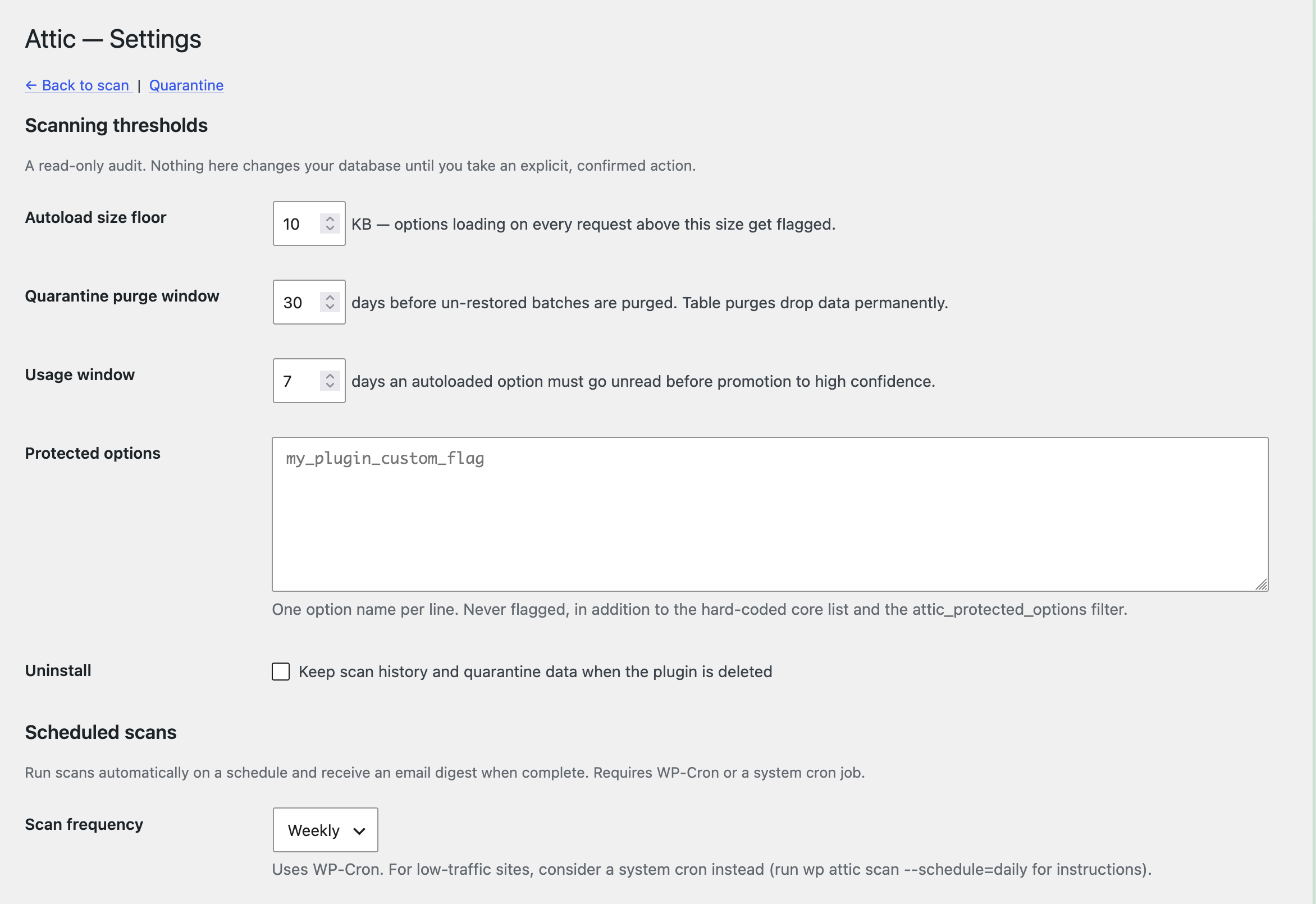
- Scheduled scans (daily, weekly or monthly) with an email digest of new and resolved findings
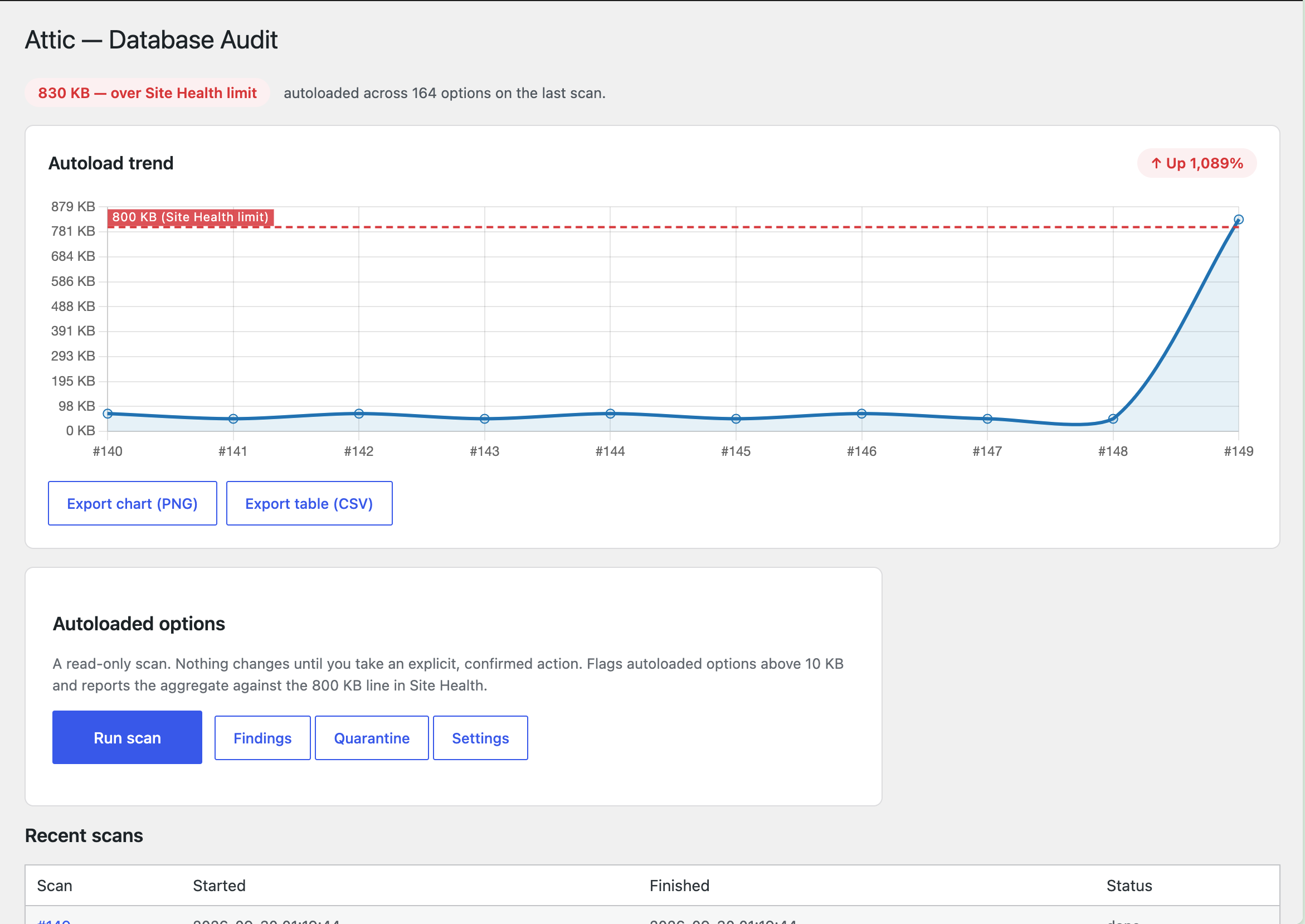
- Autoload trend chart over your last 10 scans, exportable as PNG or CSV
- WP-CLI:
wp attic scan,wp attic findings,wp attic quarantine - Multisite network dashboard with per-site scan status
- No outbound requests. No CDN, no tracking, no account. Everything runs on your server.
wp_attic_quarantined_*) and options are backed up first, with one-click restore inside the purge window (default 30 days, configurable). Permanent removal only happens once a quarantined batch passes the purge window un-restored, or if you purge it yourself on purpose. Attic also checks plugin files on disk and searches your code for references before promoting findings to high confidence, so uncertain items stay at "review."
WP-CLI commands
Run scans from the command line, across client sites or in CI/CD pipelines:
wp attic scan— run a full database auditwp attic findings— list and filter findingswp attic quarantine— manage quarantine batcheswp attic status— check plugin statuswp attic map status— inspect the bundled attribution map
wp attic map status— show the bundled map version and entry count- Add your own attributions with the
attic_prefix_map_entriesfilter
assets/vendor/chart.umd.min.js, used
only to draw the autoload trend chart in the admin. It is served from your own
site. Attic makes no outbound network requests of any kind.
Developer filters
Protecting things from ever being flagged:
attic_protected_options— additional never-flag option namesattic_protected_cron_hooks— additional never-flag cron hooksattic_protected_tables— additional never-flag tablesattic_protected_transients— additional never-flag transient names
attic_prefix_map_entries— add or override attribution map entriesattic_prefix_map_path— load the attribution map from a different fileattic_reference_scan_roots— where the code search looks; for unusual layouts and custom content directoriesattic_scan_rules— add or remove detection rules
attic_manage_capability— which capability may scan and quarantine (defaultmanage_options)attic_purge_after_days— override the quarantine purge windowattic_tracked_autoload_options— which options usage tracking watchesattic_track_autoload_usage— return false to disable usage tracking entirely
安装:
- Install and activate.
- Go to Tools → Attic.
- Click Scan.
- Review evidence for each finding (confidence, size, code references).
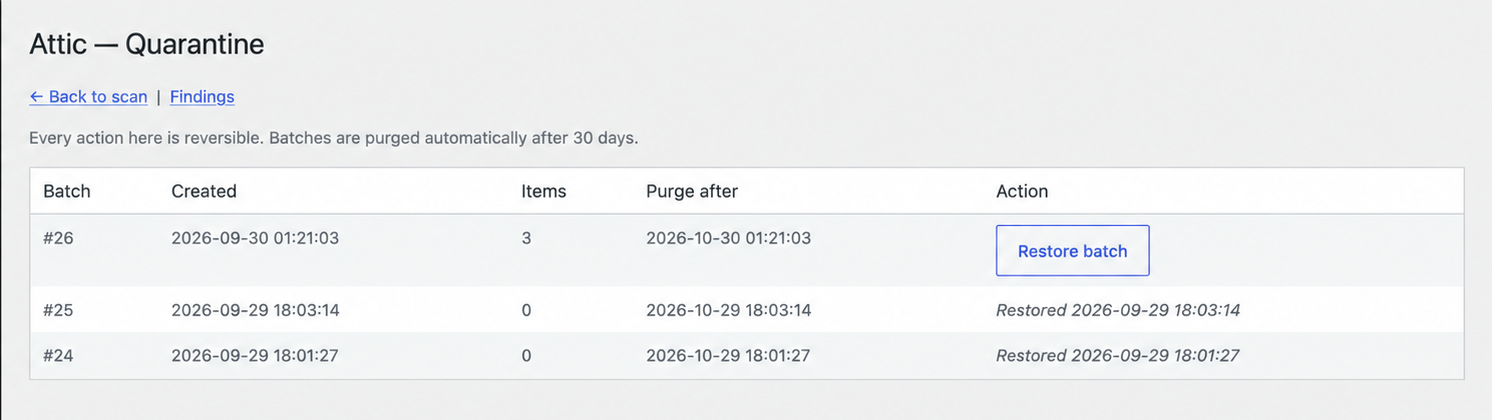
- Quarantine what you want gone — recoverable for 30 days by default (configurable) if you change your mind.
屏幕截图:
常见问题:
How do I fix "Autoloaded options could affect performance" in Site Health?
Install Attic, go to Tools → Attic and run a scan. The autoload findings list every large autoloaded option by size, with the plugin it belongs to and whether that plugin is still installed. Quarantine the ones left behind by plugins you've deleted. Your autoload size drops right away, and anything you remove can be restored for 30 days.
Will this make my site faster?
If your autoloaded options are large, yes: WordPress loads them on every page request, so shrinking them cuts work on every page. Orphaned tables and meta mostly cost disk space and backup size rather than page speed. Attic shows sizes up front so you can see what's worth removing.
Is it safe to delete leftover plugin tables?
Only if the plugin that created them is really gone and nothing on your site still reads them. Some plugins share tables, and some keep data you'd want back if you reinstall. That's why Attic never drops a table straight away: it renames it to wp_attic_quarantined_*, so your site behaves as if it were deleted. If nothing breaks during the purge window, it's removed for good. If something does break, restore it in one click.
Is this safe?
The scan is read-only. Nothing changes until you take an explicit, confirmed action. Core options like siteurl, active_plugins and cron can never be flagged, and neither can anything on your own protected list or the attic_protected_options filter.
How do I undo something?
Tools → Attic → Quarantine. Every action creates a batch; restore a whole batch in one click. Batches auto-purge after 30 days (configurable).
Why does my finding say "review" instead of "high"?
For most rules, high confidence requires the owning plugin to be absent from disk (or the option to be size-flagged and unread), and zero literal and zero prefix references anywhere in your code. Dynamic option names never literal-match, so even a weak signal keeps a finding at "review". If your filesystem could not be read, everything is marked unverified rather than guessed at. Two rules are exceptions, because a code search cannot tell you anything useful about them: an expired transient and a meta row whose parent is gone are facts about your database, not guesses about your code. Those are reported as high confidence on their own evidence.
Does it work with external object caches?
Yes — when Redis/Memcached is active, transients never touch the options table, and Attic says so instead of showing a meaningless clean bill of health.
Multisite?
Yes. Single-site, subdirectory multisite, and subdomain multisite installs all work. Network-wide fleet scanning is available via the network admin dashboard.
Which plugins does Attic work with?
Attic works with all WordPress plugins — it's a read-only cleanup tool that doesn't touch plugin data unless you explicitly quarantine it. The attribution map helps identify which plugin owns which database entries, but the scan works regardless of whether a plugin is in the map.
Plugins with known prefixes in the attribution map get named attribution, and the "leftovers from a deleted plugin" rule relies on the map to know which prefixes belonged to which plugin.
Data belonging to a plugin that is not in the map is still found by the other rules — an oversized autoloaded option, an orphaned table or a dead cron event is detected either way. It just shows its owner as "unknown". You can add your own entries with the attic_prefix_map_entries filter.
Does Attic delete plugin data?
No. Attic quarantines data (renames tables, copies options), never deletes. You can restore anything from Quarantine within the purge window (default 30 days, configurable).
What about multisite network-active plugins?
Attic correctly detects network-active plugins and never flags their data as orphaned, even if they're deactivated on individual sites.
更新日志:
- Improved: Clearer plugin directory tags, so Attic is easier to find when you search for help with autoloaded options or orphaned tables. No code changes.
- New: Attic now works on older sites too. It needs WordPress 5.6 or newer and PHP 7.4 or newer (before, it needed WordPress 6.5 and PHP 8.1).
- Improved: Leftover database tables from plugins you've deleted, such as Yoast SEO or Elementor, are now correctly marked as safe to clean up. Before, Attic was being too cautious and asked you to review them. Run a new scan after updating to see the difference.
- Fixed: After quarantining items from the Findings page, you could be left looking at a blank screen. Your items were always quarantined safely; now you see the confirmation message as you should.
- Fixed: The
wp attic scancommand (for people who manage sites from the command line) could crash while showing its progress bar. - Improved: A clearer plugin description, answers to common questions, and a short demo video.
- New: Orphaned meta detection (post, comment, user, term meta with a missing parent row).
- New: Scheduled scans with an email digest, WP-CLI support, and a network dashboard for multisite.
- New: Autoload trend chart, exportable as PNG or CSV.
- Fix: Several rules were skipping findings they should have caught (stranded transients, three of four meta tables). Re-scanning is recommended.
- Fix: Orphaned-table detection no longer flags other sites on shared multisite/database setups.
- Improved: No more per-page-load database writes; scans and quarantine are unaffected.
- Improved: No CDN or outbound requests — everything ships with the plugin.
- Fix: Quarantine action now correctly updates finding state (broken by SQL syntax error).
- Fix: Orphan tables rule no longer flags Attic's own tables on sites with nested table prefixes (e.g. wp_pc_attic_*).
- Add: Stop scan button to abort long-running scans mid-flight.
- Fix: Findings page defaults to latest completed scan instead of showing duplicates across all scans.
- Fix: Scan complete state now hides progress bar and stop button cleanly.
- Fix: Empty quarantine batches are cleaned up automatically.
- Initial plugin release: read-only database audit with quarantine-based undo, five detection rules, budgeted scan engine, reference scanning, quarantine with batch restore, and attribution map.