
Authyo Authentication and Notification for WooCommerce
| 开发者 |
yourwordpressusername
konceptwise |
|---|---|
| 更新时间 | 2026年8月17日 17:03 |
| PHP版本: | 7.4 及以上 |
| WordPress版本: | 7.0 |
| 版权: | GPLv2 or later |
| 版权网址: | 版权信息 |
详情介绍:
[authyo_login]— Adds an OTP-based login form to any page[authyo_register]— Adds an OTP-based registration form to any page
- 📧 Email — Delivered to the customer's inbox
- 💬 WhatsApp — Sent as a WhatsApp message
- 📱 SMS — Sent as a text message
- 📞 Voice Call — OTP read aloud via automated call
- 🔄 Order Received (Pending)
- ✅ Payment Confirmed (Processing)
- 📦 Order Completed
- ⏸ Order On Hold
- ❌ Order Cancelled
- 💸 Order Refunded
- ⚠️ Payment Failed
- Nonce verification on all form submissions and AJAX requests
- Rate limiting: maximum 5 OTP requests per 10 minutes per user
- Configurable maximum OTP attempt limit (1–20 attempts)
- Configurable lockout period after too many failed attempts (1–1440 minutes)
- All inputs are sanitized and validated
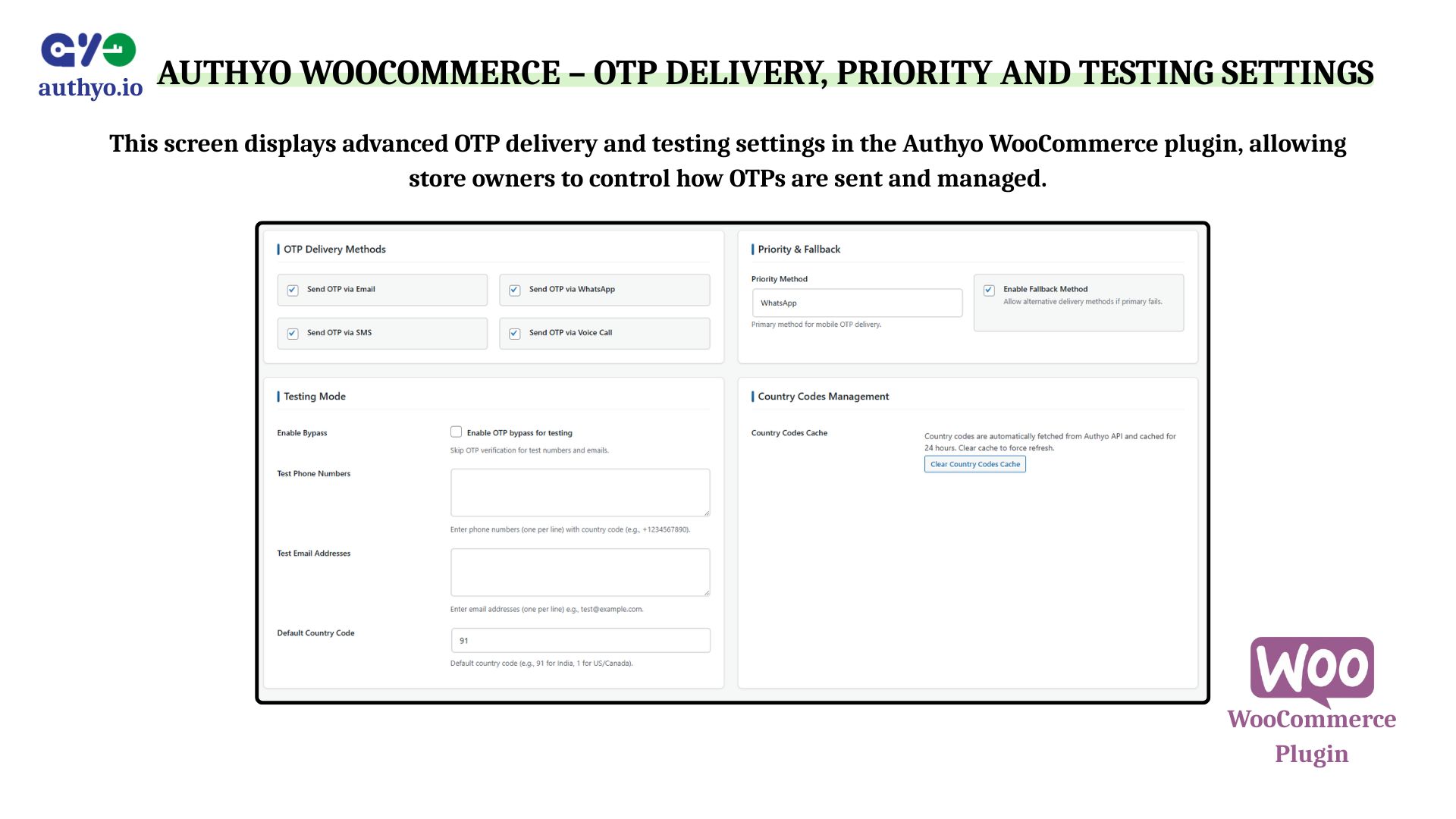
- OTP bypass mode for testing with whitelisted emails and phone numbers
- OTP length — 4 to 8 digits
- OTP expiry — 10 to 600 seconds
- Priority channel — Choose which delivery method is tried first for mobile numbers
- Fallback channels — Automatically retry with another channel if the primary one fails
- Country code management — Restrict the phone country dropdown to specific countries or allow all
- Default country — Pre-select a country code in the phone number field
- OTP activity log — View and manage all OTP send/verify events from the admin panel
- WordPress 5.0 or higher
- WooCommerce 5.0 or higher
- PHP 7.4 or higher
- A free Authyo.io account
- ✅ Compatible with WooCommerce High-Performance Order Storage (HPOS)
- ✅ Compatible with WooCommerce Cart and Checkout Blocks
- ✅ Tested with WooCommerce up to 9.0
安装:
- Upload the plugin folder to
/wp-content/plugins/, or install it directly from the WordPress plugin directory. - Activate the plugin from Plugins in your WordPress admin.
- Go to Authyo OTP in your WordPress admin menu.
- Sign up at authyo.io and generate your API credentials (Client ID and Client Secret).
- Enter your credentials on the Settings page and save.
- Enable the OTP features you want: Login, Registration, Checkout, and/or Order Notifications.
- Create pages for your login and registration forms and add the shortcodes
[authyo_login]and[authyo_register]. - Configure notification flows under Notification Flow if you want order status notifications.
屏幕截图:
常见问题:
Which channels can I use to send OTPs?
You can send OTPs via Email, SMS, WhatsApp, and Voice Call. Enable one or multiple channels in the plugin settings. You can also set a priority channel and configure automatic fallback so if one channel fails, another is tried automatically.
Can customers log in with a phone number instead of an email address?
Yes. Customers can enter either an email address or a mobile phone number. The plugin automatically detects which one is entered and routes the OTP to the right channel.
Does it support international phone numbers?
Yes. The phone number field includes a country code selector with support for countries worldwide. The available countries are loaded from the Authyo API and cached locally. You can also restrict the dropdown to specific countries from the plugin settings.
Will it work with my WooCommerce theme?
Yes. The plugin includes universal theme compatibility CSS that overrides common theme conflicts. The forms are designed to adapt to your theme's styling. The checkout OTP field integrates with both the classic WooCommerce checkout and the Gutenberg-based Checkout Block.
Can I keep password login alongside OTP login?
Yes. The OTP login form is added only to pages where you place the shortcode. The default WooCommerce login form remains untouched unless you choose to replace or hide it. Both methods can coexist.
What happens if a customer does not receive their OTP?
If the primary delivery channel fails, the plugin can automatically retry using a fallback channel (for example, trying SMS if WhatsApp fails). Customers also see a "Try another method" option in the form to manually request the OTP via a different channel.
Can I set how long an OTP is valid?
Yes. You can set the OTP expiry time between 10 and 600 seconds from the plugin settings. The default is 60 seconds.
What happens if a customer enters the wrong OTP too many times?
You can configure a maximum attempt limit (1–20 attempts) and a lockout period (1–1440 minutes). Once the limit is exceeded, the customer is temporarily blocked from attempting again. The counter resets automatically after the lockout period.
Is there a log of all OTP activity?
Yes. The plugin logs every OTP send and verification attempt. You can view the full log under Authyo OTP → OTP Logs in your admin panel, including the email/phone used, status, IP address, and timestamp. Logs can be bulk deleted.
Does checkout OTP verification slow down the checkout process?
No. Verification happens via AJAX in the background. The customer enters and submits their OTP before placing the order, so there is no delay at the point of order creation. Verification state is stored in a server-side session, not in the form, so it cannot be bypassed by manipulating form data.
Can I test the plugin without sending real OTPs?
Yes. The plugin includes a testing bypass mode. You can add specific email addresses and phone numbers to a whitelist — for those entries, the OTP step is skipped and verification always succeeds. This lets you test your checkout flow without consuming API credits.
Does it work with the latest version of WooCommerce?
Yes. The plugin is tested with the latest WooCommerce release and declares compatibility with WooCommerce HPOS (High-Performance Order Storage) and the WooCommerce Checkout Block.
更新日志:
- Fixed "Security check failed. Please try again." error.
- Fixed the login and registration forms.
- Performance improvements
- Performance improvements
- Readme file updated
- Performance improvements
- Fixed WordPress coding standards compliance issues
- Updated "Tested up to" to WordPress 7.0
- Reduced unnecessary database queries on page load for improved performance on high-traffic sites
- Optimised country code cache handling to reduce API calls
- Improved asset loading — scripts and styles now load only on pages where OTP forms are present
- Minor improvements to AJAX response handling
- Improved phone number processing to better handle international formats
- Stability improvements for the fallback channel selection logic
- Fixed an edge case where the OTP attempt counter could fail to reset after a successful login
- Fixed a display issue with the country code selector on certain themes
- Added WooCommerce order status notifications via Email, SMS, and WhatsApp
- Added Notification Flow admin interface with per-event configuration
- Added support for selecting multiple notification channels per order event
- Added toggle to enable or disable individual notification flows without deleting them
- Added enable/disable setting for order notifications in Basic Settings
- Improved reliability of the order webhook module
- Minor performance improvements
- Improved deduplication logic for order status notification hooks to prevent duplicate sends
- Code quality improvements
- Refactored SDK class for cleaner API error handling
- Improved JSON response parsing to support additional Authyo API response structures
- Added OTP verification at the WooCommerce checkout page
- Supports both email and phone OTP at checkout
- Session-based verification for improved security
- Improved country code detection for mobile number inputs
- Minor admin UI improvements
- Added configurable maximum OTP attempt limit (1–20 attempts)
- Added configurable lockout period after failed attempts (1–1440 minutes)
- Fixed WordPress plugin guideline compliance issues
- Improved database query security
- Enhanced internationalisation support
- Added automatic fallback channel support — retries with next available channel on failure
- Added OTP bypass mode for testing with whitelisted emails and phone numbers
- Improved plugin stability and security
- Improved error handling for API timeouts and network failures
- Fixed compatibility issue with certain caching plugins
- Initial release — OTP login and registration via Email, SMS, WhatsApp, and Voice Call