Auto Alt Text
| 开发者 | valeriomonti |
|---|---|
| 更新时间 | 2026年8月24日 21:05 |
| 捐献地址: | 去捐款 |
| PHP版本: | 7.4 及以上 |
| WordPress版本: | 7.1.0 |
| 版权: | GPLv3 |
| 版权网址: | 版权信息 |
详情介绍:
- Translator Instance API Key
- Translator Instance Endpoint
- Translator Instance Region After entering this data, save the options.
aatxt_content_alt_text_enabled to skip the processing for a specific request, and aatxt_content_image_alt_text to filter the alt text before it is written into the image tag.
WP-CLI
If you prefer generating alt text in batch (e.g., to avoid processing in the Media Library UI), you can use WP-CLI.
This is the recommended way to work on a large media library: the bulk action of the Media Library runs inside a single web request, so depending on your server settings (PHP max_execution_time, PHP-FPM request_terminate_timeout, web server or proxy timeouts) it can be interrupted before all the selected images have been processed. WP-CLI is not affected by those limits, shows a progress bar and can be resumed with --offset.
Generate alt text for a list of attachment IDs:
wp auto-alt-text generate --ids=123,456,789
Process all image attachments in batches:
wp auto-alt-text generate --all --limit=200 --offset=0
wp auto-alt-text generate --all --limit=200 --offset=200
Dry run (no metadata updates):
wp auto-alt-text generate --ids=123,456 --dry-run
Force overwrite of existing alt text (even if “Keep existing alt text” is enabled):
wp auto-alt-text generate --all --limit=200 --offset=0 --force
Notice: If you choose one of the methods that involves the use of external APIs, the upload times for images in the media library might increase because it requires sending a request to the APIs, waiting for the external server to process, and waiting for a response.
Logging
If the generation of the alt text via AI is set, in case of errors, to avoid blocking the editorial work, the image is loaded anyway but without the alt text being compiled.
When a call to the OpenAI, Anthropic, Gemini or Azure API fails, a record containing the error message is saved in a custom database table.
In this case, the cause of the error can be seen on the Auto Alt Text -> Error log page.
External Services
This plugin uses the following external services alternatively:
OpenAI
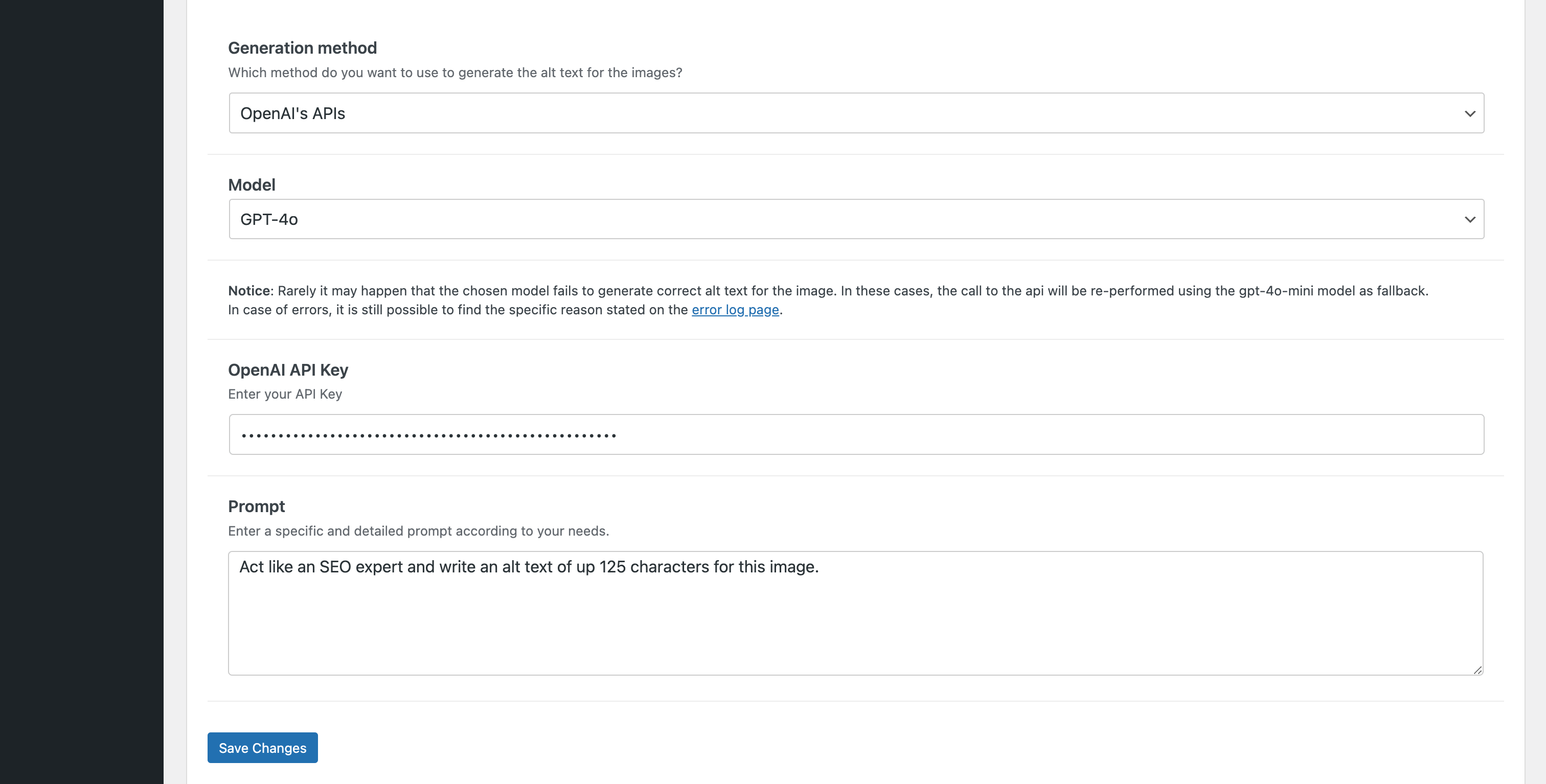
Selecting the generation method "OpenAI's APIs" will use the API services of OpenAI.
This plugin does not collect any information from your OpenAI account. The data transmitted to OpenAI mainly consists of the image files uploaded to your website and the specified prompt.
For accurate information on privacy and conditions of use, please consult the privacy policy and terms and conditions directly on the official website. It is also advisable to check the costs and usage statistics of the API service on the OpenAI website.
Anthropic Claude
Selecting the generation method "Anthropic's APIs" will use the API services of Anthropic.
This plugin does not collect any information from your Anthropic Claude account. The data transmitted to Anthropic Claude mainly consists of the image files uploaded to your website and the specified prompt.
For accurate information on privacy and conditions of use, please consult the privacy policy, terms and conditions for consumers and terms and conditions for commercial directly on the official website. It is also advisable to check the costs and usage statistics of the API service on the Anthropic website.
Google Gemini
Selecting the generation method "Google Gemini's APIs" will use the API services of Google Gemini.
This plugin does not collect any information from your Google account. The data transmitted to Google mainly consists of the image files uploaded to your website and the specified prompt.
For accurate information on privacy and conditions of use, please consult the privacy policy and terms of service directly on the official website. It is also advisable to check the costs and usage statistics of the API service on the Google AI website.
Azure
Selecting the "Azure's APIs" generation method will use the API services of Microsoft Azure.
This plugin does not collect any information from your Azure account. The data transmitted to Azure consists mainly of image files uploaded to your website.
For accurate information on privacy and conditions of use, please directly consult the privacy policy and terms and conditions on the official website. It is also advisable to check the costs and usage statistics of the API service on the Microsoft Azure's website.
Encryption Constants
We strongly recommend defining the new plugin-specific constants in your wp-config.php:
define( 'AATXT_ENCRYPTION_KEY',  'a_random_string_of_at_least_64_characters' );
define( 'AATXT_ENCRYPTION_SALT', 'another_random_string_of_at_least_64_characters' );
You will find these two define(...) lines already generated for you on the Auto Alt Text » Options page – simply copy & paste them before the /* That's all, stop editing! Happy publishing. */ line in your wp-config.php.
If you choose not to add them, the plugin will continue to work normally, but it will fall back to using your WordPress LOGGED_IN_KEY / LOGGED_IN_SALT, which may break if those salts are ever changed.
Disclaimer
Auto Alt Text is a plugin that helps users automatically generate Alt Texts of their images using AI services such as OpenAI's ChatGPT or Microsoft Azure.
Users need their own API key and must follow the rules set by the AI service they choose.
By using Auto Alt Text, users agree to watch and manage AI-made content and address any issues or misuse.
AI Engine developer and related parties are not responsible for any problems or losses caused by the use of the plugin or AI-generated content.
屏幕截图:
常见问题:
Is it mandatory to use external AI services?
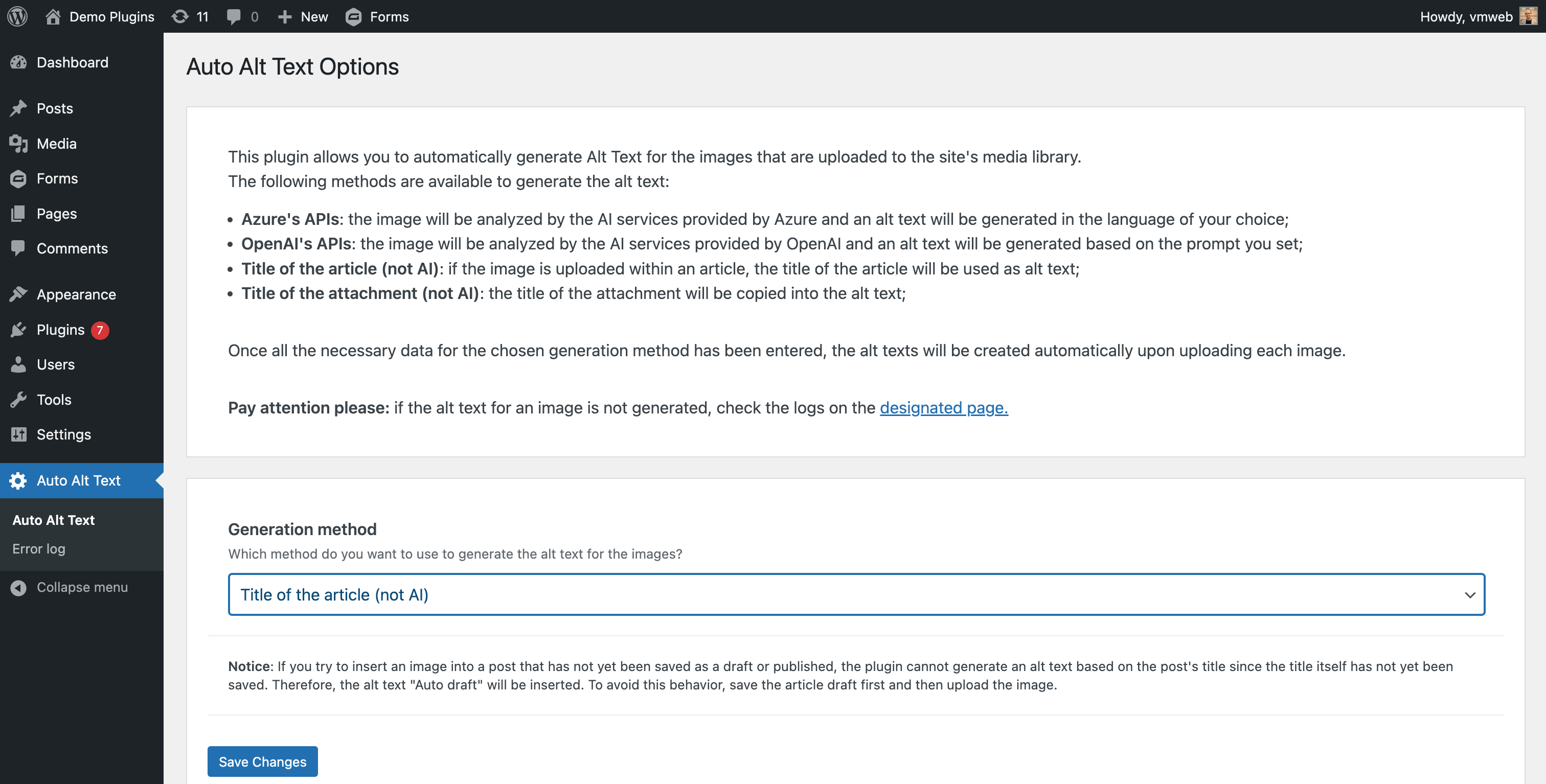
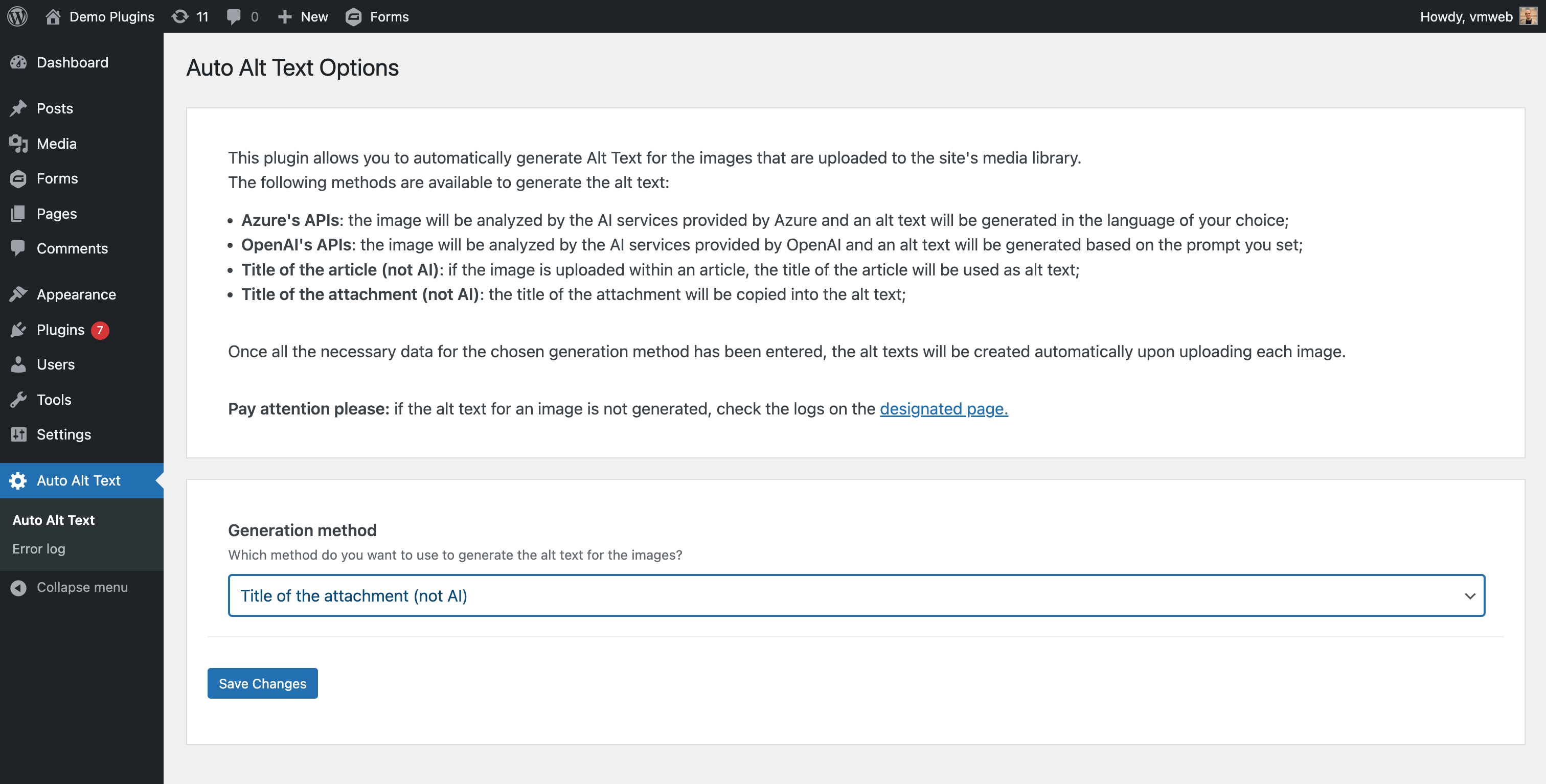
No. If you want to leverage the capabilities of AI you need an account with one of the supported services (OpenAI, Anthropic Claude, Google Gemini or Azure) and its API Key. Otherwise you can choose one of the two methods that do not use AI, which copy the title of the article or the title of the image.
Which generation method should I choose to obtain an accurate description of the image?
Any of the AI based methods ("OpenAI's APIs", "Anthropic's APIs", "Google Gemini's APIs" or "Azure's APIs") produces a real description of the image content. The methods based on the article title or on the attachment title do not look at the image at all, so they should be seen as a quick fallback rather than as an accessible description.
Is the plugin free?
The plugin is free, but the AI services are not: every generated alt text is a request billed by the provider you chose, according to its own pricing. Costs and usage statistics are always available in your provider account.
Can I generate the alt text for images already in the media library?
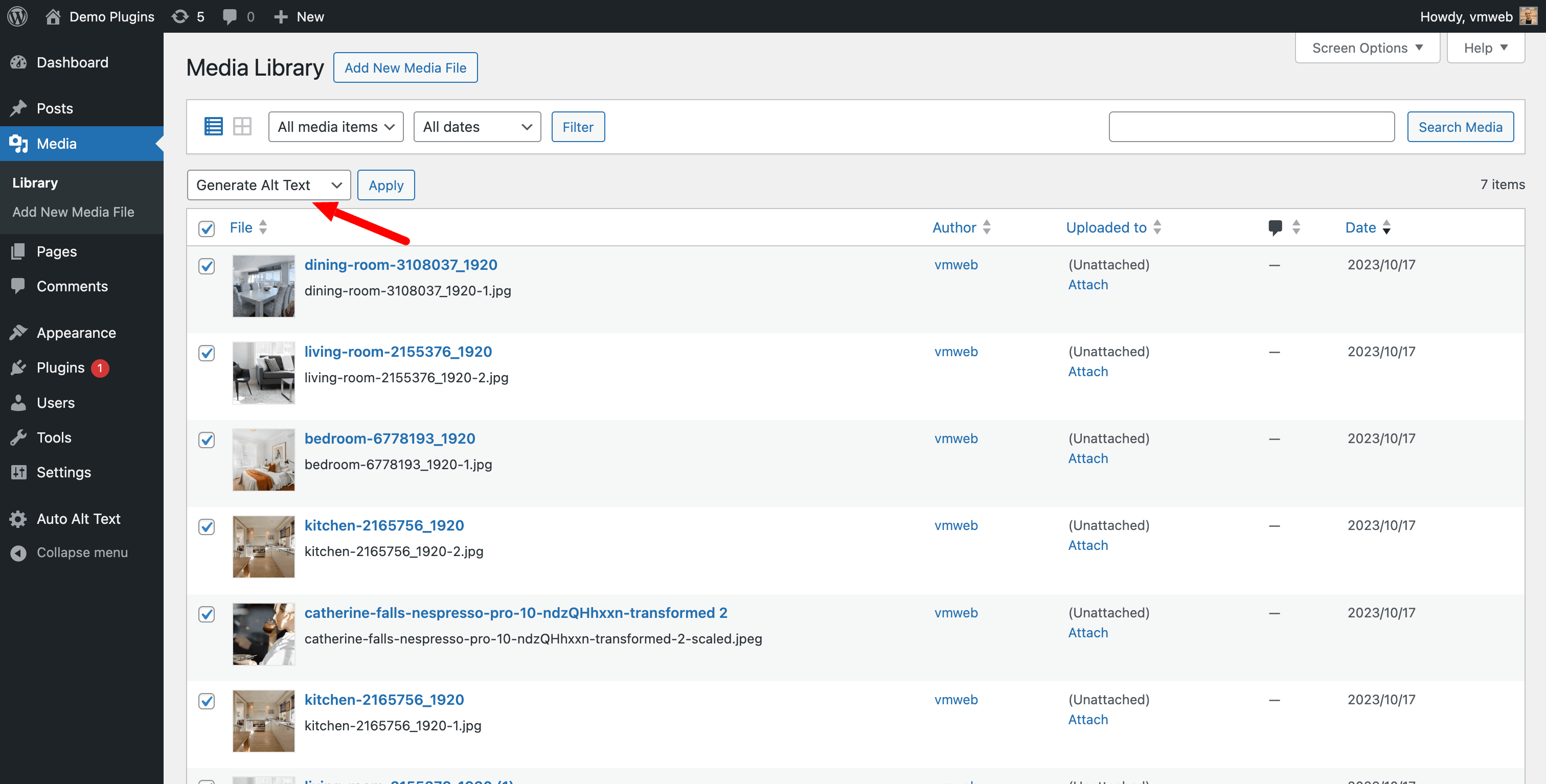
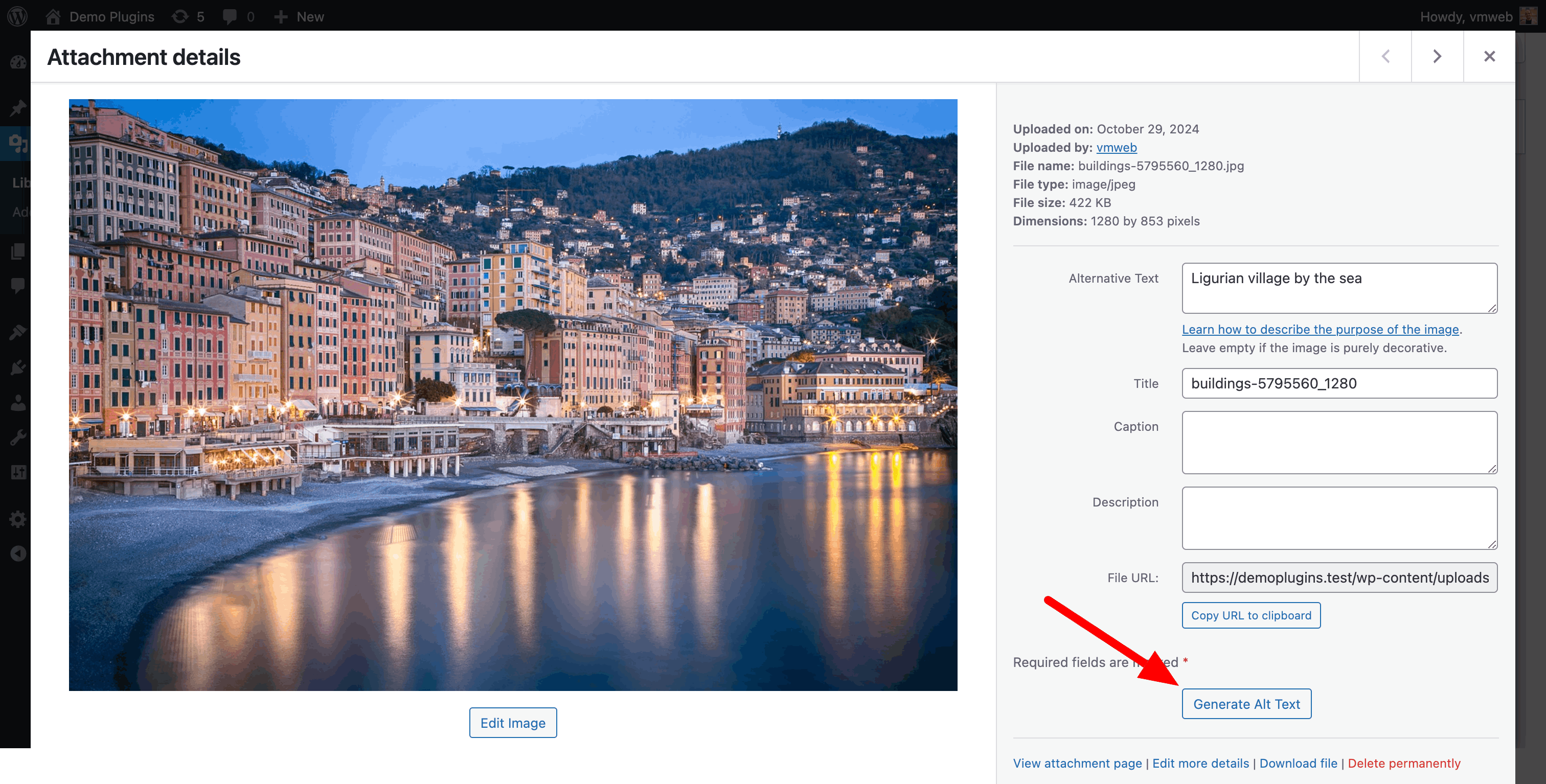
Yes, in three ways: the "Generate alt text" bulk action in the list view of the Media Library, the "Generate alt text" button available on each image in the grid view, and the WP-CLI command wp auto-alt-text generate, which is the recommended option for large libraries.
I have a lot of images: should I use the Media Library or WP-CLI?
Use WP-CLI. Every alt text is generated with a call to an external AI service, so the time needed for the bulk action in the Media Library grows with the number of selected images: depending on your server settings (PHP max_execution_time, PHP-FPM request_terminate_timeout, the web server or the proxy timeout) the request can be interrupted before all the images have been processed, and the images that were not reached yet are left without alt text. WP-CLI runs from the command line, where those web timeouts do not apply, it shows a progress bar, and it can be resumed at any time. As a rule of thumb, use the Media Library for a handful of images and WP-CLI from a few dozen upwards.
How do I generate the alt text with WP-CLI?
Run the command from the root of your WordPress installation. For a specific list of attachment IDs:
wp auto-alt-text generate --ids=123,456,789
For the whole media library, in batches:
wp auto-alt-text generate --all --limit=200 --offset=0
wp auto-alt-text generate --all --limit=200 --offset=200
Only images are processed; other attachments are skipped.
Which options does the WP-CLI command support?
--ids=<ids> a comma-separated list of attachment IDs; --all to process the image attachments of the whole library; --limit=<n> the maximum number of attachments to process (it defaults to 100 with --all); --offset=<n> where to start from when using --all; --dry-run to see what would happen without saving anything (the alt text is still generated, and therefore still billed by the AI provider); --force to regenerate the alt text even when the "Keep existing alt text" option is enabled. Either --ids or --all is required. At the end of the run the command prints how many images were processed, updated, skipped and failed.
Does the WP-CLI command use the settings of the plugin?
Yes. It generates the alt text with the same method, provider, model and prompt you configured in the plugin options, it honours the "Keep existing alt text" option (unless you pass --force) and it writes the failed calls to the Auto Alt Text » Error log page, exactly like the Media Library. Remember that each generated alt text is a request billed by your AI provider, so it is a good idea to try a small batch first (for example with --limit=10) before processing thousands of images.
Will my existing alt texts be overwritten?
No, if the "Keep existing alt text" option is enabled: images that already have an alt text are skipped. The single image button in the media library always regenerates the alt text of the image you clicked, and with WP-CLI you can force the regeneration with the --force flag.
Why is no alt text generated for some images?
The most common reason is the file format: each service supports a specific set of MIME types (for example Google Gemini does not support GIF images), and images that are not supported by the selected provider are skipped. It may also be that the API call failed: in that case the image is uploaded anyway, without alt text, and the reason is recorded on the Auto Alt Text » Error log page.
Does the plugin modify the content of my posts?
No. The "Automatically render alt text in content" option only adds the missing alt attributes to the HTML that is sent to the browser, while your saved content stays untouched. If you disable the option, the content is served exactly as it was before.
Why does the model list show “— API Key required —”?
The available models are requested to OpenAI and to Google using your API Key, so the list can only be built after the key has been saved. Enter the API Key, save the options, and the list will be populated. The list is cached and refreshed automatically every time you save a new API Key.
What happens if the model I selected is retired by the provider?
A notice is displayed in the administration area and the alt text generation keeps working using the least expensive available model, so your uploads are never blocked. Open the plugin options and select a new model to dismiss the notice.
Where can I see why a generation failed?
On the Auto Alt Text » Error log page: whenever a call to an AI service fails, the error message returned by the provider is stored in a dedicated database table. Errors never block the upload of the image.
Why do I see the error “There was a problem with the encryption of your API Key for alt text generation. Please re-enter the key and save”?
This message appears because the plugin was unable to decrypt your stored API Key. In most cases this happens when the cryptographic “salt” or “key” it originally used to encrypt your API Key has changed since you first saved it. Common causes
- You (or another plugin) have changed the WordPress authentication salts (
LOGGED_IN_KEY/LOGGED_IN_SALT) in yourwp-config.phpafter saving the API Key. -
You haven’t defined the recommended plugin-specific constants (
AATXT_ENCRYPTION_KEY/AATXT_ENCRYPTION_SALT) in yourwp-config.php, so the plugin fell back to the WordPress salts. How to fix - Go to Auto Alt Text » Options in your WordPress admin.
- Re-enter your API Key in the appropriate field and click Save Changes.
- (Recommended) Prevent this issue in the future by adding these lines before the
/* That's all, stop editing! Happy publishing. */comment in yourwp-config.php:define( 'AATXT_ENCRYPTION_KEY', 'a_random_string_of_at_least_64_characters' ); define( 'AATXT_ENCRYPTION_SALT', 'another_random_string_of_at_least_64_characters' );This ensures the plugin uses stable, plugin-specific values for encryption and won’t break if WordPress salts are ever changed again.
更新日志:
- Send the API requests over IPv4, so the generation no longer fails on hosts whose IPv6 address Google geolocates outside the supported regions
- Explain in the error log that a rejection based on the location depends on the server outbound IP, not on the API key or the plan
- Ask Gemini for a low thinking level instead of a minimal one, which the most recent models refuse
- Implement the Google Gemini API as an alternative for generating alt text
- Fill missing alt text on images rendered in the post content, using the alt text stored in the media library, without modifying the saved content
- Add the "Automatically render alt text in content" option to enable/disable this behaviour (disabled by default)
- Retrieve the available OpenAI and Gemini models automatically, and notify the user when the selected model is no longer available
- Add the Gemini 3.6 Flash model, now used as the fallback when the selected one is unavailable
- Send the image to Gemini inline instead of by URL, so the generation also works on sites Google cannot reach (local, staging, HTTP authentication)
- Avoid duplicate entries in the error log
- Replace the admin-ajax call for the single image generation with a REST API endpoint
- Update translations, Vite and the Composer dependencies
- Improve compatibility scoping vendor dependencies
- Update available Claude models
- Implement WP CLI commands for generating alt text
- Migrate to the Responses API from the Chat Completion API for OpenAI
- Remove o1 Mini deprecated model
- Replace hardcoded Openai model with the one selected from the user
- Update phpunit
- Update Vite
- Avoid to truncate alt text too long
- Implement SOLID principles
- Use design patterns
- Implement tests
- Preserve Media Library pagination when redirecting after bulk action
- Protect the plugin from Cross-Site Request Forgery attacks
- Enable the use of OpenAI's GPT-5, GPT-5 Mini and GPT-5 nano models.
- Replace a deprecated Azure Computer Vision api version.
- Implement the Anthropic API as an alternative for generating alt text.
- Modify documentation and build again the assets
- Fixed: Alt text now correctly persists when generated from both the post media overlay and the main Media Library.
- Introduce two new plugin-specific constants,
AATXT_ENCRYPTION_KEYandAATXT_ENCRYPTION_SALT, allowing API keys to be encrypted independently of WordPress’s own salts. - Implement automatic migration of existing encrypted API keys: on upgrade, keys encrypted with the old WP salts are decrypted (if possible) and re-encrypted with the new plugin key.
- Add an optional info notice on the Auto Alt Text options page showing the ready-to-copy
define()statements forwp-config.php. - Maintain full backward-compatibility: if the new constants are not defined, the plugin continues to use the WordPress
LOGGED_IN_KEY/LOGGED_IN_SALTfallback without interruption.
- Displays an error message in the administration area if the WordPress salt keys were changed after the OpenAI API key was set. The message asks the user to enter the OpenAI API key again.
- Update npm packages
- Fix a return type error in the alt text generation
- Avoid generating alt text for not supported mime types
- Hide the 'Generate Alt Text' button in media library for unsupported mime types
- Update npm packages
- Tested up to WordPress 6.7.2
- Preserves alt tags already present in images by preventing them from being overwritten by those generated by the plugin
- Update npm packages
- Allow users to select the preferred Openai model for generating alt text
- Allow users to generate the alt text for each individual image in the media library
- Set a maximum timeout of 90 seconds for OpenAI requests
- Implement the gpt-4o model for generating alt text
- Implement gpt-4-turbo template for fallback alt text generation
- Remove gpt-4 and gpt-3.5 templates as fallback options
- Implement bulk alt text generation for images already in the media library
- Update Vite package
- Implement github actions for automatic release
- Code refactoring
- DB security improvements
- Code refactoring
- Add Database log management
- Escape all output
- Add AATXT_ prefix
- Update Vite package
- Remove file log management
- Plugin released