AFB – Auto Form Builder: Drag & Drop Contact Forms, Multi-Step Forms, Conditional Logic & AI
| 开发者 | alighasemirad |
|---|---|
| 更新时间 | 2026年10月14日 05:46 |
| PHP版本: | 7.4 及以上 |
| WordPress版本: | 7.1 |
| 版权: | GPL-2.0+ |
| 版权网址: | 版权信息 |
标签
下载
详情介绍:
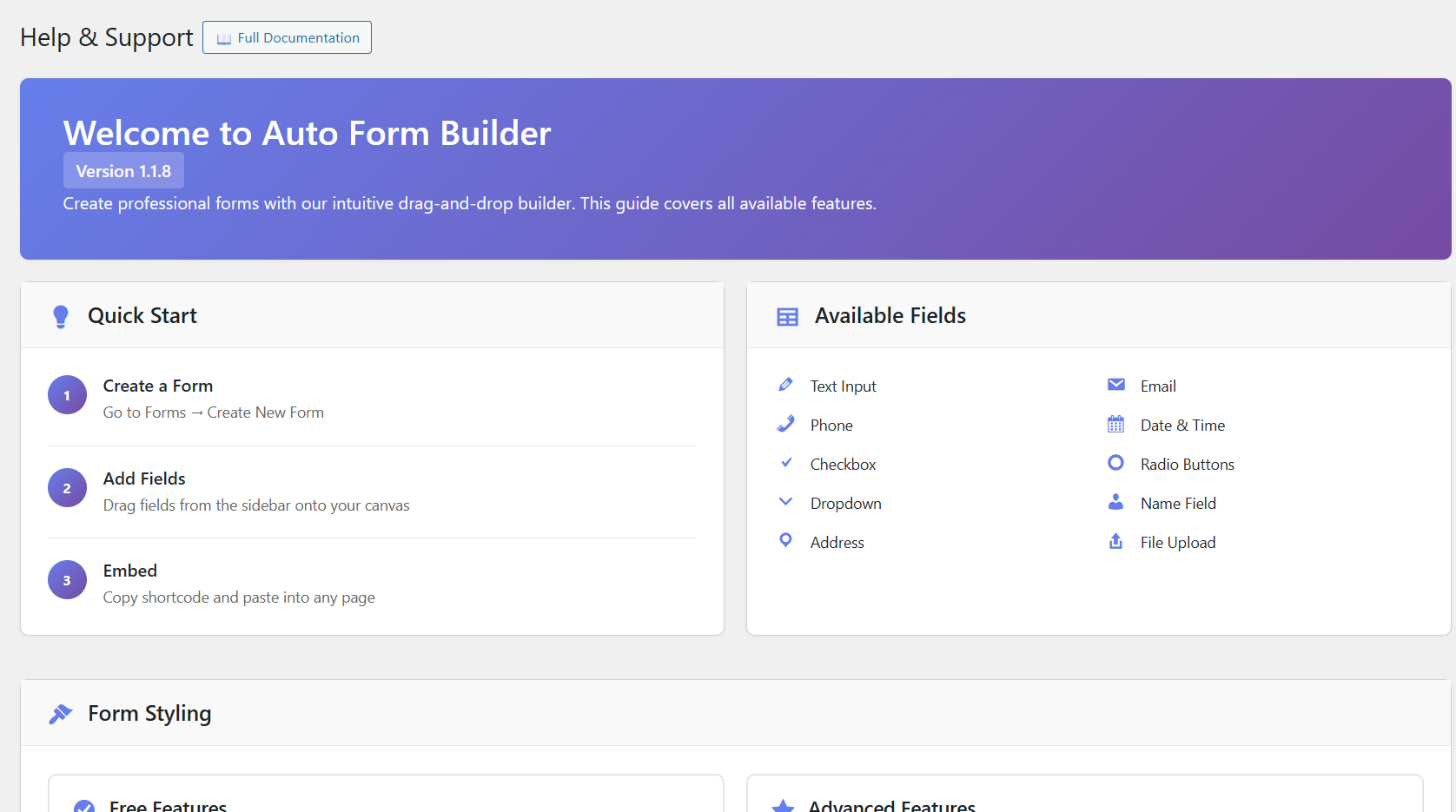
- Text — length limits, pattern validation, password mode, text transform, and hidden-field mode.
- Email — validation, a confirmation field, allowed domains, and use as the confirmation-email recipient.
- Number — min/max, step, money, percentage, or decimal display, and an optional slider.
- Checkbox — a single consent box or a group with minimum/maximum selections.
- File Upload — multiple files, drag-and-drop, type and size limits, and previews.
- Name & Address — separate parts with per-part required toggles and URL prefill.
- Calculation — a live total from other fields, with decimal places, a currency prefix or suffix, and custom separators.
- Most fields also support icons, help text, conditional logic, auto-fill, and custom CSS classes.
- Stripe Payments — take payments with Stripe Checkout using your own Stripe account. Charge a fixed price, an amount the visitor enters, or a Calculation result; payment status and refunds are tracked for you, and card details are entered on Stripe's page, never on your site. No added transaction fee — you pay only Stripe's standard processing fees.
- Popup Forms — modal, slide-in, sticky bar, full-screen, welcome mat, or floating button, triggered by delay, scroll, exit intent, or click.
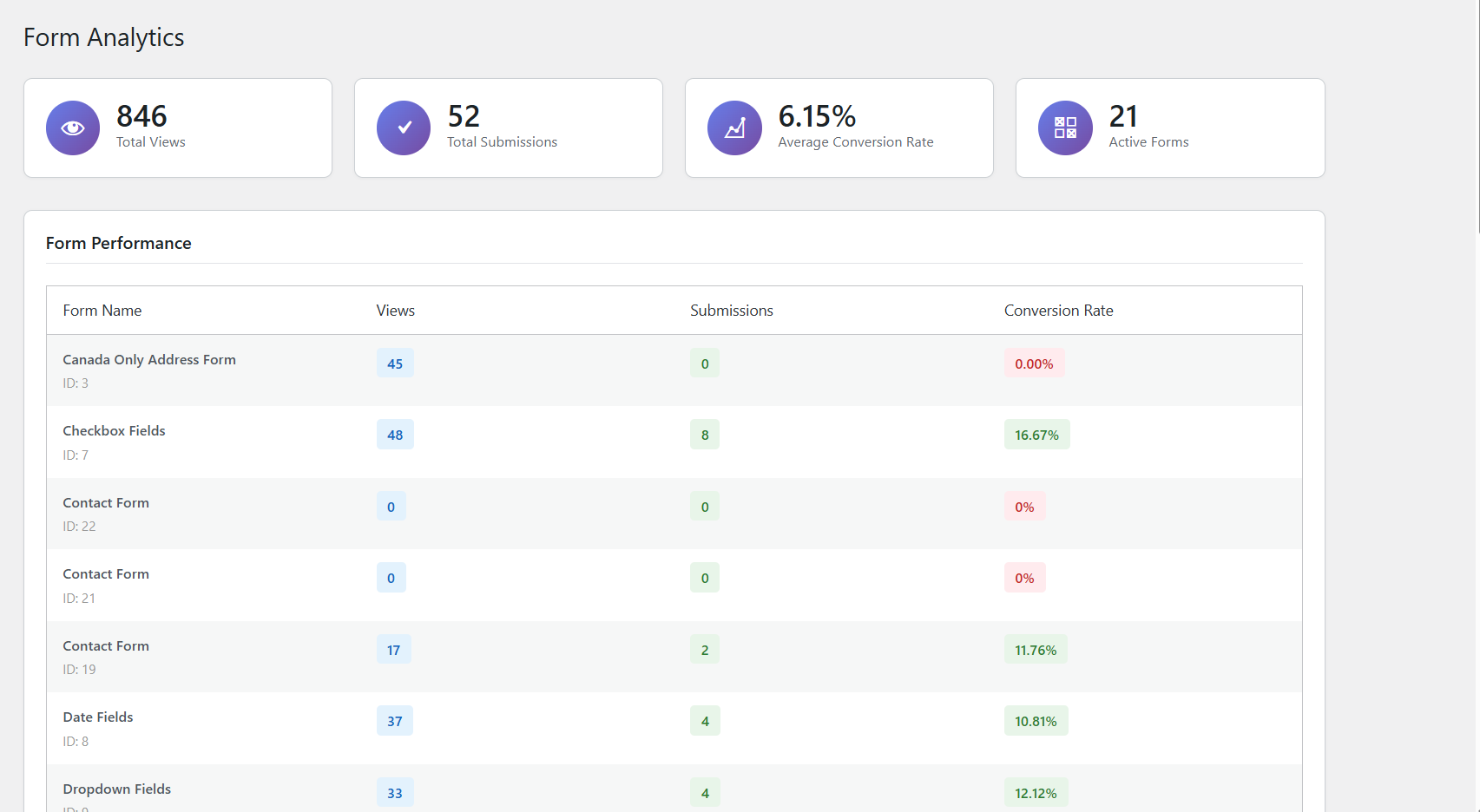
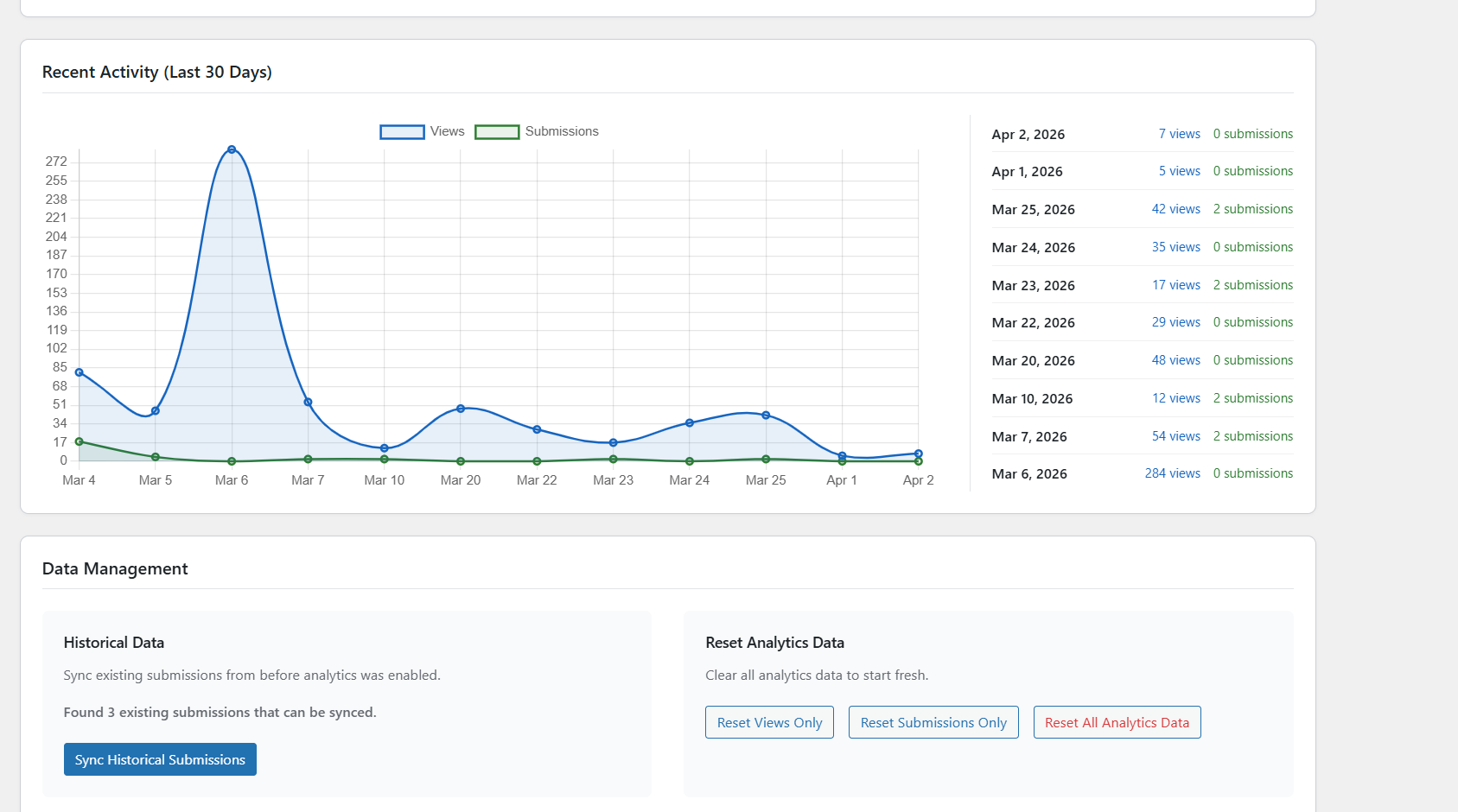
- Form Analytics — views, submissions, and conversion rates per form, with a 30-day chart.
- Spam Protection — Google reCAPTCHA and Cloudflare Turnstile.
- User Registration & Login — create accounts from any form (never as Administrator), send a welcome email, and add a login form with the [auto_form_builder_login] shortcode.
- Slack Notifications — post new submissions to your Slack channels.
- Entry Tags — color-coded tags and quick filters to organize submissions like a lightweight CRM.
- Google Sheets — send new submissions to a Google Sheet, with a spreadsheet, worksheet and field-to-column mapping for each form. Rows are sent in the background and retried automatically if Google is slow or unavailable.
- AI Assistant — build a form from a description or document, generate conditional logic, summarize submissions, draft replies, and chat with an admin assistant that can create forms.
- AI Conversation — turn any form into a friendly chat, with optional appointment booking.
安装:
- Go to Plugins > Add New in your WordPress admin.
- Search for "Auto Form Builder".
- Click Install Now, then Activate.
- Open Auto Form Builder in your admin menu.
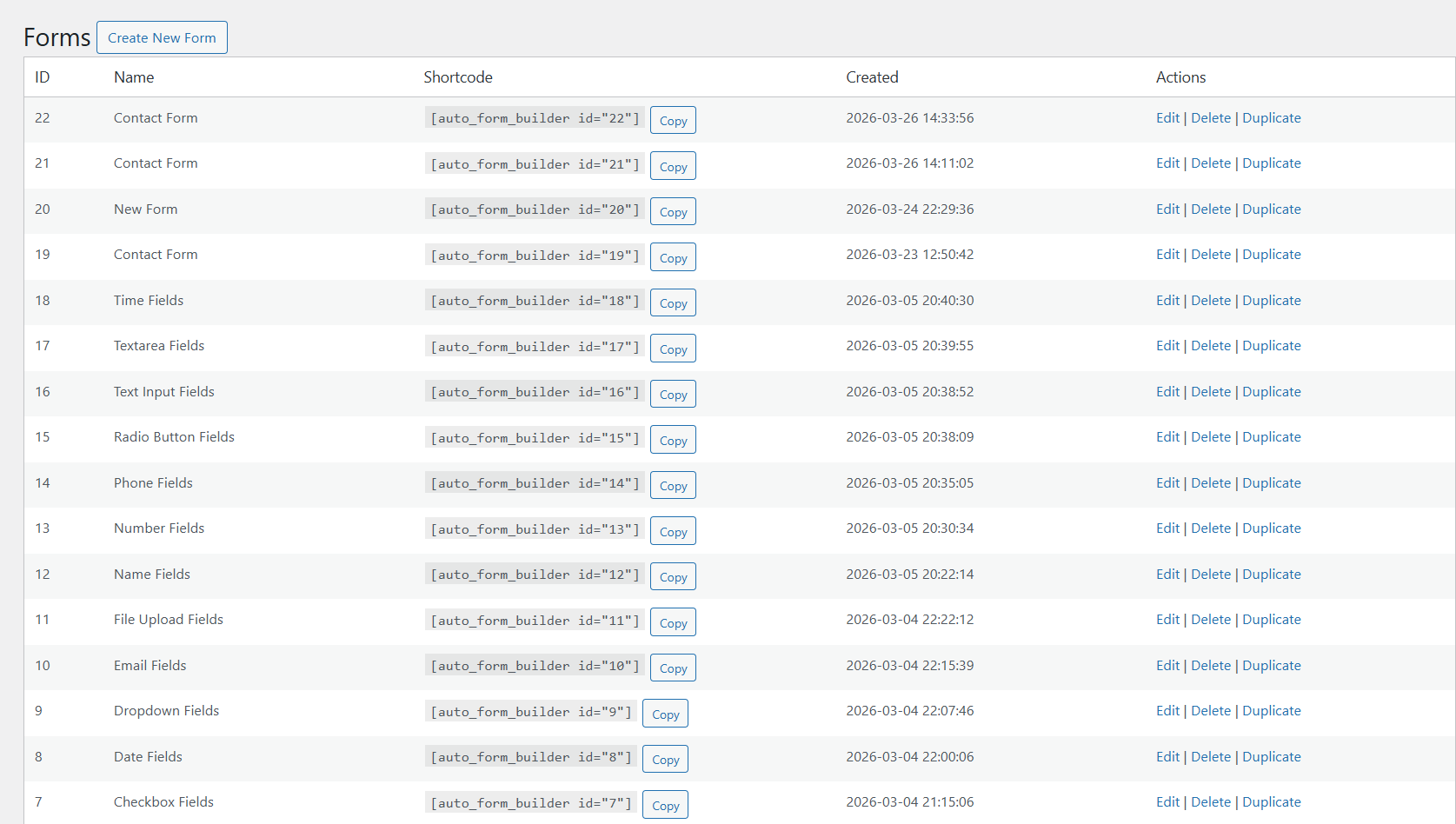
- Click Create New Form to build your first form.
- Copy the shortcode and paste it into any page or post.
屏幕截图:


常见问题:
Is this plugin really free?
Yes. The drag-and-drop builder and every non-AI feature — multi-step forms, conditional logic, surveys, calculations, Stripe payments, Google Sheets, Entry Tags, form analytics, spam protection, popups, user registration, submission management, webhooks, Slack notifications, import/export, and full visual customization — are 100% free. There is no premium version and there are no paid add-ons. The only thing you can pay for is AIDA credits for the optional AI features, and only after the free trial credits are used up.
Do I need to know how to code?
No. The drag-and-drop builder needs zero coding. Building, styling, and embedding are all handled through the visual interface.
What field types are available?
Text, Textarea, Email, Phone, Number, Date, Time, Month & Year, Checkbox, Radio, Dropdown, Name, Address, File Upload, Signature, Color Picker, Calculation, an HTML content block, Page Break (multi-step), and four survey fields: Tabular Survey (Likert grid), Star Rating, NPS, and Opinion Scale. See the full field reference.
Can I add conditional logic?
Yes. Every field supports show/hide logic with AND/OR conditions, and logic can also change your confirmation message, redirect, or which email is sent.
Can I create multi-step forms?
Yes. Enable multi-step mode and add Page Break fields where each step starts. You get step titles, custom button labels, progress bar styles, and answer-based branching that skips or jumps steps so visitors only see what applies.
Can I embed my form on another website?
Yes. Every form has a ready-made embed code that works on any site, including non-WordPress platforms and page builders like WP Bakery, Brizy, and Elementor. The embed keeps your design, resizes automatically, and stays isolated from the host theme. You can also share a direct link to the form as its own page.
Can I accept payments?
Yes, with the free Stripe Payments add-on (off by default; enable it under Forms → Add-Ons). Connect your own Stripe account and visitors pay on Stripe Checkout after submitting. The plugin adds no transaction fee or percentage — you pay only Stripe's standard processing fees.
Can my form calculate totals or prices?
Yes. Add a Calculation field and write a formula that uses other fields, for example a price times a quantity plus a fee. The total updates as the visitor fills in the form and is calculated again on your server when the form is submitted, so visitors cannot change it. A Calculation field can also set the amount of a Stripe payment.
Can I send submissions to Google Sheets?
Yes, with the free Google Sheets add-on (off by default; enable it under Forms → Add-Ons). Connect a Google service account, choose a spreadsheet and worksheet for each form, and map fields to columns. New submissions are added in the background and retried automatically if Google is slow or unavailable.
Can I show my form in a popup?
Yes, free and built in — no separate popup plugin. Display any form as a modal, slide-in, sticky bar, full-screen, welcome mat, or floating launcher, and control which pages it appears on, how it triggers, how often it shows, and what happens after submit.
Can visitors sign my forms with an e-signature?
Yes. Add the Signature field and visitors can sign with a mouse, finger, or stylus. The signature is stored securely and shown as an image in the entry details, on WordPress pages and embedded forms.
Can users register and log in through my forms?
Yes, free and built in. Pick which form creates accounts and map its fields to the account email, username, password, and name. Choose the new role, customize the welcome email, and add an independent login form (with lost password and reset) to any page via the [auto_form_builder_login] shortcode — no default WordPress login screen.
Can I protect my forms from spam?
Yes. Google reCAPTCHA and Cloudflare Turnstile are both included free — use either or both on any form.
Can I manage leads from my forms in a CRM?
Yes. Auto Form Builder integrates natively with Auto Form CRM, a premium WordPress CRM with contact management, a deal pipeline, automation, email campaigns, meeting scheduling, and live chat. Capture with Auto Form Builder, then nurture and close in Auto Form CRM. Learn more at autoformcrm.com.
Do the AI features cost money?
The core builder is free and always will be, with no account required. The optional AI features run on our AIDA service: a free AIDA account comes with free trial credits, and after those are used, continued AI usage needs one-time credit packs bought on autoformcrm.com. So AI is a paid service after the free trial, while everything else stays free. Your credit balance is always visible in the plugin.
What data is sent to external services when I use the AI features?
Only when you actually use an AI feature, and only the content it needs: the form description or uploaded document when building a form; the submission content when you summarize, reply, or "ask across submissions," or when the admin assistant answers a question; the messages you type into the admin assistant; and — only if you enable AI Conversation on a public form — the chat messages visitors type. Requests are authenticated with your AIDA token (kept encrypted on your server) and processed by our AI provider, Anthropic. Nothing is sent unless you opt in and use the feature. See "External Services" for full details.
Can I use the plugin without the AI features?
Yes. Auto Form Builder is fully functional without any AI. The AI modules are switched on by default, but the plugin never contacts AIDA until you connect an AIDA account. If you never connect one, nothing is sent, and you can switch the AI modules off under Forms → Add-Ons. Every other feature works the same either way.
Where can I get support?
Visit autoformbuilder.com/support for documentation and support.
更新日志:
- Fixed: Conversational Forms: the chat no longer stops with "The AI response could not be parsed". A reply the chat cannot read is retried once; if that also fails, the visitor is asked the current question again in the form's own wording. Visitors never see technical text.
- Fixed: Conversational Forms: when a visitor answers with something that is not a value, such as "skip this", "I'd rather not" or "call me instead", a required question is asked again politely with the reason it is needed, an optional question is skipped, and a question from the visitor is answered before the chat carries on.
- New: Conversational Forms: after three replies in a row without an answer to a required question, the visitor is offered the regular form. When they open it from the chat, every answer they already gave is filled in, so nothing has to be typed twice. The answers are kept on the server for 5 minutes and never put in the link.
- Changed: Conversational Forms: the instructions sent to the AI on each turn are shorter, so a typical conversation costs about 20% less on every tier, with the same behaviour.
- Changed: Conversational Forms: a reply that AIDA judges unusable is no longer charged, and a retried reply shares one charge with the reply it replaces.
- New: Conversational Forms: the persona, AI instructions, intro and completion messages and the scoring guide have a character limit, with a live counter under each box: 200, 4,000, 400, 400 and 1,000 characters. A save with a longer text is refused with a message that names the text and its length. Texts saved before this update are never shortened for you: a warning on the form's settings and on the Health tab lists each one until it fits.
- Fixed: Conversational Forms: when the AI instructions make the conversation too long for AIDA, the chat no longer fails. Visitors read "This chat isn't available right now." with a link to the regular form, which keeps any answers already given. Administrators and the live preview are told how long the instructions are and what the limit is. The case is listed on the Health tab, AIDA is not called again, and no credits are charged.
- New: Conversational Forms: a Health tab lists replies the chat could not use, with the time, form, tier and error, and AIDA's reason and 0 credits when AIDA judged a reply unusable. The raw reply is shown with the visitor's words, the answers collected so far, and any email address, phone number or date removed. Entries are kept for up to 7 days, and this works with conversation logging turned off.
- Fixed: Conversational Forms: the answer box matches the question being asked, with the right keyboard on phones for email, phone, number, date and time. A "Type a message instead" link is always available, and the small scroll arrows on the empty answer box are gone.
- Fixed: Conversational Forms: an answer given while correcting an earlier one is no longer lost, the lead analysis email includes the visitor's name and email, and stored transcripts keep each answer under its own field. Answers were never saved under the wrong field.
- Fixed: Conversational Forms: the button under the answer summary reads "Confirm & submit" again, without HTML code in its label.
- Fixed: When the same form appears more than once on a page (shortcode, block, popup or embed), the success message, the error box and the refilled answers show only in the copy that was sent. A popup only counts a conversion when its own copy is sent.
- Fixed: The Maximum File Size of a File field accepts decimals such as 0.3 MB in the builder, the browser and the server, and size messages read "0.3 MB" instead of "0 MB". A size of 0 or below is refused in the builder with a clear message and is not saved. The message for a file of the wrong type lists the types the field really allows, for example "PDF, DOC, DOCX".
- Fixed: The Address field no longer shows two asterisks on Address Line 1 and City, and their "required" errors use the plugin's own message instead of the browser's tooltip.
- Changed: Fields without a label use one name everywhere: the builder, the submission page, the list preview, emails, CSV exports, Google Sheets and webhooks. Webhook payloads also include a "field_labels" list.
- New: Entry exports have a "Choice answers" option: Labels (default) or Values.
- Fixed: Answers to fields inside a Row's columns, and to an Address field with a custom name, are filled back in when the server rejects a submission and when a visitor moves from the chat to the regular form.
- Fixed: The "N fields submitted" count on a submission page only counts answered fields, and an empty File field is no longer listed as "(file missing)".
- Fixed: A download link to a file that was deleted says "This file no longer exists." The security check on downloads is unchanged.
- Changed: Entries of a deleted form are named "Deleted form #34" everywhere, including the Dashboard.
- Changed: Bulk actions no longer offer "Mark as Unread" on the Unread tab or "Add to Starred" on the Starred tab.
- Fixed: On phones, the Submissions tabs show their names without overlapping, the filter dropdowns are no longer cut off, and the bottom bulk actions and paging bar sit below the list.
- Fixed: Field tiles in the builder show their full name, such as "Month & Year", in every language.
- Fixed: The scripts and styles of the built-in add-ons now follow the plugin version, so browsers load the new files after an update instead of a cached copy.
- Fixed: A form with an NPS or Opinion Scale field that has no field name can be sent again when that question is left unanswered, instead of failing with "Please select a valid rating". Fields without a name no longer pick up another field's answer during validation.
- Changed: The documentation links on the Help & Support page open the online documentation at autoformbuilder.com in a new tab.
- Removed: The "Plugin .htaccess" line on the System Status page. It reported a file the plugin never creates; the protection of the uploads folder is unchanged.
- Changed: The plugin now ships the source code and build files needed to rebuild its compiled scripts (src/, scripts/, vite.config.js, package.json and package-lock.json), and SOURCE-CODE.txt describes them accurately.
- Fixed: Answers to fields inside Rows and columns are now saved with the submission. They show on the submission page and in exports, partial entries and the Google Sheets field mapping, and files uploaded inside a Row are kept and deleted with the submission. Submissions sent before 1.5.2 did not store these answers; the notification emails always contained them.
- Fixed: Files sent through a field that accepts more than one file are now saved with the submission. They show on the submissions screens, in exports and in the AI Assistant, and are deleted with the submission. Submissions sent before 1.5.2 did not store these files; the emails, webhooks, Slack and Google Sheets always contained them, and the files themselves were kept.
- Fixed: A signature drawn in a popup, or anywhere else that is hidden when the page loads, is now saved in full. Before 1.5.2 such a signature was saved, and emailed, as a tiny image that could not be read.
- Security: Stripe Payments checks the payment amount more strictly on the server before anything is stored or charged.
- Security: Stripe Payments: a payment form no longer completes without payment when Stripe is not connected in the current mode or the stored Stripe key can no longer be read. The visitor sees "Payments are temporarily unavailable" and keeps their answers; the admin sees a notice listing the affected forms.
- Security: All server-side checks (required, email, number and slider ranges, length, pattern, file count, type, size and minimum files) now run for fields at any depth, including inside Rows and columns.
- Security: The server now decides which fields are hidden exactly the way the browser does, so hidden fields are never checked, charged or saved, and visible ones always are.
- Security: An embedded form that leaves its frame, such as a payment form, now carries a signed token tied to the form that expires after 24 hours. Signed-in visitors and the "Open" preview no longer see "Security check failed" on submit, upload or partial save. Normal forms still use the nonce.
- Security: Internal form inputs (spam checks, security codes, upload references, partial entry tokens and popup details) no longer appear in emails, webhooks, Google Sheets, exports, the submission screens or the AI Assistant. Google Sheets file cells show the file name and a link to the submission instead of a server path.
- New: Redesigned Submissions screen with five tabs: All, Unread, Starred, Spam and Trash. Existing submissions move over automatically, and a backup of any value the update changes is kept. The old Read tab is gone; old links to it open All.
- Changed: "Processed" is now called "Read". Unread submissions are bold in every tab, each tab shows one count, and the Auto Form Builder menu shows the number of unread inbox submissions.
- Changed: Opening a submission marks it as read, however it was opened. Submissions in Spam or Trash are marked read and stay where they are.
- Changed: Every submission, in the list and on its own page, has the same controls: star, read or unread, and a "More" menu with the actions that fit the tab. They work with the keyboard and screen readers, and deleting always asks first.
- Changed: The Status column is gone. The submission page shows "In Spam" or "In Trash" next to its title, and the entry number (for example #19) opens the entry.
- New: Bulk actions fit each tab, and Spam and Trash can be emptied with one button. Both ask first and say how many entries are affected.
- Changed: The submission preview lists only answered fields with their option labels. Long answers in non-Latin scripts and emoji are shortened cleanly, and a file that is no longer stored shows "(file missing)".
- Fixed: The source page is shown by its title, linked to the page, instead of "Unknown Page". Submissions received in the same second keep a stable order.
- Fixed: Tab links, search, sorting, paging, bulk actions and "Back to submissions" keep the current tab, filters and page. Counts update right after a move, and a failed action shows an error.
- Fixed: Spam and Trash are no longer counted or listed in the other tabs, the dashboard, the dashboard widget or the AI Assistant. Starring or marking read in Spam or Trash leaves the submission there.
- Fixed: On phones, the submission preview, the page numbers and the bulk actions menu now display correctly.
- New: Stripe Payments: visitors from an embedded payment form return from Stripe Checkout to a payment result page on the form's site. It shows the same confirmation, "being processed", cancelled or expired message (with "Resume payment") as a normal page, and no popups. Unknown or old links show "Link expired or invalid".
- Fixed: Stripe Payments: required fields are checked before the payment starts. If the payment cannot start, the visitor returns to the form with their answers kept, and no entry is saved for that attempt.
- New: Stripe Payments: the minimum and maximum amount settings now work with calculated totals.
- New: Stripe Payments: a "When the total is 0" setting for calculated totals. By default the form refuses the submission; it can also complete without payment.
- New: Stripe Payments: the form builder warns when payments are on but the current mode is not connected, or the webhook is not set up.
- Fixed: Emails and the submissions screens show choice labels consistently, also for fields inside Rows: a single ticked checkbox shows its label or "Yes", "None of the above" shows as written, and a radio "Other" shows the visitor's text.
- Fixed: Matrix answers in emails show each question with its choice, and a matrix field tag shows "Question: Choice" instead of "Array".
- Fixed: Show/hide rules ignore answers in hidden fields, compare dates, months and times correctly, ignore "Select all", and update after "Select all", "None of the above" or a selection limit changes the boxes. Fields on skipped steps stay disabled.
- Fixed: A required field (file upload, signature, address or pattern-checked field) that is hidden by a rule, also inside a Row, or on a skipped step no longer stops the form. It is required again when shown.
- Fixed: In a multi-step form, Next checks every field on the step, including uploads, signatures, address, checkbox minimums, matrix, time, dropdowns and email confirmation. Submit returns to the first step with an error.
- Fixed: When a check stops the form, focus moves to the first field with a problem and screen readers read its message. File messages appear next to the field instead of in a pop-up alert.
- Fixed: Clicking Clear on a signature empties it, and the server no longer accepts a blank or nearly blank signature for a required field.
- Fixed: When "Other" is chosen on a checkbox or radio field, its text must be filled in: "Please specify your answer for Other."
- Fixed: Two forms on one page, or the same form shown twice, now work separately, each with its own uploads, pickers and messages.
- Fixed: The hidden spam-check field can no longer receive focus, and screen readers do not announce it.
- Fixed: An invalid email address shows "Please enter a valid email address." and stays in the form. After the server rejects a submission, the email confirmation box is filled in again.
- Improved: Upload errors say what went wrong (too large, wrong type, too many files, or not saved). A file field checks the number, type and size of files as soon as they are added, and "Minimum Files" is also checked on the server.
- Fixed: A number field's lowest, highest and starting value, and the minimum length of text and phone fields, can now be set to 0 in the builder.
- Fixed: A slider with no lowest or highest value runs from 0 to 100 on the server too, as it does in the browser.
- Fixed: The dashboard's unread number opens the Unread tab.
- Fixed: A form turned away by the server (for example a failed spam check) now reloads with the visitor's answers filled in. File uploads and signatures must be added again.
- Fixed: A dropdown with a default or restored answer now shows the chosen option instead of looking empty.
- Security: Further hardening of form styling, stored spam-protection keys and uploaded files. Updating is recommended.
- Fixed: A single checkbox no longer shows its text twice.
- Fixed: A number slider's live value now keeps its formatting after it is moved.
- Fixed: A number typed with an exponent (such as 1e3) now gives the same result in the live calculation and the saved entry.
- Changed: reCAPTCHA and Turnstile secret keys are now stored encrypted; existing keys move over automatically. If the site's security keys (salts) change, a notice asks you to re-enter the key.
- Changed: Permanently deleting a submission now also removes its files, signatures, address details, AI outputs and unsent Google Sheets rows. Trash keeps everything.
- Fixed: A rejected submission no longer leaves uploaded files or signature images behind.
- Changed: Files uploaded but never submitted are removed after seven days.
- Changed: nginx sites see a notice with a recommended rule for the uploads folder.
- Fixed: Entries now record the page and title the form was submitted from, including embedded forms.
- Fixed: The Submissions "All" tab no longer includes Spam or Trash.
- Fixed: The builder warns when the User Confirmation Email is on but no email field is selected.
- Fixed: The form block uses block API version 3, removing the editor warning on WordPress 6.9+.
- Fixed: The Customize preview now shows the Name field as configured and applies the focus colour and shadow.
- Fixed: Popup Builder's redirect notice now considers conditional confirmations.
- Changed: "Show Number Next to Slider" is on by default for new sliders.
- Changed: Calculation fields no longer show the unused Required and Placeholder settings.
- Fixed: Clearer help text for notification rule recipients and "Break out of iframe".
- Fixed: Deleting the plugin with "remove all data" now removes all add-on data, popups, logs and temporary data. Scheduled tasks are always removed.
- Fixed: Deleting the plugin while keeping data now also removes the saved AI connection. Forms and submissions are kept.
- New: Calculation field: live totals from other fields with + − × ÷, brackets, min, max, round, abs, ceil and floor, plus decimals, prefix/suffix and separators. Recalculated on the server and shown in emails, Slack, entries and CSV exports.
- New: Stripe Payments add-on (free, off by default): take payments with Stripe Checkout using your own account. Fixed, visitor-entered or calculated amounts; payment status, filters and refunds on the Submissions screen; payment tags in emails. No added fees.
- New: {field} tags in redirect URLs, with an "Insert field" picker. Values are safely encoded.
- New: Saving a redirect URL warns about unknown tags, file or signature fields and reserved parameter names, and no longer erases the previous URL on failure.
- Changed: Clearer wording for conditional confirmation rules.
- Changed: Deleting a form now asks for confirmation, shows its submission count and can trash its submissions. Add-on settings for that form are removed.
- Changed: The success message is no longer added to the page address.
- Fixed: Emails no longer show uploaded files' server paths or a duplicate File row, and choice fields show their labels.
- Fixed: Side-by-side fields now line up at the top.
- Fixed: The Time field's help text no longer appears twice.
- Fixed: Submissions of deleted forms open without errors and are labelled "Deleted form #ID".
- Fixed: Form Analytics no longer counts views of deleted forms.
- Fixed: "Redirect" with no URL now shows the success message.
- Security: Hardening of file uploads, redirects, webhooks and spam protection.
- Fixed: Notification emails to several recipients are now sent one per recipient, so one bad address no longer blocks the rest.
- New: Notification recipients are entered as a list; existing ones convert automatically.
- New: Failed emails are logged under Settings → System Status → Email Delivery Failures.
- New: Saving a form warns about invalid or cleaned notification addresses.
- New: Per-form option to always send the main notification, or only when no email rule matches.
- New: Date field "How to Display Values" option (Plain, Friendly or Both), fixing the date showing twice.
- New: Inside-the-field icon for the Date field.
- Changed: The builder's Preview button is now Open, showing the published form in a new tab.
- Fixed: The file-upload stylesheet now loads on real installs.
- Fixed: Deactivation feedback and opt-in usage data now reach Auto Form CRM without delays.
- Changed: Removed an unused license check from AI Conversation.
- New: Google Sheets built-in add-on (off by default) with per-form mapping, background delivery and encrypted credentials.
- New: Rules can use a field's "Other (specified)" text as a condition.
- Improved: Rule editors warn when "Greater/Less than" is used on text option values.
- Fixed: Phone field format-as-you-type now handles Backspace and Delete.
- Fixed: Required Radio, Time and Matrix fields are now checked in the browser.
- Fixed: Server-side validation errors no longer clear the visitor's answers.
- Fixed: The unsaved-changes warning is reliable after adding or removing fields.
- Fixed: The Date field shows one calendar icon, on the left (right for RTL).
- Fixed: The Month & Year display format shows in every browser.
- New: Entry Tags built-in add-on: colour-coded tags, filters, templates and statistics. Existing tags are kept.
- New: The AI Assistant can see submission tags when Entry Tags is on.
- Changed: Deleting a submission removes its tags; new auto_form_builder_submission_deleted action.
- Fixed: Checkboxes "None of the above" now satisfies minimum selections, and limits are re-checked on every submit.
- Fixed: Date "Minimum Days From Today" is enforced in the browser, and failed submissions keep all values.
- Fixed: "Back to Forms" asks before leaving unsaved edits.
- Fixed: Several Month & Year and Drop-down icon and display issues.
- Fixed: Fatal errors when submitting forms with Date or survey fields.
- New: UK Mobile phone format.
- New: Date field "Minimum Days From Today" option.
- New: Inside-the-field icons for the Drop-down field.
- New: Auto-fill field values with conditional logic.
- Improved: Month & Year and Time icons now sit on the left.
- New: Month & Year field with a custom picker and "Block Future Dates" option.
- New: Save a Customize design as a reusable theme.
- New: Label icons and inside-the-field icons.
- New: Popups: modal, slide-in, bar, full-screen, welcome mat and launcher, with targeting and triggers.
- Improved: The Popups editor warns about unsaved changes.
- Fixed: Name field parts are labelled correctly in entries and emails.
- Fixed: Required asterisks show only where required.
- New: URL prefill for individual Name and Address parts.
- New: AI Assistant and AI Conversation are on by default (they stay off if you turn them off).
- New: "Build with AI" is always shown in the new-form dialog, with setup guidance.
- New: Export / Import button on the Submissions screens.
- Fixed: URL-prefilled dropdowns now trigger conditional logic.
- New: AI Assistant (optional): build forms from a description or document, generate logic, summarise and reply to submissions, and chat about your data.
- New: AI Conversation (optional): turn any form into an AI chat.
- New: AIDA credits shared by both AI features, with free trial credits. See "External Services".
- Note: The core builder and all non-AI features stay free and need no account.