
Live Data Display
| 开发者 | berkux |
|---|---|
| 更新时间 | 2026年9月4日 19:06 |
| PHP版本: | 7.4 及以上 |
| WordPress版本: | 7.1 |
| 版权: | GPLv3 |
| 版权网址: | 版权信息 |
详情介绍:
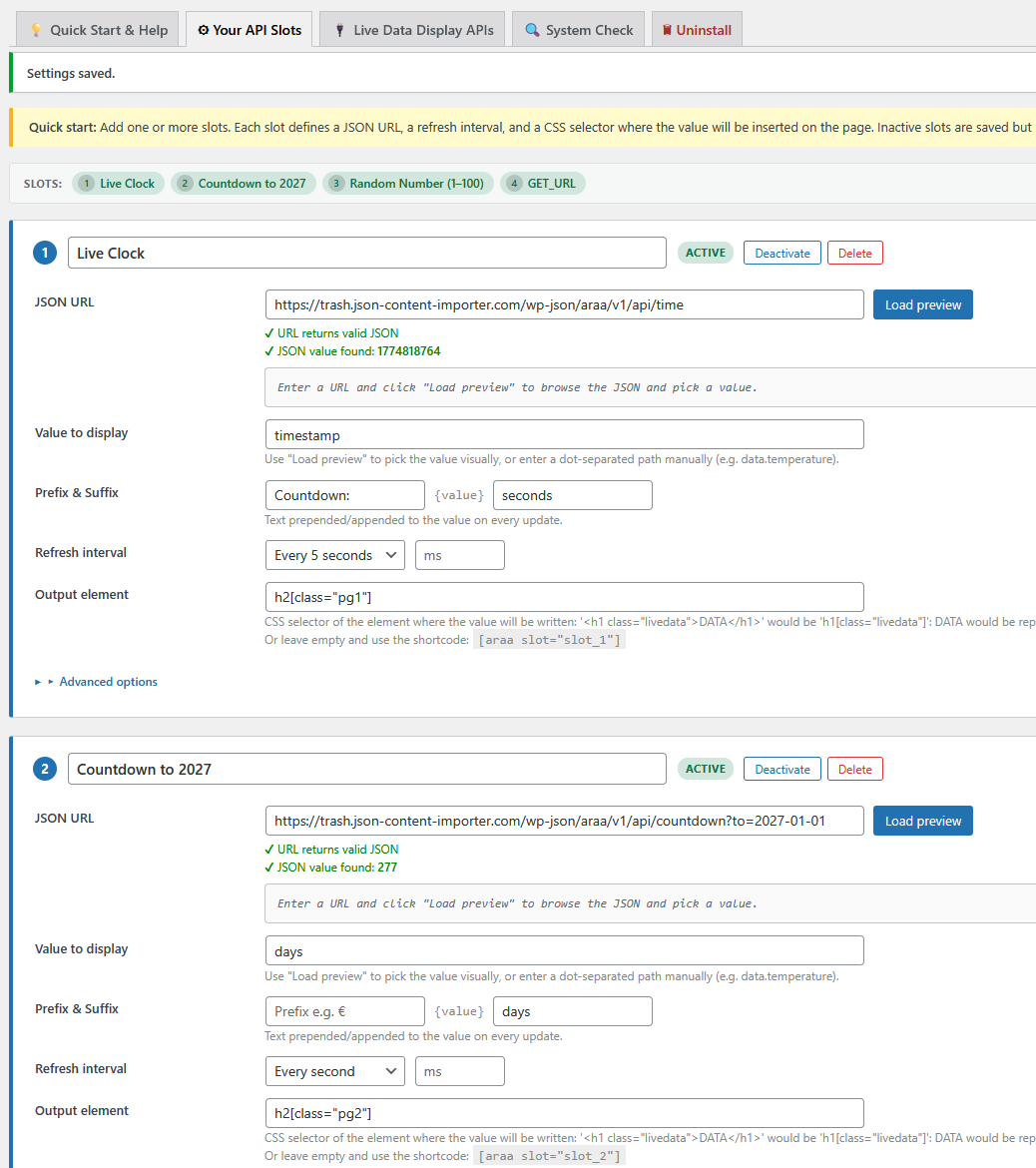
- Multiple independent slots: Configure as many data slots as you need, each with its own API URL, refresh interval, and display target.
- Shortcode and Gutenberg block: Place data anywhere with
[araa slot="slot_1"]or the built-in block. - Auto-refresh: Each slot refreshes independently at a configurable interval (minimum 500 ms).
- Server-side initial value: For slots with a refresh interval ≥ 10 s the initial value is pre-rendered server-side and cached, so visitors see data immediately — no flash of empty content.
- Proxy for cross-origin APIs: Optional server-side proxy (admin-ajax or REST API) fetches external URLs from the server, bypassing browser CORS restrictions.
- Customisable GET parameters: Use
#GET_key#placeholders in the API URL to pass the current page's GET parameters to the remote API. - Prefix / Suffix: Wrap every displayed value with configurable text (e.g. currency symbol, unit).
- Error text: Show a custom fallback message when the API request fails or the JSON path is not found.
- Page-visibility aware: Slots pause polling while the browser tab is hidden and resume immediately when it becomes visible again.
- Active / Inactive toggle: Enable or disable individual slots without deleting their configuration.
- Built-in demo APIs: The plugin ships with six ready-to-use REST API endpoints that can serve as live data sources straight away — no external service needed. Each endpoint must be individually enabled under Settings → Live Data Display → API:
/wp-json/araa/v1/api/time— current server time, date, weekday, and timezone/wp-json/araa/v1/api/countdown— seconds/days until a target date (?to=YYYY-MM-DD; defaults to next New Year)/wp-json/araa/v1/api/random— random integer within a configurable range (?min=1&max=100)- Clean uninstall: All plugin data is removed on deletion (optional: keep settings).
- Add a slot: Go to Settings → Live Data Display and create a slot.
- Enter the API URL: Paste the JSON feed URL. Use
#GET_key#for dynamic GET parameters. - Set the JSON path: Enter the dot-separated path to the value you need (e.g.
items.0.score). - Choose a proxy method (only needed for external/cross-origin URLs): admin-ajax or REST API proxy.
- Set the refresh interval: How often (in milliseconds) should the value be updated?
- Place the output: Use the shortcode
[araa slot="slot_1"], the Gutenberg block, or a custom CSS/jQuery selector. - Optional: Add prefix, suffix, placeholder, error text, and an initial-hide selector.
- Optional — enable REST API: To expose slot values via the plugin's own REST API endpoints, go to Settings → Live Data Display → API and activate the feature. The endpoints are disabled by default.
安装:
- Log in to your WordPress installation.
- Upload the plugin folder to
/wp-content/plugins/. - Activate the plugin through the Plugins menu.
- Click on Live Data Display in the left sidebar and configure your slots.
屏幕截图:
常见问题:
Where can I see a live example?
Can I display data from a protected API (with authentication)?
If the API requires authorisation headers, use the companion plugin JSON Content Importer to create an authenticated feed and point this plugin at the result.
What is the minimum refresh interval?
500 ms. Values below 500 ms are clamped to 500 ms automatically.
Does the plugin work without jQuery?
No. The frontend script depends on jQuery, which is bundled with WordPress.
What built-in API endpoints does the plugin provide?
The plugin ships with six optional REST API endpoints under the namespace araa/v1/api/. All are disabled by default and must be activated individually under Settings → Live Data Display → API.
| Endpoint | Description | Optional parameters |
|---|---|---|
| /wp-json/araa/v1/api/time | Current server time, date, weekday, and timezone | — |
| /wp-json/araa/v1/api/countdown | Countdown to a target date (days, hours, minutes, seconds) | to=YYYY-MM-DD (default: next New Year) |
| /wp-json/araa/v1/api/random | Random integer in a configurable range | min=1&max=100 |
All endpoints are publicly accessible (no authentication required) and return JSON.
When should I use "admin-ajax" and when "REST API" as the proxy method?
Both methods let the WordPress server fetch an external JSON URL on behalf of the browser, bypassing CORS restrictions. They differ in how the browser communicates with WordPress:
admin-ajax (/wp-admin/admin-ajax.php)
- The browser sends a POST request containing only the slot ID and a WordPress nonce. The external URL is never transmitted to the browser — it stays entirely on the server.
- Secured with a WordPress nonce (CSRF protection) and server-side URL validation.
- Works on every WordPress installation, including environments where the REST API is disabled by a security plugin or by the hosting provider.
-
Choose this when you want to keep the external URL (and any parameters or tokens embedded in it) hidden from the browser, or when the REST API is unavailable.
REST API proxy (
/wp-json/araa/v1/geturl) - The browser sends a GET request to a WordPress REST endpoint. The external URL is included in the request as a query parameter, signed with an HMAC-SHA256 key to prevent tampering. The WordPress server then fetches the external URL and returns the result.
- Access to the endpoint is restricted to requests originating from the same server (localhost / server IP), so it is suited to local development environments or setups where WordPress makes internal loopback requests.
- Requires the WordPress REST API to be accessible.
- Choose this when you are running WordPress locally or in a controlled environment where loopback requests are used, and you prefer the modern REST API transport. In practice: for most live production sites the admin-ajax method is the safer and more compatible choice. The REST API proxy is the right pick for local development setups or when an admin-ajax conflict forces you to look for an alternative.
What happens when a slot's API request fails?
If an Error text is configured for the slot, it is displayed in place of the value. Otherwise the last successfully loaded value remains visible.
Will my settings be lost when I update the plugin?
No. Settings are stored in the WordPress database and survive updates. A migration routine automatically converts the old single-slot format from versions before 1.3.0.
更新日志:
- Plugin ok with WordPress 7.1
- Plugin ok with Plugin Check 2.1.0, improved some code for that
- Bugfix: Catch the fatal error if wp_generate_password is not available — the function may not be loaded early enough in WordPress.
- New name: Plugin renamed from Auto Refresh API AJAX to Live Data Display. The plugin slug (
auto-refresh-api-ajax) and all existing settings are unchanged. - Multiple slots: The plugin now supports any number of independent data slots, each with its own URL, refresh interval, JSON path, selector, prefix, suffix, error text, and active flag.
- Shortcode: New
[araa slot="slot_1"]shortcode renders a self-contained element with the correct ID and class. Accepts optionaltagandclassattributes. - Gutenberg block: Native block with live editor preview via a REST endpoint (
/wp-json/araa/v1/preview). - Server-side initial value: Slots with refresh interval ≥ 10 s pre-render their value on the server (two-level cache: per-request static + WP transient). Visitors see data immediately without waiting for the first Ajax cycle.
- Security — CSRF/abuse protection: All admin-ajax proxy requests are now verified with a WordPress nonce (
araa_ajax_nonce). - Security — SSRF mitigation: The admin-ajax proxy validates the target URL with
wp_http_validate_url()before fetching. - Security — XSS fix: API values injected into the page via the output buffer are now HTML-escaped with
esc_html(). - Security — output-buffer fix: Replaced nested
ob_start()calls (one per slot) with a single buffer that applies all placeholder replacements at once. - Prefix / suffix / error text fields added to every slot.
- Active / inactive toggle per slot.
- Page-visibility API: Frontend pauses polling while the tab is hidden.
- Built-in demo APIs: Three public REST API endpoints under
/wp-json/araa/v1/api/provide ready-to-use live data (time, countdown, random number). Each endpoint is opt-in and must be activated individually under Settings → Live Data Display → API. - Settings migration: Automatically migrates settings from v1.2.10 (flat option) and v1.2.11 (single-slot JSON) to the new multi-slot format.
- Tested up to WordPress 6.9.
- Plugin is ok with WP 6.5.4.
- Compatible with Plugin Check Plugin 1.0.1 (one expected warning regarding nonce-less GET parameter handling — see FAQ).
wp_remote_getreplacesfile_get_contents.- Added
wp_json_encodebefore using received JSON. - Improved output-escaping and nonce-checking.
- Plugin is ok with WP 6.4.3 and PHP 8.
- Improved backend design.
- Fix:
$_SERVER['SERVER_NAME']may be unset when running under WP-CLI.
- Security fix: Cross-Site Scripting (XSS) vulnerability in the admin area reported by Rio D. — thank you!
- Plugin is ok with WP 6.1.1.
- Fixes for PHP 8.1 compatibility.
- Pass GET parameters from the current page to the remote JSON API using
#GET_key#placeholders in the API URL.
- Plugin is ok with WP 5.8.2.
- Bugfix: sorting out local vs. external JSON URLs.
- Plugin is ok with WP 5.8.1.
- Bugfix: local server JSON URLs now handled correctly.
- Plugin is ok with WP 5.5.1.
- Bugfix: passing parameters from PHP to JS; added validation on the settings page.
- Plugin is ok with WP 5.4 and PHP 7.4.
- Minor bugfix: missing function added.
- Added server-side initial value loading and initial-hide selector.
- Added second proxy method for cross-origin Ajax calls.
- Initial release.