
AWP Speed Optimization - Accelerate Website Pages
| 开发者 | webevolutionteam |
|---|---|
| 更新时间 | 2026年10月11日 20:04 |
| PHP版本: | 8.1 及以上 |
| WordPress版本: | 7.1 |
| 版权: | GPLv2 or later |
| 版权网址: | 版权信息 |
详情介绍:
You have a beautiful website. Your content is well written and your SEO is done right. But you are still not ranking #1 on Google. Why?
Because your website is slow.
Visitors who have to wait leave - and they do not come back. You need loading times so short that nobody notices any loading at all. Can you get there without hiring a developer or buying a premium suite? Yes. AWP brings a cloud-powered optimization engine to your site and does the work for you.
🔥 Enterprise Power for free
When you install AWP, you get all of our enterprise cloud features for free, for up to 100 pages of your choice.
- Perfect for smaller sites: for most small businesses, portfolios and personal blogs, 100 pages cover the entire website - forever.
- Risk-free for big sites: running a large WooCommerce shop or a news portal? Spend your 100 free pages on your best-converting landing pages and top products, and see the difference before you ever consider more.
- You stay in control: a minimalist dashboard lets you hand-pick exactly which pages get the treatment.
- Real-browser LCP priority: AWP detects the true Largest Contentful Paint element the way your visitors see it - separately for phone and desktop - and tells the browser to fetch it first, for better Core Web Vitals.
- Right-sized AVIF pictures: no more oversized images. AWP measures the size at which each picture is actually displayed on a phone and on a desktop, and serves a right-sized next-generation AVIF copy made on your own server (where a copy that already fits exists, it is reused instead).
- Critical CSS, measured not guessed: the styling needed for the first screen is delivered inline, the rest follows a moment later - on mobile and desktop alike.
- Pages, not URL variations: your allowance counts pages. A product page reached with filters or sorting parameters (for example ?sort=price) is still one page, so shop navigation never eats into your 100.
安装:
- Upload the plugin to
/wp-content/plugins/awp-speed-optimization/or install through the WordPress plugins screen. - Activate the plugin.
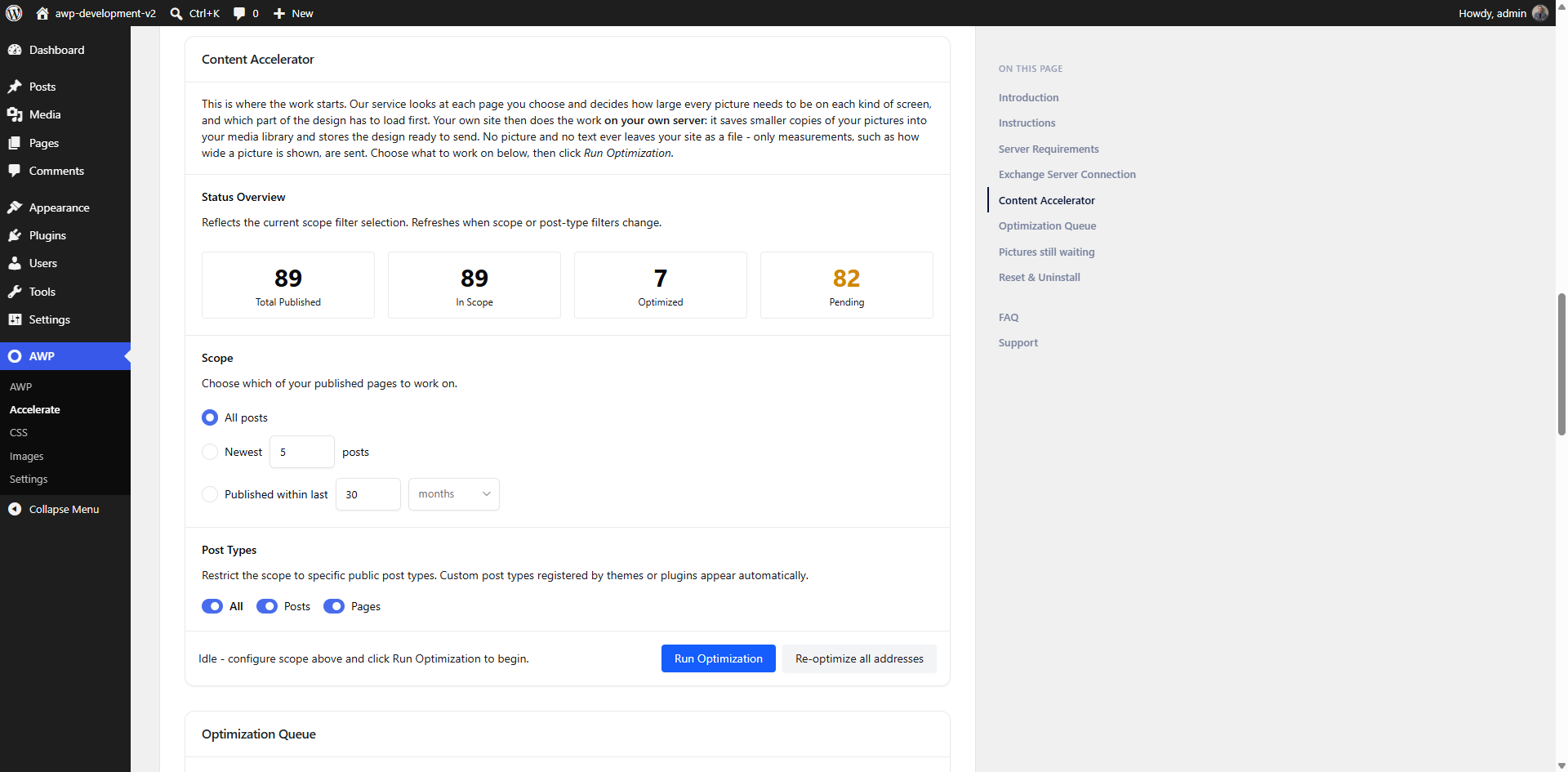
- Open AWP → Accelerate and run your first optimization.
屏幕截图:


常见问题:
Does it modify my theme?
No. The optimized version of a page is produced at the moment it is served; your theme files and your posts are never edited. The built-in Reset puts everything back the way it was.
What happens if my server cannot make AVIF?
Your pictures are left exactly as they are, and the styling optimization still runs and still reduces what the browser must load before the first paint. The Accelerate screen tells you what to ask your hosting provider for to get the pictures as well.
更新日志:
2.3.1
This one is about fonts: every optimized page carries less of them and downloads fewer, while its first screen keeps the right lettering from the first moment.
- Improved font loading, so visitors download much less font data on every page.
- Improved the size of each optimized page, so its first screen arrives sooner.
- Improved the lettering of the first screen while the rest of the page loads.
- Improved how quickly the first screen of your pages appears, on phones most of all.
- Improved the steadiness of the first screen, so its text keeps its place while the page finishes loading.
- Improved font loading, so visitors download less before they see your page.
- Improved the pictures sent to phones, so most of them get a lighter picture that still looks sharp on their screen.
- Improved the time your server needs to build an optimized page.
- Improved compatibility with caching, CDN and other optimization plugins.
- Improved the reach of the optimization, so it no longer stops at the photos in your media library and now makes the ones that come with your theme or a plugin smaller for your pages as well.
- Improved what visitors with sharper screens receive for those photos, so each one arrives at the size and the pixel density that screen actually asks for.
- Improved the checks made on every picture AWP writes, so the making of it is only treated as finished when it truly is.
- Improved the optimization of a photo that two things happen to work on at the very same moment, so each of them finishes its own work.
- Improved background work on more kinds of hosting.
- Improved the Server Requirements card, which now takes one look at your hosting and tells you, in a single line, what it can do for your visitors. Nothing to open, nothing to guess.
- Improved the message you get when your sign-in expires during a run, so it names the button that is really on the screen afterwards.
- Improved what Undo tells you when the page is already being optimized, so you know the work will finish and what to do once it has.
- Improved the handling of a page you undo while it is being optimized, so the page keeps its optimized design when that work lands.
- Improved the Resume button, so a run whose list is already done simply finishes instead of sending the same pages a second time.
- Improved the way Pause and Stop are respected, so a run you paused stays paused even if the site fails to answer at that moment.
- Improved the on and off control by bringing photos and design together under one switch on the Settings screen, with your current choice carried over for you.
- Improved what you see while signed in, so an editor now always gets the site exactly as the theme builds it.
- Improved the handling of a photo you replace or remove in the media library, so the pages that used it are brought up to date.
- Improved the reach of the optimization, so pictures used as decoration around your content are now covered as well.
- Improved the handling of feeds and embedded previews, which are now left exactly as WordPress writes them.
- Improved early loading of the main background picture.
- Improved early loading of background pictures in layered and indirectly styled elements.
- Improved main picture priority on pages with many similar pictures.
- Improved loading of the main background picture when it is an LCP file the browser fetches first.
- Improved reading of background styles written directly on page elements.
- Improved background layers recognition and optimization of photos within them.
- Improved disk use of the optimized styling.
- Improved background photo handling.
- Improved reading of background positions written as two values.
- Improved picture addresses on sites whose uploads folder has no month subfolders.
- Improved the savings figure in the editor.
- Improved reporting: your site now tells the service what each optimized page weighs by content type, before and after optimization.
- Improved background image optimization when the same photo is used in several places on one page.
- Improved background image optimization on pages that use a smaller copy of a photo.
- Improved Largest Contentful Paint (LCP) hint, so it always points at the picture the page actually paints.
- Improved sharpness on high-resolution screens for pictures shown at their natural size.
- Improved handling of pictures AWP deliberately leaves as they are.
- Improved use of your server during an optimization run.
- Improved reliability of picture optimization on pages that use framework attributes (such as Vue's @click) or a non-Latin alphabet (e.g. Cyrillic).
- Improved picture optimization on pages that use the
<picture>element for responsive images. - Improved Largest Contentful Paint (LCP) hint for background images.
- Improved optimization run when a single page fails to queue.
- Improved decisions about when a page is automatically sent for re-optimization.
- Improved handling of GIF and SVG pictures.
- Improved removal of AWP-generated pictures when the original is deleted.
- A simpler screen with one less thing to do: the "Pictures still waiting" card and its "Make them now" button have been removed. AWP already spots a picture that has no smaller copy while a visitor is on the page, and sends that page for optimization on its own, so there is nothing left for you to watch or click.
- Improved background image optimization.
- Improved image optimization for WooCommerce
- Improved image optimization for Landing pages
- Improved LCP optimization
- Improved image optimization for high-resolution screens.
- Improved icon font optimization.
- Improved reporting of optimization results.
- Improved accuracy of image measurements.
- Improved optimization of cropped images.
- Improved optimization of cropped images.
- Improved optimization of images that are already in AVIF format.
- Improved handling of upscaled images.
- Improved application of the conversion quality setting.
- Improved speed of re-optimizing already optimized pages.
- Improved image optimization for high-resolution screens.
- Improved re-optimization of pages with dynamic content.
- Improved optimization of background images.
- Improved plugin reset and uninstall.
- Improved optimization settings.
- Pages that greet visitors with a cookie banner can now be optimized properly: a new Cookie banner box on Images - Performance tells the service which Accept button to press before it measures your page. The press happens only inside the service's own browser - your visitors see nothing different.
- The Optimization Queue no longer leaves out a page that did not get optimized. It goes to the top of the list, marked in red, with the reason in plain words underneath.
- Those reasons are ones you can act on - a cookie banner that stayed on the screen, or a page the service could not open because a firewall, a login wall or maintenance mode was in the way.
- If an optimization does not finish, your page is left exactly as it was and none of your addresses is used up - and now the queue tells you so, instead of the page quietly disappearing from the list.
- A new Reconnect button on the connection card refreshes your site's access keys in one click, leaving your addresses and your existing optimizations untouched.
- Fixed: the styling for the first screen (the part of your design that has to arrive before anything else) was prepared and stored on your site, but pages optimized with the previous two versions were not sending it inline to visitors. The update alone restores it - no re-optimization needed.
- Until your site is connected, Run Optimization and Re-optimize all addresses are switched off and the screen points you to the Connect button - instead of starting a run that could only end in an error.
- Simpler Accelerate screen: you only choose which pages to work on and click Run Optimization - the defaults take care of the rest. The Batch Size field is gone.
- One place for the finer choices: how pictures are made, the extra speed options and cache busting now live on Images - Performance, in a Content Optimization Settings card with its own Save Settings button. Set them once; every optimization uses them.
- A run covers everything you selected in one go, stays within the addresses you have available, and tells you right away if some pages had to wait for more room.
- A run is easier to manage: pause, resume or reload the page and it carries on exactly where it stopped, and a page you unpublish in the meantime is simply skipped.
- Your Optimization Mode choice now applies to every page you optimize. With the default "Reuse closest existing variant", your site reuses pictures it already has and makes new copies only when none of them fits - less work for your server and less disk space.
- "Pictures still waiting" has its own card below the Optimization Queue, so it is easier to find.
- Initial release on WordPress.org.