Aysnc Login with Auth0
| 开发者 |
aysnc
junaidbhura |
|---|---|
| 更新时间 | 2025年9月13日 20:21 |
| PHP版本: | 8.2 及以上 |
| WordPress版本: | 6.8 |
| 版权: | MIT |
详情介绍:
❤️ Contribute on GitHub
Auth0 Login for WordPress provides a simple, secure way to log in to WordPress using Auth0. It hides the default login screen with a redirect to Auth0.
Watch this video to see how to configure your Auth0 application and hook it up to WordPress:
[vimeo https://vimeo.com/1104092077]
Features
- Very easy to set up
- Replaces the standard WordPress login URL with a secret link for additional security
- Authenticates users via Auth0 using OAuth 2.0 / OIDC
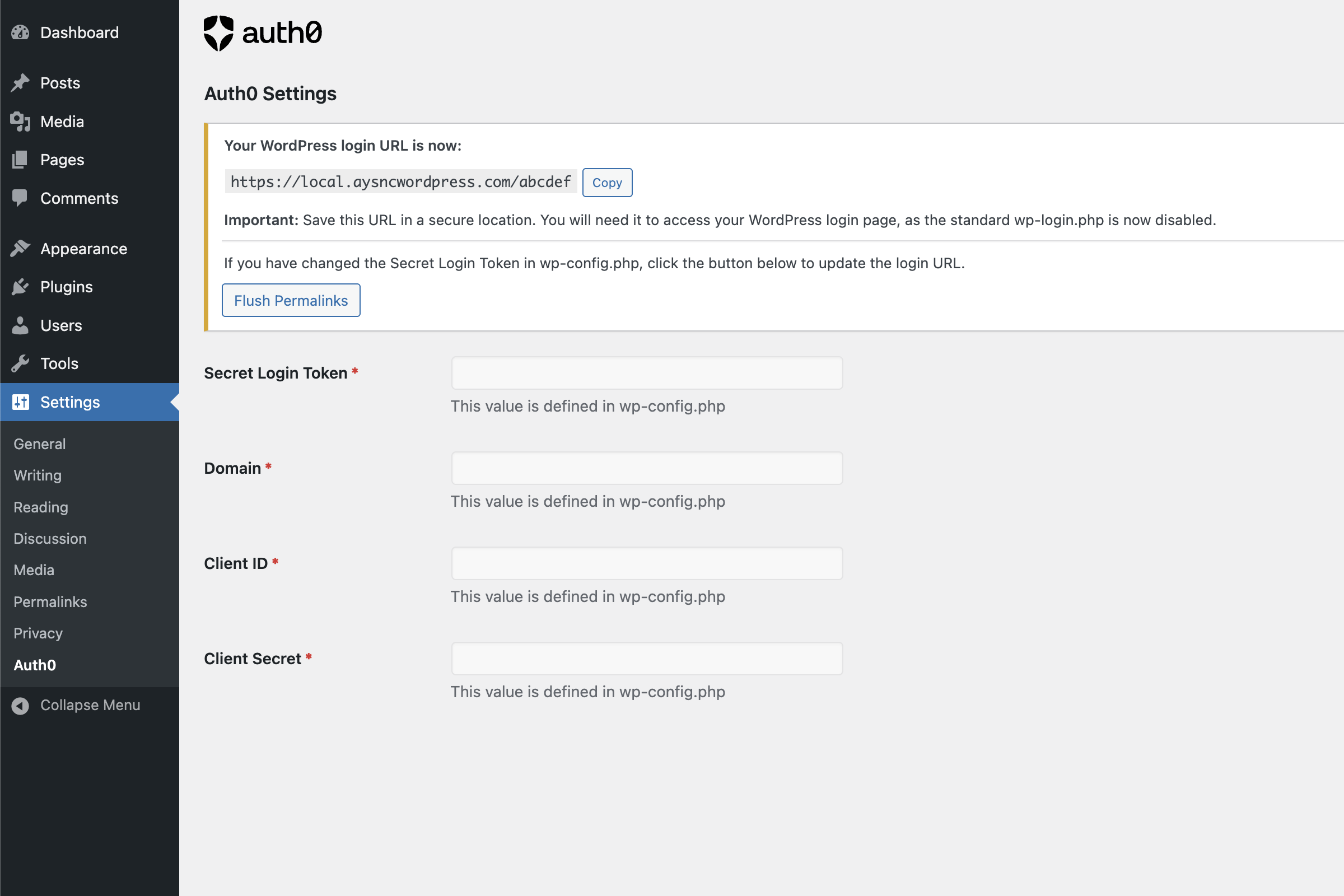
- Go to WordPress Admin > Settings > Auth0
- Enter the following required information:
- Secret Login Token: A unique, random string that will be used for your custom login URL
- Domain: Your Auth0 domain (e.g., your-tenant.auth0.com)
- Client ID: Your Auth0 application Client ID
- Client Secret: Your Auth0 application Client Secret
- Save changes
// Auth0 Configuration define( 'AYSNC_AUTH0_SECRET_LOGIN_TOKEN', 'your-secret-token' ); define( 'AYSNC_AUTH0_DOMAIN', 'your-tenant.auth0.com' ); define( 'AYSNC_AUTH0_CLIENT_ID', 'your-client-id' ); define( 'AYSNC_AUTH0_CLIENT_SECRET', 'your-client-secret' );
This method prevents your Auth0 credentials from being stored in the database.
Important: Don't lose your login URL!
After configuring the plugin:
- Your WordPress login URL will change to: https://your-wordpress-site.com/your-secret-token
- The standard wp-login.php page will be disabled
- Save your new login URL in a secure location - you'll need it to access your WordPress admin area
安装:
- Upload 'aysnc-wordpress-auth0' to the '/wp-content/plugins/' directory
- Activate the plugin through the 'Plugins' menu in WordPress
- Configure the plugin through Settings > Auth0 or by adding constants to wp-config.php
屏幕截图:
常见问题:
What happens if I lose my Secret Login Token?
If you've defined it in wp-config.php, you can retrieve it from there. If you've only set it in the WordPress admin, you may need to access your database directly to retrieve it.
Can I still use the standard WordPress login?
No, the standard wp-login.php is disabled for security reasons. You must use the custom login URL.
Does this plugin work with multisite?
Yes, the plugin is compatible with WordPress multisite installations.
What if I need to update my Auth0 credentials?
You can update them either in the WordPress admin interface or in your wp-config.php file, depending on how you initially configured the plugin.
更新日志:
1.0.0
- First stable release.