
AzlinkPRO – Amazon Affiliate Comparison Tables
| 开发者 |
azlinkpro
freemius |
|---|---|
| 更新时间 | 2026年11月19日 21:34 |
| PHP版本: | 7.4 及以上 |
| WordPress版本: | 7.1 |
| 版权: | GPLv2 or later |
| 版权网址: | 版权信息 |
详情介绍:
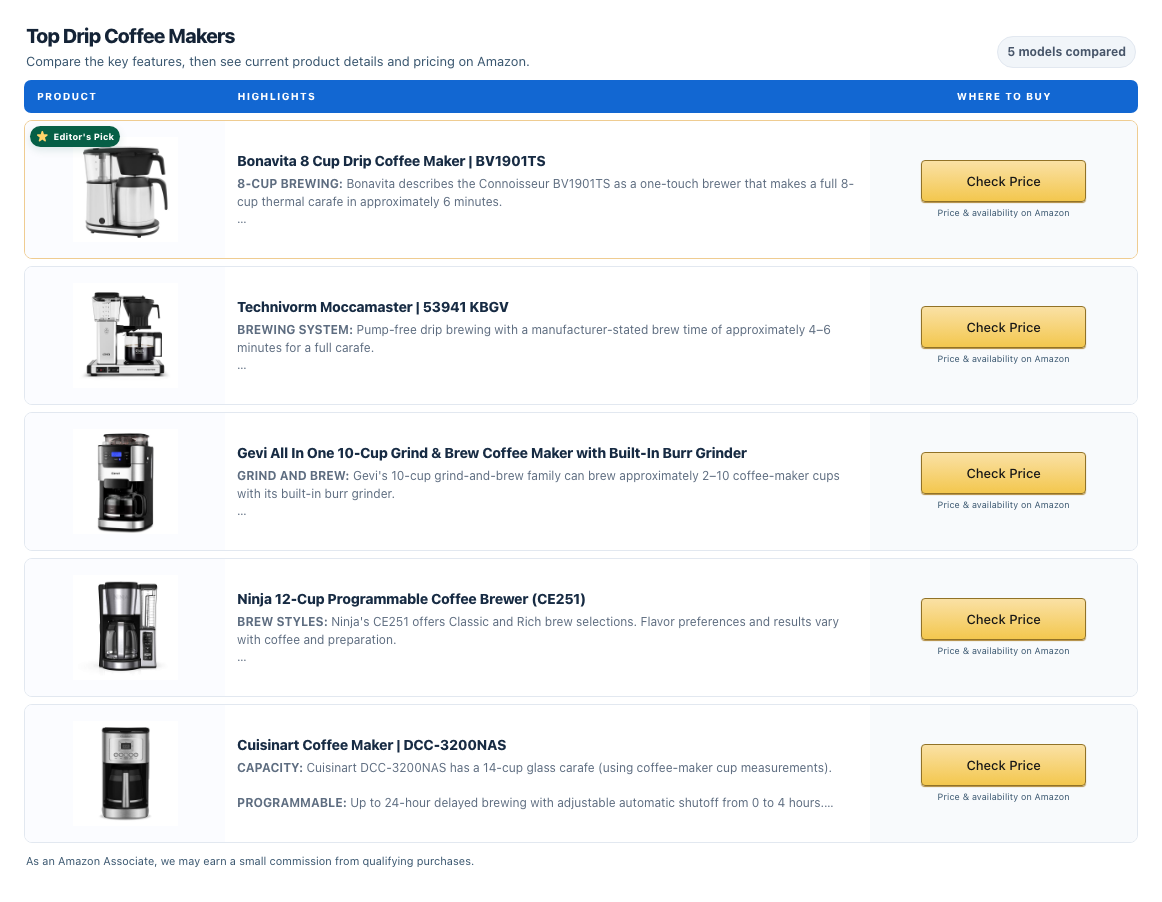
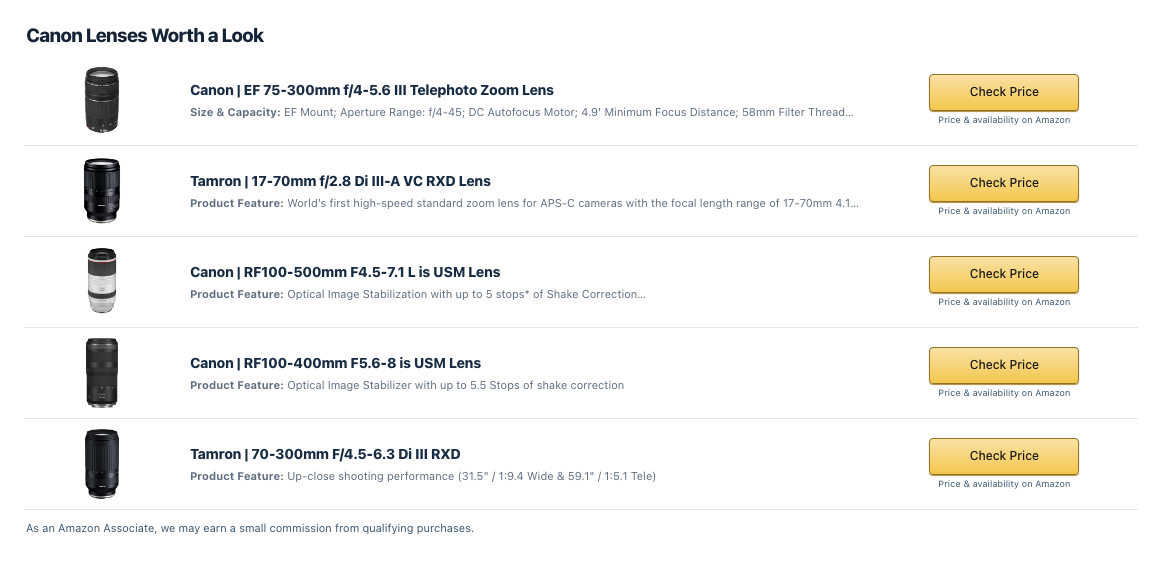
- Comparison tables in three layouts: Full (every detail, product by product), Compact (the overview on one screen) and Minimal (a short list inside your text).
- Amazon product lookup: search Amazon or add an ASIN, and the title, photo and feature highlights fill in through the Amazon Creators API. No API access yet? Type the details in yourself.
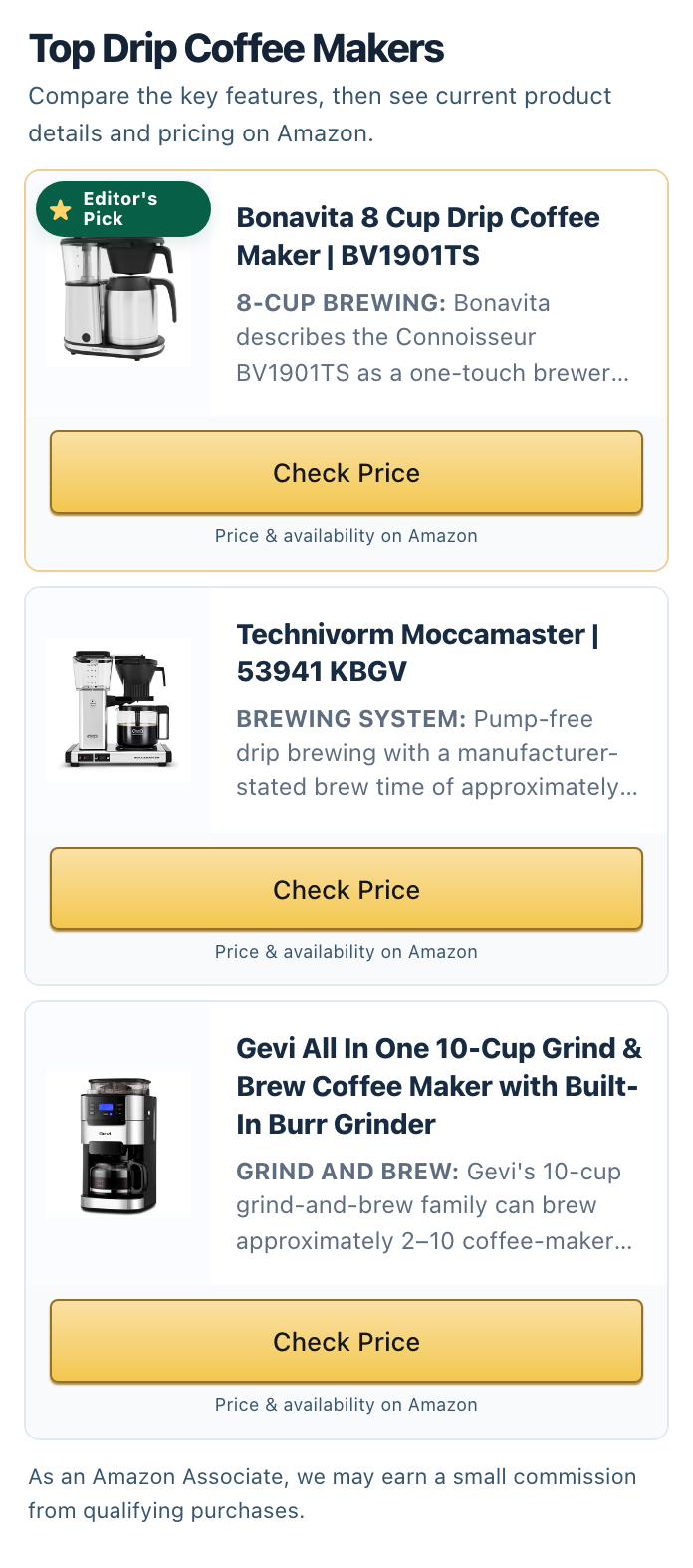
- Short product names: long Amazon titles become "Brand | Model" names readers can scan, and you can rename any product.
- Product image block: a clickable product photo with an optional Check Price button, as a shortcode or an editor block.
- AmaLinks Pro importer: convert existing AmaLinks Pro comparison tables into AzlinkPRO tables, with a preview and a rollback.
- Setup wizard: connect your Associates tracking ID and Creators API keys in a few steps, with a live connection test.
- Link Clicks: see how many clicks your Amazon links get in the last 7 and 30 days. Counts are stored on your own site, with no IP address, cookie or visitor ID, and your own clicks are skipped while you're logged in.
- Table backup and restore, undo for removed products, and a warning before you leave with unsaved changes.
- Fits phone screens: tables adapt to small screens, and wide tables scroll sideways with a visible hint.
- Nothing goes stale: no prices, star ratings or discounts are shown, so there's nothing to keep updating by hand.
- Affiliate links marked correctly: Amazon links use rel="sponsored nofollow", and an affiliate disclosure line is built in.
- An Amazon Associates account and its tracking ID.
- For automatic product lookups, Amazon Creators API credentials from Associates Central. Amazon decides who gets API access.
安装:
- In WordPress, go to Plugins → Add New, search for AzlinkPRO, and click Install and then Activate.
- The setup wizard opens. Enter your Amazon Associates tracking ID and, if you have them, your Creators API credentials. You can skip any step and come back later under AzlinkPRO → Settings.
- Go to AzlinkPRO → AZ Tables → Add New, add products by ASIN, choose a layout and publish.
- Copy the table's shortcode, for example
[azlinkpro_table id="123"], into a Shortcode block in any post or page.
屏幕截图:
常见问题:
Do I need Amazon Creators API access?
No. With API access, product titles, photos and highlights fill in automatically. Without it, you can add products by ASIN and type their details yourself, and choose photos you own or have permission to use.
Does AzlinkPRO show Amazon prices or star ratings?
No. Tables never show prices, ratings or discounts. Readers click Check Price to see current details on Amazon.
Whose affiliate tag is used?
Yours. Every Amazon link carries the tracking ID you enter in Settings. AzlinkPRO never adds its own tag.
Does it work with my theme and the block editor?
Tables are placed with a shortcode, which works in the block editor's Shortcode block, the classic editor and most page builders. The product image block is also available as a native block.
Does AzlinkPRO track my visitors?
AzlinkPRO counts clicks on the Amazon links inside its own tables and displays, so you can see which products get clicked. Only a daily count is stored, in your own WordPress database: the date, the page, the display, the product's ASIN and whether the button, photo or name was clicked. No IP address, cookie or visitor ID is stored, and nothing is sent to AzlinkPRO or anyone else. Logged-in editors and admins aren't counted unless you turn that on, and you can turn counting off under AzlinkPRO → Link Clicks.
Can I move my AmaLinks Pro tables?
Yes. AzlinkPRO → Migration Tools finds your AmaLinks Pro comparison tables, shows a preview, converts them and replaces the shortcodes in your posts. Each post is backed up first, and you can roll back.
更新日志:
- Improved: The table editor's unsaved-draft recovery and table export/import now keep the table width and title element.
- New (paid plans): The title element setting also covers the paid product cards.
- New: Choose the HTML element for comparison table titles: plain text (the new default), a paragraph, or an H2, H3 or H4 heading. Table names no longer show up in your article's heading outline or table-of-contents box unless you want them to. Set it for the whole site in Settings, for one table in step 4 of the editor, or with title_tag="h3" in the shortcode. The title looks the same either way.
- New (paid plans): The same choice for Showcase product names and Custom Comparison and Side-by-Side table titles.
- Improved (Agency): AI Review Builder checks source pages against the model numbers used in each review, so pages about other models stay out of the reader's sources list.
- Improved (Agency): AI Review Builder catches headings that open the same way or reuse the same word across three or more products, leaves out source pages about a different model number, and drops "feedback" that only restates a spec or says a site covered the product.
- Improved (Agency): AI Review Builder leaves small shop listings, resellers and pages about the same brand's other models out of the reader's sources list, drops owner feedback about other sizes or versions, and catches section headings that repeat another product's in different words.
- Improved (Agency): AI Review Builder leaves shop and marketplace pages and off-topic pages out of the reader's sources list, and gives a more realistic cost estimate for Claude models.
- Improved: Small code tidy-ups in the colour picker and the live table preview, found by the WordPress Plugin Check.
- New: Link Clicks counts clicks on your Amazon links in Tables, Showcases and Amazon Images, stored on your own site with no IP address, cookie or visitor ID. Paid plans add a full click report, and Professional and Agency add a CSV download.
- New: Step-by-step editors with live previews for Tables, AZ Images and Showcases.
- New: A Sort by menu and sales rank in Amazon searches, one shared colour picker, a colour option for the AZ Images button, and a layout option on the table shortcode.
- New: Easier Showcase grids, with click-to-pick products and search.
- New (Agency): A much improved AI Review Builder. It adds owner and reviewer feedback from independent sources, a best-fit label and an "Ideal for" line per product, an optional polish pass, a compact table above the buying guide, an optional AI featured image, suggested settings, a cost estimate and cleaner sources.
- Improved: Names fill in from the product you choose.
- Bugfix: "Load 10 more" in Amazon searches shows even when Amazon returns fewer than 10 results.
- Tweak: Code cleanup in the update check added in 1.5.16, following the WordPress Plugin Check tool. No visible changes.
- Fix: Items saved by an older AzlinkPRO version after updating (for example after reinstalling an older version or restoring a backup) are now moved to the new names too, instead of being hidden.
- Tweak: Small code cleanup in the 1.5.14 update step, following the WordPress Plugin Check tool. No visible changes.
- Tweak: Internal names updated to follow WordPress.org plugin guidelines. Saved tables, images, showcases, cards and settings move over automatically on update, and posts using older shortcode names keep working.
- Tweak: Code cleanup from the WordPress Plugin Check review (stricter output escaping and form checks). No visible changes.
- New: Width setting for comparison tables (Wide, Medium, Narrow or a custom width), plus a width="" option in the shortcode. Works with every table layout.
- New: Showcase width setting (Full, Wide, Medium, Narrow or a custom width) in the showcase editor, plus a width="" option in the showcase shortcodes.
- Bugfix: The AzlinkPRO icon now shows in WordPress update lists on sites where another plugin also uses Freemius.
- Bugfix: The Duplicate button at the top of the editor no longer stops with "The link you followed has expired."
- New: A Duplicate button at the top of the editor, next to the Create button, for tables, images and showcases.
- Improved: AzlinkPRO now shows its own icon in the WordPress Updates and Plugins update lists.
- Bugfix: AI research with Claude (paid plans) no longer stops with "not enough cited research" after a successful search.
- New: A small card on the AzlinkPRO Dashboard introduces the Product Link Audit from the paid plans. Dismiss it once and it stays hidden.
- Improved: The remove button in table search results is now a plain "Remove from table" button, matching "+ Add to table".
- Improved: In table search results, click the green "In this table" button to remove that product again. The Remove link in the product list still works too.
- New: Duplicate a table or Amazon image with one click, from its list or editor. Handy for showing the same products in another layout, such as Minimal or Compact.
- New: The Dashboard has an Amazon Images card with your image count.
- Improved: Search results that are already in your table are highlighted, so you can see what you've added.
- Improved: Amazon image search has a Load 10 more button. New results are added below the first ones, and the product you pick stays highlighted.
- Improved: The AzlinkPRO menu's Overview page is now called Dashboard.
- Improved: Plugin details updated for the WordPress.org plugin directory.
- Improved: AzlinkPRO's internal code now uses its own unique name prefix, so it can't clash with other plugins. Your tables, shortcodes and settings stay the same.
- Improved: Security hardening from the WordPress Plugin Check: all printed text is escaped and all form input is sanitized.
- Improved: The free version now contains only free features, ready for WordPress.org.
- Improved: A WordPress.org readme with a full list of the outside services AzlinkPRO uses.
- Improved: The Upgrade screen inside the plugin no longer offers a 7-day trial.
- Improved: Release notes for every version rewritten in plain language.
- New: In Custom Comparison and Side-by-Side tables, a cell line that starts with a label such as "Power:" shows the label in bold (paid plans).
- Bugfix: In Side-by-Side tables, photos and product names line up when one product has a Top Pick ribbon (paid plans).
- New: The table editor previews Side-by-Side tables as they appear on your page (paid plans).
- First public release: Full, Compact and Minimal comparison tables, Amazon product lookup, Brand | Model names, product image blocks, the setup wizard and the AmaLinks Pro importer.
- New: A photo you choose for a product is reused anywhere the same product has no photo.